
Exploring Java Collections: A Guide to Lists, Sets, Queues, and Maps
Collections are a fundamental part of the Java Collections Framework, which provides a unified architecture for storing and manipulating groups of objects. The framework includes various interfaces and classes that allow you to work with different types of collections, such as lists, sets, queues, and maps. Here’s an overview of the main components:
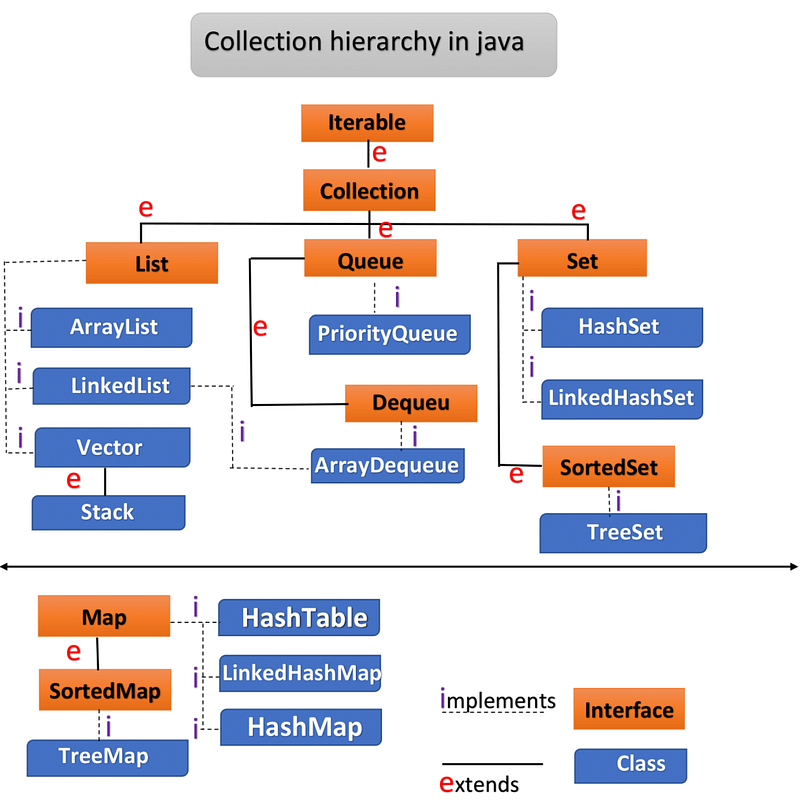
- Collection : The root interface of the collection hierarchy. It defines the most common methods for collections, such as
add,remove,contains,size, anditerator. - List : An ordered collection (also known as a sequence). It allows duplicate elements and provides positional access and insertion of elements.
- ArrayList : Resizable-array implementation of the
Listinterface. - LinkedList : Doubly-linked list implementation of the
Listinterface. - Vector : Synchronized resizable-array implementation of the
Listinterface
3. Set : A collection that does not allow duplicate elements.
- HashSet : Implementation of the
Setinterface backed by a hash table. - LinkedHashSet : Hash table and linked list implementation of the
Setinterface, with predictable iteration order. - TreeSet : Implementation of the
Setinterface that uses a tree for storage, providing sorted order.
4. Queue : A collection designed for holding elements prior to processing.
- PriorityQueue : An unbounded queue based on a priority heap.
- LinkedList : Can be used as a queue.
5. Deque : A linear collection that supports element insertion and removal at both ends.
- ArrayDeque : Resizable-array implementation of the
Dequeinterface. - LinkedList : Can be used as a deque
6. Map : An object that maps keys to values. A Map cannot contain duplicate keys; each key can map to at most one value.
- HashMap : Implementation of the
Mapinterface backed by a hash table. - LinkedHashMap : Hash table and linked list implementation of the
Mapinterface, with predictable iteration order. - TreeMap : Implementation of the
Mapinterface that uses a tree for storage, providing sorted order. - Hashtable : Synchronized implementation of the
Mapinterface.
ArrayList
ArrayList is a part of the Java Collections Framework and is found in the java.util package. It is a resizable array implementation of the List interface. Unlike arrays, which have a fixed size, ArrayList can grow and shrink dynamically as elements are added or removed.
Key Characteristics:
- Dynamic Size: Unlike arrays,
ArrayListcan automatically resize itself when elements are added or removed. - Order of Elements: It maintains the order of insertion, meaning elements are stored in the order in which they are added.
- Random Access: Elements can be accessed directly using indexes, offering fast random access to elements.
- Null Values:
ArrayListallows null values. - Not Thread-Safe: It is not synchronized, meaning multiple threads modifying the
ArrayListsimultaneously may lead to unpredictable results unless explicitly synchronized.
Basic Syntax:
import java.util.ArrayList;

ArrayList<Type> list = new ArrayList<>();
Commonly Used Constructors:
ArrayList(): Creates an empty list with an initial capacity of 10.ArrayList(Collection<? extends E> c): Creates a list initialized with the elements of the given collection.ArrayList(int initialCapacity): Creates an empty list with the specified initial capacity.
Methods in ArrayList
Below is a list of commonly used methods in ArrayList:
add(E e): Appends the specified element to the end of this list.add(int index, E element): Inserts the specified element at the specified position in this list.get(int index): Returns the element at the specified position in this list.set(int index, E element): Replaces the element at the specified position in this list with the specified element.remove(int index): Removes the element at the specified position in this list.remove(Object o): Removes the first occurrence of the specified element from this list.clear(): Removes all of the elements from this list.contains(Object o): Returnstrueif this list contains the specified element.indexOf(Object o): Returns the index of the first occurrence of the specified element.lastIndexOf(Object o): Returns the index of the last occurrence of the specified element.isEmpty(): Returnstrueif this list contains no elements.size(): Returns the number of elements in this list.toArray(): Returns an array containing all of the elements in this list.subList(int fromIndex, int toIndex): Returns a view of the portion of this list betweenfromIndex, inclusive, andtoIndex, exclusive.sort(Comparator<? super E> c): Sorts the list according to the order induced by the specified comparator.binarySearch(List<? extends T> list, T key): Searches the specified list for the specified object using the binary search algorithm (requires the list to be sorted first).iterator(): Returns an iterator over the elements in this list.listIterator(): Returns a list iterator over the elements in this list.stream(): Returns a sequential stream with this list as its source.forEach(Consumer<? super E> action): Performs the given action for each element of the list.addAll(Collection<? extends E> c): Appends all of the elements in the specified collection to the end of this list.removeAll(Collection<?> c): Removes from this list all of its elements that are contained in the specified collection.retainAll(Collection<?> c): Retains only the elements in this list that are contained in the specified collection.removeIf(Predicate<? super E> filter): Removes all elements of this list that satisfy the given predicate.
Example Usage of ArrayList
import java.util.ArrayList;

public class ArrayListExample {
    public static void main(String[] args) {
        // Creating an ArrayList of String type
        ArrayList<String> fruits = new ArrayList<>();

        // Adding elements to the ArrayList
        fruits.add("Apple");
        fruits.add("Banana");
        fruits.add("Mango");
        System.out.println("Fruits List: " + fruits);

        // Adding an element at a specific index
        fruits.add(1, "Orange");
        System.out.println("After adding Orange at index 1: " + fruits);

        // Accessing an element at a specific index
        String fruit = fruits.get(2);
        System.out.println("Element at index 2: " + fruit);

        // Removing an element from the ArrayList
        fruits.remove("Banana");
        System.out.println("After removing Banana: " + fruits);

        // Finding the index of an element
        int index = fruits.indexOf("Mango");
        System.out.println("Index of Mango: " + index);

        // Checking if an element exists
        boolean containsApple = fruits.contains("Apple");
        System.out.println("Does the list contain Apple? " + containsApple);

        // Replacing an element
        fruits.set(2, "Pineapple");
        System.out.println("After replacing Mango with Pineapple: " + fruits);

        // Getting the size of the ArrayList
        int size = fruits.size();
        System.out.println("Size of the list: " + size);

        // Checking if the list is empty
        boolean isEmpty = fruits.isEmpty();
        System.out.println("Is the list empty? " + isEmpty);

        // Clearing the list
        fruits.clear();
        System.out.println("List after clearing: " + fruits);
    }
}
OUTPUT :
Fruits List: [Apple, Banana, Mango]
After adding Orange at index 1: [Apple, Orange, Banana, Mango]
Element at index 2: Banana
After removing Banana: [Apple, Orange, Mango]
Index of Mango: 2
Does the list contain Apple? true
After replacing Mango with Pineapple: [Apple, Orange, Pineapple]
Size of the list: 3
Is the list empty? false
List after clearing: []
LinkedList
LinkedList is a part of the Java Collections Framework and is found in the java.util package. It implements the List and Deque interfaces, providing both list and queue operations. Unlike ArrayList, which is based on a dynamic array, LinkedList is implemented using a doubly linked list. This means that each element (node) in the list contains a reference to both its previous and next elements. This structure allows for efficient insertion and deletion operations, particularly when dealing with large lists.
Key Characteristics:
- Doubly Linked List: Each element (node) contains pointers to both the previous and next nodes. This allows for efficient insertion and removal operations at both ends (head and tail).
- Slower Random Access: Unlike
ArrayList, which allows constant-time access via index,LinkedListrequires traversal from the head or tail to reach a specific element, making random access slower. - Efficient Insertions and Deletions: Adding or removing elements from the beginning or end of the list is efficient, as it only involves updating a few pointers.
- Implements Queue and Deque Interfaces:
LinkedListcan be used as both a list (likeArrayList) and a double-ended queue (deque), meaning you can perform operations at both ends of the list. - Non-Synchronized: Not thread-safe, so you need to handle synchronization manually if used in a multi-threaded environment.
- Allows Duplicates : You can have multiple elements with the same value.
Basic Syntax:
import java.util.LinkedList;

LinkedList<Type> list = new LinkedList<>();
Commonly Used Constructors:
LinkedList(): Creates an empty linked list.LinkedList(Collection<? extends E> c): Creates a linked list initialized with the elements of the given collection.
Methods in LinkedList
Below is a list of commonly used methods in LinkedList, including methods inherited from List and Deque:
add(E e): Adds the specified element to the end of the list.add(int index, E element): Inserts the specified element at the specified position in the list.addAll(Collection<? extends E> c): Appends all the elements in the specified collection to the end of the list.addFirst(E e): Inserts the specified element at the beginning of the list.addLast(E e): Appends the specified element to the end of the list.clear(): Removes all elements from the list.contains(Object o): Returnstrueif the list contains the specified element.get(int index): Returns the element at the specified index.getFirst(): Returns the first element in the list.getLast(): Returns the last element in the list.remove(int index): Removes the element at the specified index.remove(Object o): Removes the first occurrence of the specified element.removeFirst(): Removes and returns the first element of the list.removeLast(): Removes and returns the last element of the list.size(): Returns the number of elements in the list.isEmpty(): Returnstrueif the list is empty.indexOf(Object o): Returns the index of the first occurrence of the specified element.lastIndexOf(Object o): Returns the index of the last occurrence of the specified element.peek(): Retrieves, but does not remove, the first element of the list.poll(): Retrieves and removes the first element of the list, or returnsnullif empty.offer(E e): Adds the specified element as the last element (queue operation).toArray(): Converts theLinkedListinto an array of objects.
Example Usage of LinkedList
import java.util.LinkedList;

public class LinkedListExample {
    public static void main(String[] args) {
        // Creating a LinkedList of String type
        LinkedList<String> cities = new LinkedList<>();

        // Adding elements to the LinkedList
        cities.add("New York");
        cities.add("London");
        cities.add("Paris");
        System.out.println("Cities List: " + cities);

        // Adding elements at the beginning and end
        cities.addFirst("Tokyo");
        cities.addLast("Berlin");
        System.out.println("After adding Tokyo and Berlin: " + cities);

        // Accessing the first and last elements
        String firstCity = cities.getFirst();
        String lastCity = cities.getLast();
        System.out.println("First City: " + firstCity);
        System.out.println("Last City: " + lastCity);

        // Removing elements from the LinkedList
        cities.removeFirst();  // Removes "Tokyo"
        cities.removeLast();   // Removes "Berlin"
        System.out.println("After removing first and last cities: " + cities);

        // Retrieving and removing the first element (queue operation)
        String polledCity = cities.poll();
        System.out.println("Polled City: " + polledCity);
        System.out.println("After polling: " + cities);

        // Checking if the list contains an element
        boolean containsLondon = cities.contains("London");
        System.out.println("Does the list contain London? " + containsLondon);

        // Converting the LinkedList to an array
        Object[] citiesArray = cities.toArray();
        System.out.print("Cities array: ");
        for (Object city : citiesArray) {
            System.out.print(city + " ");
        }
    }
}
Output :
Cities List: [New York, London, Paris]
After adding Tokyo and Berlin: [Tokyo, New York, London, Paris, Berlin]
First City: Tokyo
Last City: Berlin
After removing first and last cities: [New York, London, Paris]
Polled City: New York
After polling: [London, Paris]
Does the list contain London? true
Cities array: London Paris
When to Use LinkedList vs ArrayList
Use LinkedList when:
- You need fast insertions and deletions at the beginning, middle, or end of the list.
- You want to implement a queue or deque.
Use ArrayList when:
- You need fast random access to elements via index.
- You don’t expect many insertions or deletions, especially in the middle of the list.
Vector
Vector is a legacy class in Java that is part of the java.util package. It was introduced before the Java Collections Framework (JCF) and has since been retrofitted to implement the List interface. Vector is similar to ArrayList. It is a resizable array that can grow as needed to accommodate new elements. but with some important differences, primarily in thread safety.
Key Characteristics:
- Synchronized:
Vectoris synchronized, meaning it is thread-safe. Multiple threads can access it concurrently without causing issues. However, this synchronization introduces a performance overhead, making it slower compared toArrayListfor single-threaded operations. - Dynamic Array: Like
ArrayList,Vectoruses a dynamic array to store elements. It grows automatically when it reaches its capacity. - Legacy Class: Even though
VectorimplementsList, it's considered a legacy class and is generally replaced byArrayListin modern applications unless thread safety is required.
Basic Syntax:
import java.util.Vector;

Vector<Type> vector = new Vector<>();
Commonly Used Constructors:
Vector(): Creates an empty vector with an initial capacity of 10.Vector(int initialCapacity): Creates a vector with the specified initial capacity.Vector(int initialCapacity, int capacityIncrement): Creates a vector with the specified initial capacity and capacity increment.Vector(Collection<? extends E> c): Creates a vector containing the elements of the specified collection.
Methods in Vector
Below are commonly used methods of the Vector class:
add(E e): Adds the specified element to the end of the vector.add(int index, E element): Inserts the specified element at the specified position.addAll(Collection<? extends E> c): Adds all elements from the specified collection to the end of the vector.capacity(): Returns the current capacity of the vector.clear(): Removes all elements from the vector.contains(Object o): Returnstrueif the vector contains the specified element.elementAt(int index): Returns the element at the specified index.firstElement(): Returns the first element of the vector.lastElement(): Returns the last element of the vector.get(int index): Returns the element at the specified index.remove(int index): Removes the element at the specified index.remove(Object o): Removes the first occurrence of the specified element.removeAllElements(): Removes all elements from the vector (same asclear()).isEmpty(): Returnstrueif the vector contains no elements.size(): Returns the number of elements in the vector.trimToSize(): Trims the capacity of the vector to the current size.indexOf(Object o): Returns the index of the first occurrence of the specified element.lastIndexOf(Object o): Returns the index of the last occurrence of the specified element.toArray(): Converts the vector to an array of objects.clone(): Creates a copy of the vector.set(int index, E element): Replaces the element at the specified position with the specified element.ensureCapacity(int minCapacity): Increases the capacity of the vector if necessary to ensure it can hold at least the specified number of elements.
Example Usage of Vector
import java.util.Vector;

public class VectorExample {
    public static void main(String[] args) {
        // Creating a Vector of String type
        Vector<String> vector = new Vector<>();

        // Adding elements to the Vector
        vector.add("Apple");
        vector.add("Banana");
        vector.add("Cherry");
        System.out.println("Vector: " + vector);

        // Adding an element at a specific index
        vector.add(1, "Mango");
        System.out.println("After adding Mango at index 1: " + vector);

        // Accessing an element at a specific index
        String element = vector.get(2);
        System.out.println("Element at index 2: " + element);

        // Checking the first and last elements
        String firstElement = vector.firstElement();
        String lastElement = vector.lastElement();
        System.out.println("First Element: " + firstElement);
        System.out.println("Last Element: " + lastElement);

        // Removing an element
        vector.remove("Banana");
        System.out.println("After removing Banana: " + vector);

        // Checking the size and capacity of the Vector
        int size = vector.size();
        int capacity = vector.capacity();
        System.out.println("Size of the vector: " + size);
        System.out.println("Capacity of the vector: " + capacity);

        // Trimming the capacity to the current size
        vector.trimToSize();
        System.out.println("Capacity after trim: " + vector.capacity());
    }
}
Output :
Vector: [Apple, Banana, Cherry]
After adding Mango at index 1: [Apple, Mango, Banana, Cherry]
Element at index 2: Banana
First Element: Apple
Last Element: Cherry
After removing Banana: [Apple, Mango, Cherry]
Size of the vector: 3
Capacity of the vector: 10
Capacity after trim: 3
When to Use Vector vs ArrayList
Use Vector when:
- You need a thread-safe collection without explicit synchronization.
- You require a dynamic array but need it to be synchronized by default.
Use ArrayList when:
- You don’t need thread safety.
- You prefer a higher-performance dynamic array in single-threaded scenarios.
HashSet
HashSet is part of the Java Collections Framework and implements the Set interface. It is backed by a hash table (technically a HashMap instance) and is used to store elements in a collection that does not allow duplicates.
Key Characteristics:
- No Duplicates: A
HashSetdoes not allow duplicate elements. If you attempt to add a duplicate element, it will not be added. - Unordered: The elements in a
HashSetare not ordered. The order in which elements are inserted is not maintained. - Null Values:
HashSetallows onenullvalue. - Fast Operations: The operations like adding, removing, and checking elements happen in constant time (
O(1)), assuming there are no hash collisions. - Non-Synchronized:
HashSetis not synchronized, so it is not thread-safe. For thread-safe operations, you can useCollections.synchronizedSet(new HashSet<E>()).
Basic Syntax:
import java.util.HashSet;

HashSet<Type> set = new HashSet<>();
Commonly Used Constructors:
HashSet(): Creates an empty set with an initial capacity of 16 and load factor of 0.75.HashSet(int initialCapacity): Creates an empty set with the specified initial capacity.HashSet(int initialCapacity, float loadFactor): Creates a set with the specified initial capacity and load factor.HashSet(Collection<? extends E> c): Creates a set containing the elements of the specified collection.
Methods in HashSet
add(E e): Adds the specified element to the set if it is not already present.addAll(Collection<? extends E> c): Adds all of the elements in the specified collection to the set.clear(): Removes all elements from the set.contains(Object o): Returnstrueif the set contains the specified element.isEmpty(): Returnstrueif the set contains no elements.remove(Object o): Removes the specified element from the set if it is present.size(): Returns the number of elements in the set.iterator(): Returns an iterator over the elements in the set.toArray(): Returns an array containing all of the elements in the set.retainAll(Collection<?> c): Retains only the elements in the set that are contained in the specified collection (intersection of sets).removeAll(Collection<?> c): Removes from the set all of its elements that are contained in the specified collection.clone(): Returns a shallow copy of theHashSet.
Example Usage of HashSet
import java.util.HashSet;

public class HashSetExample {
    public static void main(String[] args) {
        // Creating a HashSet of String type
        HashSet<String> set = new HashSet<>();

        // Adding elements to the HashSet
        set.add("Apple");
        set.add("Banana");
        set.add("Cherry");
        System.out.println("HashSet: " + set);

        // Trying to add a duplicate element
        boolean isAdded = set.add("Apple");
        System.out.println("Is 'Apple' added again? " + isAdded);

        // Checking if an element exists in the HashSet
        boolean containsCherry = set.contains("Cherry");
        System.out.println("Does the set contain 'Cherry'? " + containsCherry);

        // Removing an element from the HashSet
        set.remove("Banana");
        System.out.println("After removing 'Banana': " + set);

        // Getting the size of the HashSet
        int size = set.size();
        System.out.println("Size of the HashSet: " + size);

        // Iterating over the elements of the HashSet
        System.out.println("Elements in the HashSet:");
        for (String element : set) {
            System.out.println(element);
        }
    }
}
Output:
HashSet: [Apple, Banana, Cherry]
Is 'Apple' added again? false
Does the set contain 'Cherry'? true
After removing 'Banana': [Apple, Cherry]
Size of the HashSet: 2
Elements in the HashSet:
Apple
Cherry
When to Use HashSet
- No Duplicates: Use
HashSetwhen you want to ensure no duplicate elements are stored in the collection. - Fast Operations: Since
HashSetis based on a hash table, the operations are very fast with constant time complexity (O(1)) for basic operations like add, remove, and contains. - Unordered Collection: If you don’t care about the order of elements,
HashSetis a great choice.
LinkedHashSet
A LinkedHashSet in Java is a part of the Java Collections Framework and is a combination of a HashSet and a LinkedList. It maintains a doubly linked list running through all of its entries, which allows it to preserve the insertion order of elements. Like HashSet, LinkedHashSet does not allow duplicate elements and provides constant-time performance for basic operations such as adding, removing, and checking for the presence of elements.
Key Characteristics:
- No Duplicates: Like
HashSet,LinkedHashSetdoes not allow duplicate elements. - Preserves Insertion Order: Unlike
HashSet, which does not guarantee any order,LinkedHashSetmaintains the insertion order of elements. - Null Elements:
LinkedHashSetallows a singlenullelement. - Moderate Performance: While
LinkedHashSetis slightly slower thanHashSet(due to maintaining the linked list), its performance is still fast for basic operations likeadd(),remove(), andcontains(). - Non-Synchronized:
LinkedHashSetis not synchronized, so it is not thread-safe. For thread-safe operations, you can useCollections.synchronizedSet(new LinkedHashSet<E>()).
Basic Syntax:
import java.util.LinkedHashSet;

LinkedHashSet<Type> set = new LinkedHashSet<>();
Commonly Used Constructors:
LinkedHashSet(): Creates an empty linked hash set with an initial capacity of 16 and a load factor of 0.75.LinkedHashSet(int initialCapacity): Creates a linked hash set with the specified initial capacity.LinkedHashSet(int initialCapacity, float loadFactor): Creates a linked hash set with the specified initial capacity and load factor.LinkedHashSet(Collection<? extends E> c): Creates a linked hash set containing the elements of the specified collection.
Methods in LinkedHashSet
Since LinkedHashSet extends HashSet, it inherits all the methods from HashSet. Here are the most commonly used ones:
add(E e): Adds the specified element to the set if it is not already present.addAll(Collection<? extends E> c): Adds all the elements from the specified collection to this set.clear(): Removes all the elements from the set.contains(Object o): Returnstrueif the set contains the specified element.remove(Object o): Removes the specified element from the set if it is present.size(): Returns the number of elements in the set.isEmpty(): Returnstrueif the set contains no elements.iterator(): Returns an iterator over the elements in the set.toArray(): Returns an array containing all of the elements in the set.retainAll(Collection<?> c): Retains only the elements in the set that are contained in the specified collection.removeAll(Collection<?> c): Removes from the set all of its elements that are contained in the specified collection.clone(): Returns a shallow copy of theLinkedHashSet.
Example Usage of LinkedHashSet
import java.util.LinkedHashSet;

public class LinkedHashSetExample {
    public static void main(String[] args) {
        // Creating a LinkedHashSet of String type
        LinkedHashSet<String> set = new LinkedHashSet<>();

        // Adding elements to the LinkedHashSet
        set.add("Apple");
        set.add("Banana");
        set.add("Cherry");
        System.out.println("LinkedHashSet: " + set);

        // Trying to add a duplicate element
        boolean isAdded = set.add("Apple");
        System.out.println("Is 'Apple' added again? " + isAdded);

        // Checking if an element exists in the LinkedHashSet
        boolean containsCherry = set.contains("Cherry");
        System.out.println("Does the set contain 'Cherry'? " + containsCherry);

        // Removing an element from the LinkedHashSet
        set.remove("Banana");
        System.out.println("After removing 'Banana': " + set);

        // Getting the size of the LinkedHashSet
        int size = set.size();
        System.out.println("Size of the LinkedHashSet: " + size);

        // Iterating over the elements of the LinkedHashSet
        System.out.println("Elements in the LinkedHashSet:");
        for (String element : set) {
            System.out.println(element);
        }
    }
}
Output:
LinkedHashSet: [Apple, Banana, Cherry]
Is 'Apple' added again? false
Does the set contain 'Cherry'? true
After removing 'Banana': [Apple, Cherry]
Size of the LinkedHashSet: 2
Elements in the LinkedHashSet:
Apple
Cherry
When to Use LinkedHashSet
- Preserving Insertion Order: Use
LinkedHashSetwhen you need a collection that maintains the insertion order of elements. This is useful when you need unique elements but also care about the order in which they are processed. - No Duplicates: Like all sets,
LinkedHashSetensures that there are no duplicate elements. - Moderate Performance: Though it is slightly slower than
HashSetdue to the linked list overhead, it still provides constant-time performance for basic operations.
TreeSet
TreeSet is a class in Java that implements the Set interface and is part of the Java Collections Framework. It is backed by a TreeMap and stores elements in a sorted and ascending order by default. Unlike HashSet or LinkedHashSet, TreeSet ensures that the elements are sorted in natural order or by a specified comparator.
Key Characteristics:
- Sorted Order: Elements in a
TreeSetare always sorted in ascending order (natural order) or by a comparator provided at set creation. - No Duplicates: Like all sets,
TreeSetdoes not allow duplicate elements. - Null Elements:
TreeSetdoes not allownullelements, as it uses comparisons to sort elements andnullcannot be compared. - Implements
NavigableSet: TheTreeSetclass implements theNavigableSetinterface, which provides additional methods for navigation like getting the closest match for a given element. - Slower Performance: Compared to
HashSetandLinkedHashSet,TreeSetoperations have a time complexity ofO(log n)due to its underlying tree structure (typically a Red-Black tree). - Non-Synchronized:
TreeSetis not synchronized, so it is not thread-safe. For thread-safe operations, you can useCollections.synchronizedSortedSet(new TreeSet<E>()).
Basic Syntax:
import java.util.TreeSet;

TreeSet<Type> set = new TreeSet<>();
Commonly Used Constructors:
TreeSet(): Creates an empty tree set, sorted according to the natural ordering of its elements.TreeSet(Comparator<? super E> comparator): Creates an empty tree set, sorted according to the specified comparator.TreeSet(Collection<? extends E> c): Creates a tree set containing the elements of the specified collection, sorted according to the natural ordering of its elements.TreeSet(SortedSet<E> s): Creates a tree set containing the elements of the specified sorted set, sorted in the same order.
Methods in TreeSet
TreeSet inherits methods from the NavigableSet, SortedSet, and Set interfaces. Here are the most commonly used methods:
add(E e): Adds the specified element to the set if it is not already present.addAll(Collection<? extends E> c): Adds all the elements from the specified collection to the set.clear(): Removes all elements from the set.contains(Object o): Returnstrueif the set contains the specified element.remove(Object o): Removes the specified element from the set if it is present.size(): Returns the number of elements in the set.isEmpty(): Returnstrueif the set contains no elements.iterator(): Returns an iterator over the elements in the set in ascending order.toArray(): Returns an array containing all of the elements in the set.first(): Returns the first (lowest) element currently in the set.last(): Returns the last (highest) element currently in the set.higher(E e): Returns the least element in this set strictly greater than the given element, ornullif there is no such element.lower(E e): Returns the greatest element in this set strictly less than the given element, ornullif there is no such element.ceiling(E e): Returns the least element in this set greater than or equal to the given element, ornullif there is no such element.floor(E e): Returns the greatest element in this set less than or equal to the given element, ornullif there is no such element.pollFirst(): Retrieves and removes the first (lowest) element, or returnsnullif the set is empty.pollLast(): Retrieves and removes the last (highest) element, or returnsnullif the set is empty.
Example Usage of TreeSet
import java.util.TreeSet;

public class TreeSetExample {
    public static void main(String[] args) {
        // Creating a TreeSet of String type
        TreeSet<String> set = new TreeSet<>();

        // Adding elements to the TreeSet
        set.add("Apple");
        set.add("Banana");
        set.add("Cherry");
        System.out.println("TreeSet: " + set);

        // Trying to add a duplicate element
        boolean isAdded = set.add("Apple");
        System.out.println("Is 'Apple' added again? " + isAdded);

        // Checking if an element exists in the TreeSet
        boolean containsCherry = set.contains("Cherry");
        System.out.println("Does the set contain 'Cherry'? " + containsCherry);

        // Removing an element from the TreeSet
        set.remove("Banana");
        System.out.println("After removing 'Banana': " + set);

        // Getting the size of the TreeSet
        int size = set.size();
        System.out.println("Size of the TreeSet: " + size);

        // Getting the first and last elements
        System.out.println("First element: " + set.first());
        System.out.println("Last element: " + set.last());

        // Getting higher and lower elements
        System.out.println("Higher than 'Apple': " + set.higher("Apple"));
        System.out.println("Lower than 'Cherry': " + set.lower("Cherry"));

        // Iterating over the elements of the TreeSet
        System.out.println("Elements in the TreeSet:");
        for (String element : set) {
            System.out.println(element);
        }
    }
}
Output:
TreeSet: [Apple, Banana, Cherry]
Is 'Apple' added again? false
Does the set contain 'Cherry'? true
After removing 'Banana': [Apple, Cherry]
Size of the TreeSet: 2
First element: Apple
Last element: Cherry
Higher than 'Apple': Cherry
Lower than 'Cherry': Apple
Elements in the TreeSet:
Apple
Cherry
When to Use TreeSet
- Sorted Collection: Use
TreeSetwhen you need elements to be stored in a sorted order (either natural or based on a comparator). - No Duplicates: Like other sets,
TreeSetprevents duplicate elements from being added. - Range Operations: If you need operations such as finding the closest matches to an element or fetching elements in a certain range (
headSet,tailSet),TreeSetis a good option. - Moderate Performance: Operations like
add(),remove(), andcontains()takeO(log n)time, making it slower thanHashSet, but it offers the benefit of maintaining a sorted set.
Queue
In Java, the Queue interface, part of the Java Collections Framework, represents a collection designed for holding elements prior to processing. A queue follows FIFO (First-In-First-Out) ordering, where elements are inserted at the rear and removed from the front.
Key Characteristics:
- FIFO Ordering: The queue typically processes elements in the order they were added (though variations like priority queues don’t follow FIFO).
- No Direct Access: Unlike lists, queues do not provide indexed access to elements. You can only interact with the head and tail.
- Null Values: Most queue implementations (like
PriorityQueue,ArrayDeque) do not allownullvalues. - Blocking and Non-blocking Queues: The
Queueinterface has several subinterfaces likeBlockingQueuethat support blocking operations for thread-safe access. - Non-Synchronized: Most queue implementations are not synchronized, so they are not thread-safe. For thread-safe operations, you can use concurrent queue implementations like
ConcurrentLinkedQueue.
Queue Implementations:
- LinkedList: Implements
QueueandDequeinterfaces. Provides a FIFO structure when used as a queue. - PriorityQueue: A queue that orders its elements based on their natural ordering or by a provided comparator.
- ArrayDeque: A resizable array that implements
QueueandDeque. More efficient thanLinkedListfor queues.
Commonly Used Constructors:
- For a
LinkedListqueue Queue<Type> queue = new LinkedList<>(); - For a
PriorityQueuequeue Queue<Type> queue = new PriorityQueue<>();
Commonly Used Methods in Queue
Here are some of the most commonly used methods in the Queue interface:
add(E e): Inserts the specified element into the queue. ThrowsIllegalStateExceptionif the queue is full.offer(E e): Inserts the specified element into the queue. Returnstrueif successful;falseif the queue is full (more commonly used thanadd()because it doesn't throw an exception).remove(): Retrieves and removes the head of the queue. ThrowsNoSuchElementExceptionif the queue is empty.poll(): Retrieves and removes the head of the queue, or returnsnullif the queue is empty (more commonly used thanremove()because it doesn’t throw an exception).element(): Retrieves, but does not remove, the head of the queue. ThrowsNoSuchElementExceptionif the queue is empty.peek(): Retrieves, but does not remove, the head of the queue, or returnsnullif the queue is empty.size(): Returns the number of elements in the queue.isEmpty(): Returnstrueif the queue contains no elements.clear(): Removes all elements from the queue.
Example Usage of Queue
import java.util.LinkedList;
import java.util.Queue;

public class QueueExample {
    public static void main(String[] args) {
        // Creating a queue using LinkedList
        Queue<String> queue = new LinkedList<>();

        // Adding elements to the queue
        queue.add("Apple");
        queue.add("Banana");
        queue.add("Cherry");
        System.out.println("Queue: " + queue);

        // Removing the head of the queue
        String removedElement = queue.remove();
        System.out.println("Removed: " + removedElement);
        System.out.println("Queue after removal: " + queue);

        // Accessing the head element without removing it
        String headElement = queue.peek();
        System.out.println("Head of the queue: " + headElement);

        // Adding another element using offer()
        queue.offer("Date");
        System.out.println("Queue after adding 'Date': " + queue);

        // Removing all elements
        queue.clear();
        System.out.println("Queue after clearing: " + queue.isEmpty());
    }
}
Output:
Queue: [Apple, Banana, Cherry]
Removed: Apple
Queue after removal: [Banana, Cherry]
Head of the queue: Banana
Queue after adding 'Date': [Banana, Cherry, Date]
Queue after clearing: true
When to Use Queue
- Processing Tasks in Order: Use
Queuewhen you need to process elements in the order they were added (FIFO). - Priority-Based Processing: If you need elements processed in a specific order other than FIFO (e.g., by priority), you can use
PriorityQueue. - Thread Safety: Use implementations like
BlockingQueuein multi-threaded environments where thread safety and blocking operations are important.
ArrayDeque
The ArrayDeque class in Java is a resizable, array-based implementation of both the Deque (Double-Ended Queue) interface and the Queue interface. It can be used to create a stack, a queue, or a deque depending on the operations performed on it. It is more efficient than LinkedList for queue and stack operations due to its dynamic resizing nature and array-based structure.
ArrayDeque in Java is a part of the Java Collections Framework and implements the Deque interface. It is a resizable array-based implementation of a deque (double-ended queue), which allows elements to be added or removed from both ends. ArrayDeque is not synchronized, making it not thread-safe, but it provides better performance compared to LinkedList for most deque operations.
Key Characteristics:
- Resizable Array: Unlike
ArrayList, theArrayDequedoes not have a fixed size. It automatically grows as elements are added. - No Null Elements: Unlike some other collections (like
LinkedList),ArrayDequedoes not permitnullvalues. - Efficient: It is generally faster than
LinkedListfor implementing stacks and queues, as it doesn't have the overhead of node management. - Deque Functionality: It can operate as both a queue (FIFO) and a stack (LIFO) by adding/removing elements from both ends.
- No Capacity Restrictions: While
ArrayDequeis based on an array, it dynamically resizes, so there is no need to worry about exceeding an initial capacity.
Commonly Used Constructors:
ArrayDeque(): Creates an empty deque.ArrayDeque(int numElements): Creates a deque with an initial capacity specified bynumElements.
Key Methods in ArrayDeque
addFirst(E e): Inserts the element at the front of the deque.addLast(E e): Inserts the element at the rear of the deque.offerFirst(E e): Inserts the element at the front of the deque, returningfalseif it cannot be added.offerLast(E e): Inserts the element at the rear of the deque, returningfalseif it cannot be added.removeFirst(): Removes and returns the element at the front. ThrowsNoSuchElementExceptionif the deque is empty.removeLast(): Removes and returns the element at the rear. ThrowsNoSuchElementExceptionif the deque is empty.pollFirst(): Retrieves and removes the element at the front, or returnsnullif the deque is empty.pollLast(): Retrieves and removes the element at the rear, or returnsnullif the deque is empty.getFirst(): Retrieves but does not remove the element at the front. ThrowsNoSuchElementExceptionif the deque is empty.getLast(): Retrieves but does not remove the element at the rear. ThrowsNoSuchElementExceptionif the deque is empty.peekFirst(): Retrieves but does not remove the element at the front, or returnsnullif the deque is empty.peekFirst(): Retrieves but does not remove the element at the front, or returnsnullif the deque is empty.size(): Returns the number of elements in the deque.isEmpty(): Returnstrueif the deque contains no elements.clear(): Removes all elements from the deque.iterator(): Returns an iterator over the elements in the deque in proper sequence.descendingIterator(): Returns an iterator over the elements in reverse order.
Example Usage of ArrayDeque
import java.util.ArrayDeque;
import java.util.Deque;

public class ArrayDequeExample {
    public static void main(String[] args) {
        // Creating an ArrayDeque
        Deque<String> deque = new ArrayDeque<>();

        // Adding elements to the deque (acting as a stack and queue)
        deque.addFirst("Element 1 (Stack)");
        deque.addFirst("Element 2 (Stack)");
        deque.addLast("Element 3 (Queue)");
        deque.addLast("Element 4 (Queue)");

        System.out.println("Deque after adding elements: " + deque);

        // Removing elements from the deque
        String first = deque.removeFirst(); // Acts like a stack (LIFO)
        String last = deque.removeLast();   // Acts like a queue (FIFO)

        System.out.println("Removed first (LIFO): " + first);
        System.out.println("Removed last (FIFO): " + last);
        System.out.println("Deque after removal: " + deque);

        // Peeking at elements without removing them
        String peekFirst = deque.peekFirst();
        String peekLast = deque.peekLast();
        System.out.println("Peek first element: " + peekFirst);
        System.out.println("Peek last element: " + peekLast);

        // Checking if the deque is empty
        boolean isEmpty = deque.isEmpty();
        System.out.println("Is deque empty? " + isEmpty);

        // Clearing the deque
        deque.clear();
        System.out.println("Deque after clearing: " + deque);
    }
}
Output:
Deque after adding elements: [Element 2 (Stack), Element 1 (Stack), Element 3 (Queue), Element 4 (Queue)]
Removed first (LIFO): Element 2 (Stack)
Removed last (FIFO): Element 4 (Queue)
Deque after removal: [Element 1 (Stack), Element 3 (Queue)]
Peek first element: Element 1 (Stack)
Peek last element: Element 3 (Queue)
Is deque empty? false
Deque after clearing: []
Use Cases for ArrayDeque
- Queue Operations: When you need to implement a queue (FIFO) with efficient insertions/removals at both ends.
- Stack Operations: When you need a stack (LIFO) with faster access than
Stack(which is synchronized and slower). - Deque Operations: When you need to insert/remove elements from both ends, such as implementing a deque or a double-ended queue.
PriorityQueue
The PriorityQueue class in Java is a part of the Java Collections Framework and implements the Queue interface. Unlike a regular queue, where elements are processed in FIFO (First-In-First-Out) order, a PriorityQueue orders its elements according to their natural ordering (for example, integers from low to high) or based on a Comparator provided at the queue's construction time.
PriorityQueue in Java is a part of the Java Collections Framework and implements the Queue interface. It is a resizable array-based implementation of a priority queue, which orders its elements according to their natural ordering or by a specified comparator. The head of the queue is the least element with respect to the specified ordering.
Key Characteristics:
- Priority-Based Ordering: Elements are ordered based on their priority. By default, a min-heap structure is used where the smallest element is at the head of the queue. For custom ordering, you can provide a comparator.
- No Null Elements:
PriorityQueuedoes not allownullelements. - Not Thread-Safe:
PriorityQueueis not synchronized. For thread-safe priority queues, consider usingPriorityBlockingQueue. - Dynamic Resizing: Internally,
PriorityQueueis backed by a binary heap, and it resizes dynamically as more elements are added. - Iterating in Any Order: The iterator provided by
PriorityQueuedoes not guarantee any specific order of iteration.
Constructors of PriorityQueue:
PriorityQueue(): Creates an empty priority queue with an initial capacity of 11 and orders elements according to their natural ordering.PriorityQueue(int initialCapacity): Creates an empty priority queue with a specified initial capacity.PriorityQueue(int initialCapacity, Comparator<? super E> comparator): Creates a priority queue with the specified initial capacity that orders its elements according to the specified comparator.PriorityQueue(int initialCapacity, Comparator<? super E> comparator): Creates a priority queue with the specified initial capacity that orders its elements according to the specified comparator.
Commonly Used Methods in PriorityQueue
Adding and Inserting Elements:
add(E e): Inserts the specified element into the priority queue. ThrowsIllegalStateExceptionif the queue is full.offer(E e): Inserts the specified element into the priority queue. Returnstrueif successful,falseif the queue is full.remove(): Retrieves and removes the head of the queue. ThrowsNoSuchElementExceptionif the queue is empty.poll(): Retrieves and removes the head of the queue, or returnsnullif the queue is empty.peek(): Retrieves, but does not remove, the head of the queue, or returnsnullif the queue is empty.element(): Retrieves, but does not remove, the head of the queue. ThrowsNoSuchElementExceptionif the queue is empty.size(): Returns the number of elements in the priority queue.isEmpty(): Returnstrueif the priority queue contains no elements.clear(): Removes all elements from the priority queue.contains(Object o): Returnstrueif the priority queue contains the specified element.iterator(): Returns an iterator over the elements in this priority queue, but the iterator does not guarantee any specific order.
Example Usage of PriorityQueue
import java.util.PriorityQueue;

public class PriorityQueueExample {
    public static void main(String[] args) {
        // Creating a PriorityQueue
        PriorityQueue<Integer> pq = new PriorityQueue<>();

        // Adding elements
        pq.add(30);
        pq.add(20);
        pq.add(10);
        pq.add(40);
        System.out.println("PriorityQueue: " + pq);

        // Peeking at the head element
        int head = pq.peek();
        System.out.println("Head of the queue: " + head);

        // Removing the head element (smallest element)
        int removed = pq.poll();
        System.out.println("Removed: " + removed);

        // Printing the queue after removal
        System.out.println("PriorityQueue after removal: " + pq);

        // Iterating over the queue (order is not guaranteed)
        System.out.print("Iterating over the queue: ");
        for (Integer element : pq) {
            System.out.print(element + " ");
        }
    }
}
PriorityQueue in Java: Detailed Explanation
The PriorityQueue class in Java is a part of the Java Collections Framework and implements the Queue interface. Unlike a regular queue, where elements are processed in FIFO (First-In-First-Out) order, a PriorityQueue orders its elements according to their natural ordering (for example, integers from low to high) or based on a Comparator provided at the queue's construction time.
Key Characteristics:
- Priority-Based Ordering: Elements are ordered based on their priority. By default, a min-heap structure is used where the smallest element is at the head of the queue. For custom ordering, you can provide a comparator.
- No Null Elements:
PriorityQueuedoes not allownullelements. - Not Thread-Safe:
PriorityQueueis not synchronized. For thread-safe priority queues, consider usingPriorityBlockingQueue. - Dynamic Resizing: Internally,
PriorityQueueis backed by a binary heap, and it resizes dynamically as more elements are added. - Iterating in Any Order: The iterator provided by
PriorityQueuedoes not guarantee any specific order of iteration.
Constructors of PriorityQueue:
PriorityQueue(): Creates an empty priority queue with an initial capacity of 11 and orders elements according to their natural ordering.
- java
- Copy code
PriorityQueue<Integer> pq = new PriorityQueue<>();
PriorityQueue(int initialCapacity): Creates an empty priority queue with a specified initial capacity.
- java
- Copy code
PriorityQueue<Integer> pq = new PriorityQueue<>(20);
PriorityQueue(int initialCapacity, Comparator<? super E> comparator): Creates a priority queue with the specified initial capacity that orders its elements according to the specified comparator.
- java
- Copy code
PriorityQueue<Integer> pq = new PriorityQueue<>(Comparator.reverseOrder());
PriorityQueue(Collection<? extends E> c): Creates a priority queue containing the elements of the specified collection.
- java
- Copy code
List<Integer> list = Arrays.asList(5, 2, 1, 4); PriorityQueue<Integer> pq = new PriorityQueue<>(list);
Commonly Used Methods in PriorityQueue
Adding and Inserting Elements:
add(E e): Inserts the specified element into the priority queue. ThrowsIllegalStateExceptionif the queue is full.
- java
- Copy code
pq.add(10);
offer(E e): Inserts the specified element into the priority queue. Returnstrueif successful,falseif the queue is full.
- java
- Copy code
pq.offer(20);
Removing and Retrieving Elements:
remove(): Retrieves and removes the head of the queue. ThrowsNoSuchElementExceptionif the queue is empty.
- java
- Copy code
int removed = pq.remove();
poll(): Retrieves and removes the head of the queue, or returnsnullif the queue is empty.
- java
- Copy code
Integer polled = pq.poll();
peek(): Retrieves, but does not remove, the head of the queue, or returnsnullif the queue is empty.
- java
- Copy code
Integer head = pq.peek();
element(): Retrieves, but does not remove, the head of the queue. ThrowsNoSuchElementExceptionif the queue is empty.
- java
- Copy code
Integer head = pq.element();
Other Utility Methods:
size(): Returns the number of elements in the priority queue.
- java
- Copy code
int size = pq.size();
isEmpty(): Returnstrueif the priority queue contains no elements.
- java
- Copy code
boolean isEmpty = pq.isEmpty();
clear(): Removes all elements from the priority queue.
- java
- Copy code
pq.clear();
contains(Object o): Returnstrueif the priority queue contains the specified element.
- java
- Copy code
boolean containsTen = pq.contains(10);
iterator(): Returns an iterator over the elements in this priority queue, but the iterator does not guarantee any specific order.
- java
- Copy code
Iterator<Integer> iterator = pq.iterator();
Example Usage of PriorityQueue
java
Copy codeimport java.util.PriorityQueue;
public class PriorityQueueExample {
public static void main(String[] args) {
// Creating a PriorityQueue
PriorityQueue<Integer> pq = new PriorityQueue<>();
// Adding elements
pq.add(30);
pq.add(20);
pq.add(10);
pq.add(40);
System.out.println("PriorityQueue: " + pq);
// Peeking at the head element
int head = pq.peek();
System.out.println("Head of the queue: " + head);
// Removing the head element (smallest element)
int removed = pq.poll();
System.out.println("Removed: " + removed);
// Printing the queue after removal
System.out.println("PriorityQueue after removal: " + pq);
// Iterating over the queue (order is not guaranteed)
System.out.print("Iterating over the queue: ");
for (Integer element : pq) {
System.out.print(element + " ");
}
}
}Output:
PriorityQueue: [10, 20, 30, 40]
Head of the queue: 10
Removed: 10
PriorityQueue after removal: [20, 40, 30]
Iterating over the queue: 20 40 30
Use Cases for PriorityQueue:
- Task Scheduling: In scenarios where tasks have different priorities, you can use
PriorityQueueto process tasks with the highest priority first. - Dijkstra’s Shortest Path Algorithm: Used in graph-based algorithms where nodes with lower costs are processed first.
- Event-Driven Simulation: When events need to be processed based on their scheduled time or priority.
- Job Scheduling in Operating Systems: Tasks or processes are executed based on their priority.
HashMap
A HashMap in Java is a part of the Java Collections Framework and implements the Map interface. It stores key-value pairs, allowing you to retrieve a value based on its key. HashMap provides constant-time performance for basic operations such as adding, removing, and accessing elements, as it uses a hash table for storing the data.
HashMap in Java is a part of the Java Collections Framework and is used to store key-value pairs. It is implemented as a hash table, which allows for constant-time performance for basic operations such as adding, removing, and retrieving elements. HashMap does not maintain any order of the elements; it neither maintains insertion order nor sorts the elements.
Key Characteristics:
- Stores Key-Value Pairs: Each entry in a
HashMapis a key-value pair. - No Duplicates for Keys:
HashMapdoes not allow duplicate keys. If you insert a duplicate key, the old value is replaced by the new value. - Allows Null Values: A
HashMapcan store onenullkey and multiplenullvalues. - Unordered: The elements are not stored in any particular order. The order of elements may change over time, especially when resizing happens.
- Non-Synchronized:
HashMapis not thread-safe. For synchronized operations, consider usingConcurrentHashMapor manually synchronizing theHashMap. - Performance: Average time complexity for basic operations like get and put is O(1).
Constructors of HashMap:
HashMap(): Creates an emptyHashMapwith the default initial capacity (16) and load factor (0.75).HashMap(int initialCapacity): Creates aHashMapwith the specified initial capacity.HashMap(int initialCapacity, float loadFactor): Creates aHashMapwith the specified initial capacity and load factor.HashMap(Map<? extends K,? extends V> m): Creates aHashMapwith the same mappings as the specified map.
Commonly Used Methods in HashMap
Adding and Inserting Elements:
put(K key, V value): Inserts the specified key-value pair into theHashMap. If the key already exists, its old value is replaced by the new value.putAll(Map<? extends K, ? extends V> m): Copies all the key-value mappings from the specified map to thisHashMap.putIfAbsent(K key, V value): Inserts the key-value pair only if the specified key is not already associated with a value.get(Object key): Returns the value to which the specified key is mapped, ornullif theHashMapcontains no mapping for the key.getOrDefault(Object key, V defaultValue): Returns the value to which the specified key is mapped, or the default value if the key is not found.remove(Object key): Removes the mapping for the specified key if present.remove(Object key, Object value): Removes the entry for the specified key only if it is currently mapped to the specified value.containsKey(Object key): Returnstrueif theHashMapcontains a mapping for the specified key.containsValue(Object value): Returnstrueif theHashMapmaps one or more keys to the specified value.size(): Returns the number of key-value mappings in theHashMap.isEmpty(): Returnstrueif theHashMapcontains no key-value mappings.clear(): Removes all key-value mappings from theHashMap.keySet(): Returns aSetview of the keys contained in thisHashMap.values(): Returns aCollectionview of the values contained in thisHashMap.entrySet(): Returns aSetview of the key-value mappings contained in thisHashMap.
Example Usage of HashMap
import java.util.HashMap;

public class HashMapExample {
    public static void main(String[] args) {
        // Creating a HashMap
        HashMap<String, Integer> map = new HashMap<>();

        // Adding elements
        map.put("John", 25);
        map.put("Alice", 30);
        map.put("Bob", 20);
        map.put("Mike", 35);

        // Accessing elements
        System.out.println("John's age: " + map.get("John"));

        // Checking if a key exists
        if (map.containsKey("Alice")) {
            System.out.println("Alice is in the map.");
        }

        // Removing an element
        map.remove("Bob");

        // Iterating over the map
        for (String key : map.keySet()) {
            System.out.println(key + ": " + map.get(key));
        }

        // Using entrySet() to iterate over key-value pairs
        for (HashMap.Entry<String, Integer> entry : map.entrySet()) {
            System.out.println(entry.getKey() + " => " + entry.getValue());
        }
    }
}
Output:
John's age: 25
Alice is in the map.
John: 25
Alice: 30
Mike: 35
John => 25
Alice => 30
Mike => 35
Use Cases for HashMap:
- Cache Implementations:
HashMapis frequently used to store cached data for quick lookups. - Counting Frequencies: You can use
HashMapto count the frequency of elements in an array or list. - Associative Arrays: It’s often used to simulate associative arrays or dictionaries where key-value pairs are needed.
- Object Mapping: Used in object serialization, where properties of objects are stored as key-value pairs.
LinkedHashMap
A LinkedHashMap in Java is a part of the Java Collections Framework and implements the Map interface. It extends HashMap and maintains a doubly linked list of the entries in the map, preserving the insertion order or access order of elements.
LinkedHashMap in Java is a part of the Java Collections Framework and extends HashMap. It maintains a doubly linked list running through all of its entries, which allows it to preserve the insertion order of elements. Additionally, LinkedHashMap can be configured to order its entries based on access order, where the most recently accessed entries are moved to the end of the map.
Key Characteristics:
- Ordered Entries: Unlike
HashMap, which does not guarantee any order,LinkedHashMapmaintains the order in which elements were inserted or accessed. - Faster Iteration: Since
LinkedHashMapmaintains a linked list of entries, iteration over the keys, values, or entries is faster compared toHashMap. - Performance: Like
HashMap,LinkedHashMapoffers constant time O(1) performance for operations such as insertion, deletion, and access, with an extra overhead of maintaining the linked list for ordering. - Access Order: You can create a
LinkedHashMapto maintain access order, meaning that the last accessed element will be moved to the end of the order.
Constructors of LinkedHashMap:
LinkedHashMap(): Creates an emptyLinkedHashMapwith the default initial capacity (16) and load factor (0.75).LinkedHashMap(int initialCapacity): Creates aLinkedHashMapwith the specified initial capacity.LinkedHashMap(int initialCapacity, float loadFactor): Creates aLinkedHashMapwith the specified initial capacity and load factor.LinkedHashMap(int initialCapacity, float loadFactor, boolean accessOrder): Creates aLinkedHashMapwith the specified initial capacity, load factor, and ordering mode (insertion order or access order). IfaccessOrderistrue, the map is ordered based on the last access.LinkedHashMap(Map<? extends K,? extends V> m): Creates aLinkedHashMapwith the same mappings as the specified map.
Commonly Used Methods in LinkedHashMap
The methods in LinkedHashMap are almost identical to those in HashMap, but it provides additional ordering behavior.
Adding and Inserting Elements:
put(K key, V value): Inserts the specified key-value pair into theLinkedHashMap. If the key already exists, its old value is replaced by the new value. The insertion order is maintained.
Commonly Used Methods in LinkedHashMap
The methods in LinkedHashMap are almost identical to those in HashMap, but it provides additional ordering behavior.
Adding and Inserting Elements:
put(K key, V value): Inserts the specified key-value pair into theLinkedHashMap. If the key already exists, its old value is replaced by the new value. The insertion order is maintained.putIfAbsent(K key, V value): Inserts the key-value pair only if the specified key is not already associated with a value.get(Object key): Returns the value to which the specified key is mapped, ornullif theLinkedHashMapcontains no mapping for the key. The access order is updated ifaccessOrderistrue.getOrDefault(Object key, V defaultValue): Returns the value to which the specified key is mapped, or the default value if the key is not found.remove(Object key): Removes the mapping for the specified key if presentcontainsKey(Object key): Returnstrueif theLinkedHashMapcontains a mapping for the specified key.containsValue(Object value): Returnstrueif theLinkedHashMapmaps one or more keys to the specified value.size(): Returns the number of key-value mappings in theLinkedHashMap.isEmpty(): Returnstrueif theLinkedHashMapcontains no key-value mappings.clear(): Removes all key-value mappings from theLinkedHashMap.keySet(): Returns aSetview of the keys contained in thisLinkedHashMap.values(): Returns aCollectionview of the values contained in thisLinkedHashMap.entrySet(): Returns aSetview of the key-value mappings contained in thisLinkedHashMap.
Example Usage of LinkedHashMap
import java.util.LinkedHashMap;

public class LinkedHashMapExample {
    public static void main(String[] args) {
        // Creating a LinkedHashMap
        LinkedHashMap<String, Integer> map = new LinkedHashMap<>();

        // Adding elements
        map.put("John", 25);
        map.put("Alice", 30);
        map.put("Bob", 20);
        map.put("Mike", 35);

        // Accessing elements
        System.out.println("John's age: " + map.get("John"));

        // Checking if a key exists
        if (map.containsKey("Alice")) {
            System.out.println("Alice is in the map.");
        }

        // Removing an element
        map.remove("Bob");

        // Iterating over the map in insertion order
        for (String key : map.keySet()) {
            System.out.println(key + ": " + map.get(key));
        }

        // Using entrySet() to iterate over key-value pairs
        for (LinkedHashMap.Entry<String, Integer> entry : map.entrySet()) {
            System.out.println(entry.getKey() + " => " + entry.getValue());
        }
    }
}
Output :
John's age: 25
Alice is in the map.
John: 25
Alice: 30
Mike: 35
John => 25
Alice => 30
Mike => 35
Use Cases for LinkedHashMap:
- Caches with Access Order:
LinkedHashMapis useful for building LRU (Least Recently Used) caches. By settingaccessOrder = true, you can easily implement a cache that removes the least recently accessed entry. - Maintaining Insertion Order: When you need to store mappings in the order they were inserted (e.g., for a user interface that displays items in the order they were added).
- Predictable Iteration Order: It is useful when you need predictable iteration order for testing, logging, or debugging.
TreeMap
A TreeMap in Java is part of the Java Collections Framework and implements the NavigableMap interface. It is a sorted map that orders its elements based on their keys, either by their natural ordering (if the keys implement Comparable) or by a custom comparator provided at the time of map creation.
TreeMap in Java is a part of the Java Collections Framework and implements the NavigableMap interface, which extends the SortedMap interface. It stores key-value pairs in a sorted order based on the natural ordering of the keys or by a specified comparator. TreeMap is implemented using a Red-Black tree, which ensures that the map remains balanced and provides log(n) time complexity for basic
Key Characteristics:
- Sorted Order: The keys are always sorted in ascending order by default. You can specify a custom comparator to sort in a different order.
- Navigable:
TreeMapprovides methods to navigate through the keys (e.g.,firstKey(),lastKey(),headMap(),tailMap()). - Red-Black Tree: Internally,
TreeMapis implemented as a Red-Black Tree, which guarantees O(log(n)) time complexity for common operations likeput(),get(),remove(), etc. - No Null Keys:
TreeMapdoes not allownullkeys (it will throw aNullPointerException), butnullvalues are permitted.
Constructors of TreeMap:
TreeMap(): Creates an emptyTreeMapwith natural ordering of its keys.TreeMap(Comparator<? super K> comparator): Creates an emptyTreeMapthat orders its keys according to the specified comparator.TreeMap(Map<? extends K,? extends V> m): Constructs a newTreeMapcontaining the same mappings as the given map, sorted according to the keys' natural ordering.TreeMap(SortedMap<K,? extends V> m): Constructs a newTreeMapwith the same mappings as the specified sorted map, with the same ordering.put(K key, V value): Associates the specified value with the specified key in thisTreeMap. If the map previously contained a mapping for the key, the old value is replaced.putIfAbsent(K key, V value): Associates the specified key with the specified value only if it is not already present in the map.get(Object key): Returns the value to which the specified key is mapped, ornullif this map contains no mapping for the key.getOrDefault(Object key, V defaultValue): Returns the value to which the specified key is mapped, or the default value if the map contains no mapping for the key.getOrDefault(Object key, V defaultValue): Returns the value to which the specified key is mapped, or the default value if the map contains no mapping for the key.containsKey(Object key): Returnstrueif this map contains a mapping for the specified key.containsValue(Object value): Returnstrueif this map maps one or more keys to the specified value.size(): Returns the number of key-value mappings in theTreeMap.isEmpty(): Returnstrueif theTreeMapcontains no key-value mappings.clear(): Removes all key-value mappings from theTreeMap.keySet(): Returns aSetview of the keys contained in this map, in ascending order.values(): Returns aCollectionview of the values contained in this map, in the order corresponding to ascending key order.entrySet(): Returns aSetview of the key-value mappings contained in this map, in ascending key order.
Navigational Methods in TreeMap
firstKey(): Returns the first (lowest) key currently in this map.lastKey(): Returns the last (highest) key currently in this map.headMap(K toKey): Returns a view of the portion of this map whose keys are strictly less thantoKey.tailMap(K fromKey): Returns a view of the portion of this map whose keys are greater than or equal tofromKey.subMap(K fromKey, K toKey): Returns a view of the portion of this map whose keys range fromfromKey(inclusive) totoKey(exclusive).lowerKey(K key): Returns the greatest key strictly less than the given key, ornullif there is no such key.higherKey(K key): Returns the least key strictly greater than the given key, ornullif there is no such key.floorKey(K key): Returns the greatest key less than or equal to the given key, ornullif there is no such key.ceilingKey(K key): Returns the least key greater than or equal to the given key, ornullif there is no such key.
Example Usage of TreeMap
import java.util.TreeMap;

public class TreeMapExample {
    public static void main(String[] args) {
        // Creating a TreeMap
        TreeMap<String, Integer> map = new TreeMap<>();

        // Adding elements to the TreeMap
        map.put("John", 25);
        map.put("Alice", 30);
        map.put("Bob", 20);
        map.put("Mike", 35);

        // Accessing elements
        System.out.println("John's age: " + map.get("John"));

        // Removing an element
        map.remove("Bob");

        // Iterating over the TreeMap (in sorted order)
        for (String key : map.keySet()) {
            System.out.println(key + ": " + map.get(key));
        }

        // Navigating using firstKey and lastKey
        System.out.println("First Key: " + map.firstKey());
        System.out.println("Last Key: " + map.lastKey());
    }
}
Output
John's age: 25
Alice: 30
John: 25
Mike: 35
First Key: Alice
Last Key: Mike
Custom Comparator Example
You can use a custom comparator to sort the keys in reverse order.
import java.util.TreeMap;
import java.util.Comparator;

public class TreeMapCustomComparatorExample {
    public static void main(String[] args) {
        // Creating a TreeMap with a custom comparator (reverse order)
        TreeMap<String, Integer> map = new TreeMap<>(Comparator.reverseOrder());

        // Adding elements
        map.put("John", 25);
        map.put("Alice", 30);
        map.put("Bob", 20);
        map.put("Mike", 35);

        // Iterating over the map (in reverse order)
        for (String key : map.keySet()) {
            System.out.println(key + ": " + map.get(key));
        }
    }
}
Output:
Mike: 35
John: 25
Bob: 20
Alice: 30
Use Cases for TreeMap:
- When you need to maintain a sorted order of keys.
- If you need to efficiently retrieve elements in a sorted manner, for instance, generating reports, rankings, or maintaining historical data.
- When you need efficient range queries based on keys
Hashtable in Java: Detailed Explanation
A Hashtable is a part of the Java Collections Framework and is one of the original implementations of a Map. It stores key-value pairs in a hash table and works on the principle of hashing. Unlike HashMap, which is non-synchronized, Hashtable is synchronized, making it thread-safe for concurrent access.
Hashtable in Java is a part of the Java Collections Framework and is used to store key-value pairs. It is similar to HashMap, but with some key differences. Hashtable is synchronized, making it thread-safe, and it does not allow null keys or values.
Key Characteristics:
- Synchronized: All operations on a
Hashtableare synchronized, meaning it is thread-safe and can be shared across multiple threads. However, synchronization makes it relatively slower thanHashMap. - No Null Keys or Values: Unlike
HashMap,Hashtabledoes not allownullkeys or values. If you try to insert a null key or value, it will throw aNullPointerException. - Legacy Class:
Hashtablewas part of the original version of Java (before the introduction ofCollectionsframework in Java 2) and is considered a legacy class. Though still used,ConcurrentHashMapis often preferred for concurrent operations. - Thread-Safe: Since
Hashtableis synchronized, multiple threads can access it simultaneously without causing issues, but it can lead to performance bottlenecks due to contention for locks. - Unordered: The elements (key-value pairs) in a
Hashtableare not ordered in any specific manner, unlikeTreeMap, which sorts them based on keys.
Constructors
- Hashtable(): Constructs a new, empty hashtable with a default initial capacity (11) and load factor (0.75).
- Hashtable(int initialCapacity): Constructs a new, empty hashtable with the specified initial capacity and default load factor (0.75).
- Hashtable(int initialCapacity, float loadFactor): Constructs a new, empty hashtable with the specified initial capacity and load factor.
- Hashtable(Map<? extends K, ? extends V> t): Constructs a new hashtable with the same mappings as the specified map.
Commonly Used Methods in Hashtable
Adding and Inserting Elements:
put(K key, V value): Associates the specified value with the specified key in thisHashtable. If the map previously contained a mapping for the key, the old value is replaced.putIfAbsent(K key, V value): Associates the specified key with the specified value only if it is not already present in the map.get(Object key): Returns the value to which the specified key is mapped, ornullif this map contains no mapping for the key.getOrDefault(Object key, V defaultValue): Returns the value to which the specified key is mapped, or the default value if the map contains no mapping for the key.remove(Object key): Removes the mapping for the specified key from thisHashtableif present.clear(): Removes all of the mappings from thisHashtable.containsKey(Object key): Returnstrueif this map contains a mapping for the specified key.containsValue(Object value): Returnstrueif this map maps one or more keys to the specified value.isEmpty(): Returnstrueif thisHashtablecontains no key-value mappings.size(): Returns the number of key-value mappings in thisHashtable.
Example Usage of Hashtable
import java.util.Hashtable;

public class HashtableExample {
    public static void main(String[] args) {
        // Creating a Hashtable
        Hashtable<String, Integer> table = new Hashtable<>();

        // Adding elements to the Hashtable
        table.put("John", 25);
        table.put("Alice", 30);
        table.put("Bob", 20);
        table.put("Mike", 35);

        // Accessing elements
        System.out.println("John's age: " + table.get("John"));

        // Checking presence of keys and values
        System.out.println("Contains key 'John'? " + table.containsKey("John"));
        System.out.println("Contains value 30? " + table.containsValue(30));

        // Removing an element
        table.remove("Bob");

        // Iterating over the Hashtable
        for (String key : table.keySet()) {
            System.out.println(key + ": " + table.get(key));
        }

        // Size of Hashtable
        System.out.println("Size of Hashtable: " + table.size());
    }
}
Output:
John's age: 25
Contains key 'John'? true
Contains value 30? true
Alice: 30
John: 25
Mike: 35
Size of Hashtable: 3
Use Cases for Hashtable:
Hashtableis useful when you need to store key-value pairs and ensure thread safety. However, due to the performance impact of synchronization, it's often recommended to use ConcurrentHashMap for more efficient thread-safe operations.- It can be used in legacy applications or when working in environments that require synchronized data structures by default.
ConcurrentHashMap
ConcurrentHashMap is part of the java.util.concurrent package and provides a highly efficient, thread-safe implementation of a hash-based Map. Unlike Hashtable, which synchronizes all methods, ConcurrentHashMap improves performance by partitioning the map into segments and locking only specific segments during updates, allowing multiple threads to read and write concurrently.
ConcurrentHashMap in Java is a part of the Java Collections Framework and is designed for concurrent access. It is a thread-safe implementation of the Map interface that provides better performance and scalability compared to synchronized collections like Hashtable or Collections.synchronizedMap.
Key Characteristics:
- Thread-Safe:
ConcurrentHashMapallows safe, concurrent access by multiple threads without the need for external synchronization. - No Null Keys or Values: Similar to
Hashtable,ConcurrentHashMapdoes not allownullkeys or values. It will throw aNullPointerExceptionif an attempt is made to add anullkey or value. - Segmented Locking (Fine-Grained Locking): Instead of locking the entire map like
Hashtable,ConcurrentHashMaplocks portions of the map, enabling higher throughput in multi-threaded environments. - Performance: It is faster than
Hashtablein multi-threaded environments due to reduced contention (less time spent waiting for locks). It scales better as the number of threads increases. - Weakly Consistent Iterators: Iterators returned by the
keySet(),entrySet(), andvalues()methods do not throwConcurrentModificationException. However, the iterators are weakly consistent, meaning they reflect the state of the map at the time of their creation and may not show subsequent modifications during iteration.
Constructors
- ConcurrentHashMap(): Constructs a new, empty map with a default initial table size (16).
- ConcurrentHashMap(int initialCapacity): Constructs a new, empty map with an initial table size based on the given initial capacity.
- ConcurrentHashMap(int initialCapacity, float loadFactor): Constructs a new, empty map with an initial table size based on the given initial capacity, and the given load factor.
- ConcurrentHashMap(int initialCapacity, float loadFactor, int concurrencyLevel): Constructs a new, empty map with an initial table size based on the given initial capacity, and the given load factor and concurrency level.
- ConcurrentHashMap(Map<? extends K, ? extends V> m): Constructs a new map containing the same mappings as the given map.
Commonly Used Methods in ConcurrentHashMap
Adding and Updating Elements:
put(K key, V value): Associates the specified value with the specified key. If the map previously contained a mapping for the key, the old value is replaced.putIfAbsent(K key, V value): Associates the specified key with the value only if it is not already present in the map.replace(K key, V oldValue, V newValue): Replaces the entry for a key only if currently mapped to a specific value.get(Object key): Returns the value associated with the specified key, ornullif no mapping is found.getOrDefault(Object key, V defaultValue): Returns the value associated with the specified key, or the default value if no mapping is found.remove(Object key): Removes the mapping for the specified key.clear(): Removes all the mappings from theConcurrentHashMap.remove(Object key, Object value): Removes the entry for a key only if currently mapped to the specified value.
Example Usage of ConcurrentHashMap
import java.util.concurrent.ConcurrentHashMap;

public class ConcurrentHashMapExample {
    public static void main(String[] args) {
        // Creating a ConcurrentHashMap
        ConcurrentHashMap<String, Integer> map = new ConcurrentHashMap<>();

        // Adding elements to the ConcurrentHashMap
        map.put("John", 25);
        map.put("Alice", 30);
        map.put("Bob", 20);
        map.putIfAbsent("Mike", 35);

        // Accessing elements
        System.out.println("John's age: " + map.get("John"));

        // Using atomic operations
        map.compute("Alice", (key, val) -> val != null ? val + 5 : 30);

        // Checking presence of keys and values
        System.out.println("Contains key 'John'? " + map.containsKey("John"));
        System.out.println("Contains value 30? " + map.containsValue(30));

        // Removing an element
        map.remove("Bob");

        // Iterating over the ConcurrentHashMap
        for (String key : map.keySet()) {
            System.out.println(key + ": " + map.get(key));
        }

        // Size of ConcurrentHashMap
        System.out.println("Size of ConcurrentHashMap: " + map.size());
    }
}
Output:
John's age: 25
Contains key 'John'? true
Contains value 30? true
Alice: 35
John: 25
Mike: 35
Size of ConcurrentHashMap: 3
ConcurrentHashMap vs Hashtable vs HashMap:
ConcurrentHashMap: Concurrent, thread-safe, and offers better performance thanHashtabledue to fine-grained locking.Hashtable: Synchronized, but has performance limitations due to locking the entire map for every operation.HashMap: Non-synchronized and not thread-safe, but offers the best performance in single-threaded environments.
👏 If you found my articles useful, please consider giving it claps and sharing it with your friends and colleagues.
To read other topics
- Mastering Transaction Propagation and Isolation in Spring Boot
- @Formula Annotation in Spring Boot
- @AssociationOverride, @AttributeOverrides, @Embeddable, @Embedded Annotation.
- One To One mapping in Spring Boot JPA
- One To Many mapping in Spring Boot JPA
- SOLID Principles in Java
- Java 8 Interview Questions and Answer
- Java String Interview Questions and answer
- Kafka Interview Questions and Answers
- Optional in Java 8
- Global exception handling in spring boot
- Pessimistic Locking in JPA with Spring Boot
- Optimistic Locking in JPA with Spring Boot
- Design Pattern in java
- Generic ApiResponse and Global Exception Handling in Spring Boot
- Garbage Collection in Java
- JVM Architecture
- How the JIT Compiler Enhances Java Performance: An In-Depth Explanation


