
Architecting Administrative Access in an AWS Organization
ACM.374 Leveraging the concepts from prior posts to come up with an administrative architecture strategy
~~~~~~~~~~~~~~~~~~~~~~~~~~~~~~~~~~~~~~~~~~~~~~~~~~~~~~~~~~~
⚙️ Part of my series on Automating Cybersecurity Metrics. The Code.
🔒 Related Stories: AWS Security | IAM | AWS Organizations
💻 Free Content on Jobs in Cybersecurity | ✉️ Sign up for the Email List
~~~~~~~~~~~~~~~~~~~~~~~~~~~~~~~~~~~~~~~~~~~~~~~~~~~~~~~~~~~
In the last post I explored the features and limitations of Permission Boundaries versus Service Control Policies, specifically for preventing privilege escalation using user credentials.
Deploying Environments in an AWS Organization
In this post, I want to revisit our IAM and AWS Organizations Architecture with the prior posts in mind. This recent rework started when I wanted to deploy AWS environments for different purposes.
Better IAM Policies for AWS Administrators
Before embarking on deploying environments, I went through a bunch of improvements I’ve been wanting to make in my existing code. Then I wanted to revisit and craft better administrative policies so we looked at a few AWS Constructs to help us do that. Along the way I manually developed various policies and tested them — to a degree. You should still test any policies in this blog for mistakes or changes AWS may make after I write these posts.
BoolIfExists for MFA — Just Say No
ACM.360 A better policy to require MFA for ALL actions
medium.com
Now we can take everything we tested and learned and put it together in a cohesive architecture.
The intricacies of a security architecture
Security controls do not equal architecture. The architecture is the combination of all your controls and how they work together. Along the way one small change may undermine your security architecture.
For example, I wrote about the fact that there is no way to restrict a user from creating a Virtual MFA device for any other user if you give them that permission due to the fact that the user is not a resource for that particular action. More details in the above posts on MFA if you want to read about it.
How did that come about? I am not sure, but I can imagine a scenario like this that I’ve seen in organizations before. Someone really smart designed AWS IAM. Sure it’s not perfect, but it’s pretty flexible and from the point of view of an IAM administrator or a security professional trying to review user permissions it’s way better than AWS SSO, now called Identity Center, unless they fixed some of the things I wrote about.
Whoever designed AWS IAM might have said, we’ll make user’s MFA match their username so that way no one can create an MFA device for any other user but their own. Great. Then AWS decided to add multiple MFA devices — something I’ve wanted for a very long time.
But when they did that the original person that designed the MFA naming restriction was no longer at the company and no one knew why it was designed that way. So they made the change to support multiple MFA devices which is awesome.
Now you can have a backup MFA device or you can use one for the console (a Yubikey) and one for MFA for user roles (virtual). I explained why I do not recommend a Yubikey for MFA with the AWS CLI in prior posts. It seems to be adding more risk than if you use a virtual device, even though virtual devices have some risks as well.
But in the meantime they removed the restriction that the virtual device has to match the username. They also forgot that there’s no user resource in the AWS request (at the time of this writing — I hope they fix that) so any policy you write with ${aws:username} doesn’t currently work as a restriction for creating new MFA devices. If you add that restriction the user can’t create a virtual MFA device at all. The best work around I found was the requirement that the MFA device has to match the user name.
When you create architectural components with dependencies, they need to be documented. Also, whomever is testing these changes should have probably caught that, if the test cases were sufficient. If they were not, perhaps more guidance needs to be provided on how to write test cases with proper coverage when key changes are made.
Perhaps the username requirement never existed. I seem to recall it but maybe I’m wrong. In any case, whether that is the exact scenario or not, it is a good example of how small changes can impact your security architecture. That is why one policy or architectural decision cannot be made in a vacuum without considering the overall architecture.
Administrative AWS Architecture
So now that we’ve considered all the individual components that make up our administrative policies, let’s think about our architecture as a whole.
The goal is to create a better AWS administrative policy, while limiting certain risky actions. We also don’t want to make our policies so restrictive that an administrator can’t fix a problem if they need to, like locking down permissions for compromised user credentials.
I wrote about a potential AWS Organizations hierarchy here and pondered a separate IAM account:
In the last post, I explained how that separate IAM account might limit potential misconfigurations and stolen credentials in conjunction with a Permissions Boundary and an SCP. You create your users in a single account, require a permission boundary, and grant them access to other accounts via roles.
Even if you are using an IdP you are likely using some AWS IAM users. In addition, you can use this account for cross account roles to set up your IdP in your root account rather than creating users in the root account or leveraging the AWS root user of your first AWS management account which would be a riskier approach.
But someone needs to set up your AWS IAM account and create the initial IAM policy and SCPs that limit what the IAM Administrator can do. Who does that?
I proposed an OrgRoot user in the past but now I’m changing that name to rootadmin for reasons explained in a prior post. This rootadmin needs to set up some initial core infrastructure. I did all that already once but I’m going to change the way I’m doing it a bit in the upcoming posts.
That rootadmin user was the first user that I wanted to update to use improved administrative policies.
Beyond that, I’m thinking about how I will deploy different environments.
So here’s what I’m thinking after reviewing the constructs for an improved AWS administrator role.
Administrative Accounts for an Organization and Environments
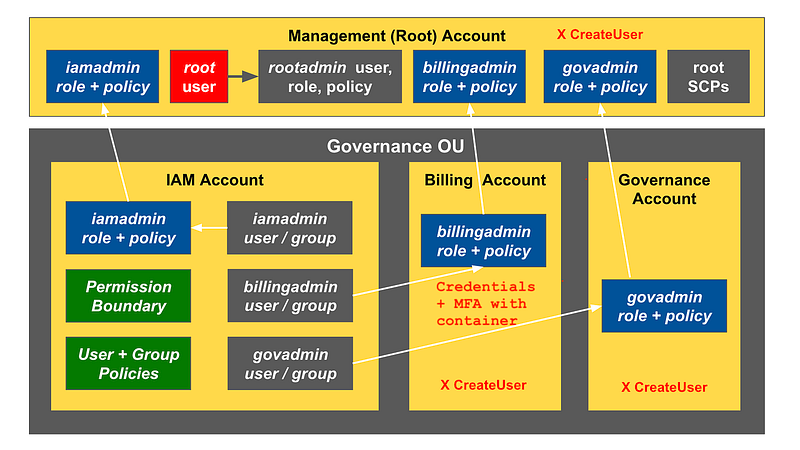
The root user creates the rootadmin user and rootadmin role in the AWS management account (the first account you create in your organization).
The rootadmin user has an IAM policy that prevents the root admin from taking IAM actions directly in the root account except for managing its own credentials. That includes user creation in the root account. All actions taken by the rootadmin user require MFA.
The rootadmin can assume any role it creates with MFA.
An rootadmin user creates the initial organization, and a governance organizational unit (OU). This OU is a production environment that contains the administrators that can perform operations across the organization.
The orgadmin creates accounts in the orgadmin OU — billing, IAM, governance.
The rootadmin creates the following users in the IAM account iamadmin, billingadmin, govadmin, and deployadmin and grants them permission to assume roles with appropriate permissions in their respective accounts. I’ll get into those permissions later.
The iamadmin will not have permission to change the billingadmin or govadmin permissions for reasons explained in prior posts.
The rootadmin creates any SCPs that the governance admin should not be allowed to change. These are things that should never change within the organization except under extreme circumstances and things that prevent the initial three admins from escalating privileges.
The rootadmin delegates organization management to the governance account.
Now this next step I’m not sure about. I need to test it out to see how it works, but I think it will. The rootadmin creates cross account roles for the billingadmin, iamadmin, and govadmin to access the management account from their respective roles in their respective accounts.
Update: This could requires role chaining, where the admin has to first assume one role, then from that role assume another.
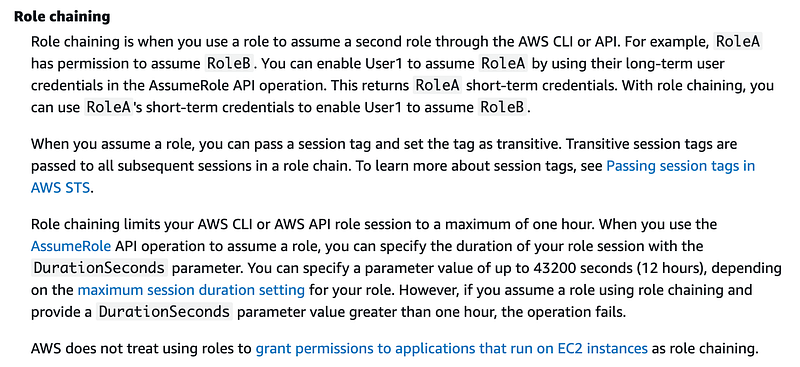
The problem is that facilitates privilege escalation if someone can use these roles to access the management account without MFA. To enforce MFA I’ll be using the containerized method of passing a token with credentials store in the account. More on that later.
Once these resources get created, the next step would be to start deploying environments for building and developing cloud applications. I want to have an environment admin (envadmin) that can administer the deployment pipeline and access accounts in the environment if needed.
After the deployment account exists, all deployments should leverage the deployment pipeline.
I’ll delve into all that in later posts as I want to get the above resources deployed first — and I’m going to make a change to the way I deploy them to align with the new directory structure we created in an earlier post.
I also want to make it easier to deploy the initial resources with only the rootadmin credentials.
Follow for updates.
Teri Radichel | © 2nd Sight Lab 2023
About Teri Radichel:
~~~~~~~~~~~~~~~~~~~~
⭐️ Author: Cybersecurity Books
⭐️ Presentations: Presentations by Teri Radichel
⭐️ Recognition: SANS Award, AWS Security Hero, IANS Faculty
⭐️ Certifications: SANS ~ GSE 240
⭐️ Education: BA Business, Master of Software Engineering, Master of Infosec
⭐️ Company: Penetration Tests, Assessments, Phone Consulting ~ 2nd Sight Lab
Need Help With Cybersecurity, Cloud, or Application Security?
~~~~~~~~~~~~~~~~~~~~~~~~~~~~~~~~~~~~~~~~~~~~~~~~~~~~~~~~~~~~~
🔒 Request a penetration test or security assessment
🔒 Schedule a consulting call
🔒 Cybersecurity Speaker for PresentationFollow for more stories like this:
~~~~~~~~~~~~~~~~~~~~~~~~~~~~~~~~~~~~~~~~~~~~~~~~~~~~~~~~~~~~~
❤️ Sign Up my Medium Email List
❤️ Twitter: @teriradichel
❤️ LinkedIn: https://www.linkedin.com/in/teriradichel
❤️ Mastodon: @teriradichel@infosec.exchange
❤️ Facebook: 2nd Sight Lab
❤️ YouTube: @2ndsightlab