avatarTeri Radichel

Free AI web copilot to create summaries, insights and extended knowledge, download it at here

4172

Abstract

       </div>
        </div>
      </a>
    </div><p id="09e2">I was using account numbers in my bucket name temporarily while I fleshed this out. I don’t want to have to track account numbers across accounts in policies with a map or some other mechanism. The above naming convention will be easier.</p><h2 id="372d">Parameters for organization prefix and environment names</h2><p id="9efa">Recall that I deployed what I call an <b><i>orgprefix</i></b> when I created my AWS organization and I use that prefix when creating organization-related resources.</p><div id="5b80" class="link-block">
      <a href="https://readmedium.com/create-an-aws-account-with-cloudformation-50dead9d7461">
        <div>
          <div>
            <h2>Create an AWS Account with CloudFormation</h2>
            <div><h3>ACM.178 Deploy an IAM, Billing, and Governance account in a Governance OU</h3></div>
            <div><p>medium.com</p></div>
          </div>
          <div>
            <div style="background-image: url(https://miro.readmedium.com/v2/resize:fit:320/1*-uDIcxgbi3KecDW-n6bizw.png)"></div>
          </div>
        </div>
      </a>
    </div><p id="b2e5">I used a secret initially. But Secrets Manager incurs various costs. SSM Parameters are more cost-effective for simple configuration values that do not have high-secrecy requirements.</p><p id="261c">Here’s the problem. We cannot reference parameters cross-account.</p><p id="cf03">What I am going to do is create the following two parameters in every account when I create new accounts.</p><p id="dfaa" type="7">OrgPrefix</p><p id="057c" type="7">Environment</p><p id="c7a2">To ensure these values are not changed incorrectly, I can create an SCP that limits who can write to those parameters and alert on any changes to them since that should not occur once the account is created and the parameter exists. Every script that deploys a resource can reference those parameters and use a consistent naming mechanism without having to pass those values around.</p><h2 id="08f1">Parameter Costs</h2><p id="b739">Another consideration would be any costs associated with accessing the parameter for every deployment. If we use a standard parameter with standard throughput and no encryption, which we can do because the parameter is not really a secret within our account anyway, there’s no cost.</p><figure id="f252"><img src="https://cdn-images-1.readmedium.com/v2/resize:fit:800/1*nxkMAgJ5hskaPzloyKjYOA.png"><figcaption></figcaption></figure><p id="38b5">If needed, an organization could apply additional encryption in a production environment. But a standard parameter in test accounts would allow many deployments to occur with no additional cost for the related options above.</p><h2 id="bdde">Add the parameters to SSM Parameter Store</h2><p id="da9a">I need to alter my account creation script to always deploy my parameters in new accounts. I’m going to manually add the OrgRoot parameter and allow anyone to access it within the account for now.</p><figure id="9e71"><img src="https://cdn-images-1.readmedium.com/v2/resize:fit:800/1*uex4fNN4TiaKq8bPeRgRuQ.png"><figcaption></figcaption></figure><p id="5b83">I’m also going to make an Environment parameter. For example, right now I’m testing in a Sandbox environment. My Sandbox and SandboxWeb accounts will have an <b><i>Environment</i></b> SSM Parameter with the value <b><i>sandbox</i></b>.</p><figure id="2d69"><img src="https://cdn-images-1.readmedium.com/v2/resize:fit:800/1*lbjaGOjP89h1XQjHFanqfg.png"><figcaption></figcaption></figure><p id="ee90">For some resources, I can’t use uppercase values so I’ll just make this lowercase. This will be a bit ugly in some resource names, but it’s the only way I can use the name consistently across all resources. Also, not all resource names can start with a number so environment names should not start with a number.</p><h2 id="6da1">Modifying templates to use SSM Parameters</h2><p id="95f8">By adding parameters, I can reference it like I did when creating OUs and accounts:</p><figure id="82d6"><img src="https://cdn-images-1.readmedi

Options

um.com/v2/resize:fit:800/1*IxD1Ncl2jTjhj6hY0fyN7Q.png"><figcaption></figcaption></figure><p id="ceb1">In the above template I was using Secrets Manager but we can use the same approach with SSM Parameter Store as explained in the AWS documentation:</p><div id="3a79" class="link-block"> <a href="https://docs.aws.amazon.com/AWSCloudFormation/latest/UserGuide/dynamic-references.html?src=radichel"> <div> <div> <h2>Using “dynamic” references to specify template values</h2> <div><h3>undefined</h3></div> <div><p>undefined</p></div> </div> <div> <div style="background-image: url(https://miro.readmedium.com/v2/resize:fit:320/)"></div> </div> </div> </a> </div><p id="71a1">I change my S3 Bucket template to reference the parameters:</p><figure id="d394"><img src="https://cdn-images-1.readmedium.com/v2/resize:fit:800/1*_JvsXoaMMdNA4qveOaqmew.png"><figcaption></figcaption></figure><p id="8720">Unfortunately it appears I cannot reference the SSM parameters in my outputs. I’m going to have to see how this affects whatever references the outputs.</p><figure id="c913"><img src="https://cdn-images-1.readmedium.com/v2/resize:fit:800/1*OFF96kWcYk8apX60BnHxPQ.png"><figcaption></figcaption></figure><p id="a991">Now I just have to go change all the code affected by this change and do a lot of troubleshooting…</p><p id="6d19">One thing I can do now is use the above method to calculate bucket names for domains in roles and policies. That way I don’t have to dynamically pass in resource ARNs which might lead to typos and misconfigurations. I may need to add in account numbers in some places but this should work in a policy:</p><figure id="58fe"><img src="https://cdn-images-1.readmedium.com/v2/resize:fit:800/1*dmy4XCsP2xqe8qpvS5fxiA.png"><figcaption></figcaption></figure><p id="3122">The other thing I just realized is that by concatenating the name inside the template is that I have to calculate the name for the CloudFormation stack name as well. This is a bit of a problem as it leads to some inconsistency. I’ll need to think on that and consider if I want to simply add those values to every resource name or not.</p><p id="a8b7">Part of the reason for this change is a larger change I’m planning to make after I get this initial website deployed. I’m thinking through how I will structure environments across an organization. A consistent naming convention will help.</p><p id="4fa3">Follow for updates.</p><p id="4a3a">Teri Radichel | <i>© <a href="https://2ndsightlab.com/?source=post_page---------------------------">2nd Sight Lab</a> 2023</i></p><div id="8b5f"><pre><span class="hljs-section">About Teri Radichel:

⭐️ Author: Cybersecurity Books
⭐️ Presentations: Presentations by Teri Radichel
⭐️ Recognition: SANS Award, AWS Security Hero, IANS Faculty
⭐️ Certifications: SANS ~ GSE 240
⭐️ Education: BA Business, Master of Software Engineering, Master of Infosec
⭐️ Company: Penetration Tests, Assessments, Phone Consulting ~ 2nd Sight Lab</pre></div><div id="caae"><pre><span class="hljs-section">Need Help With Cybersecurity, Cloud, or Application Security?
~~~~~~~~~~~~~~~~~~~~~~~~~~~~~~~~~~~~~~~~~~~~~~~~~~~~~~~~~~~~~</span>
🔒 Request a penetration test or security assessment
🔒 Schedule a consulting call
🔒 Cybersecurity Speaker for Presentation</pre></div><div id="5a42"><pre>Follow <span class="hljs-keyword">for</span> more stories like <span class="hljs-keyword">this</span>:

❤️ Sign Up my Medium Email List ❤️ Twitter: <span class="hljs-meta">@teriradichel</span> ❤️ LinkedIn: https:<span class="hljs-comment">//www.linkedin.com/in/teriradichel</span> ❤️ Mastodon: <span class="hljs-meta">@teriradichel</span><span class="hljs-meta">@infosec</span>.exchange ❤️ Facebook: 2nd Sight Lab ❤️ YouTube: @2ndsightlab</pre></div><figure id="faf5"><img src="https://cdn-images-1.readmedium.com/v2/resize:fit:800/0*H9Ew1KCl-29nZiPR.jpeg"><figcaption></figcaption></figure></article></body>

Organization-Environment Naming Convention on AWS

ACM.357 Modifying our naming convention for cross-account resource policies

~~~~~~~~~~~~~~~~~~~~~~~~~~~~~~~~~~~~~~~~~~~~~~~~~~~~~~~

⚙️ Check out my series on Automating Cybersecurity Metrics | Code.

🔒 Related Stories: AWS Security | Secure Code | IAM | AWS Organizations

💻 Free Content on Jobs in Cybersecurity | ✉️ Sign up for the Email List

~~~~~~~~~~~~~~~~~~~~~~~~~~~~~~~~~~~~~~~~~~~~~~~~~~~~~~~

In the last post I enabled S3 Bucket Keys on my S3 bucket to reduce costs.

In this post, I need to fix a few things in my S3, KMS and IAM policies related to cross-account deployments.

Renaming buckets to simplify policy deployments

I want to rename my bucket to make it easier to calculate the name of the bucket when deploying buckets.

I want my bucket name, domain name, and repo name to match to some degree — or rather one can easily be calculated from the other. That makes policy creation and consistency easier.

I’m going to use this naming convention:

environment-orgprefix-domainname

The CloudFormation stack name could end up looking like this:

role-resource-environment-orgprefix-domainname

That may end up getting a bit long, but it makes things easier to identify and using something other than account numbers will be easier and possibly less risky (even though account numbers are not intended to be secret.)

Update: I think I may leave the resources names as is but include the environment and org name in certain resources only. The problem is that SSM parameters are resolved inside templates not outside and so when deploying the resource you’d have to look up the parameters to create the name while inside the template you’re resolving the name. That leads to potential inconsistencies and errors. Still thinking about it but for now leaving my stack names as is, with the exception of a better way to obtain the role that deployed the template.

I was using account numbers in my bucket name temporarily while I fleshed this out. I don’t want to have to track account numbers across accounts in policies with a map or some other mechanism. The above naming convention will be easier.

Parameters for organization prefix and environment names

Recall that I deployed what I call an orgprefix when I created my AWS organization and I use that prefix when creating organization-related resources.

I used a secret initially. But Secrets Manager incurs various costs. SSM Parameters are more cost-effective for simple configuration values that do not have high-secrecy requirements.

Here’s the problem. We cannot reference parameters cross-account.

What I am going to do is create the following two parameters in every account when I create new accounts.

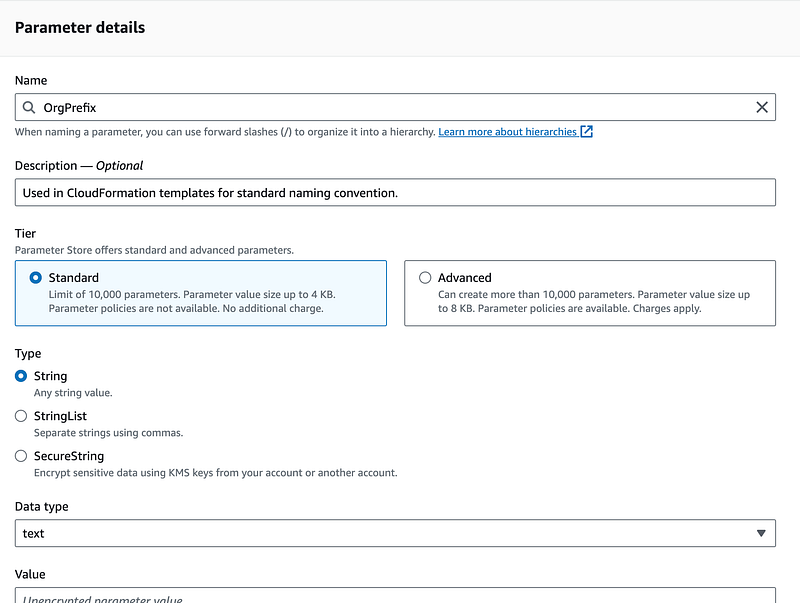
OrgPrefix

Environment

To ensure these values are not changed incorrectly, I can create an SCP that limits who can write to those parameters and alert on any changes to them since that should not occur once the account is created and the parameter exists. Every script that deploys a resource can reference those parameters and use a consistent naming mechanism without having to pass those values around.

Parameter Costs

Another consideration would be any costs associated with accessing the parameter for every deployment. If we use a standard parameter with standard throughput and no encryption, which we can do because the parameter is not really a secret within our account anyway, there’s no cost.
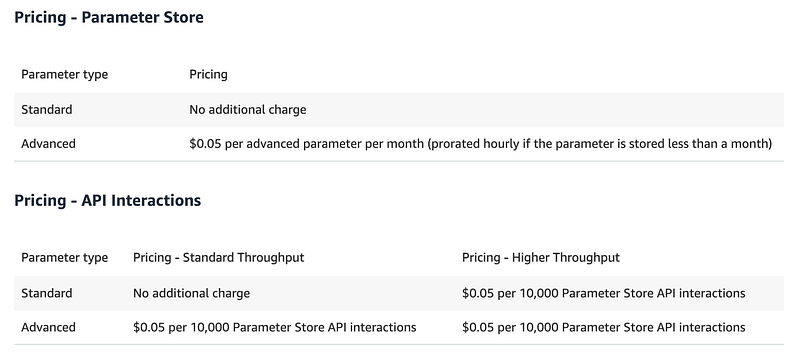
If needed, an organization could apply additional encryption in a production environment. But a standard parameter in test accounts would allow many deployments to occur with no additional cost for the related options above.

Add the parameters to SSM Parameter Store

I need to alter my account creation script to always deploy my parameters in new accounts. I’m going to manually add the OrgRoot parameter and allow anyone to access it within the account for now.
I’m also going to make an Environment parameter. For example, right now I’m testing in a Sandbox environment. My Sandbox and SandboxWeb accounts will have an Environment SSM Parameter with the value sandbox.
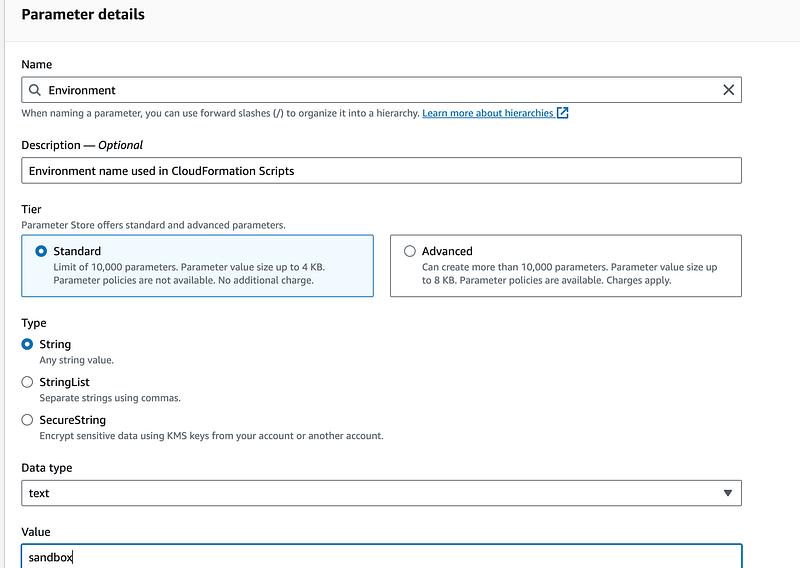
For some resources, I can’t use uppercase values so I’ll just make this lowercase. This will be a bit ugly in some resource names, but it’s the only way I can use the name consistently across all resources. Also, not all resource names can start with a number so environment names should not start with a number.

Modifying templates to use SSM Parameters

By adding parameters, I can reference it like I did when creating OUs and accounts:
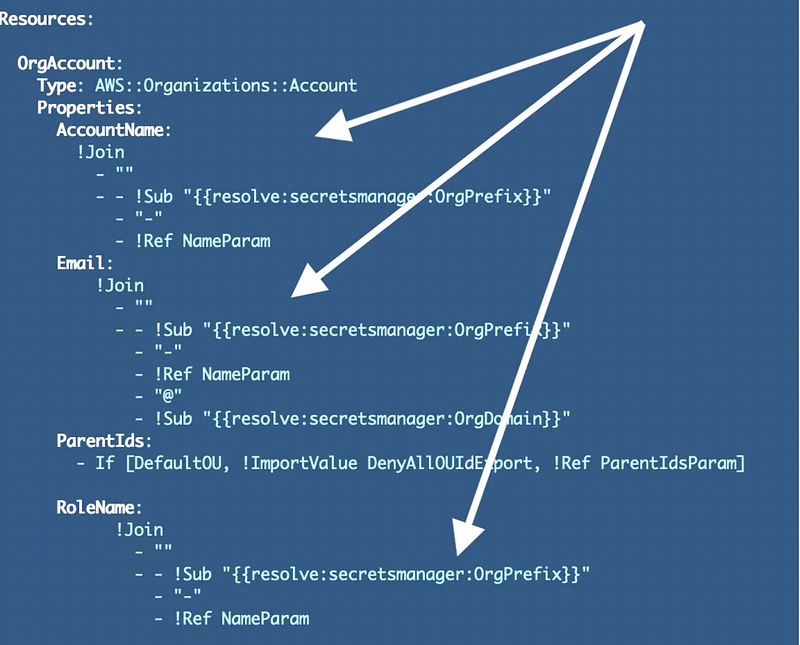
In the above template I was using Secrets Manager but we can use the same approach with SSM Parameter Store as explained in the AWS documentation:

I change my S3 Bucket template to reference the parameters:
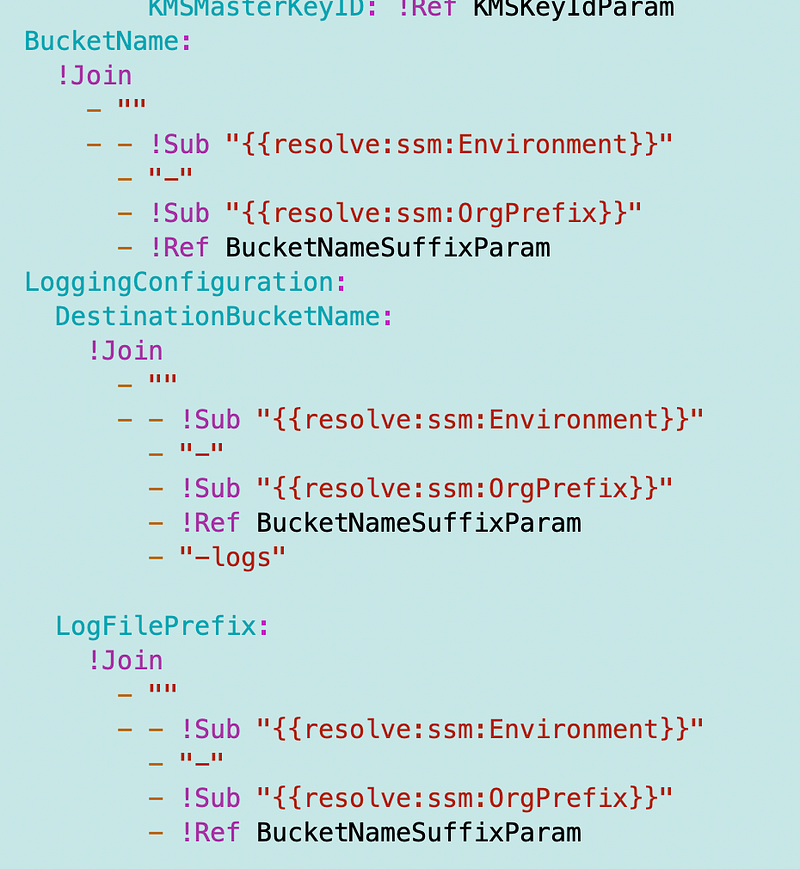
Unfortunately it appears I cannot reference the SSM parameters in my outputs. I’m going to have to see how this affects whatever references the outputs.
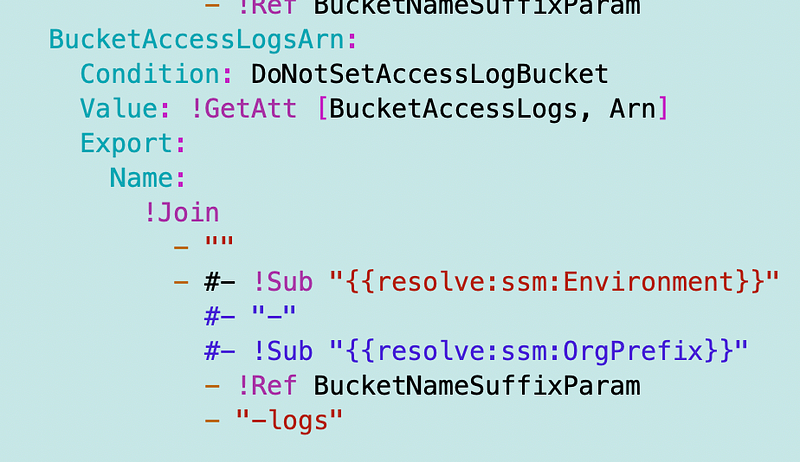
Now I just have to go change all the code affected by this change and do a lot of troubleshooting…

One thing I can do now is use the above method to calculate bucket names for domains in roles and policies. That way I don’t have to dynamically pass in resource ARNs which might lead to typos and misconfigurations. I may need to add in account numbers in some places but this should work in a policy:
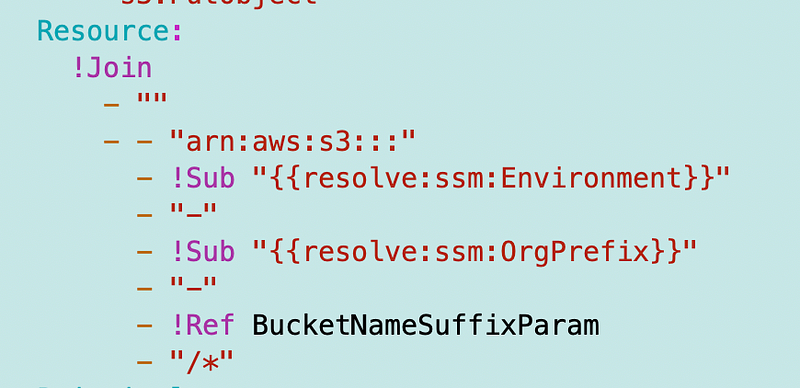
The other thing I just realized is that by concatenating the name inside the template is that I have to calculate the name for the CloudFormation stack name as well. This is a bit of a problem as it leads to some inconsistency. I’ll need to think on that and consider if I want to simply add those values to every resource name or not.

Part of the reason for this change is a larger change I’m planning to make after I get this initial website deployed. I’m thinking through how I will structure environments across an organization. A consistent naming convention will help.

Follow for updates.

Teri Radichel | © 2nd Sight Lab 2023

About Teri Radichel:
~~~~~~~~~~~~~~~~~~~~
⭐️ Author: Cybersecurity Books
⭐️ Presentations: Presentations by Teri Radichel
⭐️ Recognition: SANS Award, AWS Security Hero, IANS Faculty
⭐️ Certifications: SANS ~ GSE 240
⭐️ Education: BA Business, Master of Software Engineering, Master of Infosec
⭐️ Company: Penetration Tests, Assessments, Phone Consulting ~ 2nd Sight Lab
Need Help With Cybersecurity, Cloud, or Application Security?
~~~~~~~~~~~~~~~~~~~~~~~~~~~~~~~~~~~~~~~~~~~~~~~~~~~~~~~~~~~~~
🔒 Request a penetration test or security assessment
🔒 Schedule a consulting call
🔒 Cybersecurity Speaker for Presentation
Follow for more stories like this:
~~~~~~~~~~~~~~~~~~~~~~~~~~~~~~~~~~~~~~~~~~~~~~~~~~~~~~~~~~~~~ 
❤️ Sign Up my Medium Email List
❤️ Twitter: @teriradichel
❤️ LinkedIn: https://www.linkedin.com/in/teriradichel
❤️ Mastodon: @teriradichel@infosec.exchange
❤️ Facebook: 2nd Sight Lab
❤️ YouTube: @2ndsightlab

Aws Organizations
Naming Convention
Environment
S3 Bucket
Parameter Store
Recommended from ReadMedium