
Create an AWS Account with CloudFormation
ACM.178 Deploy an IAM, Billing, and Governance account in a Governance OU
Free Content on Jobs in Cybersecurity | Sign up for the Email List
Part of my series on Automating Cybersecurity Metrics. The Code.
In the last post, I covered some risks related to IdPs and specifically an attack on Azure Active Directory when used as an on-premises IdP based on a publication by the US Government after the Solar Winds attack.
That was a bit of a hiatus from the posts I’ve been writing about using Okta as an IdP, because someone made a comment that got me curious. Sorry I’m easily side-tracked :-) and it was a very interesting statement. If you want to find all the Okta related posts so far to setup Okta as an IdP for AWS you can find those here:
In this post we’re going to create an a new AWS account in an AWS Organization with CloudFormation.
As noted in prior posts, I’m going to have the OrgRoot user set up the initial governance account structure in our organization and then lock those keys away as we shouldn’t need them on a regular basis.
Once our initial structure is in place, the billing admin, governance admin, and IAM administrators should be able to build out the rest of our account.
The OrgRoot user is going to deploy three accounts in this post.
- Billing
- IAM
- Governance
We are going to deploy these accounts to the Governance OU we created in this post:
I’m also going to test adding accounts to the Deny All OU by default.
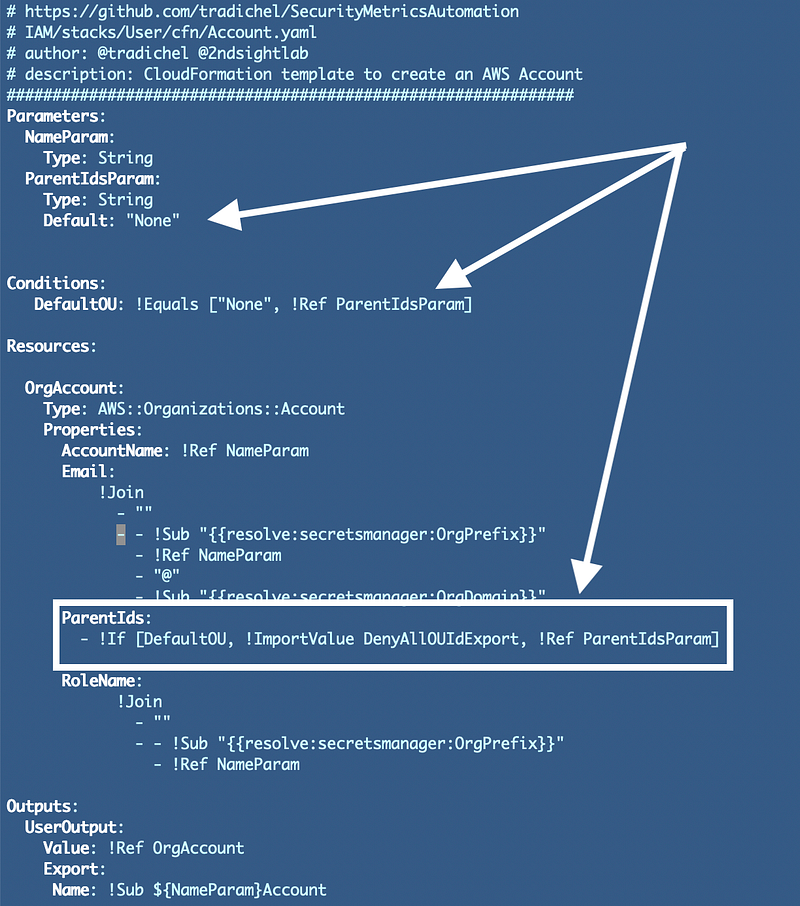
CloudFormation for an AWS Account
Here’s the CloudFormation to create an AWS account:
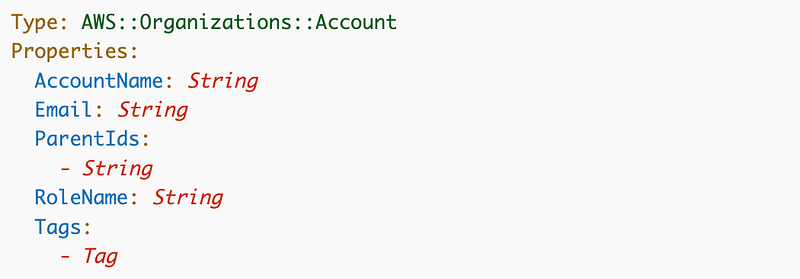
I wish you could also define the AWS account alias in Cloud Formation above. #awswishlist. I explained what that is when we created our account here:
And we used it this post to integrate with Okta:
Also need to be able to output the alias to use in scripts.
Other than that it looks straightforward and much easier than the Lambda / Python / Control Tower approach I was going to use earlier.
I can also use CloudFormation drift detection with this approach.
I don’t know why ParentIds is plural and takes a list. I certainly hope that AWS does not add in the complexity of multiple inheritance which is sure to lead to security problems. For now you can only assign one parent Id.
CloudFormation template and parameters
Alright let’s create the code to deploy our AWS accounts. Of course we want to avoid repeating the code three times for the reasons explained in this post on the DRY Principle:
We’ll create one template that works for all our accounts. I’m going to put it in an “Account” folder in my “Org/stacks” path.
We will need to pass in the ParentId where we want the account to end up in the organizational structure.
We can also pass in the AccountName, Email, and RoleName? Here are some requirements:
- Make sure that someone can’t simply add their own email or some non-company email.
- Ensure the RoleName is not the default but that we always know wht it is.
- I want these scripts to be able to deploy different account names for anyone using them.
I’m going to store two additional secrets in AWS Secrets Manager:
- EmailDomain: The domain name to be used for all emails.
- OrgPrefix: An organization identifier appended to the names below.
Our derived values will be:
- AccountName: [OrgPrefix]-[AccountName]
- RoleName: [OrgPrefix][AccountName]
- Email: [OrgPrefix]-[AccountName]@[EmailDomain]
If you are extra security conscious, you could use a hard to guess organizational identifier that would make the above hard to guess. However, if someone has access to the emails either in the email box, at AWS, or on the wire, then they could derive your account numbers and roles to reach them from the above information.
To resolve that problem, you could further modify the email address. But then make sure you can identify the account if you get an email sent to it and need to figure out to which account that email belongs!
Since I locked down the root user with no permissions in this post using an AWS Service Control Policy, I am more concerned about keeping track of all my account information than someone getting hold of the root user email (until I learn of a threat or vulnerability that makes me change my mind).
Code for our new AWS Secrets
Now you may recall that I already created a secret to store the Okta Metadata in this post:
I can reuse that code here to create the two new secrets.
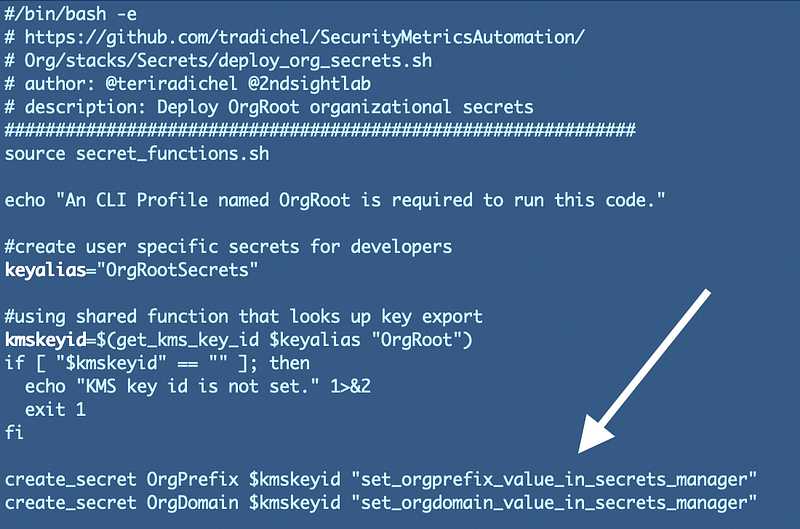
I modified my deployment scripts because I only ever need to run the Okta metadata and these org secret scripts once. So now I have two new deployments scripts:

I modified my secrets function to override the default value:
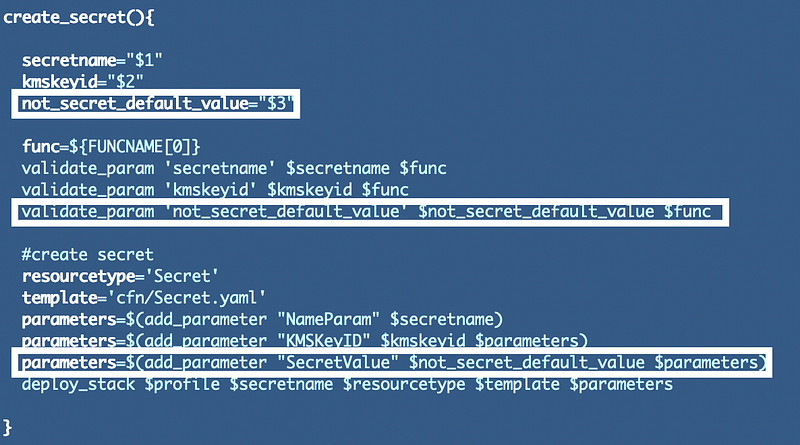
Note the name! This is not a secret value. It will be passed in as a parameter to CloudFormation and be visible on the parameters tab in the AWS console. I am only using this to pass in a default value which will show up later if someone fails to set the secret values appropriately after running this script. My default values indicate that the user has to go change the values in secrets manager. Hence, this is my deployment script for these two organizational secrets:
Code for our new AWS accounts
Now that we have these new secrets we can reference them the same way we did in our our AWS Identity Provider template. I’ll use those secrets to formulate the role name and email assigned to this new account.
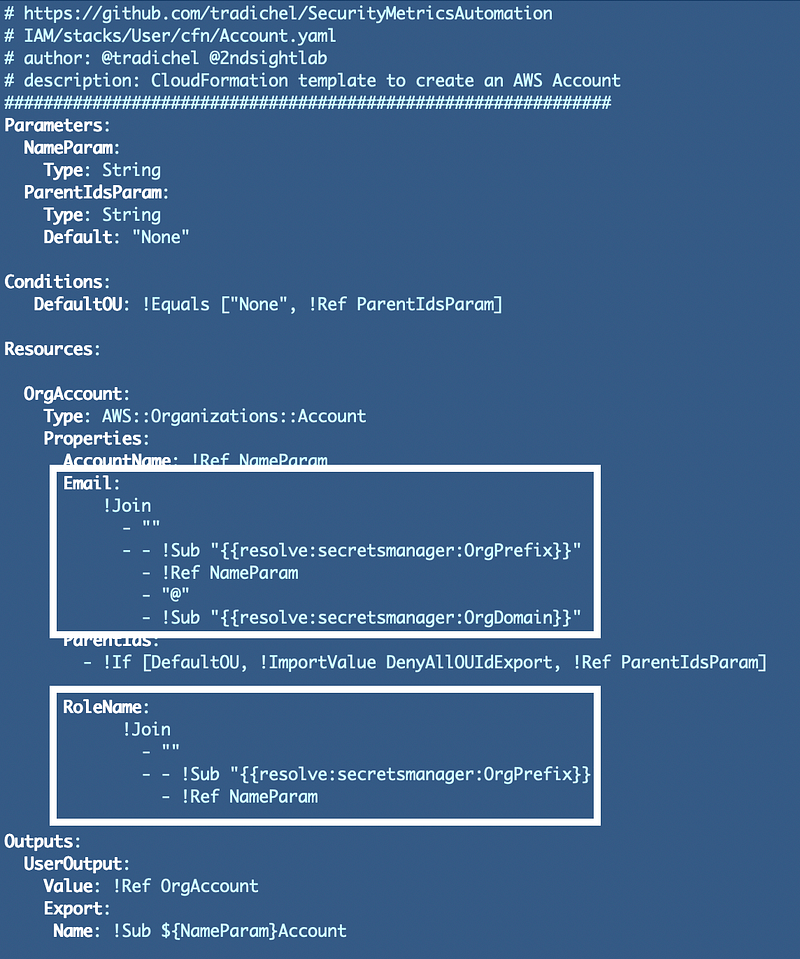
New AWS accounts will be added to the DenyAll OU by default in most cases. Initially I wanted to test out a template that adds new accounts to that OU if an OU is not provided to the ParentIdsParam. That way the Billing Administrator does not need to retrieve the OU ID to create a new account. I’m using a Condition and an If statement which I explained in a prior post. If the parameter is not passed in, I set the value of the parent id to the output of the DenyAllOU Cloudformation stack we created earlier.
Now I can run that and see the new account was successfully created:
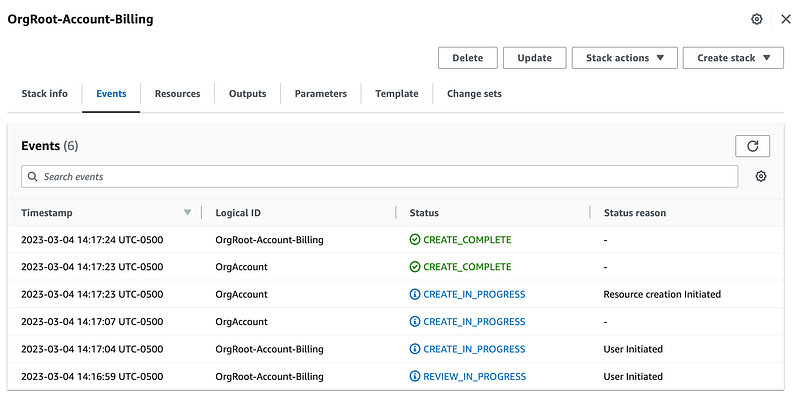
Note that because this has the OrgRoot prefix, the billing administrator role we created earlier will not be able to make changes to this CloudFormation stack since we limited access to stacks starting with certain prefixes, not including this one.
Enhancing protection of our root OU (#AWSWishList)
There is one additional step we could take to ensure accounts are never added to the root OU. If we could deploy the Organization with CloudFormation and output the root OU ID then we could easily get the root OU in this template. By doing that we could change our condition to set the OU to the deny all OU if someone tries to pass in the root OU as a Parent Id.
Since that’s not available we could create an AWS Secret, store the root OU ID, and reference that in this template to ensure no one tries to pass in the root OU ID here.
However, if our SCPs and permissions in our IAM roles prevent ever adding an account to the root OU we should be OK. The problem I mentioned earlier is that when we set the Parent ID in this template is it deploying the account straight to that OU? Or is it first deploying it to the Root OU and then moving it to the correct OU after the fact? That would pose some problems for the policy we created earlier.
Let’s head over and check what we have in our CloudTrail logs.
Warning — Limited events in CloudTrail logs
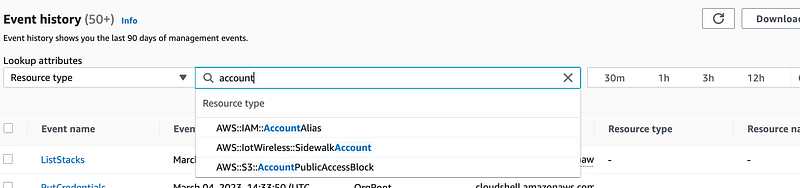
Well, I can’t look up events by resource type Account:
Organizations as a resource type also does not exist:
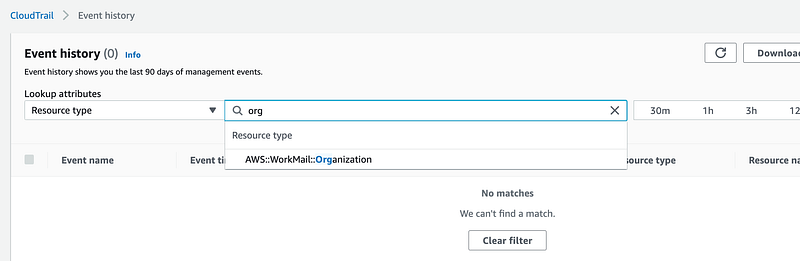
I can use the AWS Organizations event source but that also yields nothing:
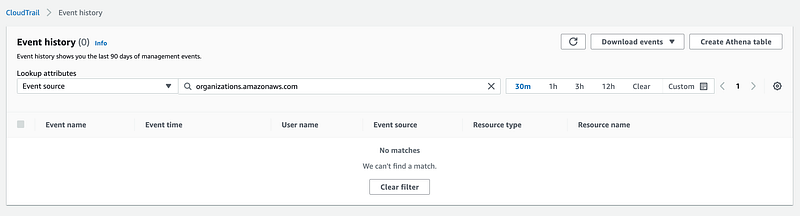
So let’s say someone created a new account in your organization. How are you going to know who did it? Hmm. That seems like a problem and hope that gets fixed soon.
Well, I’ll have to resolve my policy issue through trial and error later. For now I’m going to add two new accounts and I’m going to move all the accounts to the correct OU.
Another note on log visibility into AWS Organizations events. I initially had a bug that caused my accounts to still get deployed to the DenyAll OU. I fixed that bug to correctly pass in the OU ID so they would end up in the Governance OU and redeployed. I verified the accounts moved to the correct OU. I checked CloudTrail again — still no logs other than CloudTrail for the OU change. Still no organizations or accounts events at all. Only CloudFormation.
At some point while testing, I also disabled all my SCPs so I could delete one of them. When I looked in CloudTrail logs I couldn’t find that either. When I re-enabled the SCPs they still existed but it did not appear that they were attached to any OU. I need to test that further. Anyway, things to be aware of and why you should limit permissions for AWS Organizations to only what is explicitly required!
More warnings on account close and removal caveats
One thing I noticed when I took a look at my account on the Organizations dashboard is that I had a bug in what I intended to do with the name. I added the organization prefix to the name:
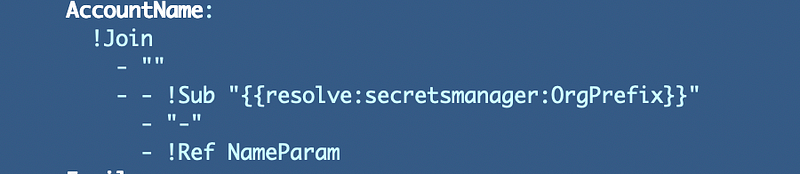
and re-ran my template:

Nope! You can’t change the name of the account or the email from CloudFormation. So you’ll want to really think through your naming policies before you begin if you want to use drift detection to spot unauthorized changes.
I deleted my stack so I could redeploy it. That worked.
Make sure you know who can delete your AWS Account CloudFormation stacks!
We can add termination protection after we’re done to help prevent deletion of CloudFormation stacks.
Even though I deleted the stack, the account still exists and is not deleted.
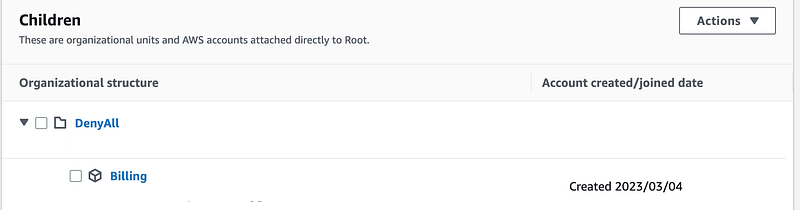
Now we have the joy of going though the removal process if we want to get rid of it completely as noted here:
Well, I can’t log into the account because I have an SCP on the account that prevents actions by the root user. I also have an SCP that prevents removing the account from the organization. So now what?
I’m going to show you how I fixed that issue in another post.
For now, I can change the format of the email address in my CloudFormation template so I get a different email address. I have to do that because I cannot reuse the same email for a new account as noted in the post above. Then I’ll deal with deleting the new account I no longer want later. I’m just trying to get through this post first and get my new accounts in place.
Final Account CloudFormation Template and Scripts
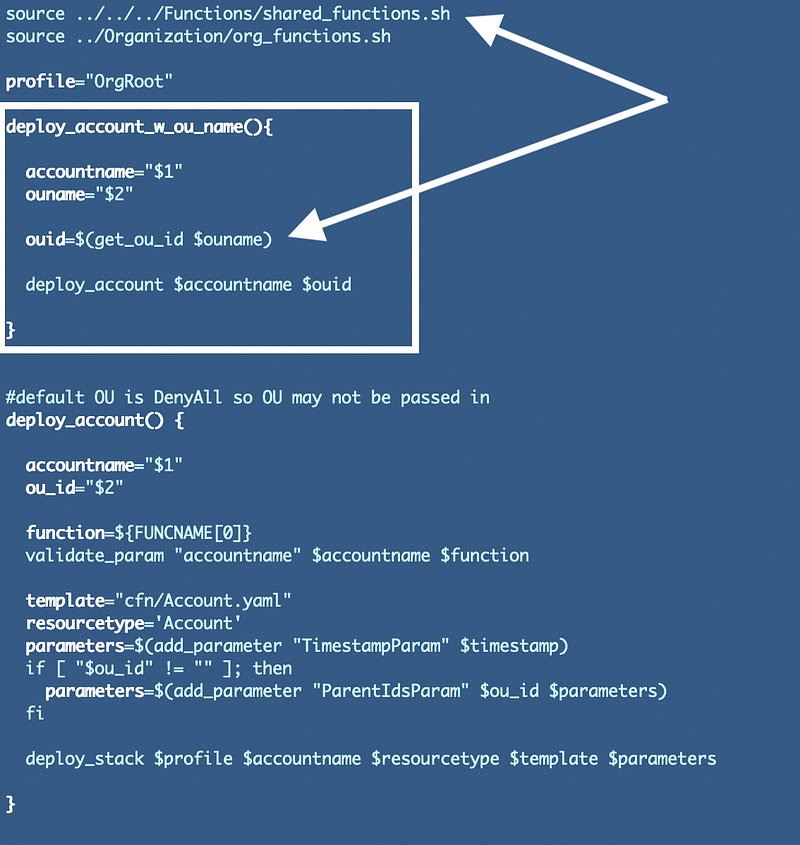
In order to deploy the accounts to the correct OU, I added a new function named deploy_account_w_ou_name that will take an OU name, lookup the OUID, and then pass that into my existing deploy_account function.
To lookup the id I source the org_functions.sh file I created in a prior post to reuse the get_ou_id function.
Note that I also fixed a bug. :)
I updated the CloudFormation template to standardize the naming of the role, the account, and the email for new accounts. The good news is, it will be easier for those who view the organization to remember what the email and role are for any new account.
Deriving the email for new accounts from a domain in an AWS Secret will help prevent the domain name typo issue I wrote about in my blog above on closing AWS accounts. Even though I was able to close that account, for some reason I am still being forced to enter a credit card for this new account I just created. A typo in the domain would make it impossible to get into that account.
The bad news is that it will also make it easier for attackers to try to figure out the names and emails for your accounts. But then no one should be using your root users on your AWS Organizations accounts, or the root account emails for the most part. Since we are using a unique prefix, it won’t be super simple to guess the account names and emails depending on the complexity of the prefix. You can monitor for AWS spam to incorrect emails not associated with an AWS account and report those to AWS.
Here’s the final template. Note that I also removed some excessive double negative logic I got from copying and pasting code as well.
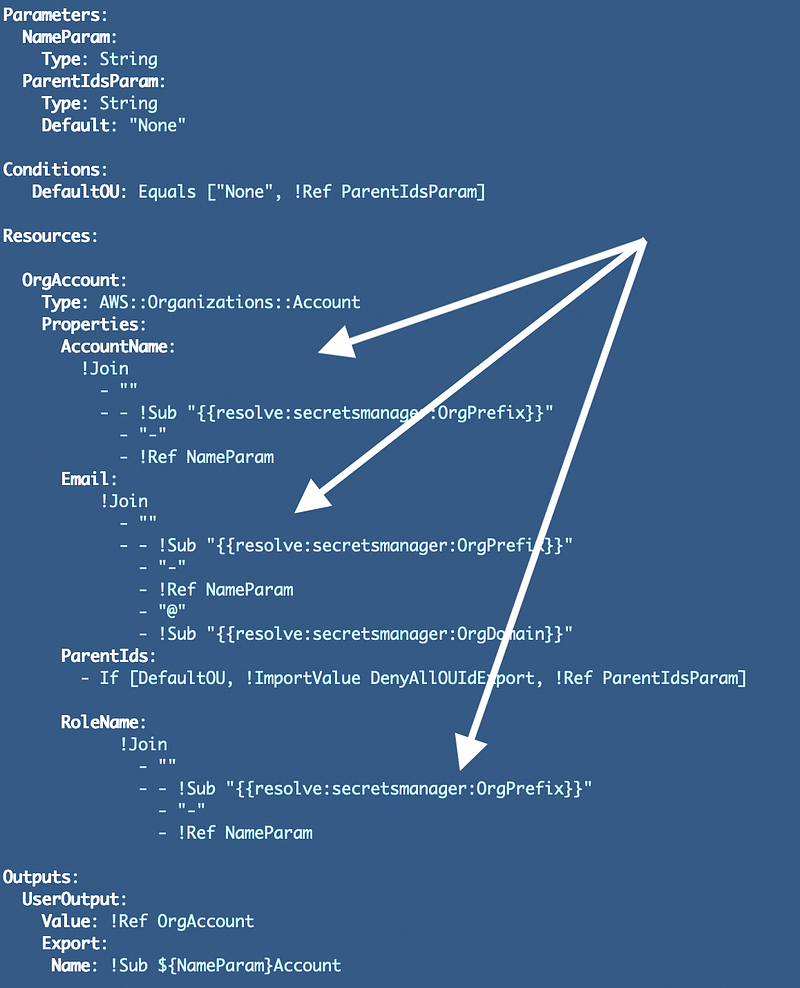
Now that we have the three new accounts we can do some additional testing and finish deployment of our initial AWS Organizations governance structure using our OrgRoot user.
Follow for updates.
Teri Radichel | © 2nd Sight Lab 2023
About Teri Radichel:
~~~~~~~~~~~~~~~~~~~~
⭐️ Author: Cybersecurity Books
⭐️ Presentations: Presentations by Teri Radichel
⭐️ Recognition: SANS Award, AWS Security Hero, IANS Faculty
⭐️ Certifications: SANS ~ GSE 240
⭐️ Education: BA Business, Master of Software Engineering, Master of Infosec
⭐️ Company: Penetration Tests, Assessments, Phone Consulting ~ 2nd Sight Lab
Need Help With Cybersecurity, Cloud, or Application Security?
~~~~~~~~~~~~~~~~~~~~~~~~~~~~~~~~~~~~~~~~~~~~~~~~~~~~~~~~~~~~~
🔒 Request a penetration test or security assessment
🔒 Schedule a consulting call
🔒 Cybersecurity Speaker for PresentationFollow for more stories like this:
~~~~~~~~~~~~~~~~~~~~~~~~~~~~~~~~~~~~~~~~~~~~~~~~~~~~~~~~~~~~~
❤️ Sign Up my Medium Email List
❤️ Twitter: @teriradichel
❤️ LinkedIn: https://www.linkedin.com/in/teriradichel
❤️ Mastodon: @teriradichel@infosec.exchange
❤️ Facebook: 2nd Sight Lab
❤️ YouTube: @2ndsightlab


