
Root OU Service Control Policies
ACM.170 Secure your organization — before — not after- you start creating new accounts
Part of my series on Automating Cybersecurity Metrics. AWS Organizations. Governance. The Code.
Free Content on Jobs in Cybersecurity | Sign up for the Email List
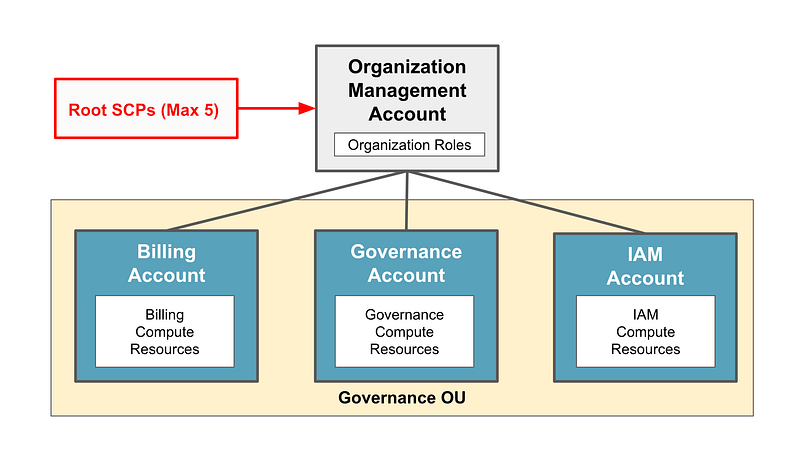
In the last post we considered our Service Control Policy architecture.
In this post, we want to add a few Service Control Policies at the root of our organization before we grant our billing administrator permission to create new accounts.
Note that if you have an existing AWS account, I do NOT recommend applying things at the root OU without testing in a parallel or separate OU environment first so you don’t break things.
The SCPs we will create:
At the root OU we will create these service control policies, which we expect will rarely change. That way we do not have to login as the OrgRoot user very often.
- AllowedRegions: to which regions users are allowed to deploy resources.
- DenyLeaveOrganization: Disallow removing an account from the organization.
- LimitRootUser: Limit what the root user can do in new AWS accounts.
- DenyAddAccountToRoot: Disallow assigning AWS accounts to the Root OU
Update: The last policy didn’t work by virtue of how AWS CloudFormation works — which is that it first adds the account to the root OU and then it moves it to the secondary OU. I went ahead and removed that policy.
These policies apply to all but the management account and therefore the management account root user, our OrgRoot user, and any roles we create in the root account. Because the regions restriction will not apply to the roles we create in the root account, we will have to add the regions limitations to those role policies or permissions boundaries.
Choosing Regions for AWS Workloads
The first SCP I want to create at the root is going to restrict creation of new resources in specified regions. I can restrict all other regions so I have less to monitor and there’s less chance someone makes a mistake and deploys something to the wrong region.
My alternate region is going to be us-east-1 because some resources have to be deployed in us-east-1 (like TLS certificates used to be but I’m not sure if that is true anymore).
Update: Some ACM is appearing in other regions in this list — going to test it out.
Make sure the services you need are available in the regions you choose.
I recommend making your primary region something other than us-east-1 because us-east-1 has historically had more outages than other reasons. That’s likely because it is the default region and everyone new to AWS starts there and never leaves, so perhaps it becomes overloaded. That’s just a guess and I haven’t checked that stat lately.
That said, us-east-1 is also a critical region as that is where some key security and IAM controls originate, so Amazon will obviously be working hard to keep that up and running.
When selecting a region, you will want to consider the following:
- What services do you intend to use? Some services are not available in all regions.
- Do you need to operate in a particular region for compliance or legal reasons? For example, if you are providing services to European customers, you may opt to run some systems in Europe to make it easier to comply with GDPR (General Data Protection Regulation) which defines legal requirements for handling data of customers in the EU.
- How much do the services you intend to use cost in each region? The pricing for each service is not the same in every region.
A pricing and service example:
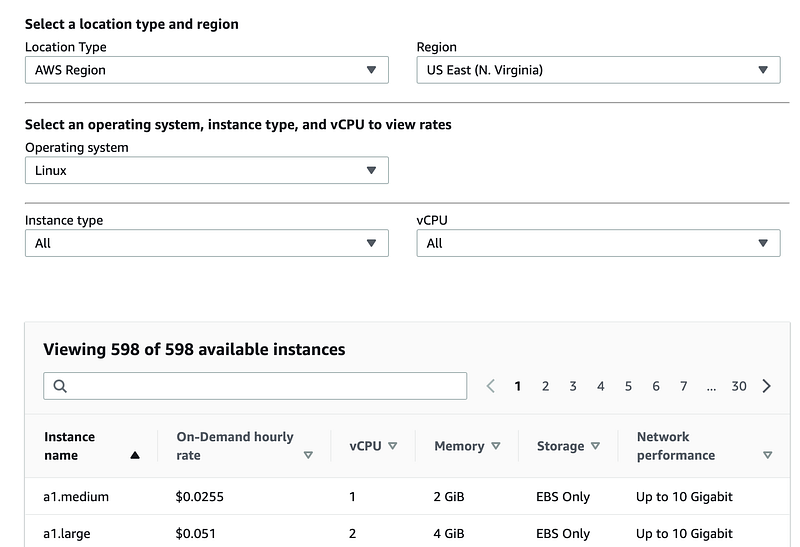
Search for the service name plus pricing to find pricing in Google — like “AWS EC2 Pricing”. In the past, that would take you straight to the pricing but AWS has made it more complicated. Once you get to this page you have to click a link. Most people will click “On-Demand” because that is the pay-as-you-go option.
Here’s the pricing for us-east-1 also known as US East (N.Virginia):
Switch over to Northern California. Here what is interesting don’t get the a1 type instance options. Only the t4 instance types.
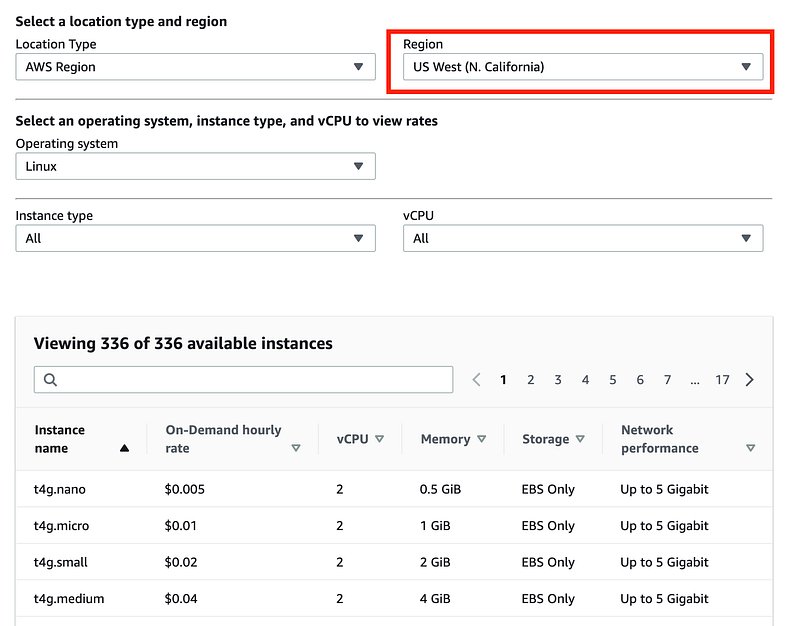
You might want to be thinking about what sort of workload you need to run and what sort of instance type you need — or choose a region that has more options if you’re not sure. You can read about AWS instance types here:
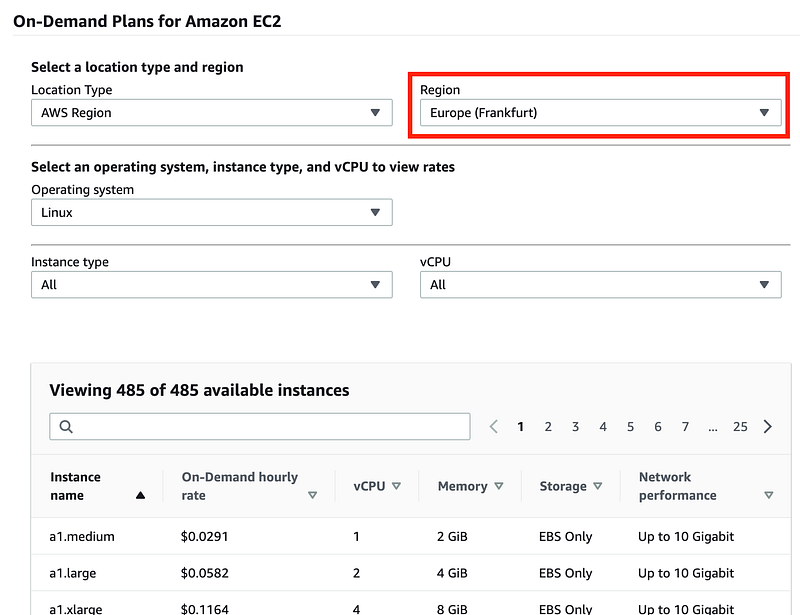
Switch over to Frankfurt in Germany. Here you can see the a1 instance types are available but the cost is different.
- Another consideration may be network latency. Perhaps you need your applications located in close proximity to your users or some other service with which you need to integrate. You may want to test latency and consider your networking options in that case, such as network optimized virtual machine types and Direct Connect for hybrid networks. Make sure the networking options you need are available in the region you choose.
Note that I used to work with resources in us-east-1 from Seattle when I was on the Capital One cloud team and I didn’t see much impact. Working in the cloud anywhere compared to working on your own machine feels like an eternity to any developer :) but I didn’t feel a huge impact compared to working on my own resources in us-west-2 (Oregon) which is closer in proximity to Seattle. Also, you can move some resources closer to your web application end users with a CDN like CloudFront. Do your own testing, though, and choose the option that works for you.
- Capacity may be another consideration. A region that has more zones which are essentially (though not always) data centers may have more capacity than regions with less zones. However, that’s not an exact relationship. It could be that a region with more zones has most of the instance types you need in use and so there’s actually less capacity than a region that has fewer data centers but more unused resources.
Interestingly enough I have only faced an issue with low capacity in AWS once and it was brief. On other other hand I had a capacity issue on Azure that lasted a mont. I can’t find any reporting on how much capacity is available in each cloud region for each type of resource. I also has some strange behavior with GCP when running a class in Australia a couple of years back that did not happen in the US.
Let’s say you plan on using a1 medium instances heavily. Which region has the most available a1 instances? I don’t see a way to find that information other than asking your AWS account manager. If you have mission critical work loads, you might want to contact your cloud provider about this issue and test out each region where you plan to operate for a while prior to your production release.
If you don’t plan to use any backup regions, you can simply use one region but any application that needs a high degree of uptime will need failover to another region. Those who architect across regions have been able to stay up and running during various cloud outages. That choice will be dependent on your business continuity plan (BCP), your disaster recovery (DR) plan, and your budget. Ask your security, legal and financial team for help to understand the recovery needs of the business.
OK, based on the above considerations, pick your regions and let’s create our new SCP.
Creating an “AllowedRegions” SCP
We can get some guidance on what constructs we need to use to create our new SCP here:
However, that policy feels a bit cumbersome. I am going to leave services out of that policy for now. The reason the services are added to that policy is so the organization can add security monitoring and logging in every region, even though they are not used. However, if Amazon’s service control policies work the way they are supposed to — no actions should be allowed in those regions and there should be nothing to log, correct? Also, if we use AWS Organizations integrated services, they should send our logs to the desired region and they use service-linked roles that should be unaffected by SCPs:
As an aside, you can disable STS in regions within each AWS account as well. This is under settings on the IAM dashboard.
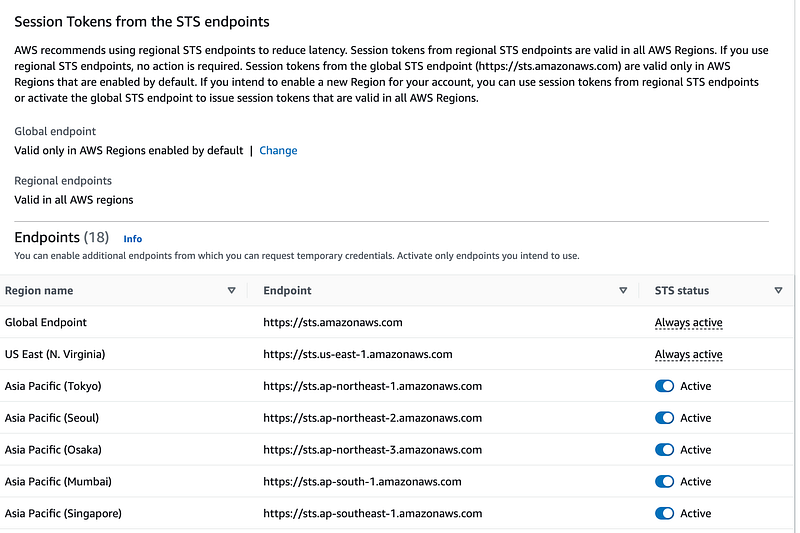
You can disable a region with the aws account disable-region command in each account. There is a corresponding enable-region command. If you use this feature just understand who can re-enable a region you have enabled, but the SCP should also prevent actions in unauthorized regions.
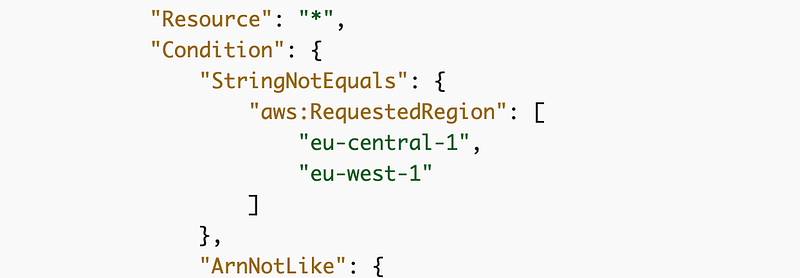
The pseudocode for our Allowed Regions policy looks something like this:
Deny
resource *
action *
where region is not in [regions]
We’ll apply this SCP at the root (which doesn’t affect the management account as noted before, so we don’t want to grant permissions in that account).
Due to the complexities of sending spaces in bash and dealing with lists in a sub in a policy I am just going to set up the template to allow two regions, but you can alter it if you need more than that. The condition in the policy will look like this.
Create a DisallowLeaveOrganization SCP
If you read my post on the complexities of closing an AWS Organizations account, you might notice that someone who obtains the root credentials for one of your organizations might be able to remove it from your organization. Also, anyone who obtains those permissions might try to take those actions. AWS offers and SCP to prevent this which we will add to our root SCPs. If any account wants to leave the organization for some reason, someone will need to add an exception to this SCP.
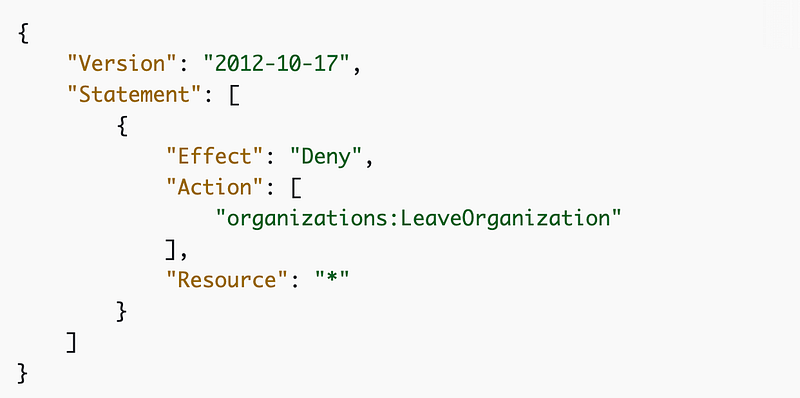
We can use the above code as is.
An SCP to limit the root user in an new AWS Account
I showed you how to login and add MFA to the root user for your AWS Organizations accounts. What about the time between when you create the account and when you add this MFA? We can add an SCP to limit the actions the root user in an AWS Organizations account can take.
Here’s the AWS example, denying EC2.
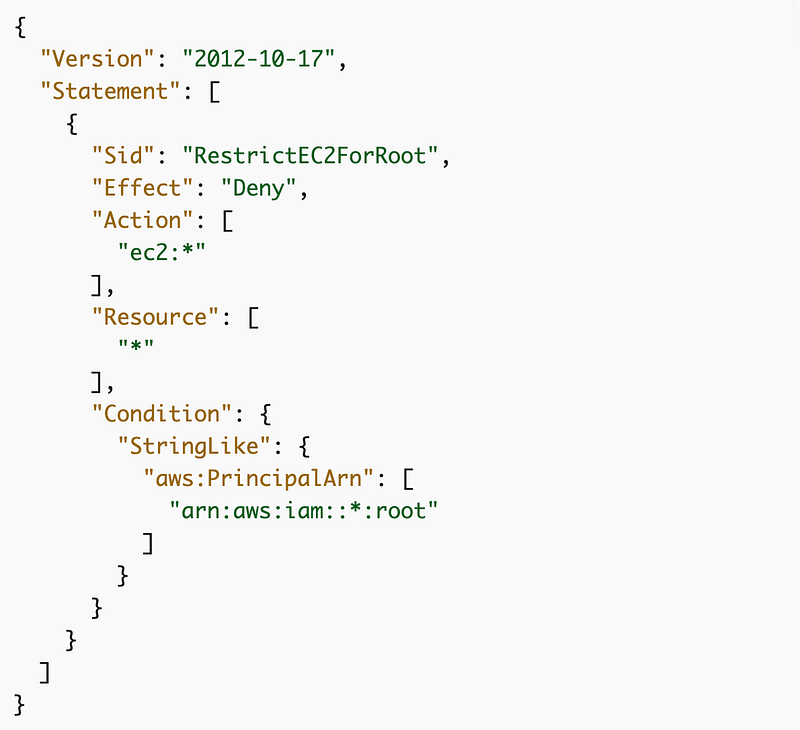
What does our root user need to do? What if we deny everything? Then the user cannot change their password, add MFA, or do anything at all in the account. Will that be a problem? Not as far as I can think of at this point. But, consider this: We plan on using the default organizations role to get into the account initially. Remember that “root” can apply to any administrative user in the account, not just the root user in a trust policy. Will that be the case here? I don’t think so, but we’ll have to test it out. For now, I am going to deny any action for the root user in a new account. We will come back and enable anything if required.
Note: This didn’t work as expected.
DenyAddAccountToRoot
The last SCP I want to create is to disallow is adding accounts to the Root OU. Accounts need to be added to any other OU. This ensures that the governance rules we create in nested OUs cannot be bypassed. We are going to create a governance OU below the root OU and we can apply restrictions on the governance OU as well.
As mentioned in the last post you can add 5 SCPs per OU so we’ve used 4 of our 5. By ensuring no accounts can be placed directly in the root OU we can create up to 10 SCPs that will apply to every account in our organization.
The pseudocode for this SCP is:
Deny
Actions CreateAccount, MoveAccount
Resources *
[to the root ou]
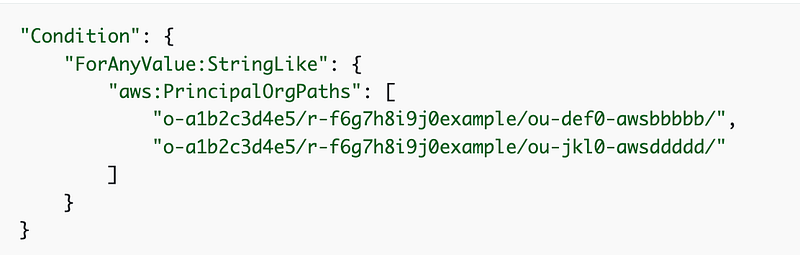
I’m not actually sure this will work so we’ll have to test it — but I am going to use the PrinicpalOrgPaths condition:
Hit Our Limit
We hit our limit on the root OU. But wait, we only added 4 SCPs? Yes, but remember there’s a default allow-all SCP. We could add additional policies to these if needed but we also have up to 5 policies we can add to our Governance OU, which is the top level at which an acccount can be added to our organization. So we can add up more policies to that for a total of 10 policies that apply to all the accounts in our organization.
More SCP Examples
You can find other examples of SCPs you might want to add before allowing users into AWS accounts here:
See the next post for the code for the above SCPs, our initial OUs and an OU-specific SCP.
Testing
Make sure you test your root OUs. In this post I simply created these OUs without testing and I ran into problems with them in future posts.
Follow for updates.
Teri Radichel | © 2nd Sight Lab 2023
About Teri Radichel:
~~~~~~~~~~~~~~~~~~~~
⭐️ Author: Cybersecurity Books
⭐️ Presentations: Presentations by Teri Radichel
⭐️ Recognition: SANS Award, AWS Security Hero, IANS Faculty
⭐️ Certifications: SANS ~ GSE 240
⭐️ Education: BA Business, Master of Software Engineering, Master of Infosec
⭐️ Company: Penetration Tests, Assessments, Phone Consulting ~ 2nd Sight Lab
Need Help With Cybersecurity, Cloud, or Application Security?
~~~~~~~~~~~~~~~~~~~~~~~~~~~~~~~~~~~~~~~~~~~~~~~~~~~~~~~~~~~~~
🔒 Request a penetration test or security assessment
🔒 Schedule a consulting call
🔒 Cybersecurity Speaker for PresentationFollow for more stories like this:
~~~~~~~~~~~~~~~~~~~~~~~~~~~~~~~~~~~~~~~~~~~~~~~~~~~~~~~~~~~~~
❤️ Sign Up my Medium Email List
❤️ Twitter: @teriradichel
❤️ LinkedIn: https://www.linkedin.com/in/teriradichel
❤️ Mastodon: @teriradichel@infosec.exchange
❤️ Facebook: 2nd Sight Lab
❤️ YouTube: @2ndsightlab


