
AWS Service Control Policy Architecture
ACM.169 Designing maintainable, readable, and secure service control policies
~~~~~~~~~~~~~~~~~~~~~~~~~~~~~~~~~~~~~~~~~~~~~~~~~~~~~~~~~~~
⚙️ Check out my series on Automating Cybersecurity Metrics. The Code.
🔒 Related Stories: AWS Security | IAM | Cloud Governance
💻 Free Content on Jobs in Cybersecurity | ✉️ Sign up for the Email List
~~~~~~~~~~~~~~~~~~~~~~~~~~~~~~~~~~~~~~~~~~~~~~~~~~~~~~~~~~~
In the last post, I showed you some of the issues you might face when trying to close an account. There are also some risks you will want to be aware of related to removing accounts from an AWS organization — who in your organization can remove accounts from the organization?
In this post, we want to take a bit deeper dive look at a strategy for designing Service Control Policies on AWS before we start recreating our organization and integrating with Okta.
Service Control Policy Architecture Components
Before we start designing our Service Control Policies, we need to understand a bit about how multiple policies work together. Here are the key points.
Default Allow Any policy
The default policy is an “Allow Any” policy which allows anything in any account below the root. You could alter that policy to only allow what you know your organization needs to use on AWS but that is likely going to get complex very fast. Creating an Allow List for your entire organization may be quite challenging. There are way too many variables to handle that in one policy for an organization in most cases.
Use SCPs to deny egregious actions
Use Deny policies to prevent egregious actions that you never want to happen in your organization. There are many things that your users never need to do, like make an S3 bucket public. I explained why you never need a public S3 bucket here:
As you become aware of new actions and problems in your accounts that should never occur, add them to your SCPs.
Single-Purpose SCPs (as much as possible)
The simpler you can keep your SCPs, the less chance for error. Complexity is the enemy of security. When you start creating overly complicated logic in a single policy that others cannot easily read and decipher you run the risk of someone inserting soething into that logic that creates a gap in your security policies. They will also be very hard to troubleshoot. Case in point, my experience with the AWS Control Tower policies and the reason I created this new account structure.
Now as we start using multiple policies we need to understand two things — how many policies can we apply to a particular level in our organization and to our organization as a whole? How do the policies work together in terms of precedence and inheritance?
Limits and Quotas for AWS SCPs
As with any cloud resource, there are limits on how many SCPs you can create and apply in your account. Let’s consult the documentation.
The above documentation says we can have up to 1000 policies of each type. So 1000 SCPS is our limit. However, we also need to consider the number of SCPs we can attach at each level of our organization. Here you can see that we can attach up to 5 policies to the root, each OU, and each account. Remember that policies do not affect the root management account.
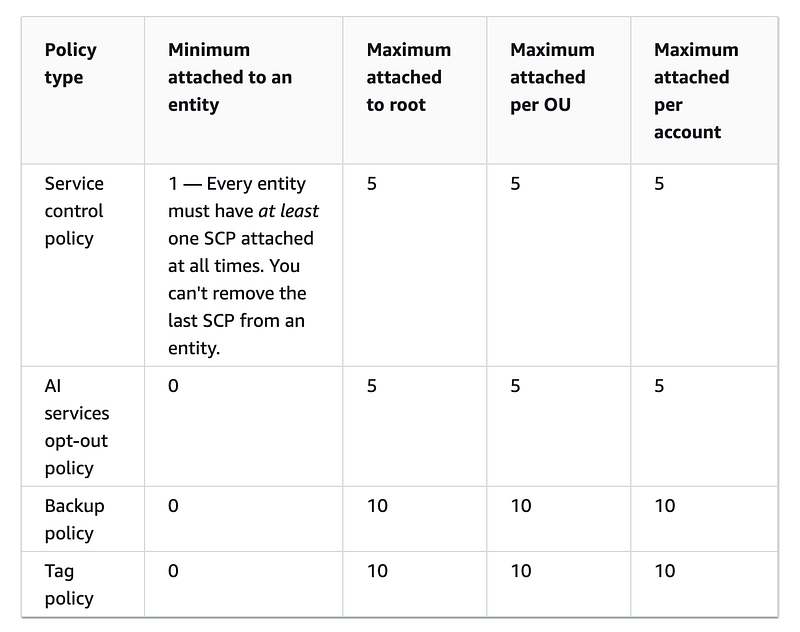
Also note the comment above:
Every entity must have at least one SCP attached.
This leads to our next question. How do service control policies work together? If the default SCP on an account is Allow All but we have a Deny Policy attached to an OU above that account, how does that work?
Inheritance and precedence
When you apply a service control policy to an OU in AWS organization, that policy applies to all resources below it. A service principal in an account will only be able to do the things that are allowed by all applicable policies. Unlike some cloud providers where a lower level policy overrides a higher-level policy, an implementation I find to be potentially error prone, AWS policies work top down. If something is denied by a policy at the root of the organization, no one in the organization will be able to take that action.
Or as stated in the AWS documentation:
An SCP at a lower level can’t add a permission after it is blocked by an SCP at a higher level. SCPs can only filter; they never add permissions.
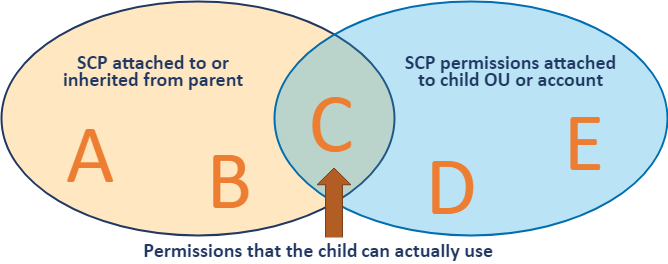
How does this affect our design choices? Well, we can create up to 5 policies at each level. If we find that we need to create more than 5 distinct policies, then perhaps we need to break the organization out into more levels.
That leads to my next question. How many nested OUs can we have in our organization? We can have up to 1,000 OUs up to 5 levels deep. AWS Control Tower did not support nested OUs in the past, a limitation I could not understand. Now that has been added but it seems a bit complicated:
Service Control Policy Architecture Strategy
My guidance on OUs differs from AWS recommendations. Here’s why:
One of the problems on AWS initially with AWS Organizations is that they were trying to align OUs with both billing and governance — and the boundaries for those two things don’t always align. Applying cost centers does not always align in such a way that you can assign one cost center to a single account. Perhaps you have a security resource that you deploy in every account that gets billed to a security cost center, for example.
However, you can use your OUs and accounts for governance. Each OU contains a set of accounts that has to follow the same rules. If you find too many variations in rules (if, then statements) for a set of accounts, it’s probably time to break them apart into separate OUs or accounts with different policies.
My guidance for structuring Accounts OUs and SCPs is this:
- Separate resources that need to be billed to different cost centers into separate accounts as much as possible.
- For things that cannot be put into separate accounts, you could use cost-allocation tags. And remember, as you creating resources, to understand if you can tag that resource or not. If you use this approach you also have to ensure no one can change or alter the tags in ways that adversely affect your financial reporting. You can use SCPs to try to enforce proper tagging.
- Alternatively, see if cost categories can help you separate out things on bills that need to be billed to different cost centers. If this works for you, it may be better than relying on tags which I have found to be fragile due to the complexities of making sure people can’t change the tags.
- Put your organizational rules that will almost never change on your root account. You want to limit editing these rules the OrgRoot user who should login only on rare occasions when some abnormal event occurs.
- Each policy should serve a single purpose and be easy to read as possible. Unfortunately due to SCP limits you may have to combine a few things but do it as little as possible.
- If you find that you need to add more than 5 policies, consider a new OU (though in some cases you may combine statements in a particular OU if it makes sense and is still easy to read).
- If you find accounts in a particular OU are requiring different policies and rules, create a new OU and move the accounts that need to abide by different rules into different OUs.
- The default policy is an allow all policy. If you know with absolute certainty that there are certain resources that will never be used in your organization, you can add a deny statement for those resources to this policy.
- However, you might want to leave the allow all policy alone and focus on denying egregious and non-compliant actions that should never occur, rather than trying to use SCPs for an Allow list — which is going to get complex very fast.
- Use your IAM Policies, trust policies, and resource policies to create zero-trust allow list policies for resources and principles.
- Adding account-specific policies is like attaching IAM policies to a single user. It’s going to make things more complicated to manage in most cases. Opt to break accounts in to separate OUs instead as much as possible.
- If you have a very specific OU for a limited purpose, you could use an Allow List for that specific OU or account. Perhaps in fully automated single-purpose production accounts you could define a very restrictive OU.
Obviously, as with any architectural guidance, these are not hard and fast rules. You may find a valid reason to adjust them within your organizational structure. Additionally, if your rules are very complex, you might end up hitting the 5 level deep limit. Always look for ways to abstract out the commonalities to simplify your rules, without compromising the intent. Architecting policies is tricky business!
About the Governance Team
What about our governance team? If you you have been following along, you may recall that in a past post, I granted access to a governance team to manage service control policies in a governance account, but not the root SCPs.
In this post, we are only deploying some SCPs that apply to the root of our organization that only the Organizational Root user I created in this post can change.
These are policies we want to deploy across the organization on any account and that will likely rarely change and we don’t want to have inadvertently or maliciously changed under any circumstances.
Once we have those policies in place, then we will once again delegate authority to manage SCPs to the governance team, excluding the root account as we did before. Only this time, I noticed that AWS has added CloudFormation to allow you to deploy that policy, so we’ll use that instead.
Now that we’ve thought about how to architect our service control policies, we’ll go ahead and add some policies to our root OU in the next post.
Follow for updates.
Teri Radichel | © 2nd Sight Lab 2023
About Teri Radichel:
~~~~~~~~~~~~~~~~~~~~
⭐️ Author: Cybersecurity Books
⭐️ Presentations: Presentations by Teri Radichel
⭐️ Recognition: SANS Award, AWS Security Hero, IANS Faculty
⭐️ Certifications: SANS ~ GSE 240
⭐️ Education: BA Business, Master of Software Engineering, Master of Infosec
⭐️ Company: Penetration Tests, Assessments, Phone Consulting ~ 2nd Sight Lab
Need Help With Cybersecurity, Cloud, or Application Security?
~~~~~~~~~~~~~~~~~~~~~~~~~~~~~~~~~~~~~~~~~~~~~~~~~~~~~~~~~~~~~
🔒 Request a penetration test or security assessment
🔒 Schedule a consulting call
🔒 Cybersecurity Speaker for PresentationFollow for more stories like this:
~~~~~~~~~~~~~~~~~~~~~~~~~~~~~~~~~~~~~~~~~~~~~~~~~~~~~~~~~~~~~
❤️ Sign Up my Medium Email List
❤️ Twitter: @teriradichel
❤️ LinkedIn: https://www.linkedin.com/in/teriradichel
❤️ Mastodon: @teriradichel@infosec.exchange
❤️ Facebook: 2nd Sight Lab
❤️ YouTube: @2ndsightlab


