avatarTeri Radichel

Free AI web copilot to create summaries, insights and extended knowledge, download it at here

4466

Abstract

ps://cdn-images-1.readmedium.com/v2/resize:fit:800/1*S-Ui1V32a32P_EEUZCVPkQ.png"><figcaption></figcaption></figure><p id="d91d"><b>Prevent removal of account from organization</b></p><p id="0dad">The other thing someone could try to do to get around restrictions would be to remove the account from the organization. We can prevent that as well.</p><figure id="e0e4"><img src="https://cdn-images-1.readmedium.com/v2/resize:fit:800/1*DJQYWLJLEQv6P7E56UvivA.png"><figcaption></figcaption></figure><div id="951f" class="link-block"> <a href="https://docs.aws.amazon.com/organizations/latest/userguide/orgs_manage_policies_scps_examples_general.html"> <div> <div> <h2>General examples</h2> <div><h3>undefined</h3></div> <div><p>undefined</p></div> </div> <div> <div style="background-image: url(https://miro.readmedium.com/v2/resize:fit:320/)"></div> </div> </div> </a> </div><p id="76c9"><b>Avoid using frequently active sessions to perform sensitive actions</b></p><p id="8627">We need to decide is who, exactly, is going to be allowed to manage domain names. We want to write an SCP that allows anyone except that specific role from accessing the account or managing domain names.</p><p id="f7f7">I’m going to set up a different user and role to manage domain names and disable the automation keys when not in use.</p><p id="e3cd">The same is true for the user account that manages SCPs.</p><p id="83e7"><b>Limiting who can change SCPs</b></p><p id="36f4">We have the same complication with SCPs that we have with other IAM permissions. Anyone who has permission to change the policies can change or remove them to suit their own needs. I’m going to use a separate user from my ROOT user to deploy SCPs.</p><p id="a8f3">If we use an SCP to prevent an IAM user from transfering a domain name, but the IAM Administrator can change the SCPs, then we’ve kind of defeated the purpose of the SCP.</p><p id="d94d">Perhaps we need to separate user management from organizational policy management. Perhaps organizational policy falls into the category of governance.</p><p id="c935"><b>Automated deployment of SCPs through CloudFormation</b></p><p id="b927">It seems like some of the documentation I referenced earlier is incorrect because I found a CloudFormation resource that appears to create an SCP:</p><div id="d02e" class="link-block"> <a href="https://docs.aws.amazon.com/AWSCloudFormation/latest/UserGuide/aws-resource-organizations-policy.html"> <div> <div> <h2>AWS::Organizations::Policy</h2> <div><h3>undefined</h3></div> <div><p>undefined</p></div> </div> <div> <div style="background-image: url(https://miro.readmedium.com/v2/resize:fit:320/)"></div> </div> </div> </a> </div><p id="a4e7"><b>Next steps</b></p><p id="5dd9">It seems like these are the next steps (if these are all possible):</p><ul><li>Create or choose a principal that is allowed to deploy SCPs.</li><li>Create or choose a principal that is allowed to manage domain names (transfers, register, deregister).</li><li>Create an SCP that denies all but our SCP admin to create, modify or delete SCPs.</li><li>Create an SCP to require MFA for all role assumptions for users.</li><li>Create an SCP that denies all but our domain administrator principal perform the Route 53 domain actions and only in the domains account.</li><li>Create an SCP to deny PassRole to any user because as noted we currently don’t need that permission and it poses a risk. (We are using roles with the CLI and requiring MFA.) We can restore this permission if and when we need it later.</li><li>Create a PermissionBoundary that only allows users to change their own password, manage their own MFA keys, or add their own developer keys. </li><li>Create an SCP to Deny anyone but our IAM Admin from using the CreateUser permission and can only add a user with the specified PermissionBoundary.</li><li>Limit root account actions.</li><li>Prevent the account from being removed from the organization to circumvent the rules.</li></ul><p id="a946"> We may have an issue with this one in relation to our automation accounts but we’ll cross that bridge when we come to it.</p><p id="

Options

5d89">Well, that’s the idea, but we’ll have to see how that works out when we attempt to implement it. Which I started to do here and continue to do in other posts in this series:</p><div id="0227" class="link-block"> <a href="https://readmedium.com/letting-governance-teams-govern-49d9854d7ebb"> <div> <div> <h2>Letting Governance Teams Govern</h2> <div><h3>ACM.138 Preventing the riskiest actions and most egregious mistakes with cloud organizational policies</h3></div> <div><p>medium.com</p></div> </div> <div> <div style="background-image: url(https://miro.readmedium.com/v2/resize:fit:320/1*31Yi7RPv3y9Lt56RhksX9w.png)"></div> </div> </div> </a> </div><div id="32f3" class="link-block"> <a href="https://readmedium.com/delegated-administrator-for-aws-organizations-8b58c021e8e1"> <div> <div> <h2>Delegated Administrator for AWS Organizations</h2> <div><h3>ACM.139 Delegating governance via service control policies to an AWS Governance account</h3></div> <div><p>medium.com</p></div> </div> <div> <div style="background-image: url(https://miro.readmedium.com/v2/resize:fit:320/1*zEL8EukAMw2FfB0Oyw780A.png)"></div> </div> </div> </a> </div><div id="8331" class="link-block"> <a href="https://readmedium.com/aws-service-control-policy-architecture-b2aabdc56a1a"> <div> <div> <h2>AWS Service Control Policy Architecture</h2> <div><h3>ACM.169 Designing maintainable, readable, and secure service control policies</h3></div> <div><p>medium.com</p></div> </div> <div> <div style="background-image: url(https://miro.readmedium.com/v2/resize:fit:320/1*kWyRmBFLoWK0G9Mk7WKIAg.png)"></div> </div> </div> </a> </div><div id="2df2" class="link-block"> <a href="https://readmedium.com/incremental-service-control-policy-rollouts-to-prevent-production-outages-14ab1ed777af"> <div> <div> <h2>Incremental Service Control Policy Rollouts to Prevent Production Outages</h2> <div><h3>ACM.203 Testing and rolling out new Service Control Policies in a safe and controlled manner</h3></div> <div><p>medium.com</p></div> </div> <div> <div style="background-image: url(https://miro.readmedium.com/v2/resize:fit:320/1*orYHH0v-dPB6fOEDV4x2Rw.png)"></div> </div> </div> </a> </div><p id="dc07">Follow for updates.</p><p id="4a3a">Teri Radichel | <i>© <a href="https://2ndsightlab.com/?source=post_page---------------------------">2nd Sight Lab</a> 2023</i></p><div id="8b5f"><pre><span class="hljs-section">About Teri Radichel:

⭐️ Author: Cybersecurity Books
⭐️ Presentations: Presentations by Teri Radichel
⭐️ Recognition: SANS Award, AWS Security Hero, IANS Faculty
⭐️ Certifications: SANS ~ GSE 240
⭐️ Education: BA Business, Master of Software Engineering, Master of Infosec
⭐️ Company: Penetration Tests, Assessments, Phone Consulting ~ 2nd Sight Lab</pre></div><div id="caae"><pre><span class="hljs-section">Need Help With Cybersecurity, Cloud, or Application Security?
~~~~~~~~~~~~~~~~~~~~~~~~~~~~~~~~~~~~~~~~~~~~~~~~~~~~~~~~~~~~~</span>
🔒 Request a penetration test or security assessment
🔒 Schedule a consulting call
🔒 Cybersecurity Speaker for Presentation</pre></div><div id="5a42"><pre>Follow <span class="hljs-keyword">for</span> more stories like <span class="hljs-keyword">this</span>:

❤️ Sign Up my Medium Email List ❤️ Twitter: <span class="hljs-meta">@teriradichel</span> ❤️ LinkedIn: https:<span class="hljs-comment">//www.linkedin.com/in/teriradichel</span> ❤️ Mastodon: <span class="hljs-meta">@teriradichel</span><span class="hljs-meta">@infosec</span>.exchange ❤️ Facebook: 2nd Sight Lab ❤️ YouTube: @2ndsightlab</pre></div><figure id="faf5"><img src="https://cdn-images-1.readmedium.com/v2/resize:fit:800/0*H9Ew1KCl-29nZiPR.jpeg"><figcaption></figcaption></figure></article></body>

AWS Service Control Policies

ACM.136b Governance: Setting security controls at the organizational level

~~~~~~~~~~~~~~~~~~~~~~~~~~~~~~~~~~~~~~~~~~~~~~~~~~~~~~~~~

⚙️ Part of my series on Automating Cybersecurity Metrics. The Code.

🔒 Related Stories: Cloud Governance | AWS Security

💻 Free Content on Jobs in Cybersecurity | ✉️ Sign up for the Email List

~~~~~~~~~~~~~~~~~~~~~~~~~~~~~~~~~~~~~~~~~~~~~~~~~~~~~~~~~

As a reminder I’ve recently been considering how to protect domain names migrated to a single AWS account in an organization that is dedicated for that purpose. I’ve considered the pros and cons of using various IAM functions and how someone might escalate privileges to get to the resources in that account.

In the last post, I reiterated The Dry Principle (Don’t Repeat Yourself). I’ve written about it a few times but decided to summarize it in a single post:

That concept is applicable to one more AWS construct we can use in our IAM architecture to help protect our resources and provide governance across our organization. We cloud disallow access to Route 53 domain management functions in each account for each user, group, or role. But we have another option that allows us to implement this policy in one place, one time, globally.

AWS Service Control Policies (SCPs) provide the ability to create a policy at the organizational level that applies across all your AWS accounts. Well, almost all — they don’t apply to the root management account. I’ll also explain some other caveats in upcoming posts related to Service-Linked roles.

Instead of writing code over and over to restrict access, we can write a policy that applies across the organization to limit actions across the board with a few minor exceptions.

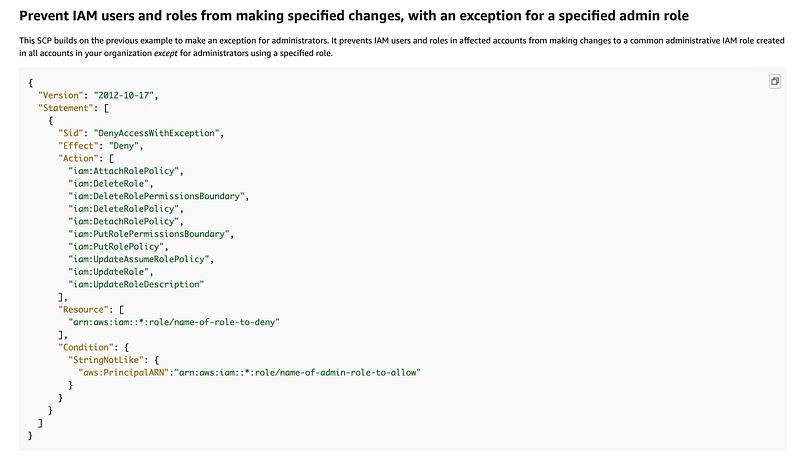
Deny all but one role to perform certain actions

AWS provides the following example of an SCP that denies particular actions to all but a single Administrative role.
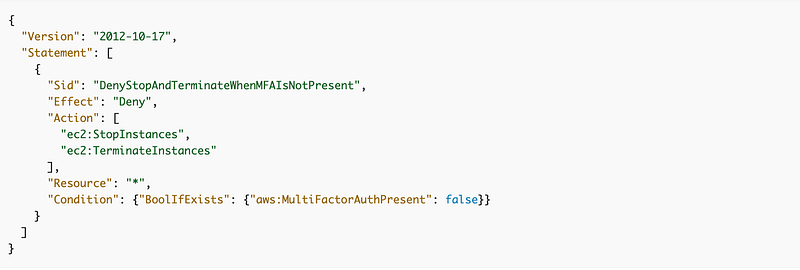
We can enforce MFA to assume the role.

We can leverage the concepts in this example policy to require MFA to assume the role.
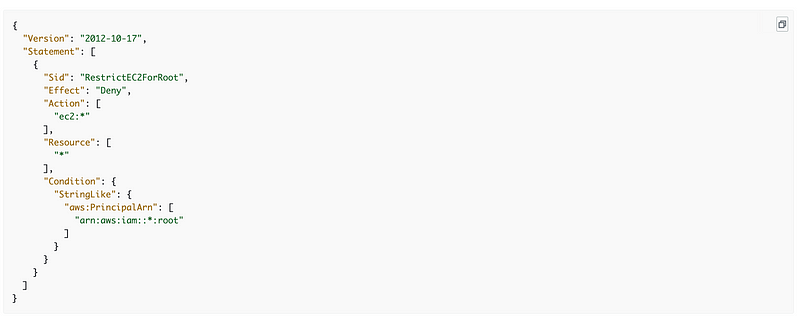
Deny account root user from taking unauthorized actions

We can also deny access to the root user of the AWS account:
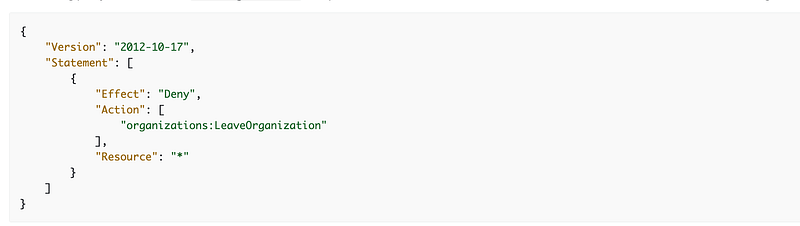
Prevent removal of account from organization

The other thing someone could try to do to get around restrictions would be to remove the account from the organization. We can prevent that as well.
Avoid using frequently active sessions to perform sensitive actions

We need to decide is who, exactly, is going to be allowed to manage domain names. We want to write an SCP that allows anyone except that specific role from accessing the account or managing domain names.

I’m going to set up a different user and role to manage domain names and disable the automation keys when not in use.

The same is true for the user account that manages SCPs.

Limiting who can change SCPs

We have the same complication with SCPs that we have with other IAM permissions. Anyone who has permission to change the policies can change or remove them to suit their own needs. I’m going to use a separate user from my ROOT user to deploy SCPs.

If we use an SCP to prevent an IAM user from transfering a domain name, but the IAM Administrator can change the SCPs, then we’ve kind of defeated the purpose of the SCP.

Perhaps we need to separate user management from organizational policy management. Perhaps organizational policy falls into the category of governance.

Automated deployment of SCPs through CloudFormation

It seems like some of the documentation I referenced earlier is incorrect because I found a CloudFormation resource that appears to create an SCP:

Next steps

It seems like these are the next steps (if these are all possible):

  • Create or choose a principal that is allowed to deploy SCPs.
  • Create or choose a principal that is allowed to manage domain names (transfers, register, deregister).
  • Create an SCP that denies all but our SCP admin to create, modify or delete SCPs.
  • Create an SCP to require MFA for all role assumptions for users.
  • Create an SCP that denies all but our domain administrator principal perform the Route 53 domain actions and only in the domains account.
  • Create an SCP to deny PassRole to any user because as noted we currently don’t need that permission and it poses a risk. (We are using roles with the CLI and requiring MFA.) We can restore this permission if and when we need it later.
  • Create a PermissionBoundary that only allows users to change their own password, manage their own MFA keys, or add their own developer keys. *
  • Create an SCP to Deny anyone but our IAM Admin from using the CreateUser permission and can only add a user with the specified PermissionBoundary.
  • Limit root account actions.
  • Prevent the account from being removed from the organization to circumvent the rules.

* We may have an issue with this one in relation to our automation accounts but we’ll cross that bridge when we come to it.

Well, that’s the idea, but we’ll have to see how that works out when we attempt to implement it. Which I started to do here and continue to do in other posts in this series:

Follow for updates.

Teri Radichel | © 2nd Sight Lab 2023

About Teri Radichel:
~~~~~~~~~~~~~~~~~~~~
⭐️ Author: Cybersecurity Books
⭐️ Presentations: Presentations by Teri Radichel
⭐️ Recognition: SANS Award, AWS Security Hero, IANS Faculty
⭐️ Certifications: SANS ~ GSE 240
⭐️ Education: BA Business, Master of Software Engineering, Master of Infosec
⭐️ Company: Penetration Tests, Assessments, Phone Consulting ~ 2nd Sight Lab
Need Help With Cybersecurity, Cloud, or Application Security?
~~~~~~~~~~~~~~~~~~~~~~~~~~~~~~~~~~~~~~~~~~~~~~~~~~~~~~~~~~~~~
🔒 Request a penetration test or security assessment
🔒 Schedule a consulting call
🔒 Cybersecurity Speaker for Presentation
Follow for more stories like this:
~~~~~~~~~~~~~~~~~~~~~~~~~~~~~~~~~~~~~~~~~~~~~~~~~~~~~~~~~~~~~ 
❤️ Sign Up my Medium Email List
❤️ Twitter: @teriradichel
❤️ LinkedIn: https://www.linkedin.com/in/teriradichel
❤️ Mastodon: @teriradichel@infosec.exchange
❤️ Facebook: 2nd Sight Lab
❤️ YouTube: @2ndsightlab

Scp
Service Control Policy
AWS
Governance
Cloud Security
Recommended from ReadMedium