avatarTeri Radichel

Free AI web copilot to create summaries, insights and extended knowledge, download it at here

10559

Abstract

-8HUbMrJMvlwuomXw.png)"></div> </div> </div> </a> </div><p id="d6fd">Please consider some alternatives to prevent the explosion in data breaches we are dealing with a more sensible approach to cloud security.</p><p id="67a5"><b>NOT my vision for cloud security</b></p><p id="3a3b">I never meant for cloud security to be “hey, now the cloud provider secures everything for us” or “DevOps means developers handle production operations.” I did not intend for all the security processes and boundaries to be dissolved in the name of innovation or some digital epiphany.</p><p id="69f5">What I actually intended when I said the cloud could be more secure, in part, was that <b><i>more segregation of duties could exist and deployments could occur in an automated fashion to prevent or revert misconfigurations.</i></b> (Like making an S3 bucket public.)</p><p id="d27e">I wrote a blog post about <a href="https://web.archive.org/web/20230122012158/https://www.secplicity.org/2017/10/13/s3-bucket-security-acls-policies/">S3 buckets</a> back in 2017 as well which included the following quote:</p><figure id="a618"><img src="https://cdn-images-1.readmedium.com/v2/resize:fit:800/1*1G4fGU0RBQHfBA7e70YgPA.png"><figcaption></figcaption></figure><p id="d942">The exact opposite transpired in most cloud environments. The resulting trends led to the catastrophic results we are dealing with — rampant misconfigurations and broad access for credentials and sessions, leading to massive data breaches.</p><p id="1d22"><b>Letting governance teams govern (for real)</b></p><p id="a08b">When I worked for Capital One, I traveled to Richmond, Virginia or Washington D.C. every few weeks from Seattle (where I lived at the time). All the people working on “<a href="https://readmedium.com/what-is-cloud-42218c32560a">the cloud</a>” at Capital One got together to discuss cloudy things. Different people would stand up and talk about what they were working on and changes we would be making. I distinctly remember a woman on the governance team standing up and poking her finger on the podium — “security<i> is</i> top priority and everyone will follow the rules!” or something to that effect.</p><p id="eb47">Inside I was like “Yay!” on the one hand because I was witnessing disregard for security by some people around me (not all) and “Yeah, right” on the other. The governance team made up a bunch of rules that people implementing cloud infrastructure didn’t even know about, let alone follow. It was like there was this ivory tower think tank who had this grand vision and was saying all these things but their idealistic viewpoint wasn’t the reality on the ground.</p><p id="8e0d"><b>How can a governance team <i>actually govern</i>?</b></p><p id="3f69">An organization can give the governance team the responsibility to write organizational policies in cloud environments to enforce the rules the organization must follow. In other words they can enforce security rules <i>via code instead of documents.</i></p><p id="51ed">How can they do that? All three major cloud providers — <a href="https://readmedium.com/aws-security-8a038e16e1f1">AWS</a>, <a href="https://readmedium.com/azure-security-7d3f68d9ae1c">Azure</a>, and <a href="https://readmedium.com/google-security-43ab82156840">GCP</a> — have the concept of <b>policies at the organizational level</b>.</p><p id="0dfa">I wrote about AWS Service Control Policies here:</p><div id="acf1" class="link-block"> <a href="https://readmedium.com/aws-service-control-policies-63979a526fe3"> <div> <div> <h2>AWS Service Control Policies</h2> <div><h3>Governance: Setting security controls at the organizational level</h3></div> <div><p>medium.com</p></div> </div> <div> <div style="background-image: url(https://miro.readmedium.com/v2/resize:fit:320/1*C6D6Cz3sdbKrDyvID0zlUQ.png)"></div> </div> </div> </a> </div><p id="2a4b">These policies do not grant access or permissions like the policies your IAM team creates. The organizational policies define and can enforce rules or at least alert on unauthorized actions that occur across your AWS accounts. I explained some of the rules you could create in the above document and I’ll write about specific rules we want to enforce in upcoming posts, but first we need to create permissions for our governance team.</p><p id="faa5"><b>Preventing privilege escalation to change service control policies</b></p><p id="93fd">We want to limit some of the permissions of the IAM users using service control policies. Since IAM users can create new users and assign themselves permissions, they could grant themselves permission to change service control policies. In order to prevent this we can test out the following approach:</p><ul><li>We can have the ROOT profile we created deploy the initial governance administrator role, group, and user.</li><li>We will disallow the IAM user from creating and assigning users to the SCP group which is allowed to create and change organizational policies.</li><li>We will disallow the governance group from doing anything other than what is required for them to manage service control policies, so in other words, they may be able to create an EC2 instance to run scripts, but they will not be able to create new IAM permissions.</li></ul><figure id="ba28"><img src="https://cdn-images-1.readmedium.com/v2/resize:fit:800/1*31Yi7RPv3y9Lt56RhksX9w.png"><figcaption></figcaption></figure><p id="94e0">I used to recommend that people put different users in different accounts but with new tools available to organizations I’m pondering an alternative approach. I haven’t quite worked it out so follow for updates.</p><p id="0b4c"><b>Creating an AWS Organization</b></p><p id="dd95">Before you can use the concepts I’m gong to write about you’ll need to create an AWS organization. You can use AWS Control Tower to do that (which is a huge topic unto itself) or enable the organization only. If you’re new to these topics, you might want to try this out first with a test AWS account and add a few other accounts to run this code. Don’t deploy my code into a production account with out testing first!</p><div id="a47a" class="link-block"> <a href="https://docs.aws.amazon.com/organizations/latest/userguide/orgs_introduction.html"> <div> <div> <h2>What is AWS Organizations?</h2> <div><h3>AWS Organizations is an account management service that enables you to consolidate multiple AWS accounts into an…</h3></div> <div><p>docs.aws.amazon.com</p></div> </div> <div> <div style="background-image: url(https://miro.readmedium.com/v2/resize:fit:320/)"></div> </div> </div> </a> </div><p id="30ad">I’m not going to add the code to create an organization to my repository at this time. I’m going to presume you have this set up because there are different ways to implement an organization. I also am not sure what changes I will make to my organization down the road.</p><p id="d671">After writing a class specifically on AWS Control Tower, SSO, and IAM, I actually decided not to teach it because I had some problems along the way. I’m not sure I can recommend the solution I wrote about in the class. I suspect by the end of this series my approach will involve parts of different components. Time will tell.</p><p id="190b">Creating an AWS organization is pretty simple. You will choose a “root” account. This account will be the container where your organization resides. In my case, I don’t like to create any extraneous resources in my root account other than what is required to operate the organization. Then you will join other AWS accounts to your organization or create new accounts in your organization.</p><p id="1e54">You can create an AWS Organization with the AWS CLI:</p><div id="b9df" class="link-block"> <a href="https://awscli.amazonaws.com/v2/documentation/api/latest/reference/organizations/create-organization.html"> <div> <div> <h2>create-organization - AWS CLI 2.9.17 Command Reference</h2> <div><h3>Creates an Amazon Web Services organization. </h3></div> <div><p>awscli.amazonaws.com</p></div> </div> <div> <div style="background-image: url(https://miro.readmedium.com/v2/resize:fit:320/)"></div> </div> </div> </a> </div><figure id="e372"><img src="https://cdn-images-1.readmedium.com/v2/resize:fit:800/1*rOwzxOE0hefQN0tK7nBduA.png"><figcaption></figcaption></figure><p id="cc35">Alternatively use the AWS Console.</p><div id="9c92" class="link-block"> <a href="https://docs.aws.amazon.com/organizations/latest/userguide/orgs_manage_org_create.html"> <div> <div> <h2>Creating an AWS Organization in the AWS Console</h2> <div><h3>undefined</h3></div> <div><p>undefined</p></div> </div> <div> <div style="background-image: url(https://miro.readmedium.com/v2/resize:fit:320/)"></div> </div> </div> </a> </div><p id="991f">You can also create an organization and a number of default settings with AWS Control Tower. AWS Control Tower tries to create your organization and accounts in a way that follows some best practices. It creates a log archive account, a security account, and some initial rules and roles. You can optionally use AWS SSO.</p><p id="24f1">I’m not going to explain it all here but the concept is good. We want to set up rules that prevent egregious actions in our accounts. One of the problems I have is that some parts of it seem overly complicated and it’s hard to change the code that builds out AWS Control Tower and the resources and policies it creates. Yes there is a way. I don’t particularly love it. If you want a UI to manage the rules your AWS principals must follow you may find AWS Control Tower helpful. I’m still evaluating some parts of it and on the fence. I’ll be writing more about it as we go as I currently have it running in my organization.</p><div id="4ab8" class="link-block"> <a href="https://docs.aws.amazon.com/controltower/latest/u

Options

serguide/what-is-control-tower.html"> <div> <div> <h2>What Is AWS Control Tower?</h2> <div><h3>AWS Control Tower offers a straightforward way to set up and govern an AWS multi-account environment, following…</h3></div> <div><p>docs.aws.amazon.com</p></div> </div> <div> <div style="background-image: url(https://miro.readmedium.com/v2/resize:fit:320/)"></div> </div> </div> </a> </div><p id="d3ce"><b>Create a Governance user, role, and policy</b></p><p id="cdc4">Once you have an AWS organization, you can grant users permissions to manage service control policies. I’m going to use my standard code for user creation to create my governance user, role, and group. I’m going to add this script to the portion of the code executed by our ROOT AWS CLI profile we created in an earlier post to create our IAM user. We can essentially copy and modify the permissions for our IAM administrators.</p><p id="0e9c"><i>User:</i></p><figure id="7c92"><img src="https://cdn-images-1.readmedium.com/v2/resize:fit:800/1*SKBWKJLqQIcYf3Oeg2BfQQ.png"><figcaption></figcaption></figure><p id="94e9">Recall that we created a generic user creation template in a past post.</p><p id="68c1"><i>Group:</i></p><figure id="1aac"><img src="https://cdn-images-1.readmedium.com/v2/resize:fit:800/1*gTInbEWNTROM6p07AUgLIw.png"><figcaption></figcaption></figure><p id="d2ec">Recall that we created a generic group and group policy creation template in a past post.</p><p id="1fa8"><i>Role:</i></p><p id="6acc">For my role I have to decide what policies I want my role to have. I mentioned adding users and assigning them to the governance group but I’m not going to do that right now. I don’t need it but you might want to do that in your organization by creating a separate governance admin and user.</p><p id="27cf">I want to give my governance admin permissions that fall under AWS organizations. If you review those permissions it includes the ability to add and remove accounts to the organization:</p><div id="4177" class="link-block"> <a href="https://docs.aws.amazon.com/service-authorization/latest/reference/list_awsorganizations.html"> <div> <div> <h2>Actions, resources, and condition keys for AWS Organizations</h2> <div><h3>Lists all of the available service-specific resources, actions, and condition keys that can be used in IAM policies to…</h3></div> <div><p>docs.aws.amazon.com</p></div> </div> <div> <div style="background-image: url(https://miro.readmedium.com/v2/resize:fit:320/)"></div> </div> </div> </a> </div><p id="799c">That could include the ability to remove our AWS domains account from the organization which could impact critical resources. I also don’t want this user to be able to delegate permissions to another account. I also don’t want this user to enable service access or all features for the organization at this time and I don’t need a GovCloud account.</p><p id="d246">Therefore, I am going to restrict this user from using this permissions:</p><p id="ac4a"><a href="https://docs.aws.amazon.com/organizations/latest/APIReference/API_RemoveAccountFromOrganization.html">RemoveAccountFromOrganization</a></p><p id="6ee6"><a href="https://docs.aws.amazon.com/organizations/latest/APIReference/API_LeaveOrganization.html">LeaveOrganization</a></p><p id="241e"><a href="https://docs.aws.amazon.com/organizations/latest/APIReference/API_RegisterDelegatedAdministrator.html">RegisterDelegatedAdministrator</a></p><p id="3574"><a href="https://docs.aws.amazon.com/organizations/latest/APIReference/API_DeregisterDelegatedAdministrator.html">DeregisterDelegatedAdministrator</a></p><p id="fe2d"><a href="https://docs.aws.amazon.com/organizations/latest/APIReference/API_EnableAWSServiceAccess.html">EnableAWSServiceAccess</a></p><p id="01c6"><a href="https://docs.aws.amazon.com/organizations/latest/APIReference/API_CreateGovCloudAccount.html">CreateGovCloudAccount</a></p><figure id="2b41"><img src="https://cdn-images-1.readmedium.com/v2/resize:fit:800/1*U2j3EnB_h2GtJNAufvJQYw.png"><figcaption></figcaption></figure><figure id="e879"><img src="https://cdn-images-1.readmedium.com/v2/resize:fit:800/1*3VML4sp2tbCi62x2P7s5Zw.png"><figcaption></figcaption></figure><p id="26ad">Recall that we have a generic role creation policy but that each role policy is unique, so we have to create that template above.</p><p id="9c33"><b>Future revisions</b></p><p id="31f4">I am considering the account structure and where I want each type of user to exist. I haven’t yet restricted the IAM user from creating new users and adding them to the governance group. In fact I’m thinking about user creation in an entirely different way at the very moment and may be making some changes as a result. Once I decide that we will start creating service control policies and perhaps permission boundaries as well.</p><p id="53d6"><b>Be aware of AWS defined roles</b></p><p id="863a">If you are using AWS Control Tower, you’ll want to be aware that AWS Control Tower uses SCPs to enforce policies throughout your organization.</p><div id="dcc0" class="link-block"> <a href="https://docs.aws.amazon.com/controltower/latest/userguide/roles-how.html"> <div> <div> <h2>How AWS Control Tower works with roles to create and manage accounts</h2> <div><h3>In general, roles are a part of identity and access management (IAM) in AWS. For general information about IAM and…</h3></div> <div><p>docs.aws.amazon.com</p></div> </div> <div> <div style="background-image: url(https://miro.readmedium.com/v2/resize:fit:320/)"></div> </div> </div> </a> </div><p id="b902">In addition, AWS Organizations creates administrative roles across accounts that have access to perform administration in a cross-account manner.</p><div id="c8d4" class="link-block"> <a href="https://docs.aws.amazon.com/organizations/latest/userguide/orgs_manage_accounts_access.html"> <div> <div> <h2>Accessing and administering the member accounts in your organization</h2> <div><h3>Access the accounts that are part of your organization in AWS Organizations. Use the root user or an AWS Identity and…</h3></div> <div><p>docs.aws.amazon.com</p></div> </div> <div> <div style="background-image: url(https://miro.readmedium.com/v2/resize:fit:320/)"></div> </div> </div> </a> </div><p id="91f2">As I already mentioned, roles are also created by AWS SSO.</p><div id="3786" class="link-block"> <a href="https://readmedium.com/aws-sso-iam-identity-center-for-separation-of-duties-f9e6627fc5a3"> <div> <div> <h2>AWS SSO (IAM Identity Center) for Separation of Duties</h2> <div><h3>ACM.126 Creating a permission set for DNS Administrators in AWS SSO</h3></div> <div><p>medium.com</p></div> </div> <div> <div style="background-image: url(https://miro.readmedium.com/v2/resize:fit:320/1*rG-vr-_z1c0efNWdgPoHGA.png)"></div> </div> </div> </a> </div><p id="535a">Update:</p><p id="ef83">Re-reading AWS documentation:</p><ul><li>SCPs <b><i>do not </i></b>affect any service-linked role. Service-linked roles enable other AWS services to integrate with AWS Organizations and can’t be restricted by SCPs.</li></ul><figure id="87e1"><img src="https://cdn-images-1.readmedium.com/v2/resize:fit:800/1*j7HNuqgcPwdRWXlqbm5i_A.png"><figcaption></figcaption></figure><div id="04d6" class="link-block"> <a href="https://docs.aws.amazon.com/organizations/latest/userguide/orgs_manage_policies_scps.html"> <div> <div> <h2>Service control policies (SCPs)</h2> <div><h3>For information and procedures common to all policy types, see the following topics: Service control policies (SCPs)…</h3></div> <div><p>docs.aws.amazon.com</p></div> </div> <div> <div style="background-image: url(https://miro.readmedium.com/v2/resize:fit:320/)"></div> </div> </div> </a> </div><p id="4f49">Ah, the fine print.</p><p id="528d">I am not sure if the above roles are considered service-linked roles, in which case they may not be affected by SCPs. Something to keep in mind and a topic I will explore further later.</p><p id="1e6f">Follow for updates.</p><p id="4a3a">Teri Radichel | <i>© <a href="https://2ndsightlab.com/?source=post_page---------------------------">2nd Sight Lab</a> 2023</i></p><div id="8b5f"><pre><span class="hljs-section">About Teri Radichel:

⭐️ Author: Cybersecurity Books
⭐️ Presentations: Presentations by Teri Radichel
⭐️ Recognition: SANS Award, AWS Security Hero, IANS Faculty
⭐️ Certifications: SANS ~ GSE 240
⭐️ Education: BA Business, Master of Software Engineering, Master of Infosec
⭐️ Company: Penetration Tests, Assessments, Phone Consulting ~ 2nd Sight Lab</pre></div><div id="caae"><pre><span class="hljs-section">Need Help With Cybersecurity, Cloud, or Application Security?
~~~~~~~~~~~~~~~~~~~~~~~~~~~~~~~~~~~~~~~~~~~~~~~~~~~~~~~~~~~~~</span>
🔒 Request a penetration test or security assessment
🔒 Schedule a consulting call
🔒 Cybersecurity Speaker for Presentation</pre></div><div id="5a42"><pre>Follow <span class="hljs-keyword">for</span> more stories like <span class="hljs-keyword">this</span>:

❤️ Sign Up my Medium Email List ❤️ Twitter: <span class="hljs-meta">@teriradichel</span> ❤️ LinkedIn: https:<span class="hljs-comment">//www.linkedin.com/in/teriradichel</span> ❤️ Mastodon: <span class="hljs-meta">@teriradichel</span><span class="hljs-meta">@infosec</span>.exchange ❤️ Facebook: 2nd Sight Lab ❤️ YouTube: @2ndsightlab</pre></div><figure id="faf5"><img src="https://cdn-images-1.readmedium.com/v2/resize:fit:800/0*H9Ew1KCl-29nZiPR.jpeg"><figcaption></figcaption></figure></article></body>

Letting Governance Teams Govern

ACM.138 Preventing the riskiest actions and most egregious mistakes with cloud organizational policies

~~~~~~~~~~~~~~~~~~~~~~~~~~~~~~~~~~~~~~~~~~~~~~~~~~~~~~~~~~~

⚙️ Check out my series on Automating Cybersecurity Metrics. The Code.

🔒 Related Stories: Cloud Governance | Secure Code | AWS Security

💻 Free Content on Jobs in Cybersecurity | ✉️ Sign up for the Email List

~~~~~~~~~~~~~~~~~~~~~~~~~~~~~~~~~~~~~~~~~~~~~~~~~~~~~~~~~~~

I have some code at the bottom of this post, but first I’m going explain as clearly as possible, why you need it. This is something I’ve been repeating since at least 2016, as you can see from the links below, but it may help to read it again with a fresh perspective. For example, after considering some of the issues I mentioned in my last post.

Also note, this is not a simple topic. I’ve been pondering exactly how I want to structure a few things for a few days and this post took longer than I hoped. The code is pseudo code, not yet tested. I will be expanding on this topic in the next few posts. I promised to get this post out today, so I am, but I might read it over tomorrow and make a few revisions if I find mistakes. On that note, I’m also taking tomorrow off so check back on Monday for a new post.

Can You Be More Secure in the Cloud?

When I envisioned organizations moving to the cloud, I argued that for some companies, the cloud could be more secure. If you don’t know my history, you might be laughing at me at this point. However, my take on cloud security as never aligned with what transpired as companies rushed to move all their applications to the cloud in the name of digital transformation.

I’m not sure if I ever explained myself clearly enough. And even if I did, telling you what will help lower risk in your cloud environment is not the same as showing you how to do it. Finally, I have time to write some code to demonstrate the concepts I’ve been talking about in classes, my blog, presentations, and my book at the bottom of this post.

When it comes to cloud security, my idea from the start was that you could actually have more control over your inventory and the actions people could take in the cloud than you do in an on-premises environment. You could react to security events with more efficiency. I wrote about theses concepts like preventing egregious actions in 2017 in a blog post titled Can The Cloud Be “More Secure”?

One of the key lines in this blog post is the following statement:

However, if security is architected and implemented correctly, the cloud offers the opportunity for IT, security and software development to converge, and a chance for businesses to re-think and re-architect (or as Amazon says re:Invent) more security into their systems and processes.

Now you might be saying — haha — you referenced Capital One’s CIO and they had a data breach! Yes, they did. I was on the original team that helped Capital One move to the cloud and was recruited away prior to the breach.

When I left that job I told the new company — “I’ll come, if I can do things the way I want” because I didn’t feel like the way we were doing things at Capital One was very secure at the time. I wrote about a secure DevOps pipeline in a white paper I wrote on event-driven security in the cloud for SANS Institute in 2016 while working at Capital One. I wanted to and did architect such a solution for my new employer and my amazing DevOps team implemented it.

What was occurring at Capital One was not my vision of what it was going to be like to work in a secure cloud environment. The catch is I couldn’t really talk about it because people presumed I knew cloud security because of my experience at Capital One. Well, kind of. I learned about a lot of the challenges implementing security in a large organization. I learned some good things and some not so good things you should be doing in the cloud.

One of the key points in the above quote from my 2017 article is:

if security is architected and implemented correctly

I explicitly added that as a subtle warning regarding some things Capital One was doing on AWS at the time. Maybe too subtle.

Many other companies operated the same way at the time an still do.

It’s not working.

Most cloud environments need improved governance — the opposite of what is promoted in some popular DevOps books and curriculum. At the same time, those publications have a point. Governance needs to work in a way that does not unreasonably or illogically hinder developers and DevOps teams from getting their jobs done. That said, there will be some additional steps in processes (if you want security). Those steps are necessary to reduce cybersecurity risk for organizations.

By the way, the order of those steps has a big impact on the productivity of your team, but that is a topic for another post.

The Evolution of DevOps

At the end of my quote in the above post I wrote:

…a chance for businesses to re-think and re-architect (or as Amazon says re:Invent) more security into their systems and processes.

In fact, the opposite occurred when companies moved to the cloud. Instead of rethinking and enhancing security, organizations threw security controls out the window.

Initially, people with no security experience on DevOps teams ended up wielding the keys to the kingdom in cloud environments. They didn’t understand things like packet sniffing and why it matters, side-channel attacks, kernel exploits, SSRF, packet fragmentation attacks, ICMP channels, DNS exfiltration, how a tools can steal credentials out of memory, the cyber kill chain, OSI model, security monitoring, digital forensics and incident response (DFIR), compliance requirements, social engineering, and on and on and on. In fact, many times they didn’t even know basic cloud security best practices.

Initially, attackers continued to attack on-premises environments because the were successful enough there that they had no need to move to the cloud. They also didn’t really know enough about it. But that soon changed. All those insecure configurations people got away with in the early days of cloud eventually caught up with companies — starting with S3 buckets.

That’s why security professionals made presentations showing unicorns pooping rainbows. I don’t blame them. I talk about these concepts a bit more in my book with more stories, but I want to get on to some code.
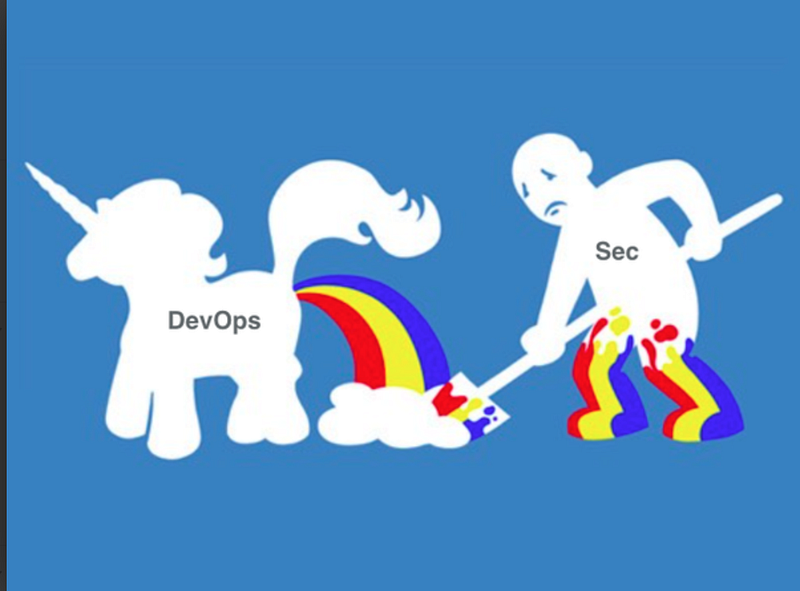
https://twitter.com/tswalliance/status/595989483834757120

Developers (later called DevOps teams) moved to the cloud first and took control of cloud environments and didn’t want to give it up. If you’re still operating this way in your organization and don’t think you can change it, then please read my last post and share it with executives at your company:

Please consider some alternatives to prevent the explosion in data breaches we are dealing with a more sensible approach to cloud security.

NOT my vision for cloud security

I never meant for cloud security to be “hey, now the cloud provider secures everything for us” or “DevOps means developers handle production operations.” I did not intend for all the security processes and boundaries to be dissolved in the name of innovation or some digital epiphany.

What I actually intended when I said the cloud could be more secure, in part, was that more segregation of duties could exist and deployments could occur in an automated fashion to prevent or revert misconfigurations. (Like making an S3 bucket public.)

I wrote a blog post about S3 buckets back in 2017 as well which included the following quote:

The exact opposite transpired in most cloud environments. The resulting trends led to the catastrophic results we are dealing with — rampant misconfigurations and broad access for credentials and sessions, leading to massive data breaches.

Letting governance teams govern (for real)

When I worked for Capital One, I traveled to Richmond, Virginia or Washington D.C. every few weeks from Seattle (where I lived at the time). All the people working on “the cloud” at Capital One got together to discuss cloudy things. Different people would stand up and talk about what they were working on and changes we would be making. I distinctly remember a woman on the governance team standing up and poking her finger on the podium — “security is top priority and everyone will follow the rules!” or something to that effect.

Inside I was like “Yay!” on the one hand because I was witnessing disregard for security by some people around me (not all) and “Yeah, right” on the other. The governance team made up a bunch of rules that people implementing cloud infrastructure didn’t even know about, let alone follow. It was like there was this ivory tower think tank who had this grand vision and was saying all these things but their idealistic viewpoint wasn’t the reality on the ground.

How can a governance team actually govern?

An organization can give the governance team the responsibility to write organizational policies in cloud environments to enforce the rules the organization must follow. In other words they can enforce security rules via code instead of documents.

How can they do that? All three major cloud providers — AWS, Azure, and GCP — have the concept of policies at the organizational level.

I wrote about AWS Service Control Policies here:

These policies do not grant access or permissions like the policies your IAM team creates. The organizational policies define and can enforce rules or at least alert on unauthorized actions that occur across your AWS accounts. I explained some of the rules you could create in the above document and I’ll write about specific rules we want to enforce in upcoming posts, but first we need to create permissions for our governance team.

Preventing privilege escalation to change service control policies

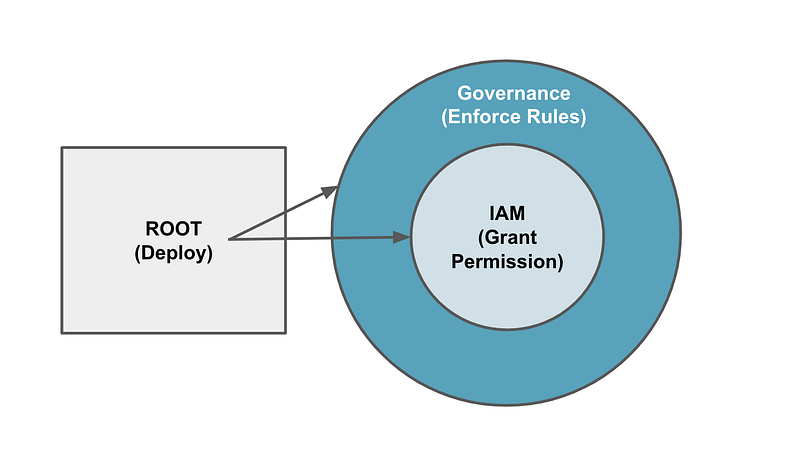
We want to limit some of the permissions of the IAM users using service control policies. Since IAM users can create new users and assign themselves permissions, they could grant themselves permission to change service control policies. In order to prevent this we can test out the following approach:

  • We can have the ROOT profile we created deploy the initial governance administrator role, group, and user.
  • We will disallow the IAM user from creating and assigning users to the SCP group which is allowed to create and change organizational policies.
  • We will disallow the governance group from doing anything other than what is required for them to manage service control policies, so in other words, they may be able to create an EC2 instance to run scripts, but they will not be able to create new IAM permissions.
I used to recommend that people put different users in different accounts but with new tools available to organizations I’m pondering an alternative approach. I haven’t quite worked it out so follow for updates.

Creating an AWS Organization

Before you can use the concepts I’m gong to write about you’ll need to create an AWS organization. You can use AWS Control Tower to do that (which is a huge topic unto itself) or enable the organization only. If you’re new to these topics, you might want to try this out first with a test AWS account and add a few other accounts to run this code. Don’t deploy my code into a production account with out testing first!

I’m not going to add the code to create an organization to my repository at this time. I’m going to presume you have this set up because there are different ways to implement an organization. I also am not sure what changes I will make to my organization down the road.

After writing a class specifically on AWS Control Tower, SSO, and IAM, I actually decided not to teach it because I had some problems along the way. I’m not sure I can recommend the solution I wrote about in the class. I suspect by the end of this series my approach will involve parts of different components. Time will tell.

Creating an AWS organization is pretty simple. You will choose a “root” account. This account will be the container where your organization resides. In my case, I don’t like to create any extraneous resources in my root account other than what is required to operate the organization. Then you will join other AWS accounts to your organization or create new accounts in your organization.

You can create an AWS Organization with the AWS CLI:
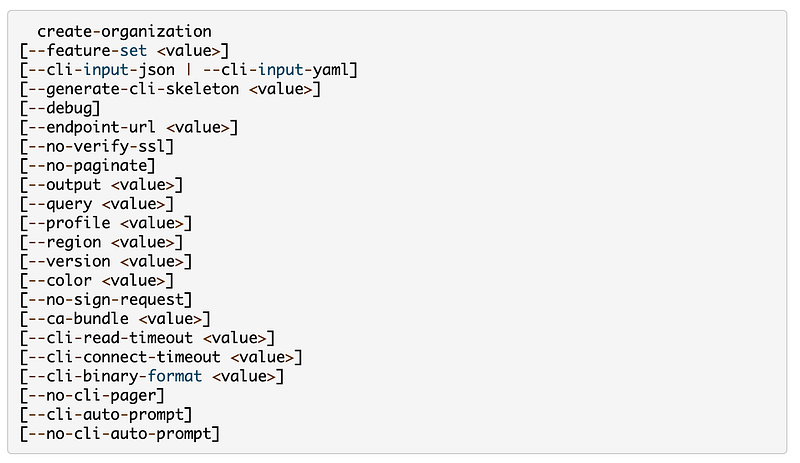
Alternatively use the AWS Console.

You can also create an organization and a number of default settings with AWS Control Tower. AWS Control Tower tries to create your organization and accounts in a way that follows some best practices. It creates a log archive account, a security account, and some initial rules and roles. You can optionally use AWS SSO.

I’m not going to explain it all here but the concept is good. We want to set up rules that prevent egregious actions in our accounts. One of the problems I have is that some parts of it seem overly complicated and it’s hard to change the code that builds out AWS Control Tower and the resources and policies it creates. Yes there is a way. I don’t particularly love it. If you want a UI to manage the rules your AWS principals must follow you may find AWS Control Tower helpful. I’m still evaluating some parts of it and on the fence. I’ll be writing more about it as we go as I currently have it running in my organization.

Create a Governance user, role, and policy

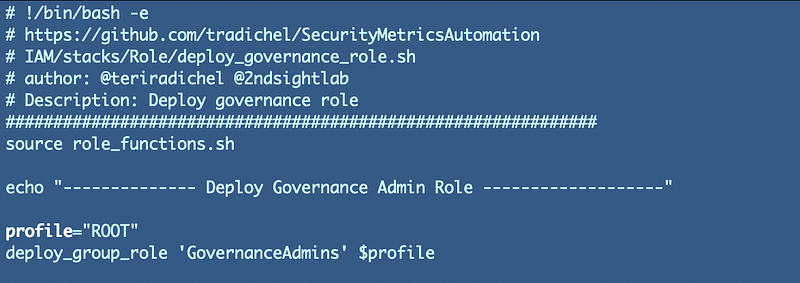
Once you have an AWS organization, you can grant users permissions to manage service control policies. I’m going to use my standard code for user creation to create my governance user, role, and group. I’m going to add this script to the portion of the code executed by our ROOT AWS CLI profile we created in an earlier post to create our IAM user. We can essentially copy and modify the permissions for our IAM administrators.

User:
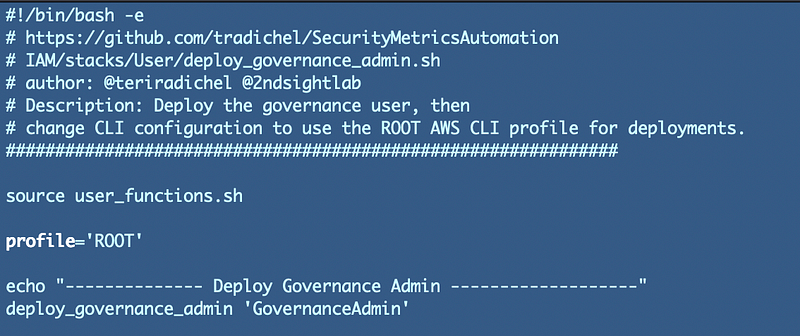
Recall that we created a generic user creation template in a past post.

Group:
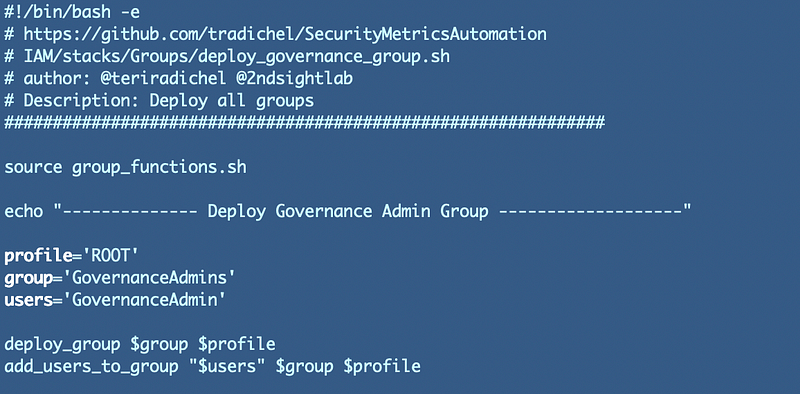
Recall that we created a generic group and group policy creation template in a past post.

Role:

For my role I have to decide what policies I want my role to have. I mentioned adding users and assigning them to the governance group but I’m not going to do that right now. I don’t need it but you might want to do that in your organization by creating a separate governance admin and user.

I want to give my governance admin permissions that fall under AWS organizations. If you review those permissions it includes the ability to add and remove accounts to the organization:

That could include the ability to remove our AWS domains account from the organization which could impact critical resources. I also don’t want this user to be able to delegate permissions to another account. I also don’t want this user to enable service access or all features for the organization at this time and I don’t need a GovCloud account.

Therefore, I am going to restrict this user from using this permissions:

RemoveAccountFromOrganization

LeaveOrganization

RegisterDelegatedAdministrator

DeregisterDelegatedAdministrator
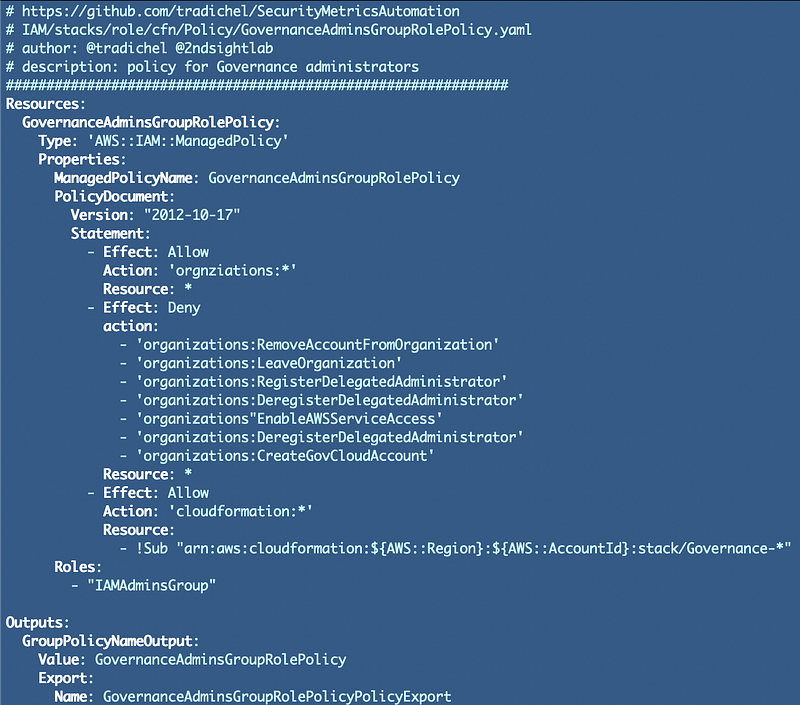
EnableAWSServiceAccess

CreateGovCloudAccount

Recall that we have a generic role creation policy but that each role policy is unique, so we have to create that template above.

Future revisions

I am considering the account structure and where I want each type of user to exist. I haven’t yet restricted the IAM user from creating new users and adding them to the governance group. In fact I’m thinking about user creation in an entirely different way at the very moment and may be making some changes as a result. Once I decide that we will start creating service control policies and perhaps permission boundaries as well.

Be aware of AWS defined roles

If you are using AWS Control Tower, you’ll want to be aware that AWS Control Tower uses SCPs to enforce policies throughout your organization.

In addition, AWS Organizations creates administrative roles across accounts that have access to perform administration in a cross-account manner.

As I already mentioned, roles are also created by AWS SSO.

Update:

Re-reading AWS documentation:

  • SCPs do not affect any service-linked role. Service-linked roles enable other AWS services to integrate with AWS Organizations and can’t be restricted by SCPs.
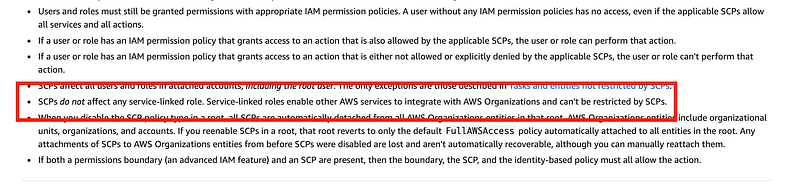
Ah, the fine print.

I am not sure if the above roles are considered service-linked roles, in which case they may not be affected by SCPs. Something to keep in mind and a topic I will explore further later.

Follow for updates.

Teri Radichel | © 2nd Sight Lab 2023

About Teri Radichel:
~~~~~~~~~~~~~~~~~~~~
⭐️ Author: Cybersecurity Books
⭐️ Presentations: Presentations by Teri Radichel
⭐️ Recognition: SANS Award, AWS Security Hero, IANS Faculty
⭐️ Certifications: SANS ~ GSE 240
⭐️ Education: BA Business, Master of Software Engineering, Master of Infosec
⭐️ Company: Penetration Tests, Assessments, Phone Consulting ~ 2nd Sight Lab
Need Help With Cybersecurity, Cloud, or Application Security?
~~~~~~~~~~~~~~~~~~~~~~~~~~~~~~~~~~~~~~~~~~~~~~~~~~~~~~~~~~~~~
🔒 Request a penetration test or security assessment
🔒 Schedule a consulting call
🔒 Cybersecurity Speaker for Presentation
Follow for more stories like this:
~~~~~~~~~~~~~~~~~~~~~~~~~~~~~~~~~~~~~~~~~~~~~~~~~~~~~~~~~~~~~ 
❤️ Sign Up my Medium Email List
❤️ Twitter: @teriradichel
❤️ LinkedIn: https://www.linkedin.com/in/teriradichel
❤️ Mastodon: @teriradichel@infosec.exchange
❤️ Facebook: 2nd Sight Lab
❤️ YouTube: @2ndsightlab

Governance
Iam
Cloudsecurity
AWS
Security Control Policies
Recommended from ReadMedium