
Delegating SCP Management to Governance Team via AWS Organizations
ACM.141 Delegated AWS Organizations Administrator — Policy as Code
~~~~~~~~~~~~~~~~~~~~~~~~~~~~~~~~~~~~~~~~~~~~~~~~~~~~~~~~~
⚙️ Check out my series on Automating Cybersecurity Metrics. The Code.
🔒 Related Stories: Cloud Governance | AWS Security | Security Architecture
💻 Free Content on Jobs in Cybersecurity | ✉️ Sign up for the Email List
~~~~~~~~~~~~~~~~~~~~~~~~~~~~~~~~~~~~~~~~~~~~~~~~~~~~~~~~~
I’ve been writing about how to delegate permission to manage SCPs to our governance team. One way to do that is via a delegated administrator.
In the last post I reverse-engineered the information that I hope will work in that policy:
Now let’s see if we can get it working.
Grant access to organization resources
We’re going to need to first of all grant access to the governance account to manage organizational resources:
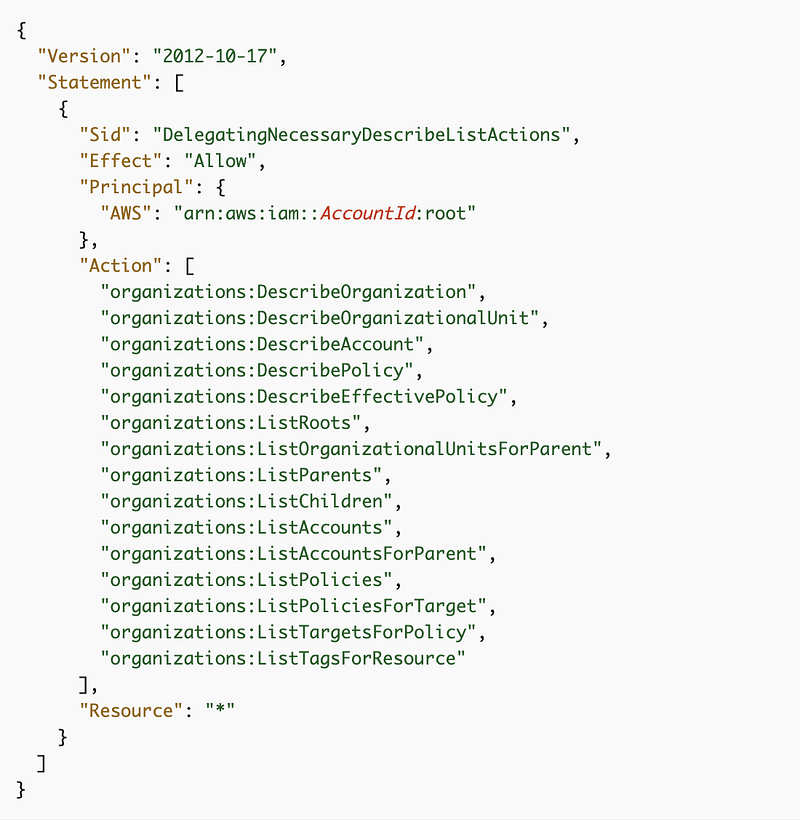
Grant access to manage SCPs
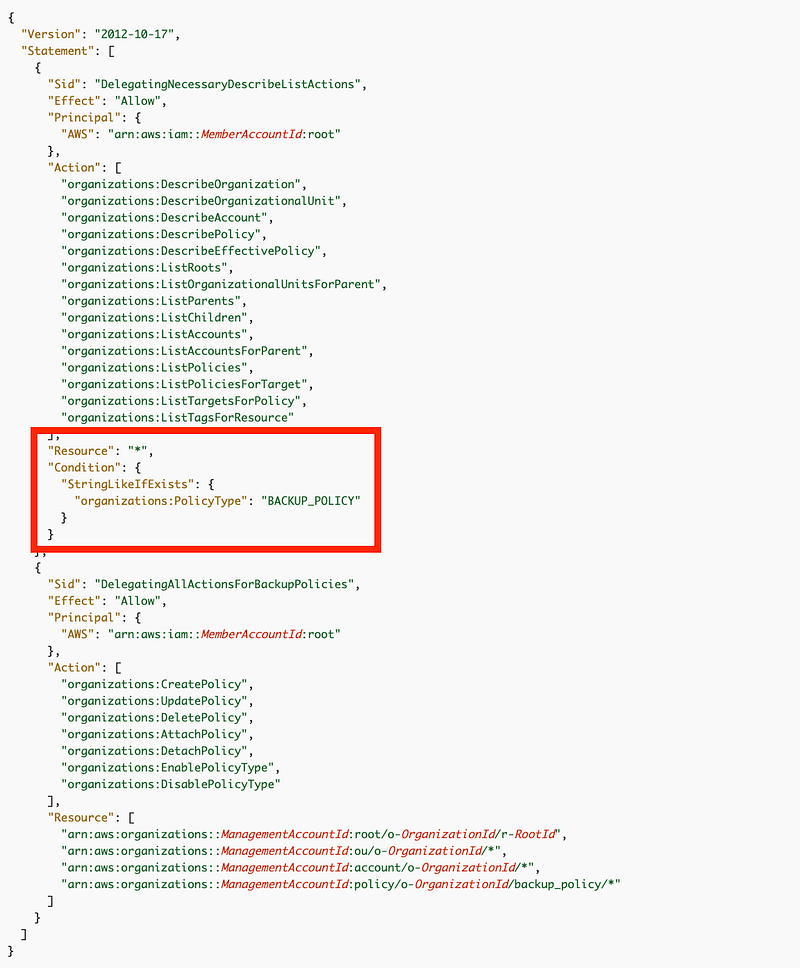
Next we want to create a policy like this but we need to change the condition to our SCPs and the resource to our organizational SCPs.
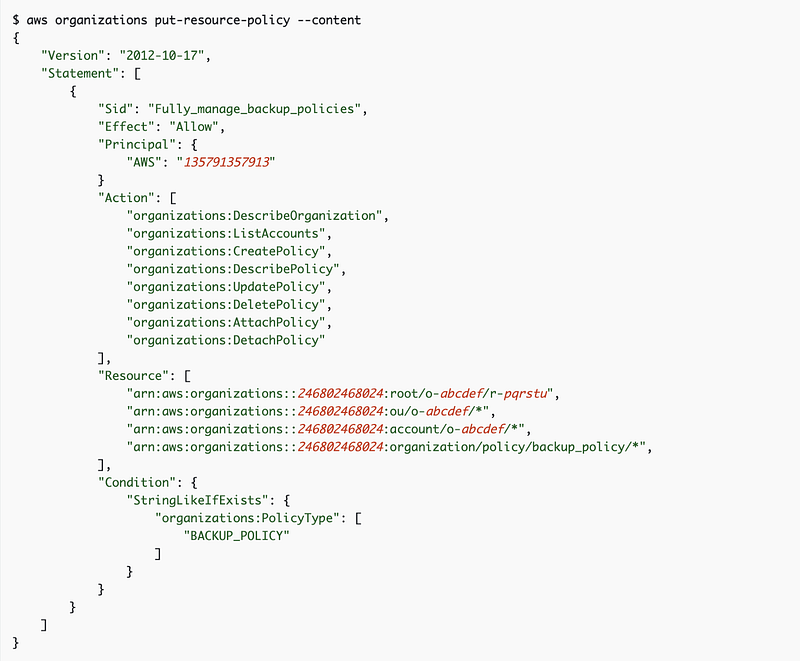
In the above policy we need to change the relevant bits to match SCPs instead of backup policies. In the last post we figured out that the condition for BACKUP_POLICY might relate to this snippet — though it doesn’t have the bit about organizations.
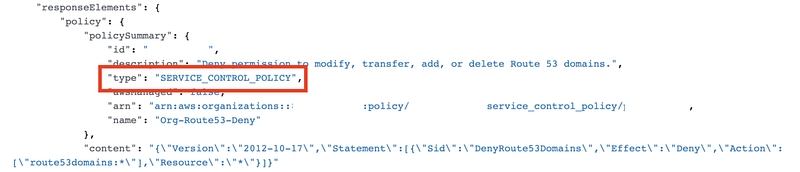
Note the location of the condition above and to which actions it applies. I think this policy may have an issue. the condition seems like it is extraneous and might not correctly apply to those actions. In the sample policy below on another page in the AWS documentation, the condition is in a different location and applies to different actions.
I doubt any tool is going to discover all these nuances for you.
We also figured out that the ARN for a Service Control Policy is structured like this:
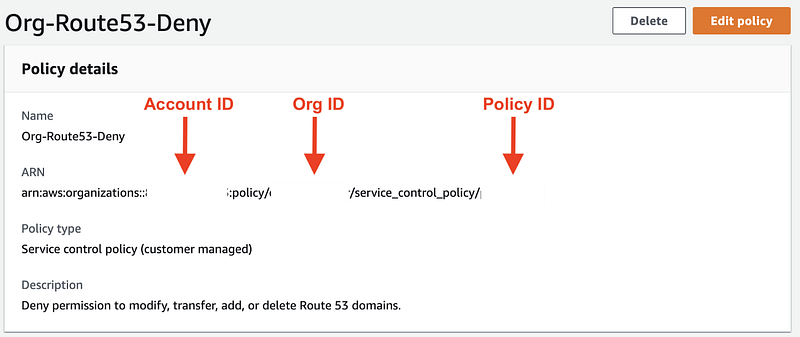
Well, we might not even need the condition, if we want to allow the governance team to manage Service Control Policies for the entire organization. The ARN itself has service_control_policy in it. So let’s try it without the condition first.
How to apply the delegated administrator policy to your AWS Organization
Note that I removed a rabbit hole I went down trying to mimic automating this in a new account. For reasons I’ll explain in a separate blog post, I’m going to do this manually for now in my existing account with a user who has the necessary permissions.
You can find both manual and automated instructions on this page:
Navigate to AWS Organizations. Click Settings.
Under Delegated administrator for AWS Organizations click Delegate.
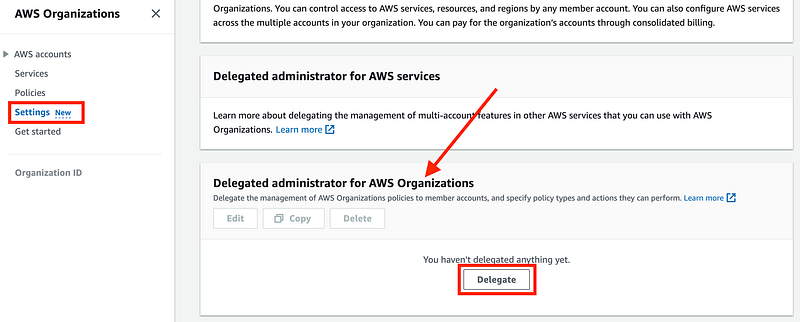
Copy and paste in the policy that allows your new account to view organization resources from this page:
I changed the SID (name or ID) to something that makes more sense to me.
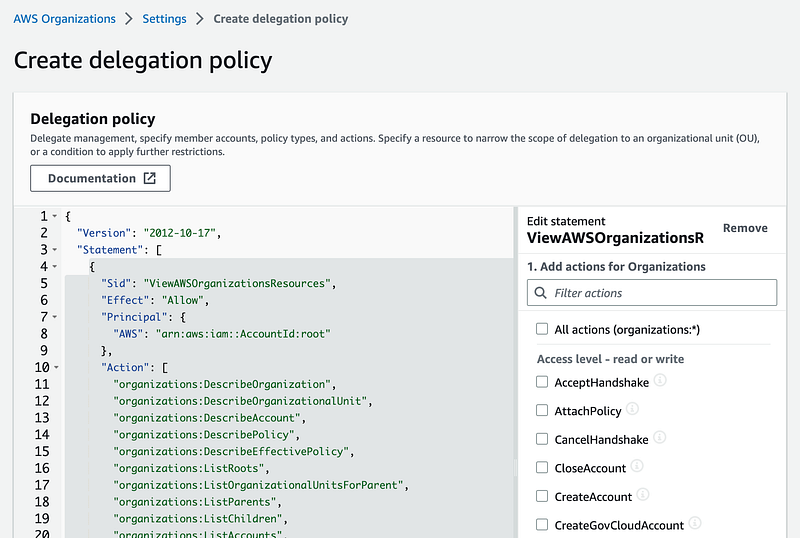
Change the AccountId in the policy to whichever account number you wish to delegate access.
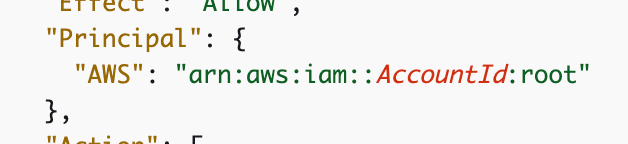
Notice that it’s granting access to the “root” user which doesn’t only mean the Account AWS actual root use but also administrators in the account. If you have concerns about how who has access you should do some testing to determine who has access and who doesn’t in that account.
In my case, I’m going to only create one role in this account for the governance administrators in this account and I’ll need to make sure that role has access when I get to it. As noted in a past post we can also apply restrictions on the root account in every AWS account using an SCP. More on that later.
Now here’s something I didn’t think would happen. We’re going to end up with a monolithic policy here because what happens is that single policy gets added to the Organizations’s settings. Instead of creating different policies for different types of access we’re going to have to apply it in one single policy like you do when you create an S3 bucket.
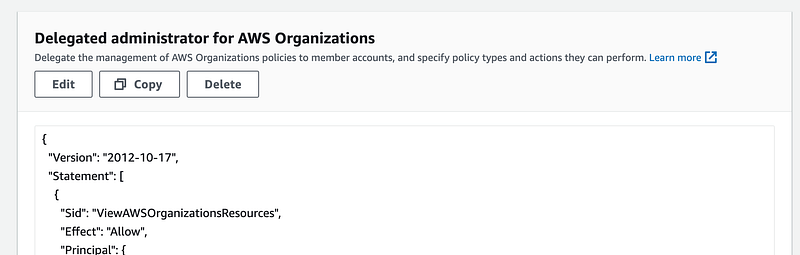
I guess I was expecting we could create different policies for different AWS Organizations delegated administrators. But it aligned with how S3 bucket policies work so it makes sense. In any case, let’s log into the governance account and see if we can view the organization information using a user that has admin access.
Yes I can, though I’m not exactly sure if this permission is granted by way of an AWS SSO role.

I navigate to another account with the same permission set, and in this case, I cannot view the policies, so this seems to work:
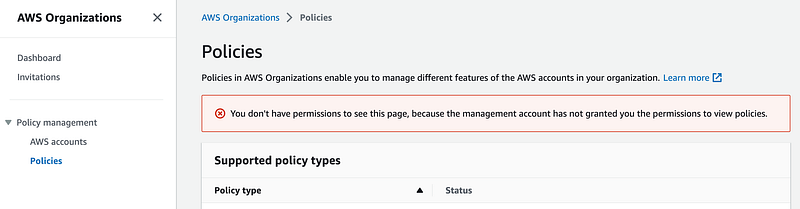
Now let’s see if we an edit an SCP, back in the governance account.
No, so our policy works as expected.
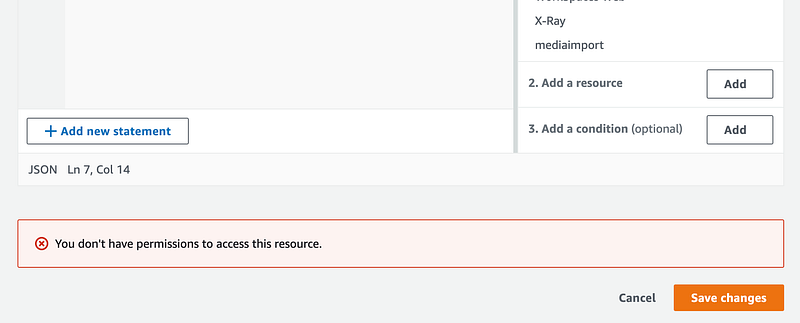
Now let’s add the permissions to manage the SCPs.
Notice the Governance account also cannot see the organization’s settings:
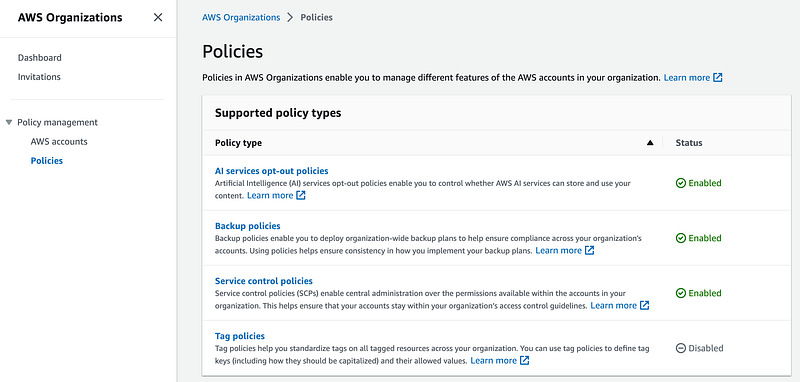
Return to the root account and edit the policy we created above.
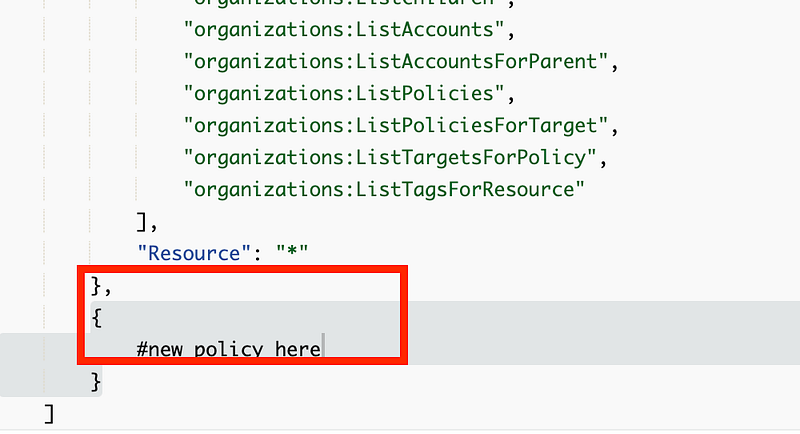
We’re going to insert a new statement because the prior statement applies to all (*) resources in our organization. the new statement is only going to apply to SCPs (hopefully). Add a comma after the existing statement and a new open and close bracket. The text “#new policy here” shows you where we’re going to insert the new policy code.
Let’s use a modified version of this policy that grants permission to manage backup policies:
Now I looked at replacing the condition in the above policy but notice to which actions the condition applied above? What is that condition applicable to in the policy from in the sample code below? The two different examples from the AWS documentation have the condition in two different places.
The condition below appears to limit the delegated administrator to viewing the organizational resources related to backup policies. The code in the prior example was applied to the actions related to policies. For my purposes, I’m going to let my governance account view any organizational information so we don’t really need that condition. We don’t need a condition on policies because the ARN we are going to use only applies to service control policies.
We’ve already added the rest of the top portion of this policy, so we just need to insert the second statement in this policy into the policy we just added to our organization, but we want to replace the four ARNs with the service control policy ARN. You’ll need to set your account number in the statement below as well, to replace the X’s underlined in red.
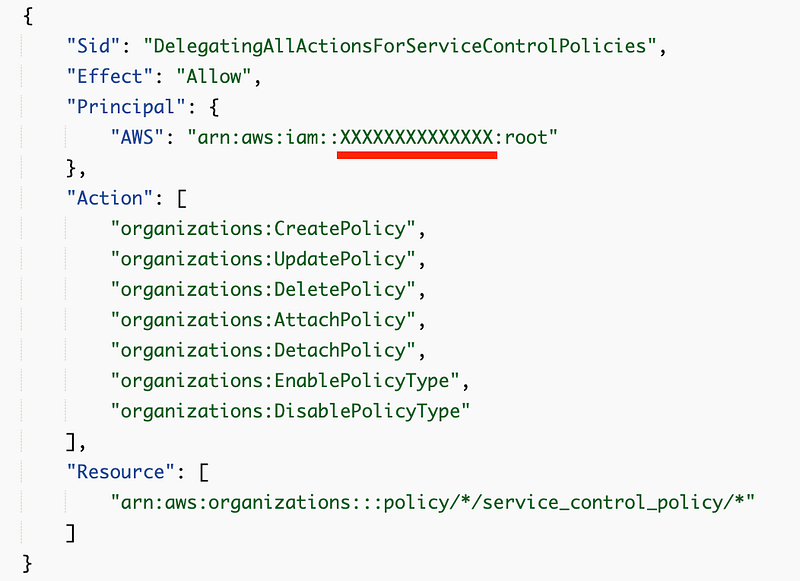
When I tested my policy the above policy statement saved successfully but did not work. I tested first with a single ARN. Then I replaced the organization specific pieces one at a time with *.
Here’s my policy working:
(Remember to change the account numbers.)
{
 "Version": "2012-10-17",
 "Statement": [
  {
   "Sid": "ViewAWSOrganizationsResources",
   "Effect": "Allow",
   "Principal": {
    "AWS": "arn:aws:iam::XXXXXXXXXXXX:root"
   },
   "Action": [
    "organizations:DescribeOrganization",
    "organizations:DescribeOrganizationalUnit",
    "organizations:DescribeAccount",
    "organizations:DescribePolicy",
    "organizations:DescribeEffectivePolicy",
    "organizations:ListRoots",
    "organizations:ListOrganizationalUnitsForParent",
    "organizations:ListParents",
    "organizations:ListChildren",
    "organizations:ListAccounts",
    "organizations:ListAccountsForParent",
    "organizations:ListPolicies",
    "organizations:ListPoliciesForTarget",
    "organizations:ListTargetsForPolicy",
    "organizations:ListTagsForResource"
   ],
   "Resource": "*"
  },
  {
   "Sid": "DelegatingAllActionsForServiceControlPolicies",
   "Effect": "Allow",
   "Principal": {
    "AWS": "arn:aws:iam::XXXXXXXXXXXX:root"
   },
   "Action": [
    "organizations:CreatePolicy",
    "organizations:UpdatePolicy",
    "organizations:DeletePolicy",
    "organizations:AttachPolicy",
    "organizations:DetachPolicy",
    "organizations:EnablePolicyType",
    "organizations:DisablePolicyType"
   ],
   "Resource": "arn:aws:organizations::*:policy/*/service_control_policy/*"
  }
 ]
}
With the above policy the governance account is able to manage service control policies, including those created by Control Tower and the ones created by the root user in the root account.
The governance team cannot change the organizational policy settings with these permissions or manage other types of policies.
Update: AWS appears to have added CloudFormation support for this and I’ll write about it and add the code to my GitHub repository in an upcoming post:
Follow for updates.
Teri Radichel | © 2nd Sight Lab 2023
About Teri Radichel:
~~~~~~~~~~~~~~~~~~~~
⭐️ Author: Cybersecurity Books
⭐️ Presentations: Presentations by Teri Radichel
⭐️ Recognition: SANS Award, AWS Security Hero, IANS Faculty
⭐️ Certifications: SANS ~ GSE 240
⭐️ Education: BA Business, Master of Software Engineering, Master of Infosec
⭐️ Company: Penetration Tests, Assessments, Phone Consulting ~ 2nd Sight Lab
Need Help With Cybersecurity, Cloud, or Application Security?
~~~~~~~~~~~~~~~~~~~~~~~~~~~~~~~~~~~~~~~~~~~~~~~~~~~~~~~~~~~~~
🔒 Request a penetration test or security assessment
🔒 Schedule a consulting call
🔒 Cybersecurity Speaker for PresentationFollow for more stories like this:
~~~~~~~~~~~~~~~~~~~~~~~~~~~~~~~~~~~~~~~~~~~~~~~~~~~~~~~~~~~~~
❤️ Sign Up my Medium Email List
❤️ Twitter: @teriradichel
❤️ LinkedIn: https://www.linkedin.com/in/teriradichel
❤️ Mastodon: @teriradichel@infosec.exchange
❤️ Facebook: 2nd Sight Lab
❤️ YouTube: @2ndsightlab