avatarTeri Radichel

Free AI web copilot to create summaries, insights and extended knowledge, download it at here

6036

Abstract

t all. I just want to have more control over my infrastructure and more stringent rules than those that come out of the box with AWS Organizations and AWS Control Tower.</p><h2 id="297c">Creating an AWS OU with CloudFormation</h2><p id="3a2f">We can use CloudFormation to create an OU:</p><div id="fc94" class="link-block"> <a href="https://docs.aws.amazon.com/AWSCloudFormation/latest/UserGuide/aws-resource-organizations-organizationalunit.html"> <div> <div> <h2>AWS::Organizations::OrganizationalUnit</h2> <div><h3>undefined</h3></div> <div><p>undefined</p></div> </div> <div> <div style="background-image: url(https://miro.readmedium.com/v2/resize:fit:320/)"></div> </div> </div> </a> </div><p id="66d6">The syntax is pretty simple:</p><figure id="01f3"><img src="https://cdn-images-1.readmedium.com/v2/resize:fit:800/1*vfp8OobUUuTnB3Ue6WBpDw.png"><figcaption></figcaption></figure><p id="653b">I explained how we can query the root or parent ID in a prior post after you create an AWS Organization here. I’m going to show you another approach in the code below.</p><div id="efff" class="link-block"> <a href="https://readmedium.com/automated-aws-organization-creation-4d31519c4a32"> <div> <div> <h2>Automated AWS Organization Creation</h2> <div><h3>ACM.152 Automating the creation of an AWS Organization, Organizational Unit, Account, and Delegated Administrator</h3></div> <div><p>medium.com</p></div> </div> <div> <div style="background-image: url(https://miro.readmedium.com/v2/resize:fit:320/1*-Zzpli2a5Y-if5y0i6WVqQ.png)"></div> </div> </div> </a> </div><h2 id="19ac">Creating a Service Control Policy with CloudFormation</h2><p id="980a">Once we create the account, we need to apply a Service Control Policy that denies all actions in that account. That will not only be helpful for new accounts, but for a compromised account if you can’t quickly pinpoint the problem on a more fine-grained level. I wrote about SCPs here:</p><div id="30c8" class="link-block"> <a href="https://readmedium.com/aws-service-control-policies-63979a526fe3"> <div> <div> <h2>AWS Service Control Policies</h2> <div><h3>Governance: Setting security controls at the organizational level</h3></div> <div><p>medium.com</p></div> </div> <div> <div style="background-image: url(https://miro.readmedium.com/v2/resize:fit:320/1*C6D6Cz3sdbKrDyvID0zlUQ.png)"></div> </div> </div> </a> </div><p id="130e">We can create a Service Control Policy with CloudFormation:</p><div id="3e8c" class="link-block"> <a href="https://docs.aws.amazon.com/AWSCloudFormation/latest/UserGuide/aws-resource-organizations-policy.html"> <div> <div> <h2>AWS::Organizations::Policy</h2> <div><h3>undefined</h3></div> <div><p>undefined</p></div> </div> <div> <div style="background-image: url(https://miro.readmedium.com/v2/resize:fit:320/)"></div> </div> </div> </a> </div><figure id="9a3a"><img src="https://cdn-images-1.readmedium.com/v2/resize:fit:800/1*AG1l1MmRcbqno7ONReQ-oQ.png"><figcaption></figcaption></figure><p id="e0b5"><i>TargetIds:</i> Attach the policy to the Root OU ID, other OU IDs, or a specific account.</p><p id="e289"><i>Type: </i>The allowed values are: AISERVICES_OPT_OUT_POLICY | BACKUP_POLICY | SERVICE_CONTROL_POLICY | TAG_POLICY. We will be using <b>SERVICE_CONTROL_POLICY</b>.</p><p id="6a57">I’m going to add two new folders to my Org directory in my Github repository: <b>OU</b> and <b>SCP</b>. Then I’ll build out the typical code structure I’ve used throughout this series:</p><ul><li>a deploy script</li><li>a resource-specific functions script</li><li>CloudFormation templates in a cfn directory</li><li>test scripts (at some point)</li></ul><p id="2e1c">I’m going to name the root deployment scripts differently because these will be executed by the OrgRoot user one time and then should not change much in the future. Separate deploy scripts will be used by the governance team to deploy new OUs and SCPs for the organization.</p><p id="1948">Remember that the profile name becomes a part of our CloudFormation stack name to help us identify resources. Additionally we created IAM policies that limit users to editing their own stacks based on the start of the stack name. There are three parts to this concept starting here:</p><div id="bf48" class="link-block"> <a href="https://readmedium.com/refactoring-existing-code-to-use-iam-naming-conventions-part-1-c265a0285fa4"> <div> <div> <h2>Refactoring Existing Code to Use IAM Naming Conventions: Part 1</h2> <div><h3>ACM.42 Consistent naming leads to simplified code</h3></div> <div><p>medium.com</p></div> </div> <div> <div style="background-image: url(https://miro.readmedium.com/v2/resize:fit:320/1*oTXYmynR4UelUhCyeG80DQ.png)"></div> </div> </div> </a> </div><p id="bf03">Our billing admins will only be able to edit CloudFormation stacks with Billing, our IAM admins can only update the CloudFormation stacks starting with IAM and so on. No other user will be allowed to create CloudFormation stacks that start with “OrgRoot” per their IAM policies. That’s why we want to ensure that we use the OrgRoot profile to create these stacks.</p><p id="d0ba">Here’s the code I ended up creating — but check the GitHub repository for any

Options

updates.</p><h2 id="afda">Organization Code</h2><p id="69ef">First we need to recreate our organization. I went head and created that script. I also added the code to enable service control policies.</p><p id="bfb3"><i>Org/stacks/Organization/org_functions.sh</i></p><p id="19a4">The first thing that I created to make our life easier are some common organizations functions such as:</p><ul><li>Get the root OU id</li><li>Get the id for a OU by name</li></ul><p id="3d98">We’ll use these functions in a few different places.</p><figure id="30f1"><img src="https://cdn-images-1.readmedium.com/v2/resize:fit:800/1*0EmsNI1Y7qPHKutjdQD-Ig.png"><figcaption></figcaption></figure><p id="c43e"><i>Org/stacks/Organization/deploy.sh</i></p><p id="d222">Next I’m going to create a deploy script to deploy the organization. I’m also going to enable service control policies. Since these two functions only need to run one time, I added logic to check if the organization already exists and if SCPs are already enabled before executing those actions.</p><figure id="638d"><img src="https://cdn-images-1.readmedium.com/v2/resize:fit:800/1*tNcUiuoGvrXNDbvVHP-B-g.png"><figcaption></figcaption></figure><p id="999c">Run the deploy script to create he organization and enable SCPs. As you can see from this run, my orgnaization aleady exisrs and SCPs are enabled.</p><figure id="638c"><img src="https://cdn-images-1.readmedium.com/v2/resize:fit:800/1*s0R0VCrCrgLLVJ63srgdxA.png"><figcaption></figcaption></figure><h2 id="c706">Code for Organizational Units</h2><p id="dc95"><i>Org/stacks/OU/ou_functions.sh</i></p><p id="3153">First I created a function to deploy OUs that leverages our common functions created earlier in this series. Note that I created the <b>deloy_ou</b> function and also a separate function <b>deploy_root_ou</b> to deploy ous using the OrgRoot user.</p><figure id="43fd"><img src="https://cdn-images-1.readmedium.com/v2/resize:fit:800/1*rsGOnzFq5SWFVgRQipK52Q.png"><figcaption></figcaption></figure><p id="dcad"><i>Org/stacks/OU/cfn/OU.yaml</i></p><p id="924f">The CloudFormation template takes a name and a parameter as inputs, so we can use the same template for any OU.</p><figure id="5803"><img src="https://cdn-images-1.readmedium.com/v2/resize:fit:800/1*RIPRy8pnfu3DvTJN6u60fQ.png"><figcaption></figcaption></figure><p id="8336"><i>Org/stacks/OU/deploy_root_ous.sh</i></p><figure id="3980"><img src="https://cdn-images-1.readmedium.com/v2/resize:fit:800/1*ziFqsFWHke7yNWsABtW44Q.png"><figcaption></figcaption></figure><p id="5027">Run the script above and verify the OUs are created.</p><p id="2144">CloudFormation stacks:</p><figure id="2977"><img src="https://cdn-images-1.readmedium.com/v2/resize:fit:800/1*1-rJEO7KhYp367m-V-hGiA.png"><figcaption></figcaption></figure><p id="f8e9">View the new OUs on the AWS Organizations dashboard.</p><figure id="3ff2"><img src="https://cdn-images-1.readmedium.com/v2/resize:fit:800/1*OluMd2A1auDcO7ksCqXA1g.png"><figcaption></figcaption></figure><h2 id="814b">Code for Service Control Policies</h2><p id="fb34"><i>Org/stacks/SCP/deploy_root_scps.sh</i></p><figure id="3772"><img src="https://cdn-images-1.readmedium.com/v2/resize:fit:800/1*dStfmXSH0CPW2LVF-N_9pg.png"><figcaption></figcaption></figure><p id="a021"><i>Org/stacks/SCP/scp_functions.sh</i></p><figure id="b071"><img src="https://cdn-images-1.readmedium.com/v2/resize:fit:800/1*i1aAUwqB63xh1VEAr7YxeQ.png"><figcaption></figcaption></figure><p id="9c2b"><i>Org/stacks/SCP/cfn/DenyAll.cfn</i></p><p id="ed33">Note that I’m using a pipe character “|” below for the Content value so the policy can span multiple lines.</p><figure id="f131"><img src="https://cdn-images-1.readmedium.com/v2/resize:fit:800/1*OUTy4qCV-P3U31B_0uJS2w.png"><figcaption></figcaption></figure><p id="c864">Deploy the SCP. Check the the policy was created.</p><figure id="4184"><img src="https://cdn-images-1.readmedium.com/v2/resize:fit:800/1*sTRwIIaffmraBvyj6BRtCQ.png"><figcaption></figcaption></figure><p id="ce6b">Click on the policy and look at the targets.</p><figure id="690c"><img src="https://cdn-images-1.readmedium.com/v2/resize:fit:800/1*O-npTzeGliav9bMoWT7hGg.png"><figcaption></figcaption></figure><p id="2630">There’s just one more OU I want to create before allowing the Billing Administrator to create accounts. I want to restrict account creation to the current region. We’ll look at that in the next post.</p><p id="6e86">Follow for updates.</p><p id="4a3a">Teri Radichel | <i>© <a href="https://2ndsightlab.com/?source=post_page---------------------------">2nd Sight Lab</a> 2023</i></p><div id="8b5f"><pre><span class="hljs-section">About Teri Radichel:

⭐️ Author: Cybersecurity Books
⭐️ Presentations: Presentations by Teri Radichel
⭐️ Recognition: SANS Award, AWS Security Hero, IANS Faculty
⭐️ Certifications: SANS ~ GSE 240
⭐️ Education: BA Business, Master of Software Engineering, Master of Infosec
⭐️ Company: Penetration Tests, Assessments, Phone Consulting ~ 2nd Sight Lab</pre></div><div id="caae"><pre><span class="hljs-section">Need Help With Cybersecurity, Cloud, or Application Security?
~~~~~~~~~~~~~~~~~~~~~~~~~~~~~~~~~~~~~~~~~~~~~~~~~~~~~~~~~~~~~</span>
🔒 Request a penetration test or security assessment
🔒 Schedule a consulting call
🔒 Cybersecurity Speaker for Presentation</pre></div><div id="5a42"><pre>Follow <span class="hljs-keyword">for</span> more stories like <span class="hljs-keyword">this</span>:

❤️ Sign Up my Medium Email List ❤️ Twitter: <span class="hljs-meta">@teriradichel</span> ❤️ LinkedIn: https:<span class="hljs-comment">//www.linkedin.com/in/teriradichel</span> ❤️ Mastodon: <span class="hljs-meta">@teriradichel</span><span class="hljs-meta">@infosec</span>.exchange ❤️ Facebook: 2nd Sight Lab ❤️ YouTube: @2ndsightlab</pre></div><figure id="faf5"><img src="https://cdn-images-1.readmedium.com/v2/resize:fit:800/0*H9Ew1KCl-29nZiPR.jpeg"><figcaption></figcaption></figure></article></body>

Creating an Organizational Unit (OU) and Service Control Policies (SCPs) with CloudFormation

ACM.170 Recreating our OUs and SCPs with CloudFormation

Part of my series on Automating Cybersecurity Metrics. AWS Organizations. Cloud Governance. The Code.

Free Content on Jobs in Cybersecurity | Sign up for the Email List
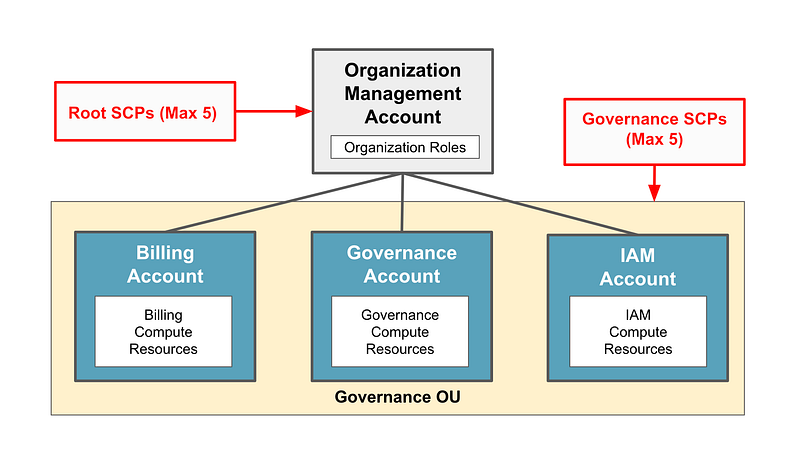
In the last post we considered which service control policies we want to add to our root OU.

Now I could jump in and create roles to allow people to do things, but there are also things I want to prevent before I start granting people access.

Consider the IAM architecture I wrote about here:

That shifted a bit as we considered how we would integrate with Okta, but the general premise is the same.

Before we create a Billing Administrator role and grant access to create new accounts, we need to create the DenyALL Organizational Unit (OU). The Billing Administrator is only allowed to create new accounts that are assigned to the DenyAll Organizational OU.

Along with the DenyAll OU we need to create the DenyAll Service Control Policy. That SCP denies any action by that account. No one will be able to use the account until the Governance Administrator creates any additional required SCPs and moves the account into the proper OU.

I’m going to add the Governance OU where our initial billing, IAM, and Governance accounts will exist.

Finally I want to create the Root SCPs I described in the last post.

We will create these resources with the OrgRoot user, created in the post below, because no one else should be able to change these resources in the organization. These are resources we don’t expect will change.

Caveats When Creating an Organizational Unit on AWS

I explained how to create Organizational Units on AWS In a prior post. As a recap you have to do that in the AWS management account.

If you’re using Control Tower, you can still create an OU within AWS Organizations, but things get confusing:
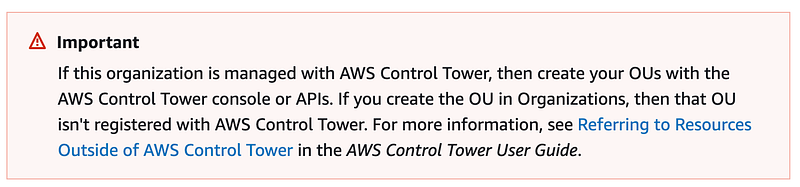
We will not be using Control Tower. I hope to emulate some of the functionality that Control Tower offers in a way that gives you more control over the configuration with less complexity and more flexibility to make changes if needed.

Again, I absolutely love the Control Tower concept and if you don’t want to write all the code I’m writing, you should use it. It’s better than not doing any of this at all. I just want to have more control over my infrastructure and more stringent rules than those that come out of the box with AWS Organizations and AWS Control Tower.

Creating an AWS OU with CloudFormation

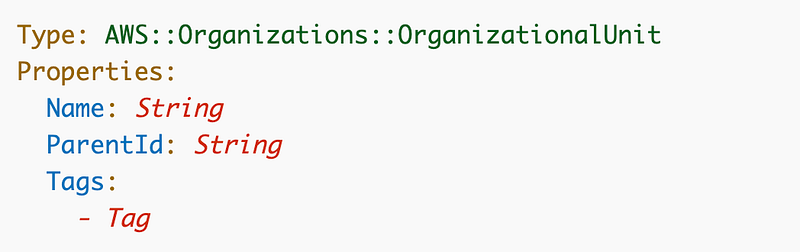
We can use CloudFormation to create an OU:

The syntax is pretty simple:
I explained how we can query the root or parent ID in a prior post after you create an AWS Organization here. I’m going to show you another approach in the code below.

Creating a Service Control Policy with CloudFormation

Once we create the account, we need to apply a Service Control Policy that denies all actions in that account. That will not only be helpful for new accounts, but for a compromised account if you can’t quickly pinpoint the problem on a more fine-grained level. I wrote about SCPs here:

We can create a Service Control Policy with CloudFormation:
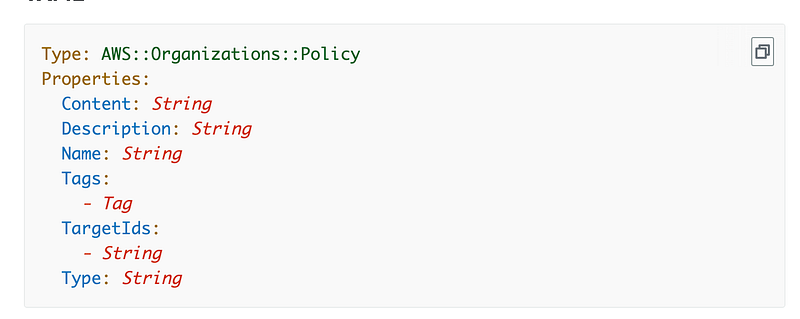
TargetIds: Attach the policy to the Root OU ID, other OU IDs, or a specific account.

Type: The allowed values are: AISERVICES_OPT_OUT_POLICY | BACKUP_POLICY | SERVICE_CONTROL_POLICY | TAG_POLICY. We will be using SERVICE_CONTROL_POLICY.

I’m going to add two new folders to my Org directory in my Github repository: OU and SCP. Then I’ll build out the typical code structure I’ve used throughout this series:

  • a deploy script
  • a resource-specific functions script
  • CloudFormation templates in a cfn directory
  • test scripts (at some point)

I’m going to name the root deployment scripts differently because these will be executed by the OrgRoot user one time and then should not change much in the future. Separate deploy scripts will be used by the governance team to deploy new OUs and SCPs for the organization.

Remember that the profile name becomes a part of our CloudFormation stack name to help us identify resources. Additionally we created IAM policies that limit users to editing their own stacks based on the start of the stack name. There are three parts to this concept starting here:

Our billing admins will only be able to edit CloudFormation stacks with Billing, our IAM admins can only update the CloudFormation stacks starting with IAM and so on. No other user will be allowed to create CloudFormation stacks that start with “OrgRoot” per their IAM policies. That’s why we want to ensure that we use the OrgRoot profile to create these stacks.

Here’s the code I ended up creating — but check the GitHub repository for any updates.

Organization Code

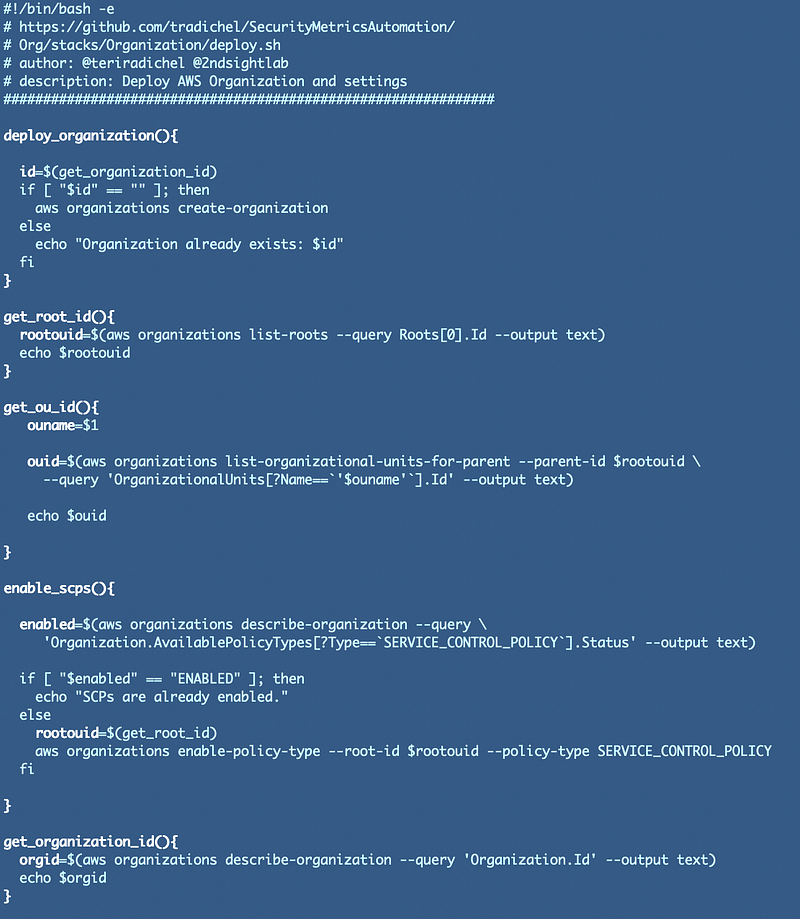
First we need to recreate our organization. I went head and created that script. I also added the code to enable service control policies.

Org/stacks/Organization/org_functions.sh

The first thing that I created to make our life easier are some common organizations functions such as:

  • Get the root OU id
  • Get the id for a OU by name

We’ll use these functions in a few different places.
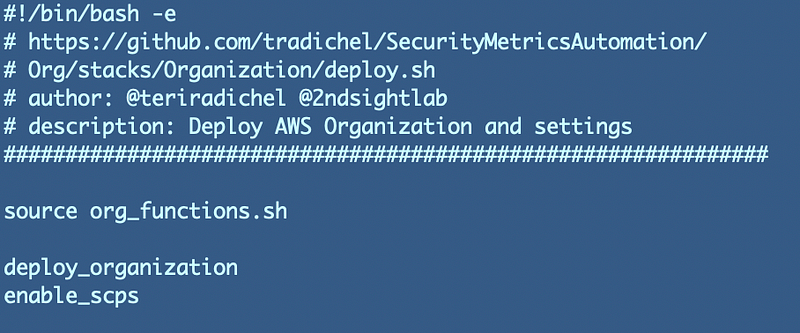
Org/stacks/Organization/deploy.sh

Next I’m going to create a deploy script to deploy the organization. I’m also going to enable service control policies. Since these two functions only need to run one time, I added logic to check if the organization already exists and if SCPs are already enabled before executing those actions.
Run the deploy script to create he organization and enable SCPs. As you can see from this run, my orgnaization aleady exisrs and SCPs are enabled.

Code for Organizational Units

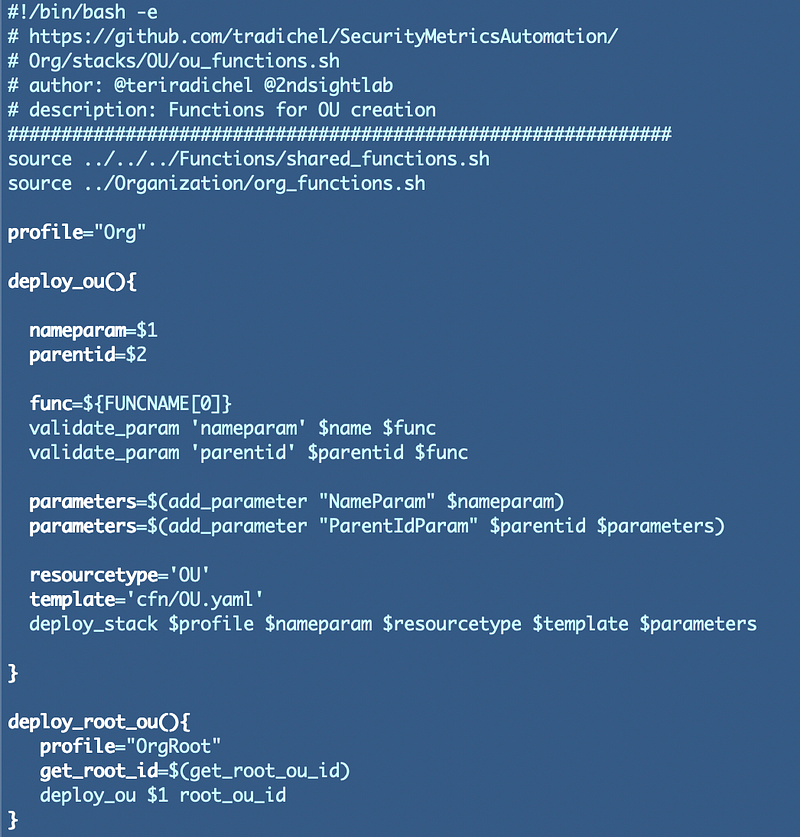
Org/stacks/OU/ou_functions.sh

First I created a function to deploy OUs that leverages our common functions created earlier in this series. Note that I created the deloy_ou function and also a separate function deploy_root_ou to deploy ous using the OrgRoot user.
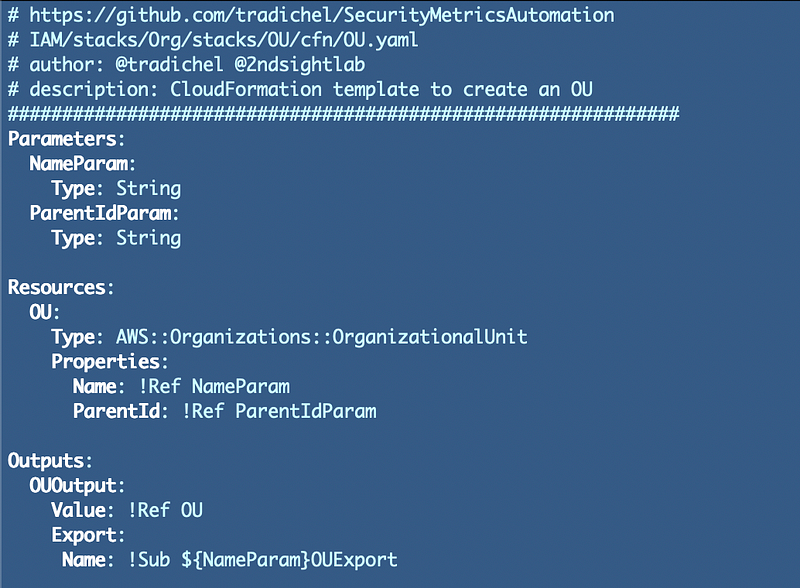
Org/stacks/OU/cfn/OU.yaml

The CloudFormation template takes a name and a parameter as inputs, so we can use the same template for any OU.
Org/stacks/OU/deploy_root_ous.sh
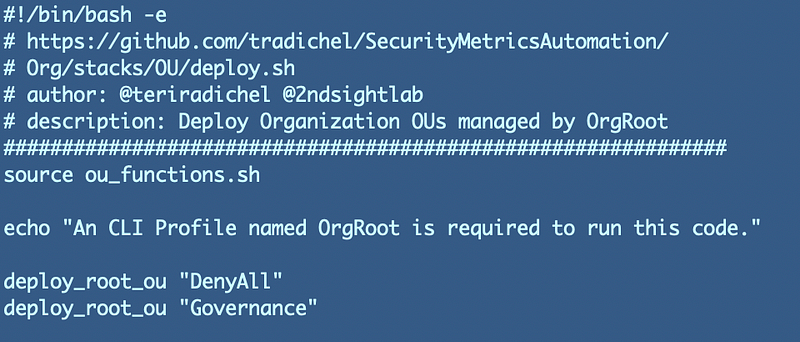
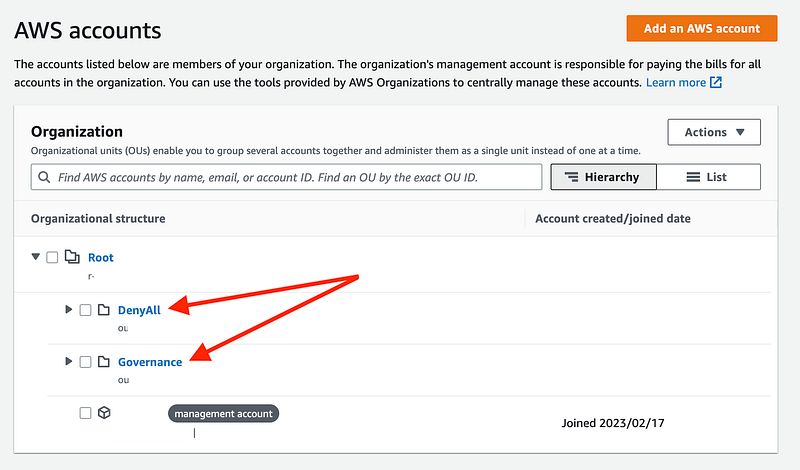
Run the script above and verify the OUs are created.

CloudFormation stacks:

View the new OUs on the AWS Organizations dashboard.
Code for Service Control Policies

Org/stacks/SCP/deploy_root_scps.sh
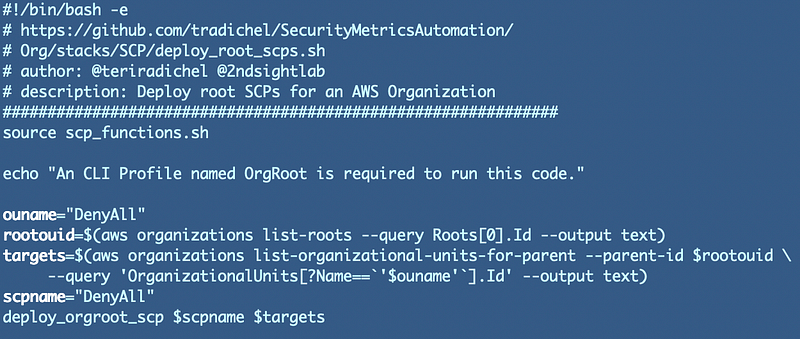
Org/stacks/SCP/scp_functions.sh
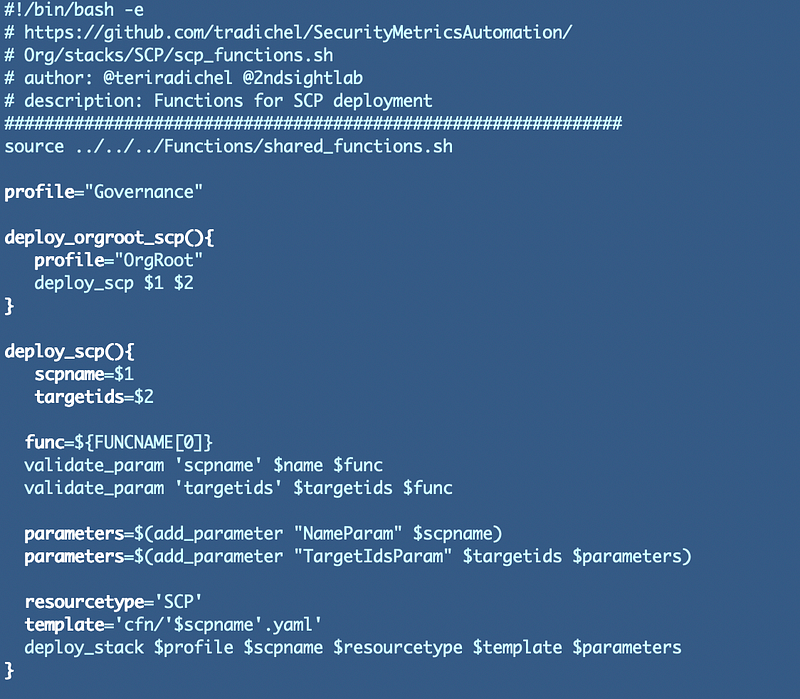
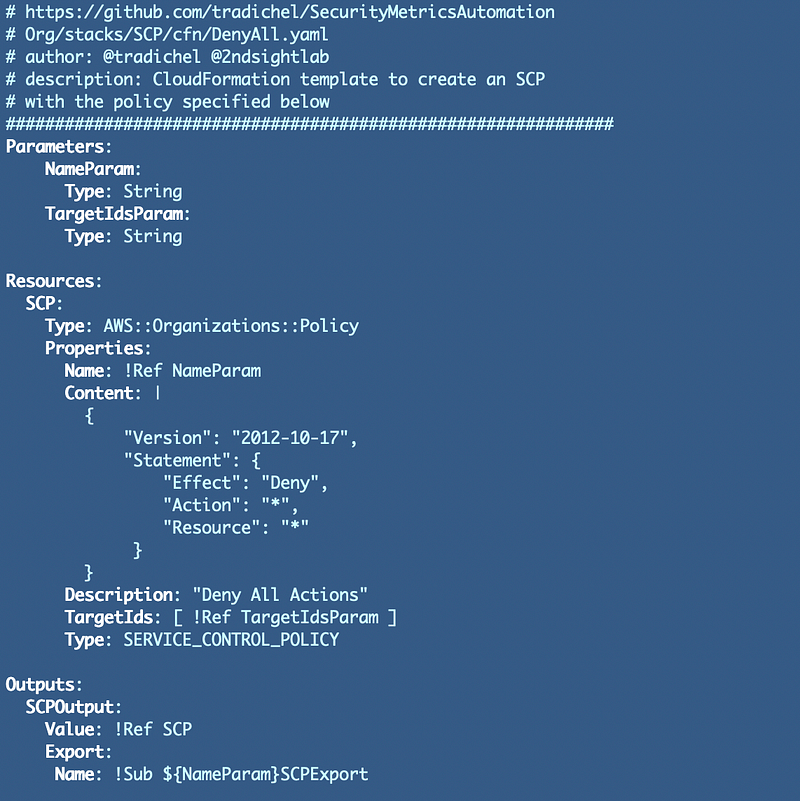
Org/stacks/SCP/cfn/DenyAll.cfn

Note that I’m using a pipe character “|” below for the Content value so the policy can span multiple lines.
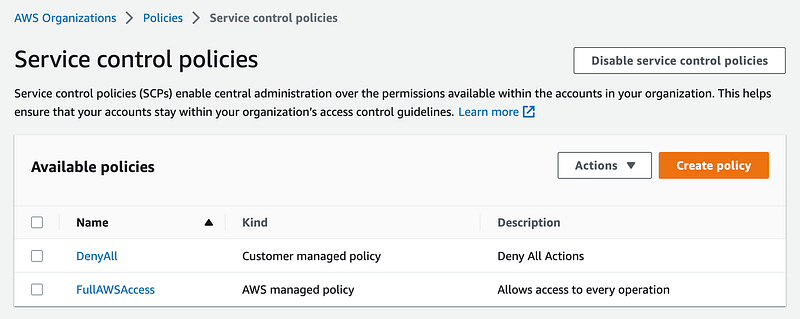
Deploy the SCP. Check the the policy was created.
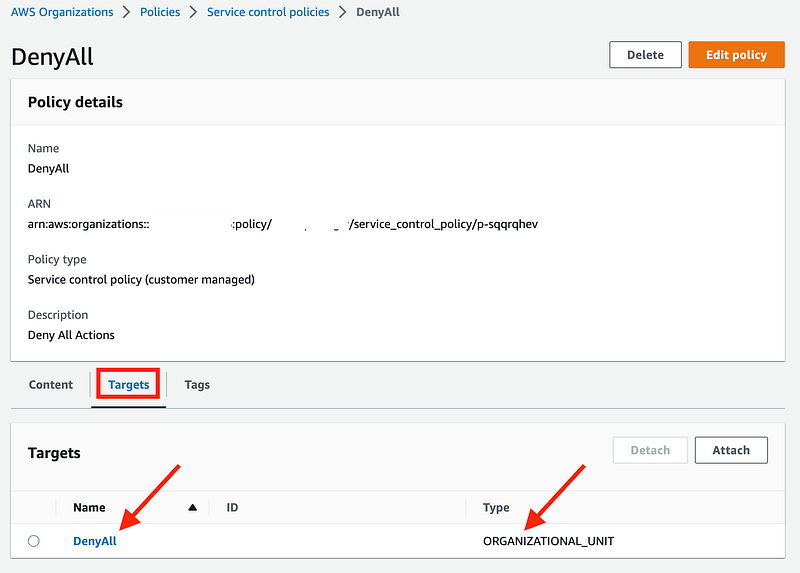
Click on the policy and look at the targets.
There’s just one more OU I want to create before allowing the Billing Administrator to create accounts. I want to restrict account creation to the current region. We’ll look at that in the next post.

Follow for updates.

Teri Radichel | © 2nd Sight Lab 2023

About Teri Radichel:
~~~~~~~~~~~~~~~~~~~~
⭐️ Author: Cybersecurity Books
⭐️ Presentations: Presentations by Teri Radichel
⭐️ Recognition: SANS Award, AWS Security Hero, IANS Faculty
⭐️ Certifications: SANS ~ GSE 240
⭐️ Education: BA Business, Master of Software Engineering, Master of Infosec
⭐️ Company: Penetration Tests, Assessments, Phone Consulting ~ 2nd Sight Lab
Need Help With Cybersecurity, Cloud, or Application Security?
~~~~~~~~~~~~~~~~~~~~~~~~~~~~~~~~~~~~~~~~~~~~~~~~~~~~~~~~~~~~~
🔒 Request a penetration test or security assessment
🔒 Schedule a consulting call
🔒 Cybersecurity Speaker for Presentation
Follow for more stories like this:
~~~~~~~~~~~~~~~~~~~~~~~~~~~~~~~~~~~~~~~~~~~~~~~~~~~~~~~~~~~~~ 
❤️ Sign Up my Medium Email List
❤️ Twitter: @teriradichel
❤️ LinkedIn: https://www.linkedin.com/in/teriradichel
❤️ Mastodon: @teriradichel@infosec.exchange
❤️ Facebook: 2nd Sight Lab
❤️ YouTube: @2ndsightlab

AWS
Ou
Service Control Policy
Scp
Cloudformation
Recommended from ReadMedium