
AWS SAML Federation to Okta Architecture
ACM.167 Architectural components and separation of duties
~~~~~~~~~~~~~~~~~~~~~~~~~~~~~~~~~~~~~~~~~~~~~~~~~~~~~~~~~~~
⚙️ Check out my series on Automating Cybersecurity Metrics. The Code.
🔒 Related Stories: Cloud Governance | IAM | AWS Security | Okta
💻 Free Content on Jobs in Cybersecurity | ✉️ Sign up for the Email List
~~~~~~~~~~~~~~~~~~~~~~~~~~~~~~~~~~~~~~~~~~~~~~~~~~~~~~~~~~~
In the last post we reviewed Okta logging, monitoring, and alerting capabilities.
Now that we understand some of the security controls available to us via the last few posts, how should we architect our AWS SAML Federation to Okta as an IdP? Here are some questions to consider.
Who should create the first Identity Provider in AWS?
Well, if we want our IAM users to login via Okta and SAML roles, we need to set up the IdP first before we can integrate and allow them to do that. In other words, an AWS Identity needs to do some configuration before we can even login with Okta. We’ll have our OrgRoot configure the initial IdP since that user was created to perform any deployments that need to occur before we can federate with Okta.
I already look into whether we can use the identity provider in a cross-account fashion. Can we simply reference the management account identity provider in other accounts? No.

If we have different SAML roles in different accounts we need an IdP in each account.
Who should create or update the other Identity Providers in AWS?
From that point on, we need to decide if the IAM administrator will be allowed to configure new IdPs. We probably don’t want our OrgRoot user logging in every time we create a new IdP. We could set it up so that only the IAM user can create the IdP but once established, we remove permission to edit it except with the blessing of the OrgRoot or Governance user or some other team. Here is where it would be nice if AWS had some kind of Just In Time Access service, but instead of getting access to network ports you get access to use a particular role.
We could implement something like that ourselves. I actually wrote about a similar concept for the AWS blog here in regards to network access via an AWS IoT button before the above services existed.
In fact, AWS published a blog post on this topic with a much more complex architecture which specifically relates to elevated access.
Someone also wrote a post on just in time access using Okta which also looks quite complicated.
I’m not recommending either of those options as I haven’t fully reviewed them but you can take a look if you are interested in creating your own just in time access solution. Make sure you carefully evaluate all the components and what they can do in your account before implementing either of the above.
Maybe we’ll revisit that later.
Where should we create the Identity Provider in AWS?
For now, we will put at least one Identity Provider in the AWS Management Account so we can test allowing users to login using Okta to perform actions that can only be performed in the management account. Organizations can only create a new AWS Account in the management account, for example. We will need a role in the management account to do that and we will start with an IdP in that account in order to assume that role.
Where should we create the roles used for SAML in AWS?
Let’s say we wanted to have one IdP in the IAM account instead of the management account. From there, we could have them use role chaining to assume roles in other accounts from there. Role chaining is where you use one role to assume another role.
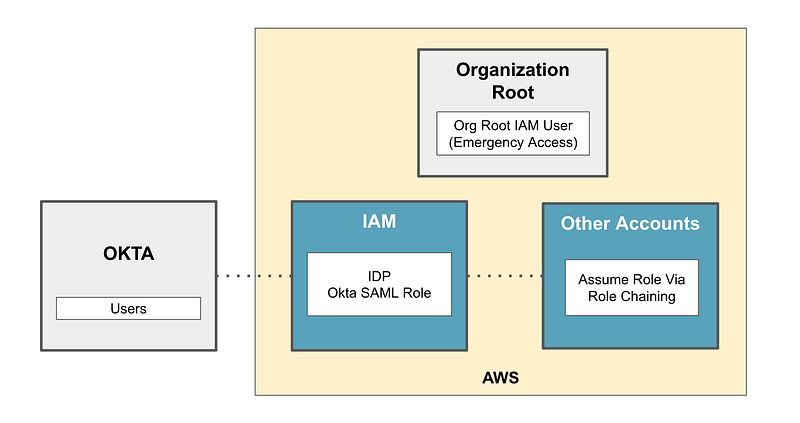
Will this be too complicated for users? What will that look like? I wrote about how cross account access works natively in AWS here:
Once the user logs into the the console via a federated role, can they use the Switch function in the console to switch to another account? Or will they only be able to switch roles via the AWS CLI? (Recall from prior posts I’m not using AWS Identity Center here and explained why.)
If we use role chaining, can we enforce MFA at the point they switch roles? I showed you that when a user performs an action using a role, there is no MFA indicator in the request in CloudFormation.
MFA is associated users on AWS and the MFA indicator is not forwarded to requests performed with roles. When a user logs into Okta they access AWS via a role so there will be no AWS MFA token in the request, so we may not be able to use an AWS MFA condition in that case. But hold that thought because we will revisit MFA with Okta later when grant Okta users permissions to assume AWS roles.
An alternative approach would be to add an IdP in each account where users are allowed to assume a role. Then perhaps Okta can display all the roles a user can assume and the user can log into each account directly from Okta. That may be user friendly. Perhaps we can enforce MFA on switching roles.
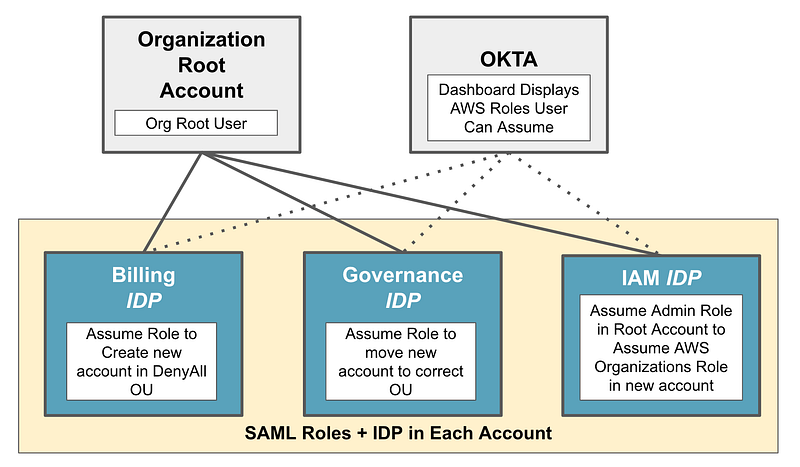
Note that there are some actions which can only be performed in the AWS management account. For those actions, we will need to create a role in the organizational root account for that purpose. We will want to limit actions that may be taken to what is minimally required.
There are two different ways to integrate Okta with AWS IAM. This documentation for use of is not really clear. Here’s what it says:
If you have more than 60 Amazon Web Services (AWS) accounts and want to manage app assignment from groups within an external directory, the preferred method is to use user groups to connect to Okta. In addition to external directories, you can use other profile-sourced applications and local Okta groups.
Well, I don’t have more than 60 accounts so this verbiage makes it sound like we don’t need this. It appears that if we take this approach we might have to deploy an IdP in every AWS account. Otherwise it sounds like we only need one IdP in the management account. However, if we don’t use the group management functionality, I’m guessing we’re going to end up with multiple AWS applications in OKTA, instead of one with a list of roles.
More importantly, with the group matching option, I don’t have to create a user, generate an access key, and add that into my Okta configuration. I’d like to avoid that, so we’re going to go with the group matching option, unless for some reason we find it doesn’t meet our needs.
How will we create a back door as recommended in the Okta documentation?
The AWS Management Account and our OrgRoot user created in a prior post are the backdoor the Okta documentation says you should have in case the IdP is malfunctioning, misconfigured, or unavailable.
We can also make sure that the OrgRoot user has a mechanims to access key accounts via a cross-account role.
Who will configure Okta Integration?
If we are trying to separate creation of users from granting users access we’ll want to separate the administrators who create users from the administrators who grant access to users.
First, we already started to separate duties in Okta in my post on Okta IAM. We created two separate custom admin roles in Okta — a User Admin and an Access Admin.
By doing so we minimize the risk of this scenario: If the Okta admin can create a new user, get the user password, and assign permissions to the user, they may be able to perform the privilege escalation I wrote about in these posts:
We can also separate the creation of roles and policies in AWS from user creation and credentials access in Okta by having separate Okta administrators and AWS IAM administrators.
This configuration should be reviewed and audited by the governance team or some other internal or external audit team, or perhaps via a security assessment on a periodic basis.
AWS account creation
I wrote about how we might structure permissions for creating new AWS Accounts here:
- A person in Billing can use a role in the management account to create a new account.
- A person in IAM can fix the role in the new account.
- A person on the Governance team moves the account from the DenyAll SCP into the organization hierarchy at the appropriate place.
How will this work with Okta?
- The AWS organizational root (OrgRoot) user we created will create the initial Billing role.
- The Okta user administrator will create three new users in Okta — the AWS Billing Administrator, AWS Governance Administrator, and AWS IAM administrator.
- Once the access is granted, the Billing administrator can login to Okta and create new accounts.
Where can users create compute resources and store data?
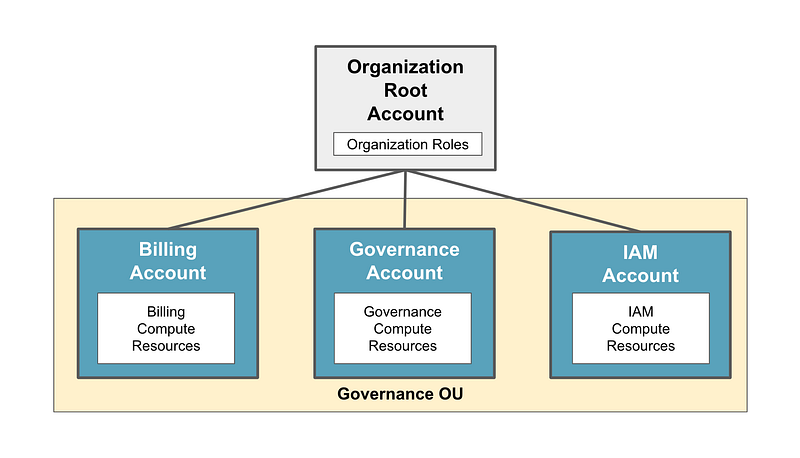
Since SCPs don’t apply to the root account as I keep reiterating, we will need to make sure the roles that allow access to the management account do not grant access to any but required services and resources.
The OrgRoot user can create the IAM administrator, who will be able to fix the default IAM role and create new roles in new AWS accounts.
The OrgRoot user can create the governance role in the governance account and make the account a delegated administrator for AWS Service Control Policies. We may also need to create a separate role for moving accounts into the correct place in the organizational hierachy in the management account.
Once those three roles are in place, they should be able to create all new accounts, users, roles, and permissions with reasonable governance for the rest of the organization.
They will log into Okta to assume the role they will use to deploy resources in the accounts to which they have access. If a user needs access to a role in a particular account, the role must exist that was created by the IAM administrators. Then the administrators on the Okta side have to set up the group mapping.
One challenge I see is that the way we started settings things up, the access admins can add themselves to groups to give themselves permission, so we’ll need to see how we can lock that down on the Okta side.
Well, looks like we need to test this out to determine if and how it is going to work.
Follow for updates.
Teri Radichel | © 2nd Sight Lab 2023
About Teri Radichel:
~~~~~~~~~~~~~~~~~~~~
⭐️ Author: Cybersecurity Books
⭐️ Presentations: Presentations by Teri Radichel
⭐️ Recognition: SANS Award, AWS Security Hero, IANS Faculty
⭐️ Certifications: SANS ~ GSE 240
⭐️ Education: BA Business, Master of Software Engineering, Master of Infosec
⭐️ Company: Penetration Tests, Assessments, Phone Consulting ~ 2nd Sight Lab
Need Help With Cybersecurity, Cloud, or Application Security?
~~~~~~~~~~~~~~~~~~~~~~~~~~~~~~~~~~~~~~~~~~~~~~~~~~~~~~~~~~~~~
🔒 Request a penetration test or security assessment
🔒 Schedule a consulting call
🔒 Cybersecurity Speaker for PresentationFollow for more stories like this:
~~~~~~~~~~~~~~~~~~~~~~~~~~~~~~~~~~~~~~~~~~~~~~~~~~~~~~~~~~~~~
❤️ Sign Up my Medium Email List
❤️ Twitter: @teriradichel
❤️ LinkedIn: https://www.linkedin.com/in/teriradichel
❤️ Mastodon: @teriradichel@infosec.exchange
❤️ Facebook: 2nd Sight Lab
❤️ YouTube: @2ndsightlab