
Mitigating CreateUser Privilege Escalation and Back Doors
ACM.143 Preventing an attacker from creating a backdoor user in your cloud account
~~~~~~~~~~~~~~~~~~~~~~~~~~~~~~~~~~~~~~~~~~~~~~~~~~~~~~~~~~~
⚙️ Check out my series on Automating Cybersecurity Metrics. The Code.
🔒 Related Stories: Data Breaches | Penetration Testing | Cybersecurity
💻 Free Content on Jobs in Cybersecurity | ✉️ Sign up for the Email List
~~~~~~~~~~~~~~~~~~~~~~~~~~~~~~~~~~~~~~~~~~~~~~~~~~~~~~~~~~~
I have been thinking about the CreateUser escalation problem I wrote about for days. Attackers get ahold of credentials and create back door users in cloud accounts to maintain persistent access. In addition, a rogue insider could potentially leverage their permissions to perform unauthorized actions.
In the end, the solution is so simple and obvious that I’m having a hard time believing it took me this long. It’s almost embarrassing how simple the solution is. But I’ve never seen anyone do this or talk about it.
The not-so-simple ideas
Sometimes you think of solutions and they just don’t feel right. They seem overly complicated or like there’s going to be some loophole that you missed. That’s how the next two solutions felt when I started thinking about them.
One solution I thought of was to have the IAM team create all the permissions except adding a user to a group. Let’s say the governance team handled adding a user to a group. That group is allowed to assume a role and only the governance team can allow that user to use that role.
The problems:
- IAM team can still create a new user and assign the role directly to a user.
- IAM team could assign permissions directly to a user with no role (an inline policy.)
So what if we disallow inline polices for a user and directly assigned roles?
- Well, we’re already using a directly-assigned user policy for a certain use case, so that causes some issues. We created that policy to only allow users to see their own secrets.
- We would also have to disallow adding a role directly to a user.
- These things are not so easy to enforce.
- I feel like I’m missing some other way this might be abused but I disregarded this approach before thinking on it further.
What if we had the IAM team create everything but the trust policy for a role? Only the governance team could add users to the trust policy?
- You can’t really separate the permissions of role creation and trust policy creation or assignment on AWS. That just nixes this solution because any attempt to control this gets ugly fast.
I though of having the governance team have to modify some kind of SCP that allows users to use certain groups.
- That is not going to scale well. I can hear the crying already. Nixed.
On top of that, the governance team’s role is not really to assign permissions to users. It is to enforce organizational rules.
The simple solution
In the end, the solution is much more simple. Once you hear it you’ll think oh, that’s so obvious. But I wonder how many people are actually doing it.
I’m going to create two IAM administrative roles:
IAMUserAdministrator: Creates users and provides users their credentials. In other words, this is an authentication administrator.
IAMAccessAdministrator: Creates roles, policies, groups, and assigns user to them. In other words, this is an authorization administrator. The permissions can only be assigned once the user has logged in and assigned an MFA device and their manager has confirmed no one else has the credentials and no other devices are added to the account.
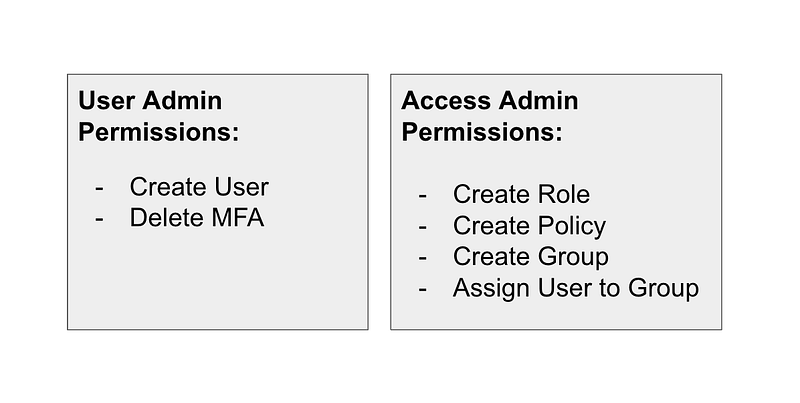
Now it takes two different people to collude to access user credentials and use them for something nefarious.
In other words, an attacker would need to get two sets of credentials and/or sessions to create a backdoor user and assign it to a group.
What about changing the password for existing users?
We have a user who can’t remember his or her password. Well, that user can go through the self-service password reset function, which every cloud service you use should provide, and users should only be able to reset their own passwords in your organization in most cases.
What if a user cannot login because their MFA device is broken or lost?
The IAM User administrator can remove the MFA device but not add a new one for that user. Before doing so they should carefully analyze the request to make sure they are not being tricked by an attacker who has the user’s credentials. Ideally at this point, the support person calls the user on the phone and validates that user is actually trying to change their MFA device prior to making this change. Potentially the User Admin stays on the phone with the user until the new MFA device is added and their password is reset and verifies the user can get into the accout. The security team should also monitor any MFA device changes.
What permissions should each admin get in their policies?
Essentially, the User Admin gets CreateUser and Remove MFA. That’s it. They get this permission in what will become our IAM account only — or perhaps a third-party user management platform.
The IAM Access Admin gets everything else that we want to allow our IAM admin to do. This includes creating roles, trust policies, role policies, user policies, group policies, crate groups, and assigning users to groups. Anything related to granting access to other users would belong to the access admin, within the bounds of whatever the organization has defined.
The assigned permissions for any user could also be restricted by whatever policies the governance team has set via SCPs.
If you must allow password reset functionality for IAM admins things get tricky. Sending passwords in email isn’t very secure.

Neither is allowing the administrator to see the password for the user. An administrator could remove the MFA device and then reset the password to whatever they want and gain access to the user’s account.
That’s why it’s better to use self-service password reset if at all possible.
Backdoor or escalation scenario — new user
Now what happens when an IAM user admin creates a new user? They can get the password, login, and assign MFA. But they would have to convince the IAM Access administrator to grant access to that user. The IAM access administrator should go through a validation process of getting the proper access from the user’s manager and validating that the only the correct user has their own user name and password — that they reset themselves — and have added their own MFA device and on other exists on the account.
If the IAM User Admin has tried to abuse their privileges, the manage of the new user should inform the IAM Access Administrator (and the security team) that something suspicious is going on, because that user has not set their own password or added their own MFA device. And yet, the IAM Access Admin is getting an access request.
Backdoor or escalation scenario — existing user
This one is trickier.
Let’s say an attacker has stolen a user’s credentials
They try to trick the IAM user admin into removing the MFA device from the user’s account so they can reset the password. If the help desk has received a call, they hang up and call the number for that user — in the corporate directory, which must be secure! — to verify that user wants to take said action. As long as the help desk has the correct phone number for the user, the attacker will likely not be able to answer the user’s phone and the plot will be foiled.
Of course, if an attacker has access via malware or otherwise to the Helpdesk workstation they would be able to remove the MFA device using the help desk credentials, but they would have also had to somehow obtain the user’s password.
What if an attacker has access to a user’s hardware MFA device but no credentials?
They would need to trick the user into resetting their password in such a way the attacker can obtain the credentials. Hopefully, if using a hardware security device, the user realizes they don’t have it and knows better than to do anything with credentials until they call the help desk and the issue is resolved. There are many ways I can think of abusing this particular process but hopefully it is not simple for an attacker to get ahold of the hardware security device, and hopefully a user realizes when it is missing before logging in.
What about malware on a phone that runs a virtual MFA solution?
In this case, the attacker can see the codes required to login to a particular web application potentially. They now just need the user’s password. If the user is entering their passwords on that same phone, thats a problem. The attacker has access to the phone. However, if the user is entering the password somewhere else and on a different network, like a web application on a desktop, the attacker now has to infiltrate the desktop as well or convince the user to give up their credentials. One thing to tell your users is not to log into your cloud portals on the phone that runs the application that generates MFA codes.
This one is tricky to resolve — unless the user doesn’t have the password….more on that in many more blog posts because I have to get through a few other things first. (Well, a bunch of other things.)
Follow for updates.
Teri Radichel | © 2nd Sight Lab 2023
About Teri Radichel:
~~~~~~~~~~~~~~~~~~~~
⭐️ Author: Cybersecurity Books
⭐️ Presentations: Presentations by Teri Radichel
⭐️ Recognition: SANS Award, AWS Security Hero, IANS Faculty
⭐️ Certifications: SANS ~ GSE 240
⭐️ Education: BA Business, Master of Software Engineering, Master of Infosec
⭐️ Company: Penetration Tests, Assessments, Phone Consulting ~ 2nd Sight Lab
Need Help With Cybersecurity, Cloud, or Application Security?
~~~~~~~~~~~~~~~~~~~~~~~~~~~~~~~~~~~~~~~~~~~~~~~~~~~~~~~~~~~~~
🔒 Request a penetration test or security assessment
🔒 Schedule a consulting call
🔒 Cybersecurity Speaker for PresentationFollow for more stories like this:
~~~~~~~~~~~~~~~~~~~~~~~~~~~~~~~~~~~~~~~~~~~~~~~~~~~~~~~~~~~~~
❤️ Sign Up my Medium Email List
❤️ Twitter: @teriradichel
❤️ LinkedIn: https://www.linkedin.com/in/teriradichel
❤️ Mastodon: @teriradichel@infosec.exchange
❤️ Facebook: 2nd Sight Lab
❤️ YouTube: @2ndsightlab


