
AWS IAM Architecture for New AWS Accounts
AM.159 Governing creation of new AWS accounts
Part of my series on Automating Cybersecurity Metrics, IAM, and AWS Organizations. The Code.
Free Content on Jobs in Cybersecurity | Sign up for the Email List
In the last post we create an OrgRoot user in our AWS management (root) account and tested accessing a new account using the default role created by AWS Organizations.
In this post we’ll ponder who we want to have create new accounts in our organization and who should be allowed to use the AWS Organizations role (and fix it as I wrote about previously!)
New account creation problems to solve:
- Who do we want to allow to create new AWS accounts?
- Who can use the default AWS Organizations administrative role in a new AWS account?
- How can we update that role to add MFA when the account gets created to reduce the risk associated with the default AWS Organizations role in new accounts?
Governance requirements:
- Only a user or role in the management account can create a new AWS Account in your organization.
- Only an administrative user or role in the root account can assume the default AWS Organizations role.
- New accounts should not be created without financial approval.
- AWS IAM administrators should manage IAM, but not be able to exceed their initial permissions or make any changes in the management account.
- The governance team should ensure accounts are added to the appropriate OU for governance purposes.
Who can create a new AWS account?
We ultimately may want a user in another account to assume a role to create new accounts, but we don’t yet have the account or the user in that account to assume the account creation role, so we need to start with an organizational root user to set up our initial new accounts.
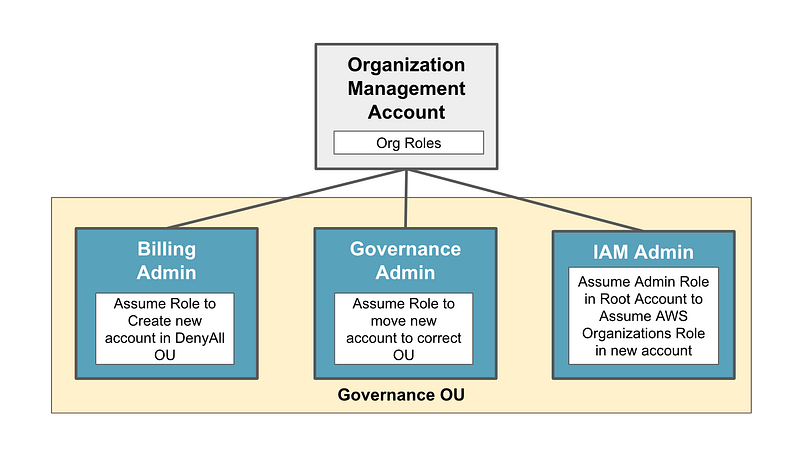
So the steps to grant access to create a new account (without an external IdP) might look something like this:
- Create a new organizational root user. (OrgRoot)
- Create a new DenyAll OU with associated SCP that denies any actions.
- Create a role in the management account that can be assumed by a Billing Administrators to create a new AWS account but can only create that new account in the DenyAll OU.
- Create a role in the management account that can be assumed by a Governance Administrator that can move an AWS account into any OU except the governance or root OU.
- Create an IAM Administrator that can access the default OrganizationsRole in any new account and update it to our new desired role with conditions to limit access as appropriate.
- Require MFA on all of the above actions and use permissions boundaries to prevent unwanted actions.
With the above permissions:
A billing administrator can create a new account when it has the correct financial approval, but that account cannot do anything until the governance team moves it to the appropriate place in the new account hierarchy and adds any additional service control policies, if needed.
A governance administrator can move the account into the proper OU but not the root OU or the governance OU. Only the IAM, Billing, and Governance accounts should be in the Governance OU, created and managed by the OrgRoot user.
Who can log into the default AWS Organizations role and fix it?
The default AWS Organizations role (OrganizationAccountAccessRole or whatever you name it) allows “root” in the AWS Organizations management account to assume it.
When a trust policy allows “root” in another account assume a role, any user or role that is an administrator in that account can assume the role, not just the root user.
To allow our AWS IAM administrators to assume the default AWS Organizations role, we can create an administrative role in the root account, allow the IAM administrators to assume that role, and then use that role assumption to assume the default AWS Organizations role in each new account.
Preventing unwanted actions by the IAM and Governance teams
We can use Service Control Policies in any account except for the management or root account. We also don’t want our governance users to be able to change their own permissions by altering SCPs. In order to restrict roles from taking actions we don’t want them to take in the management account, we should be able to use a Permissions Boundary instead.
How does Okta integration affect our architecture?
Now since we want to Integrate with Okta potentially, we should take a look at if and how this hierarchy will work with Okta before we start implementing it. We’ll take a look at how Okta works with AWS in the next post and then determine how it changes our architecture defined above.
Follow for updates.
Teri Radichel | © 2nd Sight Lab 2023
About Teri Radichel:
~~~~~~~~~~~~~~~~~~~~
⭐️ Author: Cybersecurity Books
⭐️ Presentations: Presentations by Teri Radichel
⭐️ Recognition: SANS Award, AWS Security Hero, IANS Faculty
⭐️ Certifications: SANS ~ GSE 240
⭐️ Education: BA Business, Master of Software Engineering, Master of Infosec
⭐️ Company: Penetration Tests, Assessments, Phone Consulting ~ 2nd Sight Lab
Need Help With Cybersecurity, Cloud, or Application Security?
~~~~~~~~~~~~~~~~~~~~~~~~~~~~~~~~~~~~~~~~~~~~~~~~~~~~~~~~~~~~~
🔒 Request a penetration test or security assessment
🔒 Schedule a consulting call
🔒 Cybersecurity Speaker for PresentationFollow for more stories like this:
~~~~~~~~~~~~~~~~~~~~~~~~~~~~~~~~~~~~~~~~~~~~~~~~~~~~~~~~~~~~~
❤️ Sign Up my Medium Email List
❤️ Twitter: @teriradichel
❤️ LinkedIn: https://www.linkedin.com/in/teriradichel
❤️ Mastodon: @teriradichel@infosec.exchange
❤️ Facebook: 2nd Sight Lab
❤️ YouTube: @2ndsightlab


