avatarTeri Radichel

Free AI web copilot to create summaries, insights and extended knowledge, download it at here

3513

Abstract

t should have.</p><p id="b2af">Alternatively, I could create a specific process for how and when this particular account may be used and require multiple people to access it.</p><p id="b6fb">We can allow users to assume roles as described in this post on allowing groups to assume a role. In reality, I allowed users to assume a role in a trust policy, but I automated the creation of the trust policy by iterating the users in a group.</p><div id="fecf" class="link-block"> <a href="https://readmedium.com/assigning-a-group-to-a-trust-policy-in-an-aws-iam-role-3ba8abf56954"> <div> <div> <h2>Assigning a Group to a Trust Policy in an AWS IAM Role</h2> <div><h3>ACM.45 How to assign a group to a trust policy indirectly to overcome AWS limitations</h3></div> <div><p>medium.com</p></div> </div> <div> <div style="background-image: url(https://miro.readmedium.com/v2/resize:fit:320/1*-uSVIKUbHG7V3qEY8mQedg.png)"></div> </div> </div> </a> </div><p id="4a68">So the trust policy in the OrganizationAccountAccessRole could change like this for that particular scenario:</p><figure id="561c"><img src="https://cdn-images-1.readmedium.com/v2/resize:fit:800/1*AksvUKW8sI-dLhnFd5JhQA.png"><figcaption></figcaption></figure><p id="9f2f"><b>Compromise of the IAMROOT user that is allowed to assume the role</b></p><p id="b64e">The most secure option is to limit the role to specific principals. However, what if those user’s credentials or session gets compromised?</p><p id="ed05">AWS offers a number of additional controls we can add to our trust policy:</p><div id="65ae" class="link-block"> <a href="https://aws.amazon.com/blogs/security/how-to-use-trust-policies-with-iam-roles/"> <div> <div> <h2>How to use trust policies with IAM roles | Amazon Web Services</h2> <div><h3>November 3, 2022: We updated this post to fix some syntax errors in the policy statements and to add additional use…</h3></div> <div><p>aws.amazon.com</p></div> </div> <div> <div style="background-image: url(https://miro.readmedium.com/v2/resize:fit:320/0*pCq4hmC8rft-XgSQ)"></div> </div> </div> </a> </div><ul><li><b>Limiting by IP address</b> is interesting and might be a good addition, but alone it does not protect against an attacker who has compromised a the machine where the principal is using the credentials that have been compromised. It will restrict an attacker from taking those credentials and using them from some other machine in a different network.</li><li><b>Limiting to your own organization</b> is a good idea, but this access could be too broad as it allows anyone in your organization to use the role. This would be a good addition but not a standalone control. It also would not block an attacker who has stolen valid credentials that work in your organization.</li><li><b>Limiting based on tags</b> is also interesting, but<b><i> not if the people whom you are trying to restrict can or a malicious insider can change the tags</i></b>. Consider the scenario where an attacker gets into the account and can modify the tags to give themselves access to the role. This again is a good addition but not a good stand-alone solution. Also, having dealt with tags before, it can

Options

be cumbersome and error prone. Test thoroughly if you use this approach.</li><li><b>External IDs</b> are really for use with third parties as explained in my post of the <a href="https://readmedium.com/confused-deputy-attack-in-iam-resource-and-assumerole-policies-8fea3e2553b2">Confused Deputy</a> problem. They also might help if you want to make sure someone has to know the external ID to use the role. However, anyone in the account that can see the policies and logs might be able to obtain access to the external ID. At least with this type of trust policy, an attacker cannot phish users so freely as they can with the <a href="https://readmedium.com/aws-cli-for-an-sso-user-156893beec44">AWS SSO CLI</a> solution.</li></ul><p id="ff01">Probably a combination of the above controls would be helpful. However, an <b><i>even better solution would be to</i> <i>require MFA</i></b> as I wrote about in this post below and have been doing throughout this series.</p><div id="8256" class="link-block"> <a href="https://readmedium.com/cross-account-aws-iam-roles-with-external-ids-and-mfa-4ef2a18bdd27"> <div> <div> <h2>Cross account AWS IAM roles with external IDs and MFA</h2> <div><h3>Credentials for cloud penetration tests and security assessments</h3></div> <div><p>medium.com</p></div> </div> <div> <div style="background-image: url(https://miro.readmedium.com/v2/resize:fit:320/1*nqZzhQRcUaTFvcJujXx6NA.png)"></div> </div> </div> </a> </div><p id="4813">That would limit this very powerful role to use by a specific user with an <b>MFA</b> device.</p><p id="2b50">In upcoming posts we’ll continue considering how we want to architect our accounts to facilitate a more secure configuration for new AWS accounts.</p><p id="a004">Follow for updates.</p><p id="4a3a">Teri Radichel | <i>© <a href="https://2ndsightlab.com/?source=post_page---------------------------">2nd Sight Lab</a> 2023</i></p><div id="8b5f"><pre><span class="hljs-section">About Teri Radichel:

⭐️ Author: Cybersecurity Books
⭐️ Presentations: Presentations by Teri Radichel
⭐️ Recognition: SANS Award, AWS Security Hero, IANS Faculty
⭐️ Certifications: SANS ~ GSE 240
⭐️ Education: BA Business, Master of Software Engineering, Master of Infosec
⭐️ Company: Penetration Tests, Assessments, Phone Consulting ~ 2nd Sight Lab</pre></div><div id="caae"><pre><span class="hljs-section">Need Help With Cybersecurity, Cloud, or Application Security?
~~~~~~~~~~~~~~~~~~~~~~~~~~~~~~~~~~~~~~~~~~~~~~~~~~~~~~~~~~~~~</span>
🔒 Request a penetration test or security assessment
🔒 Schedule a consulting call
🔒 Cybersecurity Speaker for Presentation</pre></div><div id="5a42"><pre>Follow <span class="hljs-keyword">for</span> more stories like <span class="hljs-keyword">this</span>:

❤️ Sign Up my Medium Email List ❤️ Twitter: <span class="hljs-meta">@teriradichel</span> ❤️ LinkedIn: https:<span class="hljs-comment">//www.linkedin.com/in/teriradichel</span> ❤️ Mastodon: <span class="hljs-meta">@teriradichel</span><span class="hljs-meta">@infosec</span>.exchange ❤️ Facebook: 2nd Sight Lab ❤️ YouTube: @2ndsightlab</pre></div><figure id="faf5"><img src="https://cdn-images-1.readmedium.com/v2/resize:fit:800/0*H9Ew1KCl-29nZiPR.jpeg"><figcaption></figcaption></figure></article></body>

A Safer AWS Organizations Management Role

ACM.156 Altering the AWS Organizations Default Management Role to Reduce Risk

Part of my series on Automating Cybersecurity Metrics and IAM. The Code.

Free Content on Jobs in Cybersecurity | Sign up for the Email List

We figured out in our last post that we don’t want to leave the default AWS Organizations Role hanging around as it is a bit risky.

How could we modify that role to reduce the risk that it could be abused?

Let’s think through some scenarios.

Change the Role Name

Although we cannot change the permissions for the default management role, we can change the name:
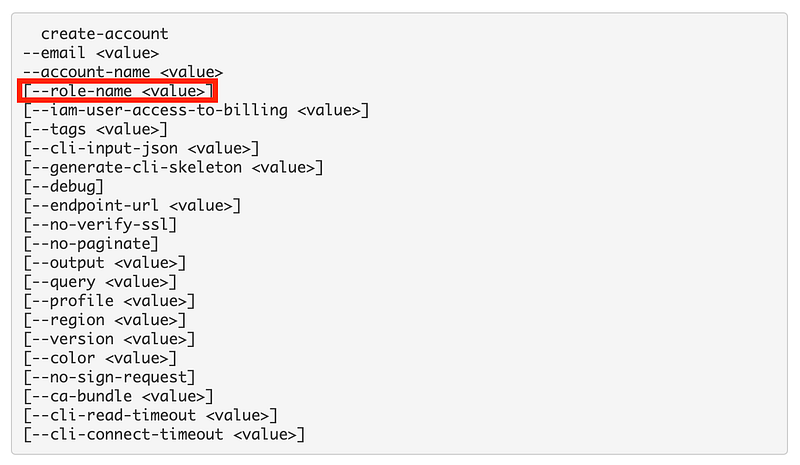
At least by changing the name it will be harder for someone to guess the name because it was left as the default and try to abuse it somehow.

Root account credentials compromised

Let’s say our root account credentials are compromised. Our organization is pretty much toast, right? The root credentials are not subject to service control policies as I’ve mentioned a number of times, nor are any users or roles in the AWS management account.

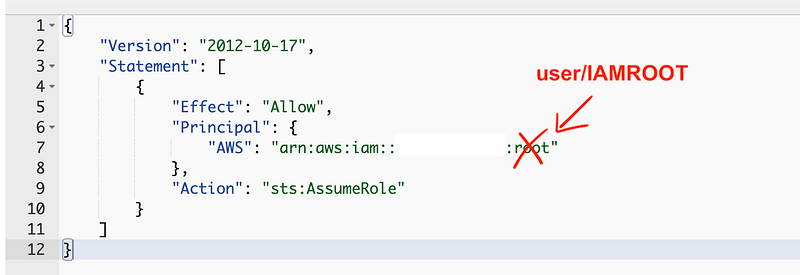
The default AWS Organizations role references the account “root” principal. That principal applies to any administrator in the root account, not just the root user.

Until we create another principal in the root account, we can’t really change the principal in the trust policy to be more restrictive. We could create a new user in the root account.

I mentioned before that I was going to create an “IAMROOT” user to run our initial scripts. Perhaps we should do that now and deploy a new role in the governance account and delete the existing role. We can grant the IAMROOT user access to create a more specific policy. Then the IAMROOT user can delete the policy we don’t want.

Now I’m considering this IAMROOT user account to be a special user account only used under special circumstances. I could create a group and add multiple users. The problem that I might face is that a new user might somehow get added to the group and obtain access that only this special IAMROOT account should have.

Alternatively, I could create a specific process for how and when this particular account may be used and require multiple people to access it.

We can allow users to assume roles as described in this post on allowing groups to assume a role. In reality, I allowed users to assume a role in a trust policy, but I automated the creation of the trust policy by iterating the users in a group.

So the trust policy in the OrganizationAccountAccessRole could change like this for that particular scenario:
Compromise of the IAMROOT user that is allowed to assume the role

The most secure option is to limit the role to specific principals. However, what if those user’s credentials or session gets compromised?

AWS offers a number of additional controls we can add to our trust policy:

  • Limiting by IP address is interesting and might be a good addition, but alone it does not protect against an attacker who has compromised a the machine where the principal is using the credentials that have been compromised. It will restrict an attacker from taking those credentials and using them from some other machine in a different network.
  • Limiting to your own organization is a good idea, but this access could be too broad as it allows anyone in your organization to use the role. This would be a good addition but not a standalone control. It also would not block an attacker who has stolen valid credentials that work in your organization.
  • Limiting based on tags is also interesting, but not if the people whom you are trying to restrict can or a malicious insider can change the tags. Consider the scenario where an attacker gets into the account and can modify the tags to give themselves access to the role. This again is a good addition but not a good stand-alone solution. Also, having dealt with tags before, it can be cumbersome and error prone. Test thoroughly if you use this approach.
  • External IDs are really for use with third parties as explained in my post of the Confused Deputy problem. They also might help if you want to make sure someone has to know the external ID to use the role. However, anyone in the account that can see the policies and logs might be able to obtain access to the external ID. At least with this type of trust policy, an attacker cannot phish users so freely as they can with the AWS SSO CLI solution.

Probably a combination of the above controls would be helpful. However, an even better solution would be to require MFA as I wrote about in this post below and have been doing throughout this series.

That would limit this very powerful role to use by a specific user with an MFA device.

In upcoming posts we’ll continue considering how we want to architect our accounts to facilitate a more secure configuration for new AWS accounts.

Follow for updates.

Teri Radichel | © 2nd Sight Lab 2023

About Teri Radichel:
~~~~~~~~~~~~~~~~~~~~
⭐️ Author: Cybersecurity Books
⭐️ Presentations: Presentations by Teri Radichel
⭐️ Recognition: SANS Award, AWS Security Hero, IANS Faculty
⭐️ Certifications: SANS ~ GSE 240
⭐️ Education: BA Business, Master of Software Engineering, Master of Infosec
⭐️ Company: Penetration Tests, Assessments, Phone Consulting ~ 2nd Sight Lab
Need Help With Cybersecurity, Cloud, or Application Security?
~~~~~~~~~~~~~~~~~~~~~~~~~~~~~~~~~~~~~~~~~~~~~~~~~~~~~~~~~~~~~
🔒 Request a penetration test or security assessment
🔒 Schedule a consulting call
🔒 Cybersecurity Speaker for Presentation
Follow for more stories like this:
~~~~~~~~~~~~~~~~~~~~~~~~~~~~~~~~~~~~~~~~~~~~~~~~~~~~~~~~~~~~~ 
❤️ Sign Up my Medium Email List
❤️ Twitter: @teriradichel
❤️ LinkedIn: https://www.linkedin.com/in/teriradichel
❤️ Mastodon: @teriradichel@infosec.exchange
❤️ Facebook: 2nd Sight Lab
❤️ YouTube: @2ndsightlab

Cloud Security
AWS
Trust Policy
Organizations
Role
Recommended from ReadMedium