avatarTeri Radichel

Free AI web copilot to create summaries, insights and extended knowledge, download it at here

6007

Abstract

monstrate the above, but what if the attacker could somehow get you to integrate their account at Okta or some other SAML system with your AWS account by changing the metadata? Perhaps they could login and take actions in your account. At the very least they could break your integration.</p><p id="4f82">Maybe there’s some sort of SAML vulnerability they could take advantage of trick systems into responding with malicious data. Or perhaps they could then redirect your request or the responses to their servers to obtain sensitive data included in those requests and responses.</p><p id="d2fb">In any case, we should carefully download the metadata, inspect it, and use it from a trusted source rather than randomly grabbing it off the Internet each time. For the initial insertion into parameter store, I can pull the metadata from the web, inspect it, and test that it works properly. We will reference the metadata we have tested and inspected from a secure location in AWS. I will not re-download it every time I create a new IdP.</p><h2 id="756c">Dynamic parameter references in CloudFormation</h2><p id="b281">We will ultimately reference our parameter in CloudFormation as described here:</p><div id="24f2" class="link-block"> <a href="https://docs.aws.amazon.com/AWSCloudFormation/latest/UserGuide/dynamic-references.html#dynamic-references-ssm-secure-strings"> <div> <div> <h2>Using dynamic references to specify template values</h2> <div><h3>undefined</h3></div> <div><p>undefined</p></div> </div> <div> <div style="background-image: url(https://miro.readmedium.com/v2/resize:fit:320/)"></div> </div> </div> </a> </div><p id="5909">What if we want to use SSM Secure-String Parameter:</p><div id="6557" class="link-block"> <a href="https://docs.aws.amazon.com/AWSCloudFormation/latest/UserGuide/dynamic-references.html#dynamic-references-ssm-secure-strings"> <div> <div> <h2>Using dynamic references to specify template values: ssm-secure</h2> <div><h3>undefined</h3></div> <div><p>undefined</p></div> </div> <div> <div style="background-image: url(https://miro.readmedium.com/v2/resize:fit:320/)"></div> </div> </div> </a> </div><p id="7a86">Remember as I wrote previously we can’t create a secure SSM parameter using CloudFormation:</p><figure id="9471"><img src="https://cdn-images-1.readmedium.com/v2/resize:fit:800/1*aNXsN2OcdxiZZtW2Y3MWlw.png"><figcaption></figcaption></figure><p id="da70">Nix that. Let’s see if we can use an encrypted Secrets Manager value.</p><div id="39aa" class="link-block"> <a href="https://docs.aws.amazon.com/AWSCloudFormation/latest/UserGuide/dynamic-references.html#dynamic-references-secretsmanager"> <div> <div> <h2>Using dynamic references to specify template values: Secrets</h2> <div><h3>undefined</h3></div> <div><p>undefined</p></div> </div> <div> <div style="background-image: url(https://miro.readmedium.com/v2/resize:fit:320/)"></div> </div> </div> </a> </div><p id="3959">First we need to create a KMS key. Then we deploy a secret that uses that key.</p><h2 id="9460">Profiles to run scripts and deactivating keys when not in use</h2><p id="44a0">Remember that we created scripts that run with certain AWS CLI profile names. To run these scripts, I created AWS developer keys for my OrgRoot user and configured the AWS CLI in CloudShell with this command (with whatever profile name I needed to run the script):</p><div id="b6b8"><pre>aws configure --profile KMS</pre></div><p id="1696">As soon as I was done using the keys or when I was not working on this I deactivated them. Using this deactivation functionality would allow you to mimic Azure Privileged Information Management and Just In Time Access, by the way — a topic I might get to later.</p><figure id="bc92"><img src="https://cdn-images-1.readmedium.com/v2/resize:fit:800/1*G7mA7BbPoJZWoaEZqLrBWA.png"><figcaption></figcaption></figure><p id="cdcb">I am only taking this approach for the initial scripts run by the OrgRoot user. The long term approach is to use roles that require MFA.</p><h2 id="13e2">Create a KMS Key in the AWS Management Account</h2><p id="41c3">If I want to create a KMS key to protect my Secret, I’ll have to create that first. We can reuse our existing KMS code and run the code as the OrgRoot user in the Management account.</p><p id="d86e">Now I was just going to re-use my existing KMS code as is but I ran into this problem. I hard coded an Import for KMS keys that should all be created by KMS administrators for typical KMS keys. But in this case, we do not yet have a KMS administrator so there’s nothing to export. I could create a KMS administrator in this account but actually I want KMS keys to exist in a separate account, managed by KMS administrators.</p><figure id="04ee"><img src="https://cdn-images-1.readmedium.com/v2/resize:fit:800/1*07VYe6IPE2Clz76sQu3cSA.png"><figcaption></figcaption></figure><p id="9a0d">To address this I created another condition that checks to see if the key alias is “OrgRootSecrets”.</p><figure id="4e62"><img src="https://cdn-images-1.readmedium.com/v2/resize:fit:800/1*QdJWfoTkJjzx0KdGDA83UA.png"><figcaption></figcaption></figure><p id="8507">Then I changed the ARN to include an if statement to use the ARN in the management account depending on the key alias.</p><figure id="579d"><img src="https://cdn-images-1.readmedium.com/v2/resize:fit:800/1*yHSaOJR5PPB8MFPs66b4hw.png"><figcaption></figcaption></figure><p id="d3cb">What could go wrong with this approach? A KMS admin using the KMS scripts c

Options

ould name a key with the above alias and use a different ARN to manage a key. We can probably restrict this with an SCP or a Permission Boundary on our KMS administrator or both. A key with that alias should only be created in the management account for organizational secrets.</p><p id="8742">My deployment script exists in /Org/stacks/KMS/deploy.sh</p><p id="999f">I have to reference the code in the remote directory. Also where a script in the remote directory references a script in a relative manner, I run into problems. The relative path is not the same when I execute the code from the Org directory. That’s why I have to navigate to the directory where the code is located and then navigate back.</p><p id="91fc">I also added the alias deployment for the key.</p><p id="98c1">My deployment script ended up looking like this:</p><figure id="21ce"><img src="https://cdn-images-1.readmedium.com/v2/resize:fit:800/1*cnwkM7raLiFUGXEWOvvlFw.png"><figcaption></figcaption></figure><h2 id="28ef">Create a Secret with the Okta Metadata</h2><p id="c531">Next we want to create a secret with the Okta Metadata. I could try to curl the Okta Metadata and automatically add it to the secret, but I’d need to be logged into the Okta account at the same time on whatever AWS resources where I’m running the code. I don’t want to Okta in AWS so I’m going to manually download the metadata and add it to the secret after the fact.</p><p id="1ec4">I tried to reuse the secret code but once again I had a secret resource policy with a hard-coded ARN.</p><figure id="a1ae"><img src="https://cdn-images-1.readmedium.com/v2/resize:fit:800/1*kSTiWiLwtG1ZCNEDIFbNtg.png"><figcaption></figcaption></figure><p id="8caa">I decided to simplify the code and remove the resource policy from the secret for now since the metadata is not exactly a secret and very few people will be able to access the secrets in the AWS management account. I may decide to apply a resource policy if that changes. In a large company, you would probably want to add one right away and restrict access to the OrgRoot user.</p><p id="9d3d">I ended up with the following:</p><p id="8dcd"><i>deploy.sh</i></p><figure id="99f3"><img src="https://cdn-images-1.readmedium.com/v2/resize:fit:800/1*oqYnL3YH1Lc7UF6mSo4eGA.png"><figcaption></figcaption></figure><p id="7244"><i>secret_functions.sh</i></p><figure id="63df"><img src="https://cdn-images-1.readmedium.com/v2/resize:fit:800/1*9m8SkG8A_nKlnscFjNe20A.png"><figcaption></figcaption></figure><p id="08cc"><i>cfn/Secret.yaml</i></p><figure id="c3a7"><img src="https://cdn-images-1.readmedium.com/v2/resize:fit:800/1*1mHQFV1BcvjhlwYueXsuMg.png"><figcaption></figcaption></figure><p id="eb7d">Once I had a secret I returned to the metadata URL as explained in the last post, obtained the metadata, and manually pasted it into my new secret.</p><h2 id="e680">Create the AWS IAM Identity Provider</h2><p id="350c">Next I created the AWS IAM Identity provider in a new directory:</p><p id="e2b5"><i>Org/stacks/IdP</i></p><p id="5f48">Just as with the other directories, I create a deploy script, a template in a cfn file and an functions script. They ended up looking like this:</p><p id="320d"><i>deploy.sh</i></p><figure id="235d"><img src="https://cdn-images-1.readmedium.com/v2/resize:fit:800/1*HZcOE-Ek61vvxDGuRG7r9A.png"><figcaption></figcaption></figure><p id="d6f5"><i>idp_functions.sh</i></p><figure id="1d47"><img src="https://cdn-images-1.readmedium.com/v2/resize:fit:800/1*LhEcCCdKtbwbWwwri9nYYQ.png"><figcaption></figcaption></figure><p id="3ee8"><i>cfn/IdP.yaml</i></p><figure id="23b5"><img src="https://cdn-images-1.readmedium.com/v2/resize:fit:800/1*dgQmb_gUB78XeuPluwqZAQ.png"><figcaption></figcaption></figure><p id="7cd0">Navigate to IAM and verify your new Identity Provider exists:</p><figure id="b89f"><img src="https://cdn-images-1.readmedium.com/v2/resize:fit:800/1*fLndLU3zLrDeKKPVHMA8Bw.png"><figcaption></figcaption></figure><p id="ae93">After creating the IdP in AWS return to the AWS application signon settings in Okta and populate the Identity Provider ARN.</p><figure id="9461"><img src="https://cdn-images-1.readmedium.com/v2/resize:fit:800/1*pZq3F4DwlNGXeMFQR6qsLQ.png"><figcaption></figcaption></figure><p id="dd77">Now that we have deployed our IdP to Okta we can move to the next step. These changes are in the code on the GitHub repository now.</p><p id="9e6c">Follow for updates.</p><p id="4a3a">Teri Radichel | <i>© <a href="https://2ndsightlab.com/?source=post_page---------------------------">2nd Sight Lab</a> 2023</i></p><div id="8b5f"><pre><span class="hljs-section">About Teri Radichel:

⭐️ Author: Cybersecurity Books
⭐️ Presentations: Presentations by Teri Radichel
⭐️ Recognition: SANS Award, AWS Security Hero, IANS Faculty
⭐️ Certifications: SANS ~ GSE 240
⭐️ Education: BA Business, Master of Software Engineering, Master of Infosec
⭐️ Company: Penetration Tests, Assessments, Phone Consulting ~ 2nd Sight Lab</pre></div><div id="caae"><pre><span class="hljs-section">Need Help With Cybersecurity, Cloud, or Application Security?
~~~~~~~~~~~~~~~~~~~~~~~~~~~~~~~~~~~~~~~~~~~~~~~~~~~~~~~~~~~~~</span>
🔒 Request a penetration test or security assessment
🔒 Schedule a consulting call
🔒 Cybersecurity Speaker for Presentation</pre></div><div id="5a42"><pre>Follow <span class="hljs-keyword">for</span> more stories like <span class="hljs-keyword">this</span>:

❤️ Sign Up my Medium Email List ❤️ Twitter: <span class="hljs-meta">@teriradichel</span> ❤️ LinkedIn: https:<span class="hljs-comment">//www.linkedin.com/in/teriradichel</span> ❤️ Mastodon: <span class="hljs-meta">@teriradichel</span><span class="hljs-meta">@infosec</span>.exchange ❤️ Facebook: 2nd Sight Lab ❤️ YouTube: @2ndsightlab</pre></div><figure id="faf5"><img src="https://cdn-images-1.readmedium.com/v2/resize:fit:800/0*H9Ew1KCl-29nZiPR.jpeg"><figcaption></figcaption></figure></article></body>

Okta SAML Integration with AWS IAM Step 2: AWS IAM Identity Provider

ACM.173 Using CloudFormation to deploy an IdP for Okta in your AWS Organizations management account

~~~~~~~~~~~~~~~~~~~~~~~~~~~~~~~~~~~~~~~~~~~~~~~~~~~~~~~~~~~

⚙️ Check out my series on Automating Cybersecurity Metrics. The Code.

🔒 Related Stories: Cloud Governance | IAM | AWS Security | Okta

💻 Free Content on Jobs in Cybersecurity | ✉️ Sign up for the Email List

~~~~~~~~~~~~~~~~~~~~~~~~~~~~~~~~~~~~~~~~~~~~~~~~~~~~~~~~~~~

In the last post we looked at how to obtain the metadata required to configure an IdP in AWS for Okta.

Today we’ll look at automating the IdP configuration in AWS.

Steps for IdP creation on AWS

We’re following these Okta instructions. We’re on step 1, however we are going to automate the creation of an IdP with CloudFormation.

Here are the steps I’m going to take:

  1. Deploy a new secret to store the Okta Metadata
  2. Create a KMS key to use with AWS Secrets Manager.
  3. Write an CloudFormation script that deploys the IDP using the metadata in Secrets Manager.
  4. Output the IdP ARN for use in the next step.

Deploy an AWS IAM Identity Provider with CloudFormation

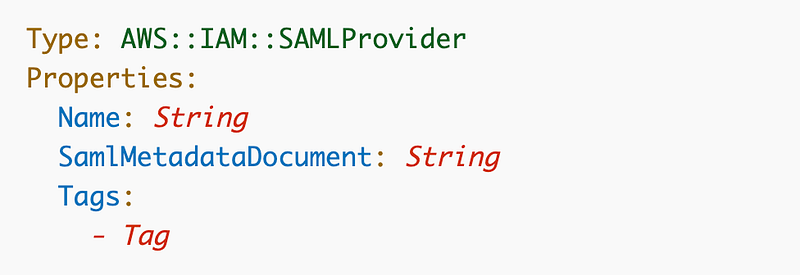
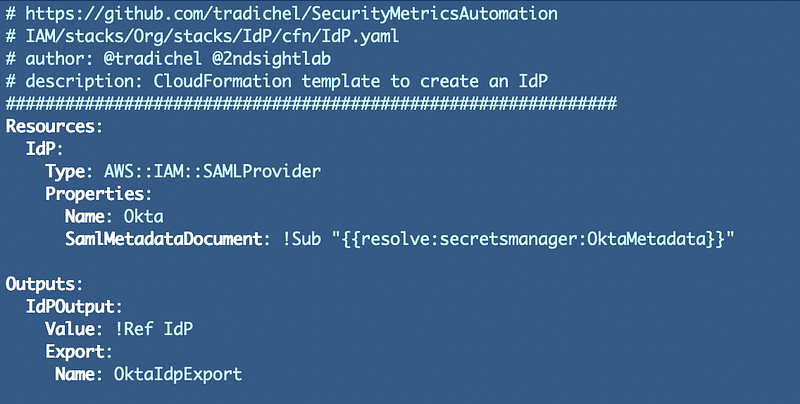
Let’s see what the AWS CloudFormation for an AWS IAM Identity Provider requires.

It’s pretty simple. We need a name and the metadata document we retrieved in our last post:
Directory Structure

I’m going to create a new IdP folder in my IAM directory structure within my code base.
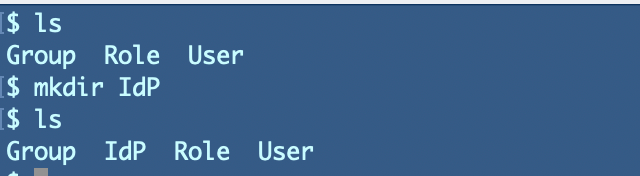
I’ll add a cfn folder in that IdP folder matching the rest of my repository and I’ll add my CloudFormation template for my IdP in there.

I’ll add a deploy script and if needed an IdP functions file in the IdP folder. There is one other thing we’re going to need to securely deploy IdPs to other accounts in the future and to create scripts that can be used by anyone in any account.

Secure and Flexible handling of Okta metadata

Now, the metadata from Okta that is required to configure the IdP that I will retrieve is specific to my account. Your metadata, if you are using Okta, will be different. Therefore I do not want to hardcode the metadata into this template. How should I handle this? Well, I can think of various ways to solve this problem.

I could make the metadata a parameter and pull it off the Internet each time I need the document and pass it into the configuration. However, any time you’re randomly pulling data off the Internet when you deploy things is not considered a secure method of deployment. What could go wrong?

  • An attacker poisons your DNS server which causes your automated process to get the metadata from a malicious domain instead of Okta.
  • An attacker intercepts the traffic with a proxy and changes the contents of the request and the response so it contains their own SAML integration.

I’d need to think through this a bit more to demonstrate the above, but what if the attacker could somehow get you to integrate their account at Okta or some other SAML system with your AWS account by changing the metadata? Perhaps they could login and take actions in your account. At the very least they could break your integration.

Maybe there’s some sort of SAML vulnerability they could take advantage of trick systems into responding with malicious data. Or perhaps they could then redirect your request or the responses to their servers to obtain sensitive data included in those requests and responses.

In any case, we should carefully download the metadata, inspect it, and use it from a trusted source rather than randomly grabbing it off the Internet each time. For the initial insertion into parameter store, I can pull the metadata from the web, inspect it, and test that it works properly. We will reference the metadata we have tested and inspected from a secure location in AWS. I will not re-download it every time I create a new IdP.

Dynamic parameter references in CloudFormation

We will ultimately reference our parameter in CloudFormation as described here:

What if we want to use SSM Secure-String Parameter:

Remember as I wrote previously we can’t create a secure SSM parameter using CloudFormation:
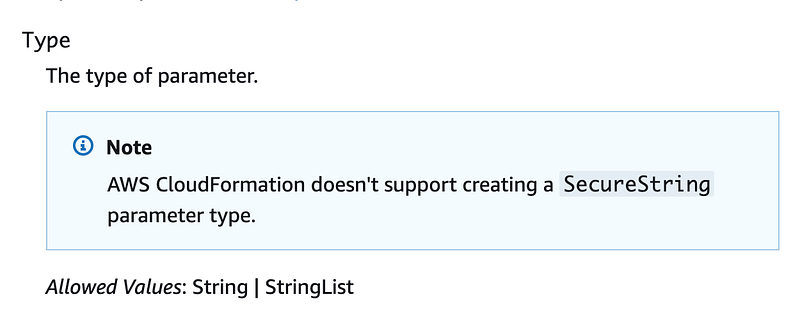
Nix that. Let’s see if we can use an encrypted Secrets Manager value.

First we need to create a KMS key. Then we deploy a secret that uses that key.

Profiles to run scripts and deactivating keys when not in use

Remember that we created scripts that run with certain AWS CLI profile names. To run these scripts, I created AWS developer keys for my OrgRoot user and configured the AWS CLI in CloudShell with this command (with whatever profile name I needed to run the script):

aws configure --profile KMS

As soon as I was done using the keys or when I was not working on this I deactivated them. Using this deactivation functionality would allow you to mimic Azure Privileged Information Management and Just In Time Access, by the way — a topic I might get to later.
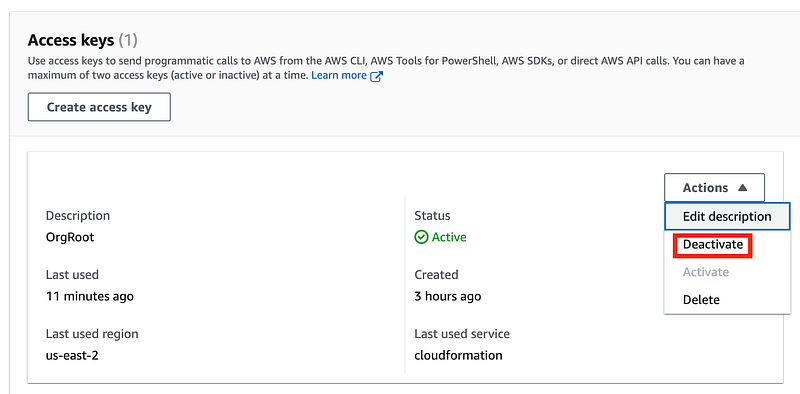
I am only taking this approach for the initial scripts run by the OrgRoot user. The long term approach is to use roles that require MFA.

Create a KMS Key in the AWS Management Account

If I want to create a KMS key to protect my Secret, I’ll have to create that first. We can reuse our existing KMS code and run the code as the OrgRoot user in the Management account.

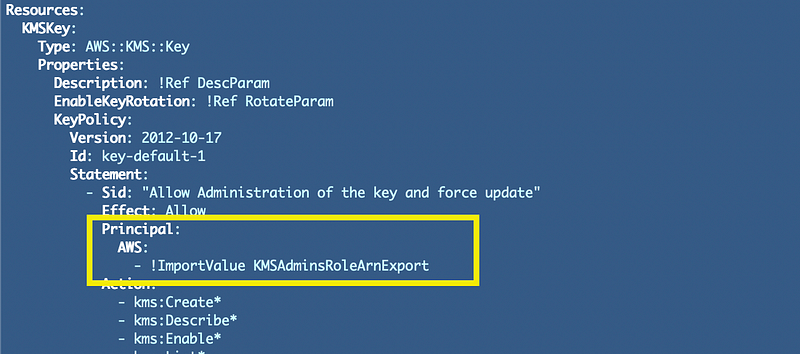
Now I was just going to re-use my existing KMS code as is but I ran into this problem. I hard coded an Import for KMS keys that should all be created by KMS administrators for typical KMS keys. But in this case, we do not yet have a KMS administrator so there’s nothing to export. I could create a KMS administrator in this account but actually I want KMS keys to exist in a separate account, managed by KMS administrators.
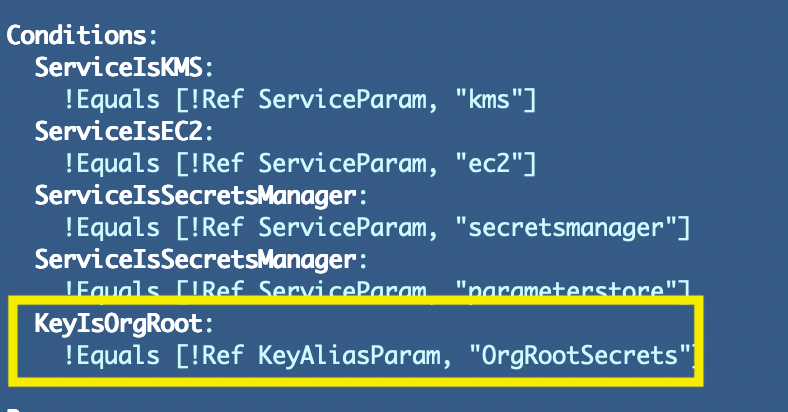
To address this I created another condition that checks to see if the key alias is “OrgRootSecrets”.
Then I changed the ARN to include an if statement to use the ARN in the management account depending on the key alias.
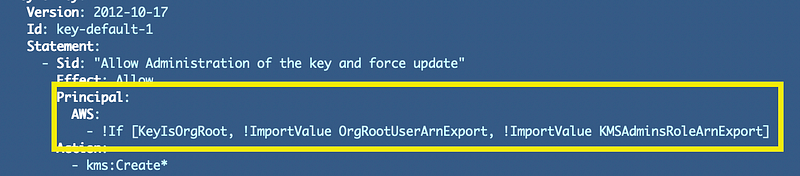
What could go wrong with this approach? A KMS admin using the KMS scripts could name a key with the above alias and use a different ARN to manage a key. We can probably restrict this with an SCP or a Permission Boundary on our KMS administrator or both. A key with that alias should only be created in the management account for organizational secrets.

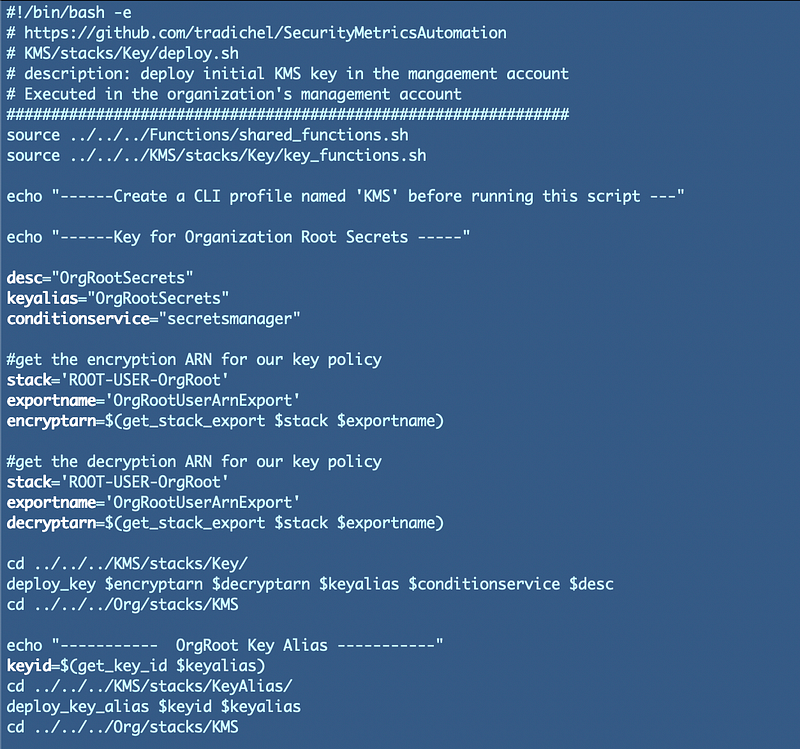
My deployment script exists in /Org/stacks/KMS/deploy.sh

I have to reference the code in the remote directory. Also where a script in the remote directory references a script in a relative manner, I run into problems. The relative path is not the same when I execute the code from the Org directory. That’s why I have to navigate to the directory where the code is located and then navigate back.

I also added the alias deployment for the key.

My deployment script ended up looking like this:
Create a Secret with the Okta Metadata

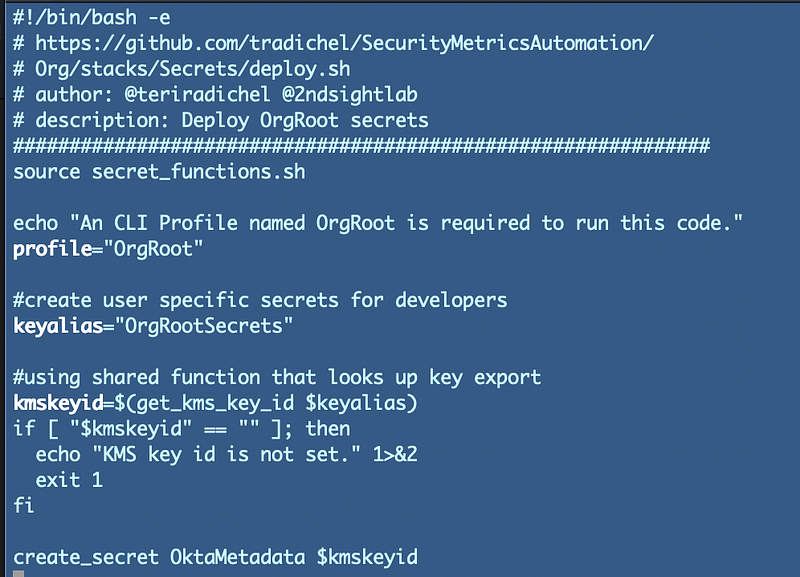
Next we want to create a secret with the Okta Metadata. I could try to curl the Okta Metadata and automatically add it to the secret, but I’d need to be logged into the Okta account at the same time on whatever AWS resources where I’m running the code. I don’t want to Okta in AWS so I’m going to manually download the metadata and add it to the secret after the fact.

I tried to reuse the secret code but once again I had a secret resource policy with a hard-coded ARN.
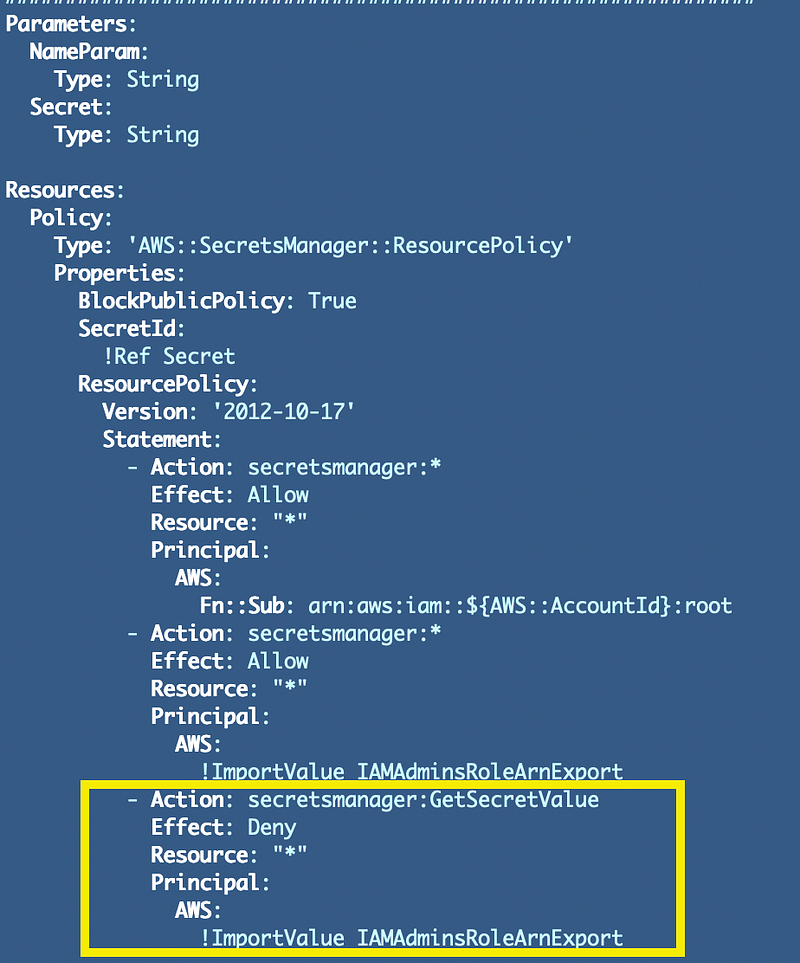
I decided to simplify the code and remove the resource policy from the secret for now since the metadata is not exactly a secret and very few people will be able to access the secrets in the AWS management account. I may decide to apply a resource policy if that changes. In a large company, you would probably want to add one right away and restrict access to the OrgRoot user.

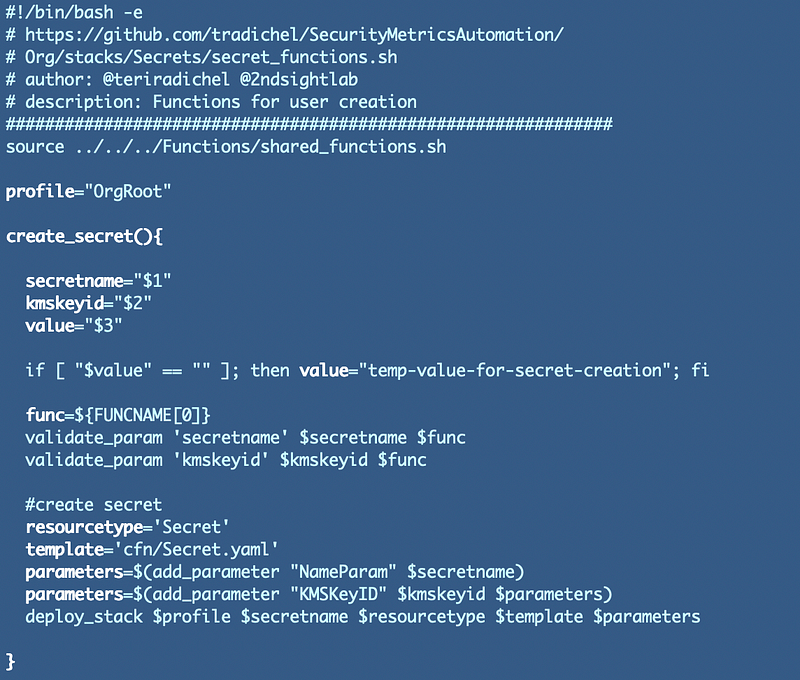
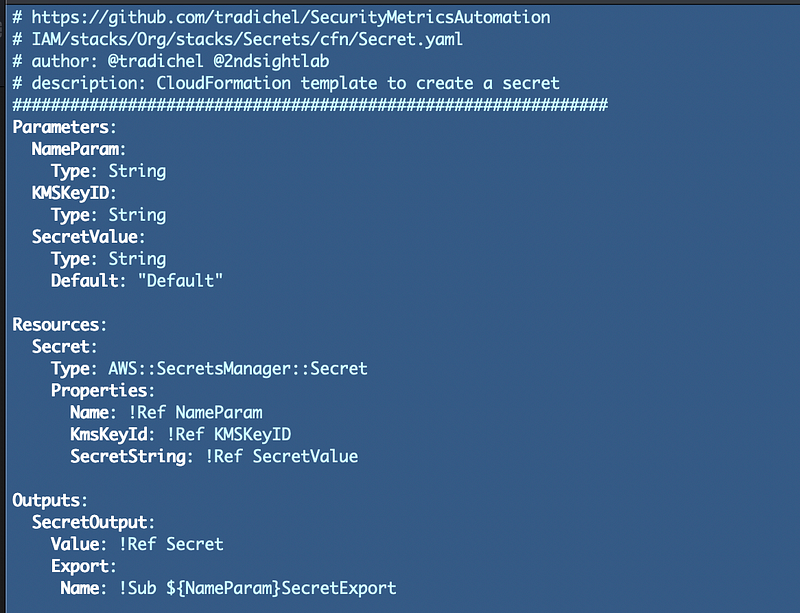
I ended up with the following:

deploy.sh
secret_functions.sh
cfn/Secret.yaml
Once I had a secret I returned to the metadata URL as explained in the last post, obtained the metadata, and manually pasted it into my new secret.

Create the AWS IAM Identity Provider

Next I created the AWS IAM Identity provider in a new directory:

Org/stacks/IdP

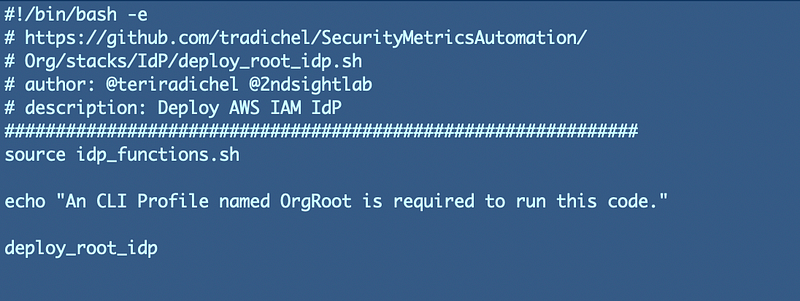
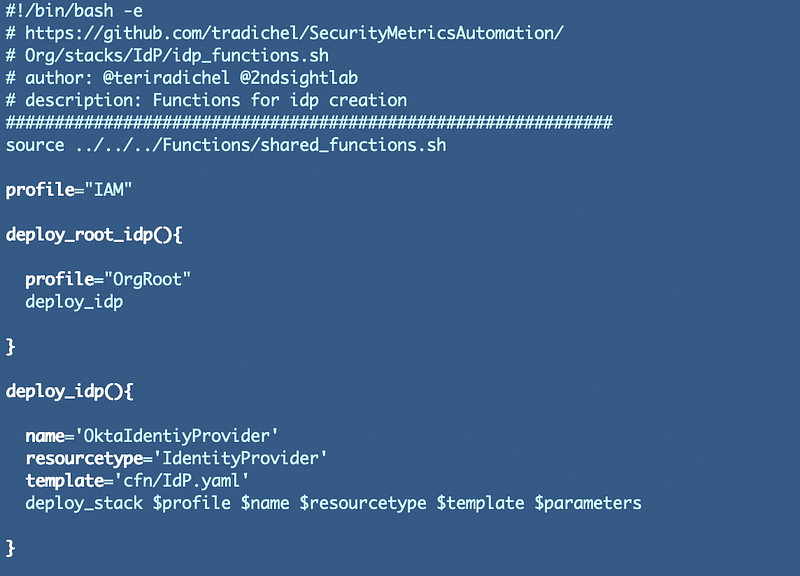
Just as with the other directories, I create a deploy script, a template in a cfn file and an functions script. They ended up looking like this:

deploy.sh
idp_functions.sh
cfn/IdP.yaml
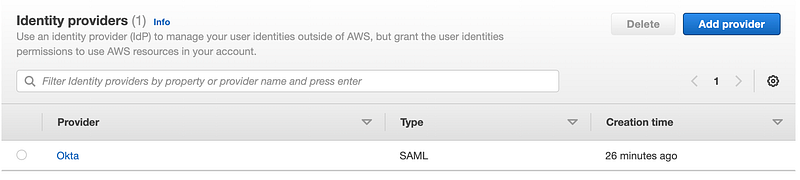
Navigate to IAM and verify your new Identity Provider exists:
After creating the IdP in AWS return to the AWS application signon settings in Okta and populate the Identity Provider ARN.
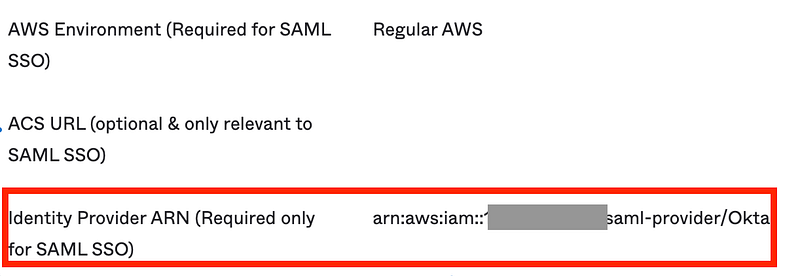
Now that we have deployed our IdP to Okta we can move to the next step. These changes are in the code on the GitHub repository now.

Follow for updates.

Teri Radichel | © 2nd Sight Lab 2023

About Teri Radichel:
~~~~~~~~~~~~~~~~~~~~
⭐️ Author: Cybersecurity Books
⭐️ Presentations: Presentations by Teri Radichel
⭐️ Recognition: SANS Award, AWS Security Hero, IANS Faculty
⭐️ Certifications: SANS ~ GSE 240
⭐️ Education: BA Business, Master of Software Engineering, Master of Infosec
⭐️ Company: Penetration Tests, Assessments, Phone Consulting ~ 2nd Sight Lab
Need Help With Cybersecurity, Cloud, or Application Security?
~~~~~~~~~~~~~~~~~~~~~~~~~~~~~~~~~~~~~~~~~~~~~~~~~~~~~~~~~~~~~
🔒 Request a penetration test or security assessment
🔒 Schedule a consulting call
🔒 Cybersecurity Speaker for Presentation
Follow for more stories like this:
~~~~~~~~~~~~~~~~~~~~~~~~~~~~~~~~~~~~~~~~~~~~~~~~~~~~~~~~~~~~~ 
❤️ Sign Up my Medium Email List
❤️ Twitter: @teriradichel
❤️ LinkedIn: https://www.linkedin.com/in/teriradichel
❤️ Mastodon: @teriradichel@infosec.exchange
❤️ Facebook: 2nd Sight Lab
❤️ YouTube: @2ndsightlab

Okta
AWS
Saml
Identity Provider
Cloud Security
Recommended from ReadMedium