
Okta SAML Integration with AWS IAM Step 1: Obtaining the Metadata
ACM.172 Obtaining the metadata from Okta to create the IdP configuration on AWS
~~~~~~~~~~~~~~~~~~~~~~~~~~~~~~~~~~~~~~~~~~~~~~~~~~~~~~~~~~~
⚙️ Check out my series on Automating Cybersecurity Metrics. The Code.
🔒 Related Stories: Cloud Governance | IAM | AWS Security | Okta
💻 Free Content on Jobs in Cybersecurity | ✉️ Sign up for the Email List
~~~~~~~~~~~~~~~~~~~~~~~~~~~~~~~~~~~~~~~~~~~~~~~~~~~~~~~~~~~
In the last post we recreated our initial organizational structure. The organization itself has to be created in the console or on the command line. From there we used CloudFormation to create our inital root level Service Control Policies and our Governance OU.
We’ve considered our architecture options and created a partially secure based for new accounts. Now we’re going to start integrating with Okta. There are some other things I can do to secure new accounts but we’ll get those in a bit.
TL;DR
If you already know the difference between federation options on Okta like SWA and SAML, and you want to skip over the troubleshooting process I went through to find the Okta metadata URL and the inaccurate instructions I went through in the process, skip to the bottom. We’re going to use that metadata link to create our AWS Identity Provider (IdP) in the next post.
Recap of Okta integration options and our approach
As I mentioned before, Okta has many different ways to integrate with applications.
One of the options is to use Okta as an IdP, where your users are stored within the Okta directory. When setting up an IdP it’s important to understand exactly how things are being integrated and where your data exists.
One of your options to integrate applications with Okta is by using SCIM. SCIM is used when you want to sync information between two systems for authentication purposes.
One of your options with AWS would be to use AWS SSO with SCIM.
I’m not using that approach here for the reasons explained in the above posts. I want to store my users in Okta and manage access from there so I can manage all my users and their access across all clouds in one place. We’ll evaluate the secruity of this option as we set this up.
We’re going to use Okta’s option to integrate applications using SAML with Okta as the IdP (as opposed to syncing users and passwords between AWS and Okta). Our users will be stored in Okta’s directory, not on AWS. Here’s more information about integrating applications using SAML on Okta.
SAML has had a myriad of security problems and misconfigurations over time so we’ll want to ensure that whatever we have control over on our side is configured properly. We’ll have to inspect what we can about the Okta configuration for any security issues. Initially, however, I’m simply going to follow the Okta guidance for SAML application integrations.
Okta SAML Integration with AWS
Okta provides specific instructions for integrating with AWS via SAML here. This document does not specify whether this applies to the Identity Engine or the Classic Engine. As mentioned in a prior post we are using the Identity Engine because it’s a newer iteration of the products. This is one of the first resources that shows up in Google.
This particular document says that you should use user groups if you are connecting to multiple AWS accounts, unlike the documentation in the last post which says you should only use that option if you are connecting to more than 60 accounts. Perhaps Okta could clarify that further.

This documentation seems to be heavy on Active Directory, so I’m not sure if the answer is different when using an Okta directory:

I also found the link specific to Identity Engine in the documentation. (Or so I thought.)
I’ll started with the above instructions.
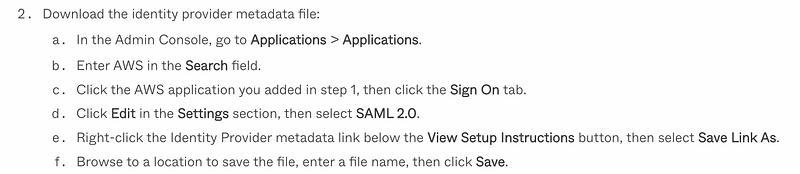
The first step is to create an AWS application and obtain the metadata file. I’m going to attempt to login as my Access Admin and follow these steps. I got to 1b and noticed that the option to add an application does not exist for my access admin.
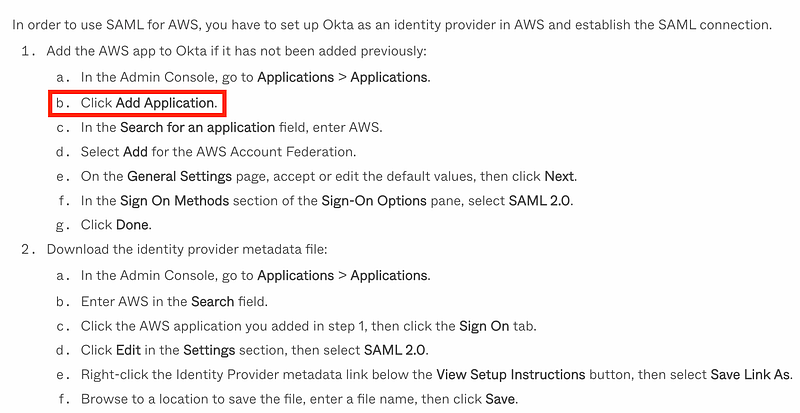
Over on my super admin screen this option also does not exist so this documentation must be out of date.
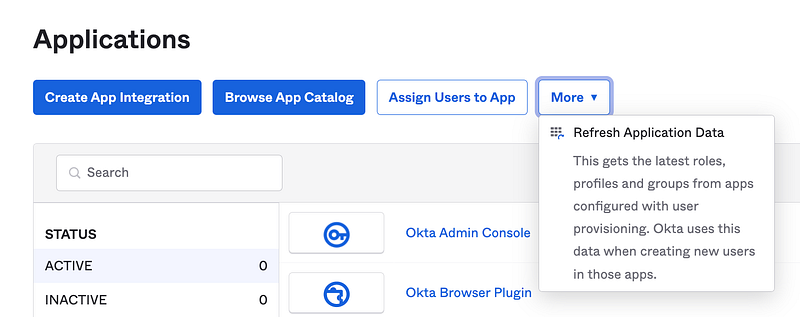
Back over on my Access admin, I looked at the settings under “Create App Integration” and they didn’t seem to align with the instructions. I clicked on “Browse App Catalog.” Then I searched on AWS and chose to view all options.
It’s not exactly clear which option to pick, even when I know exactly what I’m trying to do. Through process of elimination I can immediately eliminate AWS Identity Center because I want to keep my users in Okta. I know SWA is not the most secure option. I’m not trying to integrate the AWS ClientVPN. So the only option that appears to somewhat match what I am trying to do is no the top right — AWS Account Federation.
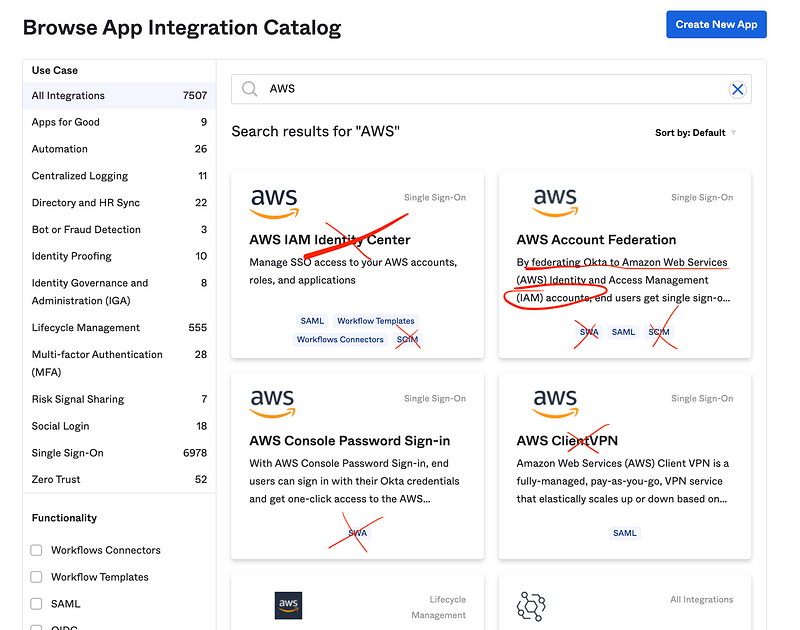
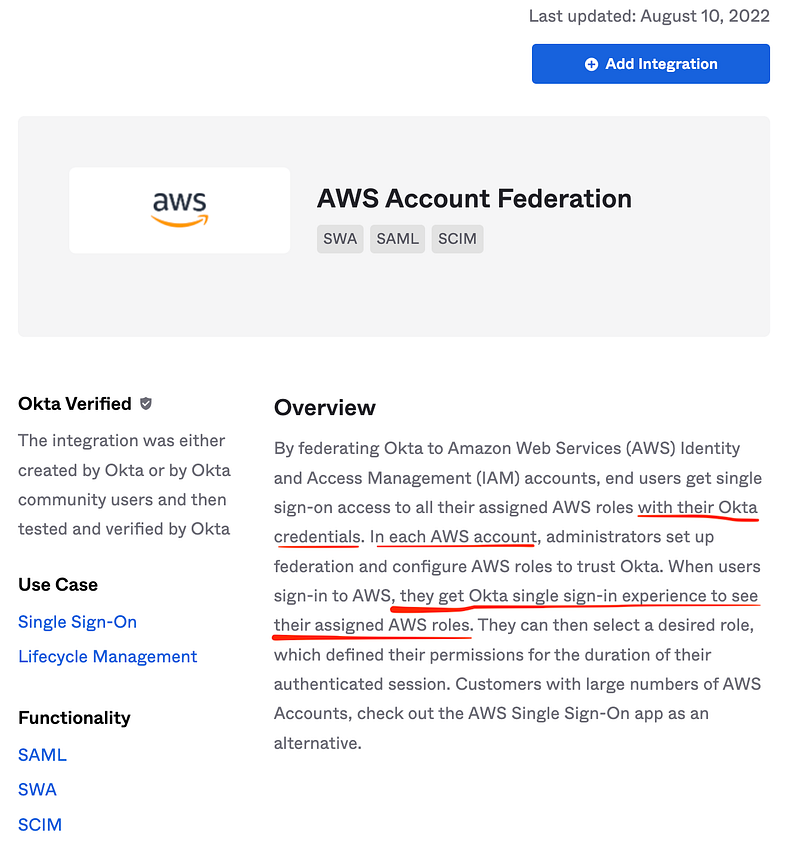
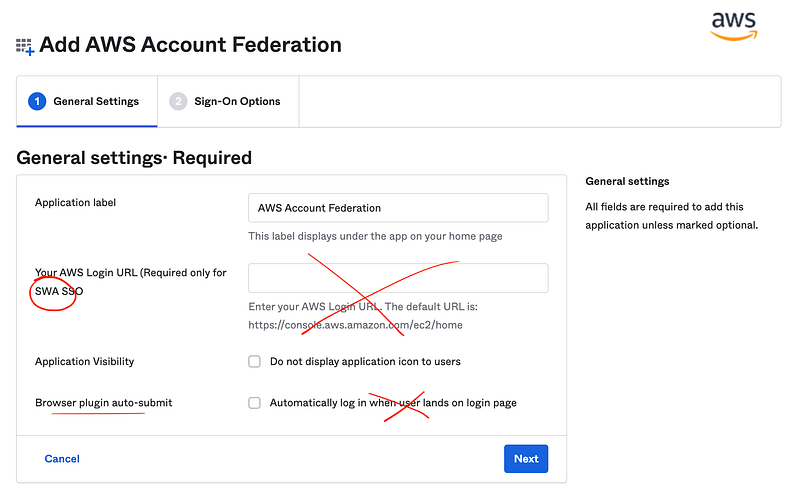
This post seems like it is has gotten exceedingly more complicated than I initially thought it would be…Anyway, I click on the top right option for AWS Account Federation. Here’s what I see. Based on the description and the specific items I underlined in red below, this appears to be the option we want. Click Add Integration.
On the next screen, I’m going to delete the SWA Url. As I already explained, SWA is not the most secure option, so I am not sure why it’s being auto-populated on this screen. I also do not want “auto-login” as that just doesn’t sound right. I’m also not a fan of browser plugins so I’m not going to use that unless required.
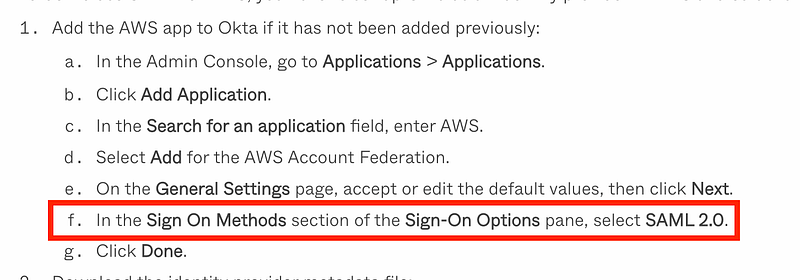
Here’s where things get confusing again. I know the end state I want but it’s not clear which options to pick based on the descriptions of SAML 2.0 and Federated User Login. (Okta Federated to AWS or AWS Federated to Okta?) Since the instructions say to choose SAML and seems to align now I’ll pick that.
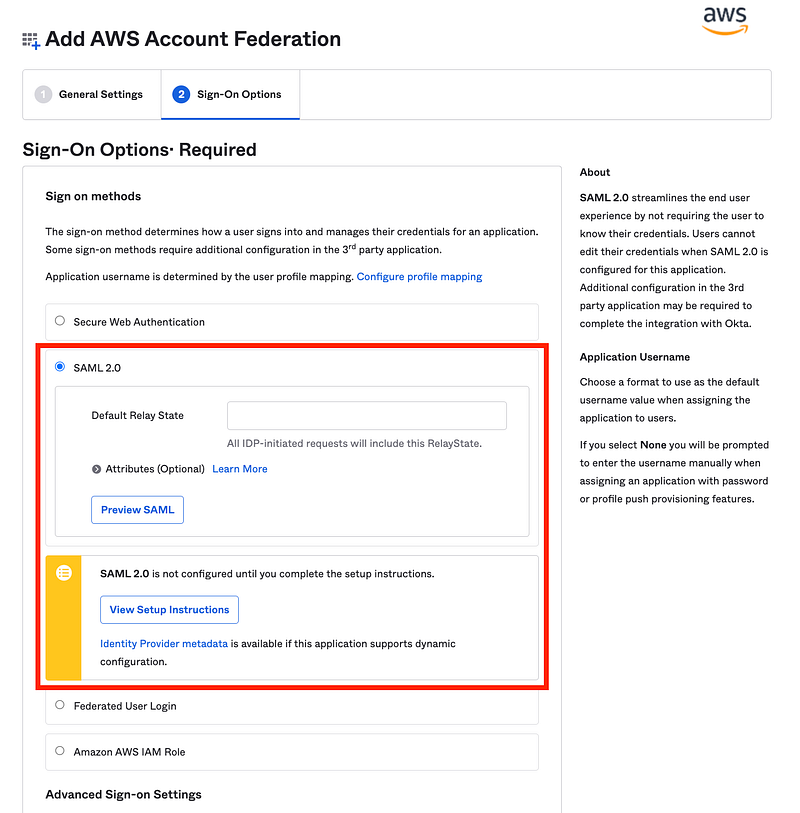
I’m not sure if I need a Default Relay State at this point. I’m going to leave this blank for now. AWS explains Default Relay State here in relation to AWS:
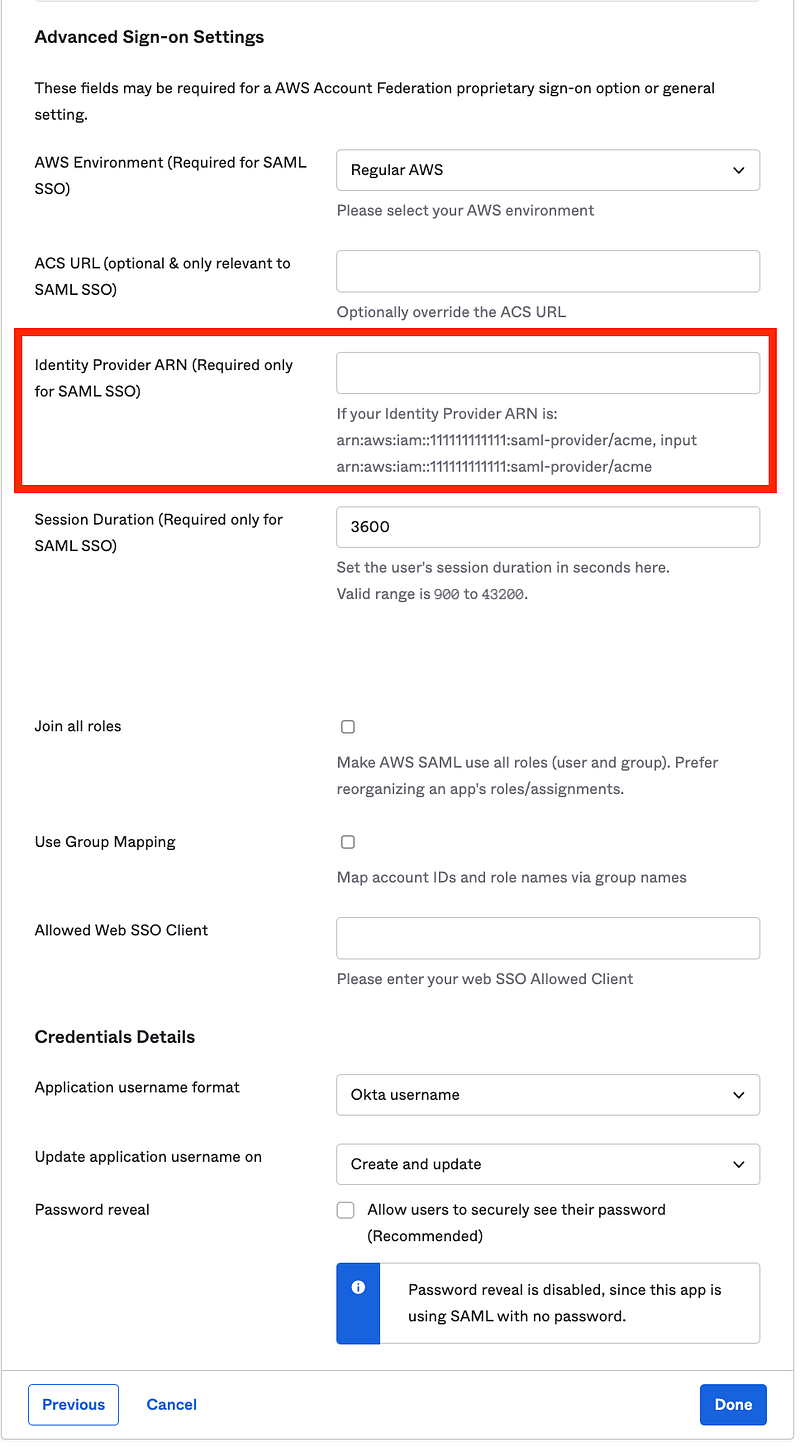
There are a lot of advanced settings at the bottom and this gets a bit confusing again. We have to enter an Identity Provider ARN. However, we can’t create the Identity Provider in AWS without the Okta Metadata. So hopefully we can save this and come back and add the ARN later. Turns out we can.
Now lets’ try the next set of instructions.
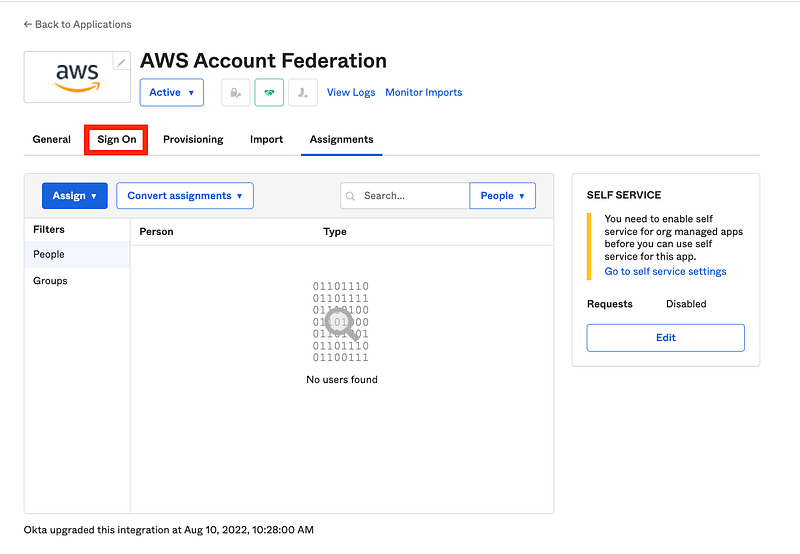
I didn’t have to navigate to my application because I got dropped into it after clicking Done above. Click on Sign on (which is a link, not a tab).
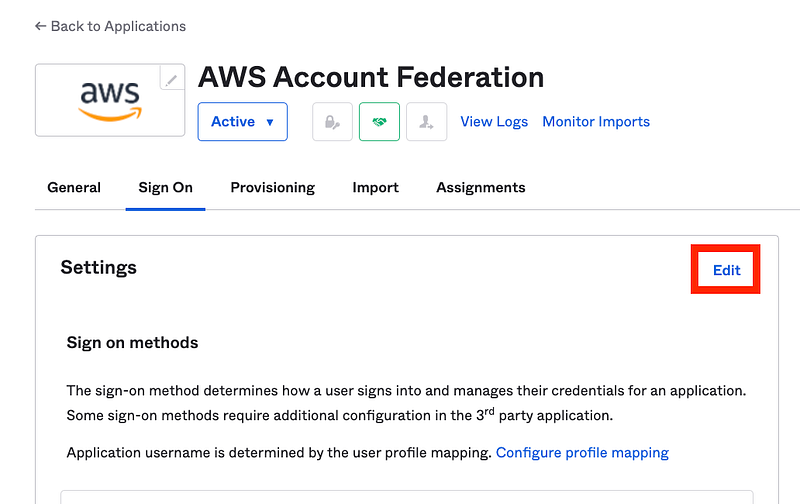
Click Edit as directed.
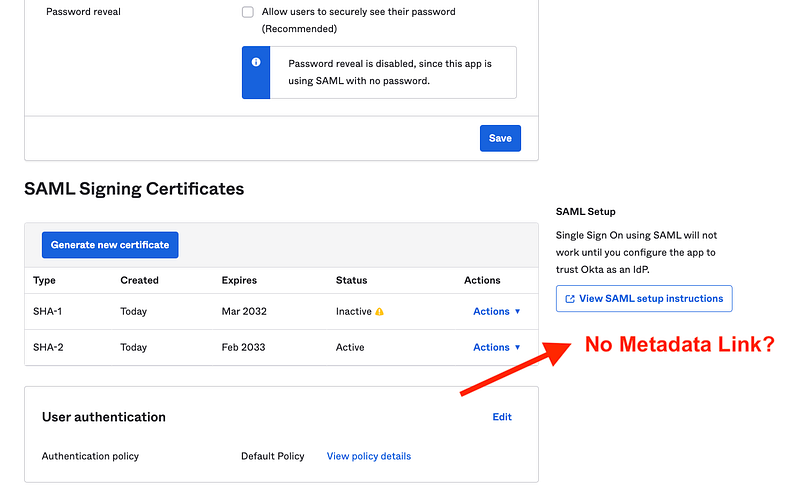
No metadata link exists here:
Alright, I’m confused. The instructions don’t match what appears on the screen.
Let’s check out that other set of instructions using the View SAML setup instructions link above, because basically, the other instructions do not work. Upon digging through this document I ran across the following instructions:
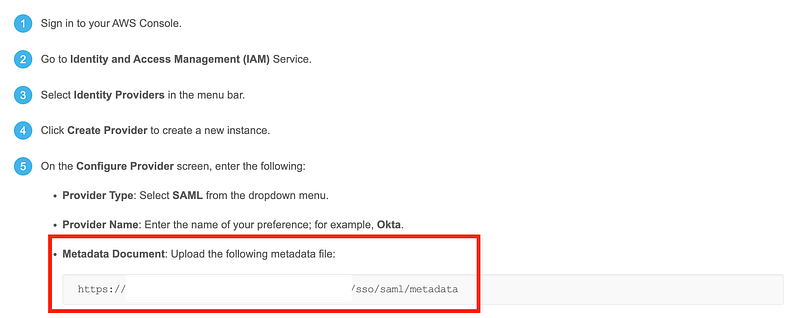
You will only be able to get the correct URL if you login as an administrator in your Okta account:

The link will appear in these instructions once you are logged in with the appropriate user on this page.
But not only do you have to be logged into the Okta Admin portal, you must navigate to this page from the View SAML setup instructions link under the application sign on settings shown above. If you use the link above, I discovered, it doesn’t work even if you are logged in.
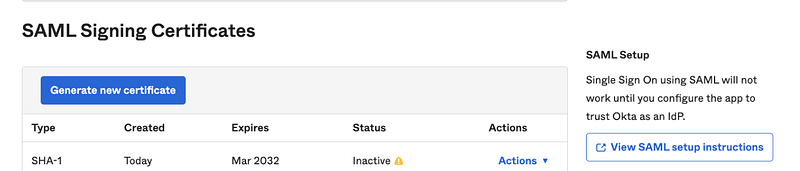
This seems overly complicated. Okta should probably provide the link within the AWS app settings to match the Identity Engine instructions. Perhaps they are working on that.
Well, I found the metadata. That’s what I need for the next step so we’re good for now.
Steps to Obtain the Okta Metadata (short version)
- Browser the Okta App Catalog.
- Choose AWS Account Federation.
- Click on General Settings (if not selected).
- Delete the AWS SSO link for SWA.
- Uncheck the box for automatic login.
- Click Next for Sign-on options.
- Choose SAML.
- Click Done.
- Click View SAML setup instructions
- Search for “metadata” to get the metadata link you’ll need to configure the AWS IAM Identity Provider.
Now we can head over to AWS and create our IdP over there. We’ll do that next.
Follow for updates.
Teri Radichel | © 2nd Sight Lab 2023
About Teri Radichel:
~~~~~~~~~~~~~~~~~~~~
⭐️ Author: Cybersecurity Books
⭐️ Presentations: Presentations by Teri Radichel
⭐️ Recognition: SANS Award, AWS Security Hero, IANS Faculty
⭐️ Certifications: SANS ~ GSE 240
⭐️ Education: BA Business, Master of Software Engineering, Master of Infosec
⭐️ Company: Penetration Tests, Assessments, Phone Consulting ~ 2nd Sight Lab
Need Help With Cybersecurity, Cloud, or Application Security?
~~~~~~~~~~~~~~~~~~~~~~~~~~~~~~~~~~~~~~~~~~~~~~~~~~~~~~~~~~~~~
🔒 Request a penetration test or security assessment
🔒 Schedule a consulting call
🔒 Cybersecurity Speaker for PresentationFollow for more stories like this:
~~~~~~~~~~~~~~~~~~~~~~~~~~~~~~~~~~~~~~~~~~~~~~~~~~~~~~~~~~~~~
❤️ Sign Up my Medium Email List
❤️ Twitter: @teriradichel
❤️ LinkedIn: https://www.linkedin.com/in/teriradichel
❤️ Mastodon: @teriradichel@infosec.exchange
❤️ Facebook: 2nd Sight Lab
❤️ YouTube: @2ndsightlab


