
AWS S3 Bucket Keys to Reduce KMS costs
ACM.356 Reducing KMS Costs for KMS Keys Used With S3 Buckets
~~~~~~~~~~~~~~~~~~~~~~~~~~~~~~~~~~~~~~~~~~~~~~~~~~~~~~~
⚙️ Check out my series on Automating Cybersecurity Metrics | Code.
🔒 Related Stories: AWS Security | Secure Code | S3
💻 Free Content on Jobs in Cybersecurity | ✉️ Sign up for the Email List
~~~~~~~~~~~~~~~~~~~~~~~~~~~~~~~~~~~~~~~~~~~~~~~~~~~~~~~
In the last post I wrote a summary of some of the reasons I’m not using step functions after creating a base container image for my Lambda functions.
In this post, I want to revisit the KMS key I’m using for the S3 bucket I’m using to host my website. As you may recall I was pondering the pros and cons of using a KMS key at all since it is for a public website. By encrypting everything you may check some compliance boxes. It could potentially help with the integrity of the contents of the website, even though the contents are public.
Then I was talking to a customer who had removed KMS keys from their S3 buckets due to cost and I remembered that AWS came out with a new option to encrypt S3 buckets a while back. I figured I should try it out and write about it. My usage is minuscule compared to many companies so I’m not sure it will make a difference in my costs, but if its ultimately cheaper and since this is already public data anyway, we might as well use this option.
How is an S3 Bucket KMS key different?
Normally, Amazon S3 makes a call to AWS KMS every time a request is made against a KMS-encrypted object.
When you create an AWS S3 Bucket key, AWS contacts KMS to create a short lived key which is used for encryption operations and it is stored in S3 while in use. This local key is used during it’s lifetime to perform encryption operations, reducing the number of round trips to KMS.
That allows AWS to lower your costs for these types of keys.
If you want to know more about how KMS works in general, by using envelope encryption and data keys, check out my prior posts on the topic.
How much will you save?
How much you save depends on the reduction of requests to KMS.
Here is the current pricing for KMS:
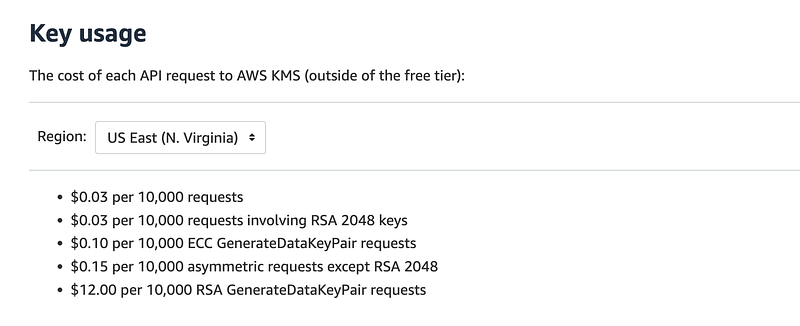
When you use S3 bucket keys, a separate bucket level key is created for each IAM principal session that accesses the bucket.
If you have a single user session requesting a lot of encrypt and decrypt functions for different objects, this could cut down your requests to KMS dramatically.
In our case, we have an S3 bucket that has contents that may be requested by many different users. However, we’ve also got some other things in our architecture that should reduce the number of principal sessions.
- We’re going to use CloudFront which will cache files, limiting the requests to S3 and thereby the KMS key in general.
- On top of that the files are requested by CloudFront, not the end user, so I suspect that would be a limited number of sessions.
Those factors should reduce the KMS costs a bit — but given the number of hits on my website likely not much.
However, if you have a very busy website getting many dynamic hits per day perhaps this will make a very big difference. The best way to find out is to run your own beta test to see how the change impacts your costs. Given it can only save you money and if the data is public anyway, it seems like a no brainer to use this feature.
Configuring an S3 Bucket KMS Key
All we have to do to use this feature is to enable it.
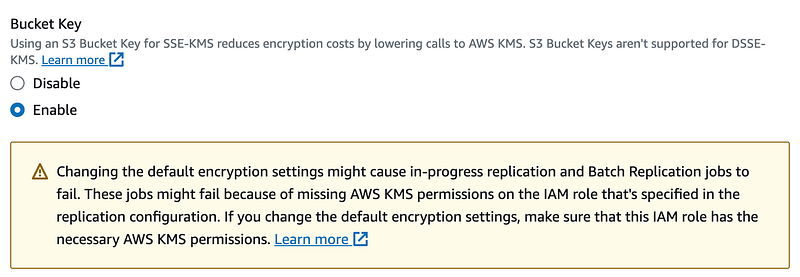
Recall that I have already deployed an S3 bucket for my static website.
The encryption for an S3 bucket is defined by the Bucket Encryption property.
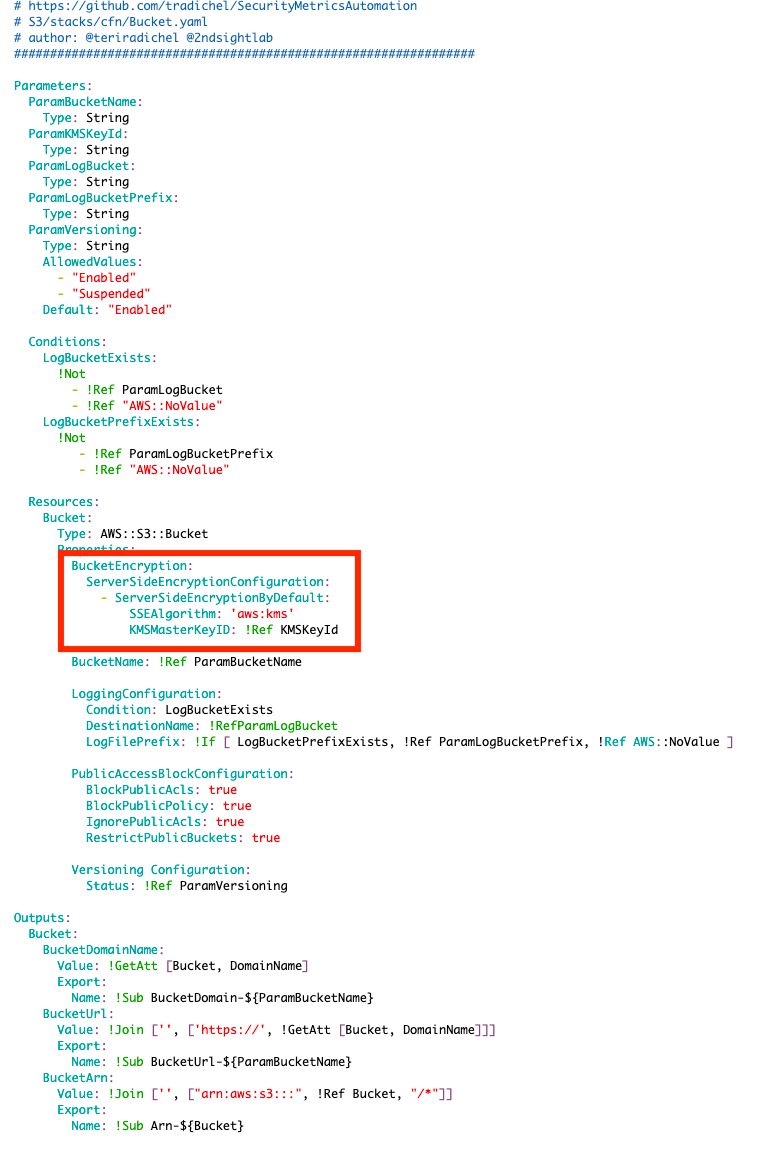
If we take a look at the CloudFormation documentation, the BucketEncryption property has a ServerSideEncryptionConfiguration which I have configured above. It says it is an array of ServerSideEncryptionRule properties.
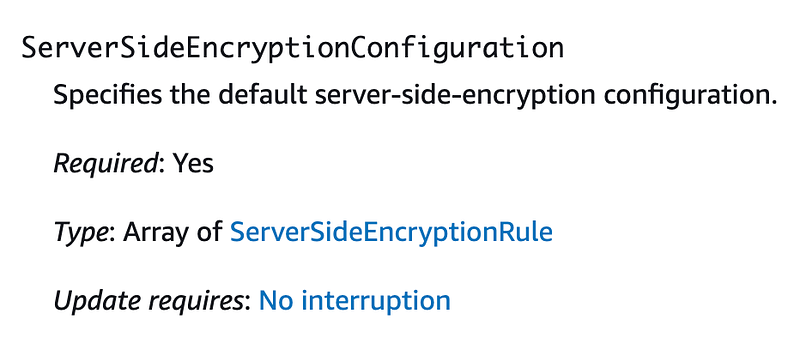
Why an array, I have no idea. If you drill down into the configuration of a rule, it looks like this:
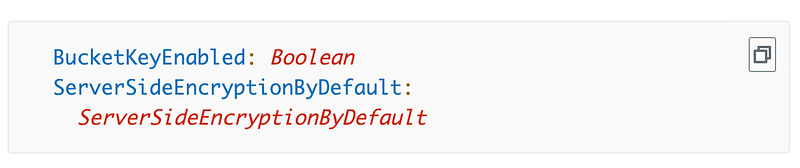
You can see above that I have already configured ServerSideEncryptionByDefault to use a KMS key. I just need to add the BucketKeyEnabled property and set it to true in that same rule. The sample code confirms this:
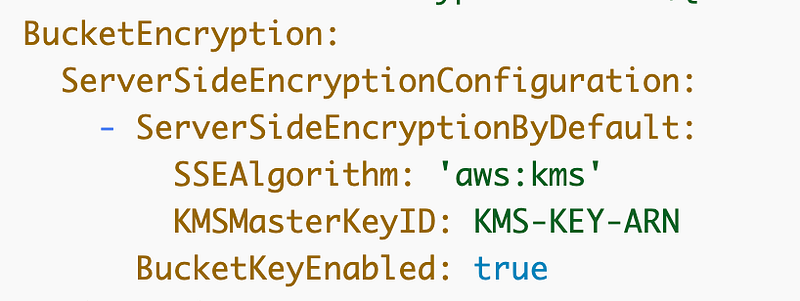
Yay for sample code! Like I said, I have no idea why this is an array because I can’t see a reason at this point why you would ever have more than one rule, and I don’t know what would happen if you did that. Perhaps for rotation? Not sure.
Anyway, I can change my template to add that one value, redeploy it, and that’s it — we have an S3 bucket key for every bucket deployed with that template.
I have just a few things left to deploy the website. I have a few things to fix, a trigger, and the remaining S3 bucket and CloudFront configuration.
Follow for updates.
Teri Radichel | © 2nd Sight Lab 2023
About Teri Radichel:
~~~~~~~~~~~~~~~~~~~~
⭐️ Author: Cybersecurity Books
⭐️ Presentations: Presentations by Teri Radichel
⭐️ Recognition: SANS Award, AWS Security Hero, IANS Faculty
⭐️ Certifications: SANS ~ GSE 240
⭐️ Education: BA Business, Master of Software Engineering, Master of Infosec
⭐️ Company: Penetration Tests, Assessments, Phone Consulting ~ 2nd Sight Lab
Need Help With Cybersecurity, Cloud, or Application Security?
~~~~~~~~~~~~~~~~~~~~~~~~~~~~~~~~~~~~~~~~~~~~~~~~~~~~~~~~~~~~~
🔒 Request a penetration test or security assessment
🔒 Schedule a consulting call
🔒 Cybersecurity Speaker for PresentationFollow for more stories like this:
~~~~~~~~~~~~~~~~~~~~~~~~~~~~~~~~~~~~~~~~~~~~~~~~~~~~~~~~~~~~~
❤️ Sign Up my Medium Email List
❤️ Twitter: @teriradichel
❤️ LinkedIn: https://www.linkedin.com/in/teriradichel
❤️ Mastodon: @teriradichel@infosec.exchange
❤️ Facebook: 2nd Sight Lab
❤️ YouTube: @2ndsightlab


