
Restricting Users to Creation of Their Own MFA Devices
ACM.369 CreateVirtualMFADevice Lacks a User Resource for Policy Restrictions
~~~~~~~~~~~~~~~~~~~~~~~~~~~~~~~~~~~~~~~~~~~~~~~~~~~~~~~
⚙️ Check out my series on Automating Cybersecurity Metrics | Code.
🔒 Related Stories: AWS Security | Secure Code | Cybersecurity | IAM
💻 Free Content on Jobs in Cybersecurity | ✉️ Sign up for the Email List
~~~~~~~~~~~~~~~~~~~~~~~~~~~~~~~~~~~~~~~~~~~~~~~~~~~~~~~
In the last post I explained why BoolIfExist should not be used in policies where you are actually trying to enforce MFA for all actions and showed you how to fix it.
BoolIfExists for MFA — Just Say No
ACM.360 A better policy to require MFA for ALL actions
medium.com
In that post, I noticed that it allows a user to create a virtual MFA device for any other user. Why isn’t that also restricted in the policy? If you are enforcing MFA on all actions, but someone can go add their own MFA device to a user for whom they have credentials, then your attempts to enforce MFA are somewhat futile.
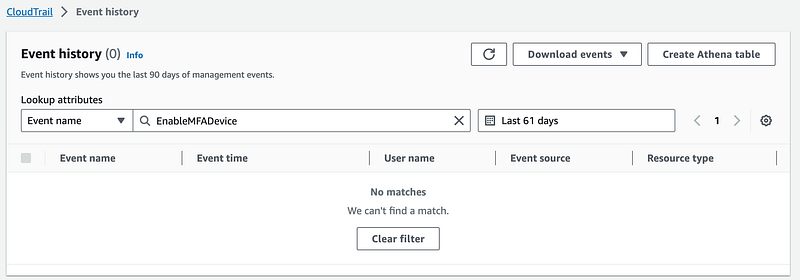
I decided to go take a look at that action in CloudTrail and see if it is different from the other actions somehow to figure out why it is pulled out into a separate statement without the user condition. First let’s look at EnableMFADevice.
Well, I can’t find that action when I search by EventType even though it comes up as an option in the list:
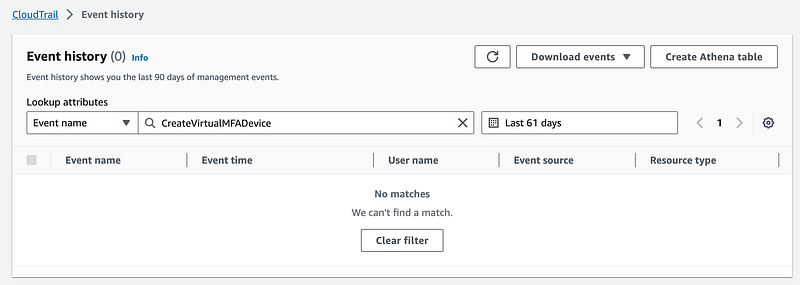
Neither does CreateVirtualMFADevice:
What if I search on my user — TestAdmin.
I see CheckMfa, but no sign of MFA management.

Here’s what’s weird. The MFA actions are in us-east-1 even though that’s not the region where I took the actions.
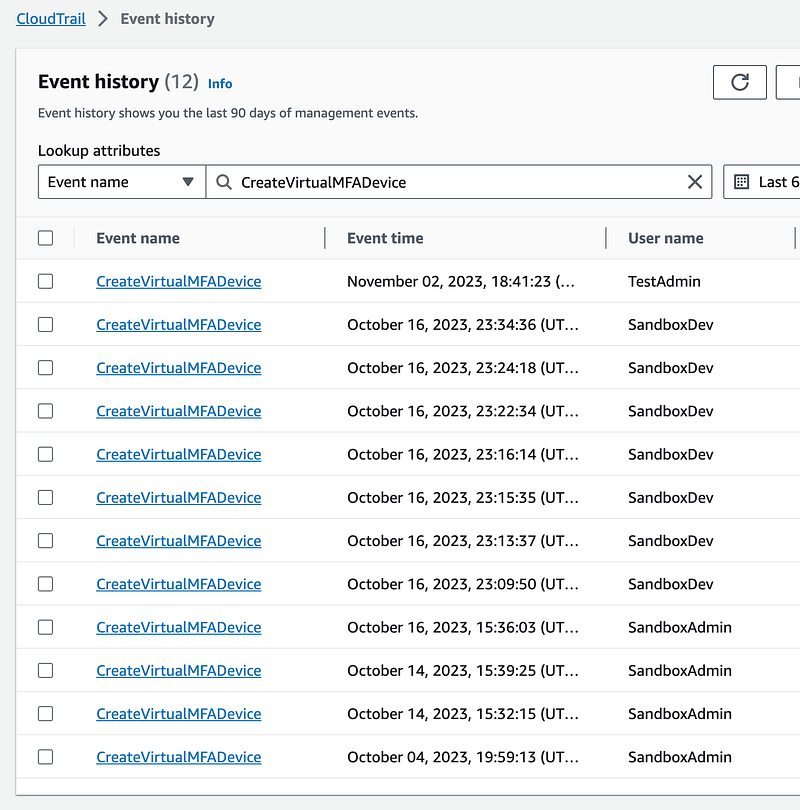
This is one of the reasons why I recommended when you only allow certain regions in your account that you include us-east-1 in your Service Control Policy (SCP), because you will need to use us-east-1 for certain things that are only available via us-east-1. The thing is, this should be on every page that writes about MFA devices in the AWS console. It’s weird. It’s not intuitive at all.
This is not the rabbit hole I was planning to go down today, but here we are.
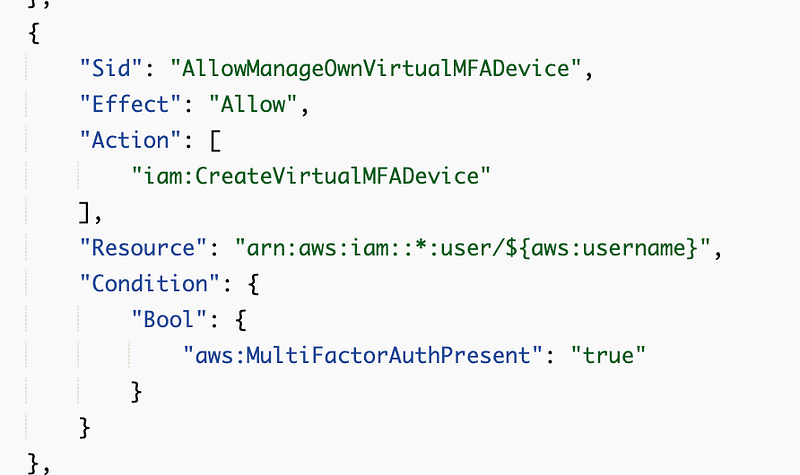
Here’s the snippet from our last policy:
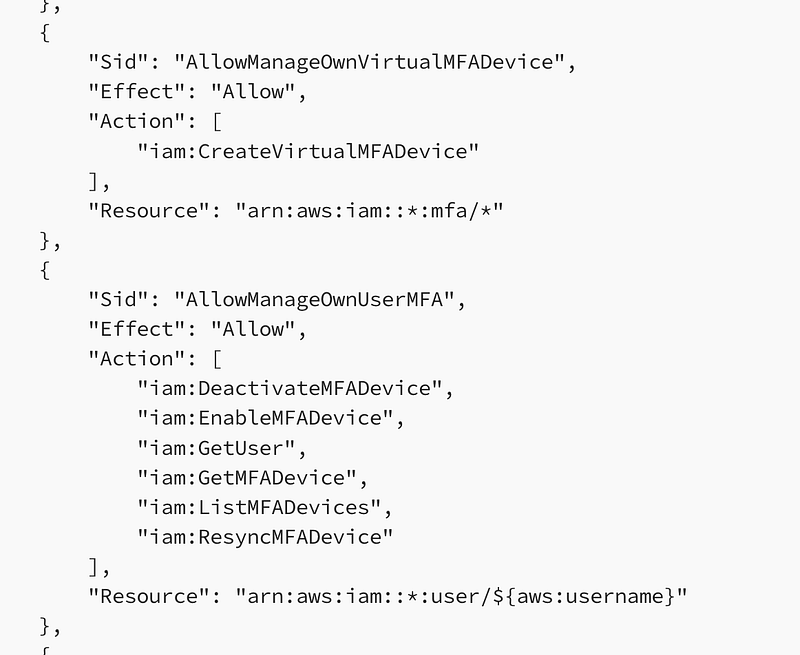
Why is CreateVirtualMFADevice separated from the actions that require a specific username? Does the username not exist for CreateVirtualMFADevice?
I’m going to look at all the actions taken by the TestAdmin I created in the last post.
Here is where I see a bunch of garbage cluttering the logs I’ve written about before. This noise makes it hard to see what you’re looking for and I question whether this is really necessary.
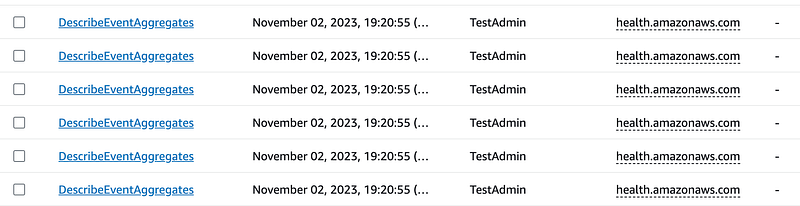
I think you can get rid of this by removing the health widget from the AWS console home page if I recall correctly.
Anyway I’m looking for any of the actions that require MFA.
I find ListMFADevices.
I take a look at the resources. What is interesting is that it says no resources are referenced:

When I look at the resources for CreateVirtualMFADevice:
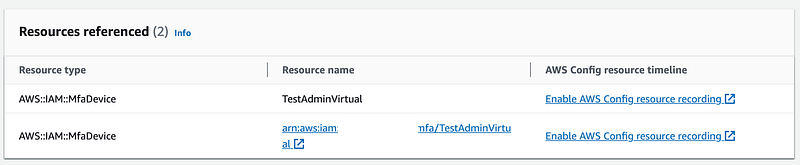
What about GetUser? Nada. Shouldn’t the user be listed here as a resource?

Hmm. What is a bit odd is that when I look at the details of CreateVirtualMfaDevice, it shows a role, not my user. I didn’t create the MFA device with a role. Weird.
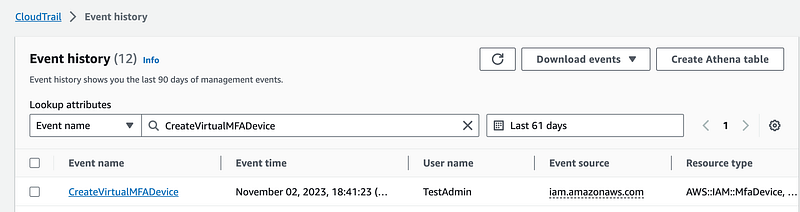
Here’s what I see:
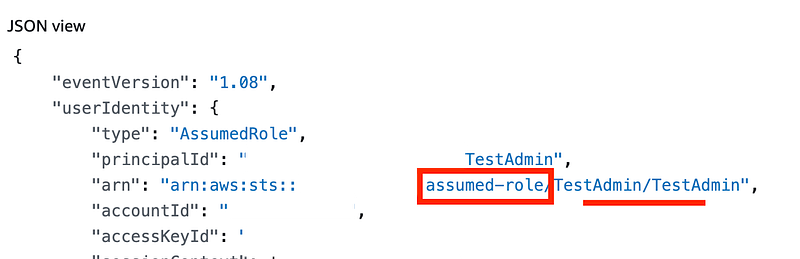
I take a look at that action for my other user — SandboxAdmin.
Here I see the user in the ARN. Hmm.
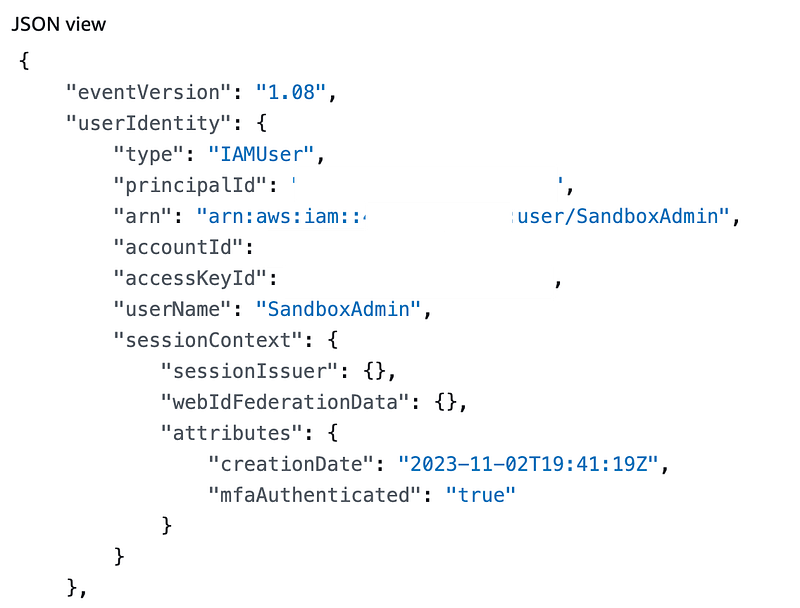
I also see this really weird user agent. Why does this say aws-internal for ListMFADevices? Wouldn’t only a user be doing that and shouldn’t it have the UserAgent of the user’s browser? In this case I must have been looking at the MFA devices for the SandboxDevAutomation user.

OK that’s weird.
Here’s what I am going to do. I’m going to create a new user named TestAdmin2. I’m going to move CreateVirtualMFADevice into the list of actions restricted to the user but that do not require MFA and see if that works.
Testing CreateVirtualMFADevice for a user
I changed my policy to use the user resource instead of the MFA resource which is actually kind of pointless. That action probably only works on MFA devices. What else would it work on?
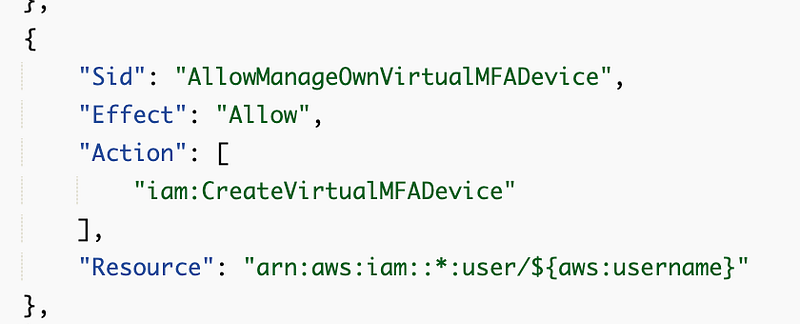
I create a user named TestAdmin2 and assign that policy. I do not create a role for that user name.
I test adding a hardware MFA device and it works fine. Why CreateVirtualMFADevice is separated out into a separate statement in the AWS sample policy is a mystery to me.
I head back over to CloudTrail to take a look at the logs.
I search for all the events for the name TestAdmin2. There is no event in the list for CreateVirtualMFADevice.
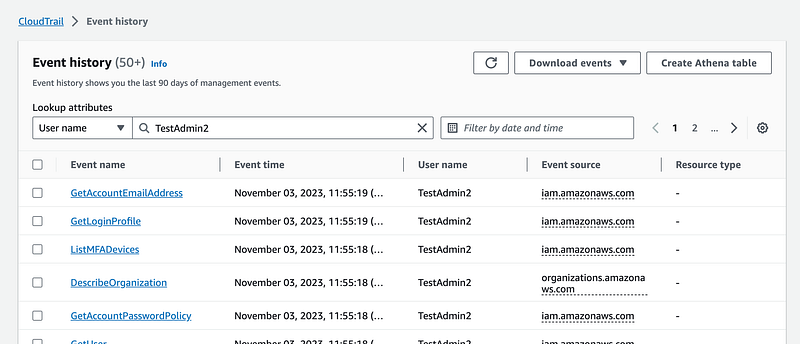
I do see EnableMFADevice action.
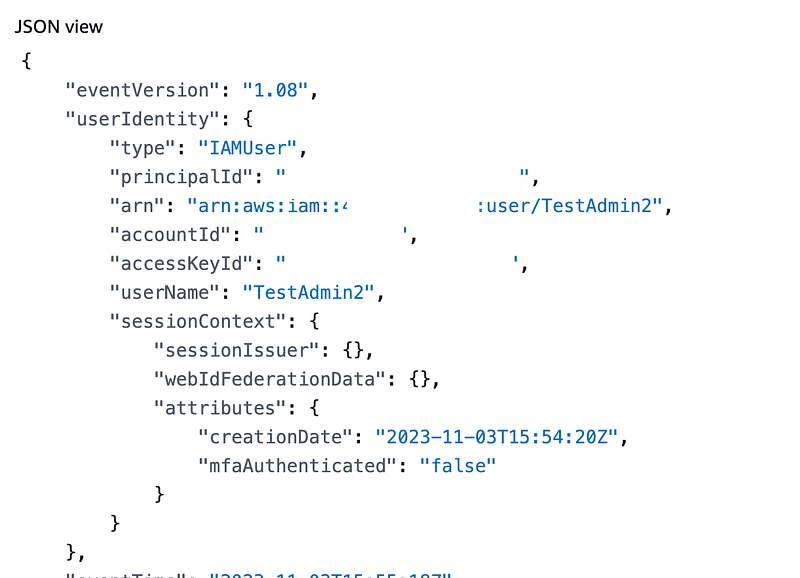
Once again, the useragent is odd.

I would like this to show the actual user agent of the user for security incident purposes.
There are no CreateVirtualMFA events for this user.
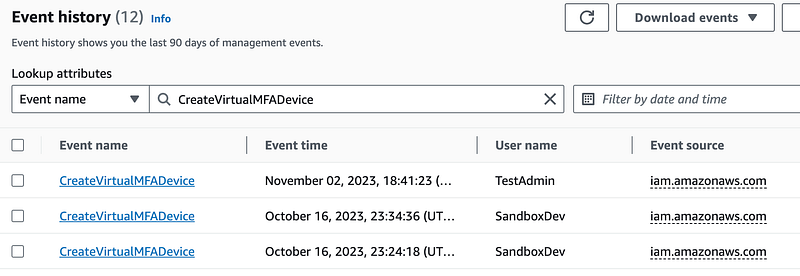
Next, I create a virtual MFA device.
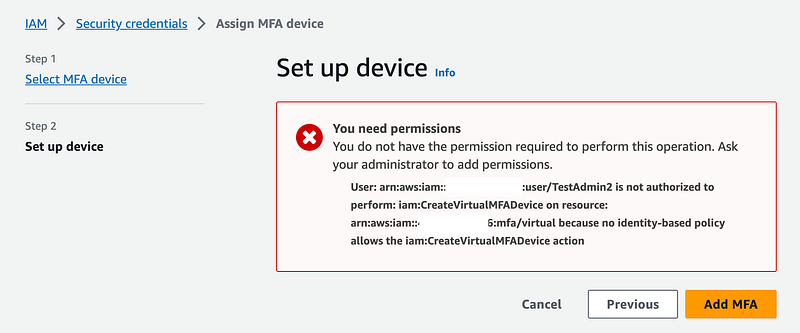
Now you might think, see, this doesn’t work! But here’s the thing. What happens if you log out and log back in. It works. Apparently, once you add the hardware MFA, you are required to use MFA to add the virtual MFA.
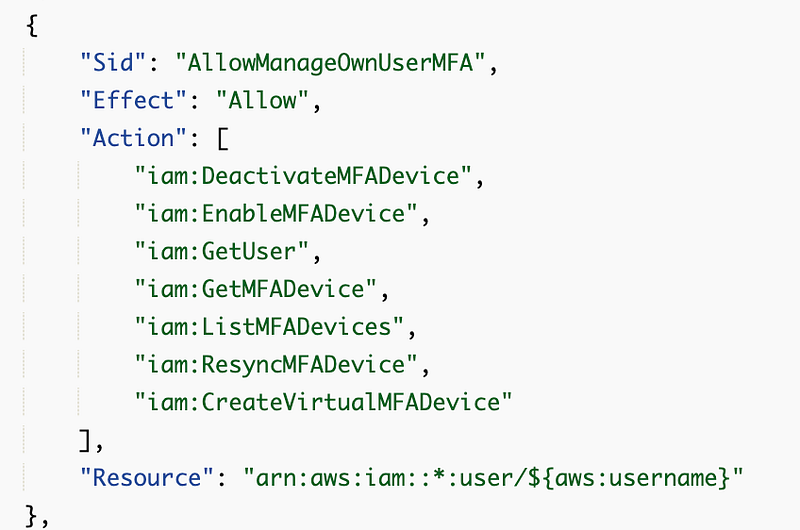
So in theory we can just merge that statement with this one:
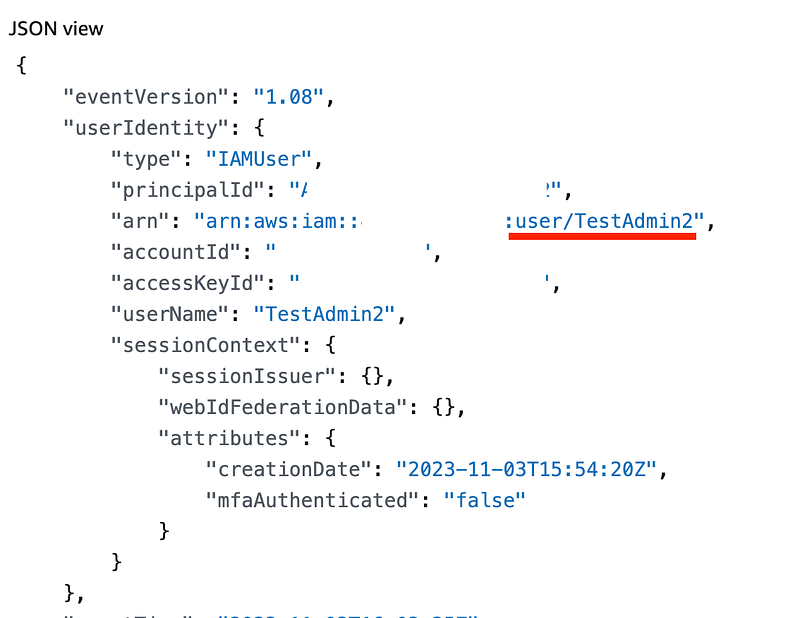
Let’s check CloudTrail again for the TestAdmin2 user and see what showes up.
Ok this is really bizarre and I can’t explain it but this time I see the actual username that added the virtual MFA instead of that strange role.
Requiring MFA to create virtual MFA devices
Can we make our policy even better?
- I can require a user to create the hardware device first, which uses the EnableMFADevice action.
- I can require MFA for the CreateVirtualMFADevice action.
Let’s try this:
This policy would be for any users that do not have to manage virtual MFA devices for other users only. If a user needs to assign and manage virtual devices for other users that would cause problems. But most of the time a virtual device is intended to be used by and help identify the user associated with the credentials in the logs, so in almost all cases, that’s the policy we want.
Once again I manually test this out. I deleted my TestAdmin user and tested all the steps in the prior post again including using the CLI to make sure this still works.
Here’s where it gets weird. I follow all the steps, log out and log back in with hardware MFA. I start to create my MFA device, but then when I try to enter the codes, it tells me that the codes are invalid. Hmm.
So I get out of that and try to start over. I only see the hardware device in my list of MFA devices:
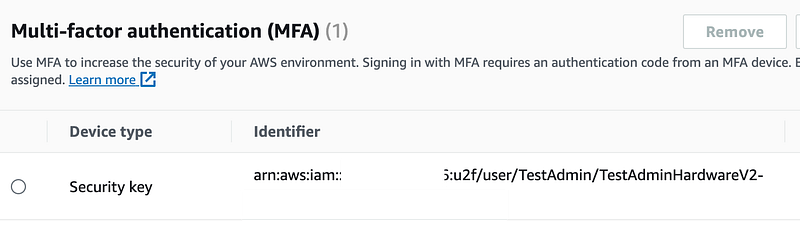
I try to recreate the device with the same name and I get an error saying that the virtual device already exists but I can’t see it. Hmm??
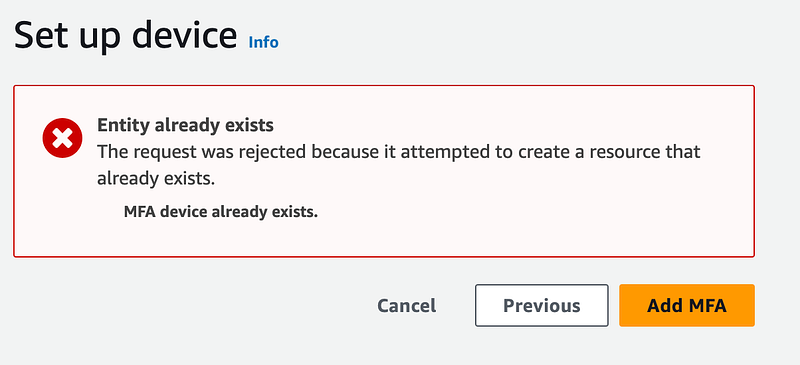
Let’s try a different name.
And, it worked. Not sure what that was all about?!
I head over to my events for the TestAdmin user and do not see any errors here:
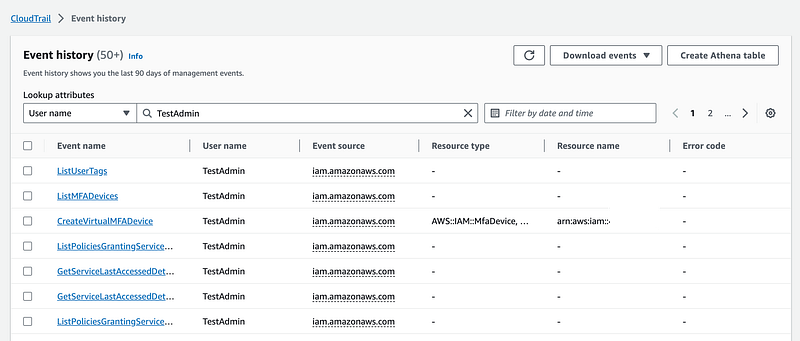
Even more odd is that if I search on the event CreateVirtualMFADevice I do see the errors with the TestAdmin user name?

Seems like a bug. Let’s look at those events.
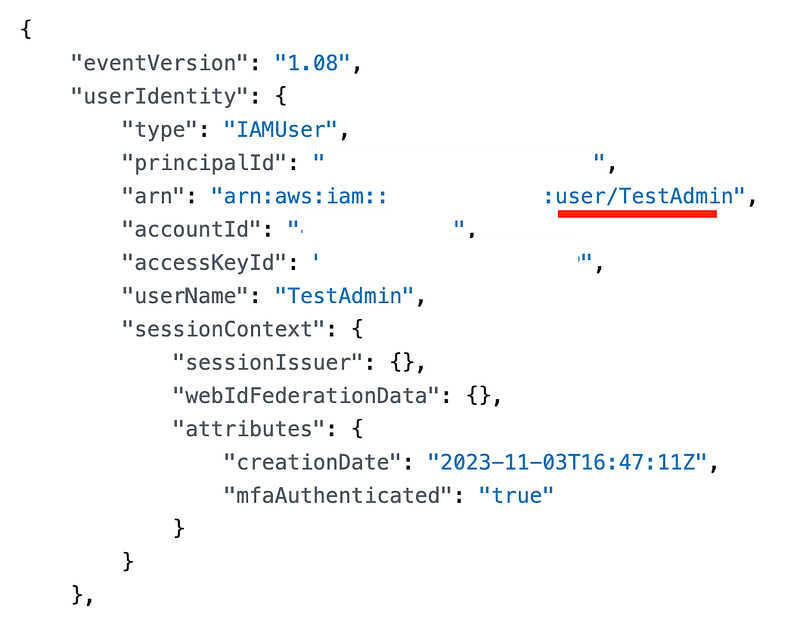
I see the correct user, not that weird role.
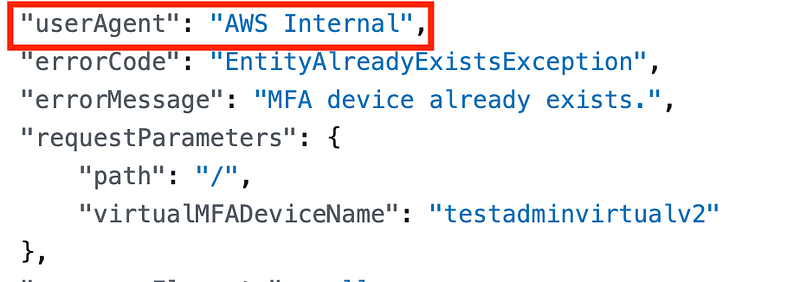
The User Agent is still wrong.
So here’s some other weirdness. The ARNs and Resource names are different for various errors.
- For access denied there’s no resource name at all.
- I do not see the AccessDenied error for the initial attempt to create the MFA device without MFA in this round of testing.
- For entity already exists, it does not show the ARN. Why? I would like to see the ARN here since it says it exists but I can’t see it on my user account?
- The ARN for the successful event is not actually an ARN, it has the ARN and the name. Is that neccessary or just the ARN since the ARN should always have the name in it, no? But the ARN also has an additional ID at the end. Why is the full ARN not shown here?
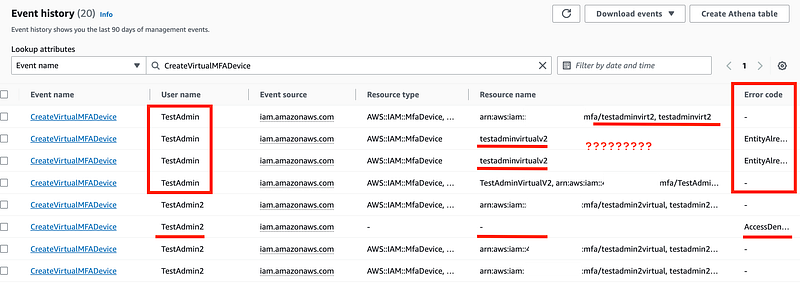
Curious. But anyway, the policy works and it’s better than before. Yeah.
About DeleteVirtualMFADevice
The documentation states that you should never allow a user to delete their own MFA device. Well, if you have created your policies to require MFA for every action a user can take, except for adding an MFA device, then what can an attacker do?
- The attacker gets into an active user session.
- The attacker deletes the MFA device.
- The attacker adds their own MFA device.
Now the user can no longer get into their own account. But presumably the user could not get into their own account if the attacker changed the username and password as well.
- The attacker changes the user’s password.
- The user cannot get into their account even if the MFA still exists
Let’s say a user deletes their own MFA device. If we are only allowing all actions via a role assumption with MFA other than creating a new MFA device, then that doesn’t really do the user any good does it?
I’m still thinking this over but I think deletion of MFA device with MFA is OK. Because if an attacker can do that, they can also change the password if they are in an active user session.
But, maybe I’m missing something. I’m still thinking about it because maybe AWS is seeing various security incidents I am not seeing and knows something I don’t know or haven’t thought of yet. I think the bigger problem is the boolifexists issue I wrote about in the last post and the logic in that policy altogether could be better.
Additionally, think about or existing policy. I’ve granted the admin full access to perform any action with MFA. That includes deleting MFA devices, no? Let me try to delete my virtual MFA device with the current policy.
Yes. I can. With MFA according to our policy. But what else can I do with this policy?
I can delete anyone’s MFA devices!
That’s not what we want. So I am going to restrict the users to only delete their own MFA devices.
What about DeactivateMFADevice?
Here’s another thing. Why would we allow a user to deactivate an MFA device without MFA? That also is moving into our “with MFA category.”
What about ResyncMFADevice?
Let’s take a look at what this action does:
You can perform the resynchornization before logging into the AWS Console if you are having problems with your MFA device.
You must have the user credentials and then you can enter two new codes to resynchronize your device. This is similar to allowing the user to add an MFA device without MFA because the first time a user adds a device they don’t have MFA.
Do you need to resynchronize hardware keys? If you are using the type of harware device that generates codes, you might have to do that. I’m not using those. I am also not really a fan of those types of devices. In my case, the only resyncing that could possibly happen is if a user is resyncing a virtual MFA device. If a user needs to do that for their own virtual MFA device, in my case, they can login with their hardware key and do it in the AWS console.
The resync without MFA feels a bit risky. Even if it is rock solid it is a risk I do not need to take in my particular architecture and policy design, so I’m moving that to requiring MFA.
So here’s my policy at the moment. But I’m still not done.
{
 "Version": "2012-10-17",
 "Statement": [
  {
   "Sid": "AllowViewAccountInfo",
   "Effect": "Allow",
   "Action": "iam:ListVirtualMFADevices",
   "Resource": "*"
  },
  {
   "Sid": "AllowManageOwnVirtualMFADevice",
   "Effect": "Allow",
   "Action": [
    "iam:CreateVirtualMFADevice",
    "iam:DeleteVirtualMFADevice",
    "iam:DeactivateMFADevice",
    "iam:ResyncMFADevice"
   ],
   "Resource": "arn:aws:iam::*:user/${aws:username}",
   "Condition": {
    "Bool": {
     "aws:MultiFactorAuthPresent": "true"
    }
   }
  },
  {
   "Sid": "AllowManageOwnUserMFA",
   "Effect": "Allow",
   "Action": [
    "iam:EnableMFADevice",
    "iam:GetUser",
    "iam:GetMFADevice",
    "iam:ListMFADevices"
   ],
   "Resource": "arn:aws:iam::*:user/${aws:username}"
  },
  {
   "Sid": "AllowAnyActionWithMFA",
   "Effect": "Allow",
   "Action": [
    "*"
   ],
   "Resource": "*",
   "Condition": {
    "Bool": {
     "aws:MultiFactorAuthPresent": "true"
    }
   }
  }
 ]
}
Testing that the user cannot change other user’s MFA devices
Now instead of assuming this works and only allows a user to modify their own MFA devices, we need to test it.
I choose another user and I was able to add a hardware key for that user. That means our policy is still not quite right.
What if I add this to our policy:
{
    "Sid": "DenyManagingOtherUsersMFA",
    "Effect": "Deny",
    "Action": [
      "iam:EnableMFADevice",
      "iam:GetUser",
      "iam:GetMFADevice",
      "iam:ListMFADevices",
      "iam:CreateVirtualMFADevice",
      "iam:DeleteVirtualMFADevice",
      "iam:DeactivateMFADevice",
      "iam:ResyncMFADevice"
    ],
    "NotResource": "arn:aws:iam::*:user/${aws:username}"
  },
If the above policy restricts actions based on the resource as claimed in the documentation, then this policy should deny actions if not the current user is not the resource.
Guess what. That doesn’t do anything. That means adding the user as a resource isn’t doing anything either, which makes sense because the user is not listed as a resource when we look at the CloudTrail logs.
So is the documentation just wrong?
Anyway, how can we fix this. Let’s take a look at the CloudTrail action for adding the MFA hardware device.
[This is so not what I intended to be doing today.]
Well, first of all the Resource name field is showing multiple values again. It looks like a user name and an ARN. Is this the reason why policies based on resource are not working?
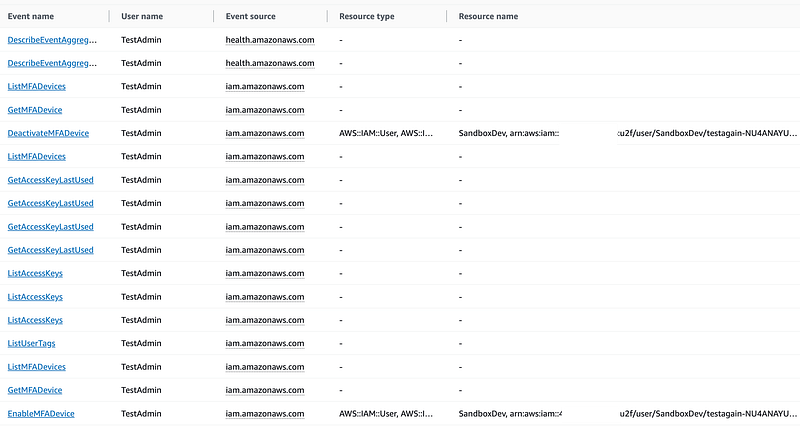
Let’s click into the EnableMFADevice event.
There’s a username in the identity section:
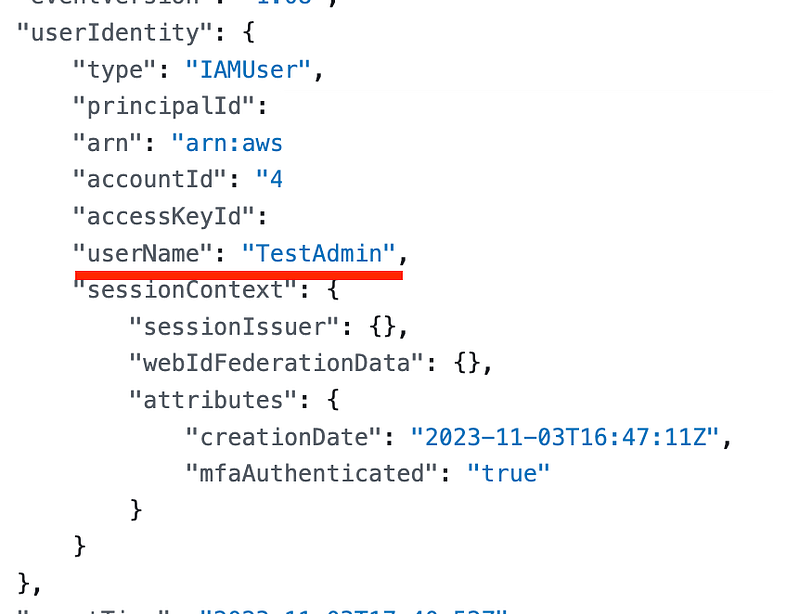
There’s a username in the Request Values:

These are the two things we want to match.
There is a resource listed here as a user:
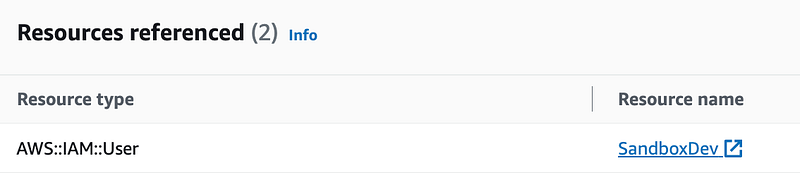
But the user doesn’t have the full ARN. But then, the user doesn’t match with or without the ARN so either way the request should be denied.
Test Adding the account number (!?!?!?)
So I start thinking about the ARNS and I think, what if I use the full hardware ARN? But then I start thinking, wait a minute. What if I remove the asteRISK in that ARN and put in the actual account number where the user exists?
So I change my policy to remove all the asterisks from the user ARN and replace them with the actual account number.
Now when I log into the console this is what I see for my TestAdmin. And this makes more sense.
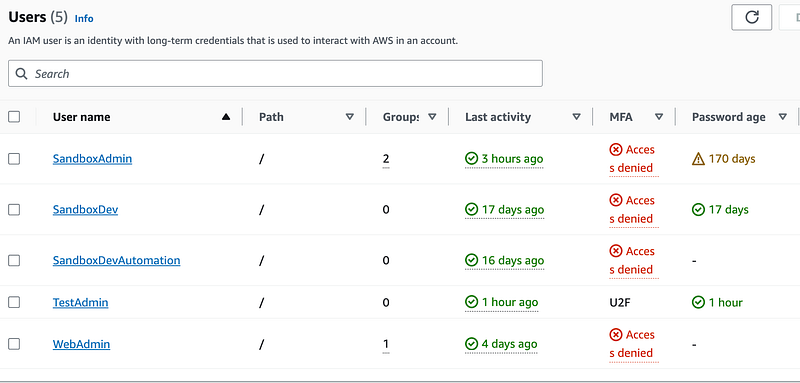
Now when I click over to the SandboxAdmin MFA devices I don’t even see the option to add a device:
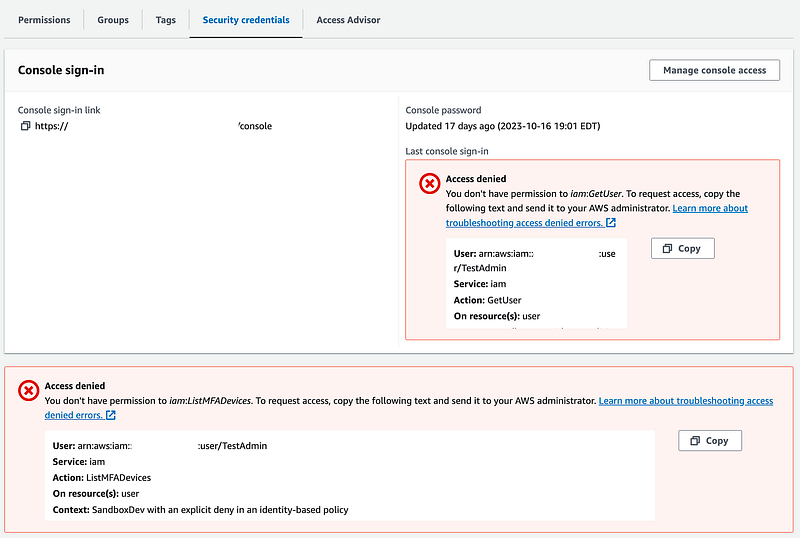
I test adding a second hardware key to my TestAdmin and it works.
Great.
Now test adding a virtual MFA device. We’re back to this:
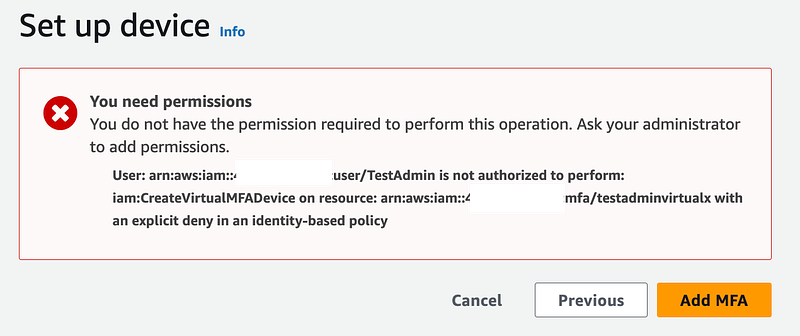
Recall that a user is not a resource in the CreateVirtualMFADevice event. Why?!
But can we still make this work? What are the resources?

No joy. The user can create an MFA device with any name and there is no user resource. AWS please fix this. #awswishlist.
I remove CreateMFADevice from this list of actions:
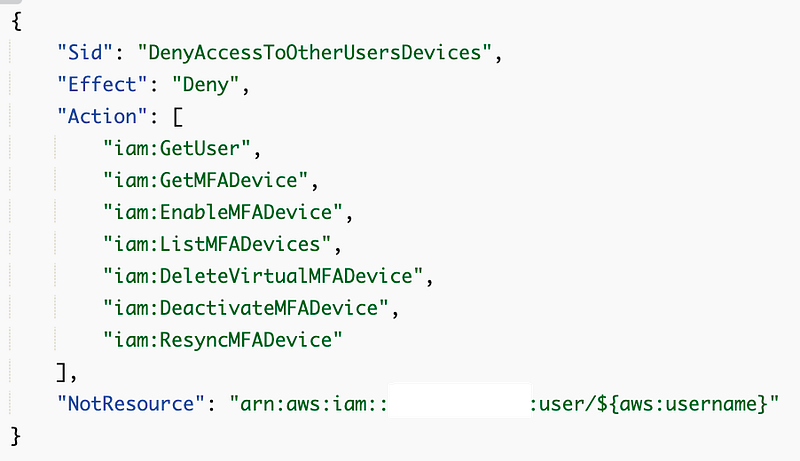
That will allow a user to create a virtual MFA device as long as they have MFA enabled. But we only want them to be able to create their own virtual devices.
But now the user can also create MFA devices for other users potentially. Not through the console:
But possibly through an API or CLI call.
Well, I don’t see a way to fix this problem at the moment. But I can force identification of the user that created the MFA device on the account. I can require that the name of the MFA device matches the name of the user that creates it.
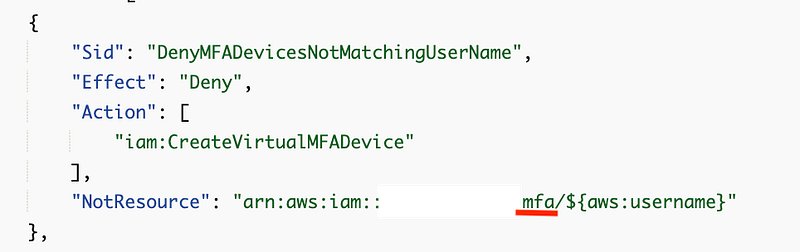
So now if I try to create a virtual MFA device that does not match my user name:
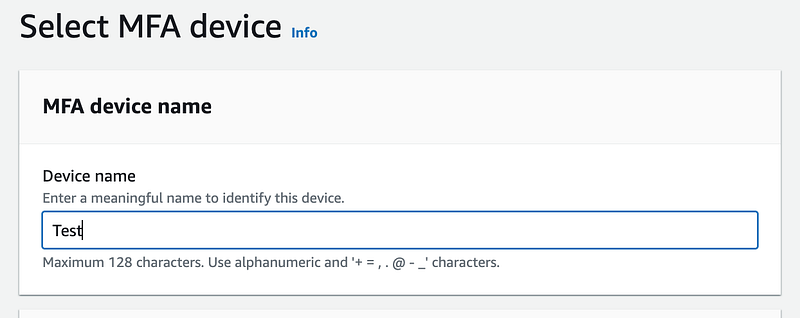
Not Allowed:
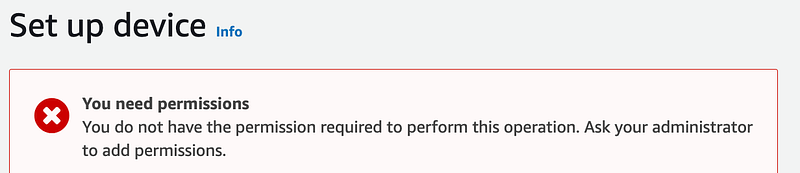
If I use my username which is currently TestAdmin:
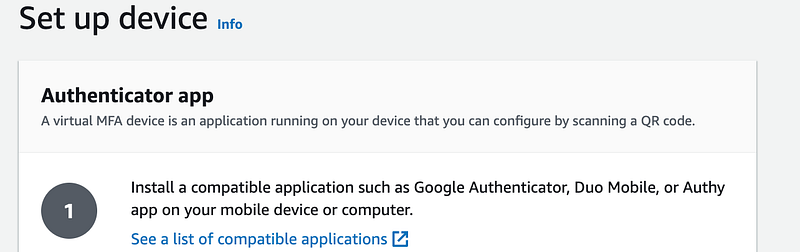
I can proceed.
This is not ideal nor perfect. AWS really needs to add the user to the Virtual MFA request. But at least we can know which user added VirtualMFA to someone else’s account and they can’t do it through the console with this policy.
I’m not anywhere near done with this policy. We still have to consider other types of credentials and the fact that the user can change their own policy. More on that later but my dog is getting ancy. This took too long once again and was not what I planned to be working on today. Oh well.
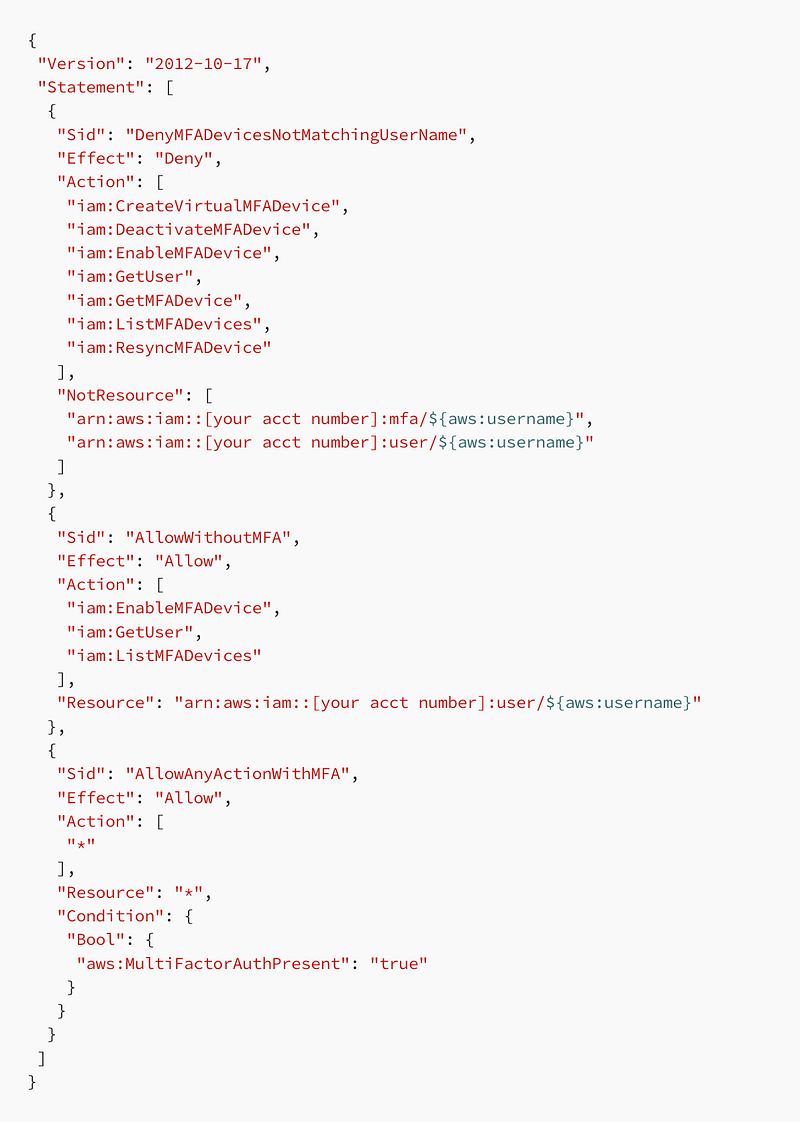
Here’s my policy for the moment:
{
 "Version": "2012-10-17",
 "Statement": [
  {
   "Sid": "DenyMFADevicesNotMatchingUserName",
   "Effect": "Deny",
   "Action": [
    "iam:CreateVirtualMFADevice",
    "iam:DeactivateMFADevice",
    "iam:EnableMFADevice",
    "iam:GetUser",
    "iam:GetMFADevice",
    "iam:ListMFADevices",
    "iam:ResyncMFADevice"
   ],
   "NotResource": [
    "arn:aws:iam::[your acct number]:mfa/${aws:username}",
    "arn:aws:iam::[your acct number]:user/${aws:username}"
   ]
  },
  {
   "Sid": "AllowWithoutMFA",
   "Effect": "Allow",
   "Action": [
    "iam:EnableMFADevice",
    "iam:GetUser",
    "iam:ListMFADevices"
   ],
   "Resource": "arn:aws:iam::[your acct number]:user/${aws:username}"
  },
  {
   "Sid": "AllowAnyActionWithMFA",
   "Effect": "Allow",
   "Action": [
    "*"
   ],
   "Resource": "*",
   "Condition": {
    "Bool": {
     "aws:MultiFactorAuthPresent": "true"
    }
   }
  }
 ]
}
Follow for updates.
Teri Radichel | © 2nd Sight Lab 2023
About Teri Radichel:
~~~~~~~~~~~~~~~~~~~~
⭐️ Author: Cybersecurity Books
⭐️ Presentations: Presentations by Teri Radichel
⭐️ Recognition: SANS Award, AWS Security Hero, IANS Faculty
⭐️ Certifications: SANS ~ GSE 240
⭐️ Education: BA Business, Master of Software Engineering, Master of Infosec
⭐️ Company: Penetration Tests, Assessments, Phone Consulting ~ 2nd Sight Lab
Need Help With Cybersecurity, Cloud, or Application Security?
~~~~~~~~~~~~~~~~~~~~~~~~~~~~~~~~~~~~~~~~~~~~~~~~~~~~~~~~~~~~~
🔒 Request a penetration test or security assessment
🔒 Schedule a consulting call
🔒 Cybersecurity Speaker for PresentationFollow for more stories like this:
~~~~~~~~~~~~~~~~~~~~~~~~~~~~~~~~~~~~~~~~~~~~~~~~~~~~~~~~~~~~~
❤️ Sign Up my Medium Email List
❤️ Twitter: @teriradichel
❤️ LinkedIn: https://www.linkedin.com/in/teriradichel
❤️ Mastodon: @teriradichel@infosec.exchange
❤️ Facebook: 2nd Sight Lab
❤️ YouTube: @2ndsightlab


