
Defining an AWS Organization Governance Architecture
ACM.180 Defining accounts and organizational units based on by trust boundaries and roles to protect critical assets
~~~~~~~~~~~~~~~~~~~~~~~~~~~~~~~~~~~~~~~~~~~~~~~~~~~~~~~~~~~
⚙️ Check out my series on Automating Cybersecurity Metrics. The Code.
🔒 Related Stories: Cloud Governance | IAM | AWS Security
💻 Free Content on Jobs in Cybersecurity | ✉️ Sign up for the Email List
~~~~~~~~~~~~~~~~~~~~~~~~~~~~~~~~~~~~~~~~~~~~~~~~~~~~~~~~~~~
In the last post, I covered geopolitical risk in your supply chain in relation to our use of Okta, the IDP I’ve been assessing in prior posts.
In this post I’m pondering the accounts I may create to support a multi-account architecture in my organization. I may not end up with this exact structure upon further review and testing, but here’s what I’m considering at the moment. I explain the different Organizational Units and Accounts and their purposes below.
If you happen to use this information anywhere, please reference it. Referrals much appreciated. These are my own ideas that I have not seen employed or discussed elsewhere in terms of aggregation of critical resources and this approach will help organizations better secure their cloud accounts. You can ask me questions about this topic on calls through IANS Research or reach out to me on LinkedIn for paid speaking engagements or training. Follow this blog to see how I implement and troubleshoot automated creation and monitoring for an AWS Organization.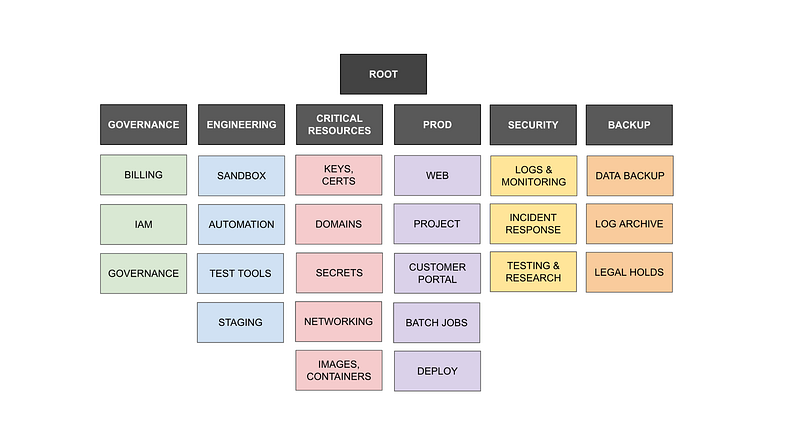
Note that I also ended up creating a Sandbox OU outside of all of this for testing SCPs and other things that might not conform to governance restrictions, such as quickly migrating resources from a different AWS Organization into your structure. I explain that in a future post.
When to create a new OU or Account in AWS
When creating AWS Accounts, I consider the following for determining when I want to put something in new account.
- Billing
- Trust Boundaries
- Blast Radius
When thinking about Organizational Units consider:
- Governance Rules
You may have other considerations, but these are the ones I am going to address in my design below.
Billing
Putting resources into different accounts will make it easier for your finance department to assign different cost centers or accounting codes to different resources to allocate the expense to the appropriate department. The more you can think through your bills and allocation of them by the finance department, the better off you will be in the long run. That said, you may have resources that need to be handled another way because they traverse account boundaries. I covered that in this post:
In my case, when I perform projects for clients, I tend to put each project in a separate account and then I can see the costs associated with that project. Before making a final decision you might want to create a sandbox account and take a look at the bills, or review your current billing structure if you plan to reorganize your AWS accounts. Separating bills into a sensible structure also helps you quickly determine when you have a rogue resource generating excessive costs.
Trust Boundaries
Different people will manage and have access to different applications and resources. We can leverage AWS accounts as a nice way to prevent misconfigurations that give people access to things across trust boundaries we would rather they not cross. If a developer role only ever has access to a developer account, they won’t be able to access production resource inadvertently.
In my example below, I’m going to put resources owned by separate roles and managed by different people into different accounts. Best practice is to separate Dev, QA and prod resources so I’m doing that below.
I’m also separating out critical resources that could easily facilitate a security breach due to a misconfiguration into their own accounts. As explained in prior posts, I’m designing my IAM architecture in a manner that requires multiple people to take critical actions could lead to data exposure or a security breach.
Blast Radius
If a resource in an account gets compromised, what else can it access and compromise via pivoting and lateral movement? By limiting what exists in a particular account, we can limit what an attacker can pivot to via networking between resources in that account — if the resources are in a private network and not exposed to the Internet.
We can limit blast radius via IAM using service control policies and restrictive IAM policies that allow any cross-account roles to perform only required actions. The roles can access what they need to maintain the organization but can be limited to accessing any data or critical resources in the account. We can require two sets of credentials for certain critical actions and locked away credentials for our root level administrator and account.
Organizational Units
I’m going to group accounts together that have similar rules based on job function. I wrote about how you might architect your Service Control Policies in this post and the rules I want to define drives how I group my accounts.
I’m putting critical resources that protect other resources into their own OU.
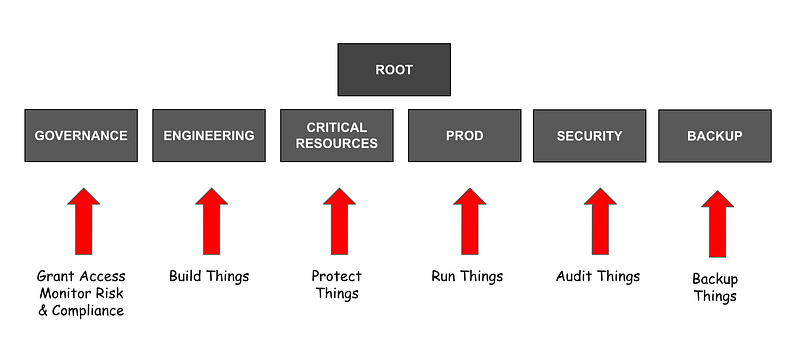
Here are the different activities that may occur in the different organizational units. We would likely have different rules for these different activities.
Governance — Sets and monitors adherence to the rules for the organization and grants access to AWS resources.
Engineering — Engineers may be doing some more risky actions while developing new resources for the organization.
Critical Resources — Infrastructure and resources that, if compromised or misconfigured, have a higher likelihood of leading to a security breach.
Production — Resources that must be handled with the utmost care as they contain sensitive data and resources that are public facing and potentially subject to attack (e.g. our website, customer portals, production jobs that calculate financial data, etc.)
Security — The security team needs access to audit the entire organization and will be collecting and monitoring data related to security incidents and events. They may also be handling malware and performing high-risk security activities in separate, designated accounts.
Backup — We want a separate, air-gapped OU for things that need to be backed up. We don’t want to use our day-to-day credentials and roles with the backup account. In fact, we may not want to grant SSO access to our backup accounts at all.
Accounts
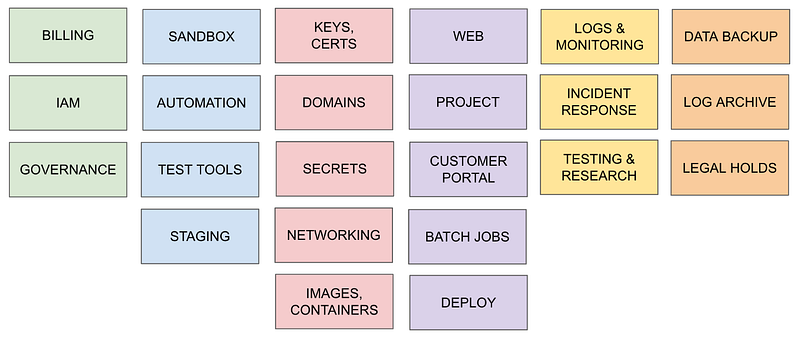
Governance — Billing: The billing account role might be running tools or ad hoc scripts related to finances and billing.
Governance — IAM: The IAM account can be used to grant permissions to roles and users across the organization. I explained why you might want a separate IAM team.
Governance: The governance account manages (Service Control Policies) SCPs and explained in a proper post on letting your governance team govern and subsequent posts.
Engineering — Sandbox: For button clicking. The sandbox account might have less stringent rules for testing new things out. This account has no access to deployment systems but allows users to click on and try out new services. It might have more Internet access as well while testing and less stringent IAM policies.
Engineering — Automation: If we want to enforce automated disaster recovery and infrastructure as code, deployments need to be automated. Completely. This account is used to deploy resources headed for production in an automated fashion. Only resources deployed from our source control system should exist here. No button-clicking allowed!
Engineering — Test Tools: QA teams often deploy tools for automated testing. These tools require separate rules that do not exist in production or the automated development environment and many require variations in SCPs and networking rules. They may require additional secrets and encryption keys as well. This is not where you test your prod-like deployments because the account will not mirror production and should definitely not house any sensitive data. All resources deployed here should match exactly how resources are deployed in the Automation account to ensure QA is testing exactly what developers have created and deployed. The QA team should not be able to alter the deployment of resources bound for production because that invalidates what they have tested.
Engineering — Staging: This account mirrors production with a possible exception — it may not host PII or sensitive data if it is under the engineering OU. If you need this account to host sensitive data for production testing, then create a separate Staging account under the Prod OU. This is where the deployment gets tested before deploying to production. This can also be where user-acceptance testing occurs. You should be able to re-deploy any resource to match production to this account using your disaster recovery scripts and backups, but possibly with data tokenization for any sensitive data depending on the OU where it exists.
NOTE:
Production deployments cannot be tested in environments where developers and QA teams have gone through multiple iterations of changes because they are testing on top of previously deployed code that does not exist in production. Things will be missed and break at the point where you attempt to deploy to production — and that’s where the misconfigurations and security breaches occur. You need to test deployments in a staging environment and validate all artifacts are correct and cannot change when deployed to production. (Refer to the Solar Winds for why this matters.)

https://medium.com/cloud-security/solarwinds-hack-retrospective-322f03b4eb9b
Critical Resources: Keys, Certs, Domains, Secrets, Networking, Images, Containers: Separate accounts will exist for critical resources depending on who will be managing those resources and how often they need to change. Account-specific SCPs may apply.
Production accounts: Production accounts contain the systems that run the business. They may be customer facing (a website) or process sensitive data (batch jobs). Separate accounts may exist for different types of resources. A deployment system is a production resource that needs to be carefully deployed, managed, and monitored.
Security — Logs and Monitoring: I found the account names and layout of Control Tower confusing and kept forgetting where to log into to see and monitor logs. I want this all in one account with an obvious name. To me, this is obvious but do what works for you. This is where the security team logs in to review reports, logs, alerts and see whatever else they need to see to ensure the organization is secure.
Security — Incident Response: Resources impacted by security incidents have two issues: the evidence needs to follow a proper chain of custody so we want to strictly limit access to this account. Additionally, incident responders may be handling malware which we do not want to infect other systems or accounts. Put this activity in a separate account with a separate boundary.
Security — Testing and Research: Security teams may be working with new penetration testing tools, investigating malware unrelated to a breach, or deploying honey pots that may attract unwanted traffic. We’ll segregate this out into a sort-of air-gapped account with very limited access to the rest of the organization, accounts, or resources.
Backup Accounts: As noted above, we want to air-gap backups from the rest of the organization. Whether or not we need or want a separate account for legal holds may depend on who is accessing it and how frequently. You may decide to have separate types of backup accounts for different purposes with severe restrictions on the account that backs up critical resources required for disaster recovery due to ransomware. Ransomware will often try to get into your backups before deploying to encrypt those as well, so we want to ensure those resources in particular are in a completely separate account that is rarely accessed with a separate set of credentials, but closely monitored.
Networking Cost Considerations
Just a note on networking as you build out your account architecture. If you have resources reaching out over the network between two accounts, you will likely want to implement peering to keep those resources on the AWS backbone and a private network (as opposed to the Internet). There is an additional cost to send data to another account over the network. It will be even higher if you send it out over the Internet. If you have large volumes or data to send over the network that may influence the architecture of your account structure.
Organizational Units and Rules Hierarchy
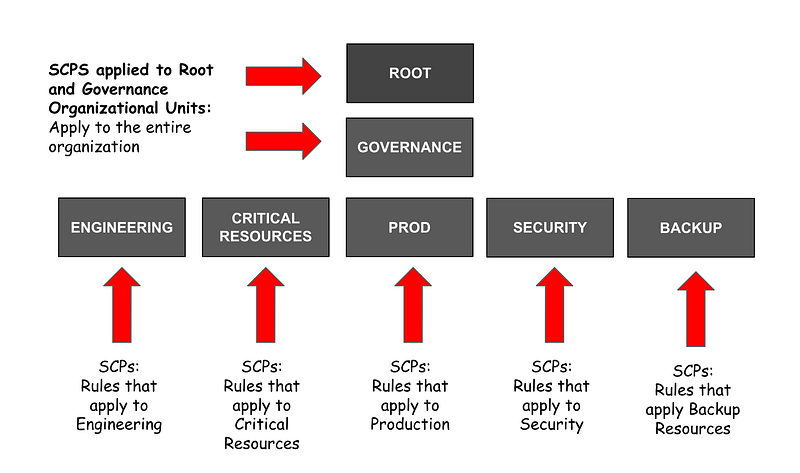
I already wrote a blog post on Service Control Policy (SCP) architecture and considerations. As you build out an account structure, consider which rules will apply to all accounts. As you discover a group or accounts has a varying set of rules, it may be time to break those accounts into two separate OUs.
When you look at the breakdown of rules you may find a subset of rules applies to all the accounts. Put those rules in a higher-level OU and then create new OUs below it for the rules that vary.
In my case, I’m going to create rules for the Root and Governance OUs that apply to the entire organization for reasons explained in this post.
I expect to have different rules for the accounts below the other OUs so I’ll put those OUs below the governance OU like this:
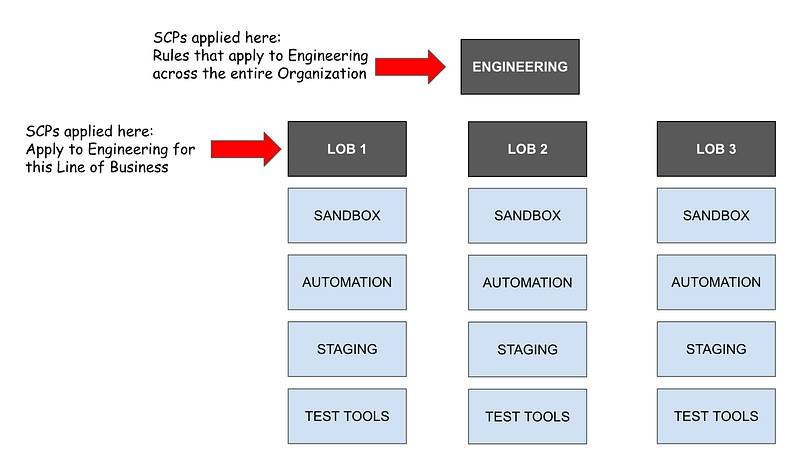
What if you have multiple Lines of Business (LOBs) that has a similar departmental structure. For example, you have a line of business for a bank that deals with investing, and one that deals with auto loans, and another that deals with credit cards. The departmental rules are the same for each line of business. However, each line of business may have additional rules over and above the rules that apply to the organization as a whole. Maybe you have separate governance teams at each line of business that manage these LOB specific rules. Then you might structure the OUs for your engineering department like this, for example:
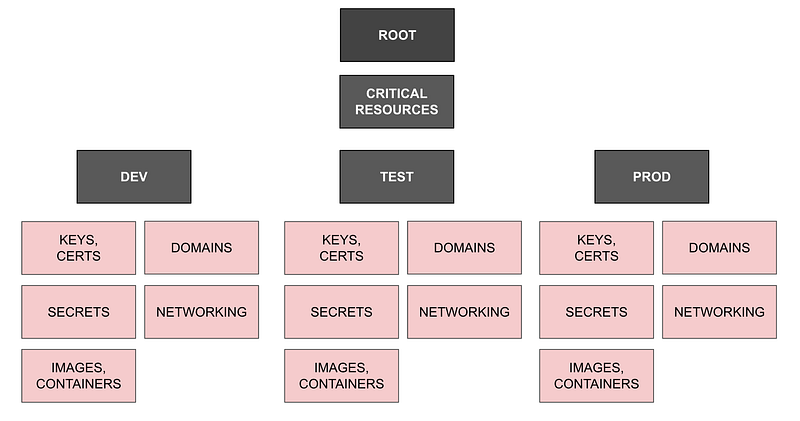
Critical Resources By Environment
You should not use the same secrets in Dev, QA, and Test. Let’s say you want one team to manage all your KMS keys for all environments — development, QA, Staging, and Testing. Perhaps you put all those keys in one account and share them out to other accounts. But let’s say you want to ensure a developer with access to developer KMS keys in the Keys account cannot access production access keys by virtue of some misconfiguration. You could take your account breakdown a bit further and break out Dev, Test, Prod, and even Staging resources into their own accounts.
I’m not going to do this. I’m going to see if I can create a naming convention that ensures each user, environment, an application only has access to their own critical resources and have a single team manage those critical resources in a single account. I’m going to try to architect it such that it would take access to multiple accounts to change a configuration to access data. However, this is an alternate approach below if you have the resources to manage the additional complexity.
Service Quota for AWS accounts
If I follow the plan above, I would need to create a lot of accounts. At this point we need to revisit our AWS Organizations Service Quotas. Here we find that the number of accounts we can create by default is ten. If you want to create more accounts than that, click the link for the Service Quota console and request the number of accounts you need.
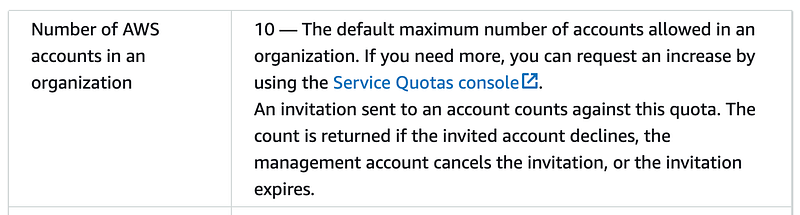
Also be aware that you cannot create more than five accounts at a time. If I were to create a script to build out the entire structure above, I’d need to take this into consideration and design my script accordingly.

Service Quota for organizational units
We can create up to 1000 organizational units and it does not say how many Accounts we can add to a single Organizational Unit. We do know that we can only next them 5 layers deep as noted in a prior post. So it seems like so far our hypothetical organizational structure is OK.
Other things to be aware of and test
Based on some issues I’ve had with cross-account access in the past we will want to test and verify the following:
- We can grant cross-account access to resources. Not all AWS resources can be referenced in a cross-account manner, such as AWS Systems Manager Parameter Store.
- The necessary visibly exists for any actions taken in logs.
- Cross-account policies work as expected.
- Service Control Policies work as expected.
- Resources such as AWS Certificates many need to be in the same AWS account where the application exists but perhaps we can manage them from our Keys and Certificates account.
There is no “reference architecture”
There is no single answer for every organization or “reference architecture” that tells you exactly how to structure your organization. You will want to consider the rules you want to enforce and the data and resources you want to protect, as well as how you handle your AWS expenses. This is my hypothetical design so far and I don’t need it all at once. I’ll be building it out and testing it as I go.
I’ll be using the same code I used in this post:
I’ve already deployed something similar in the past so I know for the most part it should work, but I ran across a few issues I hope have been fixed by now, since I previously reported them to AWS. I also have a few new ideas above I haven’t yet tested and want to try out. We’ll also be exploring how this works with our Okta integration.
Follow for updates.
Teri Radichel | © 2nd Sight Lab 2023
About Teri Radichel:
~~~~~~~~~~~~~~~~~~~~
⭐️ Author: Cybersecurity Books
⭐️ Presentations: Presentations by Teri Radichel
⭐️ Recognition: SANS Award, AWS Security Hero, IANS Faculty
⭐️ Certifications: SANS ~ GSE 240
⭐️ Education: BA Business, Master of Software Engineering, Master of Infosec
⭐️ Company: Penetration Tests, Assessments, Phone Consulting ~ 2nd Sight Lab
Need Help With Cybersecurity, Cloud, or Application Security?
~~~~~~~~~~~~~~~~~~~~~~~~~~~~~~~~~~~~~~~~~~~~~~~~~~~~~~~~~~~~~
🔒 Request a penetration test or security assessment
🔒 Schedule a consulting call
🔒 Cybersecurity Speaker for PresentationFollow for more stories like this:
~~~~~~~~~~~~~~~~~~~~~~~~~~~~~~~~~~~~~~~~~~~~~~~~~~~~~~~~~~~~~
❤️ Sign Up my Medium Email List
❤️ Twitter: @teriradichel
❤️ LinkedIn: https://www.linkedin.com/in/teriradichel
❤️ Mastodon: @teriradichel@infosec.exchange
❤️ Facebook: 2nd Sight Lab
❤️ YouTube: @2ndsightlab


