
Restricting Users to Changing Their Own Credentials
ACM.370 Also, the nightmare policy caused by inconsistent resources in API requests
~~~~~~~~~~~~~~~~~~~~~~~~~~~~~~~~~~~~~~~~~~~~~~~~~~~~~~~
⚙️ Check out my series on Automating Cybersecurity Metrics | Code.
🔒 Related Stories: AWS Security | Secure Code | Cybersecurity | IAM
💻 Free Content on Jobs in Cybersecurity | ✉️ Sign up for the Email List
~~~~~~~~~~~~~~~~~~~~~~~~~~~~~~~~~~~~~~~~~~~~~~~~~~~~~~~
In the last post I wrote and tested a policy that restricts a user with admin permissions otherwise from changing any MFA devices other than their own — except that we can’t exactly with virtual devices. We did the best we can as far as I can tell with the policy in the post. I will update if I find out things change or discover something new.
OK next up. Although we restricted MFA devices, there are a lot of other types of credentials on AWS that a user could modify besides an MFA device for another user.
Please note that I’m delirious from trying to sort out all the inconsistencies in how AWS passes defines resources in requests and writing the associated policy correctly, so I haven’t tested every action in this policy in this post. If you are using it in a production environment, you should test that the user can do every action they are supposed to do and not any of the actions they are not supposed to do.
Here are some sample policies, none of which completely addresses the credential issues and some using logic that even the AWS documentation warns against. I’ll try to sort it out below.
AWS has a post on passwords here:
This post covers passwords, service specific credentials, and signing certificates:
This one covers access keys and SSH keys:
This tutorial…
Links to an even more extensive policy that uses some of the faulty logic I wrote about earlier.
What’s the risk of not being explicit in our policy?
What if we have an administrator (*) policy that only allows the admin to take certain credential related actions on their own account? Then what if AWS adds a new type of credential and action not in that list? Then our administrator will be able to use it to change other people’s credentials.
As I was testing this policy I came up with a lot of similar caveats.
Really what we need to do is take a look at all the actions in the list of possible IAM actions and explicitly assign what we want the user to be able to do or not do. However your eyes might start to glaze over when you look at this list because it’s very long.
Let’s see, how can we simplify this. There’s a list of actions that require a user in the column:
Resource types (*required)
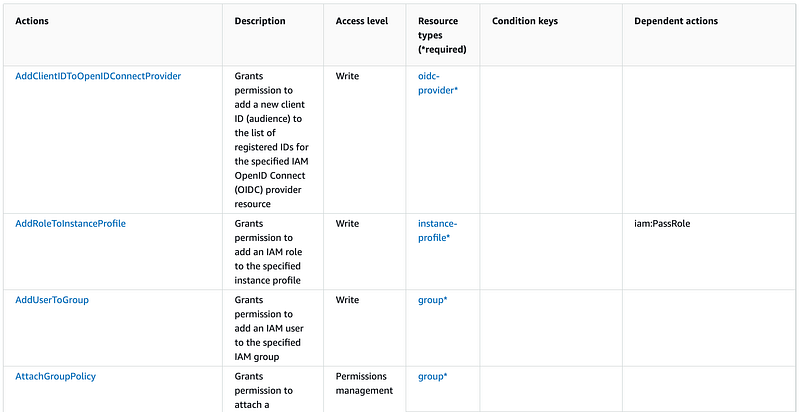
We are most concerned with the actions that are applicable to users. We could simply deny any actions that are applicable to users if this is not an IAM admin using a generic user ARN as the resource. (In theory as I found out below.)
The admin could still modify policies, assign groups, and make other changes, but could not modify user passwords or credentials. Let’s look through the list and see what, if any, permissions we still might need out of that list that are applicable to users.
We may want to allow the Admin to use the following actions to administer users:
- CreateUser
- CreateLoginProfile
- DeleteLoginProfile
- DeleteUser
- DeleteUserPermissionsBoundary
- DetachUserPolicy
- GenerateServiceLastAccessedDetails
- Get*
- List*
- PutUserPermissionsBoundary
- PutUserPolicy
- SimulatePrincipalPolicy
- Tag*
- Untag*
- UpdateUser
OK so we need a policy that:
- Allows any IAM action not specific to a user
- Allows any of the above with MFA
- Denies any other action specific to a user not in the above list
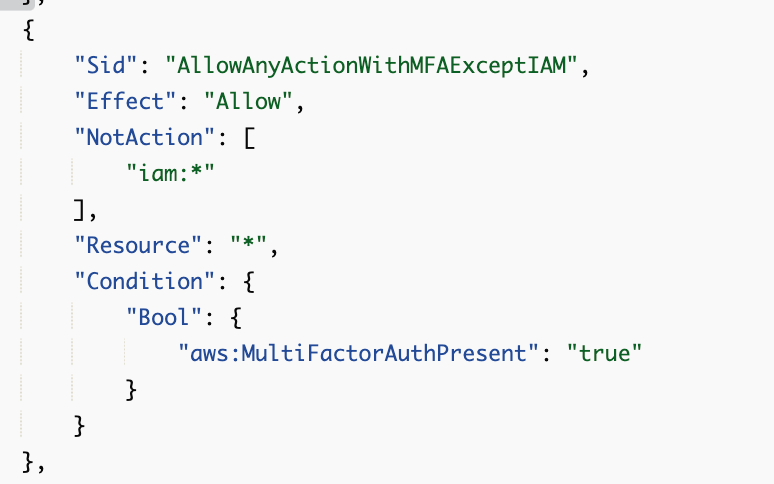
What if we exclude IAM from all allowed services:
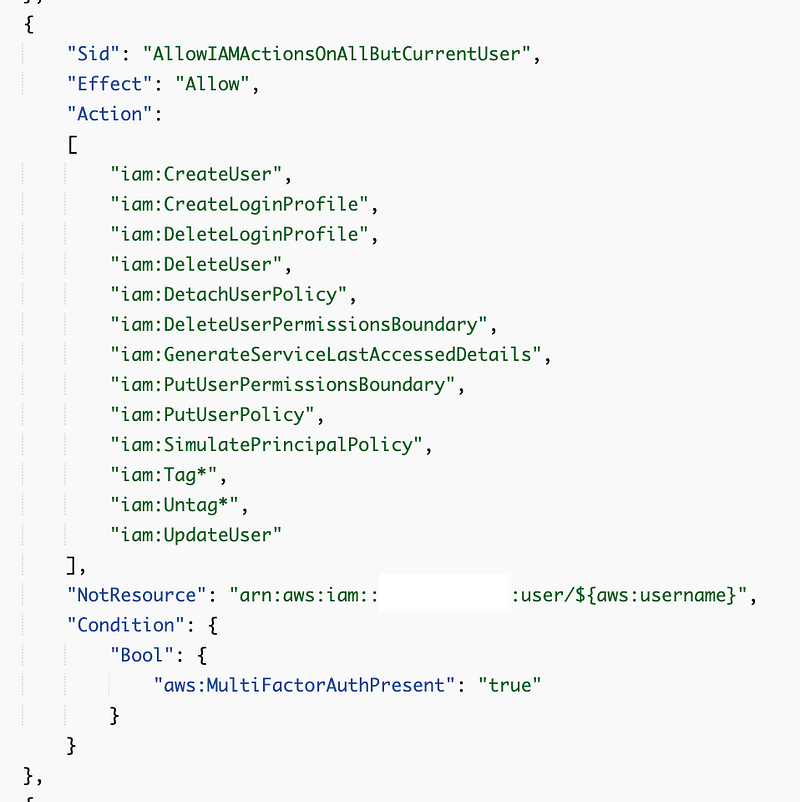
We allow the following except for the current user:
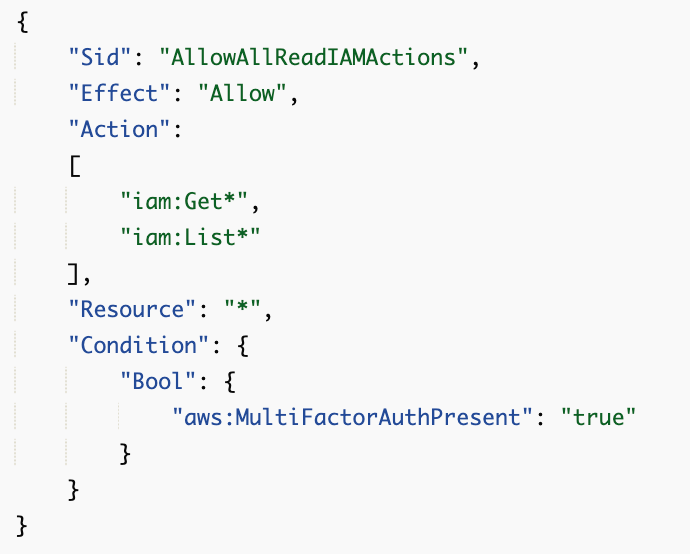
We allow all Get and List actions, users or not.
We allow all other IAM actions that are not user specific.
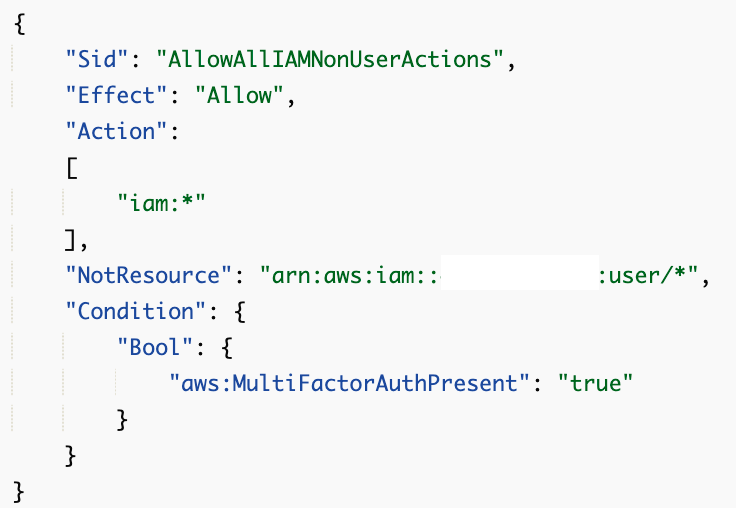
Now we need to add the additional permissions from the above example policies that we want to allow our admin user to perform on their own user account. I can remove any List and Get actions since we allow Administrators to see all the data in the console, just not modify it.
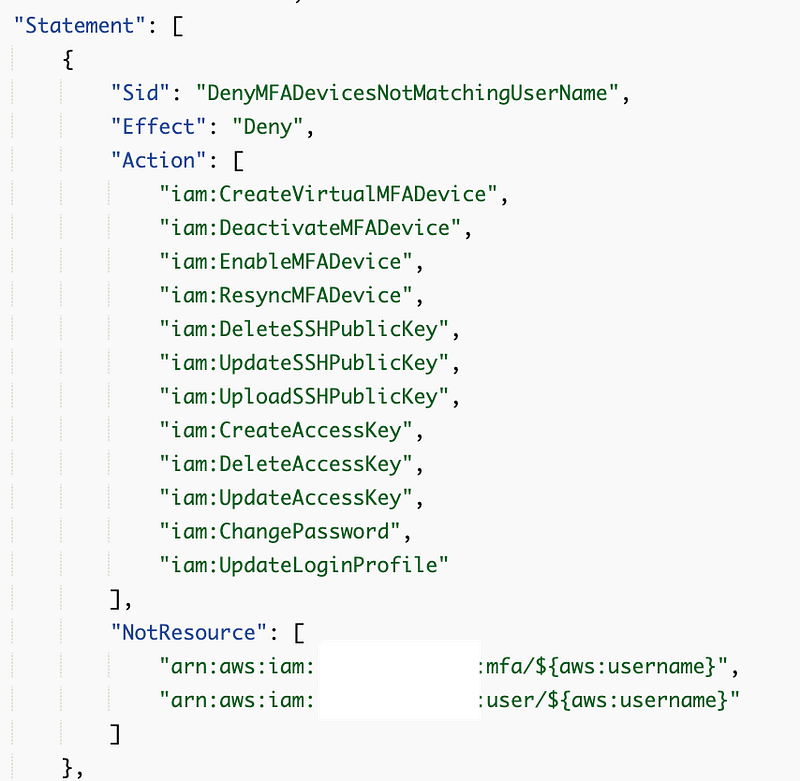
Will it work? I don’t know. I need to test it. But in theory if AWS adds some new service that has credentials associated with it, a user can add their own credentials if we add them to the policy, but they will not automatically be available. In addition, an administrator will not be able to set them for new users without changes to this policy.
Well, first of all, I test MFA functions and they still work as expected. Next, I try to change my TestAdmin password and that fails with an error.

I try to look at the error in the logs but the requestParameters are not present.
So I head over to my SandboxAdmin user and test with a policy that allows me to make the change and I see the following:
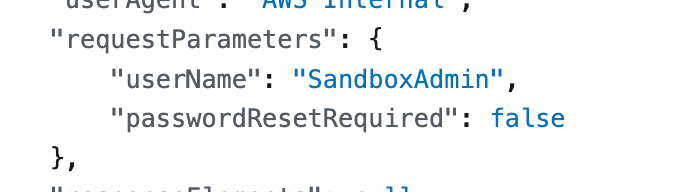
Why is this not passing in an ARN for the user?? Also, the resource listed for this action in the console is not an ARN, it is a username. This username could be in any account and I already showed you in a past post how not including the account number allowed me to update anyone’s MFA. This needs to be an ARN with an account number in my opinion. Sorry. I’m repeating myself.
So I’m not going to just add “${aws:username}” as a resource and in fact, I don’t think I can because it will fail on valid ARN. But let’s try it in a separate statement.
As expected the IAM console gripes about this resource:
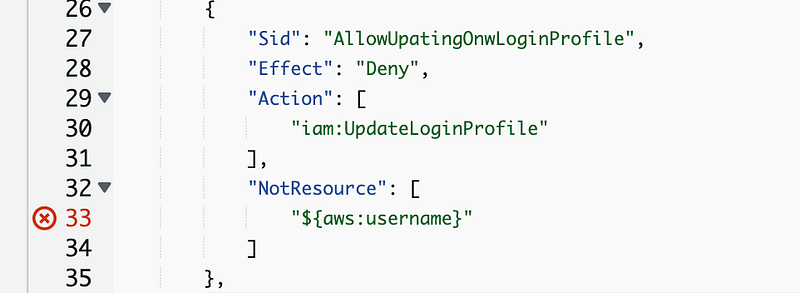
It’s not a valid ARN so why is the request not a valid ARN?
So here’s the next problem. If these *LoginProfile events don’t use actual user ARNs then this isn’t going to work either:
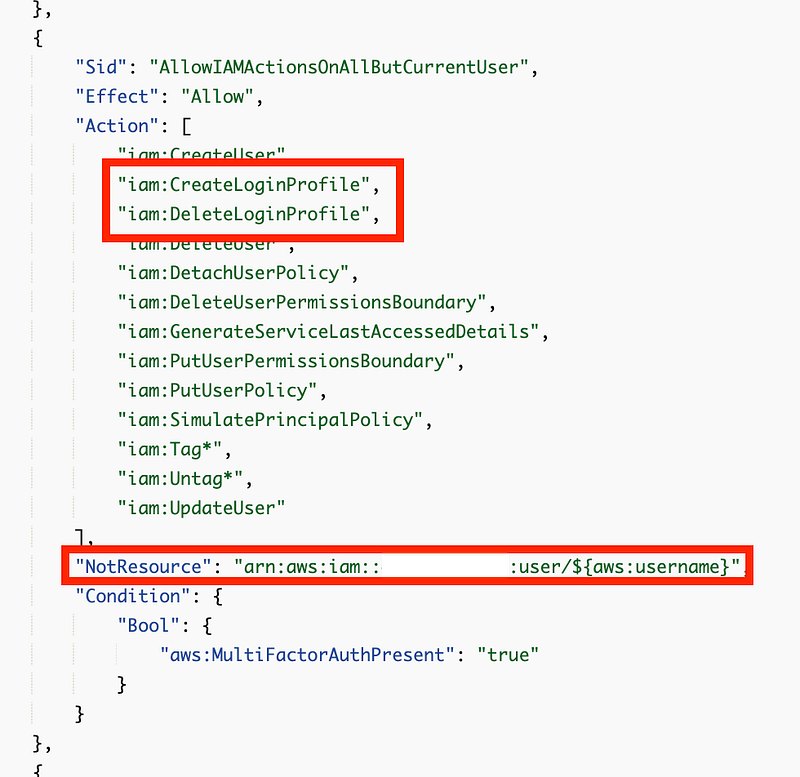
So my admin can’t grant initial console access to users. We need to move those actions over to this statement:
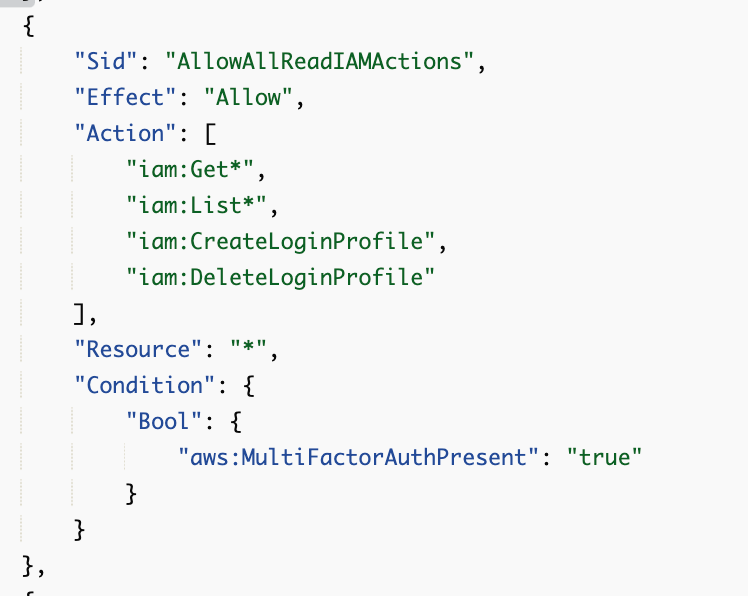
But if you think about this for a minute, if an admin can delete and recreate a LoginProfile then they can essentially change a user’s password. I’m going to change that to Create only.
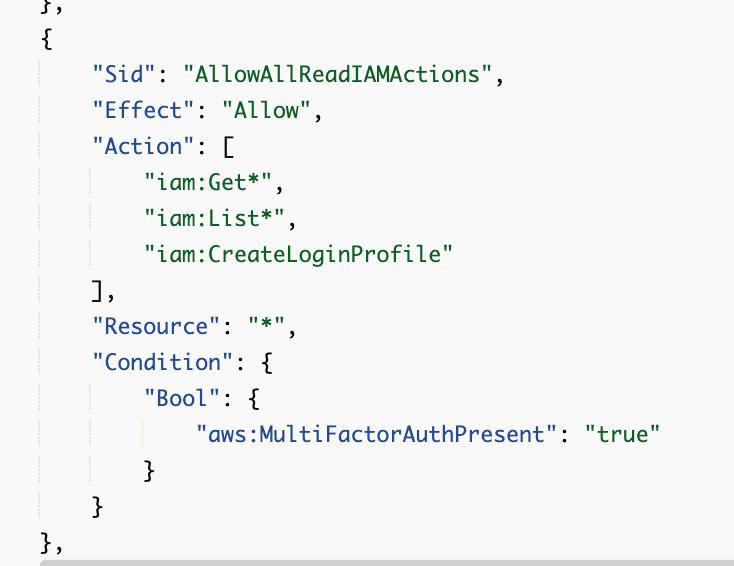
But if the admin can’t delete login profiles then they can’t delete users either, so we can remove DeleteUser. Perhaps we have a separate admin for Deletion of users. I’ll need to think about that.
With those changes I ran a basic test to create a new user and assign a password. But after those changes I was able to update the user’s password in the console as well.
That’s because I’m allowing all IAM actions not specific to a user ARN and this action is not apparently using a valid user ARN as the resource.
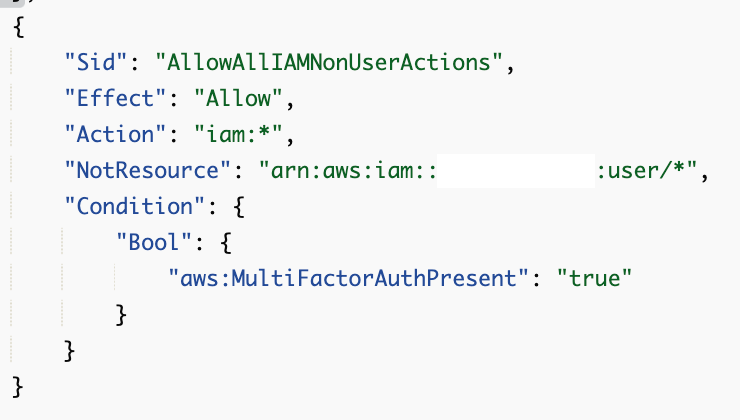
The inconsistency is a bit frustrating. That means I have to explicitly deny those actions.
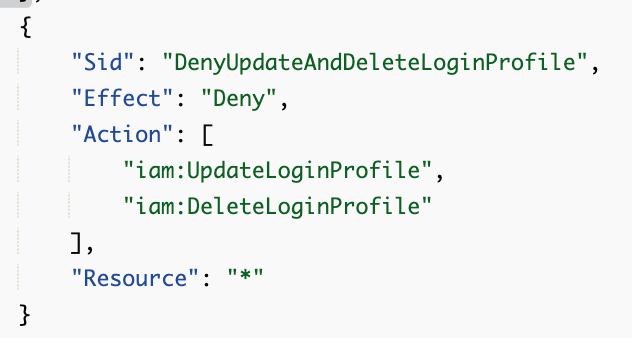
But that means the admin can’t change their own password in the console. They should still be able to do that using the link on the login page.
What would be nice is if we could somehow use the request parameters. We could restrict actions to the current account where the userName = ${aws:user} or passwordResetRequired = “true”.
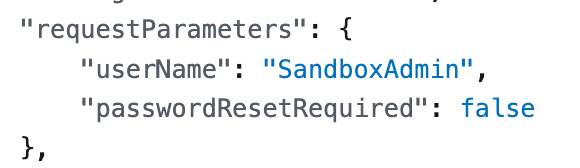
That would eliminate some but not all risks in ways I’m not going to spell out here. For the moment, this admin can create new users and everyone has to reset their own password using the AWS sign in page link.
There is possibly some other problem with this policy due to inconsistencies in resources which will appear later. But for now I’m testing this:
{
 "Version": "2012-10-17",
 "Statement": [
  {
   "Sid": "DenyMFAandCredentialActionsNotMatchingUserName",
   "Effect": "Deny",
   "Action": [
    "iam:CreateVirtualMFADevice",
    "iam:DeactivateMFADevice",
    "iam:EnableMFADevice",
    "iam:ResyncMFADevice",
    "iam:DeleteSSHPublicKey",
    "iam:UpdateSSHPublicKey",
    "iam:UploadSSHPublicKey",
    "iam:CreateAccessKey",
    "iam:DeleteAccessKey",
    "iam:UpdateAccessKey",
    "iam:ChangePassword",
    "iam:UpdateLoginProfile"
   ],
   "NotResource": [
    "arn:aws:iam::xxxxxxxxxxxx:mfa/${aws:username}",
    "arn:aws:iam::xxxxxxxxxxxx:user/${aws:username}"
   ]
  },
  {
   "Sid": "AllowWithoutMFA",
   "Effect": "Allow",
   "Action": [
    "iam:EnableMFADevice",
    "iam:ListMfaDevices",
    "iam:GetUser",
    "iam:GetAccountPasswordPolicy"
   ],
   "Resource": "arn:aws:iam::xxxxxxxxxxxx:user/${aws:username}"
  },
  {
   "Sid": "AllowAnyActionWithMFAExceptIAM",
   "Effect": "Allow",
   "NotAction": [
    "iam:*"
   ],
   "Resource": "*",
   "Condition": {
    "Bool": {
     "aws:MultiFactorAuthPresent": "true"
    },
    "StringEquals": {
     "aws:PrincipalAccount": [
      "xxxxxxxxxxxx"
     ]
    }
   }
  },
  {
   "Sid": "AllowIAMActionsOnAllButCurrentUser",
   "Effect": "Allow",
   "Action": [
    "iam:AttachUserPolicy",
    "iam:CreateUser",
    "iam:DetachUserPolicy",
    "iam:DeleteUserPermissionsBoundary",
    "iam:GenerateServiceLastAccessedDetails",
    "iam:PutUserPermissionsBoundary",
    "iam:PutUserPolicy",
    "iam:SimulatePrincipalPolicy",
    "iam:Tag*",
    "iam:Untag*",
    "iam:UpdateUser"
   ],
   "NotResource": "arn:aws:iam::xxxxxxxxxxxx:user/${aws:username}",
   "Condition": {
    "Bool": {
     "aws:MultiFactorAuthPresent": "true"
    },
    "StringEquals": {
     "aws:PrincipalAccount": [
      "xxxxxxxxxxxx"
     ]
    }
   }
  },
  {
   "Sid": "AllowAllReadIAMActionsandCreateConsoleLogin",
   "Effect": "Allow",
   "Action": [
    "iam:Get*",
    "iam:List*",
    "iam:CreateLoginProfile"
   ],
   "Resource": "*",
   "Condition": {
    "Bool": {
     "aws:MultiFactorAuthPresent": "true"
    },
    "StringEquals": {
     "aws:PrincipalAccount": [
      "xxxxxxxxxxx"
     ]
    }
   }
  },
  {
   "Sid": "DenyUpdateAndDeleteLoginProfile",
   "Effect": "Deny",
   "Action": [
    "iam:UpdateLoginProfile",
    "iam:DeleteLoginProfile"
   ],
   "Resource": "*"
  }
 ]
}
Note that I initially forgot: “iam:GetAccountPasswordPolicy” in the allowed actions that do not require MFA below. Like I said…test this policy before you use it.
There’s another conundrum — if you want to require MFA to change a password, then the user can’t change their password on first login. You could change the policy for that user after first login, but I wish AWS had a a configuration option for that.
But what is weird is the IP address and useragent in that failed request:

That should be the user IP and user agent, no?
I didn’t test every single path but likely will be in future posts.
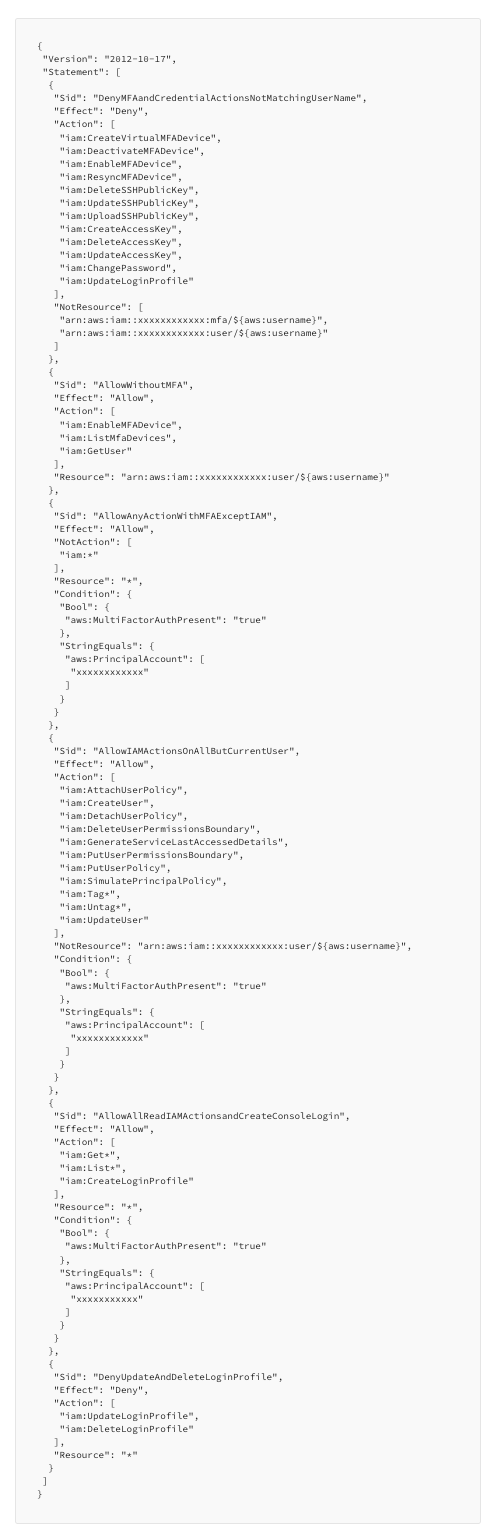
Note that I just added the principal account restrictions and need to test those further. But given the issues with the asterisk in my earlier policies I’m being very explicit here. For a break-glass administrator in an account the administrator should only have access to that specific account. I will have higher-level accounts that can perform cross-account actions.
There’s one more thing I need to do before I use this policy. This user can create a new user and assign privileges higher than their own. I need to prevent that. And do more testing because I haven’t tested every aspect of this policy.
Please make all resources in actions act on valid ARNs so they can be used in policies. #awswishlist
Follow for updates.
Teri Radichel | © 2nd Sight Lab 2023
About Teri Radichel:
~~~~~~~~~~~~~~~~~~~~
⭐️ Author: Cybersecurity Books
⭐️ Presentations: Presentations by Teri Radichel
⭐️ Recognition: SANS Award, AWS Security Hero, IANS Faculty
⭐️ Certifications: SANS ~ GSE 240
⭐️ Education: BA Business, Master of Software Engineering, Master of Infosec
⭐️ Company: Penetration Tests, Assessments, Phone Consulting ~ 2nd Sight Lab
Need Help With Cybersecurity, Cloud, or Application Security?
~~~~~~~~~~~~~~~~~~~~~~~~~~~~~~~~~~~~~~~~~~~~~~~~~~~~~~~~~~~~~
🔒 Request a penetration test or security assessment
🔒 Schedule a consulting call
🔒 Cybersecurity Speaker for PresentationFollow for more stories like this:
~~~~~~~~~~~~~~~~~~~~~~~~~~~~~~~~~~~~~~~~~~~~~~~~~~~~~~~~~~~~~
❤️ Sign Up my Medium Email List
❤️ Twitter: @teriradichel
❤️ LinkedIn: https://www.linkedin.com/in/teriradichel
❤️ Mastodon: @teriradichel@infosec.exchange
❤️ Facebook: 2nd Sight Lab
❤️ YouTube: @2ndsightlab


