
Medium Blogging Tools
Free tools that are specifically useful to Medium writers
There are a lot of premium tools which can help writers on Medium succeed.
However, there are also a number of free tools that most writers don’t utilize. Below is a compilation of some of the best free tools that are specifically useful to Medium writers.
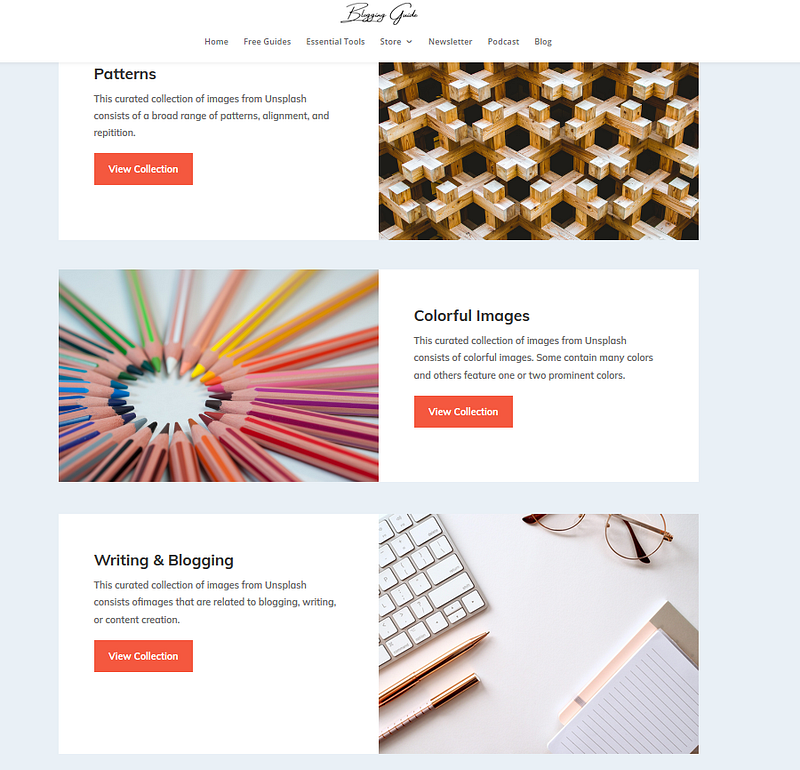
1. Unsplash Curated
Most Medium writers are familiar with Unsplash, the royalty free photo library, which is integrated into Medium’s toolbar editor.
However, finding unique images on Unsplash is a challenge for many writers. As a result, many writers use the same images over and over again. This is why I created “Unsplash Curated.”
Unsplash Curated is a continually updated collection of some of my favorite photos on Unsplash.
Why did I create these image collections?
I already spend hours per week sifting through potential images on Unsplash, so I decided to create collections of images, organized by topic and theme.
These photos are available free of charge to anyone.
2. Medium Enhanced Stats Browser Extension
Medium Enhances Stats is a Chrome browser extension, which allows Medium writers to view a comprehensive breakdown of their stats.
The extension goes beyond the limits of Medium’s built in statistics, and provides crucial insight into the data from your articles.
Some of the popular stats that the Medium Enhanced Stats extension includes are:
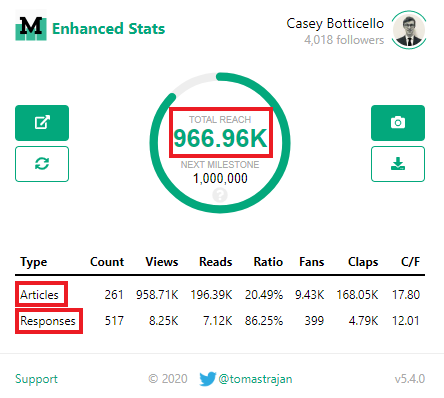
- A graph displaying the total views across all of your Medium articles.
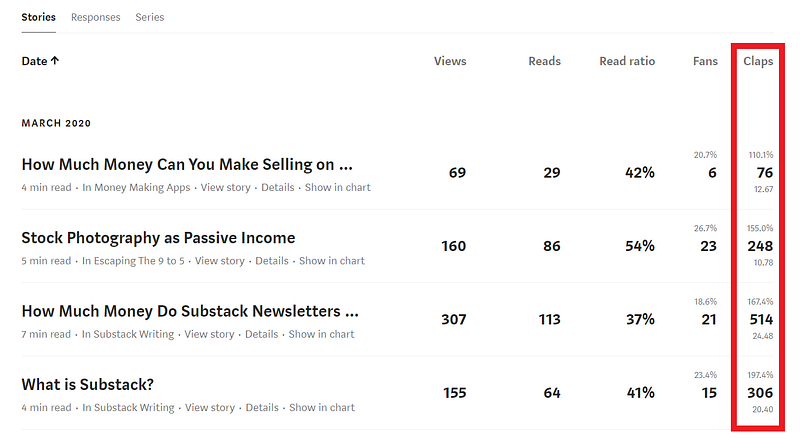
- Stats for both Medium stories and Medium responses. Some of the measured stats include: views, reads, read ratio, fans, claps, fans-to-claps ratio, and a count of the total number of stories or responses published.
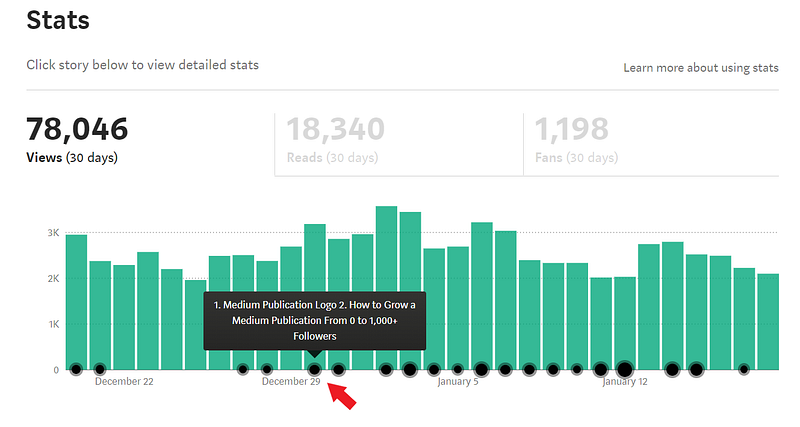
- A more detailed Medium Stats section graph. Each black dot represents a day that articles were published. If you move your cursor over the black dots, you can see which stories were published on any given day.
- You also get a more detailed breakdown in the Medium Stats section (below the chart) where you see a list of your story-specific stats. You will notice that in addition to the standard data points (views, reads, read ratio, and fans), there is a column allowing you to view an article’s claps.
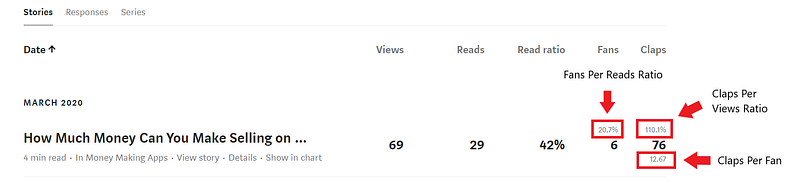
- There are also percentage calculations for Fans and Claps. These include Fans per Reads Ratio, Claps per Views Ratio, and Claps per Fan.

Best of all?
All of this is 100% free and very easy to use!
You just need to use Chrome or Opera Browsers so that you can add the extension.
3. DocDroid
Are you looking to embed lengthy articles or entire studies in your article?
If so, DocDroid is a free and easy to use tool that you should consider.
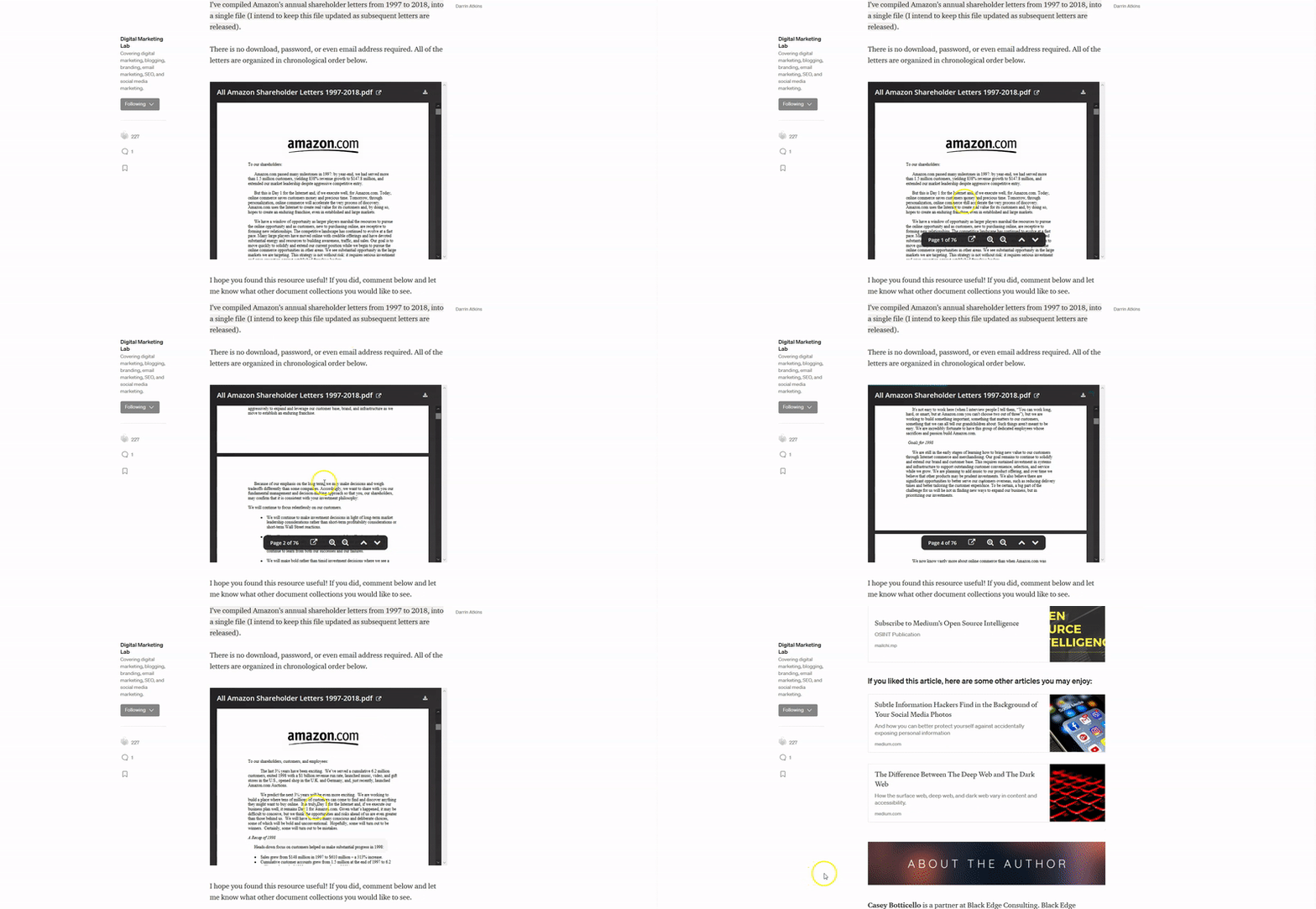
Upload your documents in any format. DocDroid supports PDF, DOCX, DOC, ODT, RTF, XLS, XLSX, ODS, PPT, PPTX, ODP, TXT and more! DocDroid creates a link for sharing, which can be natively inserted into Medium articles.
This embedded function makes sharing source documents a breeze!
For example, I used DocDroid to upload an aggregation of every Amazon shareholder letter, into an article I was writing on the topic:
4. Medium Title Capitalization Tool
If you want your Medium stories to be eligible for curation, you should always make sure that you follow Medium’s preferred style guide.
Alternatively, you can use the Medium Title Capitalization Tool. I created this tool because I received constant questions about article title formatting.
This tool is free, and hosted on my website, BloggingGuide.org.
5. Active Publications
Active Publications is a compilation of active Medium publications, which are currently accepting submissions from writers. The publications are organized by topic.
This tool is intended to serve as a guide for Medium writers who are looking for active publications that accept new writers and new content. All these publications also have published the work of at least three different authors.
The hope is that this list will help writers identify publications that won’t waste their time and are more likely to publish the work of another writer (beside the publication owner).
6. Canva
Canva gives businesses, organizations, and even individual professionals with a very simple design platform that enables them to create amazing and professional quality graphic designs. This online design solution offers a throng of powerful features, including a simple drag-and-drop design tool and a vast collection of over 1 million photographs, graphics, and fonts.
For Medium bloggers in particular, Canva is an invaluable free tool which can be used to create custom blog banners.
You can also check out my new publication, Canva Design, which will contain a number of tips, templates, and free tutorials designed to help new Canva users.
7. Smedian
There are nearly 10,000 publications on Medium.
One of the best resources for submitting your Medium articles to publications, is Smedian.
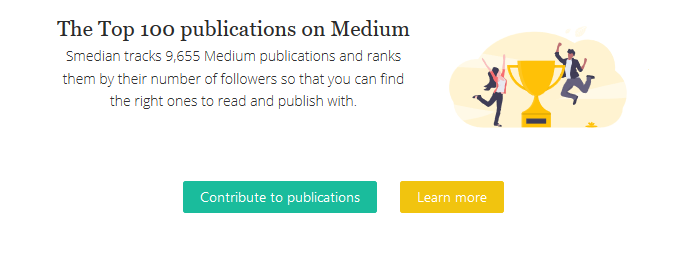
Smedian tracks 9,655 Medium publications and ranks them by their number of followers so that you can find the right ones to read and publish with.

Smedian is also the largest community of Medium editors and writers. Writers can request to contribute to top and fast growing publications, chat, and grow their audience through writing tools.
With over 10,000 publications accepting article submissions in a streamlined process, this should be your first stop when looking for a publication.
Smedian Full Review:
Smedian Link:
8. ManyStories
ManyStories is part of the Penname platform. Penname is a platform of integrated websites dedicated to content distribution and discovery; a place where writers grow their audience and readers discover stories.
If you have read my previous articles on Medium Tools, you may have noticed my reviews of Smedian and Signal, which are also part of the Penname platform, and created by Medium veteran and software developer, Lincoln W Daniel.
If you are trying to expand your audience beyond the same Medium readers, then ManyStories is a must!
9. Signal
Signal can auto-tweet your Medium articles (or any article, for that matter), on Twitter, according to the schedule you set. This can be used to promote new content or revive old content that has faded out of view on Medium’s featured articles, tags, topics, or publications.
I used the free version of Signal from Penname for most of my first year on Medium, and this was largely sufficient as I could keep auto-tweeting up to 10 stories for free (note: Signal currently offers 3 stories to auto tweet under their free plan).
However, as I wrote more articles, and wanted to experiment with developing articles that could grow in views, overtime, I decided to upgrade from Signal Starter (free version) to Signal Pro ($6.99 per month).
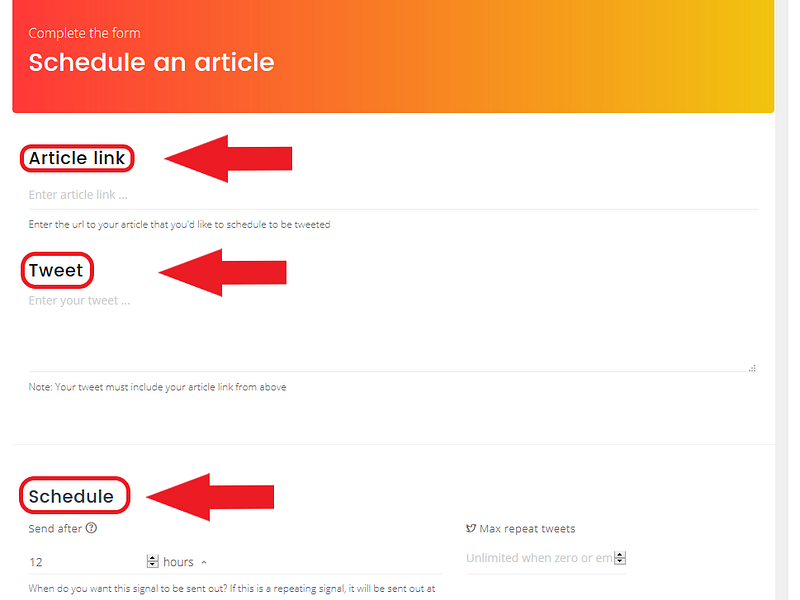
As you can see from the screenshot of my Signal page, the interface is fairly simple. I simply enter the link to my Medium story, customize my tweet (optional), and select the published interval.
Source: Casey Botticello
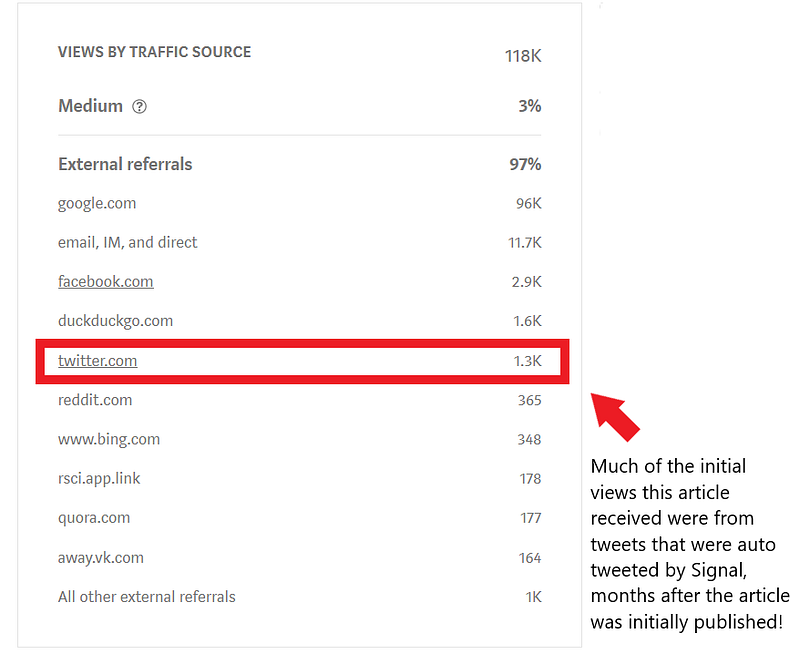
As example, I used Signal to help promote my article which is has now generated over 100,000 views, and is still growing in terms of views, each day (a true feat for a Medium article).
Read Full Signal Review:
Try Signal for Free:
10. TopPub.xyz
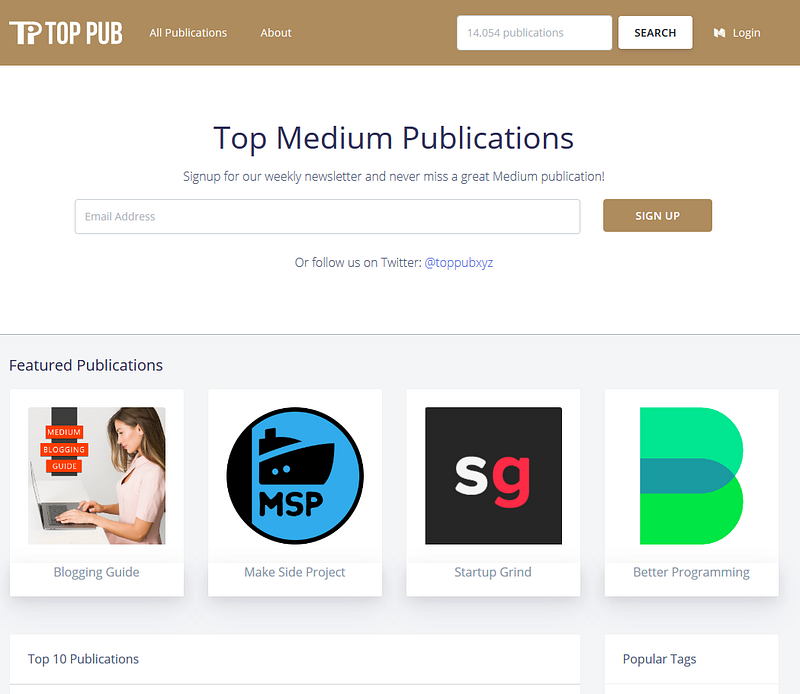
Toppub.xyz is another great resource for finding new Medium publications to submit your articles to.
It is easy to use and completely free!
11. Grammarly
As a blogger, writing error-free articles is extremely important. Blog posts that are riddled with errors will get ridiculed by readers. This can lead to your content not being taken seriously, as well as a high bounce rate.
Recently, Grammarly has become a popular tool used by many bloggers to eliminate grammar and spelling errors.
What is Grammarly?
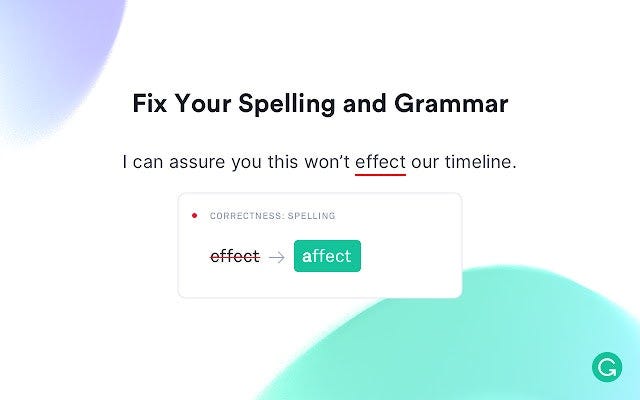
Grammarly is an AI-powered grammar checking and proofreading tool. It can be used to detect various grammatical errors and punctuation mistakes. Including subject-verb mismatch, syntax errors, bad sentence structure, and more. At the same time, the software provides suggestions that may help your sentences sound more grammatically correct and read better.
Grammarly also consists of additional tools for better writing.:
- A spell checker that helps to prevent common misspellings.
- Plagiarism checker that compares your content to billions of other pieces of writing on the web to prevent duplication.
- Writing style checker which helps to improve readability and ensures your writing style is consistent with the type of audience you are writing for.
Grammarly was founded in July 2009 by Ukrainians Max Lytvyn, Alex Shevchenko, and Dmytro Lider. The three entrepreneurs set out to create the tool in order to help students become better at grammar and spelling. Later on, the software was further developed to boost effective communication between readers and writers of English, whether for professional business purposes or personal use.
Launched initially as a subscription-only app, a free version of Grammarly was made available to the public in 2015. Since then, it has grown to over 30 million daily active users. In addition, the software is constantly being updated with new and innovative features.
Full Grammarly Review:
Try Grammarly for Free:
12. GIF Maker
Want to create a GIF (like the image below) but don’t know how?
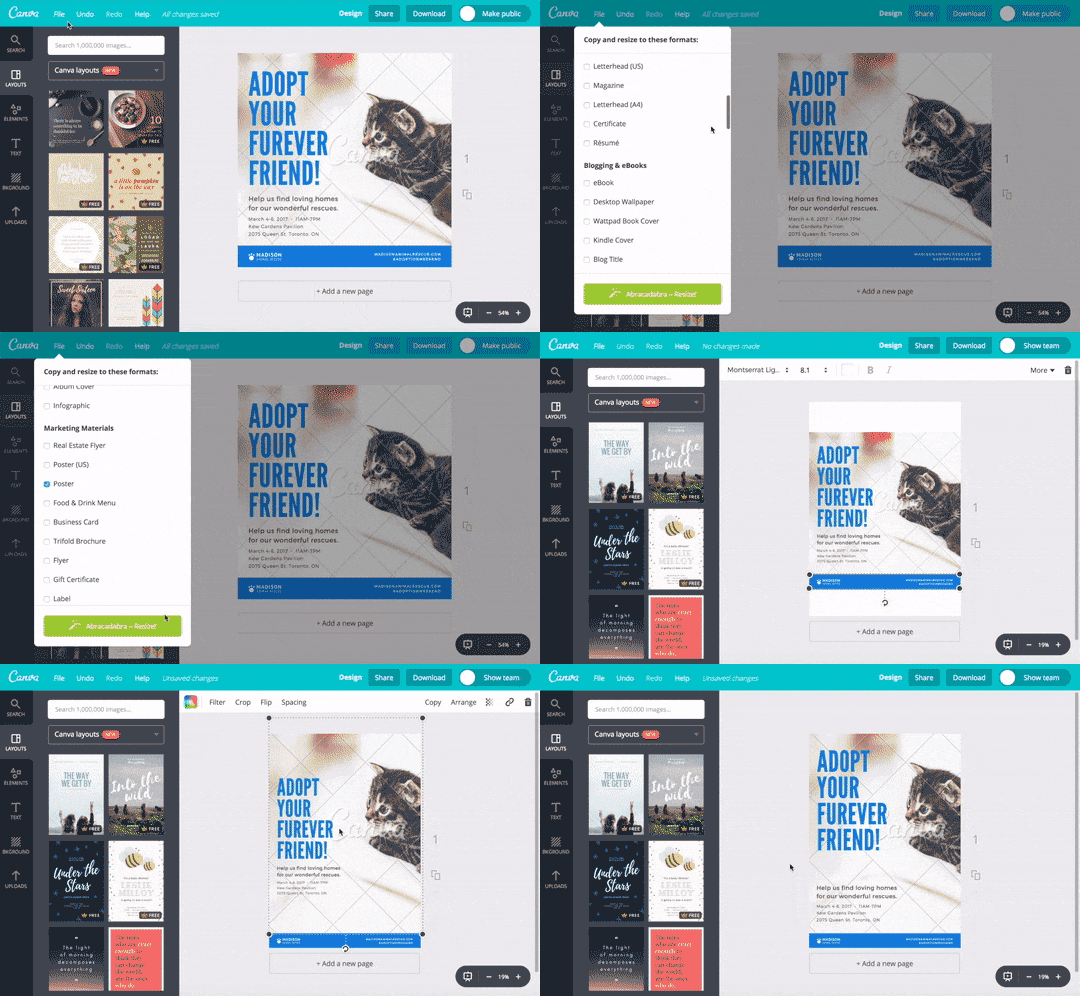
EZGIF is a free online video to GIF converter.
You don’t even need to create an account to use it!
Simply upload any video and this tool will format your video files as a GIF. If you are looking for free video/screen recording tools, see the next item on this list.
13. Free video recorder
I personally use Screencast-O-Matic to record free videos that I intend to turn into GIFs.
It’s fast, free and easy to use! You can also use this tool to capture your screen, add a webcam and use narration to customize your video.
14. Free Stock Photo Sites
I’ve written before about how to choose the perfect featured image for your Medium publication:
One of my tips was to try to pick images that were both unique and of high quality.
However, as many of my readers have pointed out, while it is great that Unsplash has become such a well integrated source for Medium article images, this has also lead to the problem of sourcing new images.
I’ve compiled a list of free stock photography sites, that are ideal for Medium writers (or anyone searching for royalty-free images):
15. Gumroad
Gumroad is an online platform that originated back in 2011. Geared towards creatives in various industries, it is the perfect place to easily sell artwork, writing, and other creative content online. Many different kinds of artists use this platform to sell their goods and services to clients all around the world. In many ways, it is like Shopify, but it is primarily used by creative professionals.
You can choose to sell products and services individually or to instead sell memberships that allow customers to pay monthly, quarterly, or annually. With complete sales support, it is the perfect space for writers or any other kind of creative to begin selling immediately.
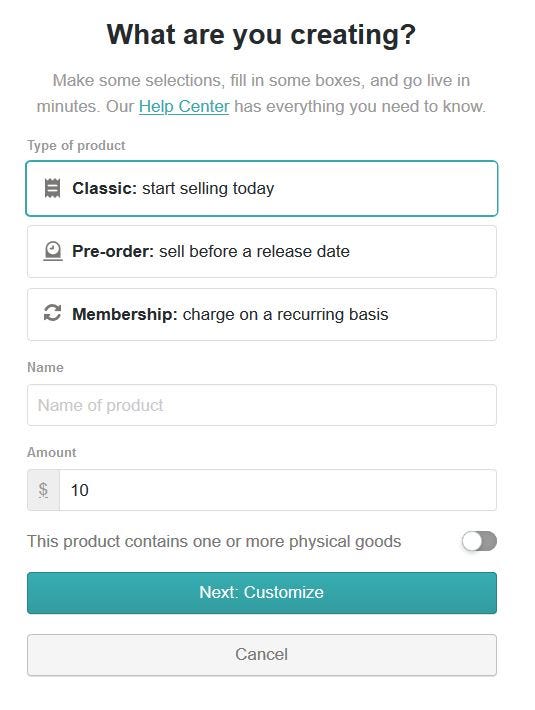
Content can be delivered in a wide range of formats including Mobi, ePub, PDFs, or even audio formats for eBooks. For software sales, it has support to generate individual license keys as well.
All of this can be set up free of charge!
Gumroad only collects a small fee on successful sales made through the platform.
The other reason to use Gumroad is that it is one of the few embedded functions that can be automatically pasted into a Medium article. This make Gumroad the ideal tool for Medium bloggers who want to include their products or services in an article.
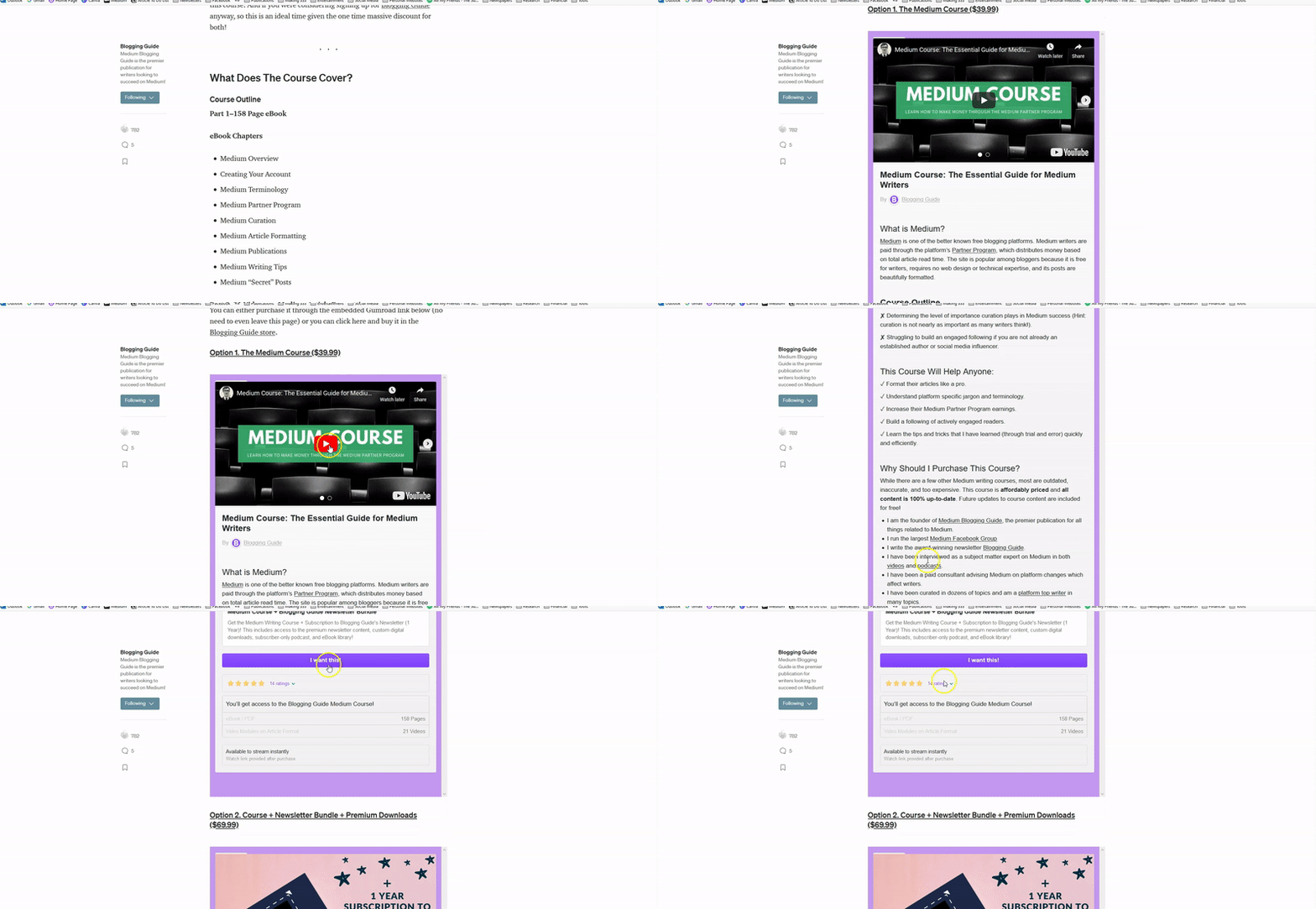
For example, I used Gumroad to embed a sales page on my Medium Course within my article explaining what my Medium course consists of:
16. Medium Symbols for Articles
Sometimes you want to add a little flair to your Medium articles or your Medium profile.
One of the easiest ways to do this is by adding symbols or custom characters to your Medium content.
Below is a list of custom characters which you can copy and paste directly into your Medium articles, publications, or profile bio:
17. Fancy Text Generator
Another way to add some flair to your Medium articles is to use a custom font generator.
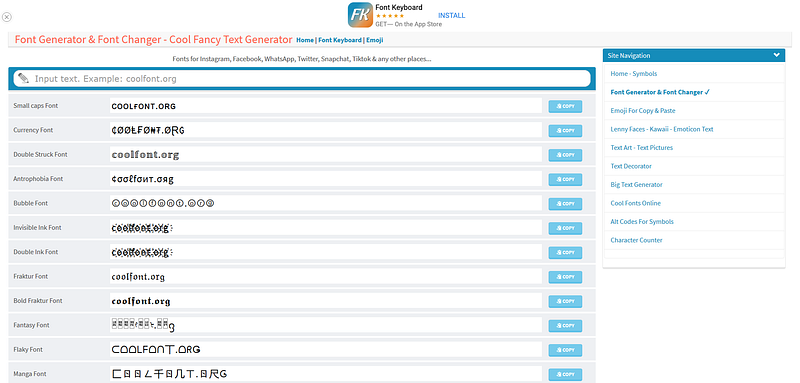
I use Cool Font, which is free and very easy to use.
Cool Fancy Text Generator is a copy and paste font generator and font changer online that generates cool fonts for Medium and social media sites.
It converts a normal text to different free cool fonts styles, such as tattoo fonts, calligraphy fonts, web script fonts, cursive fonts, handwriting fonts, old English fonts, word fonts, pretty fonts, font art, and much more.
Note: While these custom fonts can be cool looking in moderation, be careful to not overuse them!
For example, you could write an entire article in Medium using Cool Fonts, but this is really just annoying for readers!
₣ØⱤ ɆӾ₳₥₱ⱠɆ, ɎØɄ ₵ØɄⱠĐ ₩Ɽł₮Ɇ ₳₦ Ɇ₦₮łⱤɆ ₳Ɽ₮ł₵ⱠɆ ł₦ ₥ɆĐłɄ₥ Ʉ₴ł₦₲ ₵ØØⱠ ₣Ø₦₮₴, ฿Ʉ₮ ₮Ⱨł₴ ł₴ ⱤɆ₳ⱠⱠɎ JɄ₴₮ ₳₦₦ØɎł₦₲ ₣ØⱤ ⱤɆ₳ĐɆⱤ₴!
🇫🇴🇷 🇪🇽🇦🇲🇵🇱🇪, 🇾🇴🇺 🇨🇴🇺🇱🇩 🇼🇷🇮🇹🇪 🇦🇳 🇪🇳🇹🇮🇷🇪 🇦🇷🇹🇮🇨🇱🇪 🇮🇳 🇲🇪🇩🇮🇺🇲 🇺🇸🇮🇳🇬 🇨🇴🇴🇱 🇫🇴🇳🇹🇸, 🇧🇺🇹 🇹🇭🇮🇸 🇮🇸 🇷🇪🇦🇱🇱🇾 🇯🇺🇸🇹 🇦🇳🇳🇴🇾🇮🇳🇬 🇫🇴🇷 🇷🇪🇦🇩🇪🇷🇸!
Ϝ⊙☈ €⌘ꍏᗰρ↳€, ⚧⊙☋ ☾⊙☋↳ᕲ ω☈♗†€ ꍏ♫ €♫†♗☈€ ꍏ☈†♗☾↳€ ♗♫ ᗰ€ᕲ♗☋ᗰ ☋∫♗♫❡ ☾⊙⊙↳ Ϝ⊙♫†∫, ♭☋† †♄♗∫ ♗∫ ☈€ꍏ↳↳⚧ ♪☋∫† ꍏ♫♫⊙⚧♗♫❡ Ϝ⊙☈ ☈€ꍏᕲ€☈∫!
ɟoɹ ǝxɐɯdlǝ, ʎon ɔonlp ʍɹıʇǝ ɐu ǝuʇıɹǝ ɐɹʇıɔlǝ ıu ɯǝpınɯ nsıuƃ ɔool ɟouʇs, qnʇ ʇɥıs ıs ɹǝɐllʎ ɾnsʇ ɐuuoʎıuƃ ɟoɹ ɹǝɐpǝɹs!
F͜͡o͜͡r͜͡ ͜͡e͜͡x͜͡a͜͡m͜͡p͜͡l͜͡e͜͡,͜͡ ͜͡y͜͡o͜͡u͜͡ ͜͡c͜͡o͜͡u͜͡l͜͡d͜͡ ͜͡w͜͡r͜͡i͜͡t͜͡e͜͡ ͜͡a͜͡n͜͡ ͜͡e͜͡n͜͡t͜͡i͜͡r͜͡e͜͡ ͜͡a͜͡r͜͡t͜͡i͜͡c͜͡l͜͡e͜͡ ͜͡i͜͡n͜͡ ͜͡M͜͡e͜͡d͜͡i͜͡u͜͡m͜͡ ͜͡u͜͡s͜͡i͜͡n͜͡g͜͡ ͜͡C͜͡o͜͡o͜͡l͜͡ ͜͡F͜͡o͜͡n͜͡t͜͡s͜͡,͜͡ ͜͡b͜͡u͜͡t͜͡ ͜͡t͜͡h͜͡i͜͡s͜͡ ͜͡i͜͡s͜͡ ͜͡r͜͡e͜͡a͜͡l͜͡l͜͡y͜͡ ͜͡j͜͡u͜͡s͜͡t͜͡ ͜͡a͜͡n͜͡n͜͡o͜͡y͜͡i͜͡n͜͡g͜͡ ͜͡f͜͡o͜͡r͜͡ ͜͡r͜͡e͜͡a͜͡d͜͡e͜͡r͜͡s͜͡!͜͡
18. Medium Facebook Groups
If you are looking for support as a blogger on Medium, you should consider checking out some of the free Facebook groups offered for Medium writers:
19. Image Resizer
If you need to make simple changes to an image in your Medium article, I would suggest using PicResize, which is a free photo editing tool:
This tool allows anyone to easily flip, rotate, crop, filter, or resize your images.

Thanks for reading this article! Leave a comment below if you have any questions. Be sure to sign up for the Blogging Guide newsletter, to get the latest tips, tricks, and news about writing on Medium and to join our Facebook group, Medium Writing, to share your latest Medium posts and connect with other writers.
If you liked this article, here are some other articles you may enjoy:

Casey Botticello is an internet entrepreneur and the founder of Blogging Guide, an online community of writers with an award-winning newsletter. He is also the creator of the popular Medium Writing Course and the Substack Newsletter Course.
Casey previously worked at several tech startups, a lobbying & strategic communications firm, and has created several businesses of his own. He is a graduate of The University of Pennsylvania, where he received his B.A. in Urban Studies.
You can connect with him on LinkedIn, Twitter, Facebook, follow his Medium publications, Digital Marketing Lab and Medium Blogging Guide, or reach out to him directly on his personal website.


