
Medium Tools
Signal Review: Tool That Auto-Tweets Your Medium Articles on a Schedule
A look at the best tool to automate Medium article promotion
For those that don’t know, Signal is a product developed by Lincoln W Daniel a software developer who specializes in efficiency.
Signal can auto-tweet your Medium articles (or any article, for that matter), on Twitter, according to the schedule you set. This can be used to promote new content or revive old content that has faded out of view on Medium’s featured articles, tags, topics, or publications.
I used the free version of Signal from Penname for most of my first year on Medium, and this was largely sufficient as I could keep auto-tweeting up to 10 stories for free.
However, as I wrote more articles, and wanted to experiment with developing articles that could grow in views, overtime, I decided to upgrade from Signal Starter (free version) to Signal Pro ($6.99 per month).
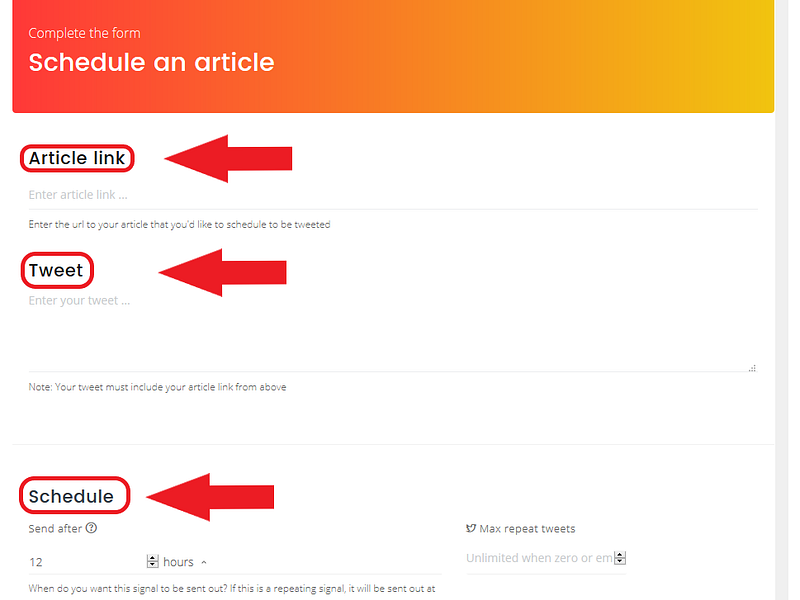
As you can see from the screenshot of my Signal page, the interface is fairly simple. I simply enter the link to my Medium story, customize my tweet (optional), and select the published interval.
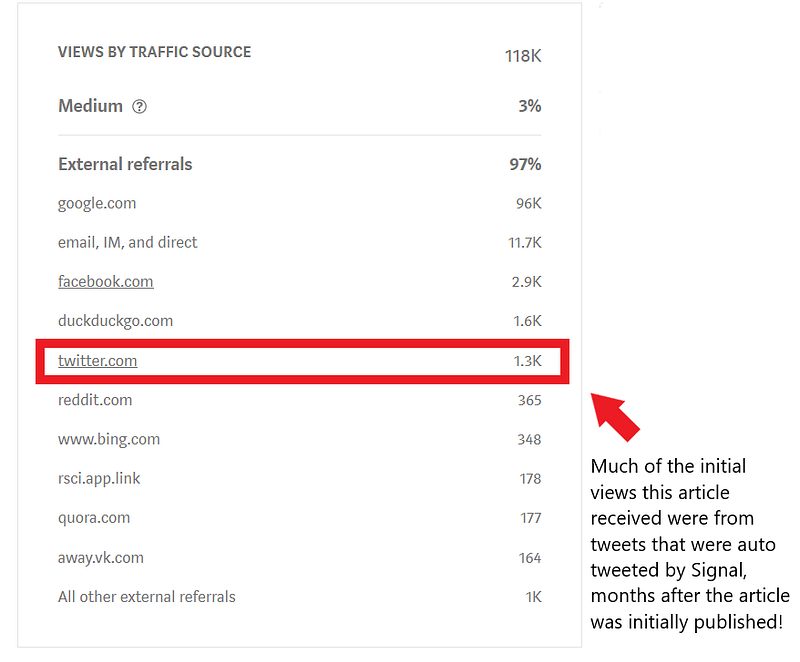
As example, I used Signal to help promote my article which is has now generated over 100,000 views, and is still growing in terms of views, each day (a true feat for a Medium article)!
What is the difference between the free version and the pro version?
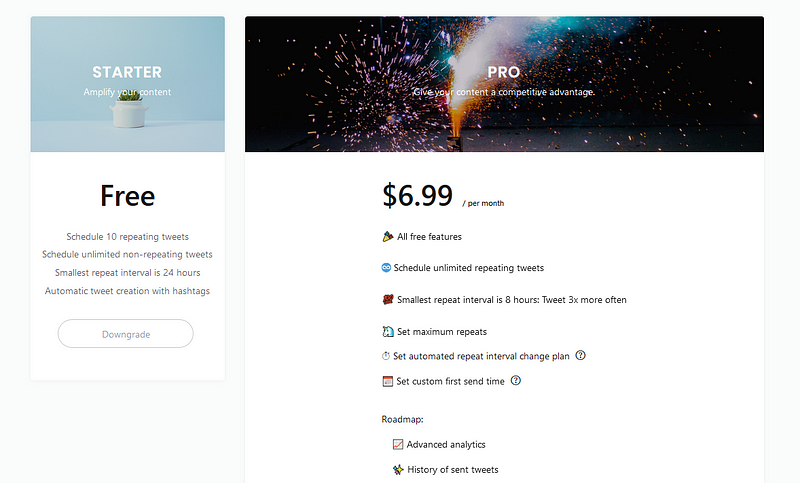
The main difference is that the free version allows for you to tweet 10 different Medium stories, continuously. The pro version allows you to schedule an unlimited number of stories.
When I first started off writing on Medium, 10 stories was great (I believe it was actually 5 at the time). I would experiment with new stories trying to gain that initial momentum that helps an article gain views or to try to revive old articles that were declining in views.
However, as I have published more, I decided it was worth trying the upgrade. So far it has been a big success! I have more than quadrupled my levels of Twitter engagement! Best of all — Signal is extremely efficient in the long run.
It was a little annoying to enter my story links the first time, but now they auto-tweet on an endless cycle (of my choosing). I am all about automation and productivity when it comes to marketing so that I can spend more time focusing on writing!
Even if the premium version is not right for you, I would highly recommend trying the free version. It may be just the boost a particular article needs to go viral or it may just increase your overall views, reads, and claps by a modest amount. Either way, it’s worth the 5 minutes it takes to create an account and set up your first 10 auto-tweets.
Data Analytics
Signal offers users comprehensive data analytics which help you understand how many people are actually clicking/engaging with your auto tweets:
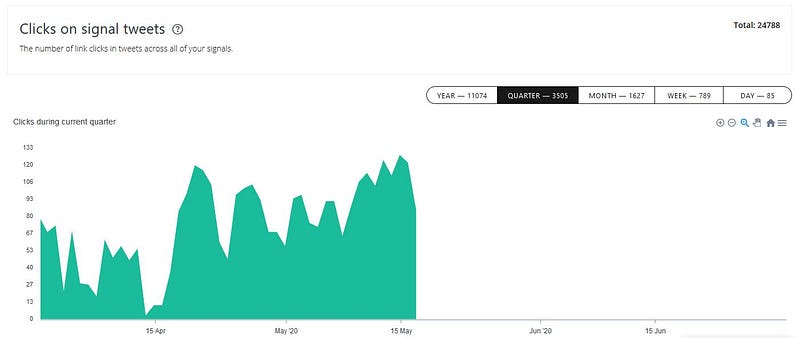
As you can see from the chart above, my auto-tweets generate about 80–100 unique click per day. This level of engagement is far above any other tool I have experimented with (including paid Facebook ads).
Here’s more of what you can do with Signal and what Signal can do for you, as a Medium writer:
♾️ Schedule articles to be tweeted on repeat
🐣 Schedule articles to be tweeted one time (like Buffer)
🦄 Set maximum repeats
💯 Auto-tweet a story up to three times a day
📅 Set custom first send time
✍️ Edit queued signals at anytime
🔥 Coming soon: analytics, Insights™
Thanks for reading this article! Leave a comment below if you have any questions, and if you want to learn more about blogging, content marketing, or subscription newsletter strategy, be sure to sign up for the Blogging Guide Newsletter!
If you liked this article, here are some other articles you may enjoy:

Casey Botticello is an internet entrepreneur and the founder of Blogging Guide, an online community of writers with an award-winning newsletter. He is also the creator of the popular Medium Writing Course and the Substack Newsletter Course.
Casey previously worked at several tech startups, a lobbying & strategic communications firm, and has created several businesses of his own. He is a graduate of The University of Pennsylvania, where he received his B.A. in Urban Studies.
You can connect with him on LinkedIn, Twitter, Facebook, follow his Medium publications, Digital Marketing Lab and Medium Blogging Guide, or reach out to him directly on his personal website.


