Free AI web copilot to create summaries, insights and extended knowledge, download it at here
4189
Abstract
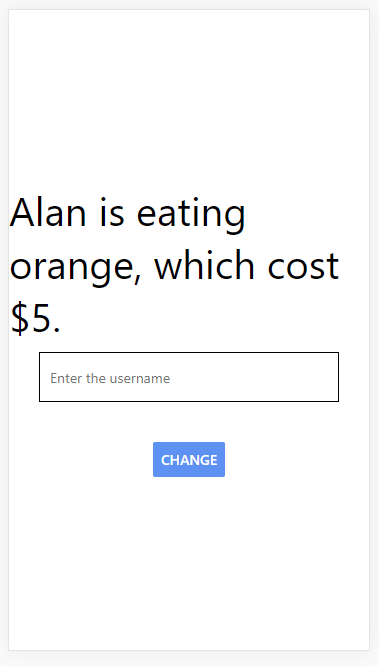
pre><span class="hljs-attribute">placeholder</span><span class="hljs-operator">=</span>”Enter the username”</pre></div><div id="cf9e"><pre><span class="hljs-meta prompt_">/></span></pre></div><p id="0c65">We can also detect whenever the value changes whenever a user types a new character inside this field, we then take the current value that is inside the field and update our state.</p><p id="32ac">We add the “setUser” function to onChange, so it pass the current value to the function and update the state.</p><div id="3beb"><pre><TextInput</pre></div><div id="8e7a"><pre><span class="hljs-attribute">style</span><span class="hljs-operator">=</span>{styles.textinput}</pre></div><div id="15b1"><pre><span class="hljs-attribute">placeholder</span><span class="hljs-operator">=</span><span class="hljs-string">"Enter the username"</span></pre></div><div id="ee91"><pre><span class="hljs-attribute">onChange</span><span class="hljs-operator">=</span>{e<span class="hljs-operator">=</span>>setUser(e.target.value)}</pre></div><div id="53a1"><pre><span class="hljs-meta prompt_">/></span></pre></div><p id="6e6b">It should update in real time when we are typing inside the input field.
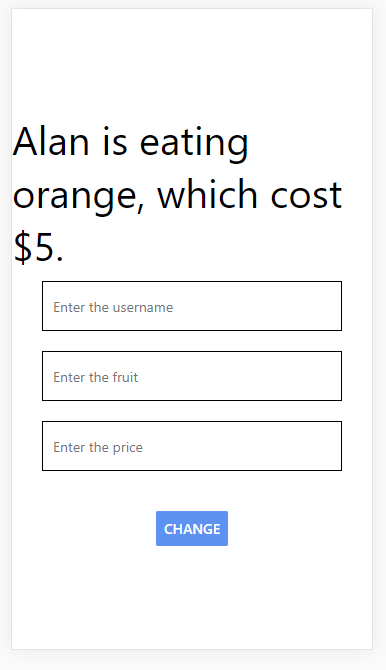
We can do for the second piece of state which is fruit. We need to duplicate the input field twice and change the placeholder for name and price.</p><div id="e7a4"><pre><TextInput</pre></div><div id="8b50"><pre><span class="hljs-attribute">style</span><span class="hljs-operator">=</span>{styles.textinput}</pre></div><div id="313c"><pre><span class="hljs-attribute">placeholder</span><span class="hljs-operator">=</span><span class="hljs-string">"Enter the username"</span></pre></div><div id="4d7c"><pre><span class="hljs-attribute">onChange</span><span class="hljs-operator">=</span>{e<span class="hljs-operator">=</span>>setUser(e.target.value)}</pre></div><div id="c09f"><pre><span class="hljs-meta prompt_">/></span></pre></div><div id="dfed"><pre><TextInput</pre></div><div id="02c1"><pre><span class="hljs-attribute">style</span><span class="hljs-operator">=</span>{styles.textinput}</pre></div><div id="f9b3"><pre><span class="hljs-attribute">placeholder</span><span class="hljs-operator">=</span><span class="hljs-string">"Enter the fruit"</span></pre></div><div id="9aaf"><pre>onChange = {<span class="hljs-attribute">e=>setFruit({...fruit,name</span>:e<span class="hljs-variable">.target</span><span class="hljs-variable">.value</span>})}</pre></div><div id="3487"><pre><span class="hljs-meta prompt_">/></span></pre></div><div id="ff5f"><pre><TextInput</pre></div><div id="017d"><pre><span class="hljs-attribute">style</span><span class="hljs-operator">=</span>{styles.textinput}</pre></div><div id="5271"><pre><span class="hljs-attribute">placeholder</span><span class="hljs-operator">=</span><span class="hljs-string">"Enter the price"</span></pre></div><div id="d988"><pre>onChange={<span class="hljs-attribute">e=>setFruit({...fruit,price</span>:e<span class="hljs-variable">.target</span><span class="hljs-variable">.value</span>})}</pre></div><div id="6d44"><pre><span class="hljs-meta prompt_">/></span></pre></div><p id="018e">Since the fruit is the object, so we need to use the spread operator to make a copy of that object, then update the value of that field.</p>
<figure id="3f85">
<div>
<div>
<img class="ratio" src="http://placehold.it/16x9">
<iframe class="" src="https://cdn.embedly.com/widgets/media.html?src=https%3A%2F%2Fwww.youtube.com%2Fembed%2Ft4_vjPhlZyg%3Ffeature%3Doembed&display_name=YouTube&url=https%3A%2F%2Fwww.youtube.com%2Fwatch%3Fv%3Dt4_vjPhlZyg&image=https%3A%2F%2Fi.ytimg.com%2Fvi%2Ft4_vjPhlZyg%2Fhqdefault.jpg&key=a19fcc184b9711e1b4764040d3dc5c07&type=text%2Fhtml&schema=youtube" allowfullscreen="" frameborder="0" height="480" width="854">
</div>
</div>
</figure></iframe></div></div></figure><figure id="b015"><img src="https://cdn-images-1.readmedium.com/v2/resize:fit:800/1*34FltpDIou0-nilXHMuEhA.png"><figcaption></figcaption></figure><figure id="504e"><img src="https://cdn-images-1.r
Options
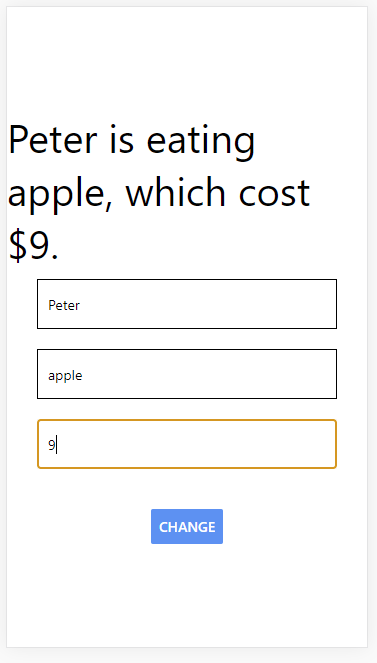
eadmedium.com/v2/resize:fit:800/1*JFqXTypunHcNKI__MTq6Xg.png"><figcaption></figcaption></figure><p id="1497">We can type in the user, fruit name and fruit price to update the state. Now we can see the sentence is “Peter is eating apple, which cost $9”.
Lastly, we can add the multi-line prop which allows us to add multiple
different lines inside the text input.</p><p id="0ab7">The next prop is the keyboard type and we can set this equal to numeric.
If we click on this, the keyboard that pops up should be numeric okay</p><div id="b1df"><pre><TextInput</pre></div><div id="2b5e"><pre><span class="hljs-attribute">style</span><span class="hljs-operator">=</span>{styles.textinput}</pre></div><div id="680d"><pre><span class="hljs-attribute">multiline</span></pre></div><div id="e916"><pre><span class="hljs-attribute">placeholder</span><span class="hljs-operator">=</span><span class="hljs-string">"Enter the fruit"</span></pre></div><div id="88da"><pre>onChange = {<span class="hljs-attribute">e=>setFruit({...fruit,name</span>:e<span class="hljs-variable">.target</span><span class="hljs-variable">.value</span>})}</pre></div><div id="08c9"><pre><span class="hljs-meta prompt_">/></span></pre></div><div id="f691"><pre><TextInput</pre></div><div id="3142"><pre><span class="hljs-attribute">style</span><span class="hljs-operator">=</span>{styles.textinput}</pre></div><div id="2c7f"><pre><span class="hljs-attribute">keyboardType</span><span class="hljs-operator">=</span><span class="hljs-string">"numeric"</span></pre></div><div id="ef33"><pre><span class="hljs-attribute">placeholder</span><span class="hljs-operator">=</span><span class="hljs-string">"Enter the price"</span></pre></div><div id="f8e4"><pre>onChange={<span class="hljs-attribute">e=>setFruit({...fruit,price</span>:e<span class="hljs-variable">.target</span><span class="hljs-variable">.value</span>})}</pre></div><div id="3b88"><pre><span class="hljs-meta prompt_">/></span></pre></div><p id="5af0">Related course:</p><div id="7de5" class="link-block">
<a href="https://www.udemy.com/course/complete-react-course-w-hooks-react-router-redux-usecontext/?referralCode=B192869617ADE079536F">
<div>
<div>
<h2>React - The Complete Guide with React Hook Redux 2021 in 4hr</h2>
<div><h3>He is a registered teacher who has experience in teaching javascript, physics, maths and statistics for over 10 years…</h3></div>
<div><p>www.udemy.com</p></div>
</div>
<div>
<div style="background-image: url(https://miro.readmedium.com/v2/resize:fit:320/0*elPwGFtGuvRBXBS3)"></div>
</div>
</div>
</a>
</div><p id="e308">Get Free tutorials on Youtube:</p><div id="05ae" class="link-block">
<a href="https://www.youtube.com/channel/UCu4-4FnutvSHVo9WHvq80Ww">
<div>
<div>
<h2>ckmobile</h2>
<div><h3>JavaScript is very important now no matter you are working in backend or frontend. NodeJS, Angular, VueJS or React all…</h3></div>
<div><p>www.youtube.com</p></div>
</div>
<div>
<div style="background-image: url(https://miro.readmedium.com/v2/resize:fit:320/0*I04ARIkwBabzhrJ6)"></div>
</div>
</div>
</a>
</div><p id="6361">Follow us:</p><p id="7b63"><a href="https://twitter.com/ckmobilejavasc1">https://twitter.com/ckmobilejavasc1</a></p><div id="294b" class="link-block">
<a href="https://www.linkedin.com/company/ckmobi/">
<div>
<div>
<h2>Ckmobile | LinkedIn</h2>
<div><h3>Ckmobile | 30 followers on LinkedIn. Major focus on JavaScript tutorials for beginners and also different JavaScript…</h3></div>
<div><p>www.linkedin.com</p></div>
</div>
<div>
<div style="background-image: url(https://miro.readmedium.com/v2/resize:fit:320/0*SuxMZfZfBat_Ff-w)"></div>
</div>
</div>
</a>
</div></article></body>