Free AI web copilot to create summaries, insights and extended knowledge, download it at here
11330
Abstract
s a registered teacher who has experience in teaching javascript, physics, maths and statistics for over 10 years…</h3></div>
<div><p>www.udemy.com</p></div>
</div>
<div>
<div style="background-image: url(https://miro.readmedium.com/v2/resize:fit:320/0*0Lkre3aJTk9sDFBQ)"></div>
</div>
</div>
</a>
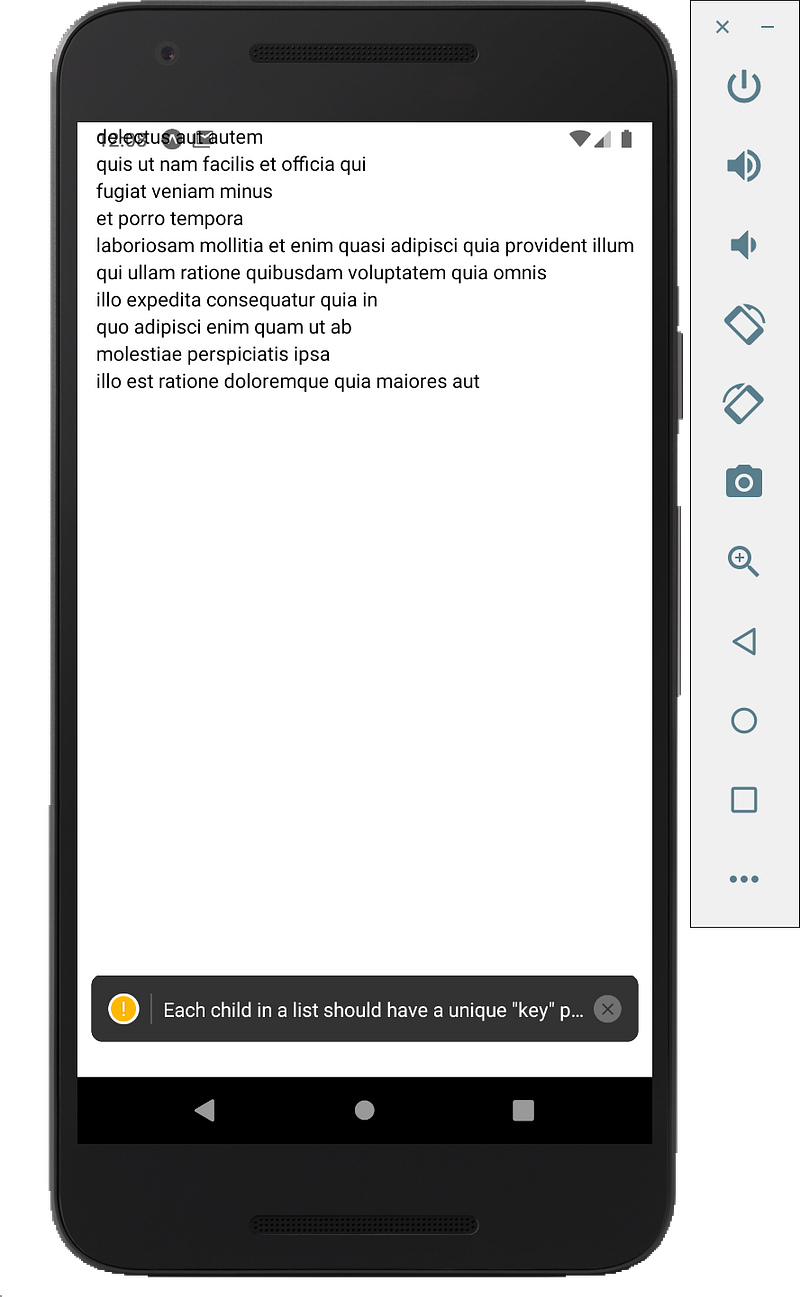
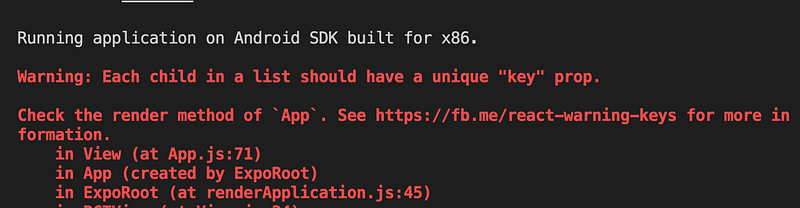
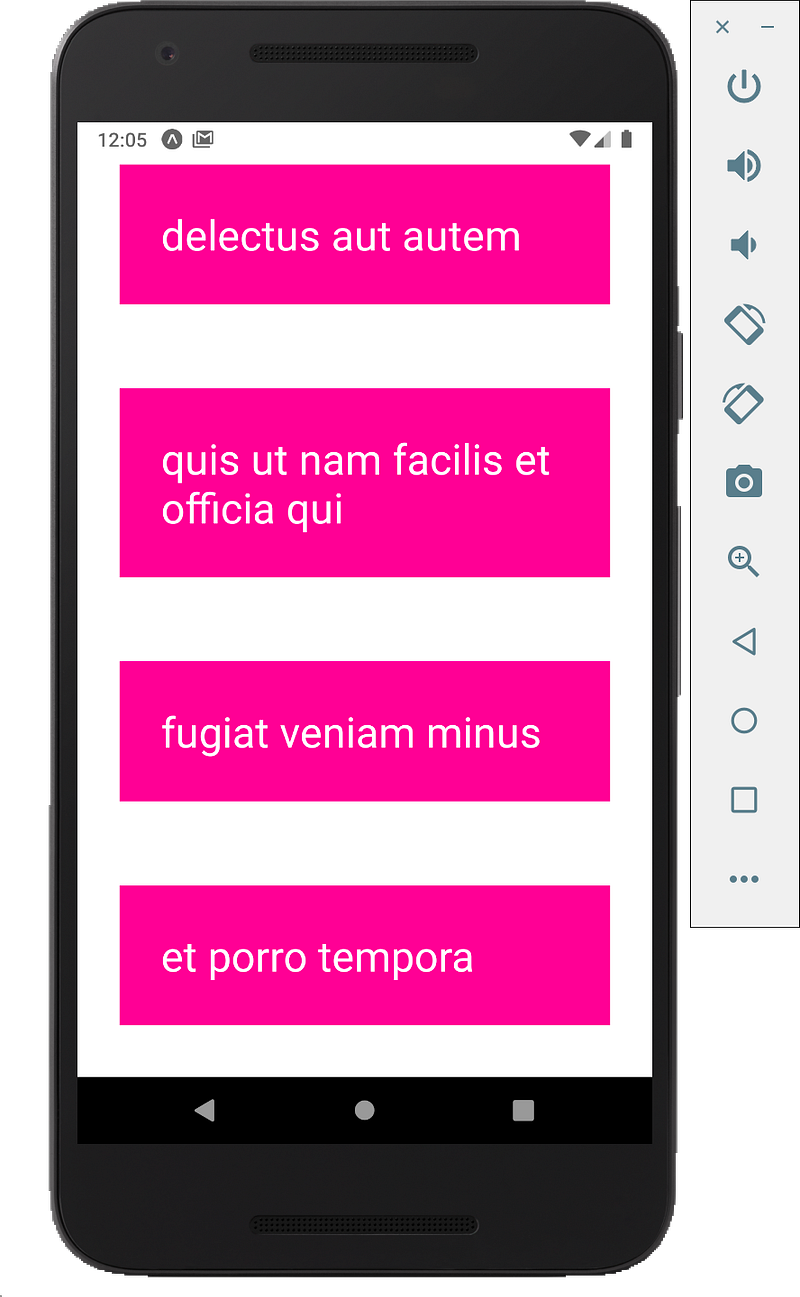
</div><p id="9ccb"><b>Cycle through the array</b></p><p id="a36c">We through JSON array and output it in some kind of template by using an array function in JavaScript, which is map function.</p><div id="f54d"><pre><span class="hljs-tag"><<span class="hljs-name">View</span> <span class="hljs-attr">style</span>=<span class="hljs-string">{styles.container}</span>></span></pre></div><div id="1bd8"><pre>{todos.<span class="hljs-built_in">map</span>(<span class="hljs-function"><span class="hljs-params">todo</span> =></span> {</pre></div><div id="29a1"><pre><span class="hljs-keyword">return</span> (</pre></div><div id="b4ae"><pre><span class="hljs-section"><View></span></pre></div><div id="1cb7"><pre><span class="language-xml"><span class="hljs-tag"><<span class="hljs-name">Text</span> ></span></span><span class="hljs-template-variable">{todo.title}</span><span class="language-xml"><span class="hljs-tag"></<span class="hljs-name">Text</span>></span></span></pre></div><div id="f79d"><pre><span class="hljs-section"></View></span></pre></div><div id="306d"><pre>)</pre></div><div id="98be"><pre>})}</pre></div><div id="3019"><pre><span class="hljs-section"></View></span></pre></div><figure id="2d74"><img src="https://cdn-images-1.readmedium.com/v2/resize:fit:800/1*NsC7JXyq418VpRej_ng_pA.png"><figcaption></figcaption></figure><p id="b010">It cycle through each todo and return some kind of template, here we return a todo title inside text component.</p><p id="3208">We see all the items but we also get this error warning</p><figure id="4f54"><img src="https://cdn-images-1.readmedium.com/v2/resize:fit:800/1*YfBq_VdXLzcZXd5AYGtNfw.png"><figcaption></figcaption></figure><p id="6836">The parent component has to have a key prop to identify this, so we can say key is equal to “todo.id”.</p><p id="bb6f"><b>Style the todo component</b></p><p id="0cc7">We are going to add the “styles={styles.todo}” to the text component.</p><div id="6340"><pre><span class="hljs-section"><View></span></pre></div><div id="7e32"><pre><span class="language-xml"><span class="hljs-tag"><<span class="hljs-name">Text</span> <span class="hljs-attr">style</span>=</span></span><span class="hljs-template-variable">{styles.todo}</span><span class="language-xml"><span class="hljs-tag">></span></span><span class="hljs-template-variable">{todo.title}</span><span class="language-xml"><span class="hljs-tag"></<span class="hljs-name">Text</span>></span></span></pre></div><div id="c620"><pre><span class="hljs-section"></View></span></pre></div><p id="d437">Next, we are going to create this style at the bottom</p><div id="88a5"><pre><span class="hljs-symbol">todo:</span> {</pre></div><div id="1d0c"><pre><span class="hljs-attribute">margin</span>: <span class="hljs-number">30</span>,</pre></div><div id="ed74"><pre><span class="hljs-symbol">backgroundColor:</span> <span class="hljs-comment">'deeppink',</span></pre></div><div id="34bd"><pre><span class="hljs-attribute">color</span>: <span class="hljs-string">'white'</span>,</pre></div><div id="7df6"><pre><span class="hljs-attribute">fontSize</span>: <span class="hljs-number">30</span>,</pre></div><div id="9a70"><pre><span class="hljs-attribute">padding</span>: <span class="hljs-number">30</span></pre></div><div id="3575"><pre>}</pre></div><p id="7f65">We can also comment the alignItems and justifyContent these two properties.</p><div id="ac3c"><pre><span class="hljs-symbol">container:</span> {</pre></div><div id="6f8b"><pre><span class="hljs-attribute">flex</span>: <span class="hljs-number">1</span>,</pre></div><div id="3660"><pre><span class="hljs-attribute">backgroundColor</span>: '<span class="hljs-comment">#fff',</span></pre></div><div id="efc5"><pre><span class="hljs-regexp">//</span> alignItems: <span class="hljs-string">'center'</span>,</pre></div><div id="b7c0"><pre><span class="hljs-regexp">//</span> justifyContent: <span class="hljs-string">'center'</span>,</pre></div><div id="fbc7"><pre>},</pre></div><p id="cfd1">We can see these todos a bit bigger and with a background
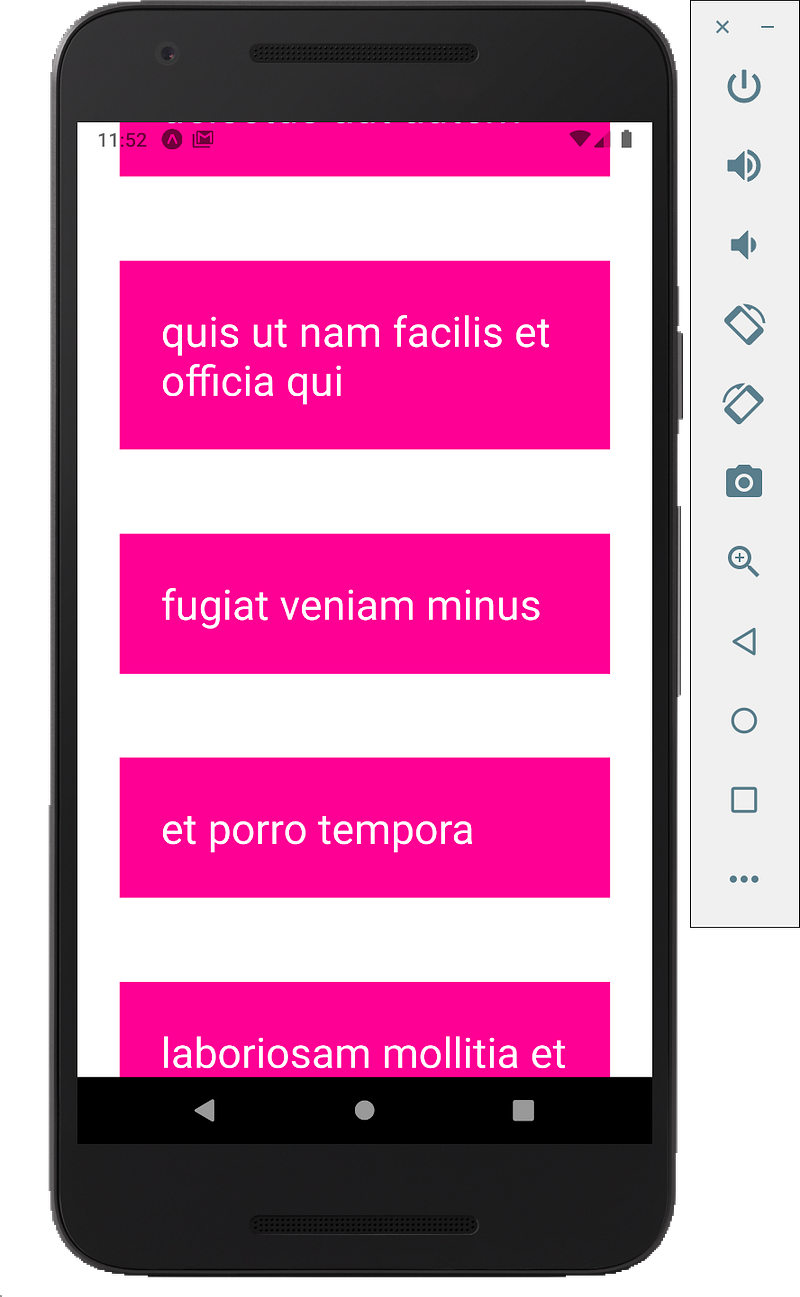
color of pink. Some of the todos are off the screen, but if we swipe
on our device, it cannot scroll.</p><figure id="a397"><img src="https://cdn-images-1.readmedium.com/v2/resize:fit:800/1*qGFcu-5C1m5DGMZVCtupng.png"><figcaption></figcaption></figure><h2 id="6fe0">ScrollView</h2><p id="ad33">If we want something to be scrollable, we have to surround it with a scroll view component. We need to surround all of these todos with a scroll view
component.</p><div id="4d0e"><pre><span class="hljs-tag"><<span class="hljs-name">View</span> <span class="hljs-attr">style</span>=<span class="hljs-string">{styles.container}</span>></span></pre></div><div id="9f5d"><pre><span class="hljs-section"><ScrollView></span></pre></div><div id="5261"><pre>{todos.<span class="hljs-built_in">map</span>(<span class="hljs-function"><span class="hljs-params">todo</span> =></span> {</pre></div><div id="4c14"><pre><span class="hljs-keyword">return</span> (</pre></div><div id="7ce2"><pre><span class="hljs-section"><View></span></pre></div><div id="2f1f"><pre><span class="language-xml"><span class="hljs-tag"><<span class="hljs-name">Text</span> <span class="hljs-attr">style</span>=</span></span><span class="hljs-template-variable">{styles.todo}</span><span class="language-xml"><span class="hljs-tag">></span></span><span class="hljs-template-variable">{todo.title}</span><span class="language-xml"><span class="hljs-tag"></<span class="hljs-name">Text</span>></span></span></pre></div><div id="0bd8"><pre><span class="hljs-section"></View></span></pre></div><div id="a05d"><pre>)</pre></div><div id="7e61"><pre>})}</pre></div><div id="b1ec"><pre><span class="hljs-section"></ScrollView></span></pre></div><div id="51af"><pre><span class="hljs-section"></View></span></pre></div><p id="fead">We should now be able to scroll through the list and we can see a little bar
as we scroll.</p><figure id="9f5a"><img src="https://cdn-images-1.readmedium.com/v2/resize:fit:800/1*U32dw2_LUSm6EAaomfku4Q.png"><figcaption></figcaption></figure><div id="9658" class="link-block">
<a href="https://developer.mozilla.org/en-US/docs/Web/JavaScript/Reference/Functions/Arrow_functions">
<div>
<div>
<h2>Arrow function expressions</h2>
<div><h3>An arrow function expression is a compact alternative to a traditional function expression, but is limited and can't be…</h3></div>
<div><p>developer.mozilla.org</p></div>
</div>
<div>
<div style="background-image: url(https://miro.readmedium.com/v2/resize:fit:320/0*ZeHeGEV_7Nv0p_Ny)"></div>
</div>
</div>
</a>
</div><p id="8323">Since this is an arrow function and it only takes one parameter, we can remove the body brackets and word “return”, as the return is implied.</p><div id="8b5c"><pre><span class="hljs-tag"><<span class="hljs-name">View</span> <span class="hljs-attr">style</span>=<span class="hljs-string">{styles.container}</span>></span></pre></div><div id="2f38"><pre><span class="hljs-section"><ScrollView></span></pre></div><div id="fbc8"><pre>{todos.<span class="hljs-built_in">map</span>(<span class="hljs-function"><span class="hljs-params">todo</span> =></span></pre></div><div id="1962"><pre>(</pre></div><div id="33f9"><pre><span class="hljs-section"><View></span></pre></div><div id="c1c5"><pre><span class="language-xml"><span class="hljs-tag"><<span class="hljs-name">Text</span> <span class="hljs-attr">style</span>=</span></span><span class="hljs-template-variable">{styles.todo}</span><span class="language-xml"><span class="hljs-tag">></span></span><span class="hljs-template-variable">{todo.title}</span><span class="language-xml"><span class="hljs-tag"></<span class="hljs-name">Text</span>></span></span></pre></div><div id="c998"><pre><span class="hljs-section"></View></span></pre></div><div id="a075"><pre>)</pre></div><div id="0a0f"><pre>)}</pre></div><div id="cc46"><pre><span class="hljs-section"></ScrollView></span></pre></div><div id="07d3"><pre><span class="hljs-section"></View></span></pre></div><p id="fabe">It should be no different, we see all the todos and we can scroll through them.</p><p id="99b5">Full Source Code:</p><div id="8cd2"><pre><span class="hljs-keyword">import</span> React, { useState } <span class="hljs-keyword">from</span> <span class="hljs-string">'react'</span>;</pre></div><div id="b948"><pre><span class="hljs-keyword">import</span> { StyleSheet, <span class="hljs-type">Text</span>, <span class="hljs-keyword">View</span>, ScrollView } <span class="hljs-keyword">from</span> <span class="hljs-string">'react-native'</span>;</pre></div><div id="7cc4"><pre><span class="hljs-keyword">export</span> <span class="hljs-keyword">default</span> <span class="hljs-function"><span class="hljs-keyword">function</span> <span class="hljs-title">App</span><span class="hljs-params">()</span> <span class="hljs-comment">{</span></span></pre></div><div id="ebad"><pre><span class="hljs-keyword">const</span> [todos, <span class="hljs-built_in">set</span>Todos] = useState([{</pre></div><div id="bbf7"><pre><span class="hljs-attr">"userId"</span><span class="hljs-punctuation">:</span> <span class="hljs-number">1</span><span class="hljs-punctuation">,</span></pre></div><div id="0370"><pre><span class="hljs-attr">"id"</span><span class="hljs-punctuation">:</span> <span class="hljs-number">1</span><span class="hljs-punctuation">,</span></pre></div><div id="c68d"><pre><span class="hljs-attr">"title"</span><span class="hljs-punctuation">:</span> <span class="hljs-string">"delectus aut autem"</span><span class="hljs-punctuation">,</span></pre></div><div id="299f"><pre><span class="hljs-attr">"completed"</span><span class="hljs-punctuation">:</span> <span class="hljs-literal"><span class="hljs-keyword">false</span></span></pre></div><div id="7de9"><pre>},</pre></div><div id="6712"><pre>{</pre></div><div id="a0b8"><pre><span class="hljs-attr">"userId"</span><span class="hljs-punctuation">:</span> <span class="hljs-number">1</span><span class="hljs-punctuation">,</span></pre></div><div id="c1e7"><pre><span class="hljs-attr">"id"</span><span class="hljs-punctuation">:</span> <span class="hljs-number">2</span><span class="hljs-punctuation">,</span></pre></div><div id="d4ec"><pre><span class="hljs-attr">"title"</span><span class="hljs-punctuation">:</span> <span class="hljs-string">"quis ut nam facilis et officia qui"</span><span class="hljs-punctuation">,</span></pre></div><div id="9f3b"><pre><span class="hljs-attr">"completed"</span><span class="hljs-punctuation">:</span> <span class="hljs-literal"><span class="hljs-keyword">false</span></span></pre></di
Options
v><div id="07cd"><pre>},</pre></div><div id="16a4"><pre>{</pre></div><div id="6dc8"><pre><span class="hljs-attr">"userId"</span><span class="hljs-punctuation">:</span> <span class="hljs-number">1</span><span class="hljs-punctuation">,</span></pre></div><div id="07e1"><pre><span class="hljs-attr">"id"</span><span class="hljs-punctuation">:</span> <span class="hljs-number">3</span><span class="hljs-punctuation">,</span></pre></div><div id="64ed"><pre><span class="hljs-attr">"title"</span><span class="hljs-punctuation">:</span> <span class="hljs-string">"fugiat veniam minus"</span><span class="hljs-punctuation">,</span></pre></div><div id="aee1"><pre><span class="hljs-attr">"completed"</span><span class="hljs-punctuation">:</span> <span class="hljs-literal"><span class="hljs-keyword">false</span></span></pre></div><div id="26d2"><pre>},</pre></div><div id="47e3"><pre>{</pre></div><div id="e099"><pre><span class="hljs-attr">"userId"</span><span class="hljs-punctuation">:</span> <span class="hljs-number">1</span><span class="hljs-punctuation">,</span></pre></div><div id="0624"><pre><span class="hljs-attr">"id"</span><span class="hljs-punctuation">:</span> <span class="hljs-number">4</span><span class="hljs-punctuation">,</span></pre></div><div id="17ef"><pre><span class="hljs-attr">"title"</span><span class="hljs-punctuation">:</span> <span class="hljs-string">"et porro tempora"</span><span class="hljs-punctuation">,</span></pre></div><div id="fbda"><pre><span class="hljs-attr">"completed"</span><span class="hljs-punctuation">:</span> <span class="hljs-literal"><span class="hljs-keyword">true</span></span></pre></div><div id="795f"><pre>},</pre></div><div id="d2fb"><pre>{</pre></div><div id="e12a"><pre><span class="hljs-attr">"userId"</span><span class="hljs-punctuation">:</span> <span class="hljs-number">1</span><span class="hljs-punctuation">,</span></pre></div><div id="cad1"><pre><span class="hljs-attr">"id"</span><span class="hljs-punctuation">:</span> <span class="hljs-number">5</span><span class="hljs-punctuation">,</span></pre></div><div id="7398"><pre><span class="hljs-comment">"title"</span>: <span class="hljs-comment">"laboriosam mollitia et enim quasi adipisci quia provident illum"</span>,</pre></div><div id="753e"><pre><span class="hljs-attr">"completed"</span><span class="hljs-punctuation">:</span> <span class="hljs-literal"><span class="hljs-keyword">false</span></span></pre></div><div id="b79e"><pre>},</pre></div><div id="0806"><pre>{</pre></div><div id="f934"><pre><span class="hljs-attr">"userId"</span><span class="hljs-punctuation">:</span> <span class="hljs-number">1</span><span class="hljs-punctuation">,</span></pre></div><div id="d35f"><pre><span class="hljs-attr">"id"</span><span class="hljs-punctuation">:</span> <span class="hljs-number">6</span><span class="hljs-punctuation">,</span></pre></div><div id="0b59"><pre><span class="hljs-comment">"title"</span>: <span class="hljs-comment">"qui ullam ratione quibusdam voluptatem quia omnis"</span>,</pre></div><div id="0433"><pre><span class="hljs-attr">"completed"</span><span class="hljs-punctuation">:</span> <span class="hljs-literal"><span class="hljs-keyword">false</span></span></pre></div><div id="eada"><pre>},</pre></div><div id="4589"><pre>{</pre></div><div id="ba82"><pre><span class="hljs-attr">"userId"</span><span class="hljs-punctuation">:</span> <span class="hljs-number">1</span><span class="hljs-punctuation">,</span></pre></div><div id="9f29"><pre><span class="hljs-attr">"id"</span><span class="hljs-punctuation">:</span> <span class="hljs-number">7</span><span class="hljs-punctuation">,</span></pre></div><div id="bedb"><pre><span class="hljs-comment">"title"</span>: <span class="hljs-comment">"illo expedita consequatur quia in"</span>,</pre></div><div id="5e60"><pre><span class="hljs-attr">"completed"</span><span class="hljs-punctuation">:</span> <span class="hljs-literal"><span class="hljs-keyword">false</span></span></pre></div><div id="b5da"><pre>},</pre></div><div id="0192"><pre>{</pre></div><div id="c2a8"><pre><span class="hljs-attr">"userId"</span><span class="hljs-punctuation">:</span> <span class="hljs-number">1</span><span class="hljs-punctuation">,</span></pre></div><div id="8397"><pre><span class="hljs-attr">"id"</span><span class="hljs-punctuation">:</span> <span class="hljs-number">8</span><span class="hljs-punctuation">,</span></pre></div><div id="04e4"><pre><span class="hljs-comment">"title"</span>: <span class="hljs-comment">"quo adipisci enim quam ut ab"</span>,</pre></div><div id="cfc4"><pre><span class="hljs-attr">"completed"</span><span class="hljs-punctuation">:</span> <span class="hljs-literal"><span class="hljs-keyword">true</span></span></pre></div><div id="757d"><pre>},</pre></div><div id="8112"><pre>{</pre></div><div id="3517"><pre><span class="hljs-attr">"userId"</span><span class="hljs-punctuation">:</span> <span class="hljs-number">1</span><span class="hljs-punctuation">,</span></pre></div><div id="916b"><pre><span class="hljs-attr">"id"</span><span class="hljs-punctuation">:</span> <span class="hljs-number">9</span><span class="hljs-punctuation">,</span></pre></div><div id="f2e8"><pre><span class="hljs-attr">"title"</span><span class="hljs-punctuation">:</span> <span class="hljs-string">"molestiae perspiciatis ipsa"</span><span class="hljs-punctuation">,</span></pre></div><div id="fb5d"><pre><span class="hljs-attr">"completed"</span><span class="hljs-punctuation">:</span> <span class="hljs-literal"><span class="hljs-keyword">false</span></span></pre></div><div id="f720"><pre>},</pre></div><div id="1f84"><pre>{</pre></div><div id="52a0"><pre><span class="hljs-attr">"userId"</span><span class="hljs-punctuation">:</span> <span class="hljs-number">1</span><span class="hljs-punctuation">,</span></pre></div><div id="b077"><pre><span class="hljs-attr">"id"</span><span class="hljs-punctuation">:</span> <span class="hljs-number">10</span><span class="hljs-punctuation">,</span></pre></div><div id="3b3a"><pre><span class="hljs-comment">"title"</span>: <span class="hljs-comment">"illo est ratione doloremque quia maiores aut"</span>,</pre></div><div id="067b"><pre><span class="hljs-attr">"completed"</span><span class="hljs-punctuation">:</span> <span class="hljs-literal"><span class="hljs-keyword">true</span></span></pre></div><div id="d856"><pre>}])</pre></div><div id="9468"><pre><span class="hljs-keyword">return</span> (</pre></div><div id="fa36"><pre><span class="hljs-tag"><<span class="hljs-name">View</span> <span class="hljs-attr">style</span>=<span class="hljs-string">{styles.container}</span>></span></pre></div><div id="dedf"><pre><span class="hljs-section"><ScrollView></span></pre></div><div id="2732"><pre>{todos.<span class="hljs-title function_">map</span>(<span class="hljs-function"><span class="hljs-params">todo</span> =></span> (<span class="language-xml"><span class="hljs-tag"><<span class="hljs-name">View</span> <span class="hljs-attr">key</span>=<span class="hljs-string">{todo.id}</span> <span class="hljs-attr">style</span>=<span class="hljs-string">{styles.todo}</span>></span></span></pre></div><div id="0eae"><pre><span class="language-xml"><span class="hljs-tag"><<span class="hljs-name">Text</span>></span></span><span class="hljs-template-variable">{todo.title}</span><span class="language-xml"><span class="hljs-tag"></<span class="hljs-name">Text</span>></span></span></pre></div><div id="13d0"><pre><span class="hljs-tag"></<span class="hljs-name">View</span>></span>)</pre></div><div id="33d5"><pre>)}</pre></div><div id="9403"><pre><span class="hljs-section"></ScrollView></span></pre></div><div id="35e5"><pre><span class="hljs-section"></View></span></pre></div><div id="619e"><pre>)<span class="hljs-comment">;</span></pre></div><div id="3456"><pre>}</pre></div><div id="d7d0"><pre>const styles <span class="hljs-operator">=</span> StyleSheet.create({</pre></div><div id="229c"><pre><span class="hljs-symbol">container:</span> {</pre></div><div id="74d9"><pre><span class="hljs-attribute">flex</span>: <span class="hljs-number">1</span>,</pre></div><div id="3fec"><pre><span class="hljs-attribute">backgroundColor</span>: '<span class="hljs-comment">#fff',</span></pre></div><div id="154b"><pre><span class="hljs-regexp">//</span> alignItems: <span class="hljs-string">'center'</span>,</pre></div><div id="9826"><pre><span class="hljs-regexp">//</span> justifyContent: <span class="hljs-string">'center'</span>,</pre></div><div id="a6ef"><pre>},</pre></div><div id="e664"><pre><span class="hljs-symbol">todo:</span> {</pre></div><div id="7440"><pre><span class="hljs-attribute">margin</span>: <span class="hljs-number">30</span>,</pre></div><div id="5bd2"><pre><span class="hljs-symbol">backgroundColor:</span> <span class="hljs-comment">'deeppink',</span></pre></div><div id="8c7c"><pre><span class="hljs-attribute">color</span>: <span class="hljs-string">'white'</span>,</pre></div><div id="db0b"><pre><span class="hljs-attribute">fontSize</span>: <span class="hljs-number">30</span>,</pre></div><div id="bb2b"><pre><span class="hljs-attribute">padding</span>: <span class="hljs-number">30</span></pre></div><div id="daa6"><pre>}</pre></div><div id="4531"><pre>})<span class="hljs-comment">;</span></pre></div><p id="612f">Get Free tutorials on Youtube:</p><div id="8247" class="link-block">
<a href="https://www.youtube.com/channel/UCu4-4FnutvSHVo9WHvq80Ww">
<div>
<div>
<h2>ckmobile</h2>
<div><h3>JavaScript is very important now no matter you are working in backend or frontend. NodeJS, Angular, VueJS or React all…</h3></div>
<div><p>www.youtube.com</p></div>
</div>
<div>
<div style="background-image: url(https://miro.readmedium.com/v2/resize:fit:320/0*KLCuqb6x5s_j6WFe)"></div>
</div>
</div>
</a>
</div><p id="a7f2">Follow us:</p><p id="98b4"><a href="https://twitter.com/ckmobilejavasc1">https://twitter.com/ckmobilejavasc1</a></p><div id="4e65" class="link-block">
<a href="https://www.linkedin.com/company/ckmobi/">
<div>
<div>
<h2>Ckmobile | LinkedIn</h2>
<div><h3>Ckmobile | 30 followers on LinkedIn. Major focus on JavaScript tutorials for beginners and also different JavaScript…</h3></div>
<div><p>www.linkedin.com</p></div>
</div>
<div>
<div style="background-image: url(https://miro.readmedium.com/v2/resize:fit:320/0*29iemcyXlnCfWCHg)"></div>
</div>
</div>
</a>
</div><div id="c169" class="link-block">
<a href="https://www.facebook.com/javascript.ck/">
<div>
<div>
<h2>Log into Facebook</h2>
<div><h3>Log into Facebook to start sharing and connecting with your friends, family, and people you know.</h3></div>
<div><p>www.facebook.com</p></div>
</div>
<div>
<div style="background-image: url(https://miro.readmedium.com/v2/resize:fit:320/)"></div>
</div>
</div>
</a>
</div></article></body>