avatarCkmobile

Free AI web copilot to create summaries, insights and extended knowledge, download it at here

4405

Abstract

"><pre><span class="hljs-keyword">export</span> <span class="hljs-keyword">default</span> <span class="hljs-function"><span class="hljs-keyword">function</span> <span class="hljs-title">App</span><span class="hljs-params">()</span> <span class="hljs-comment">{</span></span></pre></div><div id="178e"><pre><span class="hljs-keyword">return</span> (</pre></div><div id="cca7"><pre><span class="hljs-tag"><<span class="hljs-name">View</span> <span class="hljs-attr">style</span>=<span class="hljs-string">{styles.container}</span>></span></pre></div><div id="e0e2"><pre>Welcome <span class="hljs-keyword">to</span> ckmobile</pre></div><div id="9807"><pre><StatusBar style<span class="hljs-operator">=</span><span class="hljs-string">"auto"</span> /></pre></div><div id="3aa4"><pre><span class="hljs-section"></View></span></pre></div><div id="220c"><pre>)<span class="hljs-comment">;</span></pre></div><div id="54e4"><pre>}</pre></div><p id="eefd">We cannot do that without a text component so if we type “Welcome to ckmobile” without wrapping with Text component. It is not going to be valid.</p><figure id="321f"><img src="https://cdn-images-1.readmedium.com/v2/resize:fit:800/1*QJ_jXqeSP7WKK4enW88rKw.png"><figcaption></figcaption></figure><p id="7fb4">Click Save and it tries to refresh then we should probably get the above error.</p><p id="ceec">You can see text strings must be rendered within a <text> component.</text></p><p id="0d3f">So output text it needs to be within this Text component.</p><p id="e88f">These are two basic components that we will use a lot.</p><h2 id="a09e">Style</h2><div id="e8dc"><pre><span class="hljs-tag"><<span class="hljs-name">View</span> <span class="hljs-attr">style</span>=<span class="hljs-string">{styles.container}</span>></span></pre></div><p id="a579">We can add this style prop to different components.</p><p id="9119">It just like in HTML we can add inline style like below:</p><div id="6251"><pre><h1 style=<span class="hljs-string">"color:blue;"</span>>A Blue Heading</h1> react <span class="hljs-keyword">native</span> doesn’t <span class="hljs-keyword">use</span> CSS</pre></div><p id="9cb2">React Native does not have CSS, it just emulates the idea of CSS. This is because both iOS and Android devices do not support CSS.</p><p id="1d95">What react native does is emulate the idea of CSS that we are familiar and then it takes all of those different properties and converts it into a way that Android and iOS understands.</p><p id="8a84">To style our different components on the screen, we do this by using this style prop and then we set it equal to some kind of object and that object is going to contain different CSS properties.</p><div id="0650"><pre>const styles <span class="hljs-operator">=</span> StyleSheet.create({</pre></div><div id="6946"><pre><span class="hljs-symbol">container:</span> {</pre></div><div id="1422"><pre><span class="hljs-attribute">flex</span>: <span class="hljs-number">1</span>,</pre></div><div id="42ff"><pre><span class="hljs-attribute">backgroundColor</span>: '<span class="hljs-comment">#fff',</span></pre></div><div id="3c40"><pre><span class="hljs-symbol">alignItems:</span> <span class="hljs-comment">'center',</span></pre></div><div id="f721"><pre><span class="hljs-symbol">justifyContent:</span> <span class="hljs-comment">'center',</span></pre></div><div id="cbd5"><pre>},</pre></div><div id="463b"><pre>})<span class="hljs-comment">;</span></pre></div><p id="f0c1">We define styles down as a constant and that is equal to style sheet which we import up at the top.</p><p id="fbe5">We use a method on that called creates so we invoke that method and we pass in an object into that method.</p><p id="e556">This object represents the kind of style sheet that we are going to use. Inside the object we have different key value pairs so this looks very much like a CSS rule.</p><p id="c1b2">container is just like the CSS selector and the object is the set of CSS properties.</p><p id="0d6d">We can define as many different key value pairs inside this style sheet.</p><p id="2fb8">Now we are going to add our own style, which is equal to style.mystyle.This will be an object and inside we will say color is blue, font weight will be bold and the font size is 40.</p><div id="f74f"><pre><span class="hljs-symbol">mystyle:</span> {</pre></div><div id="5bc5"><pre><span class="hlj

Options

s-attribute">color</span>: <span class="hljs-string">'blue'</span>,</pre></div><div id="fa82"><pre><span class="hljs-symbol">fontWeight:</span> <span class="hljs-comment">'bold',</span></pre></div><div id="0be8"><pre><span class="hljs-attribute">fontSize</span>: <span class="hljs-number">38</span></pre></div><div id="847b"><pre>}</pre></div><figure id="f022"><img src="https://cdn-images-1.readmedium.com/v2/resize:fit:800/1*ZZqQ-UlLG_fD5DIR1oElKw.png"><figcaption></figcaption></figure><p id="d714">This is difference between this and CSS, we hyphen these double-barrel names like “font-size”. In React Native we use camel case “fontSize”.</p><h2 id="bd14">Inheritance</h2><p id="f2a4">If if we add some kind of style to View component, the style do not automatically inherit it inside a text component right so styles are not</p><p id="19aa">If we go to the container and say font weight is going to be bold then it’s not going to display as bold text even though these text components are inside this view component. If we want to do that we have to add it on directly .</p><p id="3a79">The idea of inheritance really work when text component inside another text component.</p><div id="2fe8"><pre><span class="hljs-keyword">export</span> <span class="hljs-keyword">default</span> <span class="hljs-function"><span class="hljs-keyword">function</span> <span class="hljs-title">App</span><span class="hljs-params">()</span> <span class="hljs-comment">{</span></span></pre></div><div id="5ec3"><pre><span class="hljs-keyword">return</span> (</pre></div><div id="b937"><pre><span class="hljs-tag"><<span class="hljs-name">View</span> <span class="hljs-attr">style</span>=<span class="hljs-string">{styles.container}</span>></span></pre></div><div id="431f"><pre><span class="hljs-tag"><<span class="hljs-name">Text</span> <span class="hljs-attr">style</span>=<span class="hljs-string">{styles.mystyle}</span>></span><span class="hljs-tag"><<span class="hljs-name">Text</span>></span>Hello !!<span class="hljs-tag"></<span class="hljs-name">Text</span>></span>Welcome to ckmobile<span class="hljs-tag"></<span class="hljs-name">Text</span>></span></pre></div><div id="d729"><pre><StatusBar style<span class="hljs-operator">=</span><span class="hljs-string">"auto"</span> /></pre></div><div id="3c81"><pre><span class="hljs-section"></View></span></pre></div><div id="a5ff"><pre>)<span class="hljs-comment">;</span></pre></div><div id="e68d"><pre>}</pre></div><p id="31d2">This is how to use the core component of React Native.</p><p id="fa6d">If you liked this story, you might also like a Medium membership. It’s only $5 a month (a price of a cup of coffee!) but it will give you unlimited access to stories while supporting your favorite writers. If you sign up using <a href="https://ckmobile.medium.com/membership">this link</a>, I’ll earn a small commission. Thanks!</p><h1 id="c794">Follow us: YouTube, Medium, Udemy, Linkedin, Twitter, Instagram, Gumroad, Quora, Telegram</h1><p id="2d9d">Join affiliates to earn money</p><p id="7977"><a href="https://ckmobile.gumroad.com/affiliates">https://ckmobile.gumroad.com/affiliates</a></p><p id="035d">Get more FREE tutorials on Youtube:</p><div id="a0e2" class="link-block"> <a href="https://www.youtube.com/channel/UCu4-4FnutvSHVo9WHvq80Ww"> <div> <div> <h2>ckmobile</h2> <div><h3>JavaScript is very important now no matter you are working in backend or frontend. NodeJS, Angular, VueJS or React all…</h3></div> <div><p>www.youtube.com</p></div> </div> <div> <div style="background-image: url(https://miro.readmedium.com/v2/resize:fit:320/0*psT8Bn2YYRvaFmx2)"></div> </div> </div> </a> </div><p id="6fc5">Follow Us:</p><div id="9d67" class="link-block"> <a href="https://linktr.ee/ckmobile"> <div> <div> <h2>@ckmobile</h2> <div><h3>Linktree. Make your link do more.</h3></div> <div><p>linktr.ee</p></div> </div> <div> <div style="background-image: url(https://miro.readmedium.com/v2/resize:fit:320/0*XMiNGVRPh3AoPEYb)"></div> </div> </div> </a> </div></article></body>

Expo React Native View, Text and Style

Start writing code with Expo React Native

Photo by Nubelson Fernandes on Unsplash

In the previous article, we talked about

How to build a React Native app with Expo

In this article, we are going to talk about some of the basic components that in react native, particularly the view, text and also the stylesheet.
App.js

Related Course:

Complete React Native articles:

  1. How to build a React Native app with Expo
  2. How to Run the Expo React Native app on the emulator
  3. Expo folder and file structure
  4. Expo React Native View, Text and Style
  5. Expo React Native — using React Hook useState()
  6. How to Use TextInput Component to Change State in React Native?
  7. How to Use Expo React Native List and ScrollView
  8. How and why we use Flatlist in Expo React Native
  9. What is TouchableOpacity in Expo React Native?

We can use styles in React to control how our components look on the screen.

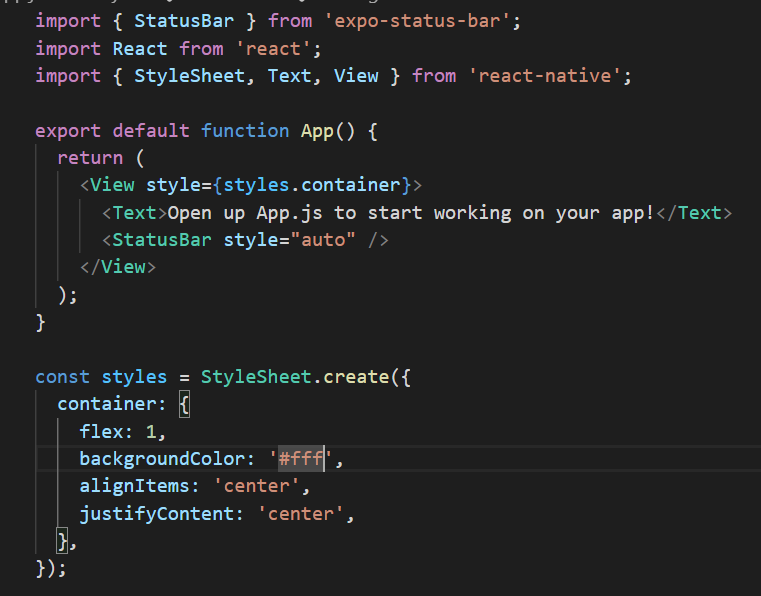
At the very top we import react, we need that because we are using react and we need a few different things from react native, the stylesheet and two components text and view.

View component

The view component is a bit like a div component in HTML we use it to wrap other elements.

Text component

Here we are using this view to wrap this text component, now we use text components to output a bit of text.

import { StatusBar } from 'expo-status-bar';
import React from 'react';
import { StyleSheet, Text, View } from 'react-native';
export default function App() {
return (
<View style={styles.container}>
Welcome to ckmobile
<StatusBar style="auto" />
</View>
);
}

We cannot do that without a text component so if we type “Welcome to ckmobile” without wrapping with Text component. It is not going to be valid.
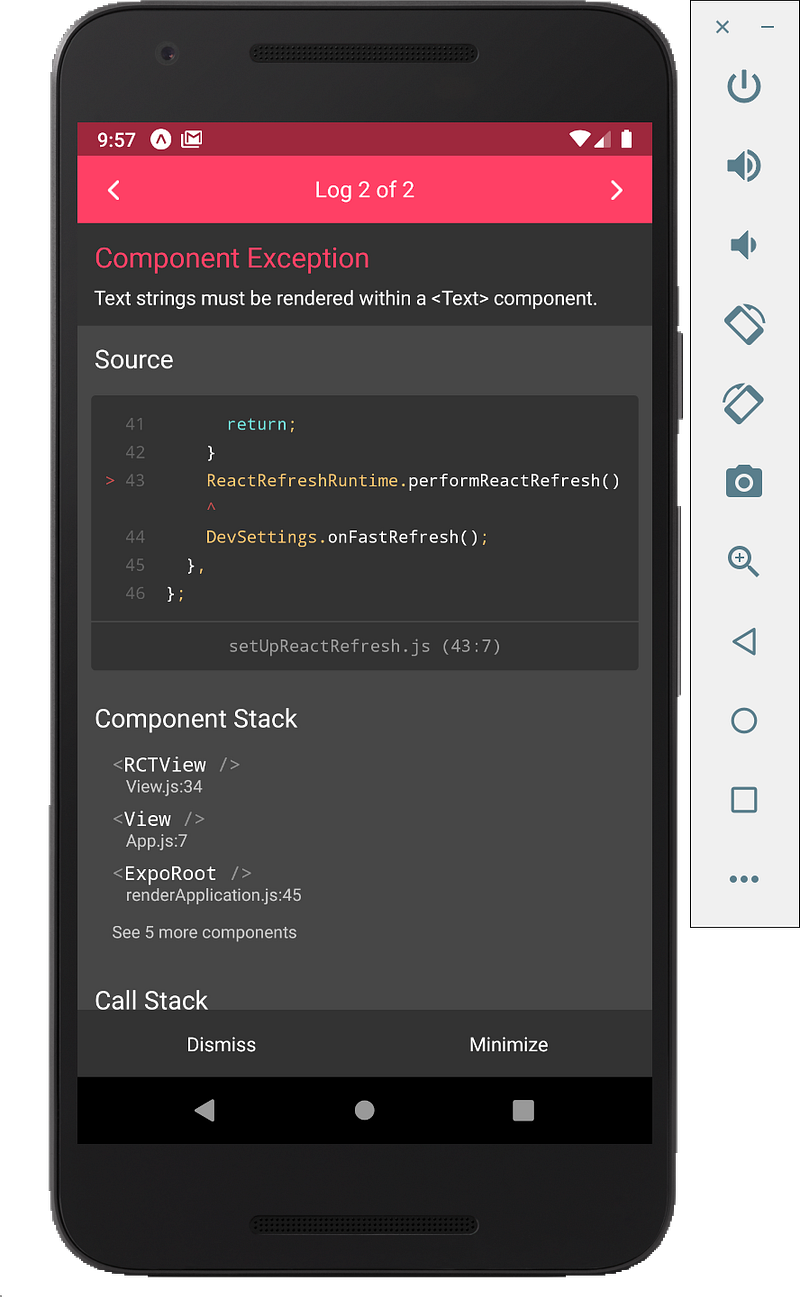
Click Save and it tries to refresh then we should probably get the above error.

You can see text strings must be rendered within a component.

So output text it needs to be within this Text component.

These are two basic components that we will use a lot.

Style

<View style={styles.container}>

We can add this style prop to different components.

It just like in HTML we can add inline style like below:

<h1 style="color:blue;">A Blue Heading</h1> react native doesn’t use CSS

React Native does not have CSS, it just emulates the idea of CSS. This is because both iOS and Android devices do not support CSS.

What react native does is emulate the idea of CSS that we are familiar and then it takes all of those different properties and converts it into a way that Android and iOS understands.

To style our different components on the screen, we do this by using this style prop and then we set it equal to some kind of object and that object is going to contain different CSS properties.

const styles = StyleSheet.create({
container: {
flex: 1,
backgroundColor: '#fff',
alignItems: 'center',
justifyContent: 'center',
},
});

We define styles down as a constant and that is equal to style sheet which we import up at the top.

We use a method on that called creates so we invoke that method and we pass in an object into that method.

This object represents the kind of style sheet that we are going to use. Inside the object we have different key value pairs so this looks very much like a CSS rule.

container is just like the CSS selector and the object is the set of CSS properties.

We can define as many different key value pairs inside this style sheet.

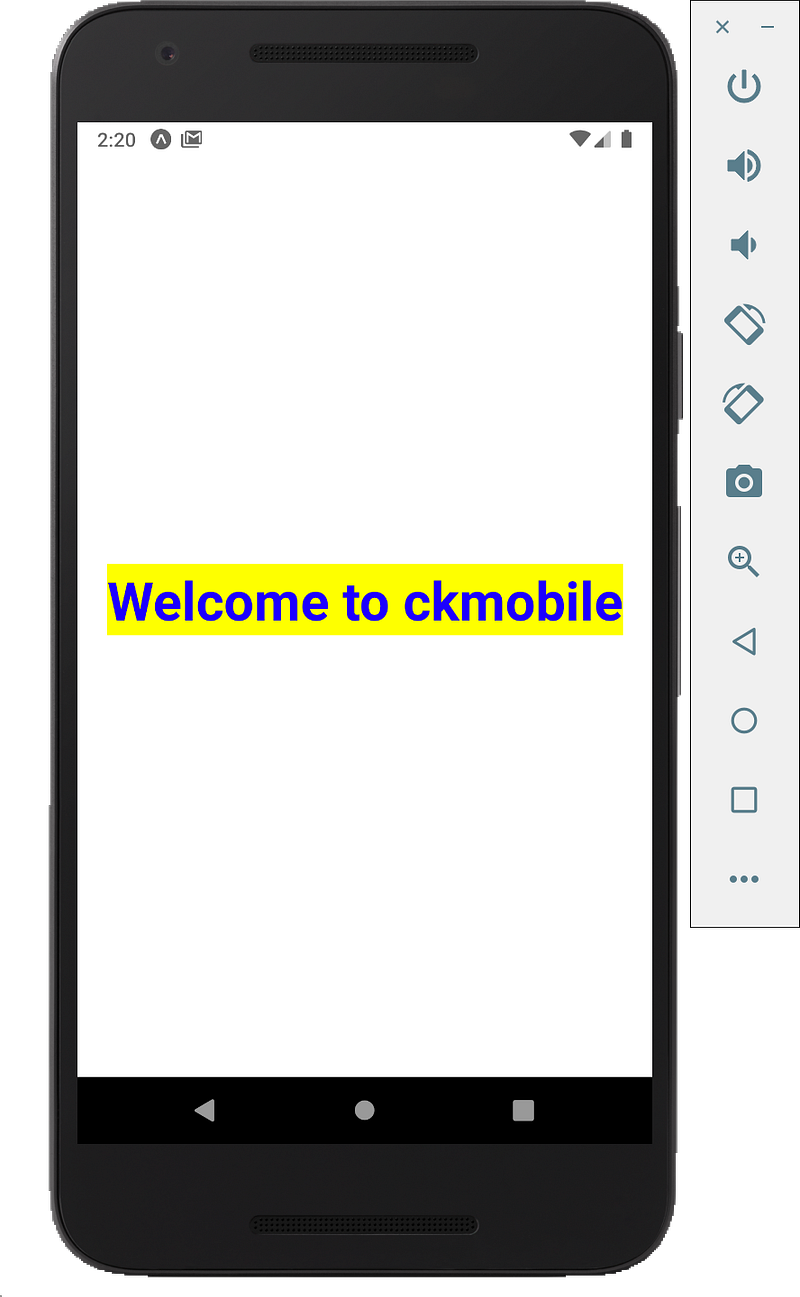
Now we are going to add our own style, which is equal to style.mystyle.This will be an object and inside we will say color is blue, font weight will be bold and the font size is 40.

mystyle: {
color: 'blue',
fontWeight: 'bold',
fontSize: 38
}

This is difference between this and CSS, we hyphen these double-barrel names like “font-size”. In React Native we use camel case “fontSize”.

Inheritance

If if we add some kind of style to View component, the style do not automatically inherit it inside a text component right so styles are not

If we go to the container and say font weight is going to be bold then it’s not going to display as bold text even though these text components are inside this view component. If we want to do that we have to add it on directly .

The idea of inheritance really work when text component inside another text component.

export default function App() {
return (
<View style={styles.container}>
<Text style={styles.mystyle}><Text>Hello !!</Text>Welcome to ckmobile</Text>
<StatusBar style="auto" />
</View>
);
}

This is how to use the core component of React Native.

If you liked this story, you might also like a Medium membership. It’s only $5 a month (a price of a cup of coffee!) but it will give you unlimited access to stories while supporting your favorite writers. If you sign up using this link, I’ll earn a small commission. Thanks!

Follow us: YouTube, Medium, Udemy, Linkedin, Twitter, Instagram, Gumroad, Quora, Telegram

Join affiliates to earn money

https://ckmobile.gumroad.com/affiliates

Get more FREE tutorials on Youtube:

Follow Us:

React Native
CSS
Reactjs
Android
iOS App Development
Recommended from ReadMedium