avatarJ3

Free AI web copilot to create summaries, insights and extended knowledge, download it at here

7476

Abstract

n></figure><div id="3fbf"><pre># <span class="hljs-keyword">create</span> our cumulative <span class="hljs-built_in">sum</span> <span class="hljs-keyword">function</span></pre></div><div id="7564"><pre><span class="hljs-keyword">def</span> <span class="hljs-title function_">cumsum</span>(<span class="hljs-params">a</span>)<span class="hljs-symbol">:</span></pre></div><div id="a993"><pre> <span class="hljs-attr">a</span> = iter(a)</pre></div><div id="a689"><pre> <span class="hljs-attr">b</span> = [next(a)]</pre></div><div id="2110"><pre> for <span class="hljs-selector-tag">i</span> in <span class="hljs-selector-tag">a</span>:</pre></div><div id="dedb"><pre> <span class="hljs-selector-tag">b</span><span class="hljs-selector-class">.append</span>(<span class="hljs-selector-tag">b</span><span class="hljs-selector-attr">[-1]</span> + <span class="hljs-selector-tag">i</span>)

return np<span class="hljs-selector-class">.array</span>(<span class="hljs-selector-tag">b</span>)</pre></div><div id="aceb"><pre><span class="hljs-meta"># execute the fn</span></pre></div><div id="696c"><pre><span class="hljs-attribute">cs</span> <span class="hljs-operator">=</span> cumsum(hist)</pre></div><div id="b6a2"><pre><span class="hljs-meta"># display the result</span></pre></div><div id="9fd4"><pre>plt.<span class="hljs-keyword">plot</span>(<span class="hljs-keyword">cs</span>)</pre></div><div id="3282"><pre><span class="hljs-meta">[&lt;matplotlib.lines.Line2D at <span class="hljs-number">0x1d0b4eafb20</span>&gt;]</span></pre></div><figure id="410c"><img src="https://cdn-images-1.readmedium.com/v2/resize:fit:800/1*y1NlrHQM6IPrAf6CZgeVAg.png"><figcaption></figcaption></figure><div id="619f"><pre><span class="hljs-comment"># formula to calculate cumulation sum</span></pre></div><div id="f566"><pre>display(Math(<span class="hljs-string">r's_k = \sum_{j=0}^{k} {\frac{n_j}{N}}'</span>))</pre></div><figure id="9a0b"><img src="https://cdn-images-1.readmedium.com/v2/resize:fit:800/1*dKXXOQfgtaIt6XZuVQ6dcw.png"><figcaption></figcaption></figure><div id="7667"><pre># re<span class="hljs-operator">-</span><span class="hljs-keyword">normalize</span> cumsum <span class="hljs-keyword">values</span> <span class="hljs-keyword">to</span> be <span class="hljs-keyword">between</span> <span class="hljs-number">0</span><span class="hljs-number">-255</span></pre></div><div id="3330"><pre><span class="hljs-meta"># numerator &amp; denomenator</span></pre></div><div id="3fe7"><pre>nj = (<span class="hljs-keyword">cs</span> - <span class="hljs-keyword">cs</span>.<span class="hljs-built_in">min</span>()) * 255</pre></div><div id="3aea"><pre><span class="hljs-keyword">N</span> = <span class="hljs-keyword">cs</span>.<span class="hljs-built_in">max</span>() - <span class="hljs-keyword">cs</span>.<span class="hljs-built_in">min</span>()</pre></div><div id="4b28"><pre><span class="hljs-meta"># re-normalize the cdf</span></pre></div><div id="f814"><pre><span class="hljs-attribute">cs</span> <span class="hljs-operator">=</span> nj / N</pre></div><div id="ac7d"><pre>plt.<span class="hljs-keyword">plot</span>(<span class="hljs-keyword">cs</span>)</pre></div><div id="9cb3"><pre><span class="hljs-meta">[&lt;matplotlib.lines.Line2D at <span class="hljs-number">0x1d0b4f0b7c0</span>&gt;]</span></pre></div><p id="71db">Casting:</p><div id="2c60"><pre><span class="hljs-comment"># cast it back to uint8 since we can't use floating point values in images</span></pre></div><div id="d4a1"><pre><span class="hljs-title">cs</span> = cs.<span class="hljs-keyword">as</span><span class="hljs-keyword">type</span>('uint8')</pre></div><div id="6286"><pre>plt.<span class="hljs-keyword">plot</span>(<span class="hljs-keyword">cs</span>)</pre></div><div id="247c"><pre><span class="hljs-meta">[&lt;matplotlib.lines.Line2D at <span class="hljs-number">0x1d0b5f8bd60</span>&gt;]</span></pre></div><p id="cd91">Get CDF:</p><div id="1f5f"><pre># <span class="hljs-keyword">get</span> the <span class="hljs-keyword">value</span> <span class="hljs-keyword">from</span> cumulative sum <span class="hljs-keyword">for</span> every <span class="hljs-keyword">index</span> <span class="hljs-keyword">in</span> flat, <span class="hljs-keyword">and</span> <span class="hljs-keyword">set</span> that <span class="hljs-keyword">as</span> img_new</pre></div><div id="d61d"><pre><span class="hljs-attr">img_new</span> = cs[flat]</pre></div><div id="4a61"><pre><span class="hljs-comment"># we see a much more evenly distributed histogram</span></pre></div><div id="cf00"><pre>plt.hist(img_new, <span class="hljs-attribute">bins</span>=50)</pre></div><figure id="da91"><img src="https://cdn-images-1.readmedium.com/v2/resize:fit:800/1*cRtraed26kmTs7dNGj2PNw.png"><figcaption></figcaption></figure><h1 id="384c">How does it work?</h1><p id="aa16">Equalization implies mapping one distribution (the given histogram) to another distribution (a wider and more uniform distribution of intensity values) so the intensity values are spread over the whole range.</p><div id="ab71"><pre># <span class="hljs-keyword">get</span> the <span class="hljs-keyword">value</span> <span class="hljs-keyword">from</span> cumulative sum <span class="hljs-keyword">for</span> every <span class="hljs-keyword">index</span> <span class="hljs-keyword">in</span> flat, <span class="hljs-keyword">and</span> <span class="hljs-keyword">set</span> that <span class="hljs-keyword">as</span> img_new</pre></div><div id="f89a"><pre><span class="hljs-attr">img_new</span> = cs[flat]</pre></div><div id="884b"><pre><span class="hljs-comment"># we see a much more evenly distributed histogram</span></pre></div><div id="bc56"><pre>plt.hist(img_new, <span class="hljs-attribute">bins</span>=50)</pre></div><figure id="c07b"><img src="https://cdn-images-1.readmedium.com/v2/resize:fit:800/1*-eFiOZ3BJ3dxRkWcgK4vJQ.png"><figcaption></figcaption></figure><div id="28e9"><pre><span class="hljs-comment"># put array back into original shape since we flattened it</span></pre></div><div id="b06c"><pre>img_new = np.<span class="hljs-built_in">reshape</span>(img_new, img.<span class="hljs-built_in">shape</span>)</pre></div><div id="c8ea"><pre><span class="hljs-attribute">img_new</span></pre></div><div id="a2f2"><pre><span class="hljs-built_in">array</span>([[<span class="hljs-number">233</span>, <span class="hljs-number">231</span>, <span class="hljs-number">228</span>, ..., <span class="hljs-number">216</span>, <span class="hljs-number">216</span>, <span class="hljs-number">215</span>],

<span class="hljs-string"> [233, 230, 228, ..., 215, 215, 214]</span>, <span class="hljs-string"> [233, 231, 229, ..., 213, 213, 212]</span>, ..., <span class="hljs-string"> [115, 107, 96, ..., 180, 187, 194]</span>, <span class="hljs-string"> [111, 103, 93, ..., 187, 189, 192]</span>, <span class="hljs-string"> [111, 103, 93, ..., 187, 189, 192]</span>], dtype=<span class="hljs-built_in">uint8</span>)</pre></div><p id="b0f2">Check it out:</p><div id="03fd"><pre># <span class="hljs-keyword">set</span> up side-<span class="hljs-keyword">by</span>-side image <span class="hljs-keyword">display</span></pre></div><div id="6025"><pre><span class="hljs-attribute">fig</span> <span class="hljs-operator">=</span> plt.figure()</pre></div><div id="f618"><pre><span class="hljs-attribute">fig</span>.set_figheight(<span class="hljs-number">15</span>)</pre></div><div id="a900"><pre><span class="hljs-attrib

Options

ute">fig</span>.set_figwidth(<span class="hljs-number">15</span>)</pre></div><div id="9308"><pre><span class="hljs-attribute">fig</span>.add_subplot(<span class="hljs-number">1</span>,<span class="hljs-number">2</span>,<span class="hljs-number">1</span>)</pre></div><div id="33fc"><pre>plt.imshow(img, <span class="hljs-attribute">cmap</span>=<span class="hljs-string">'gray'</span>)</pre></div><div id="9b88"><pre># <span class="hljs-built_in">display</span> the <span class="hljs-built_in">new</span> <span class="hljs-built_in">image</span></pre></div><div id="2233"><pre><span class="hljs-attribute">fig</span>.add_subplot(<span class="hljs-number">1</span>,<span class="hljs-number">2</span>,<span class="hljs-number">2</span>)</pre></div><div id="dc9f"><pre>plt.imshow(img_new, <span class="hljs-attribute">cmap</span>=<span class="hljs-string">'gray'</span>)</pre></div><div id="0305"><pre>plt.show(<span class="hljs-attribute">block</span>=<span class="hljs-literal">True</span>)</pre></div><h1 id="d508">Using OpenCV equalizeHist(img) Method</h1><h1 id="e51c">02 step — And by using the OpenCV function</h1><div id="7bbd"><pre><span class="hljs-comment"># Reading image via OpenCV and Equalize it right away!</span></pre></div><div id="e947"><pre><span class="hljs-attr">img</span> = cv2.imread(<span class="hljs-string">'DATA/einstein.jpg'</span>,<span class="hljs-number">0</span>)</pre></div><div id="e19b"><pre><span class="hljs-attribute">equ</span> <span class="hljs-operator">=</span> cv2.equalizeHist(img)</pre></div><p id="2790">Ready! that’s all you need to do!</p><div id="1913"><pre><span class="hljs-attribute">fig</span> <span class="hljs-operator">=</span> plt.figure()</pre></div><div id="d28e"><pre><span class="hljs-attribute">fig</span>.set_figheight(<span class="hljs-number">15</span>)</pre></div><div id="623f"><pre><span class="hljs-attribute">fig</span>.set_figwidth(<span class="hljs-number">15</span>)</pre></div><div id="171a"><pre><span class="hljs-attribute">fig</span>.add_subplot(<span class="hljs-number">1</span>,<span class="hljs-number">2</span>,<span class="hljs-number">1</span>)</pre></div><div id="ef79"><pre>plt.imshow(img, <span class="hljs-attribute">cmap</span>=<span class="hljs-string">'gray'</span>)</pre></div><div id="b5e6"><pre><span class="hljs-comment"># display the Equalized (equ) image</span></pre></div><div id="d0f9"><pre><span class="hljs-attribute">fig</span>.add_subplot(<span class="hljs-number">1</span>,<span class="hljs-number">2</span>,<span class="hljs-number">2</span>)</pre></div><div id="9ceb"><pre>plt.imshow(equ, <span class="hljs-attribute">cmap</span>=<span class="hljs-string">'gray'</span>)</pre></div><div id="1fdf"><pre>plt.show(<span class="hljs-attribute">block</span>=<span class="hljs-literal">True</span>)</pre></div><figure id="74a7"><img src="https://cdn-images-1.readmedium.com/v2/resize:fit:800/1*xZjXvf-9pctTnxQsOtsggw.png"><figcaption></figcaption></figure><div id="c373"><pre><span class="hljs-function"><span class="hljs-title">print</span><span class="hljs-params">(<span class="hljs-string">"That´s it! Thank you once again!\nI hope will be helpful."</span>)</span></span></pre></div><div id="4208"><pre>That´s it! Thank you once again! I hope will be helpful.</pre></div><p id="1a83">👉Jupiter notebook <a href="https://drive.google.com/file/d/1xWwLLGZF1XRA9ua97upcCXOssi1Z-s7k/view?usp=sharing">link</a> :)</p><p id="5a5f">👉<a href="https://github.com/giljr/pyImage">Github</a> (EX_04)</p><h1 id="fe57">Credits & References:</h1><p id="bbd8">Jose Portilla — <a href="https://www.udemy.com/course/python-for-computer-vision-with-opencv-and-deep-learning/">Python for Computer Vision with OpenCV and Deep Learning </a>— Learn the latest techniques in computer vision with Python, OpenCV, and Deep Learning!</p><p id="c482"><a href="https://www.tutorialspoint.com/dip/histogram_equalization.htm">https://www.tutorialspoint.com/dip/histogram_equalization.htm</a></p><p id="531a"><a href="https://readmedium.com/a-tutorial-to-histogram-equalization-497600f270e2">https://readmedium.com/a-tutorial-to-histogram-equalization-497600f270e2</a></p><p id="9b1f"><a href="https://docs.opencv.org/3.4/d4/d1b/tutorial_histogram_equalization.html">https://docs.opencv.org/3.4/d4/d1b/tutorial_histogram_equalization.html</a></p><p id="c69d"><a href="https://docs.opencv.org/4.x/d4/d86/group__imgproc__filter.html">https://docs.opencv.org/4.x/d4/d86/group__imgproc__filter.html</a></p><p id="c6dd"><a href="https://stackoverflow.com/questions/32838802/numpy-with-python-convert-3d-array-to-2d">https://stackoverflow.com/questions/32838802/numpy-with-python-convert-3d-array-to-2d</a></p><p id="53d7"><a href="https://techtutorialsx.com/2018/06/02/python-opencv-converting-an-image-to-gray-scale/">https://techtutorialsx.com/2018/06/02/python-opencv-converting-an-image-to-gray-scale/</a></p><p id="df9d"><a href="https://docs.opencv.org/3.4/d4/d1b/tutorial_histogram_equalization.html">https://docs.opencv.org/3.4/d4/d1b/tutorial_histogram_equalization.html</a></p><p id="7827"><a href="https://docs.opencv.org/4.x/d5/daf/tutorial_py_histogram_equalization.html">https://docs.opencv.org/4.x/d5/daf/tutorial_py_histogram_equalization.html</a></p><p id="febe"><a href="https://stackoverflow.com/questions/61583991/opencv-python-error-unsupported-data-type-4-in-function-cvopt-avx2getmo">https://stackoverflow.com/questions/61583991/opencv-python-error-unsupported-data-type-4-in-function-cvopt-avx2getmo</a></p><p id="3c1c"><a href="https://ai.stanford.edu/~syyeung/cvweb/tutorial1.html">https://ai.stanford.edu/~syyeung/cvweb/tutorial1.html</a></p><p id="45c3"><a href="https://readmedium.com/histogram-equalization-in-python-from-scratch-ebb9c8aa3f23">https://readmedium.com/histogram-equalization-in-python-from-scratch-ebb9c8aa3f23</a></p><h1 id="fd2d">Posts Related:</h1><p id="b4e9"><b>00</b> Episode#Hi Python Computer Vision — PIL! — <a href="https://readmedium.com/hi-python-computer-vision-pil-786a1da7b2d4"><b>An Intro To Python Imaging Library</b></a> #PyVisionSeries</p><p id="60b7"><b>01</b> Episode# Jupyter-lab — Python — <a href="https://readmedium.com/jupyter-lab-python-opencv-c55de86ec557"><b>OpenCV</b> </a>— Image Processing Exercises #PyVisionSeries</p><p id="d5f4"><b>02</b> Episode# OpenCV — <a href="https://readmedium.com/opencv-image-basics-2e63d973851a"><b>Image Basics </b></a>— Create Image From Scratch #PyVisionSeries</p><p id="79e5"><b>03</b> Episode# OpenCV — <a href="https://readmedium.com/opencv-morphological-operations-54f861eeb532"><b>Morphological Operations</b></a> — How To Erode, Dilate, Edge Detect w/ Gradient #PyVisionSeries</p><p id="7efb"><b>04</b> Episode# OpenCV — <a href="https://readmedium.com/histogram-equalization-34149fc299a6"><b>Histogram Equalization</b></a> — HOW TO Equalize Histograms Of Images — #PyVisionSeries</p><p id="24d7"><b>05</b> Episode# OpenCV — OpenCV — <a href="https://readmedium.com/opencv-resize-an-image-54df7680e828"><b>Resize an Image </b></a>— How To Resize Without Distortion</p><p id="37c5"><b>07</b> Episode# <a href="https://readmedium.com/yolo-object-detection-2828800fd2a2"><b>YOLO — Object Detection</b> </a>— The state of the art in object detection Framework!</p><p id="0642"><b>08</b> Episode# OpenCV — <a href="https://readmedium.com/opencv-object-detection-7edf30c1fabf"><b>HaashCascate — Object Detection</b></a> — Viola–Jones object detection framework — #PyVisionSeries</p></article></body>

OpenCV — Histogram Equalization

HOW TO Equalize Histograms Of Images — #PyVisionSeries — Episode #04

INDEX
01 step — Equalizing Manually
02 stepAnd by using the OpenCV function

What is an Image Histogram?

It is a graphical representation of the intensity distribution of an image. It quantifies the number of pixels for each intensity value considered.

01 step — Equalizing Manually

%matplotlib inline
from IPython.display import display, Math, Latex
import numpy as np
import matplotlib.pyplot as plt
from PIL import Image
img = Image.open('DATA/einstein.jpg')
plt.imshow(img)
<matplotlib.image.AxesImage at 0x1d0b37d2250>
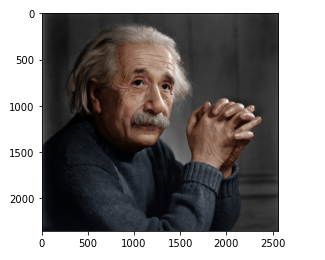
Displaying the color image

Convert image into a numpy array, so OpenCV can work with:

img = np.asanyarray(img)
img.shape
(2354, 2560, 3)

Converting RGB to Gray Scale:

import cv2
img = cv2.cvtColor(img, cv2.COLOR_BGR2GRAY)
img.shape
(2354, 2560)

display the image:

plt.imshow(img, cmap='gray')
<matplotlib.image.AxesImage at 0x1d0b415e100>
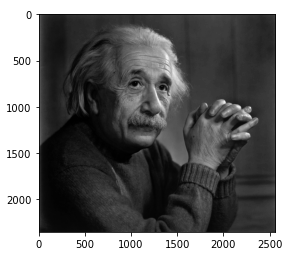
In gray tones now we have how to work the histogram…
img.max()
255
img.min()
0
img.shape
(2354, 2560)

Flatting it out:

flat = img.flatten()
# 1 row 2354 x 2560 = 6.026.240
flat.shape
(6026240,)

show the histogram

plt.hist(flat, bins=50)
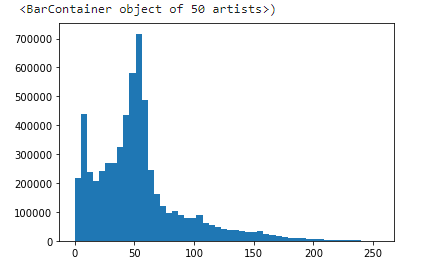
Note that the grayscale values ​​are badly distributed around some value…

What is Histogram Equalization?

To make it clearer, from the image above, you can see that the pixels seem clustered around the middle of the available range of intensities. What Histogram Equalization does is to stretch out this range.

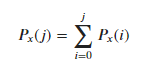
# formula for creating the histogram
display(Math(r'P_x(j) = \sum_{i=0}^{j} P_x(i)'))
# create our own histogram function
def get_histogram(image, bins):
  # array with size of bins, set to zeros
  histogram = np.zeros(bins)
  # loop through pixels and sum up counts of pixels
  for pixel in image:
    histogram[pixel] += 1
    # return our final result
    return histogram
hist = get_histogram(flat, 256)
plt.plot(hist)
[<matplotlib.lines.Line2D at 0x1d0b4e4da90>]
# create our cumulative sum function
def cumsum(a):
  a = iter(a)
  b = [next(a)]
  for i in a:
    b.append(b[-1] + i)
   
    return np.array(b)
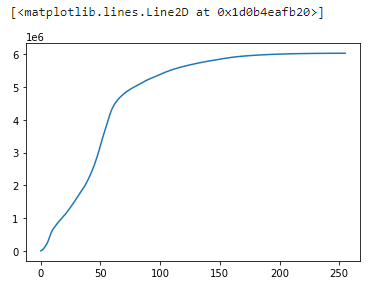
# execute the fn
cs = cumsum(hist)
# display the result
plt.plot(cs)
[<matplotlib.lines.Line2D at 0x1d0b4eafb20>]
# formula to calculate cumulation sum
display(Math(r's_k = \sum_{j=0}^{k} {\frac{n_j}{N}}'))
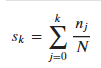
# re-normalize cumsum values to be between 0-255
# numerator & denomenator
nj = (cs - cs.min()) * 255
N = cs.max() - cs.min()
# re-normalize the cdf
cs = nj / N
plt.plot(cs)
[<matplotlib.lines.Line2D at 0x1d0b4f0b7c0>]

Casting:

# cast it back to uint8 since we can't use floating point values in images
cs = cs.astype('uint8')
plt.plot(cs)
[<matplotlib.lines.Line2D at 0x1d0b5f8bd60>]

Get CDF:

# get the value from cumulative sum for every index in flat, and set that as img_new
img_new = cs[flat]
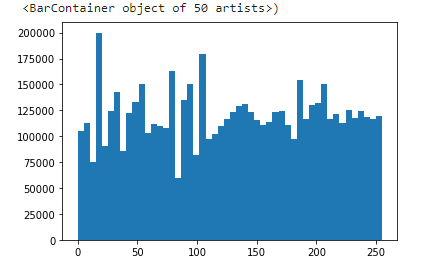
# we see a much more evenly distributed histogram
plt.hist(img_new, bins=50)

How does it work?

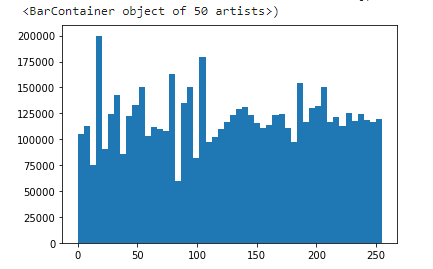
Equalization implies mapping one distribution (the given histogram) to another distribution (a wider and more uniform distribution of intensity values) so the intensity values are spread over the whole range.

# get the value from cumulative sum for every index in flat, and set that as img_new
img_new = cs[flat]
# we see a much more evenly distributed histogram
plt.hist(img_new, bins=50)
# put array back into original shape since we flattened it
img_new = np.reshape(img_new, img.shape)
img_new
array([[233, 231, 228, ..., 216, 216, 215],
       [233, 230, 228, ..., 215, 215, 214],
       [233, 231, 229, ..., 213, 213, 212],
       ...,
       [115, 107,  96, ..., 180, 187, 194],
       [111, 103,  93, ..., 187, 189, 192],
       [111, 103,  93, ..., 187, 189, 192]], dtype=uint8)

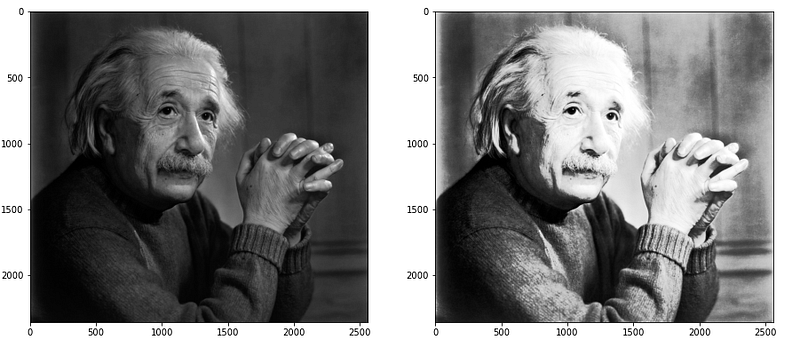
Check it out:

# set up side-by-side image display
fig = plt.figure()
fig.set_figheight(15)
fig.set_figwidth(15)
fig.add_subplot(1,2,1)
plt.imshow(img, cmap='gray')
# display the new image
fig.add_subplot(1,2,2)
plt.imshow(img_new, cmap='gray')
plt.show(block=True)

Using OpenCV equalizeHist(img) Method

02 step — And by using the OpenCV function

# Reading image via OpenCV and Equalize it right away!
img = cv2.imread('DATA/einstein.jpg',0)
equ = cv2.equalizeHist(img)

Ready! that’s all you need to do!

fig = plt.figure()
fig.set_figheight(15)
fig.set_figwidth(15)
fig.add_subplot(1,2,1)
plt.imshow(img, cmap='gray')
# display the Equalized (equ) image
fig.add_subplot(1,2,2)
plt.imshow(equ, cmap='gray')
plt.show(block=True)
print("That´s it! Thank you once again!\nI hope will be helpful.")
That´s it! Thank you once again!
I hope will be helpful.

👉Jupiter notebook link :)

👉Github (EX_04)

Credits & References:

Jose Portilla — Python for Computer Vision with OpenCV and Deep Learning — Learn the latest techniques in computer vision with Python, OpenCV, and Deep Learning!

https://www.tutorialspoint.com/dip/histogram_equalization.htm

https://readmedium.com/a-tutorial-to-histogram-equalization-497600f270e2

https://docs.opencv.org/3.4/d4/d1b/tutorial_histogram_equalization.html

https://docs.opencv.org/4.x/d4/d86/group__imgproc__filter.html

https://stackoverflow.com/questions/32838802/numpy-with-python-convert-3d-array-to-2d

https://techtutorialsx.com/2018/06/02/python-opencv-converting-an-image-to-gray-scale/

https://docs.opencv.org/3.4/d4/d1b/tutorial_histogram_equalization.html

https://docs.opencv.org/4.x/d5/daf/tutorial_py_histogram_equalization.html

https://stackoverflow.com/questions/61583991/opencv-python-error-unsupported-data-type-4-in-function-cvopt-avx2getmo

https://ai.stanford.edu/~syyeung/cvweb/tutorial1.html

https://readmedium.com/histogram-equalization-in-python-from-scratch-ebb9c8aa3f23

Posts Related:

00 Episode#Hi Python Computer Vision — PIL! — An Intro To Python Imaging Library #PyVisionSeries

01 Episode# Jupyter-lab — Python — OpenCV — Image Processing Exercises #PyVisionSeries

02 Episode# OpenCV — Image Basics — Create Image From Scratch #PyVisionSeries

03 Episode# OpenCV — Morphological Operations — How To Erode, Dilate, Edge Detect w/ Gradient #PyVisionSeries

04 Episode# OpenCV — Histogram Equalization — HOW TO Equalize Histograms Of Images — #PyVisionSeries

05 Episode# OpenCV — OpenCV — Resize an Image — How To Resize Without Distortion

07 Episode# YOLO — Object Detection — The state of the art in object detection Framework!

08 Episode# OpenCV — HaashCascate — Object Detection — Viola–Jones object detection framework — #PyVisionSeries

Histogram Equalization
Opencv Python
Histogram Manipulation
Image Enhancement
Opencv
Recommended from ReadMedium