avatarJ3

Free AI web copilot to create summaries, insights and extended knowledge, download it at here

5927

Abstract

ass="hljs-comment"># aspect ratio of image</span> aspect = w/h <span class="hljs-built_in">print</span>(f<span class="hljs-string">"The original aspect ratio is {aspect:.3}"</span>)</pre></div><div id="a83f"><pre># compute scaling and pad sizing <span class="hljs-title">if</span> aspect > <span class="hljs-number">1</span>: # horizontal image new_w = sw new_h = np.round(new_w/aspect).<span class="hljs-keyword">as</span><span class="hljs-keyword">type</span>(int) pad_vert = (sh-new_h)/<span class="hljs-number">2</span> pad_top, pad_bot = np.floor(pad_vert).<span class="hljs-keyword">as</span><span class="hljs-keyword">type</span>(int),
np.ceil(pad_vert).<span class="hljs-keyword">as</span><span class="hljs-keyword">type</span>(int) pad_left, pad_right = <span class="hljs-number">0</span>, <span class="hljs-number">0</span></pre></div><div id="69df"><pre><span class="hljs-built_in">print</span>(<span class="hljs-string">f"h=<span class="hljs-subst">{new_h}</span>, new_w=<span class="hljs-subst">{new_w}</span>"</span>) <span class="hljs-comment"># Recalc the aspect ratio</span> aspect = w/h <span class="hljs-built_in">print</span>(<span class="hljs-string">f"The new aspect ratio is still <span class="hljs-subst">{aspect:<span class="hljs-number">.3</span>}</span>"</span>) <span class="hljs-built_in">print</span>(<span class="hljs-string">"With this math we proportionally convert the image to 200 x 200"</span>)</pre></div><div id="8d9c"><pre><span class="hljs-attribute">The</span> original aspect ratio is <span class="hljs-number">1</span>.<span class="hljs-number">33</span> <span class="hljs-attribute">h</span>=<span class="hljs-number">150</span>, new_w=<span class="hljs-number">200</span> <span class="hljs-attribute">The</span> new aspect ratio is still <span class="hljs-number">1</span>.<span class="hljs-number">33</span> <span class="hljs-attribute">With</span> this math we proportionally convert the image to <span class="hljs-number">200</span> x <span class="hljs-number">200</span></pre></div><p id="9a6c">07 step # Mount the Image with Pads, if necessary</p><div id="f5d7"><pre>scaled_img = cv2.resize(img, (<span class="hljs-keyword">new</span><span class="hljs-type">_w</span>, <span class="hljs-keyword">new</span><span class="hljs-type">_h</span>), interpolation=interp)</pre></div><div id="2e97"><pre>scaled_img = cv2.copyMakeBorder(scaled_img, pad_top, pad_bot, pad_left, pad_right, <span class="hljs-attribute">borderType</span>=cv2.BORDER_CONSTANT, <span class="hljs-attribute">value</span>=127)</pre></div><div id="05b5"><pre><span class="hljs-attr">i</span> = plt.imshow(scaled_img, cmap=<span class="hljs-string">'gray'</span>)</pre></div><div id="1da3"><pre>scaled_img.<span class="hljs-built_in">shape</span></pre></div><div id="0a48"><pre>(<span class="hljs-number">200</span><span class="hljs-punctuation">,</span> <span class="hljs-number">200</span><span class="hljs-punctuation">,</span> <span class="hljs-number">3</span>)</pre></div><figure id="ac00"><img src="https://cdn-images-1.readmedium.com/v2/resize:fit:800/1*a4Ez6huVR5TNlyqE1PVE2g.png"><figcaption></figcaption></figure><p id="242b">08 step #Run It All Together & Check it out</p><div id="73e2"><pre>import cv2 import numpy <span class="hljs-keyword">as</span> np def resizeAndPad(img, size, padColor=<span class="hljs-number">0</span>): h, w = img.shape[:<span class="hljs-number">2</span>] sh, sw = size

interpolation <span class="hljs-keyword">method</span>

<span class="hljs-title function_">if</span> <span class="hljs-title function_">h</span> > <span class="hljs-title function_">sh</span> <span class="hljs-title function_">or</span> <span class="hljs-title function_">w</span> > <span class="hljs-title function_">sw</span>: # shrinking image interp = cv2.INTER_AREA</pre></div><div id="fdb4"><pre> <span class="hljs-keyword">else</span>: <span class="hljs-comment"># stretching image</span> <span class="hljs-attr">interp</span> = cv2.INTER_CUBIC</pre></div><div id="e5e3"><pre><span class="hljs-comment"># aspect ratio of image</span> <span class="hljs-attr">aspect</span> = w/h</pre></div><div id="5fe2"><pre># compute scaling and pad sizing <span class="hljs-title">if</span> aspect > <span class="hljs-number">1</span>: # horizontal image new_w = sw new_h = np.round(new_w/aspect).<span class="hljs-keyword">as</span><span class="hljs-keyword">type</span>(int) pad_vert = (sh-new_h)/<span class="hljs-number">2</span> pad_top, pad_bot = np.floor(pad_vert).<span class="hljs-keyword">as</span><span class="hljs-keyword">type</span>(int),
np.ceil(pad_vert).<span class="hljs-keyword">as</span><span class="hljs-keyword">type</span>(int) pad_left, pad_right = <span class="hljs-number">0</span>, <span class="hljs-number">0</span></pre></div><div id="efb2"><pre><span class="hljs-title">elif</span> aspect < <span class="hljs-number">1</span>: # vertical image new_h = sh new_w = np.round(new_h*aspect).<span class="hljs-keyword">as</span><span class="hljs-keyword">type</span>(int) pad_horz = (sw-new_w)/<span class="hljs-number">2</span> pad_left, pad_right = np.floor(pad_horz).<span class="hljs-keyword">as</span><span class="hljs-keyword">type</span>(int), np.ceil(pad_horz).<span class="hljs-keyword">as</span><span class="hljs-keyword">type</span>(int)</pre></div><div id="98ec"><pre> <span class="hljs-attribute">pad_top</span>, pad_bot = <span class="hljs-number">0</span>, <span class="hljs-number">0</span></pre></div><div id="19a3"><pre><span class="hljs-keyword">else</span>: <span class="hljs-type"></span># square image <span class="hljs-keyword">new</span><span class="hljs-type">_h</span>, <span class="hljs-keyword">new</span><span class="hljs-type">_w</span> = sh, sw pad_left, pad_right, pad_top, pad_bot = <span class="hljs-number">0</span>, <span class="hljs-number">0</span>, <sp

Options

an class="hljs-number">0</span>, <span class="hljs-number">0</span></pre></div><div id="c204"><pre><span class="hljs-comment"># set pad color</span> <span class="hljs-keyword">if</span> <span class="hljs-built_in">len</span>(img.shape) == <span class="hljs-number">3</span> <span class="hljs-keyword">and</span> <span class="hljs-keyword">not</span> <span class="hljs-built_in">isinstance</span>(padColor, (<span class="hljs-built_in">list</span>, <span class="hljs-built_in">tuple</span>, np.ndarray)): <span class="hljs-comment"># color image but only one color provided</span> padColor = [padColor]*<span class="hljs-number">3</span></pre></div><div id="bb63"><pre><span class="hljs-comment"># scale and pad</span> scaled_img = cv2.resize(img, (new_w, new_h), <span class="hljs-attribute">interpolation</span>=interp) scaled_img = cv2.copyMakeBorder(scaled_img, pad_top, pad_bot, pad_left, pad_right, <span class="hljs-attribute">borderType</span>=cv2.BORDER_CONSTANT,
<span class="hljs-attribute">value</span>=padColor)</pre></div><div id="c69e"><pre><span class="hljs-keyword">return</span> scaled_img</pre></div><p id="caf6">Checking it out:</p><div id="460f"><pre><span class="hljs-keyword">new</span><span class="hljs-type">_img</span> = resizeAndPad(img, (<span class="hljs-number">200</span>,<span class="hljs-number">200</span>), <span class="hljs-number">127</span>) i = plt.imshow(<span class="hljs-keyword">new</span><span class="hljs-type">_img</span>, cmap=<span class="hljs-string">'gray'</span>) <span class="hljs-keyword">new</span><span class="hljs-type">_img</span>.shape</pre></div><div id="6967"><pre># Saving the <span class="hljs-keyword">new</span> image inside DATA folder filename = <span class="hljs-string">'tv_laptop_resized.jpg'</span>

<span class="hljs-keyword">Using</span> cv2.imwrite() <span class="hljs-keyword">method</span>

<span class="hljs-title function_">Saving</span> <span class="hljs-title function_">the</span> <span class="hljs-title function_">image</span>

<span class="hljs-title function_">cv2</span>.<span class="hljs-title function_">imwrite</span><span class="hljs-params">(filename, new_img)</span></pre></div><div id="1e80"><pre>(<span class="hljs-number">200</span><span class="hljs-punctuation">,</span> <span class="hljs-number">200</span><span class="hljs-punctuation">,</span> <span class="hljs-number">3</span>)</pre></div><figure id="7721"><img src="https://cdn-images-1.readmedium.com/v2/resize:fit:800/1*H9mFKeK1mWiVV0AunoJZ5w.png"><figcaption></figcaption></figure><div id="2140"><pre><span class="hljs-function"><span class="hljs-title">print</span><span class="hljs-params">(<span class="hljs-string">"That´s it! Thank you once again!\nI hope will be helpful."</span>)</span></span></pre></div><div id="4162"><pre>That´s it! Thank you once again! I hope will be helpful.</pre></div><p id="b50b">👉Jupiter notebook <a href="https://drive.google.com/file/d/1RtJcO47dgzkw9gQzJ055TzJl06CzKRSg/view?usp=sharing">link</a> :)</p><p id="f1a3">👉<a href="https://github.com/giljr/pyImage">Github</a> (EX_05)</p><h1 id="ca6e">Credits & References:</h1><p id="c999">Jose Portilla — <a href="https://www.udemy.com/course/python-for-computer-vision-with-opencv-and-deep-learning/">Python for Computer Vision with OpenCV and Deep Learning </a>— Learn the latest techniques in computer vision with Python, OpenCV, and Deep Learning!</p><p id="a32b"><a href="https://www.videoconverterfactory.com/tips/change-aspect-ratio.html">https://www.videoconverterfactory.com/tips/change-aspect-ratio.html</a></p><p id="1231"><a href="https://elitescreens.com/understanding-aspect-ratio/">https://elitescreens.com/understanding-aspect-ratio/</a> <a href="https://invideo.io/blog/aspect-ratio-for-videos/">https://invideo.io/blog/aspect-ratio-for-videos/</a><a href="http://wiki.robotz.com/index.php/Cinema_Aspect_Ratios">http://wiki.robotz.com/index.php/Cinema_Aspect_Ratios</a></p><p id="6c75"><a href="https://mubi.com/films/this-is-cinerama">https://mubi.com/films/this-is-cinerama</a></p><p id="f0bf"><a href="https://oilcity.news/community/city/2017/09/08/spectacle-cinerama-comes-casper-weekend/">https://oilcity.news/community/city/2017/09/08/spectacle-cinerama-comes-casper-weekend/</a></p><h1 id="0185">Posts Related:</h1><p id="4f4f"><b>00</b> Episode# <a href="https://readmedium.com/hi-python-computer-vision-pil-786a1da7b2d4"><b>Hi Python Computer Vision — PIL!</b> </a>— An Intro To Python Imaging Library #PyVisionSeries</p><p id="f189"><b>01</b> Episode# Jupyter-lab — Python — <a href="https://readmedium.com/jupyter-lab-python-opencv-c55de86ec557"><b>OpenCV</b> </a>— Image Processing Exercises #PyVisionSeries</p><p id="5c21"><b>02</b> Episode# OpenCV — <a href="https://readmedium.com/opencv-image-basics-2e63d973851a"><b>Image Basics </b></a>— Create Image From Scratch #PyVisionSeries</p><p id="02dc"><b>03</b> Episode# OpenCV — <a href="https://readmedium.com/opencv-morphological-operations-54f861eeb532"><b>Morphological Operations</b></a> — How To Erode, Dilate, Edge Detect w/ Gradient #PyVisionSeries</p><p id="18ce"><b>04</b> Episode# OpenCV — <a href="https://readmedium.com/histogram-equalization-34149fc299a6"><b>Histogram Equalization</b></a> — HOW TO Equalize Histograms Of Images — #PyVisionSeries</p><p id="0ef1"><b>05</b> Episode# OpenCV — <a href="https://readmedium.com/opencv-resize-an-image-54df7680e828"><b>Resize an image</b> </a>— How To Resize Without Distortion — #PyVisionSeries</p><p id="628d"><b>07</b> Episode# <a href="https://readmedium.com/yolo-object-detection-2828800fd2a2"><b>YOLO — Object Detection</b> </a>— The state of the art in object detection Framework!</p><p id="f54a"><b>08</b> Episode# OpenCV — <a href="https://readmedium.com/opencv-object-detection-7edf30c1fabf"><b>HaashCascate — Object Detection</b></a> — Viola–Jones object detection framework — #PyVisionSeries</p></article></body>

OpenCV — Resize an Image

How To Resize Without Distortion #PyVisionSeries — Episode #05

The problem is quite simple: I want to take a very large image (3448x4592) and transform it into, for example,(200x200) pixels, without distorting it. How to make it?
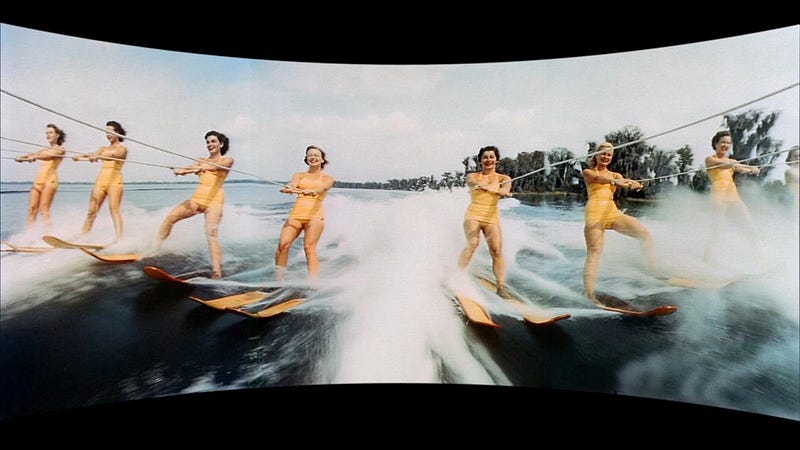
Cinerama — image borrowed from linkCinerama, a panoramic process that involved projecting on three screens made its debut in this glorified slideshow presented by Merian C. Cooper that toured the nation in 1952.

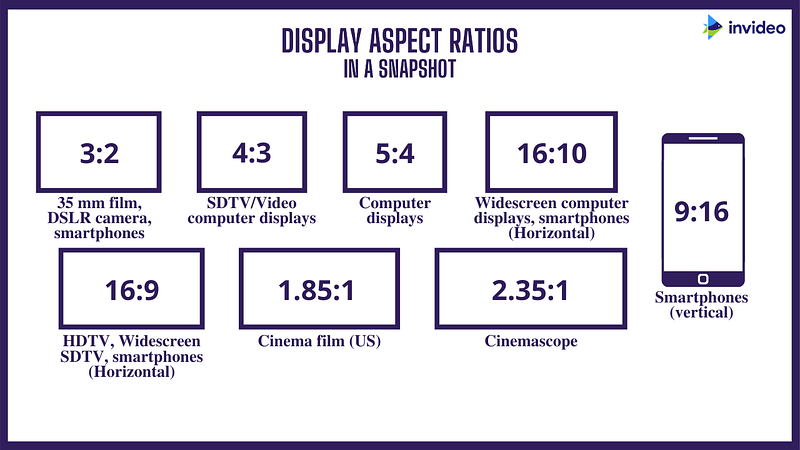
This is all about aspect ratio.

The aspect ratio of an image is the ratio of its width to its height, and is expressed with two numbers separated by a colon, such as 16:9, sixteen-to-nine. wikipedia

In your social media platforms chances are that you want to repurpose one picture in various ways, on different platforms. For example, you may want to repurpose a horizontal Facebook picture on an Instagram story.

How are you going to do it?

By simply changing the aspect ratio.

Let’s get Started!

00 step # First, Let’s Showing the Problem.

Importing all the libs:

import os
import time
import cv2
import numpy as np
import matplotlib.pyplot as plt
%matplotlib inline

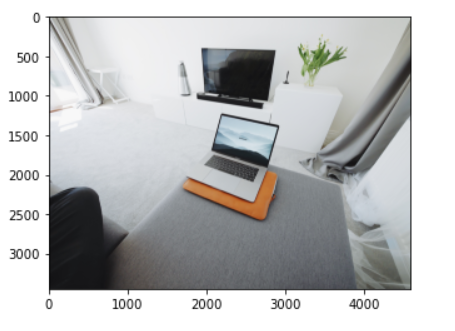
01 step # Importing the Image to Work with

f = 'tv_laptop.jpg'
path = 'DATA/'+f
img = cv2.imread(path)
# Correcting coloring for MatPlotLib
img = cv2.cvtColor(img, cv2.COLOR_RGB2BGR)
i = plt.imshow(img, cmap='gray')
img.shape
(3448, 4592, 3)

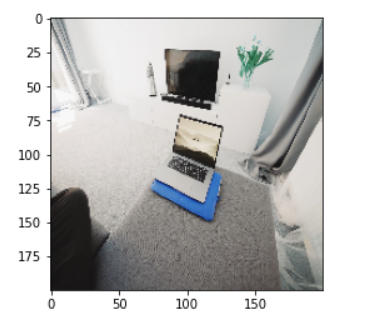
02 step # Showing the Problem — Trying to Do a Raw Resize :/

resized = cv2.resize(img, (200,200), cv2.INTER_AREA)
# Correcting coloring for MatPlotLib
img = cv2.cvtColor(resized, cv2.COLOR_RGB2BGR)
i = plt.imshow(img, cmap='gray')
img.shape
(200, 200, 3)

03 step # Find The Size of the Original Image

# reload everything
f = 'tv_laptop.jpg'
path = 'DATA/'+f
img = cv2.imread(path)
img = img.copy()
# Correcting coloring for MatPlotLib
img = cv2.cvtColor(img, cv2.COLOR_RGB2BGR)
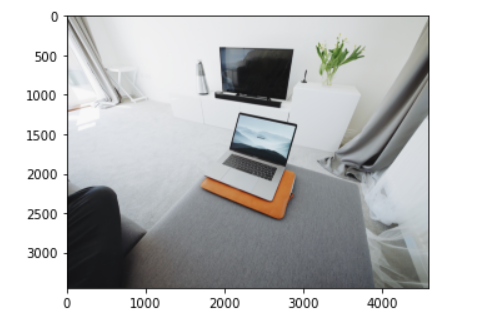
i = plt.imshow(img, cmap='gray')
img.shape
# Saving height(h) for variable h, and length for w
# Use Tuple unpacking tecnique
h, w = img.shape[:2]
print(h, w)
3448 4592
04 step # What Size do You Want to Convert the Image to?

size = (200,200)
sh, sw = size
print(sh, sw)
200 200

05 step # Choose an OpenCV Interpolation Method

# interpolation method
if h > sh or w > sw: # shrinking image
interp = cv2.INTER_AREA
else: # stretching image
interp = cv2.INTER_CUBIC

06 step # Calculate the Pads in case the Images are Horizontal or Vertical

# aspect ratio of image
aspect = w/h
print(f"The original aspect ratio is {aspect:.3}")
# compute scaling and pad sizing
if aspect > 1: # horizontal image
  new_w = sw
  new_h = np.round(new_w/aspect).astype(int)
  pad_vert = (sh-new_h)/2
  pad_top, pad_bot = np.floor(pad_vert).astype(int),   
       np.ceil(pad_vert).astype(int)
  pad_left, pad_right = 0, 0
print(f"h={new_h}, new_w={new_w}")
# Recalc the aspect ratio
aspect = w/h
print(f"The new aspect ratio is still {aspect:.3}")
print("With this math we proportionally convert the image to 200 x 200")
The original aspect ratio is 1.33
h=150, new_w=200
The new aspect ratio is still 1.33
With this math we proportionally convert the image to 200 x 200

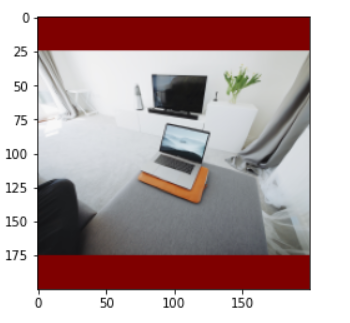
07 step # Mount the Image with Pads, if necessary

scaled_img = cv2.resize(img, (new_w, new_h), interpolation=interp)
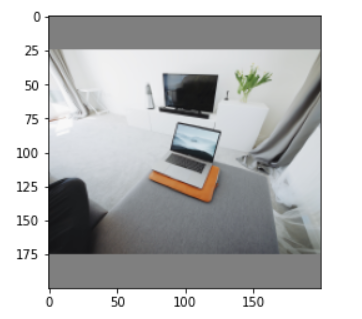
scaled_img = cv2.copyMakeBorder(scaled_img, pad_top, pad_bot, pad_left, pad_right, borderType=cv2.BORDER_CONSTANT, value=127)
i = plt.imshow(scaled_img, cmap='gray')
scaled_img.shape
(200, 200, 3)

08 step #Run It All Together & Check it out

import cv2
import numpy as np
def resizeAndPad(img, size, padColor=0):
  h, w = img.shape[:2]
  sh, sw = size
  # interpolation method
  if h > sh or w > sw: # shrinking image
     interp = cv2.INTER_AREA
  else: # stretching image
    interp = cv2.INTER_CUBIC
# aspect ratio of image
aspect = w/h
# compute scaling and pad sizing
if aspect > 1: # horizontal image
  new_w = sw
  new_h = np.round(new_w/aspect).astype(int)
  pad_vert = (sh-new_h)/2
  pad_top, pad_bot = np.floor(pad_vert).astype(int),   
     np.ceil(pad_vert).astype(int)
  pad_left, pad_right = 0, 0
elif aspect < 1: # vertical image
  new_h = sh
  new_w = np.round(new_h*aspect).astype(int)
  pad_horz = (sw-new_w)/2
  pad_left, pad_right = np.floor(pad_horz).astype(int), 
     np.ceil(pad_horz).astype(int)
  pad_top, pad_bot = 0, 0
else: # square image
  new_h, new_w = sh, sw
  pad_left, pad_right, pad_top, pad_bot = 0, 0, 0, 0
# set pad color
if len(img.shape) == 3 and not isinstance(padColor, (list, tuple, 
     np.ndarray)): # color image but only one color provided
  padColor = [padColor]*3
# scale and pad
scaled_img = cv2.resize(img, (new_w, new_h), interpolation=interp)
scaled_img = cv2.copyMakeBorder(scaled_img, pad_top, pad_bot, 
     pad_left, pad_right, borderType=cv2.BORDER_CONSTANT,  
     value=padColor)
return scaled_img

Checking it out:

new_img = resizeAndPad(img, (200,200), 127)
i = plt.imshow(new_img, cmap='gray')
new_img.shape
# Saving the new image inside DATA folder
filename = 'tv_laptop_resized.jpg'  
# Using cv2.imwrite() method
# Saving the image
cv2.imwrite(filename, new_img)
(200, 200, 3)
print("That´s it! Thank you once again!\nI hope will be helpful.")
That´s it! Thank you once again!
I hope will be helpful.

👉Jupiter notebook link :)

👉Github (EX_05)

Credits & References:

Jose Portilla — Python for Computer Vision with OpenCV and Deep Learning — Learn the latest techniques in computer vision with Python, OpenCV, and Deep Learning!

https://www.videoconverterfactory.com/tips/change-aspect-ratio.html

https://elitescreens.com/understanding-aspect-ratio/ https://invideo.io/blog/aspect-ratio-for-videos/http://wiki.robotz.com/index.php/Cinema_Aspect_Ratios

https://mubi.com/films/this-is-cinerama

https://oilcity.news/community/city/2017/09/08/spectacle-cinerama-comes-casper-weekend/

Posts Related:

00 Episode# Hi Python Computer Vision — PIL! — An Intro To Python Imaging Library #PyVisionSeries

01 Episode# Jupyter-lab — Python — OpenCV — Image Processing Exercises #PyVisionSeries

02 Episode# OpenCV — Image Basics — Create Image From Scratch #PyVisionSeries

03 Episode# OpenCV — Morphological Operations — How To Erode, Dilate, Edge Detect w/ Gradient #PyVisionSeries

04 Episode# OpenCV — Histogram Equalization — HOW TO Equalize Histograms Of Images — #PyVisionSeries

05 Episode# OpenCV — Resize an image — How To Resize Without Distortion — #PyVisionSeries

07 Episode# YOLO — Object Detection — The state of the art in object detection Framework!

08 Episode# OpenCV — HaashCascate — Object Detection — Viola–Jones object detection framework — #PyVisionSeries

Opencv
Opencv Python
Cinerama
Image Processing
Image Resizing
Recommended from ReadMedium