

Flutter — Microsoft API Management secured with AD — Web API
In the previous article Flutter — Authentication we added support for an authentication service.
Now we turn our attention to implementing an authentication service starting with support for Microsoft technologies.
It is only the tip of the iceberg, the start of your journey; security configuration is always changing, has many parts and rarely has comprehensive guides.
Due to the complexity of the setup I’ve broken it into eight parts:
- Web API — Setting up your Web API with Visual Studio.
- APIM Service — Creating an API management service in Azure.
- Secure Gateway — Securing requests through the API gateway.
- MSAL — Authenticating your Flutter app on iOS.
- MSAL — Authenticating your Flutter app on Android.
- MSAL — Authenticating your Flutter app on the Web.
- Hosted API — Hosting your Web API’s in Azure.
- Secure Hosted API — Secure requests with the APIM Gateway
In this first article in the series we will create a minimal .Net API that returns a list of recipes.
Recipes API
You can use Visual Studio to create a minimal Web API without security.
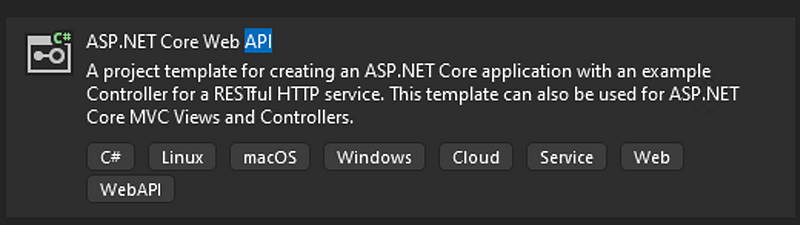
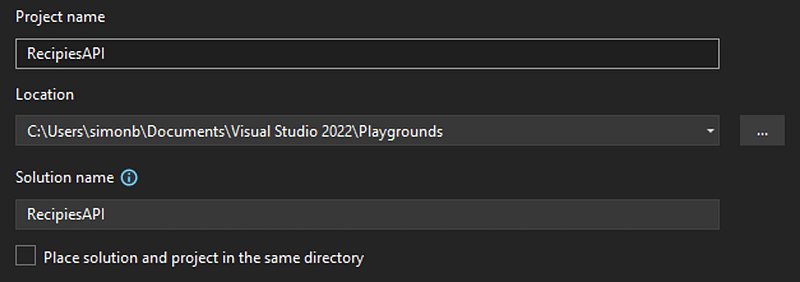
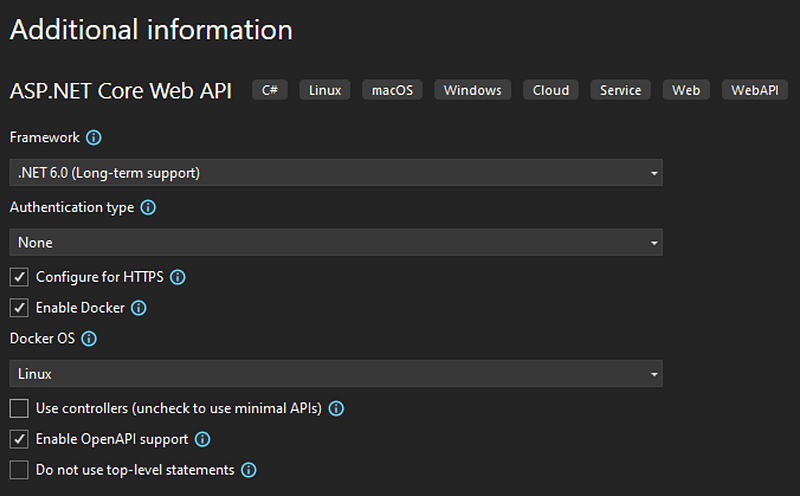
Add the Swashbuckle Annotations nugget package

Replace the program.cs file code with this:
using Microsoft.OpenApi.Models;
using Swashbuckle.AspNetCore.Annotations;

var builder = WebApplication.CreateBuilder(args);

// Add services to the container.

builder.Services.AddEndpointsApiExplorer();

// Learn more about configuring Swagger/OpenAPI at https://aka.ms/aspnetcore/swashbuckle
builder.Services.AddSwaggerGen(options =>
{
    options.SwaggerDoc("v1", new OpenApiInfo
    {
        Description = "Recipe Management",
        Title = "Recipies Api",
        Version = "v1"
    });
    options.EnableAnnotations();
});

var app = builder.Build();

// Configure the HTTP request pipeline.

if (app.Environment.IsDevelopment())
{
    app.UseSwagger();
    app.UseSwaggerUI(c =>
    {
        c.SwaggerEndpoint("/swagger/v1/swagger.json", "Recipes Minimal API v1");

    });
}

app.UseHttpsRedirection();

// Recipes API

app.MapGet("/recipes", [SwaggerOperation(summary: "List Recipes.", description: "Gets a list of all Recipes.")] () =>
    {
        var recipes = new Recipe[]
        {
            new Recipe(
                "How to boil an egg",
                "https://www.theguardian.com/lifeandstyle/2014/nov/11/how-to-boil-an-egg-the-heston-blumenthal-way",
                "Heston Blumenthal",
                TimeSpan.FromSeconds(630),
                "https://i.guim.co.uk/img/static/sys-images/Guardian/Pix/pictures/2014/11/5/1415205733799/4bfbd71a-6cd0-4494-833f-eaaed20a15b3-1020x612.jpeg?width=620&quality=45&auto=format&fit=max&dpr=2&s=ca3a95d7e761d267eff1b79b58cc4849" )
        };
        return recipes;
    })
    .WithName("GetRecipes")
    .WithTags("Recipes");

app.Run();

internal record Recipe(string Title, string Link, string Source, TimeSpan Duration, string Thumbnail)
{
}
Fix the local port number in the docker launch settings
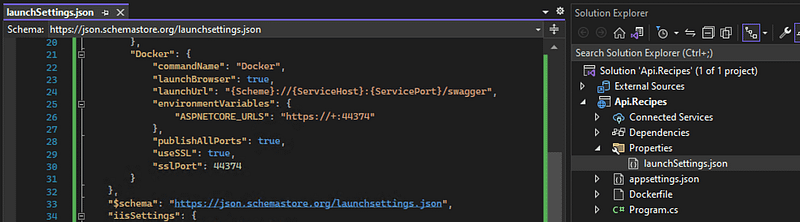
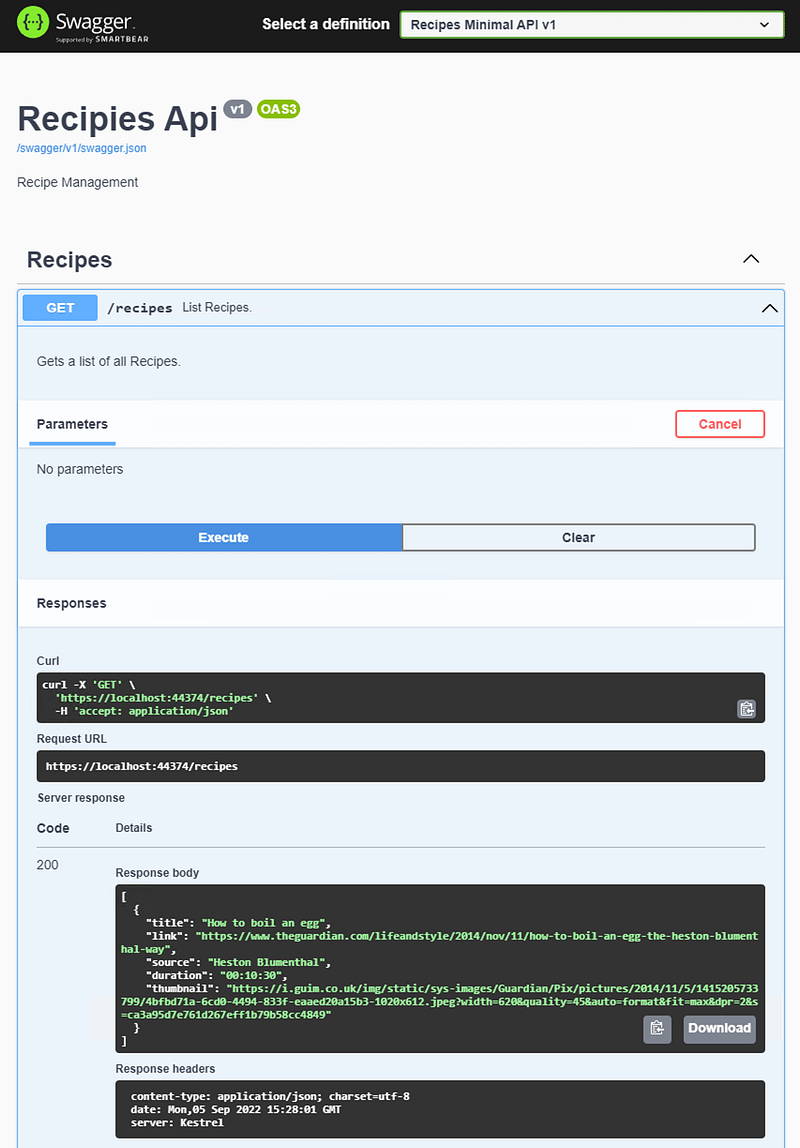
Run it with docker and test it works

If it does, click on the API link to view the swagger.json file and save it to disk.
Ta Da
Swagger OpenAPI Definition
{
  "openapi": "3.0.1",
  "info": {
    "title": "Recipies Api",
    "description": "Recipe Management",
    "version": "v1"
  },
  "paths": {
    "/recipes": {
      "get": {
        "tags": [
          "Recipes"
        ],
        "summary": "List Recipes.",
        "description": "Gets a list of all Recipes.",
        "operationId": "GetRecipes",
        "responses": {
          "200": {
            "description": "Success",
            "content": {
              "application/json": {
                "schema": {
                  "type": "array",
                  "items": {
                    "$ref": "#/components/schemas/Recipe"
                  }
                }
              }
            }
          }
        }
      }
    }
  },
  "components": {
    "schemas": {
      "Recipe": {
        "type": "object",
        "properties": {
          "title": {
            "type": "string",
            "nullable": true
          },
          "link": {
            "type": "string",
            "nullable": true
          },
          "source": {
            "type": "string",
            "nullable": true
          },
          "duration": {
            "$ref": "#/components/schemas/TimeSpan"
          },
          "thumbnail": {
            "type": "string",
            "nullable": true
          }
        },
        "additionalProperties": false
      },
      "TimeSpan": {
        "type": "object",
        "properties": {
          "ticks": {
            "type": "integer",
            "format": "int64"
          },
          "days": {
            "type": "integer",
            "format": "int32",
            "readOnly": true
          },
          "hours": {
            "type": "integer",
            "format": "int32",
            "readOnly": true
          },
          "milliseconds": {
            "type": "integer",
            "format": "int32",
            "readOnly": true
          },
          "minutes": {
            "type": "integer",
            "format": "int32",
            "readOnly": true
          },
          "seconds": {
            "type": "integer",
            "format": "int32",
            "readOnly": true
          },
          "totalDays": {
            "type": "number",
            "format": "double",
            "readOnly": true
          },
          "totalHours": {
            "type": "number",
            "format": "double",
            "readOnly": true
          },
          "totalMilliseconds": {
            "type": "number",
            "format": "double",
            "readOnly": true
          },
          "totalMinutes": {
            "type": "number",
            "format": "double",
            "readOnly": true
          },
          "totalSeconds": {
            "type": "number",
            "format": "double",
            "readOnly": true
          }
        },
        "additionalProperties": false
      }
    }
  }
}
BackBurner
I took a brief stab at looking at ways to scaffold .net core Web API’s and found Wrapt, but discounted for now after seeing the amount of code generated.
I may be tempted to come back to it but want to experiment with other ways to scaffold API’s including using EF.
The aim is to make adding new API endpoints easy whilst ensuring consistency and avoiding limiting the capabilities, more on this another time.


