avatarsimbu

Free AI web copilot to create summaries, insights and extended knowledge, download it at here

7258

Abstract

//cdn-images-1.readmedium.com/v2/resize:fit:800/1*bwElDQhIYqHBaXaGqS8NTA.png"><figcaption>Add a scope to expose the API</figcaption></figure><figure id="5535"><img src="https://cdn-images-1.readmedium.com/v2/resize:fit:800/1*EE81Rf4GhxIg1MsRRkEioA.png"><figcaption>save it</figcaption></figure><figure id="548a"><img src="https://cdn-images-1.readmedium.com/v2/resize:fit:800/1*75sHISRzPwHfxFpV5c55Jw.png"><figcaption>Permission naming rules</figcaption></figure><figure id="b470"><img src="https://cdn-images-1.readmedium.com/v2/resize:fit:800/1*j2YbBqIhyjYoeiZHBgbfLw.png"><figcaption>Example scope (permission) : Employees</figcaption></figure><figure id="47c8"><img src="https://cdn-images-1.readmedium.com/v2/resize:fit:800/1*TxClk-zMxs4FJdNAkeaXgw.png"><figcaption>Name and describe it</figcaption></figure><figure id="3e05"><img src="https://cdn-images-1.readmedium.com/v2/resize:fit:800/1*l1vi4rgeo3DplM-nEb0_6w.png"><figcaption>You can view the new scope in the list of scopes for this application</figcaption></figure><h2 id="918b">Add your new API to the APIM Gateway</h2><p id="bef7">See my<a href="https://readmedium.com/flutter-microsoft-api-management-secured-with-ad-apim-service-771a5100fb69">previous article on APIM</a>if it’s new to you.</p><p id="9f05">Run the <a href="https://readmedium.com/flutter-microsoft-api-management-secured-with-ad-hosted-api-91e414443e79">DigestsAPI that you previously created</a> and save the OpenAPI specification to file.</p><figure id="bc4f"><img src="https://cdn-images-1.readmedium.com/v2/resize:fit:800/1*h05OIfdNftSeZPYMvpDdAw.png"><figcaption>Click on the link to the swaggger json file</figcaption></figure><figure id="5659"><img src="https://cdn-images-1.readmedium.com/v2/resize:fit:800/1*3Q58RjjAUXEiR7APNu079g.png"><figcaption>Opens the OpenAPI json in a new browser tab</figcaption></figure><figure id="738b"><img src="https://cdn-images-1.readmedium.com/v2/resize:fit:800/1*8Ml6nmZ51l9hO5BW-MSd8A.png"><figcaption>Save the json to file</figcaption></figure><p id="993a">In you API management service in the Azure portal Select APIs</p><figure id="0eac"><img src="https://cdn-images-1.readmedium.com/v2/resize:fit:800/1*izvQZadi4AXDJI2jeWF-nQ.png"><figcaption></figcaption></figure><figure id="0461"><img src="https://cdn-images-1.readmedium.com/v2/resize:fit:800/1*PV7n6gUOUgNj-457uFWypQ.png"><figcaption>Create a new api from an OpenAPI definition</figcaption></figure><figure id="5dc7"><img src="https://cdn-images-1.readmedium.com/v2/resize:fit:800/1*eAou4s3sIWhrGu_nnRb8wA.png"><figcaption>Select and upload the swaggger.json file</figcaption></figure><figure id="823c"><img src="https://cdn-images-1.readmedium.com/v2/resize:fit:800/1*Tz9zwp-lP0tWkQzQhEteWQ.png"><figcaption>Create new API from the specification</figcaption></figure><figure id="7404"><img src="https://cdn-images-1.readmedium.com/v2/resize:fit:800/1*DOKDjlntFLIFCWv0021Mag.png"><figcaption>The new API definition is now configured and ready to use</figcaption></figure><p id="d210">Link the API App and APIM</p><p id="7cb2">Go to the API app you created and under the API section select API Management:</p><figure id="101a"><img src="https://cdn-images-1.readmedium.com/v2/resize:fit:800/1*7PZq4haemHc-LL0q5MecdA.png"><figcaption></figcaption></figure><p id="ce9f">And complete the form to link to the APIM</p><figure id="50bf"><img src="https://cdn-images-1.readmedium.com/v2/resize:fit:800/1*F-hWMI8kMeDUXSO33XLgDw.png"><figcaption></figcaption></figure><figure id="ff9f"><img src="https://cdn-images-1.readmedium.com/v2/resize:fit:800/1*N3UzlJZcCpX0fX2mRSAWBA.png"><figcaption>After linking you will see this</figcaption></figure><p id="9dff">Note: Whilst I would have liked to use this option it failed, so I linked it without and deleted the extra operations created in the APIM.</p><figure id="b5fd"><img src="https://cdn-images-1.readmedium.com/v2/resize:fit:800/1*GsuyGYoWVua7-v_xW8mMfQ.png"><figcaption></figcaption></figure><h2 id="8e4d">Add an APIM policy to redirect request to the backend API App Service</h2><p id="60a4">Now that the you have linked the API App service to the APIM service:</p><figure id="735d"><img src="https://cdn-images-1.readmedium.com/v2/resize:fit:800/1*RBETTRZ3Yraep9w2D7sgNw.png"><figcaption></figcaption></figure><p id="1da0">You can setup a policy to redirect requests from the gateway to the service:</p><figure id="b18b"><img src="https://cdn-images-1.readmedium.com/v2/resize:fit:800/1*HKA6-KeFA0VBdObP-ZDxyw.png"><figcaption></figcaption></figure><figure id="17c7"><img src="https://cdn-images-1.readmedium.com/v2/resize:fit:800/1*Gz1_1e5AE634O4sTQAq4jQ.png"><figcaption></figcaption></figure><div id="5705"><pre><span class="hljs-tag"><<span class="hljs-name">policies</span>></span> <span class="hljs-tag"><<span class="hljs-name">inbound</span>></span> <span class="hljs-tag"><<span class="hljs-name">base</span> /></span> <span class="hljs-tag"><<span class="hljs-name">set-backend-service</span> <span class="hljs-attr">backend-id</span>=<span class="hljs-string">"WebApp_simbu-api"</span> /></span> <span class="hljs-tag"></<span class="hljs-name">inbound</span>></span> <span class="hljs-tag"><<span class="hljs-name">outbound</span>></span> <span class="hljs-tag"><<span class="hljs-name">base</span> /></span> <span class="hljs-tag"></<span class="hljs-name">outbound</span>></span> <span class="hljs-tag"><<span class="hljs-name">on-error</span>></span> <span class="hljs-tag"><<span class="hljs-name">base</span> /></span> <span class="hljs-tag"></<span class="hljs-name">on-error</span>></span> <span class="hljs-tag"><<span class="hljs-name">backend</span>></span> <span class="hljs-tag"><<span class="hljs-name">forward-request</span> <span class="hljs-attr">timeout</span>=<span class="hljs-string">"10"</span> /></span> <span class="hljs-tag"></<span class="hljs-name">backend</span>></span> <span class="hljs-tag"></<span class="hljs-name">policies</span>></span></pre></div><figure id="d2b8"><img src="https://cdn-images-1.readmedium.com/v2/resize:fit:800/1*XwsLWi0sq3MphVxKFZxNYQ.png"><figcaption></figcaption></figure><h2 id="92c5">Add a product</h2><p id="2e37">Products let you group APIs, define terms of use, and runtime policies. API consumers can subscribe to a product on the developer portal to obtain a key to call your APIs.</p><p id="ecf9">Without a product been setup and published calls to the API via Postman will fail:</p><div id="b99e"><pre>{ <span class="hljs-comment">"statusCode"</span>: <span class="hljs-number">401</span>, <span class="hljs-comment">"message"</span>: <span class="hljs-comment">"Access denied due to missing subscription key. Make sure to include subscription key when making requests to an API."</span> }</pre></div><p id="d461">I decided to name the product Digests and then added it to the Azure APIM service:</p><figure id="96e6"><img src="https://cdn-images-1.readmedium.com/v2/resize:fit:800/1*NHKd7HeQqCp7rQzBDsVI_Q.png"><figcaption></figcaption></figure><h2 id="59ca">Add an APIM policy to secure requests to the Gateway</h2><p id="2fb4

Options

">Add a validate JWT token policy to the API inbound requests:</p><figure id="e245"><img src="https://cdn-images-1.readmedium.com/v2/resize:fit:800/1*a8JMtVUqZj2TVBZD8Az4gA.png"><figcaption>AddValidateJWTPolicy.png</figcaption></figure><figure id="cdb1"><img src="https://cdn-images-1.readmedium.com/v2/resize:fit:800/1*m-GzMs5_kd2flT6HUsPf8g.png"><figcaption></figcaption></figure><p id="feb4">Edit the new policy and add the openid-config:</p><div id="3f35"><pre><span class="hljs-tag"><<span class="hljs-name">validate-jwt</span> <span class="hljs-attr">header-name</span>=<span class="hljs-string">”Authorization”</span> <span class="hljs-attr">failed-validation-httpcode</span>=<span class="hljs-string">”401</span>" <span class="hljs-attr">failed-validation-error-message</span>=<span class="hljs-string">”Unauthorised.</span> <span class="hljs-attr">Access</span> <span class="hljs-attr">token</span> <span class="hljs-attr">is</span> <span class="hljs-attr">missing</span> <span class="hljs-attr">or</span> <span class="hljs-attr">invalid.</span>”></span> <span class="hljs-tag"><<span class="hljs-name">openid-config</span> <span class="hljs-attr">url</span>=<span class="hljs-string">https://login.microsoftonline.com/a3988af1-cea6-4ed2-b818-63b00f7967b5/v2.0/.well-known/openid-configuration</span>" /></span> <span class="hljs-tag"></<span class="hljs-name">validate-jwt</span>></span></pre></div><h2 id="ddde">Using postman to access the API via a secured gateway</h2><figure id="5002"><img src="https://cdn-images-1.readmedium.com/v2/resize:fit:800/1*unWRDQNfERYcAKuIxwz_kw.png"><figcaption>You can get the values and set up the client secret in the AAD DigestsAPI App Registration, overview and authorisation sections</figcaption></figure><figure id="cac2"><img src="https://cdn-images-1.readmedium.com/v2/resize:fit:800/1*oQ12QTIH-5cPDp07sny9Ig.png"><figcaption>Comfirmation on receipt of valid access token</figcaption></figure><figure id="e135"><img src="https://cdn-images-1.readmedium.com/v2/resize:fit:800/1*l29BjZGxqLQfQzULA9tHtA.png"><figcaption>Use the access token when making the request</figcaption></figure><figure id="a6de"><img src="https://cdn-images-1.readmedium.com/v2/resize:fit:800/1*jyGOs_-5u6s1abDWh2WzmQ.png"><figcaption>Send the request</figcaption></figure><h2 id="2518">Updating an OpenAPI Specification in Azure APIM</h2><p id="b2ad">Once your API is published you will need to make changes to it.</p><p id="94d9">In addition to revision and versions:</p><figure id="a05c"><img src="https://cdn-images-1.readmedium.com/v2/resize:fit:800/1*uDfwllkCQrW58ihx23Gy1A.png"><figcaption></figcaption></figure><p id="ef26">You can just update the specification, by clicking on the pencil to the right of Frontend:</p><figure id="8641"><img src="https://cdn-images-1.readmedium.com/v2/resize:fit:800/1*3JPmIxLIekOacQbY9qwUtA.png"><figcaption></figcaption></figure><figure id="dfa2"><img src="https://cdn-images-1.readmedium.com/v2/resize:fit:800/1*8SrC-a80juX5CSA_yqNEwA.png"><figcaption></figcaption></figure><h2 id="970c">Read a JWT Token</h2><p id="7da0">You can learn about and decode your JWT auth and access tokens online at <a href="https://jwt.io/">https://jwt.io/</a> e.g.</p><figure id="0f06"><img src="https://cdn-images-1.readmedium.com/v2/resize:fit:800/1*EfYS7PHrQCeQsiOS8OOuVw.png"><figcaption></figcaption></figure><h2 id="4aee">Token version and TokenInvalidSignature error</h2><p id="a051">After completing all the steps and getting and using a valid access token <a href="https://www.postman.com">Postman</a> was still returning a 401 unauthorised error.</p><figure id="a8d7"><img src="https://cdn-images-1.readmedium.com/v2/resize:fit:800/1*0TtMvZrEXRjvBQrcRsvZkg.png"><figcaption></figcaption></figure><p id="265a">After a fair amount of googling without success I decode the access token and noticed an unusual issuer entry:</p><div id="22d4"><pre><span class="hljs-attr">"iss"</span><span class="hljs-punctuation">:</span> <span class="hljs-string">"https://sts.windows.net/a39...23421dfdaf"</span></pre></div><figure id="9cdf"><img src="https://cdn-images-1.readmedium.com/v2/resize:fit:800/1*oozZNUPdlYP_q84mfasyRA.png"><figcaption></figcaption></figure><p id="aee1">It turns out that you need to update your app registrations to use oath v2.</p><p id="637f">To update it open the app registration manifest and add the version:</p><div id="ca20"><pre><span class="hljs-attr">"accessTokenAcceptedVersion"</span><span class="hljs-punctuation">:</span> <span class="hljs-literal"><span class="hljs-keyword">null</span></span><span class="hljs-punctuation">,</span></pre></div><p id="1101">To</p><div id="7104"><pre><span class="hljs-attr">"accessTokenAcceptedVersion"</span><span class="hljs-punctuation">:</span> <span class="hljs-number">2</span><span class="hljs-punctuation">,</span></pre></div><p id="6f0a">Now the access token issuer is correct and the token signature is valid:</p><figure id="f19e"><img src="https://cdn-images-1.readmedium.com/v2/resize:fit:800/1*fwvKlR_8yZXnqOKy250t_Q.png"><figcaption></figcaption></figure><h1 id="0c7e">BackBurner</h1><h2 id="d4fc">Continuous Deployment</h2><p id="e960">More work on CI/CD to support environmental deployment and update the API specification changes e.g.</p><figure id="6c6b"><img src="https://cdn-images-1.readmedium.com/v2/resize:fit:800/1*rCJAUkZc1PJ4EGKCSUIs0g.png"><figcaption></figcaption></figure><h2 id="5c93">Securing your API App</h2><p id="0560">We have secured access via the APIM gateway:</p><div id="cf9b"><pre>https:<span class="hljs-regexp">//</span>apim-xxx.azure-api.net<span class="hljs-regexp">/digests/</span>recipes</pre></div><p id="047a">But you can still access the API App directly without security:</p><div id="082d"><pre>https:<span class="hljs-regexp">//</span>api-xxx.azurewebsites.net<span class="hljs-regexp">/digests/</span>recipes</pre></div><p id="6ecb">In a production system you would want to restrict access to requests from your APIM, this can be done by configuring the networking in the API App:</p><figure id="fb6f"><img src="https://cdn-images-1.readmedium.com/v2/resize:fit:800/1*iTB3MwaoibTV89ehlHBeRA.png"><figcaption></figcaption></figure><h1 id="8635">Links</h1><ul><li><a href="https://learn.microsoft.com/en-us/azure/active-directory/manage-apps/user-admin-consent-overview">User and admin consent in Azure Active Directory</a></li><li><a href="https://learn.microsoft.com/en-us/graph/auth/auth-concepts">Authentication and authorisation basics</a></li><li><a href="https://azure.github.io/apiops/apiops/0-labPrerequisites/apim-basic-concepts-0-2.html">APIOps basics</a></li><li><a href="https://learn.microsoft.com/en-us/graph/permissions-overview?tabs=http#permissions-naming-pattern">Permission Naming</a></li><li><a href="https://learn.microsoft.com/en-us/azure/api-management/api-management-key-concepts">What is Azure API Management?</a></li><li><a href="https://learn.microsoft.com/en-gb/azure/api-management/api-management-howto-add-products?WT.mc_id=Portal-fx&amp;tabs=azure-portal">Create and publish a Product</a></li><li><a href="https://learn.microsoft.com/en-us/azure/api-management/api-management-howto-policies">APIM Policies</a></li></ul></article></body>

Join Medium to view all my articles.

Flutter — Microsoft API Management secured with AD — Hosted Gateway

This is the eighth part of a mini series to show how to secure your Flutter applications using Microsoft technologies:

  1. Web API — Setting up your Web API with Visual Studio.
  2. APIM Service — Creating an API management service in Azure.
  3. Secure Gateway — Securing requests through the API gateway.
  4. MSAL — Authenticating your Flutter app on iOS.
  5. MSAL — Authenticating your Flutter app on Android.
  6. MSAL — Authenticating your Flutter app on the Web.
  7. Hosted API — Hosting your Web API’s on Azure.
  8. Secure Hosted API — Secure requests with the APIM Gateway

In this article we show how to secure requests to the Azure hosted Digests API with your APIM Gateway.

Before an application can get a token from the Microsoft identity platform (AAD), it must be registered in the Azure portal.

Registration integrates your app with the Microsoft identity platform and establishes the information that it uses to get tokens.

We have already registered the DigestableMe application and added the iOS, Android and the SPA platforms.

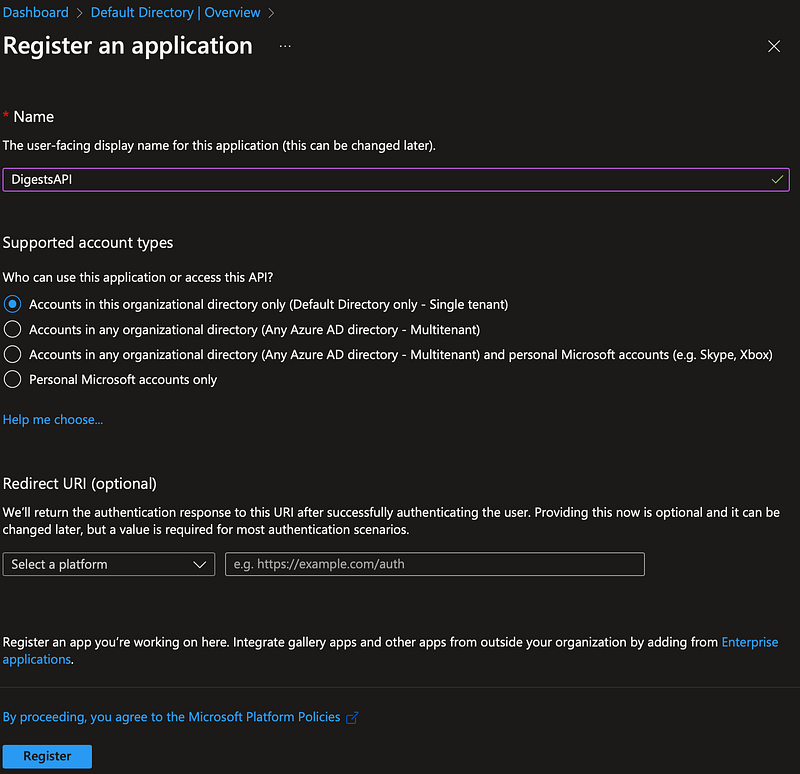
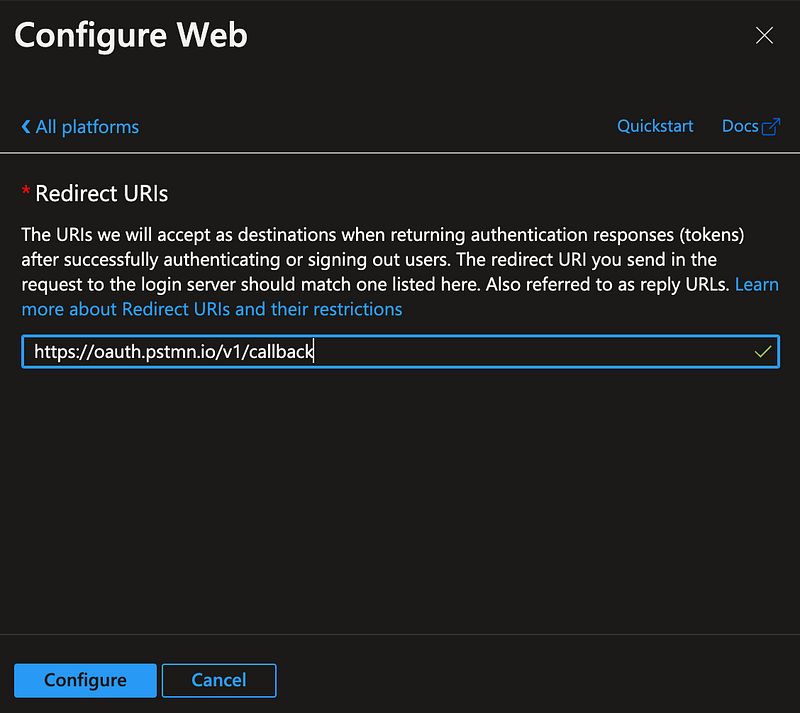
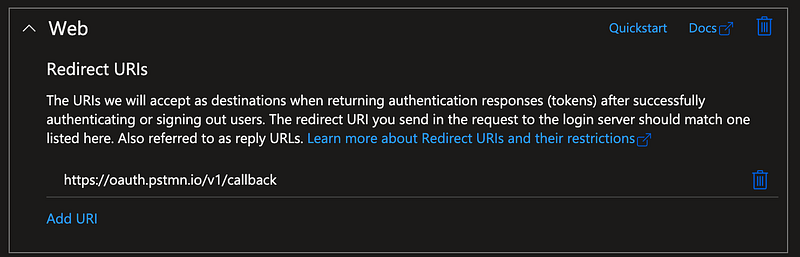
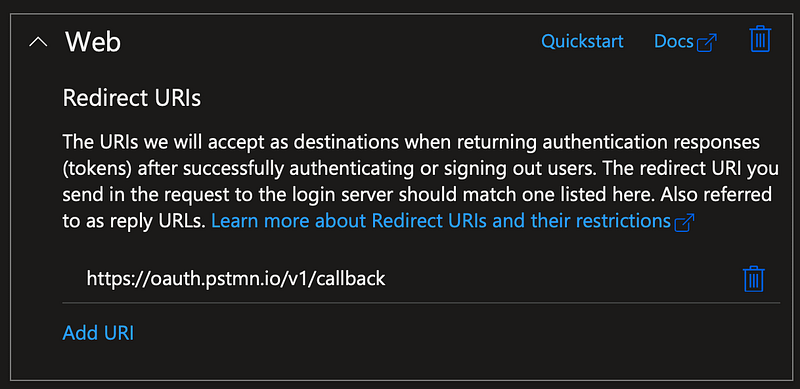
To secure and new Digests API I created a new registration and added the web platform to it with a redirect url to support requests from Postman:
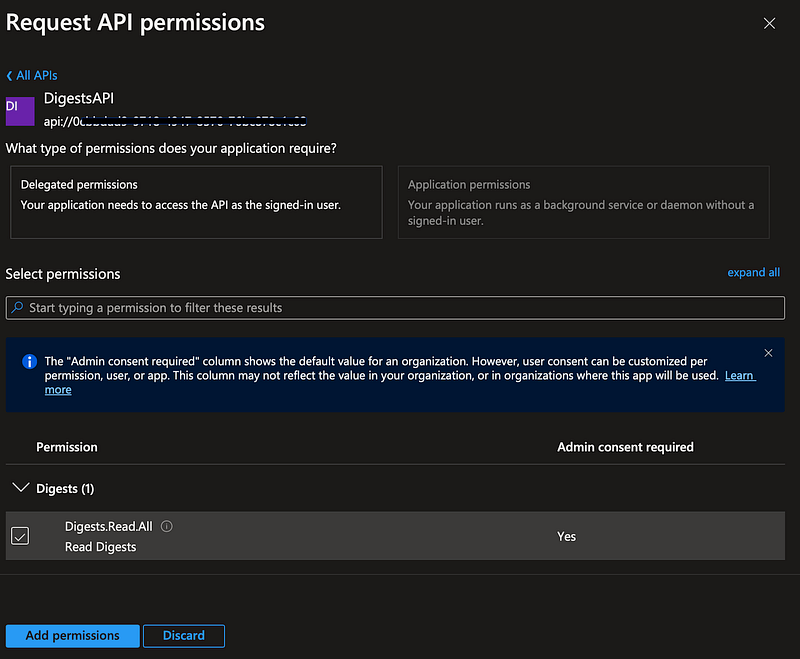
I then exposed the API and assigned permissions to allow DigestableMe to use it.

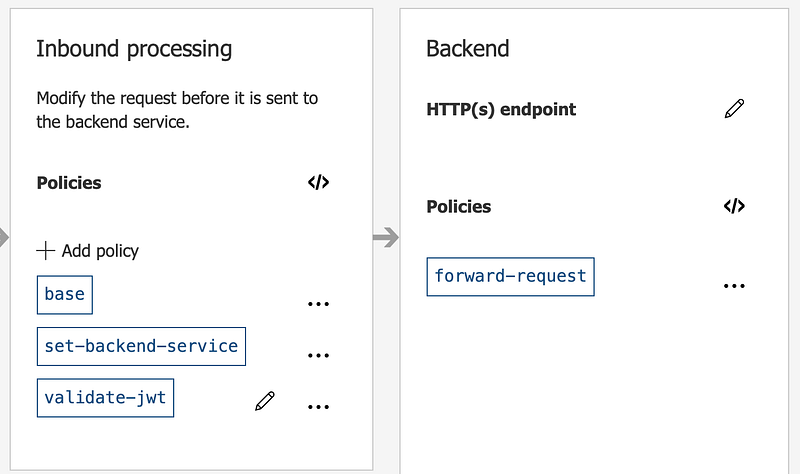
I added the Digests API to the API’s in the APIM and create some gateway policies to get the gateway to validate the access token and forward requests to the backend API App.
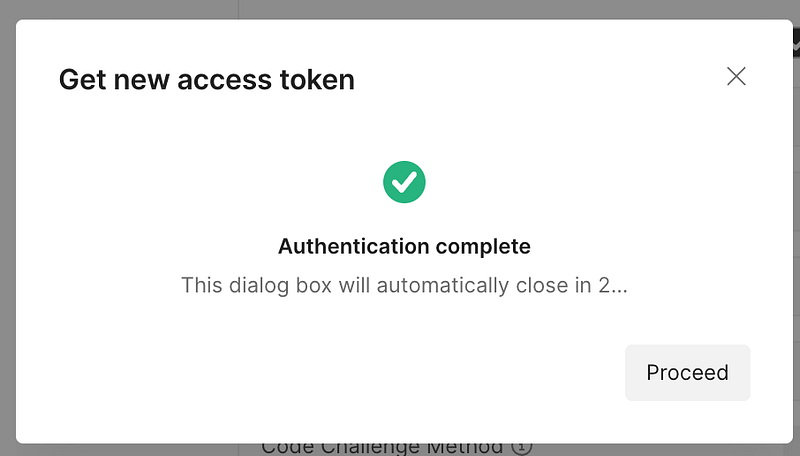
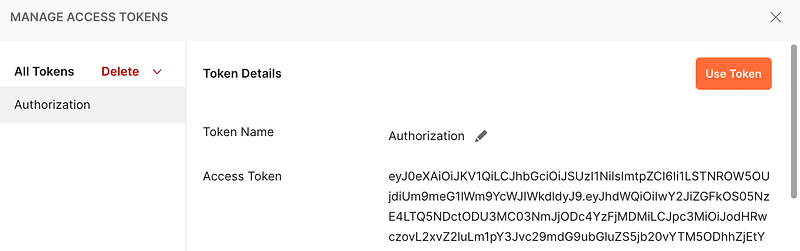
Ta Da
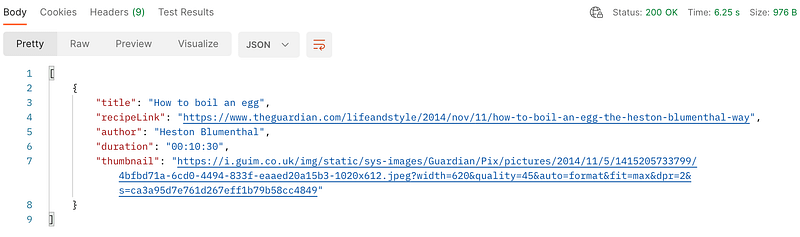
200 Ok response from a call to the gateway secured API.
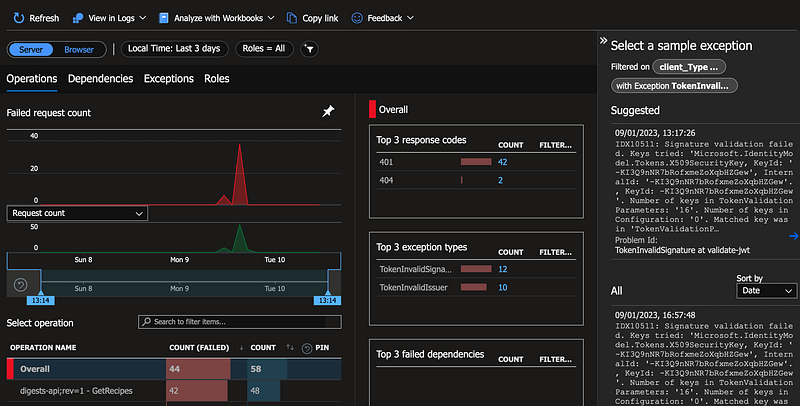
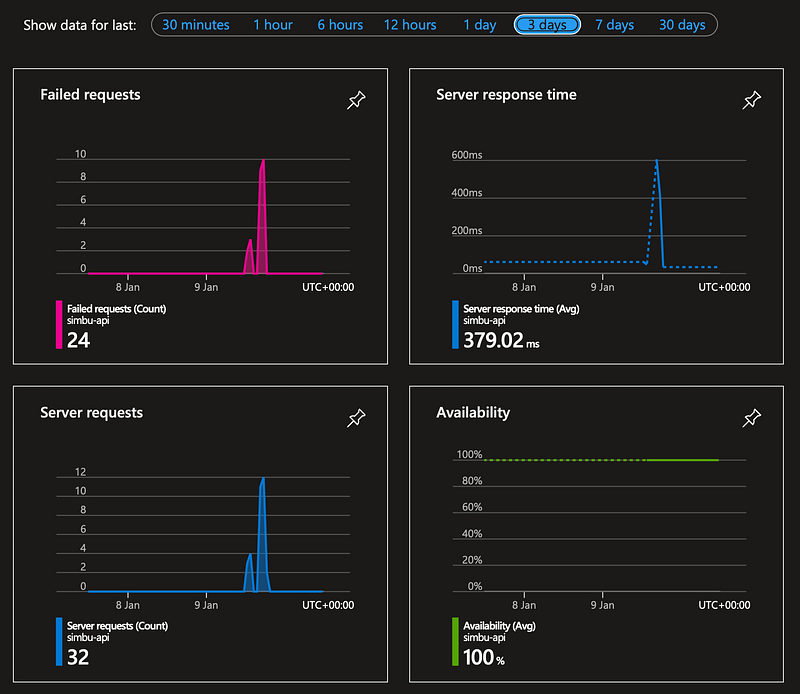
Gateway insights
Insights into gateway failures

XP

This section lists the actions you need to take using the Azure Portal UI to add and secure the digests API with the APIM gateway and how to call it using Postman.

It includes some additional information about debugging JWT tokens and updating the app registration access token version for OAuth2.

Register API App
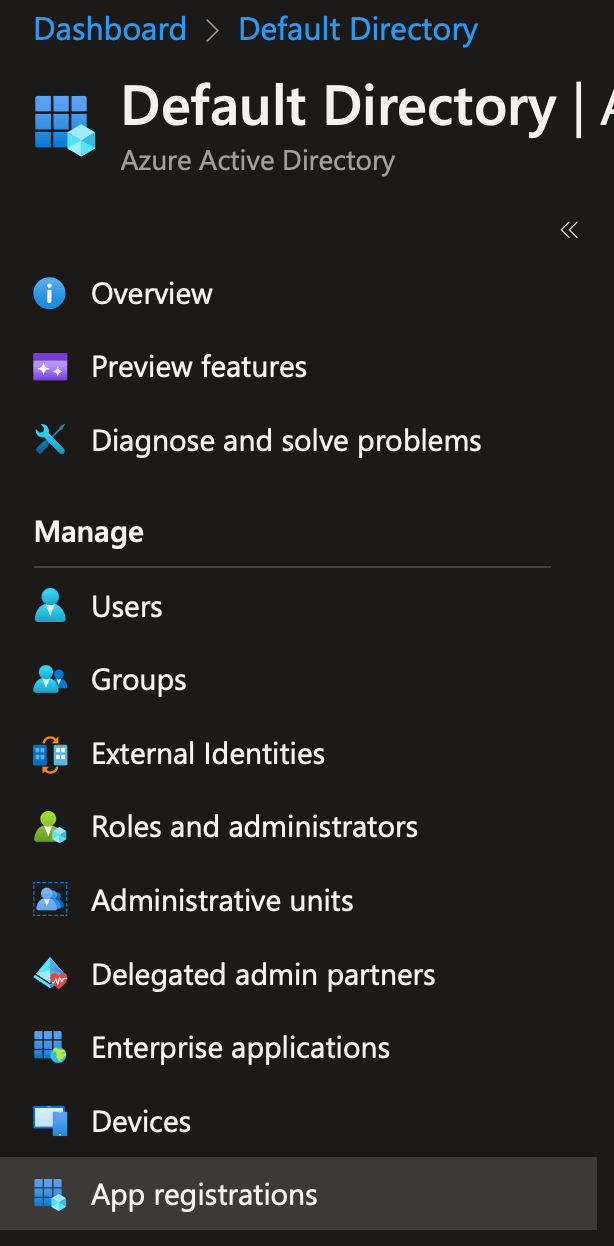
Select app registrations in your AAD
Register the app and limit authentication to users in your AD

Add the web platform to support Postman

Add the web platform to the api app registration with a redirect to support requests from Postman

url: https://oauth.pstmn.io/v1/callback
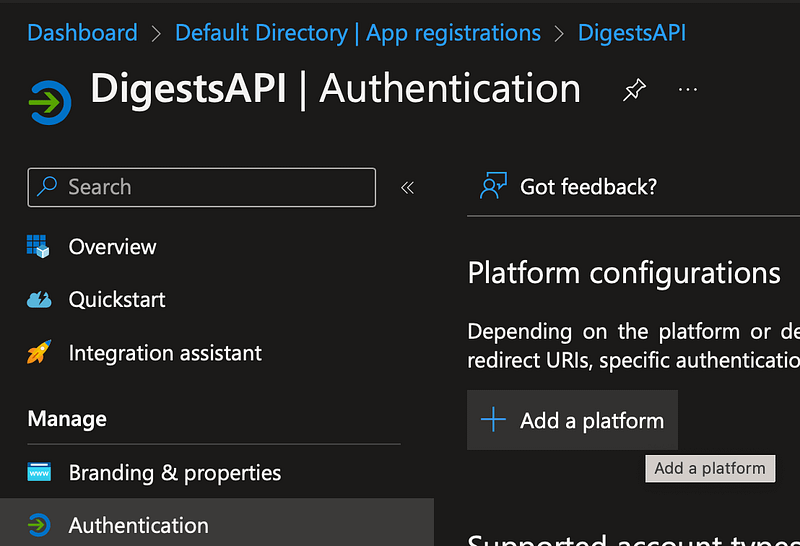
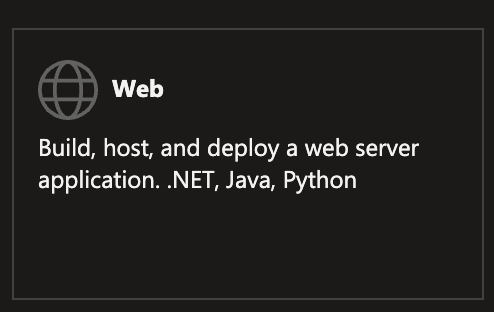
Select the Authorization section in your app registration
Select the web platform
Add the redirect url
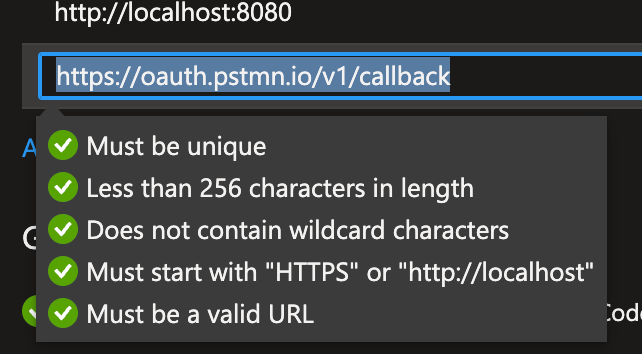
Redirect rules
New platform display in app registration

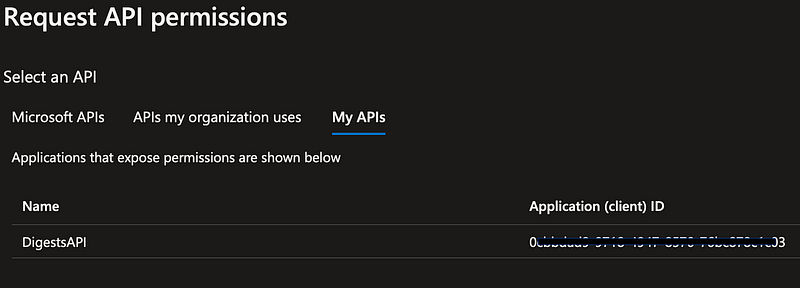
Grant your app registration permission to the API
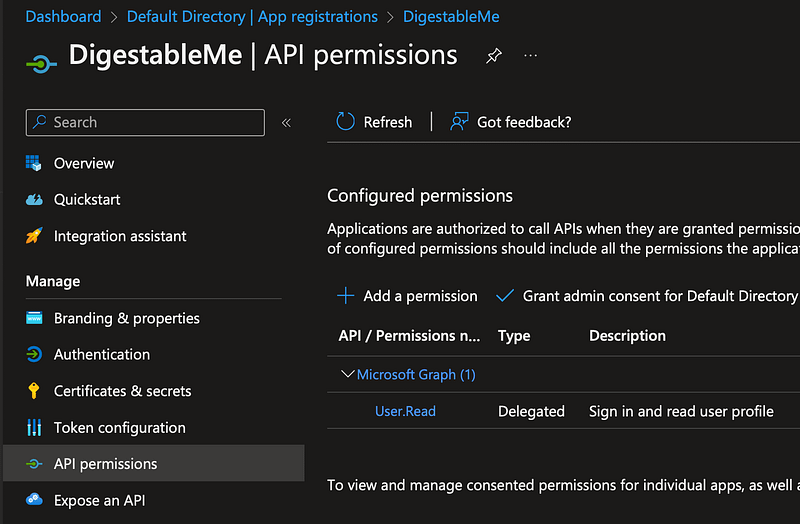
Add permission to the Digests API to the DigestableMe client app
select the Digests API
Create the permission
Permission created
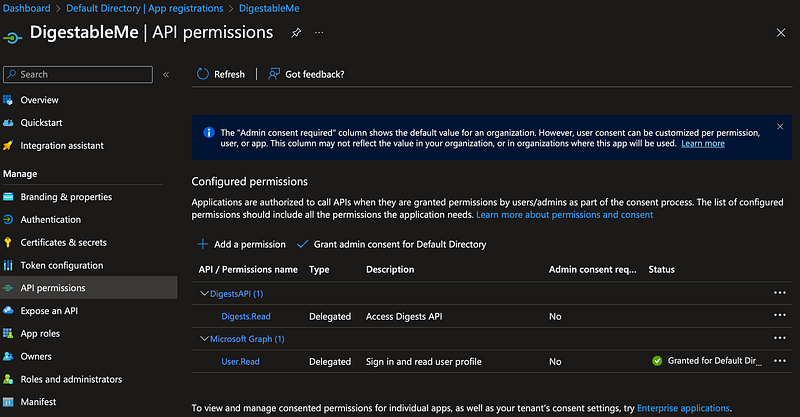
Grant admin consent
Confirm consent
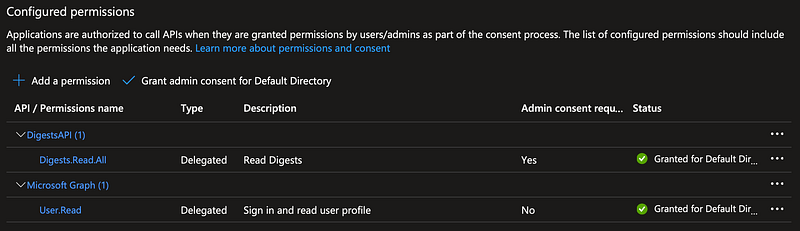
List permissions

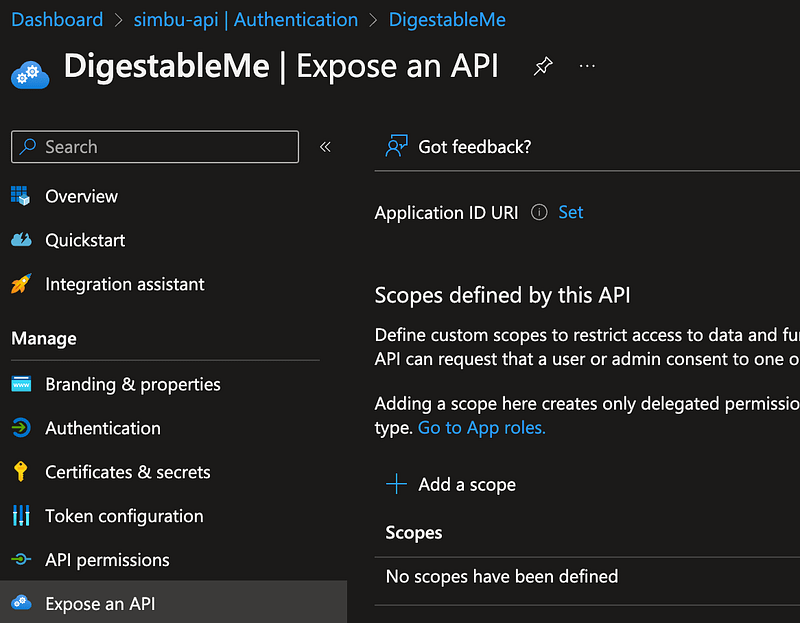
Expose the API

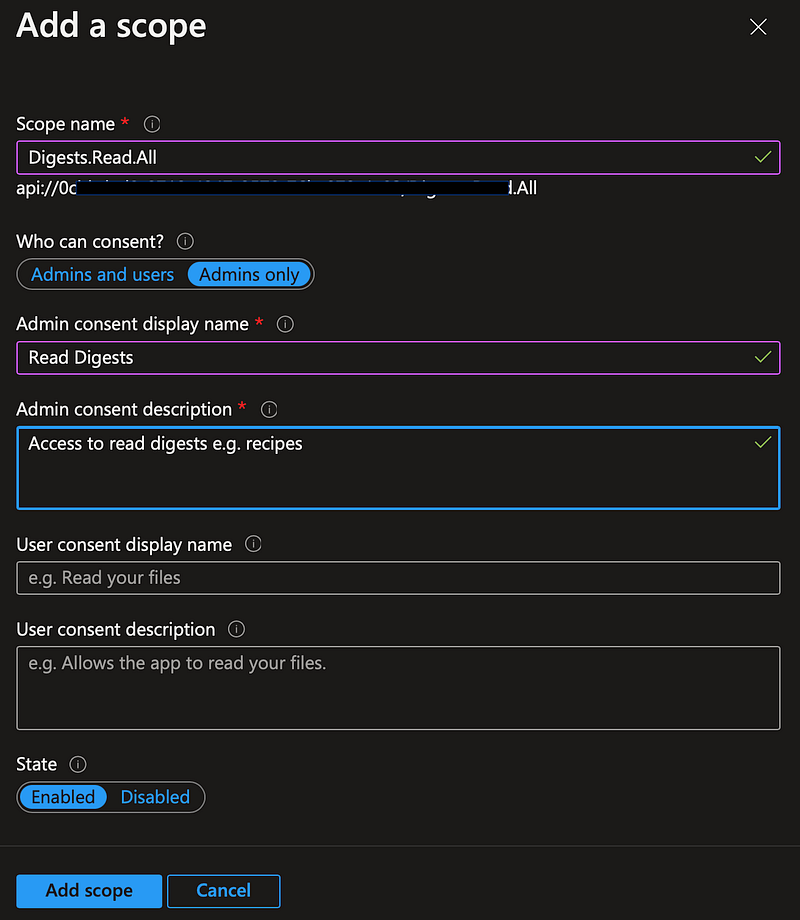
Add a scope to expose the API
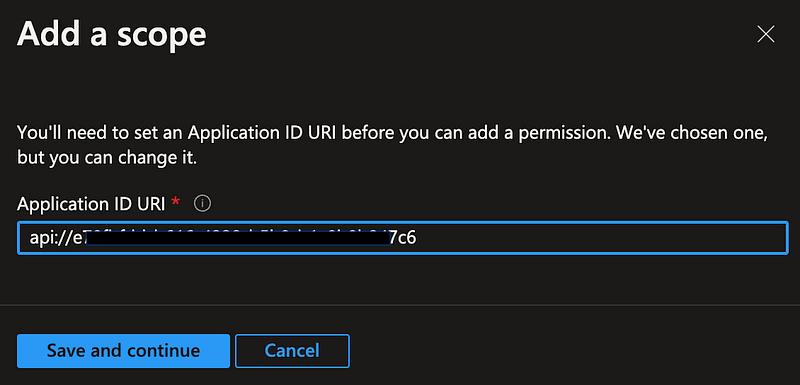
save it
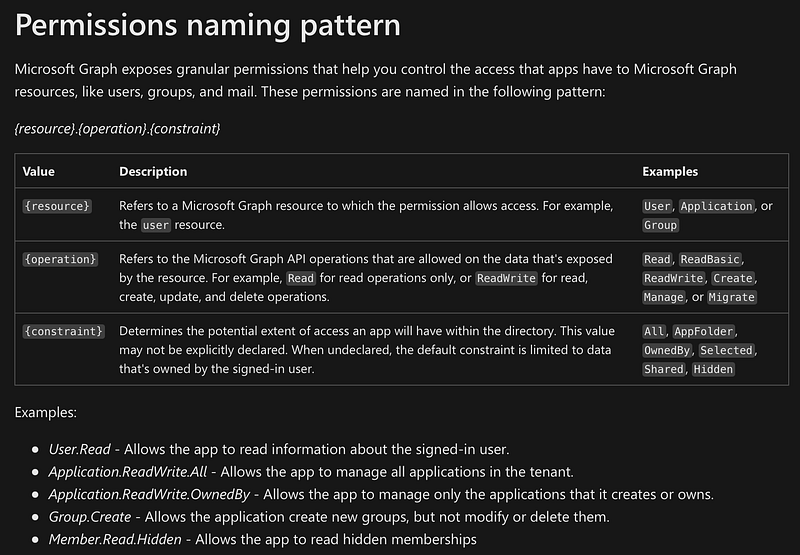
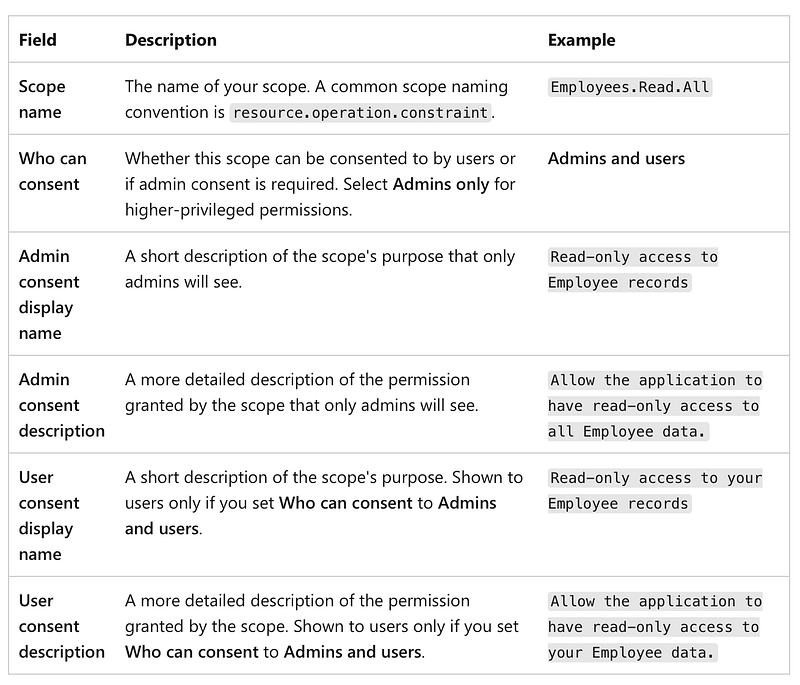
Permission naming rules
Example scope (permission) : Employees
Name and describe it
You can view the new scope in the list of scopes for this application

Add your new API to the APIM Gateway

See myprevious article on APIMif it’s new to you.

Run the DigestsAPI that you previously created and save the OpenAPI specification to file.
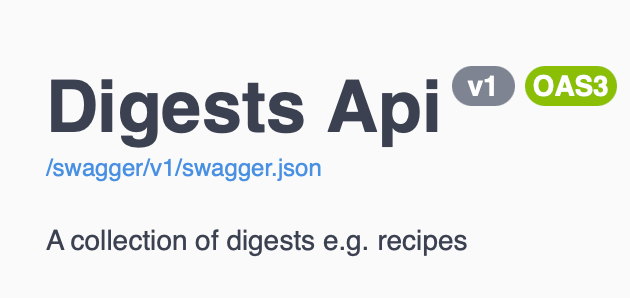
Click on the link to the swaggger json file
Opens the OpenAPI json in a new browser tab
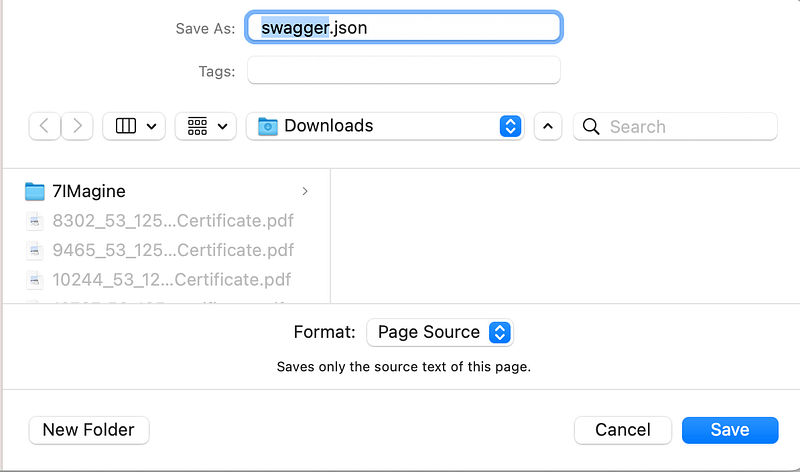
Save the json to file

In you API management service in the Azure portal Select APIs
Create a new api from an OpenAPI definition
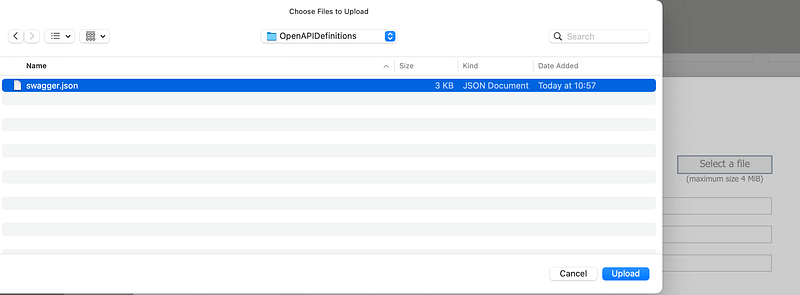
Select and upload the swaggger.json file
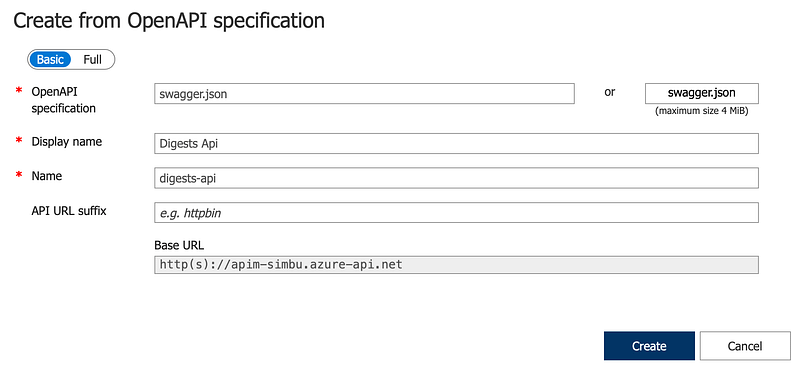
Create new API from the specification
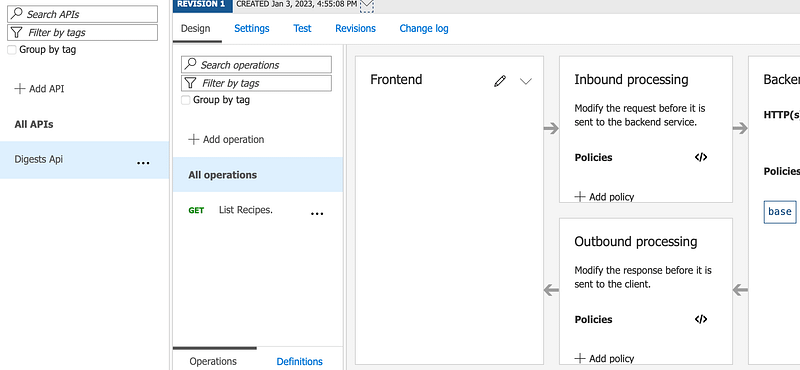
The new API definition is now configured and ready to use

Link the API App and APIM

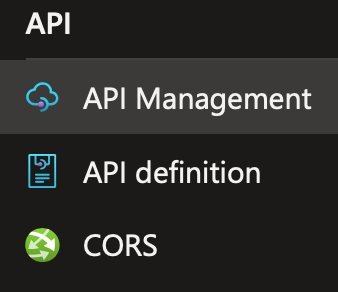
Go to the API app you created and under the API section select API Management:
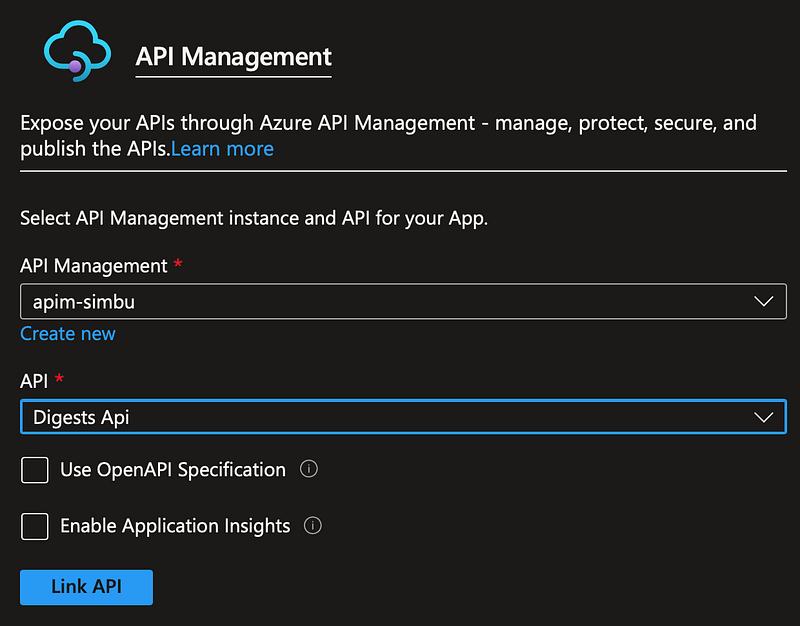
And complete the form to link to the APIM
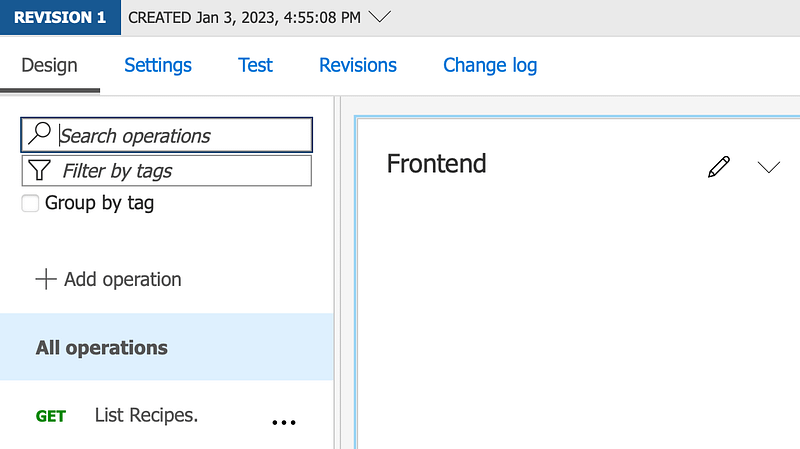
After linking you will see this

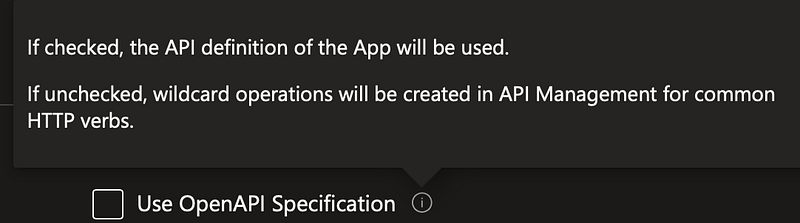
Note: Whilst I would have liked to use this option it failed, so I linked it without and deleted the extra operations created in the APIM.
Add an APIM policy to redirect request to the backend API App Service

Now that the you have linked the API App service to the APIM service:
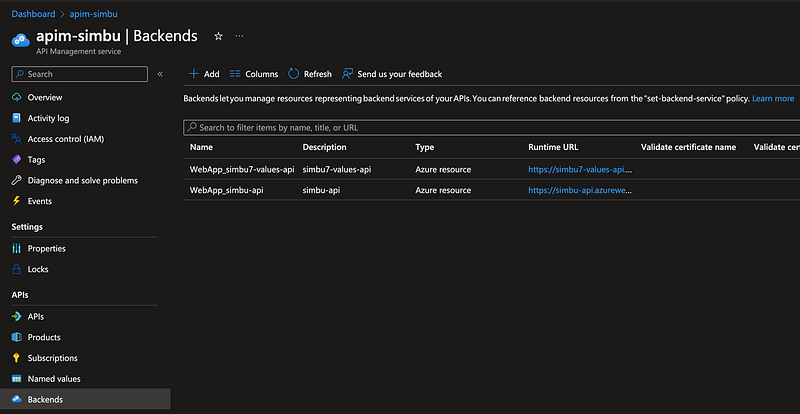
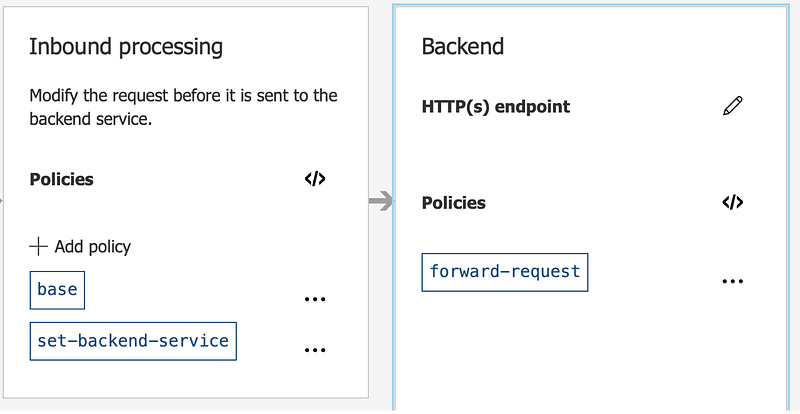
You can setup a policy to redirect requests from the gateway to the service:
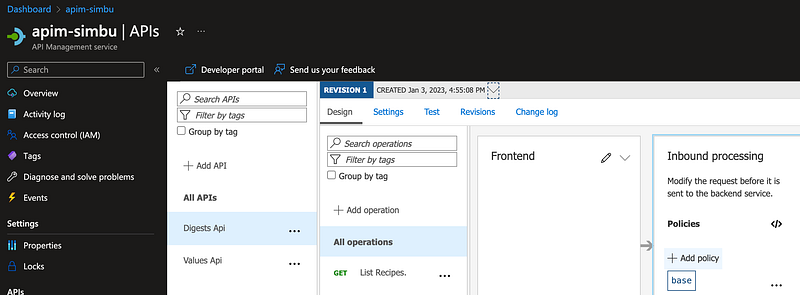
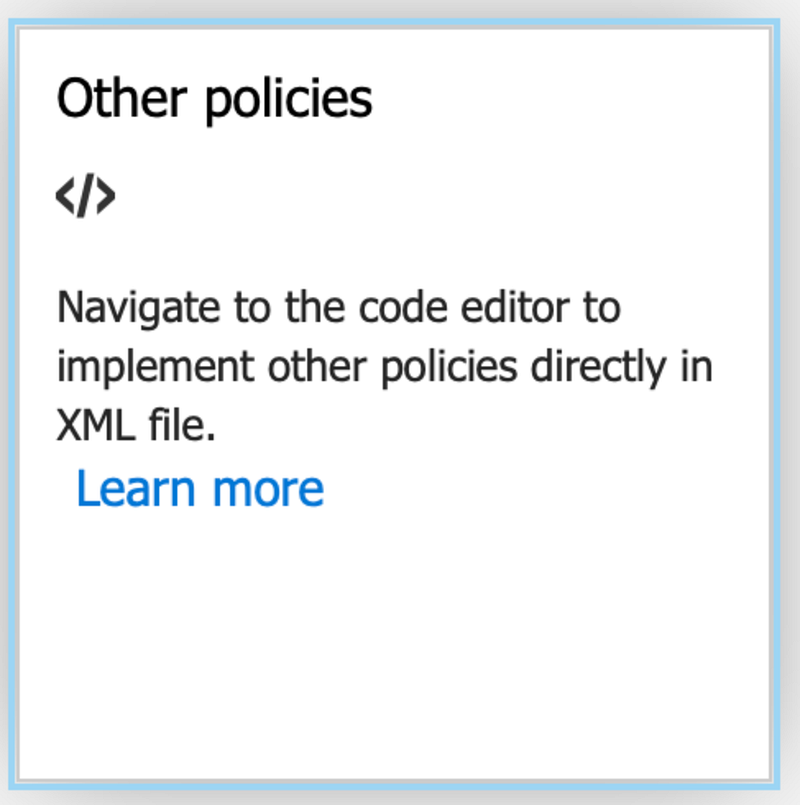
<policies>
    <inbound>
        <base />
        <set-backend-service backend-id="WebApp_simbu-api" />
    </inbound>
    <outbound>
        <base />
    </outbound>
    <on-error>
        <base />
    </on-error>
    <backend>
        <forward-request timeout="10" />
    </backend>
</policies>
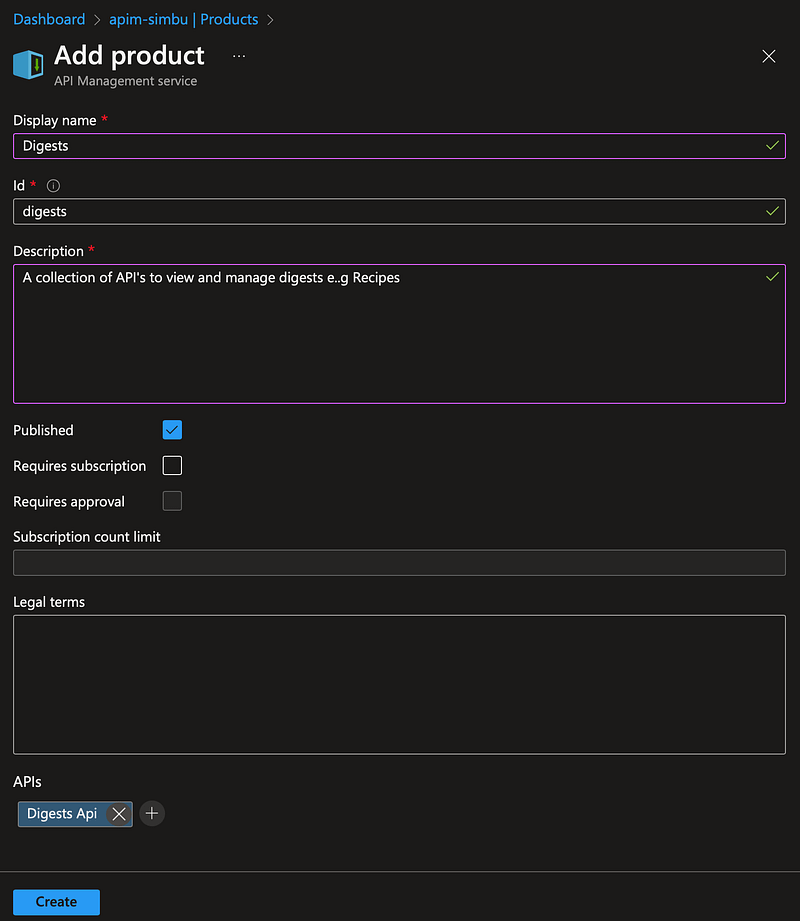
Add a product

Products let you group APIs, define terms of use, and runtime policies. API consumers can subscribe to a product on the developer portal to obtain a key to call your APIs.

Without a product been setup and published calls to the API via Postman will fail:

{
    "statusCode": 401,
    "message": "Access denied due to missing subscription key. Make sure to include subscription key when making requests to an API."
}

I decided to name the product Digests and then added it to the Azure APIM service:
Add an APIM policy to secure requests to the Gateway

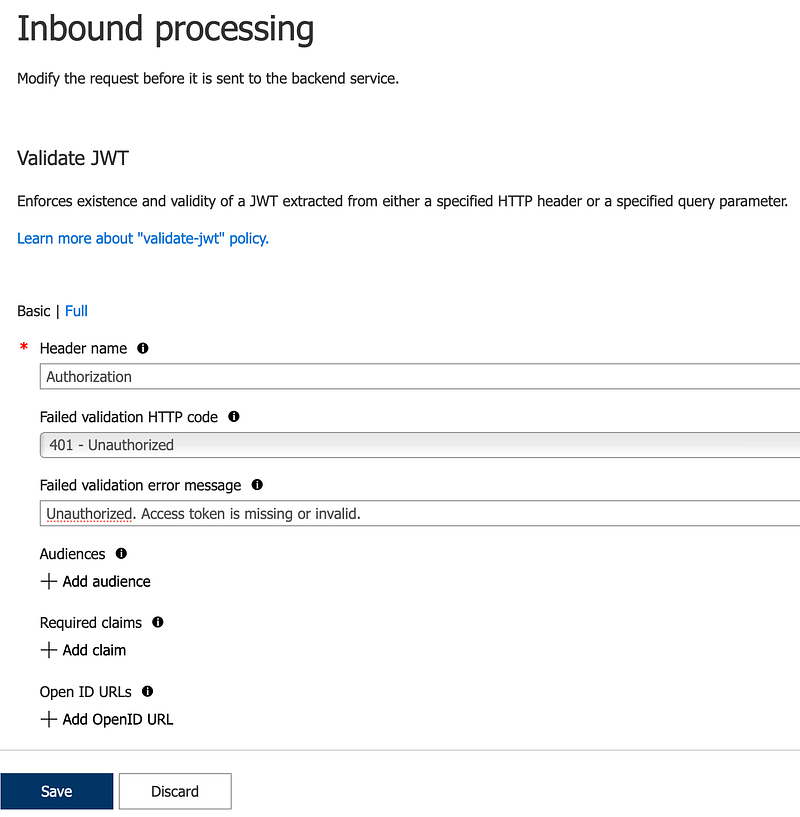
Add a validate JWT token policy to the API inbound requests:
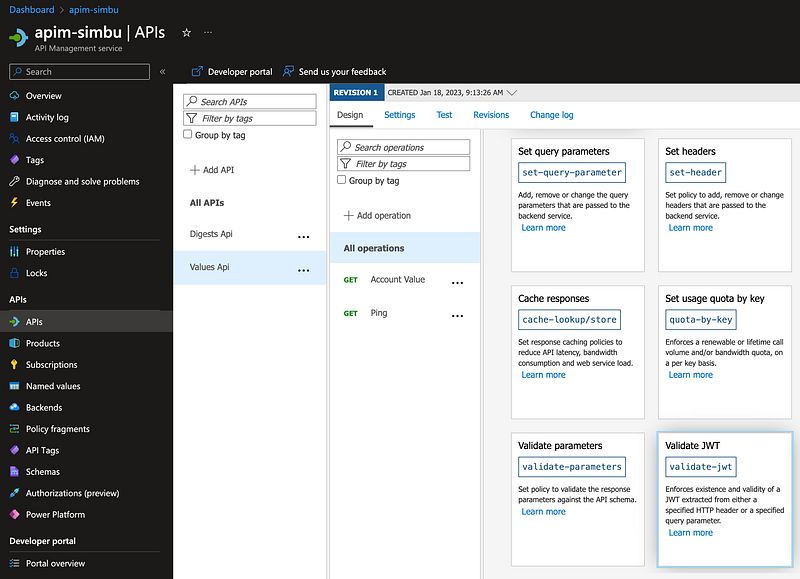
AddValidateJWTPolicy.png

Edit the new policy and add the openid-config:

<validate-jwt header-name=”Authorization” failed-validation-httpcode=”401" failed-validation-error-message=”Unauthorised. Access token is missing or invalid.”>
 <openid-config url=”https://login.microsoftonline.com/a3988af1-cea6-4ed2-b818-63b00f7967b5/v2.0/.well-known/openid-configuration" />
</validate-jwt>

Using postman to access the API via a secured gateway
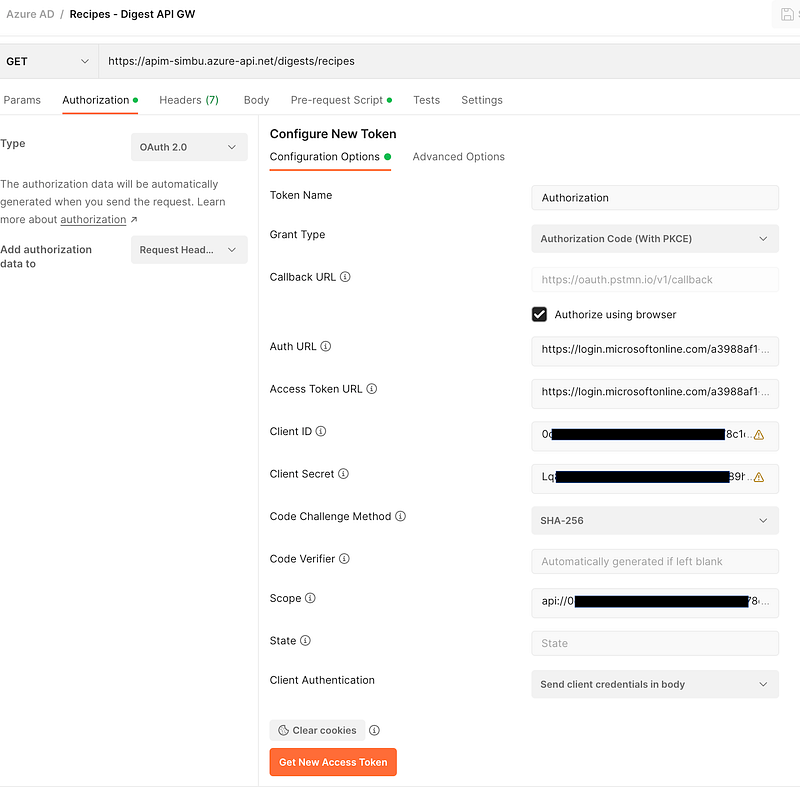
You can get the values and set up the client secret in the AAD DigestsAPI App Registration, overview and authorisation sections
Comfirmation on receipt of valid access token
Use the access token when making the request
Send the request

Updating an OpenAPI Specification in Azure APIM

Once your API is published you will need to make changes to it.

In addition to revision and versions:
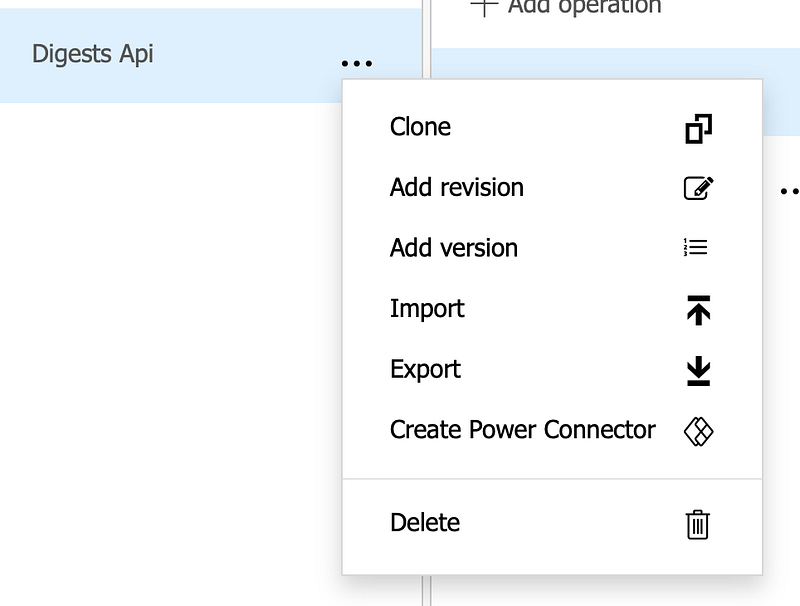
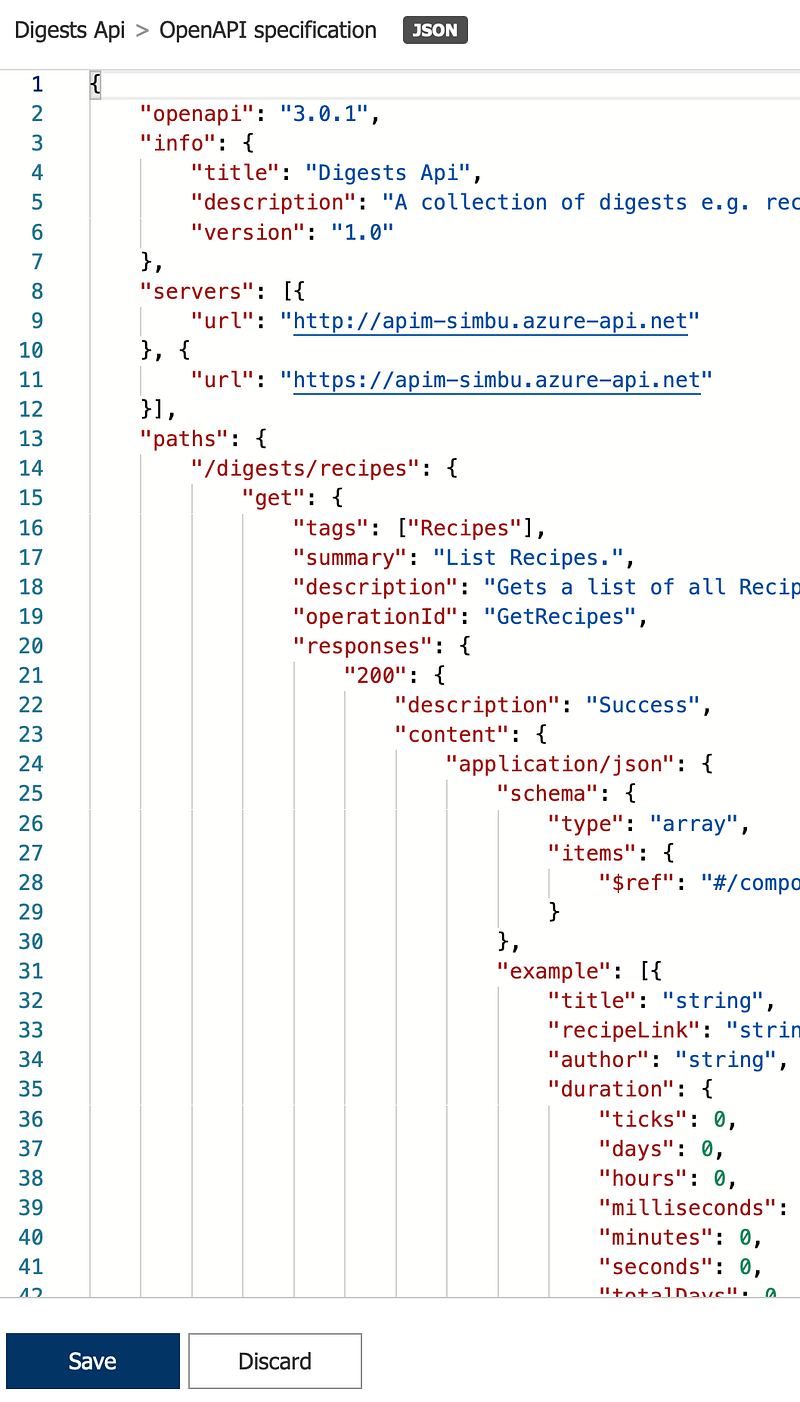
You can just update the specification, by clicking on the pencil to the right of Frontend:

Read a JWT Token

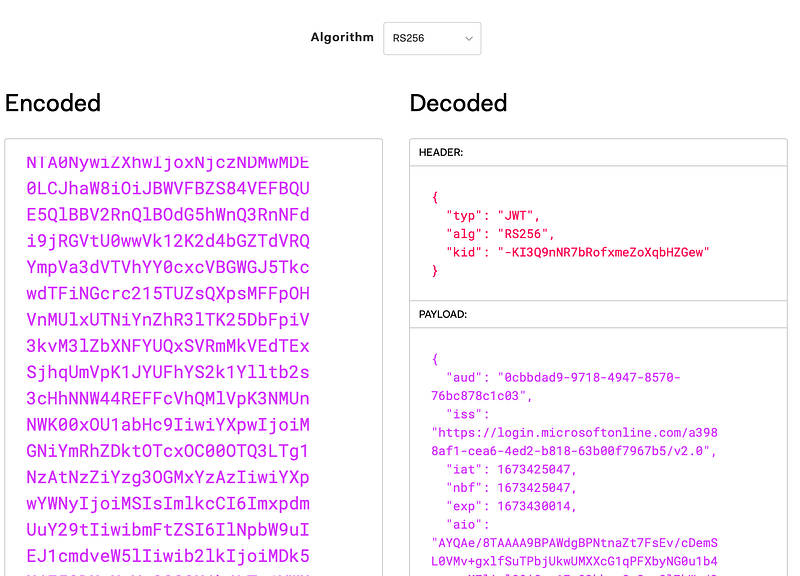
You can learn about and decode your JWT auth and access tokens online at https://jwt.io/ e.g.
Token version and TokenInvalidSignature error

After completing all the steps and getting and using a valid access token Postman was still returning a 401 unauthorised error.

After a fair amount of googling without success I decode the access token and noticed an unusual issuer entry:

"iss": "https://sts.windows.net/a39...23421dfdaf"
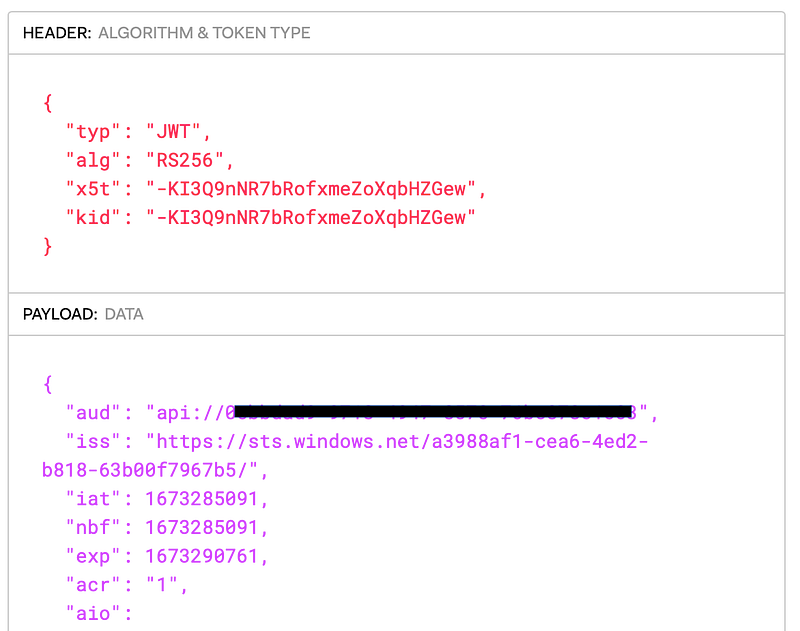
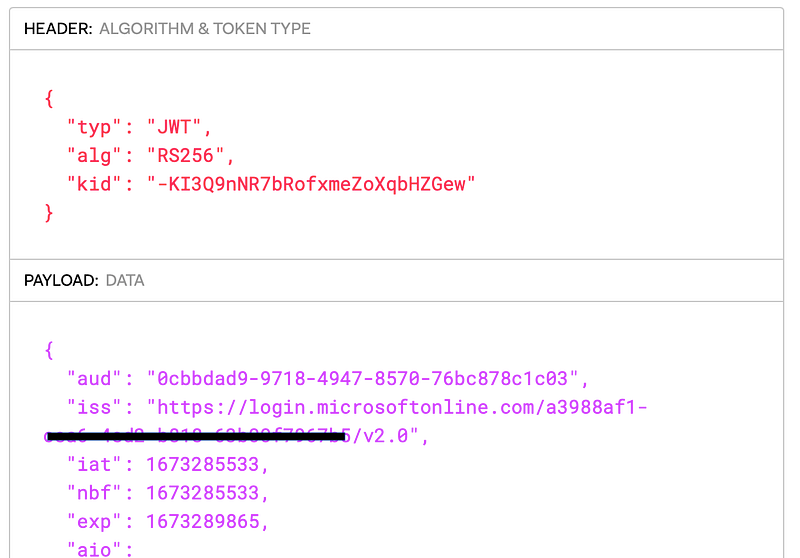
It turns out that you need to update your app registrations to use oath v2.

To update it open the app registration manifest and add the version:

"accessTokenAcceptedVersion": null,

To

"accessTokenAcceptedVersion": 2,

Now the access token issuer is correct and the token signature is valid:
BackBurner

Continuous Deployment

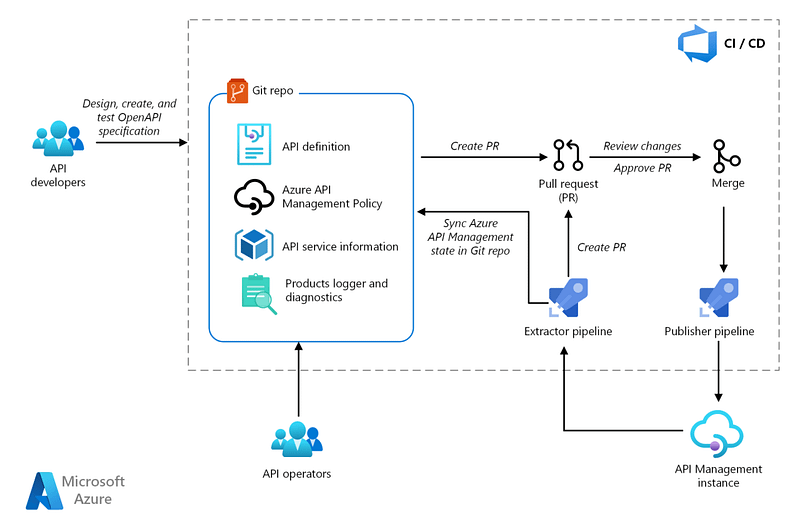
More work on CI/CD to support environmental deployment and update the API specification changes e.g.
Securing your API App

We have secured access via the APIM gateway:

https://apim-xxx.azure-api.net/digests/recipes

But you can still access the API App directly without security:

https://api-xxx.azurewebsites.net/digests/recipes

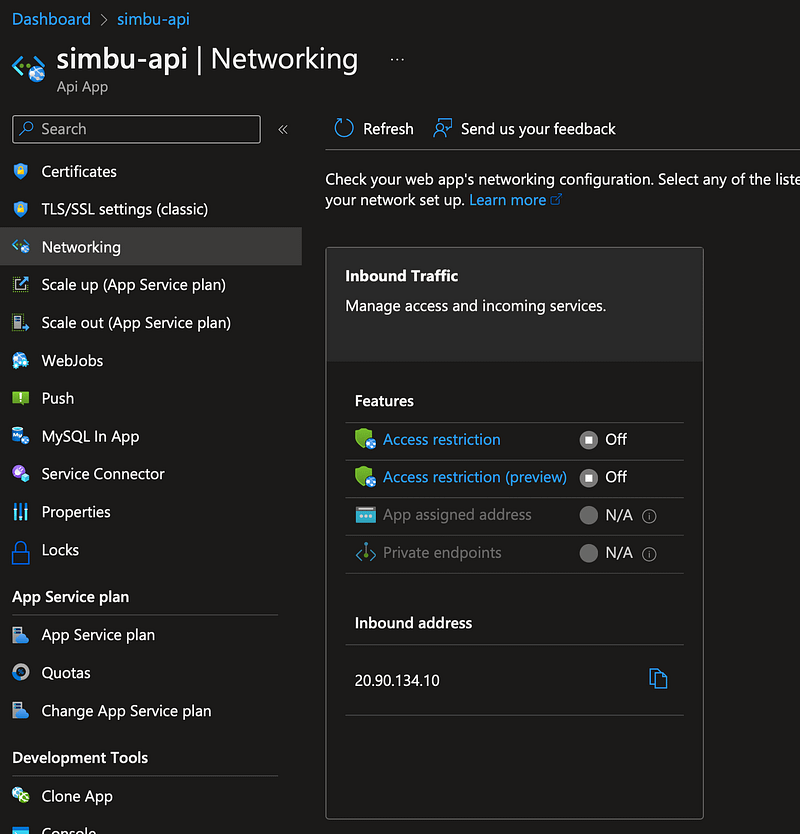
In a production system you would want to restrict access to requests from your APIM, this can be done by configuring the networking in the API App:
Links

Flutter
Programming
API
Mobile App Development
Mobile
Recommended from ReadMedium