
Comprehensive Guide to Java Concurrency: ExecutorService, Thread Pools, Future Interface, Runnable, and Callable

👉 A Complete Overview of Multithreading Concepts and Practices — click the link to read more 👈
In this article, topics are covered.
- What is ExecutorService?
- Why ExecutorService?
- What is a Thread Pool?
- Why Use a Thread Pool?
- How Does a Thread Pool Work?
- Types of Thread Pools in Java[ Single Thread Executor, Fixed Thread Pool, Cached Thread Pool, Scheduled Thread Pool ].
- Advantages of Thread Pool
- Methods of ExecutorService[ submit(Runnable task), submit(Callable<T> task), invokeAll(Callable<T> tasks), invokeAny(Callable<T> tasks), shutdown(), shutdownNow(), isShutdown(), isTerminated() ].
- Future Interface
- Runnable Interface
- Callable Interface
- Differences Between
RunnableandCallable - Examples [ExecutorService, different methods used in ExecutorService, Future Interface, Runnable Interface, Callable Interface, Different types of threadPoolExecutor].
Here, we shall first grasp theoretically before delving extensively into several examples.
In Java, an ExecutorService is a part of the java.util.concurrent package and is a higher-level replacement for managing threads. It provides a more flexible and manageable way to handle asynchronous tasks compared to manually creating and managing threads. ExecutorService is an interface that is a sub-interface of the Executor interface and provides methods for executing, scheduling, and managing tasks concurrently.
Why ExecutorService?
- Simplifies Thread Management: It abstracts away the complexities of managing thread creation, execution, and termination.
- Thread Pooling: By using a pool of threads, it reuses threads for multiple tasks, improving resource management and performance, especially in multi-core systems.
- Task Scheduling: It provides methods to submit tasks and retrieve results (e.g.,
Future), handle task timeouts, and schedule tasks periodically. - Graceful Shutdown: It offers mechanisms to stop or shut down the service in a controlled manner, ensuring tasks complete or terminate gracefully.
Use Case Scenario
Imagine you have a web application that processes a large number of user requests, such as fetching data from an API. Instead of creating a new thread for each request, you can use ExecutorService to efficiently manage and reuse threads.
Consider a scenario where you need to fetch data from multiple APIs simultaneously. Using ExecutorService, you can submit multiple API call tasks, and it will manage them using a pool of threads.
import java.util.concurrent.*;

public class ApiRequestProcessor {

    // Create a fixed thread pool with 4 threads
    private static final ExecutorService executorService = Executors.newFixedThreadPool(4);

    public static void main(String[] args) {
        // Create tasks to handle multiple API requests
        Callable<String> apiRequest1 = () -> {
            // Simulating an API request
            Thread.sleep(2000); // Simulates delay in API response
            return "Response from API 1";
        };

        Callable<String> apiRequest2 = () -> {
            Thread.sleep(1000); // Simulates delay in API response
            return "Response from API 2";
        };

        Callable<String> apiRequest3 = () -> {
            Thread.sleep(3000); // Simulates delay in API response
            return "Response from API 3";
        };

        // Submit tasks to the ExecutorService
        Future<String> future1 = executorService.submit(apiRequest1);
        Future<String> future2 = executorService.submit(apiRequest2);
        Future<String> future3 = executorService.submit(apiRequest3);

        try {
            // Get the results (blocking until they are done)
            System.out.println(future1.get());
            System.out.println(future2.get());
            System.out.println(future3.get());
        } catch (InterruptedException | ExecutionException e) {
            e.printStackTrace();
        } finally {
            // Shut down the ExecutorService gracefully
            executorService.shutdown();
        }
    }
}
Output
Response from API 1
Response from API 2
Response from API 3
Explanation:
- Fixed Thread Pool: We create a fixed thread pool of 4 threads using
Executors.newFixedThreadPool(4). - Callable Tasks: Three API call tasks are defined using
Callable<String>which simulates delays usingThread.sleep(). - Submitting Tasks: We submit the tasks to the
ExecutorService, which manages the execution of tasks in the background using pooled threads. - Future: We use
Futureto get the result of each task when it completes. Theget()method blocks until the task is done. - Graceful Shutdown: After submitting all tasks and receiving the results, the
ExecutorServiceis shut down to release resources.
What is a Thread Pool?
A Thread Pool is a group (or pool) of pre-initialized, reusable threads that are maintained and managed for performing tasks. Instead of creating and destroying threads for every single task, a thread pool reuses a fixed number of threads to execute multiple tasks concurrently. Once a thread completes a task, it becomes available for the next task, which helps in reducing the overhead of frequent thread creation and destruction.
Thread pooling is an important concept in concurrent programming and is commonly used to improve performance by limiting the number of concurrent threads and managing their lifecycle efficiently.
Key Characteristics of a Thread Pool:
- Fixed Number of Threads: A thread pool has a fixed number of threads (though this can be dynamic, depending on the implementation). This means that at any given time, a maximum number of threads will be actively executing tasks.
- Task Queue: If all threads are busy, any additional tasks that are submitted are placed in a queue. These tasks wait until a thread becomes available.
- Thread Reuse: Once a thread completes a task, it does not terminate. Instead, it is returned to the pool and becomes available to pick up new tasks. This reuse of threads minimizes the overhead associated with thread creation and destruction.
- Task Scheduling: Thread pools manage task execution by assigning tasks to available threads. The pool takes care of starting the threads, running the tasks, and reassigning threads once tasks are completed.
- Efficient Resource Usage: By reusing threads and controlling the number of threads executing concurrently, a thread pool ensures that resources like CPU and memory are not overburdened by excessive thread creation.
Why Use a Thread Pool?
- Thread Creation Overhead: Creating a new thread is costly in terms of time and system resources. By reusing threads, the thread pool reduces the overhead associated with thread creation and destruction.
- Limits the Number of Threads: A system can be overwhelmed if too many threads are created (leading to thread contention and excessive context switching). By limiting the number of threads, a thread pool prevents resource exhaustion and ensures that the system remains responsive.
- Task Management: With a thread pool, you don’t need to worry about manually starting or stopping threads. You simply submit tasks, and the thread pool manages the execution, queuing, and reuse of threads.
- Scalability: Thread pools help scale applications to handle many tasks by efficiently managing the available threads, queuing excess tasks, and avoiding the pitfalls of thread proliferation.
How Does a Thread Pool Work?
- Task Submission: Tasks are submitted to the thread pool. These tasks can be
RunnableorCallableobjects. - Task Queueing: If all threads in the pool are currently busy executing tasks, the newly submitted task is placed in a queue (typically a blocking queue like
LinkedBlockingQueueorArrayBlockingQueue). - Task Execution by Worker Threads: If a thread is available, it picks up the task from the queue and starts executing it.
- Completion and Reuse: After a thread completes its task, it does not die. Instead, it becomes available again to execute another task from the queue.
- Shutdown: When the application is done using the thread pool, you can call the
shutdown()method on the pool. The pool stops accepting new tasks and waits for currently running tasks to finish.
Types of Thread Pools in Java:
Java’s Executors class provides different types of thread pools depending on your use case:
- Fixed Thread Pool: Creates a pool with a fixed number of threads. This is suitable when the number of tasks is known in advance, and you want to restrict the number of concurrent threads.
ExecutorService fixedPool = Executors.newFixedThreadPool(4);2. Cached Thread Pool: Creates a pool that creates new threads as needed but reuses previously created threads when they are available. This is suitable for short-lived tasks.
ExecutorService cachedPool = Executors.newCachedThreadPool();3. Single Thread Executor: Creates a pool with a single thread. This is useful when you need to guarantee that tasks are executed sequentially.
ExecutorService singleThreadPool = Executors.newSingleThreadExecutor();4. Scheduled Thread Pool: Creates a pool of threads that can schedule tasks to execute after a delay or periodically.
ScheduledExecutorService scheduledPool = Executors.newScheduledThreadPool(2);Advantages of Thread Pool:
- Improved Performance: By reusing existing threads and controlling the number of concurrent threads, thread pools can improve performance by reducing the overhead of creating and destroying threads.
- Better Resource Management: Thread pools allow you to control the number of active threads, preventing resource exhaustion in environments with limited CPU and memory.
- Simplified Concurrency: Instead of managing threads manually, you can focus on the tasks themselves. The thread pool handles scheduling, execution, and concurrency management.
- Scalability: Thread pools are well-suited for handling a large number of tasks and can easily scale across multiple cores in multi-core processors.
Disadvantages of Thread Pool:
- Potential for Task Delay: If the number of tasks exceeds the pool size, tasks will be queued, and some tasks might experience delays.
- Deadlocks and Resource Contention: If a task in the pool is waiting for another task to finish (e.g., by joining a thread), it can lead to a deadlock if all threads are busy.
- Task Rejection: If the thread pool’s queue is full and no threads are available, tasks may be rejected. You need to handle such scenarios carefully.
Creating a Thread Pool:
Here is a basic example of how a thread pool works in Java:
import java.util.concurrent.*;

public class ThreadPoolExample {
    public static void main(String[] args) {
        // Creating a fixed thread pool with 3 threads
        ExecutorService threadPool = Executors.newFixedThreadPool(3);

        // Submitting multiple tasks to the thread pool
        for (int i = 0; i < 10; i++) {
            threadPool.submit(new Task(i));
        }

        // Shutdown the thread pool (no more tasks will be accepted)
        threadPool.shutdown();
    }
}

class Task implements Runnable {
    private int taskId;

    public Task(int taskId) {
        this.taskId = taskId;
    }

    @Override
    public void run() {
        System.out.println("Task " + taskId + " is being executed by " +
                           Thread.currentThread().getName());
        try {
            Thread.sleep(2000); // Simulating work with sleep
        } catch (InterruptedException e) {
            e.printStackTrace();
        }
    }
}
Explanation of Code:
- Fixed Thread Pool: We create a thread pool with 3 threads using
Executors.newFixedThreadPool(3). This means that at any given time, only 3 threads will be executing tasks concurrently. - Task Submission: We submit 10 tasks to the thread pool. Each task is an instance of the
Taskclass, which implements theRunnableinterface. Each task sleeps for 2 seconds to simulate some work. - Thread Reuse: As there are only 3 threads in the pool, the tasks are queued once all 3 threads are busy. As soon as a thread finishes executing a task, it picks up the next task from the queue.
- Shutdown: After submitting all tasks, we call
shutdown()on theExecutorServiceto prevent new tasks from being accepted. However, the already submitted tasks will continue to execute until completion.
Methods of ExecutorService:
Here is a detailed explanation of the types of methods provided by ExecutorService:
1. Task Submission Methods
These methods are used to submit tasks for execution, either immediately or after a delay.
submit(Runnable task)Submits aRunnabletask for execution and returns aFuture<?>representing the result of the task.submit(Callable<T> task)Submits aCallabletask for execution and returns aFuture<T>representing the result of the task. TheCallableallows you to return a value from the task.submit(Runnable task, T result)Submits aRunnabletask and returns aFuture<T>that will return the provided result (T) upon completion.
2. Invoke Methods
These methods allow the submission of multiple tasks at once and provide different ways to retrieve their results.
invokeAll(Collection<? extends Callable<T>> tasks)Submits a collection ofCallabletasks and returns a list ofFuture<T>objects representing the status of each task. The method blocks until all tasks are complete.invokeAll(Collection<? extends Callable<T>> tasks, long timeout, TimeUnit unit)Submits a collection ofCallabletasks with a time limit, and returns a list ofFuture<T>. Tasks that don't complete within the specified time are canceled.invokeAny(Collection<? extends Callable<T>> tasks)Submits a collection ofCallabletasks and returns the result of one successfully completed task (whichever completes first). It cancels the other tasks.invokeAny(Collection<? extends Callable<T>> tasks, long timeout, TimeUnit unit)Similar toinvokeAny(), but with a timeout. Returns the result of one task if it completes within the specified time limit; otherwise, throws aTimeoutException.
3. Shutdown and Termination Methods
These methods control the lifecycle of the ExecutorService, allowing you to gracefully or forcibly shut down the pool of threads.
shutdown()Initiates an orderly shutdown of theExecutorService. It will no longer accept new tasks, but will allow previously submitted tasks to finish execution.shutdownNow()Immediately attempts to stop all actively executing tasks and halts the processing of waiting tasks. It returns a list of tasks that were waiting to be executed.isShutdown()Returnstrueif theExecutorServicehas been shut down either viashutdown()orshutdownNow().isTerminated()Returnstrueif all tasks have completed following a shutdown. If tasks are still running, this returnsfalse.awaitTermination(long timeout, TimeUnit unit)Blocks until all tasks have completed after a shutdown request, or the timeout occurs, or the current thread is interrupted, whichever happens first. This helps ensure that all tasks finish within a specific time frame.
What is Future interface and runnable and callable?
1. Future Interface
The Future interface in Java represents the result of an asynchronous computation. It provides methods to check the status of the computation, retrieve the result when it’s ready, and cancel the task if necessary.
Key Features of Future:
- Handles Asynchronous Computation: A
Futureis used to retrieve the result of a task that is executed asynchronously (i.e., in a different thread). - Task Status: It can check whether the task is completed, canceled, or still in progress.
- Task Cancellation: You can cancel the task if it hasn’t finished execution.
- Blocking Get: It allows you to retrieve the result of the task, and this operation blocks the calling thread if the task is still running.
Common Methods of Future:
boolean cancel(boolean mayInterruptIfRunning)Attempts to cancel the execution of the task. If the task has already completed or was already canceled, it returnsfalse. ThemayInterruptIfRunningflag determines whether to interrupt the task if it's currently running.boolean isCancelled()Returnstrueif the task was canceled before it completed normally.boolean isDone()Returnstrueif the task has completed, either by normal termination or cancellation.T get()Retrieves the result of the computation. This method blocks until the task is completed.T get(long timeout, TimeUnit unit)Retrieves the result but waits only for the specified timeout before throwing aTimeoutException.
Example of Future:
import java.util.concurrent.*;

public class FutureExample {
    public static void main(String[] args) throws InterruptedException, ExecutionException {
        ExecutorService executor = Executors.newSingleThreadExecutor();

        // Submit a task that returns a result
        Future<Integer> future = executor.submit(() -> {
            Thread.sleep(2000); // Simulate long-running task
            return 10;
        });

        // Perform other operations while the task is running
        System.out.println("Task submitted, doing something else...");

        // Block and get the result once the task is done
        Integer result = future.get();
        System.out.println("Task completed, result: " + result);

        executor.shutdown();
    }
}
2. Runnable Interface
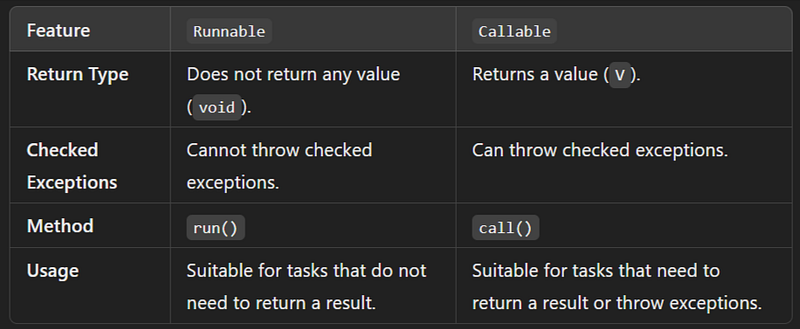
Runnable is one of the basic interfaces for representing a task that can be executed concurrently in a separate thread. A Runnable represents a task that does not return any result and cannot throw a checked exception.
Key Features of Runnable:
- No Return Value: The
run()method doesn’t return any value. It’s suitable for tasks that are executed for their side effects (e.g., updating a UI, processing files) rather than returning a result. - Can Be Used with Threads:
Runnablecan be passed to aThreadobject, or it can be submitted to anExecutorService. - Cannot Throw Checked Exceptions: It cannot throw any checked exceptions from the
run()method, limiting its flexibility compared toCallable.
Runnable Method:
void run(): The abstract method that must be implemented. This is the method that contains the code to be executed when the task is run.
Example of Runnable:
public class RunnableExample {
    public static void main(String[] args) {
        // Creating a Runnable task
        Runnable task = () -> {
            System.out.println("Executing task inside a thread: " + Thread.currentThread().getName());
        };

        // Executing the task using a Thread
        Thread thread = new Thread(task);
        thread.start();
    }
}
When to Use Runnable:
- When you don’t need a result from the task.
- When you don’t need to throw checked exceptions.
- Suitable for simple background tasks.
3. Callable Interface
Callable is a similar interface to Runnable, but it’s more powerful. It allows you to return a result and also to throw checked exceptions. A Callable is often used when you need the result of the computation.
Key Features of Callable:
- Return Value: The
call()method returns a value (generic typeV). This makesCallablemore flexible thanRunnable, which cannot return anything. - Can Throw Checked Exceptions: The
call()method allows checked exceptions to be thrown. This makes it suitable for tasks where you might need to handle exceptions explicitly (e.g., handling I/O operations). - Used with
ExecutorService:Callableis typically submitted to anExecutorService, and its result can be retrieved using aFuture.
Callable Method:
V call(): The abstract method that must be implemented. It contains the code to execute and returns a result.
Example of Callable:
import java.util.concurrent.*;

public class CallableExample {
    public static void main(String[] args) throws InterruptedException, ExecutionException {
        ExecutorService executor = Executors.newSingleThreadExecutor();

        // Creating a Callable task that returns a result
        Callable<Integer> task = () -> {
            System.out.println("Task is being executed");
            Thread.sleep(2000); // Simulate some work
            return 42;
        };

        // Submitting the task to ExecutorService and getting a Future
        Future<Integer> future = executor.submit(task);

        // Get the result of the task (this will block until the task is complete)
        Integer result = future.get();
        System.out.println("Task completed, result: " + result);

        executor.shutdown();
    }
}
When to Use Callable:
- When you need to return a result from the task.
- When the task might throw checked exceptions (e.g., when dealing with I/O, database, or network operations).
- When using
ExecutorServiceto handle the execution of background tasks and needing a result after task completion.
Key Differences Between Runnable and Callable
Usage of Future, Runnable, and Callable Together
Runnablecan be used with anExecutorServiceorThreadto execute a task that doesn't return a value.Callableis typically used with anExecutorServiceto execute tasks that return a result or might throw exceptions. When you submit aCallableto anExecutorService, it returns aFuture, which you can use to obtain the result of theCallable.
Example: Using Callable with Future:
ExecutorService executor = Executors.newFixedThreadPool(2);

// Submit a Callable task that returns a result
Future<String> future = executor.submit(() -> {
    Thread.sleep(1000);
    return "Task Completed";
});

// Do other work here while the task is being executed

// Block and retrieve the result
try {
    String result = future.get();
    System.out.println("Task result: " + result);
} catch (InterruptedException | ExecutionException e) {
    e.printStackTrace();
}

executor.shutdown();- Runnable is for tasks that don’t need to return a result.
- Callable is for tasks that need to return a result and may throw exceptions.
- Future is used to represent the result of an asynchronous task, allowing you to check the task’s status, retrieve its result, or cancel it if necessary.
Examples
1. ExecutorService using submit(Runnable task)
Here’s an example of using the ExecutorService with submit(Runnable task). In this example, we will create a thread pool with multiple threads using ExecutorService, submit several Runnable tasks for execution, and observe the output.
Use Case Scenario:
Suppose we are processing multiple orders concurrently in an e-commerce system, and each task represents the processing of a single order. Since we don’t need a return value, we’ll use Runnable.
import java.util.concurrent.ExecutorService;
import java.util.concurrent.Executors;

public class OrderProcessingExample {

    // Simulate order processing
    public static class ProcessOrderTask implements Runnable {
        private final int orderId;

        public ProcessOrderTask(int orderId) {
            this.orderId = orderId;
        }

        @Override
        public void run() {
            System.out.println("Processing order: " + orderId + " by thread: " + Thread.currentThread().getName());
            // Simulate some processing time
            try {
                Thread.sleep(1000);  // Simulate time to process an order
            } catch (InterruptedException e) {
                e.printStackTrace();
            }
            System.out.println("Completed processing order: " + orderId);
        }
    }

    public static void main(String[] args) {
        // Create an ExecutorService with a fixed thread pool of 3 threads
        ExecutorService executorService = Executors.newFixedThreadPool(3);

        // Submit 5 order processing tasks to the executor
        for (int i = 1; i <= 5; i++) {
            executorService.submit(new ProcessOrderTask(i));
        }

        // Shutdown the executor service after tasks are submitted
        executorService.shutdown();
    }
}
Output:
Processing order: 1 by thread: pool-1-thread-1
Processing order: 2 by thread: pool-1-thread-2
Processing order: 3 by thread: pool-1-thread-3
Completed processing order: 1
Processing order: 4 by thread: pool-1-thread-1
Completed processing order: 2
Processing order: 5 by thread: pool-1-thread-2
Completed processing order: 3
Completed processing order: 4
Completed processing order: 5
Explanation:
- We create a fixed thread pool of 3 threads using
Executors.newFixedThreadPool(3). - We create and submit 5
Runnabletasks (ProcessOrderTask) to theExecutorService. Each task simulates the processing of an order, represented by an order ID. - Each task runs on a separate thread from the thread pool. Since we have a pool of 3 threads, the first 3 tasks will be processed simultaneously. The remaining tasks wait until a thread becomes available.
- After submitting all the tasks, we call
shutdown()to prevent theExecutorServicefrom accepting new tasks and ensure that it shuts down after completing the currently submitted tasks.
2. ExecutorService using submit(Callable<T> task)
Here’s an example of using the ExecutorService with submit(Callable<T> task). In this example, we will create a thread pool, submit several Callable tasks, and get their results using Future.
Use Case Scenario:
Suppose we are calculating the prices of items in an e-commerce system, where each task represents fetching the price of a single item. Since we need to return a result (the item price), we’ll use Callable.
import java.util.concurrent.Callable;
import java.util.concurrent.ExecutorService;
import java.util.concurrent.Executors;
import java.util.concurrent.Future;
import java.util.List;
import java.util.ArrayList;

public class PriceCalculationExample {

    // Simulate price calculation task for an item
    public static class PriceTask implements Callable<Double> {
        private final int itemId;

        public PriceTask(int itemId) {
            this.itemId = itemId;
        }

        @Override
        public Double call() throws Exception {
            System.out.println("Fetching price for item: " + itemId + " by thread: " + Thread.currentThread().getName());
            // Simulate some processing time
            Thread.sleep(1000);  // Simulate time to calculate price
            double price = Math.random() * 100; // Simulate price between 0 and 100
            System.out.println("Price for item " + itemId + " is: $" + price);
            return price;
        }
    }

    public static void main(String[] args) throws Exception {
        // Create an ExecutorService with a fixed thread pool of 3 threads
        ExecutorService executorService = Executors.newFixedThreadPool(3);

        // Create a list to hold Future objects that store the results
        List<Future<Double>> futures = new ArrayList<>();

        // Submit 5 price calculation tasks to the executor
        for (int i = 1; i <= 5; i++) {
            Future<Double> future = executorService.submit(new PriceTask(i));
            futures.add(future);  // Store the future result
        }

        // Retrieve and display the results of each task
        for (int i = 0; i < futures.size(); i++) {
            Double price = futures.get(i).get();  // This will block until the result is available
            System.out.println("Final price for item " + (i + 1) + " is: $" + price);
        }

        // Shutdown the executor service after tasks are submitted
        executorService.shutdown();
    }
}
Output:
Fetching price for item: 1 by thread: pool-1-thread-1
Fetching price for item: 2 by thread: pool-1-thread-2
Fetching price for item: 3 by thread: pool-1-thread-3
Price for item 1 is: $32.3548353899836
Fetching price for item: 4 by thread: pool-1-thread-1
Price for item 2 is: $25.243423111847564
Fetching price for item: 5 by thread: pool-1-thread-2
Price for item 3 is: $57.83639876554309
Price for item 4 is: $41.63741232512334
Price for item 5 is: $11.482103439847643
Final price for item 1 is: $32.3548353899836
Final price for item 2 is: $25.243423111847564
Final price for item 3 is: $57.83639876554309
Final price for item 4 is: $41.63741232512334
Final price for item 5 is: $11.482103439847643
Explanation:
- Thread Pool Creation: We create a fixed thread pool with 3 threads using
Executors.newFixedThreadPool(3). - Callable Task (PriceTask): We define a
Callabletask (PriceTask) that simulates fetching the price of an item by waiting for 1 second and then generating a random price between 0 and 100. - Submit Callable Tasks: We submit 5
PriceTaskobjects to theExecutorService. Each task will calculate the price for one item, and the result will be stored in aFutureobject. - Future Handling: We store the
Futureobjects in a list and then callget()on each future to retrieve the calculated price. Theget()method blocks until the price is available, ensuring we get the correct result. - Shutdown: After submitting all the tasks, we call
shutdown()on theExecutorServiceto ensure no new tasks are accepted and the service shuts down after completing the submitted tasks.
3. ExecutorService using invokeAll(Callable<T> task)
Here’s an example of using ExecutorService with the invokeAll(Collection<? extends Callable<T>> tasks) method in Java. This method executes a collection of Callable tasks and returns a list of Future objects representing the results of the tasks. The invokeAll method blocks until all tasks have completed.
Use Case Scenario:
Let’s imagine we are fetching data from multiple remote APIs simultaneously. Each API call is simulated as a separate Callable task. We want to execute all API calls concurrently and retrieve the results once all tasks are complete.
import java.util.concurrent.*;
import java.util.List;
import java.util.ArrayList;

public class APIDataFetchExample {

    // Simulate API data fetching task
    public static class FetchDataTask implements Callable<String> {
        private final String apiName;

        public FetchDataTask(String apiName) {
            this.apiName = apiName;
        }

        @Override
        public String call() throws Exception {
            System.out.println("Fetching data from: " + apiName + " by thread: " + Thread.currentThread().getName());
            // Simulate some delay in fetching data
            Thread.sleep((long) (Math.random() * 2000));  // Simulate variable time for each API call
            String result = apiName + " data";
            System.out.println("Data fetched from " + apiName);
            return result;
        }
    }

    public static void main(String[] args) throws InterruptedException, ExecutionException {
        // Create an ExecutorService with a fixed thread pool of 3 threads
        ExecutorService executorService = Executors.newFixedThreadPool(3);

        // Create a list of Callable tasks to fetch data from multiple APIs
        List<Callable<String>> apiTasks = new ArrayList<>();
        apiTasks.add(new FetchDataTask("API_1"));
        apiTasks.add(new FetchDataTask("API_2"));
        apiTasks.add(new FetchDataTask("API_3"));
        apiTasks.add(new FetchDataTask("API_4"));
        apiTasks.add(new FetchDataTask("API_5"));

        // Execute all tasks and wait for them to complete using invokeAll
        List<Future<String>> results = executorService.invokeAll(apiTasks);

        // Process the results
        for (int i = 0; i < results.size(); i++) {
            String result = results.get(i).get();  // This will block until the task is done
            System.out.println("Result of API task " + (i + 1) + ": " + result);
        }

        // Shutdown the executor service
        executorService.shutdown();
    }
}
Output:
Fetching data from: API_1 by thread: pool-1-thread-1
Fetching data from: API_2 by thread: pool-1-thread-2
Fetching data from: API_3 by thread: pool-1-thread-3
Data fetched from API_2
Fetching data from: API_4 by thread: pool-1-thread-2
Data fetched from API_3
Fetching data from: API_5 by thread: pool-1-thread-3
Data fetched from API_1
Data fetched from API_5
Data fetched from API_4
Result of API task 1: API_1 data
Result of API task 2: API_2 data
Result of API task 3: API_3 data
Result of API task 4: API_4 data
Result of API task 5: API_5 data
Explanation:
- Thread Pool Creation: We create a fixed thread pool with 3 threads using
Executors.newFixedThreadPool(3). - Callable Task (FetchDataTask): Each task simulates fetching data from an API. The
call()method simulates a delay (random between 0 and 2000 milliseconds) to mimic different response times for each API. - invokeAll: We use
invokeAll()to submit all the tasks at once. This method blocks until all tasks are completed, meaning all data fetching operations will be executed concurrently by the thread pool. - Result Processing: After all tasks are completed, we use
Future.get()on eachFutureobject in the result list to retrieve the data fetched by each API. - Shutdown: Once all tasks are processed, we shut down the
ExecutorService.
4. ExecutorService using invokeAny(Collection<? extends Callable<T>> tasks)
Here’s an example of using ExecutorService with the invokeAny(Collection<? extends Callable<T>> tasks) method in Java. This method executes a collection of Callable tasks and returns the result of the first successfully completed task. If any task throws an exception, it will be propagated, and execution will stop.
Use Case Scenario:
Let’s imagine we are trying to find the price of a product from multiple sources (APIs). We want to retrieve the price from the fastest source available. Each source is represented by a Callable task that simulates fetching the price.
import java.util.concurrent.*;
import java.util.ArrayList;
import java.util.List;

public class FastestPriceFetcherExample {

    // Simulate price fetching task from different sources
    public static class PriceFetchTask implements Callable<Double> {
        private final String sourceName;
        private final int delay; // Delay to simulate fetch time

        public PriceFetchTask(String sourceName, int delay) {
            this.sourceName = sourceName;
            this.delay = delay;
        }

        @Override
        public Double call() throws Exception {
            System.out.println("Fetching price from: " + sourceName + " (delay: " + delay + "ms)");
            // Simulate variable fetch time
            Thread.sleep(delay);
            double price = Math.random() * 100; // Simulate price between 0 and 100
            System.out.println("Price fetched from " + sourceName + ": $" + price);
            return price;
        }
    }

    public static void main(String[] args) {
        // Create an ExecutorService with a fixed thread pool of 3 threads
        ExecutorService executorService = Executors.newFixedThreadPool(3);

        // Create a list of Callable tasks with different delays
        List<Callable<Double>> priceFetchTasks = new ArrayList<>();
        priceFetchTasks.add(new PriceFetchTask("Source 1", 2000)); // 2 seconds delay
        priceFetchTasks.add(new PriceFetchTask("Source 2", 1000)); // 1 second delay
        priceFetchTasks.add(new PriceFetchTask("Source 3", 1500)); // 1.5 seconds delay
        priceFetchTasks.add(new PriceFetchTask("Source 4", 3000)); // 3 seconds delay

        try {
            // Invoke any task and get the result of the first one that completes
            Double fastestPrice = executorService.invokeAny(priceFetchTasks);
            System.out.println("Fastest fetched price: $" + fastestPrice);
        } catch (InterruptedException | ExecutionException e) {
            e.printStackTrace();
        } finally {
            // Shutdown the executor service
            executorService.shutdown();
        }
    }
}
Output
Fetching price from: Source 1 (delay: 2000ms)
Fetching price from: Source 2 (delay: 1000ms)
Fetching price from: Source 3 (delay: 1500ms)
Price fetched from Source 2: $45.25639845363515
Fastest fetched price: $45.25639845363515
Price fetched from Source 1: $73.48567579210142
Price fetched from Source 3: $34.83928121117716
Price fetched from Source 4: $29.00117935605395
Explanation:
- Thread Pool Creation: We create a fixed thread pool with 3 threads using
Executors.newFixedThreadPool(3). - Callable Task (PriceFetchTask): Each task simulates fetching a price from a source. The
call()method includes a delay (simulating the time taken to fetch the price) and returns a randomly generated price. - invokeAny: We use
invokeAny()to submit all tasks at once. This method blocks until the first task completes successfully, returning the result of that task. - Output: The output shows which task was executed first, along with the corresponding price fetched from that source. If multiple tasks complete, only the result of the first one that finished successfully is returned.
- Shutdown: After obtaining the result, we shut down the
ExecutorService.
5. ExecutorService using Shutdown and Termination Methods
Here’s an example of using the shutdown and termination methods of ExecutorService in Java. This example will demonstrate how to gracefully shut down an executor service and ensure that all tasks have completed before the program exits.
Use Case Scenario:
Let’s consider a scenario where we are processing a list of tasks that simulate downloading files. We want to ensure that all downloads are completed before the application shuts down.
import java.util.concurrent.*;

public class FileDownloadExample {

    // Simulate a file download task
    public static class DownloadTask implements Runnable {
        private final String fileName;

        public DownloadTask(String fileName) {
            this.fileName = fileName;
        }

        @Override
        public void run() {
            System.out.println("Starting download: " + fileName + " by thread: " + Thread.currentThread().getName());
            // Simulate time taken to download a file
            try {
                Thread.sleep((long) (Math.random() * 3000)); // Random sleep between 0 and 3 seconds
            } catch (InterruptedException e) {
                Thread.currentThread().interrupt(); // Restore interrupted status
            }
            System.out.println("Completed download: " + fileName);
        }
    }

    public static void main(String[] args) {
        // Create an ExecutorService with a fixed thread pool of 2 threads
        ExecutorService executorService = Executors.newFixedThreadPool(2);

        // Submit download tasks to the executor
        for (int i = 1; i <= 5; i++) {
            executorService.submit(new DownloadTask("File_" + i));
        }

        // Initiate shutdown of the executor service
        executorService.shutdown();
        System.out.println("Shutdown initiated. No new tasks will be accepted.");

        try {
            // Wait for existing tasks to terminate, with a timeout
            if (!executorService.awaitTermination(5, TimeUnit.SECONDS)) {
                System.out.println("Some tasks are still running after timeout. Forcing shutdown...");
                executorService.shutdownNow(); // Force shutdown if tasks are still running
            }
        } catch (InterruptedException e) {
            System.err.println("Shutdown interrupted!");
            executorService.shutdownNow(); // Force shutdown on interruption
        }

        System.out.println("Executor service has been shut down.");
    }
}
Output
Starting download: File_1 by thread: pool-1-thread-1
Starting download: File_2 by thread: pool-1-thread-2
Starting download: File_3 by thread: pool-1-thread-1
Completed download: File_2
Completed download: File_1
Starting download: File_4 by thread: pool-1-thread-2
Completed download: File_3
Completed download: File_4
Starting download: File_5 by thread: pool-1-thread-1
Completed download: File_5
Shutdown initiated. No new tasks will be accepted.
Executor service has been shut down.
Explanation:
- Thread Pool Creation: We create a fixed thread pool with 2 threads using
Executors.newFixedThreadPool(2). - Runnable Task (DownloadTask): Each task simulates downloading a file. The
run()method includes a delay to simulate the time taken to download. - Submitting Tasks: We submit 5 download tasks to the executor service.
- Shutdown Initiation: We call
executorService.shutdown(), which initiates an orderly shutdown where previously submitted tasks are executed but no new tasks will be accepted. - Await Termination: We use
awaitTermination()to wait for all tasks to complete within a specified timeout (5 seconds in this case). If tasks are still running after the timeout, we force shutdown usingshutdownNow(). - Handling InterruptedException: If the current thread is interrupted while waiting, we catch the
InterruptedExceptionand callshutdownNow()to ensure the executor service stops. - Final Output: After shutdown, we confirm that the executor service has been shut down.
Example 6 : Different types of thread pools and their specific behavior
Here’s an example covering the different types of thread pools provided by the ExecutorService in Java. We will create three types of thread pools: fixed thread pool, cached thread pool, and scheduled thread pool. Each will be used to demonstrate their specific behavior.
import java.util.concurrent.*;

public class ThreadPoolTypesExample {

    public static void main(String[] args) {
        // Fixed Thread Pool
        System.out.println("Fixed Thread Pool:");
        ExecutorService fixedThreadPool = Executors.newFixedThreadPool(2);
        submitTasks(fixedThreadPool, 5);
        fixedThreadPool.shutdown();
        awaitTermination(fixedThreadPool);

        // Cached Thread Pool
        System.out.println("\nCached Thread Pool:");
        ExecutorService cachedThreadPool = Executors.newCachedThreadPool();
        submitTasks(cachedThreadPool, 5);
        cachedThreadPool.shutdown();
        awaitTermination(cachedThreadPool);

        // Scheduled Thread Pool
        System.out.println("\nScheduled Thread Pool:");
        ScheduledExecutorService scheduledThreadPool = Executors.newScheduledThreadPool(2);
        for (int i = 1; i <= 5; i++) {
            scheduledThreadPool.schedule(() -> {
                System.out.println("Scheduled task executed by thread: " + Thread.currentThread().getName());
            }, i, TimeUnit.SECONDS);
        }
        scheduledThreadPool.shutdown();
        awaitTermination(scheduledThreadPool);
    }

    private static void submitTasks(ExecutorService executorService, int taskCount) {
        for (int i = 1; i <= taskCount; i++) {
            executorService.submit(() -> {
                System.out.println("Task executed by thread: " + Thread.currentThread().getName());
                try {
                    Thread.sleep((long) (Math.random() * 2000)); // Simulate variable work
                } catch (InterruptedException e) {
                    Thread.currentThread().interrupt();
                }
                System.out.println("Task completed by thread: " + Thread.currentThread().getName());
            });
        }
    }

    private static void awaitTermination(ExecutorService executorService) {
        try {
            if (!executorService.awaitTermination(5, TimeUnit.SECONDS)) {
                System.out.println("Forcing shutdown...");
                executorService.shutdownNow();
            }
        } catch (InterruptedException e) {
            System.err.println("Termination interrupted!");
            executorService.shutdownNow();
        }
    }
}
Output :
Fixed Thread Pool:
Task executed by thread: pool-1-thread-1
Task executed by thread: pool-1-thread-2
Task completed by thread: pool-1-thread-1
Task executed by thread: pool-1-thread-1
Task completed by thread: pool-1-thread-2
Task completed by thread: pool-1-thread-1
Task executed by thread: pool-1-thread-2
Task completed by thread: pool-1-thread-2
Task executed by thread: pool-1-thread-1
Task completed by thread: pool-1-thread-1

Cached Thread Pool:
Task executed by thread: pool-2-thread-1
Task executed by thread: pool-2-thread-2
Task executed by thread: pool-2-thread-3
Task executed by thread: pool-2-thread-4
Task completed by thread: pool-2-thread-2
Task completed by thread: pool-2-thread-1
Task completed by thread: pool-2-thread-3
Task completed by thread: pool-2-thread-4
Task executed by thread: pool-2-thread-1
Task completed by thread: pool-2-thread-1

Scheduled Thread Pool:
Scheduled task executed by thread: pool-3-thread-1
Scheduled task executed by thread: pool-3-thread-2
Scheduled task executed by thread: pool-3-thread-1
Scheduled task executed by thread: pool-3-thread-2
Scheduled task executed by thread: pool-3-thread-1
👉 A Complete Overview of Multithreading Concepts and Practices — click the link to read more 👈
👏 If you found my articles useful, please consider giving it claps and sharing it with your friends and colleagues.
To read other topics
- Spring Boot Circuit Breaker Example with Resilience4j: Step-by-Step Guide
- Spring Boot Retry Pattern Example with Resilience4j: Step-by-Step Guide
- Method References in Java 8
- Mastering Transaction Propagation and Isolation in Spring Boot
- @Formula Annotation in Spring Boot
- Understanding Logging in Spring Boot: A Complete Overview with Example
- Understanding Hash Collisions in Java’s HashMap
- Exploring Java Collections: A Guide to Lists, Sets, Queues, and Maps
- Using the @Temporal Annotation in Hibernate and Spring Boot
- Understanding CORS and CSRF in Spring Boot
- Complete CRUD Example in Spring Boot with DTO Validation, and Common API Response using MySQL
- Guide to Spring Boot Validation Annotations
- Mastering Git and GitHub Integration in IntelliJ IDEA
- Spring Boot Profiles
- Design Pattern in java


