
Java Threads and Concurrency: A Complete Overview of Multithreading Concepts and Practices
In this article, topics are covered.👇
- Thread
- Extend Thread class
- Implementing the
Runnableinterface - When to Use the
ThreadClass - When to Use the
RunnableInterface - Thread lifecycle
- Multithreading
- Multitasking
- Thread Scheduler in Java
- Thread Methods[
start(), run(), sleep(), join(), interrupt(), yield(). - Thread priority
- Synchronization
- Synchronized Methods
- Synchronized Blocks
- Static Synchronization
- Inter-thread Communication[
wait(),notify(), andnotifyAll()] - ReentrantLock
- Semaphore
- Deadlock, Starvation, and Livelock
- Daemon thread
- Volatile Keyword
- Atomic operations[
AtomicInteger, AtomicLong, AtomicBoolean, AtomicReference - Fork/Join Framework
Thread,
A thread in Java is the smallest unit of a process that can execute independently. Java provides built-in support for threads through the Thread class and the Runnable interface. A single Java application can have multiple threads running concurrently.
- Main Thread: Every Java application has at least one thread, known as the main thread, which is started by the Java Virtual Machine (JVM).
2. Creating a Thread: You can create a thread by extending the Thread class or implementing the Runnable interface.
- By Extend Thread class : The Thread class is the most basic way to create a thread in Java. It provides a simple interface for creating and managing threads.
- By Implement Runnable Interface : To create a thread using the Runnable interface, you need to create a new class that implements the Runnable interface and then override the run() method in the class. The run() method is where you will define the task that the thread will perform.
Extending Thread Class
- Purpose: The
Threadclass is a higher-level abstraction that represents a thread of execution. It provides methods for creating, starting, and managing threads. - Implementation: To use
Thread, you can either extend theThreadclass and override itsrun()method or create an instance ofThreadwith aRunnableinstance. - Usage: When extending
Thread, you directly override therun()method to define the thread's task. You then create an instance of your subclass and callstart()to begin execution.
Example : Extending the Thread class:
class MyThread extends Thread {
    public void run() {
        // Code that will run in the new thread
        System.out.println("Thread is running");
    }
}

public class Main {
    public static void main(String[] args) {
        MyThread t1 = new MyThread();
        t1.start(); // Start the new thread
    }
}
using Lambda Thread
public class LambdaThreadExample {
    public static void main(String[] args) {
        // Creating a thread using a lambda expression
        Thread thread = new Thread(() -> {
            System.out.println("Thread is running");
        });

        // Start the thread
        thread.start();
    }
}
Implementing Runnable Interface
- Purpose: The
Runnableinterface represents a task that can be executed concurrently by a thread. It contains a single method,run(), which defines the code to be executed by the thread. - Implementation: To use
Runnable, you need to create a class that implements theRunnableinterface and override itsrun()method. - Usage: Typically, you pass an instance of a
Runnableimplementation to aThreadobject, which then executes therun()method on a new thread.
Example : Implementing the Runnable interface:
class MyThread2 implements Runnable
{
    public  void run()
    {
        System.out.println("Runnable Thread is running");
    }
}
public class Example2 {

    public static void main(String[] args) {
        MyThread2 myThread2 = new MyThread2();
        Thread t1 = new Thread(myThread2);
        t1.start();
    }
}
Using Lambda with Runnable Interface
public class LambdaRunnableExample {
    public static void main(String[] args) {
        // Implementing Runnable using a lambda expression
        Runnable runnable = () -> {
            System.out.println("Runnable is running");
        };

        // Creating a thread with the Runnable instance
        Thread thread = new Thread(runnable);

        // Start the thread
        thread.start();
    }
}
When to Use the Thread Class
- Simple Tasks: If your task is straightforward and doesn’t need to implement any other class or interface, extending the
Threadclass can be a quick solution.
- Example: If you only need to perform a simple, one-off background task without additional complexity.
2. Single Inheritance Constraint: If your class is not required to inherit from any other class, extending Thread is straightforward and can be more convenient.
- Example: If you have a class that is dedicated solely to running a thread.
3. Quick Prototyping: For simple, quick prototypes or proof-of-concept applications where you don’t anticipate complex threading needs.
- Example: Testing a small piece of functionality in isolation.
When to Use the Runnable Interface
- Flexibility and Extensibility: Use
Runnablewhen you need to separate the task from the thread management. This allows you to implementRunnablein a class that also extends another class.
- Example: If your class needs to inherit from a parent class but also needs to perform concurrent tasks.
2. Reusability: Runnable can be used to create multiple threads that execute the same task concurrently or for passing the same task to different thread pools.
- Example: For tasks that need to be reused or executed by different threads.
3. Separation of Concerns: When you want to keep the task logic separate from thread management logic, using Runnable is preferable.
- Example: Implementing complex tasks that can be shared across different threads or even reused in different contexts.
4. Thread Pool Usage: Runnable is often used with thread pools (e.g., ExecutorService) where you submit Runnable tasks for execution.
- Example: When working with
ExecutorServicefor managing a pool of threads.
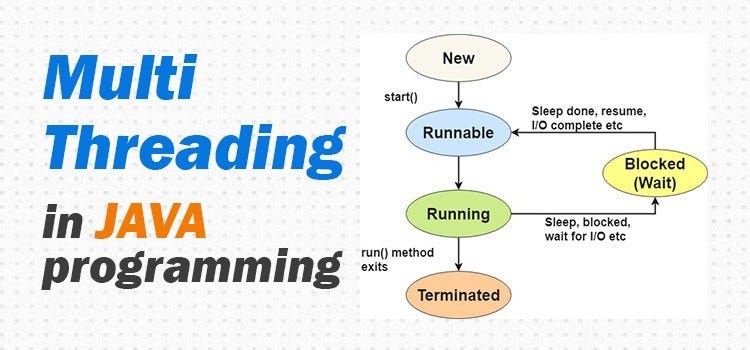
Thread lifecycle Here’s an explanation of the thread lifecycle in Java:
- New (or Created): A thread is created by instantiating the Thread class. At this point, it is in the new state.
Thread myThread = new Thread();2. Runnable (or Ready): After the thread is created, it moves to the runnable state when the start() method is called. The start() method internally calls the run() method, and the thread becomes ready for execution.
myThread.start(); // Moves the thread to the runnable state3. Running: Once the scheduler selects the thread for execution, it enters the running state. The run() method contains the code that will be executed when the thread is running.
public void run() {
    // Code to be executed when the thread is running
}
4. Blocked (or Waiting): A running thread may enter the blocked state if it encounters an operation that makes it wait, such as calling sleep(), wait(), or performing I/O operations.
// Example: Thread sleeps for 1 second
try {
    Thread.sleep(1000); // Thread enters blocked state for 1 second
} catch (InterruptedException e) {
    e.printStackTrace();
}
5. Terminated (or Dead): The thread enters the terminated state when the run() method completes its execution or when an uncaught exception occurs.
// Example: Completing the run method
public void run() {
    // Code to be executed when the thread is running
    // ...
    // The thread terminates when this method completes
}
Multithreading
Multithreading is a programming technique where multiple threads run concurrently within a single process. Each thread performs its tasks simultaneously. This is useful for tasks that can be performed independently, allowing efficient use of CPU resources.
Advantages:
- Improves performance by parallelizing tasks.
- Makes programs more responsive, especially for long-running tasks like I/O operations.
- Allows better resource utilization in multi-core systems.
class Task1 extends Thread {
    public void run() {
        for (int i = 0; i < 5; i++) {
            System.out.println("Task1: " + i);
        }
    }
}

class Task2 extends Thread {
    public void run() {
        for (int i = 0; i < 5; i++) {
            System.out.println("Task2: " + i);
        }
    }
}

public class Main {
    public static void main(String[] args) {
        Task1 task1 = new Task1();
        Task2 task2 = new Task2();
        task1.start();
        task2.start();
    }
}
Multitasking Multitasking refers to the capability of an operating system to execute multiple tasks (programs or processes) at the same time. There are two types of multitasking:
- Process-based Multitasking: The ability to run multiple processes at once. For example, running a web browser and an IDE simultaneously on your computer.
- Thread-based Multitasking (Multithreading): This is specific to multithreaded applications, where multiple threads within a single process can run concurrently.
Thread Scheduler in Java
The Thread Scheduler in Java is a part of the Java Virtual Machine (JVM) responsible for managing the execution of threads. It determines the order in which threads are executed and ensures that multiple threads can run concurrently on a multi-core processor.
How Thread Scheduling Works in Java
- Thread Creation: When a new thread is created and started using
thread.start(), it is added to the thread scheduler’s queue. - Thread Execution: The scheduler picks threads from the queue based on its algorithm and assigns them to the CPU. Threads may run concurrently on multi-core processors.
- Thread Blocking: If a thread performs blocking operations (like I/O), the scheduler may suspend its execution and switch to another thread.
- Thread Yielding: Threads can call
Thread.yield()to suggest that the current thread should pause its execution to allow other threads to run, though this is merely a hint and may not always be respected by the scheduler.
Scheduling Policies
The actual scheduling algorithm is determined by the JVM implementation and the underlying operating system. Common policies include:
- First-Come, First-Served (FCFS): Threads are executed in the order they arrive.
- Round-Robin: Threads are given equal time slices in a cyclic order.
- Priority-Based: Threads are scheduled based on their priority levels.
Example
Here’s a simple example demonstrating how threads might be scheduled:
public class ThreadSchedulerDemo {
    public static void main(String[] args) {
        Runnable task1 = () -> {
            for (int i = 0; i < 5; i++) {
                System.out.println("Task 1 - " + i);
                try { Thread.sleep(100); } catch (InterruptedException e) { }
            }
        };

        Runnable task2 = () -> {
            for (int i = 0; i < 5; i++) {
                System.out.println("Task 2 - " + i);
                try { Thread.sleep(100); } catch (InterruptedException e) { }
            }
        };

        Thread thread1 = new Thread(task1);
        Thread thread2 = new Thread(task2);

        thread1.start();
        thread2.start();
    }
}
In this example, both tasks are executed concurrently, but the exact order and timing depend on the thread scheduler’s decisions. The threads will run in parallel, with the scheduler determining how the CPU time is divided between them
Thread Methods
start()run()sleep()join()interrupt()yield()
start() and run()
In Java, the start() method is used to begin the execution of a thread. When you call start(), a new thread of execution is created, and the run() method of the Thread class (or the Runnable interface) is invoked in that new thread.
the run() method is where the code that constitutes the thread's task is defined. The run() method is part of the Runnable interface, and when a thread is started using the start() method, it internally invokes the run() method in a new thread of execution.
Key Points of start() and run() Method:
- New Thread Creation: The
start()method creates a new thread and allows the Java Virtual Machine (JVM) to manage the execution. - Calls
run()Method: Thestart()method doesn't directly callrun()but invokes it in a separate thread. - Single Call: You can only call
start()once on a thread. If you try to start a thread more than once, it will throw anIllegalThreadStateException. - Asynchronous Execution: After calling
start(), therun()method executes asynchronously, meaning the main program flow and the thread run in parallel.
Difference Between start() and run():
start(): Starts a new thread and then calls therun()method in that new thread.run(): If you directly callrun()instead ofstart(), it will execute the code in the same thread, not creating a new one.
// Implementing Runnable interface to define the run() method
class MyThread implements Runnable {
    @Override
    public void run() {
        // This code will be executed in a separate thread
        System.out.println("Thread is running: " + Thread.currentThread().getName());
    }
}

public class Main {
    public static void main(String[] args) {
        // Creating an instance of the thread class
        MyThread myRunnable = new MyThread();
        Thread thread = new Thread(myRunnable);

        // Starting the thread
        thread.start();

        // Code in the main thread continues to execute in parallel
        System.out.println("Main thread: " + Thread.currentThread().getName());
    }
}
Output
Main thread: main
Thread is running: Thread-0
sleep(long millis)
- Description: This method causes the currently executing thread to sleep (pause execution) for the specified number of milliseconds.
- Example:
Thread.sleep(2000); // Sleeps for 2 seconds - Note: It throws
InterruptedException, so you need to handle it with atry-catchblock.
4. join()
- Description: This method allows one thread to wait until another thread finishes its execution.
- Example:
thread.join(); - Note: It forces the calling thread to wait for the thread on which
join()was called to complete.
5. interrupt()
- Description: This method interrupts a thread, causing it to stop sleeping or waiting, by throwing an
InterruptedException. - Example:
thread.interrupt(); - Note: You should handle the
InterruptedExceptionwhen calling methods likesleep().
6. yield()
- Description: This method temporarily pauses the current thread, allowing other threads of the same or higher priority to execute.
- Example:
Thread.yield(); - Note: It’s a hint to the thread scheduler to allow other threads to run, but it’s not guaranteed.
Example with all methods
class MyThread extends Thread {
    @Override
    public void run() {
        try {
            // Yielding the current thread to other threads
            System.out.println(Thread.currentThread().getName() + " is yielding...");
            Thread.yield();

            // Putting the thread to sleep for 2 seconds
            System.out.println(Thread.currentThread().getName() + " is sleeping...");
            Thread.sleep(2000);

            System.out.println(Thread.currentThread().getName() + " has finished executing.");
        } catch (InterruptedException e) {
            System.out.println(Thread.currentThread().getName() + " was interrupted.");
        }
    }
}

public class ThreadMethodsExample {
    public static void main(String[] args) throws InterruptedException {
        MyThread thread1 = new MyThread();
        MyThread thread2 = new MyThread();

        // Starting both threads
        thread1.start();
        thread2.start();

        // Joining thread1 to ensure the main thread waits for it to finish
        thread1.join();
        System.out.println(thread1.getName() + " has completed. Main thread continues...");

        // Interrupting thread2 while it's sleeping
        thread2.interrupt();
    }
}
Output:
Thread-0 is yielding...
Thread-1 is yielding...
Thread-0 is sleeping...
Thread-1 is sleeping...
Thread-1 was interrupted.
Thread-0 has finished executing.
Thread-0 has completed. Main thread continues...
Thread Priority
Thread priority is a mechanism that allows you to influence the order in which threads are executed by the thread scheduler. Each thread is assigned a priority, and the scheduler uses this priority to decide how frequently each thread should run relative to other threads. Higher-priority threads are more likely to be chosen for execution over lower-priority threads.
Key Points about Thread Priority:
- Range of Priority: Thread priority in Java ranges from 1 to 10. The constants defined in the
Threadclass are:
Thread.MIN_PRIORITY(1) — the lowest priority.Thread.NORM_PRIORITY(5) — the default priority.Thread.MAX_PRIORITY(10) — the highest priority.
2. Setting Thread Priority: You can set the priority of a thread using the setPriority(int priority) method. For example:
thread.setPriority(Thread.MAX_PRIORITY);3. Influence, Not Guarantee: Thread priority serves as a hint to the thread scheduler but does not guarantee execution order. The actual behavior depends on the operating system’s thread scheduling algorithm.
4. Default Priority: When a thread is created, it inherits the priority of the thread that created it (usually the main thread, which has a default priority of 5).
5. Preemptive Scheduling: In systems with preemptive scheduling, higher-priority threads may preempt lower-priority ones.
How to Set and Get Thread Priority
- Setting Priority: You can use the
setPriority()method to assign a priority to a thread:
thread.setPriority(Thread.MAX_PRIORITY);- Getting Priority: You can retrieve the priority of a thread using the
getPriority()method:
int priority = thread.getPriority();Example: Setting Thread Priority
Here is an example where we create three threads with different priorities.
class MyThread extends Thread {
    public MyThread(String name) {
        super(name);
    }

    @Override
    public void run() {
        for (int i = 1; i <= 3; i++) {
            System.out.println(Thread.currentThread().getName() + " - Priority: " + Thread.currentThread().getPriority() + " - Count: " + i);
        }
    }
}

public class Main {
    public static void main(String[] args) {
        // Creating threads with different priorities
        MyThread thread1 = new MyThread("Thread-1");
        MyThread thread2 = new MyThread("Thread-2");
        MyThread thread3 = new MyThread("Thread-3");

        // Setting thread priorities
        thread1.setPriority(Thread.MIN_PRIORITY);  // Priority 1
        thread2.setPriority(Thread.NORM_PRIORITY); // Priority 5
        thread3.setPriority(Thread.MAX_PRIORITY);  // Priority 10

        // Starting threads
        thread1.start();
        thread2.start();
        thread3.start();
    }
}
Possible Output:
Thread-1 - Priority: 1 - Count: 1
Thread-3 - Priority: 10 - Count: 1
Thread-2 - Priority: 5 - Count: 1
Thread-3 - Priority: 10 - Count: 2
Thread-1 - Priority: 1 - Count: 2
Thread-2 - Priority: 5 - Count: 2
Thread-3 - Priority: 10 - Count: 3
Thread-1 - Priority: 1 - Count: 3
Thread-2 - Priority: 5 - Count: 3
Synchronization
In Java, synchronization ensures that only one thread can access a resource at a time, preventing issues like race conditions when multiple threads try to modify shared data. It’s mainly used to control access to critical sections of code. Java provides intrinsic locks (or monitor locks) to enforce synchronization.
1. Synchronized Methods
A synchronized method locks the object that contains the method, ensuring that only one thread can access it at a time. When one thread is executing a synchronized method on an object, all other threads that want to execute any synchronized method on the same object must wait.
class Counter {
    private int count = 0;

    public synchronized void increment() {
        count++;
    }

    public int getCount() {
        return count;
    }
}

public class SynchronizedMethodExample {
    public static void main(String[] args) throws InterruptedException {
        Counter counter = new Counter();

        // Thread 1
        Thread t1 = new Thread(() -> {
            for (int i = 0; i < 1000; i++) {
                counter.increment();
            }
        });

        // Thread 2
        Thread t2 = new Thread(() -> {
            for (int i = 0; i < 1000; i++) {
                counter.increment();
            }
        });

        t1.start();
        t2.start();

        t1.join();
        t2.join();

        System.out.println("Final Count: " + counter.getCount());
    }
}
Output :
Final Count: 2000In this case, the increment() method is synchronized, ensuring that both threads modify the shared count variable in a thread-safe manner.
2. Synchronized Blocks
Instead of synchronizing an entire method, you can synchronize a specific block of code. This is useful when you want finer control over which parts of the method are synchronized.
class Counter {
    private int count = 0;

    public void increment() {
        synchronized (this) {
            count++;
        }
    }

    public int getCount() {
        return count;
    }
}

public class SynchronizedBlockExample {
    public static void main(String[] args) throws InterruptedException {
        Counter counter = new Counter();

        Thread t1 = new Thread(() -> {
            for (int i = 0; i < 1000; i++) {
                counter.increment();
            }
        });

        Thread t2 = new Thread(() -> {
            for (int i = 0; i < 1000; i++) {
                counter.increment();
            }
        });

        t1.start();
        t2.start();

        t1.join();
        t2.join();

        System.out.println("Final Count: " + counter.getCount());
    }
}
Output:
Final Count: 2000In this case, the increment() method contains a synchronized block that only locks the code modifying count, making the rest of the method available to other threads.
3. Static Synchronization
Static synchronization is used to lock the class instead of an instance. This is helpful when multiple threads are working on shared static data.
class StaticCounter {
    private static int count = 0;

    public static synchronized void increment() {
        count++;
    }

    public static int getCount() {
        return count;
    }
}

public class StaticSynchronizedExample {
    public static void main(String[] args) throws InterruptedException {
        Thread t1 = new Thread(() -> {
            for (int i = 0; i < 1000; i++) {
                StaticCounter.increment();
            }
        });

        Thread t2 = new Thread(() -> {
            for (int i = 0; i < 1000; i++) {
                StaticCounter.increment();
            }
        });

        t1.start();
        t2.start();

        t1.join();
        t2.join();

        System.out.println("Final Count: " + StaticCounter.getCount());
    }
}
Output:
Final Count: 2000In this case, the increment() method is static and synchronized, ensuring that all threads accessing it lock the StaticCounter class, maintaining thread safety for static variables.
4. Intrinsic Locks (Monitor Locks)
Java uses intrinsic locks (monitor locks) to control synchronization. Every object in Java has an intrinsic lock. When a thread enters a synchronized method or block, it automatically acquires the intrinsic lock for that object or class.
In the previous examples:
- Synchronized method/block: The intrinsic lock is held on the object (
this). - Static synchronization: The intrinsic lock is held on the class (
ClassName.class).
Java automatically handles intrinsic locks when a thread enters a synchronized method/block and releases the lock when the thread exits.
Inter-thread Communication in Java
In Java, inter-thread communication is essential for allowing threads to collaborate and share information while performing tasks concurrently. The most commonly used methods for inter-thread communication are wait(), notify(), and notifyAll(). These methods must be called from within a synchronized block or method.
1. wait()
- Purpose: Causes the current thread to wait until another thread invokes
notify()ornotifyAll()on the same object. The thread releases the lock on the object and waits for notification.
2. notify()
- Purpose: Wakes up one waiting thread that is waiting on the same object. The thread is chosen by the scheduler and resumes once it regains the lock.
3. notifyAll()
- Purpose: Wakes up all the threads that are waiting on the same object. One of the awakened threads will acquire the lock and resume execution.
Example of wait(), notify(), and notifyAll()
Let’s consider a scenario where one thread is producing data, and another thread is consuming that data. The consumer must wait until the producer has produced something before it can consume it.
class SharedResource {
    private int data;
    private boolean isProduced = false;

    // Producer method
    public synchronized void produce(int value) throws InterruptedException {
        while (isProduced) {
            wait(); // Wait until the consumer consumes the data
        }
        data = value;
        System.out.println("Produced: " + data);
        isProduced = true;
        notify(); // Notify the consumer that the data is ready
    }

    // Consumer method
    public synchronized void consume() throws InterruptedException {
        while (!isProduced) {
            wait(); // Wait until the producer produces the data
        }
        System.out.println("Consumed: " + data);
        isProduced = false;
        notify(); // Notify the producer that the data has been consumed
    }
}

public class InterThreadCommunicationExample {
    public static void main(String[] args) {
        SharedResource resource = new SharedResource();

        // Producer thread
        Thread producerThread = new Thread(() -> {
            for (int i = 1; i <= 5; i++) {
                try {
                    resource.produce(i);
                } catch (InterruptedException e) {
                    Thread.currentThread().interrupt();
                }
            }
        });

        // Consumer thread
        Thread consumerThread = new Thread(() -> {
            for (int i = 1; i <= 5; i++) {
                try {
                    resource.consume();
                } catch (InterruptedException e) {
                    Thread.currentThread().interrupt();
                }
            }
        });

        producerThread.start();
        consumerThread.start();
    }
}
Output:
Produced: 1
Consumed: 1
Produced: 2
Consumed: 2
Produced: 3
Consumed: 3
Produced: 4
Consumed: 4
Produced: 5
Consumed: 5
Explanation:
- SharedResource Class: This class holds a shared integer value
databetween the producer and consumer threads.
produce(int value): Produces data and notifies the consumer once the data is ready.consume(): Consumes data and notifies the producer once the data is consumed.
2. Producer Thread: The producer thread calls produce() and generates numbers from 1 to 5. If the data is already produced (i.e., isProduced is true), the producer thread will wait until the consumer consumes the data.
3. Consumer Thread: The consumer thread calls consume() to consume the data. If there is no data to consume (i.e., isProduced is false), the consumer thread waits until the producer produces the data.
4. wait(): Used to make the current thread wait until the other thread performs the expected action.
5. notify(): Wakes up one thread (either the producer or consumer) that is waiting on the object.
In this example, the producer produces data, and the consumer consumes it in an alternating manner. The notify() method ensures that each thread is properly notified to continue its task once the other has finished.
ReentrantLock in Java
ReentrantLock is part of the java.util.concurrent.locks package and is a flexible alternative to the traditional synchronized block in Java. It provides more advanced locking mechanisms compared to the implicit locking provided by the synchronized keyword.
A ReentrantLock is called “reentrant” because the same thread can acquire the lock multiple times without causing a deadlock. If a thread that holds the lock attempts to lock it again, it will succeed, but it must also release the lock the same number of times before another thread can acquire it.
Features of ReentrantLock
- Explicit Locking: You must explicitly acquire and release the lock using
lock()andunlock(). - Fairness: You can create a fair lock that grants access to the longest-waiting thread. The default is non-fair (like
synchronized). - Try Locking: You can attempt to acquire the lock with
tryLock()without blocking indefinitely. - Interruptible Locking: It supports locking that can be interrupted.
Example Scenario
Consider a scenario where multiple threads are attempting to update a shared counter. To ensure thread safety, we can use ReentrantLock to manage access to the counter.
Use Case
Let’s simulate a situation where multiple threads are trying to increment a shared counter, and we will use a ReentrantLock to ensure that the counter updates are done in a thread-safe manner.
Code Example
import java.util.concurrent.locks.ReentrantLock;

public class ReentrantLockExample {

    // Shared counter
    private int counter = 0;

    // Creating a ReentrantLock
    private final ReentrantLock lock = new ReentrantLock();

    // Method to increment the counter in a thread-safe manner
    public void increment() {
        lock.lock();  // Acquire the lock
        try {
            counter++;  // Critical section
            System.out.println(Thread.currentThread().getName() + " incremented counter to: " + counter);
        } finally {
            lock.unlock();  // Release the lock
        }
    }

    public static void main(String[] args) {
        ReentrantLockExample example = new ReentrantLockExample();

        // Creating multiple threads that try to increment the counter
        Thread t1 = new Thread(example::increment, "Thread 1");
        Thread t2 = new Thread(example::increment, "Thread 2");
        Thread t3 = new Thread(example::increment, "Thread 3");

        // Starting the threads
        t1.start();
        t2.start();
        t3.start();

        // Wait for the threads to finish
        try {
            t1.join();
            t2.join();
            t3.join();
        } catch (InterruptedException e) {
            e.printStackTrace();
        }

        // Final counter value
        System.out.println("Final counter value: " + example.counter);
    }
}
Output
Thread 1 incremented counter to: 1
Thread 2 incremented counter to: 2
Thread 3 incremented counter to: 3
Final counter value: 3
Explanation:
- ReentrantLock Object (
lock): We create an instance ofReentrantLockto control access to the sharedcounter. - Locking Mechanism:
lock.lock()is called to acquire the lock before modifying thecounter.- Inside the
try-finallyblock, we increment the counter and print its value. - The
finallyblock ensures that the lock is always released withlock.unlock()after the counter is incremented, even if an exception occurs.
3. Multiple Threads:
- We create three threads (
t1,t2, andt3) that call theincrementmethod concurrently. Each thread attempts to acquire the lock, increment the counter, and then release the lock.
Why Use ReentrantLock?
- Fine-grained control: Unlike
synchronized,ReentrantLockallows more control, like try-locking or interrupting a thread while it waits. - Fairness: If you want to ensure threads acquire locks in the order they requested it,
ReentrantLockcan be used in a fair mode.
Comparison with synchronized
- Fairness:
synchronizedblocks do not guarantee which thread will acquire the lock first.ReentrantLockcan be made fair. - Try Locking:
ReentrantLockhas methods liketryLock()to attempt locking without waiting indefinitely. - Interruptibility: Threads blocked by
synchronizedcannot be interrupted, butReentrantLockprovides aninterruptible lockmethod.
Semaphore in Java
A Semaphore in Java is a thread synchronization construct from the java.util.concurrent package. It is used to control access to a shared resource by multiple threads. A semaphore maintains a set of permits, which threads can acquire or release. The purpose of a semaphore is to manage concurrent access to resources and control the number of threads that can access a specific resource simultaneously.
Key Concepts of Semaphore:
- Permits: The semaphore maintains a number of permits. When a thread wants to access a shared resource, it acquires a permit. If a permit is available, the thread proceeds. If no permits are available, the thread is blocked until one is released.
- Acquiring and Releasing Permits:
- Acquire: A thread calls
acquire()to get a permit. If permits are available, it decrements the permit count. If no permits are available, the thread waits. - Release: A thread calls
release()to give up a permit, increasing the permit count, potentially allowing a blocked thread to proceed.
Types of Semaphores:
- Counting Semaphore: This type of semaphore allows multiple threads to access the resource, depending on the number of permits. For example, a semaphore with 5 permits allows up to 5 threads to access the resource concurrently.
- Binary Semaphore: A binary semaphore behaves like a lock. It has only two states: 0 (locked) and 1 (unlocked). It is similar to a mutex and allows only one thread to access the resource at a time.
Example Scenario:
Let’s consider a parking lot with limited parking spots. If there are 5 parking spots, only 5 cars (threads) can park at any given time. Once a car leaves (releases the permit), another car can park (acquire a permit).
Example Code
import java.util.concurrent.Semaphore;

class ParkingLot {
    // Creating a semaphore with 5 permits (5 parking spots)
    private final Semaphore parkingSpots = new Semaphore(5);

    // Method to simulate parking a car
    public void parkCar(String car) {
        try {
            System.out.println(car + " is trying to park...");
            parkingSpots.acquire();  // Try to acquire a parking spot (permit)
            System.out.println(car + " parked successfully.");

            // Simulate parking time
            Thread.sleep(2000);

        } catch (InterruptedException e) {
            e.printStackTrace();
        } finally {
            System.out.println(car + " is leaving the parking lot.");
            parkingSpots.release();  // Release the parking spot (permit)
        }
    }
}

public class SemaphoreExample {
    public static void main(String[] args) {
        ParkingLot lot = new ParkingLot();

        // Creating 10 cars (threads) trying to park in a lot with only 5 spots
        for (int i = 1; i <= 10; i++) {
            String car = "Car " + i;
            new Thread(() -> lot.parkCar(car)).start();
        }
    }
}
Output :
Car 1 is trying to park...
Car 2 is trying to park...
Car 3 is trying to park...
Car 1 parked successfully.
Car 2 parked successfully.
Car 3 parked successfully.
Car 4 is trying to park...
Car 5 is trying to park...
Car 4 parked successfully.
Car 5 parked successfully.
Car 6 is trying to park...
Car 7 is trying to park...
Car 1 is leaving the parking lot.
Car 6 parked successfully.
...
Explanation:
- Semaphore with 5 permits: The semaphore is initialized with 5 permits, representing the 5 available parking spots.
acquire()method: Each car (thread) attempts to acquire a permit (park). If a permit is available, the car proceeds and "parks".release()method: After simulating parking for 2 seconds, the car releases the permit (leaves the parking spot), allowing another car to park.
Deadlock, Starvation, and Livelock
1. Deadlock
A deadlock occurs when two or more threads are blocked forever, each waiting on the other to release a resource.
Example in Java:
Consider two threads (Thread A and Thread B) and two resources (Resource 1 and Resource 2). Thread A locks Resource 1 and waits for Resource 2, while Thread B locks Resource 2 and waits for Resource 1. This leads to both threads being unable to proceed.
Example Code:
public class DeadlockExample {
    static class Resource {
        public synchronized void action(Resource otherResource) {
            System.out.println(Thread.currentThread().getName() + ": Acquired this resource, trying to acquire other resource.");
            otherResource.performAction();
        }

        public synchronized void performAction() {
            System.out.println(Thread.currentThread().getName() + ": Performing action.");
        }
    }

    public static void main(String[] args) {
        Resource resource1 = new Resource();
        Resource resource2 = new Resource();

        Thread thread1 = new Thread(() -> {
            resource1.action(resource2);  // Thread A locks resource1 and tries to lock resource2
        });

        Thread thread2 = new Thread(() -> {
            resource2.action(resource1);  // Thread B locks resource2 and tries to lock resource1
        });

        thread1.start();
        thread2.start();
    }
}
How to Avoid Deadlock:
- Lock ordering: Always acquire locks in the same order.
- Timeouts: Use
tryLockwith a timeout. - Deadlock detection: Some systems can detect and recover from deadlocks.
2. Starvation
Starvation happens when a thread is perpetually denied access to resources, making it unable to progress. This can occur if threads with higher priority continually access the resource, leaving lower-priority threads waiting indefinitely.
Example in Java:
Consider a thread pool where high-priority threads dominate, causing low-priority threads to never get CPU time.
Example Code:
public class StarvationExample {
    public static void main(String[] args) {
        Runnable task = () -> {
            String threadName = Thread.currentThread().getName();
            System.out.println(threadName + " is executing.");
        };

        Thread highPriorityThread = new Thread(task);
        Thread lowPriorityThread = new Thread(task);

        highPriorityThread.setPriority(Thread.MAX_PRIORITY);  // High-priority thread
        lowPriorityThread.setPriority(Thread.MIN_PRIORITY);  // Low-priority thread

        lowPriorityThread.start();
        highPriorityThread.start();
    }
}
In this example, depending on the thread scheduler, the low-priority thread may get little to no CPU time.
How to Avoid Starvation:
- Fair scheduling: Use fair locking techniques (
ReentrantLockwith fairness set to true). - Priority inversion handling: Properly manage thread priorities to avoid imbalance.
3. Livelock
A livelock is similar to a deadlock, but the threads or processes keep changing their state in response to each other without making any real progress.
Example in Java:
Imagine two threads attempting to resolve a conflict by releasing and reacquiring resources, but always in a way that they prevent each other from making progress.
Example Code:
public class LivelockExample {
    static class Resource {
        private boolean inUse = false;

        public synchronized boolean isInUse() {
            return inUse;
        }

        public synchronized void use() {
            inUse = true;
        }

        public synchronized void release() {
            inUse = false;
        }
    }

    public static void main(String[] args) {
        final Resource resource1 = new Resource();
        final Resource resource2 = new Resource();

        Thread thread1 = new Thread(() -> {
            while (!resource1.isInUse()) {
                resource1.use();
                if (resource2.isInUse()) {
                    resource1.release();
                    continue;  // Retry acquiring both resources
                }
                System.out.println("Thread 1: Working with both resources");
                resource1.release();
                break;
            }
        });

        Thread thread2 = new Thread(() -> {
            while (!resource2.isInUse()) {
                resource2.use();
                if (resource1.isInUse()) {
                    resource2.release();
                    continue;  // Retry acquiring both resources
                }
                System.out.println("Thread 2: Working with both resources");
                resource2.release();
                break;
            }
        });

        thread1.start();
        thread2.start();
    }
}
Here, both threads keep trying to acquire the resources and release them, but neither is able to make any real progress, causing a livelock.
How to Avoid Livelock:
- Use backoff algorithms, where the system increases the time between retries to give other threads a chance to complete.
- Retry limit: Implement a retry limit after which threads stop and take a different action.
Summary:
- Deadlock: Threads are stuck waiting for each other, never progressing.
- Starvation: A thread is constantly denied resources, leading to no progress.
- Livelock: Threads or processes are active but not making progress due to repeated state changes.
Daemon Thread
A daemon thread in Java is a background thread that provides services to other threads or runs background tasks. The Java Virtual Machine (JVM) does not wait for daemon threads to finish their execution when all user threads (non-daemon threads) have completed. When only daemon threads remain, the JVM will exit, terminating all daemon threads immediately.
Daemon threads are often used for background tasks like garbage collection, monitoring, or other non-critical tasks that should not prevent the JVM from exiting.
Characteristics of Daemon Threads:
- Background Task: They run in the background and are usually not involved in critical tasks.
- Non-blocking JVM shutdown: If only daemon threads are left running, the JVM will terminate without waiting for them to finish.
- Low Priority: They often run at a lower priority compared to user threads.
- Termination with JVM: Daemon threads terminate when the JVM exits, regardless of their state.
Setting a Thread as Daemon:
In Java, you can turn a thread into a daemon by using the setDaemon(true) method before starting the thread.
Example of Daemon Thread:
public class DaemonThreadExample {
    public static void main(String[] args) {
        Thread daemonThread = new Thread(() -> {
            while (true) {
                System.out.println("Daemon thread running...");
                try {
                    Thread.sleep(1000);  // Simulating background task
                } catch (InterruptedException e) {
                    e.printStackTrace();
                }
            }
        });

        daemonThread.setDaemon(true);  // Set the thread as a daemon thread
        daemonThread.start();  // Start the daemon thread

        // Main thread simulates some work
        System.out.println("Main thread is doing some work.");
        try {
            Thread.sleep(3000);  // Main thread sleeps for 3 seconds
        } catch (InterruptedException e) {
            e.printStackTrace();
        }

        System.out.println("Main thread is done.");
        // Once the main thread finishes, the JVM will exit, and the daemon thread will be terminated.
    }
}
Output:
Main thread is doing some work.
Daemon thread running...
Daemon thread running...
Daemon thread running...
Main thread is done.
Explanation:
- Daemon thread: A thread is created to simulate a background task (
daemonThread). This thread is set as a daemon by callingsetDaemon(true). - Main thread: The main thread runs for 3 seconds and then finishes. When the main thread exits, the JVM terminates, and the daemon thread also stops executing (even though it’s in an infinite loop).
- Daemon termination: Since the daemon thread doesn’t block the JVM from exiting, it stops running after the main thread completes.
Volatile Keyword
The volatile keyword in Java is used to ensure visibility and ordering of variables across multiple threads. When a variable is declared as volatile, changes made by one thread to this variable are immediately visible to all other threads. It guarantees that:
- Visibility: The value of a
volatilevariable is always read from the main memory, not from the thread's local cache. - Atomic read/write: It guarantees that reads and writes to a
volatilevariable are atomic, though operations like increment (read-modify-write) are not atomic.
Why Use volatile?
In a multithreaded environment, threads might cache variables for performance, leading to inconsistent views of a variable. volatile helps to avoid this by ensuring that all reads and writes are directly from main memory.
Example Scenario Without volatile:
Let’s look at an example where a thread could end up reading a stale value if volatile is not used.
Without volatile:
public class VolatileWithoutExample {
    private static boolean flag = false;

    public static void main(String[] args) {
        Thread readerThread = new Thread(() -> {
            while (!flag) {
                // Wait until flag becomes true
            }
            System.out.println("Reader thread detected flag change!");
        });

        Thread writerThread = new Thread(() -> {
            try {
                Thread.sleep(1000);  // Simulate some work
            } catch (InterruptedException e) {
                e.printStackTrace();
            }
            flag = true;
            System.out.println("Writer thread updated flag to true!");
        });

        readerThread.start();
        writerThread.start();
    }
}
Expected Output:
Writer thread updated flag to true!
Reader thread detected flag change!
Possible Actual Output:
Writer thread updated flag to true!In this example, the readerThread may never see the updated value of flag because it could be using a cached version of the variable, and flag was not declared as volatile.
Using volatile:
Now, let’s fix this issue by making flag volatile.
With volatile:
public class VolatileExample {
    private static volatile boolean flag = false;  // Volatile keyword ensures visibility

    public static void main(String[] args) {
        Thread readerThread = new Thread(() -> {
            while (!flag) {
                // Wait until flag becomes true
            }
            System.out.println("Reader thread detected flag change!");
        });

        Thread writerThread = new Thread(() -> {
            try {
                Thread.sleep(1000);  // Simulate some work
            } catch (InterruptedException e) {
                e.printStackTrace();
            }
            flag = true;
            System.out.println("Writer thread updated flag to true!");
        });

        readerThread.start();
        writerThread.start();
    }
}
Output:
Writer thread updated flag to true!
Reader thread detected flag change!
Explanation:
- Without
volatile: The reader thread could use a cached value offlag, so it may never see the updated value set by the writer thread. This can lead to the reader thread being stuck in the loop indefinitely. - With
volatile: Thevolatilekeyword ensures that any update toflagby the writer thread is immediately visible to the reader thread. The reader thread sees the updated value offlagand exits the loop as expected.
Important Points:
- Visibility Guarantee: A
volatilevariable ensures that its most recent value is visible to all threads. Threads will always read its current value from main memory. - No Atomicity: The
volatilekeyword does not make compound operations likei++(read-modify-write) atomic. For atomic operations,synchronizedorAtomicclasses should be used. - Avoid Caching: Variables marked as
volatileare never cached in registers or thread-local memory, making them ideal for communication between threads.
Atomic Operations
Atomic operations in Java are operations that are performed in a single step without the possibility of being interrupted by other threads. They guarantee that the operation is indivisible and thread-safe, meaning that no intermediate state of the operation is visible to other threads, and the entire operation completes before any other thread can see any change.
In multithreading, atomicity is crucial because multiple threads can access shared resources concurrently. If operations on shared resources are not atomic, inconsistent or incorrect results can occur due to race conditions.
Characteristics of Atomic Operations:
- Indivisible: The operation cannot be split into smaller steps.
- Thread-safe: No synchronization is needed for basic atomic operations.
- No intermediate states: Other threads cannot see partial results of an atomic operation.
Types of Atomic Operations:
- Read and Write: Simple reads and writes to variables of certain types (e.g.,
int,longon 32-bit systems) can be atomic. - Atomic classes: Java provides a set of atomic classes in the
java.util.concurrent.atomicpackage to handle compound atomic operations.
Example of Atomic Operations:
Atomic operations can be demonstrated through the following scenarios:
1. Atomic Variables:
Java provides several atomic classes in the java.util.concurrent.atomic package for atomic operations on primitive types and object references.
Common Atomic Classes:
AtomicIntegerAtomicLongAtomicBooleanAtomicReference
These classes provide methods for performing atomic operations, such as incrementing, decrementing, comparing, and swapping values.
Example Using AtomicInteger:
import java.util.concurrent.atomic.AtomicInteger;

public class AtomicExample {
    private static AtomicInteger counter = new AtomicInteger(0);

    public static void main(String[] args) {
        Thread t1 = new Thread(() -> {
            for (int i = 0; i < 1000; i++) {
                counter.incrementAndGet();  // Atomic increment
            }
        });

        Thread t2 = new Thread(() -> {
            for (int i = 0; i < 1000; i++) {
                counter.incrementAndGet();  // Atomic increment
            }
        });

        t1.start();
        t2.start();

        try {
            t1.join();
            t2.join();
        } catch (InterruptedException e) {
            e.printStackTrace();
        }

        System.out.println("Final counter value: " + counter.get());  // Should print 2000
    }
}
Output:
Final counter value: 2000Explanation:
AtomicInteger'sincrementAndGet()method performs an atomic increment operation.- The counter is incremented atomically by two threads concurrently, and there is no race condition.
- Without atomic operations, if two threads tried to increment a shared
intcounter, they might overwrite each other's changes, resulting in incorrect values.
2. Non-Atomic Operations (Race Condition Example):
To understand the significance of atomic operations, consider an example without atomic classes:
public class NonAtomicExample {
    private static int counter = 0;

    public static void main(String[] args) {
        Thread t1 = new Thread(() -> {
            for (int i = 0; i < 1000; i++) {
                counter++;  // Non-atomic increment
            }
        });

        Thread t2 = new Thread(() -> {
            for (int i = 0; i < 1000; i++) {
                counter++;  // Non-atomic increment
            }
        });

        t1.start();
        t2.start();

        try {
            t1.join();
            t2.join();
        } catch (InterruptedException e) {
            e.printStackTrace();
        }

        System.out.println("Final counter value: " + counter);  // Likely less than 2000 due to race condition
    }
}
Possible Output (Race Condition):
Final counter value: 1897 (or some random number less than 2000)Explanation:
counter++is not atomic. It is composed of three steps: read, increment, and write. If two threads execute these steps simultaneously, one thread's write may overwrite the other thread's value, leading to incorrect results.- This example may result in a value less than 2000 due to a race condition between the two threads.
Fork/Join Framework
The Fork/Join Framework in Java is a framework introduced in Java 7 that facilitates parallel programming by breaking a large task into smaller subtasks that can be executed concurrently. It is based on the divide-and-conquer strategy and is designed to take advantage of modern multi-core processors. The framework makes it easier to write parallel code that can utilize all available processors, which results in faster and more efficient execution for CPU-bound tasks.
Concepts of Fork/Join Framework:
- Divide and Conquer: A task is divided into smaller subtasks (forking), and when the subtasks are small enough, they are processed. Once completed, the results of the subtasks are combined (joining).
- Work Stealing: If a thread finishes its own tasks early, it will try to “steal” tasks from other threads to maintain optimal CPU utilization. This ensures better load balancing.
- RecursiveTask and RecursiveAction:
RecursiveTask<V>: Represents a task that returns a result.RecursiveAction: Represents a task that does not return a result.
Fork/Join Framework Components:
- ForkJoinPool: This is the pool of worker threads where tasks are submitted. It implements work stealing, ensuring that idle threads help with incomplete tasks from other threads.
- ForkJoinTask: This is the base class for tasks that run in the Fork/Join framework. It can either return a result (
RecursiveTask) or perform actions (RecursiveAction).
Basic Steps of the Fork/Join Framework:
- Divide: Break a task into smaller sub-tasks (fork).
- Conquer: Process each subtask in parallel.
- Combine: Join the results of subtasks to produce the final result.
Example Scenario:
We will demonstrate the Fork/Join Framework by summing an array of numbers using RecursiveTask. If the problem size is too large, it will divide the task into smaller subtasks until they are small enough to solve sequentially.
Example Code: Fork/Join Framework in Java
import java.util.concurrent.RecursiveTask;
import java.util.concurrent.ForkJoinPool;

public class ForkJoinExample {

    // RecursiveTask for summing an array
    static class SumTask extends RecursiveTask<Integer> {
        private static final int THRESHOLD = 10;  // Threshold for splitting the task
        private int[] array;
        private int start, end;

        // Constructor
        public SumTask(int[] array, int start, int end) {
            this.array = array;
            this.start = start;
            this.end = end;
        }

        // The compute method implements the divide-and-conquer logic
        @Override
        protected Integer compute() {
            int length = end - start;
            // If the task is small enough, process it directly
            if (length <= THRESHOLD) {
                int sum = 0;
                for (int i = start; i < end; i++) {
                    sum += array[i];
                }
                return sum;
            } else {
                // Otherwise, split the task into two subtasks
                int mid = start + length / 2;
                SumTask leftTask = new SumTask(array, start, mid);
                SumTask rightTask = new SumTask(array, mid, end);

                // Fork the subtasks (execute them asynchronously)
                leftTask.fork();
                rightTask.fork();

                // Join the results of both subtasks
                int leftResult = leftTask.join();
                int rightResult = rightTask.join();

                // Combine the results
                return leftResult + rightResult;
            }
        }
    }

    public static void main(String[] args) {
        // Create a large array of random integers
        int[] array = new int[100];
        for (int i = 0; i < array.length; i++) {
            array[i] = i + 1;
        }

        // Create a ForkJoinPool
        ForkJoinPool pool = new ForkJoinPool();

        // Create a SumTask to sum the array
        SumTask task = new SumTask(array, 0, array.length);

        // Submit the task to the ForkJoinPool and get the result
        int result = pool.invoke(task);

        System.out.println("Sum of array: " + result);
    }
}
Output :
Sum of array: 5050Explanation:
- SumTask:
- This class extends
RecursiveTask<Integer>because it returns a result (the sum of integers in the array). - The compute() method is the key method where the task is recursively divided into smaller subtasks. If the problem is small enough (less than or equal to
THRESHOLD), it computes the sum sequentially. Otherwise, it splits the task into two subtasks
- ForkJoinPool:
- We create a
ForkJoinPool, which is responsible for managing and executing the tasks. - The
invoke()method is called to submit the root task (SumTask) to the pool. This method waits for the task to complete and returns the result.
Fork/Join Framework Key Points:
- RecursiveTask and RecursiveAction: Use
RecursiveTaskwhen the task returns a result, andRecursiveActionwhen it doesn’t return a result. - Forking: Subtasks are submitted asynchronously using the
fork()method. - Joining: The result of the subtask is retrieved using the
join()method. - Work Stealing: Threads that complete their tasks early will try to “steal” work from other threads, ensuring better CPU utilization and parallelism.
Benefits of Fork/Join Framework:
- Scalability: Efficiently utilizes multiple processors and cores for CPU-bound tasks.
- Parallelism: Simplifies writing parallel programs using a divide-and-conquer strategy.
- Work-Stealing: Ensures better load balancing and optimal use of CPU resources.
When to Use Fork/Join Framework:
- It is ideal for recursive tasks that can be divided into independent subtasks.
- It is best suited for problems with large data sets that can be processed in parallel, such as:
- Parallel sorting algorithms (e.g., merge sort, quicksort).
- Matrix computations.
- Search operations in large datasets.
In summary, the Fork/Join Framework in Java is a powerful tool for leveraging modern multi-core processors, enabling tasks to be broken down into smaller, manageable pieces and processed in parallel for better performance.
.


