avatarClaudio Autiero 🖋

Free AI web copilot to create summaries, insights and extended knowledge, download it at here

8990

Abstract

that is less realistic and more creative.</p><h1 id="a385">To associate a series of commands with a single command to make it easier to type the prompt, you can create a preset on Midjourney.</h1><p id="56f1">Let’s say you often create images where you repeat a large part of the prompt. You can create a preset to call up the part of the prompt that you need with a simple command.</p><p id="2236">To customize the command, you can type <b>/prefer</b> option set on Midjourney. This will bring up a field called “<b>option</b>,” where you can enter the name you want to give to this command. For example, you can name it “insta” because you will use it frequently when creating images for Instagram. Of course, you can name it whatever you want. Then, you will be asked to fill in the “<b>value</b>” field, where you will enter your string, for example, — ar 9:16 quality — q 2 — v 4. This way, every time you need to create an image for Instagram that requires these commands, you only need to type — insta in the prompt.</p><p id="8a0a">Always remember to structure the prompt by <i>first entering a description of the image to be created and then the commands</i>. Also, if you intend to modify an image accessible at a certain address, the prompt structure should always be as follows: URL of the image to work on, description of the image to be created, commands.</p><h1 id="56f2">Prompt to create photo-realistic images with Midjourney</h1><p id="0aea">Here is a first prompt for Midjourney that can provide me with a portrait of a beautiful young girl photographed in a seaside tourist location, with a nice bokeh effect that allows us to see the subject in the foreground on a partially blurred background.</p><p id="7422"><b>This is the prompt</b>:</p><blockquote id="8c1e"><p><i>portrait of a beautiful blond girl in her 20s, a marina in the background, clear facial features, photograph, accent lighting, global illumination — uplight — v 4</i></p></blockquote><p id="bf55"><b>And this is the result</b>:</p><figure id="dd51"><img src="https://cdn-images-1.readmedium.com/v2/resize:fit:800/1*p9Qsvh1d4xBPJJt6Bc5Csg.jpeg"><figcaption>Image Created by Author with Midjourney</figcaption></figure><p id="ebb6">But I didn’t stop there because I tried to provide Midjourney with a prompt with additional information such as the lens used to take the photo and the aperture to try to get different images. However, I must say that in the end the result was almost the same, that is, subject in focus and background blurred as in the following prompt:</p><blockquote id="7724"><p><i>portrait of a beautiful blond girl in her 20s, a marina in the background, clear facial features, photograph, 50mm lens, f/2.8, accent lighting, global illumination — uplight — v 4</i></p></blockquote><p id="11bd">And the result was this:</p><figure id="a1d1"><img src="https://cdn-images-1.readmedium.com/v2/resize:fit:800/1*sOX34DRt6L7cjSN7VnXxMw.jpeg"><figcaption>Image Created by Author with Midjourney</figcaption></figure><p id="9bc4">Setting a 50mm lens and f/2.8 aperture, the desired effect was, of course, a bokeh effect (subject in focus and background blurred), but by varying these parameters, I expected to obtain different types of shots. For example, with the following prompt, I reduced the focal distance and increased the aperture to obtain a more homogeneous focus.</p><p id="17cb">This was the prompt used:</p><blockquote id="142d"><p><i>portrait of a beautiful blond girl in her 20s, a marina in the background, clear facial features, photograph, 24mm lens, f/ 22, accent lighting, global illumination — uplight — v 4</i></p></blockquote><p id="edd8">and this was the result obtained:</p><figure id="b65a"><img src="https://cdn-images-1.readmedium.com/v2/resize:fit:800/1*JUbzmMzNpDMNpp3FDYIcnQ.jpeg"><figcaption>Image Created by Author with Midjourney</figcaption></figure><p id="45ab">As you can still see a bokeh effect.</p><p id="b726">That’s why I ask you: “if you have any prompts through which, by entering parameters such as lens length, focal aperture, and whatever else, you can significantly modify images, <b>feel free to write them in the comments</b>.</p><p id="20ef">In any case, the results obtained with this type of prompt are really impressive, and therefore I definitely consider it a prompt to save.</p><p id="90cb">Obviously, then it is a matter of playing with the subject to obtain the variations that you prefer.</p><p id="b355">For example, if we want the same type of photograph but instead of the beautiful 20-year-old blonde girl, we want the portrait of a beautiful 30-year-old brunette girl with brown eyes, the game is easily done.</p><p id="b99d">This is the prompt:</p><blockquote id="92ca"><p><i>portrait of a beautiful 30-year-old brunette girl with brown eyes, a marina in the background, clear facial features, photograph, 50mm lens, f/2.8, accent lighting, global illumination — uplight — v 4</i></p></blockquote><p id="6496">and this is the result:</p><figure id="0d5f"><img src="https://cdn-images-1.readmedium.com/v2/resize:fit:800/1*btT1BgLgL-dCNTm1jKDVOw.jpeg"><figcaption>Image Created by Author with Midjourney</figcaption></figure><p id="1a07">Now let’s add the “<b>stylize</b>” command to the prompt that we saw earlier to make the image more artistic.</p><p id="6d06">Here’s the new prompt:</p><blockquote id="88d7"><p>portrait of a beautiful blonde girl in her 20s, a marina in the background, clear facial features, photograph, accent lighting, global illumination --uplight --v 4 --s 500</p></blockquote><p id="2b05">And here’s the result:</p><figure id="588a"><img src="https://cdn-images-1.readmedium.com/v2/resize:fit:800/1*qWx_Hz-3jjm6aYup4nHrzg.jpeg"><figcaption>Created by Author with Midjourney</figcaption></figure><p id="8fb3">As you can see, the resulting images are much more artistic and less photorealistic.</p><p id="4559">Needless to say, you can have fun and experiment by changing the subject, location, and lighting. Enjoy the process, and if you feel like it, feel free to share your results here in the comments.</p><h2 id="09d3">Prompt for creating anime-style images with Midjourney</h2><p id="088e">Now, let’s see a prompt for an anime-style image.</p><p id="724b">Here’s the prompt:</p><blockquote id="399c"><p>highly realistic anime illustration of a smiling child in a forest, bright and colorful, sharp and detailed, cinematic background</p></blockquote><p id="3bf0">And here’s the result:</p><figure id="f844"><img src="https://cdn-images-1.readmedium.com/v2/resize:fit:800/1*z1SIGHJzNCy9URwOqPu_Rw.jpeg"><figcaption>Created by Author with Midjourney</figcaption></figure><p id="2a6a">As you can see, thanks to this prompt for Midjourney, we have created a beautiful anime-style image that we can further customize. For example, we could specify that the child must always be smiling, with one arm raised, looking upward, and wearing a brown dress.</p><p id="bb5a">Here’s the prompt:</p><blockquote id="e4c7"><p>Highly realistic anime illustration of a smiling child in a forest, one arm raised and looking upward, wearing a brown dress, bright and colorful image, sharp and detailed, cinematic background</p></blockquote><p id="3f29">And here’s the image:</p><figure id="b958"><img src="https://cdn-images-1.readmedium.com/v2/resize:fit:800/1*rWmPlQaSQkN2gd4vh7yeag.jpeg"><figcaption>Created by Author with Midjourney</figcaption></figure><h2 id="42d4">Prompt for creating cartoon-style images with Midjourney</h2><p id="c3ed">Let’s create a cute cartoon-style image of a little dog dressed as a cowboy.</p><p id="38d1">Here’s the prompt:</p><blockquote id="0809"><p>cute little dog dressed as a cowboy, cartoon style</p></blockquote><p id="e9ed">And here’s the result:</p><figure id="bb39"><img src="https://cdn-images-1.readmedium.com/v2/resize:fit:800/1*J2fhGQAALUIBBeYbxYLqaQ.jpeg"><figcaption>Created by Author with Midjourney</figcaption></figure><p id="c41e">For this prompt, we didn’t give any specific instructions, but we can certainly be more specific if we want to.</p><h2 id="71e1">Prompt for creating 3D rendered images with Midjourney</h2><p id="3fd4">Now, let’s use another prompt to ask Midjourney to create a 3D rendered version of our cute little dog.</p><p id="ce41">Here’s the prompt:</p><blockquote id="5c23"><p>high detail cute dog face, realistic 3D render --v 4</p></blockquote><p id="3b07">And here’s the result:</p><figure id="083b"><img src="https://cdn-images-1.readmedium.com/v2/resize:fit:800/1*dNHrB_JnGzHZMlKBz4rl4g.jpeg"><figcaption>Created by Author with Midjourney</figcaption></figure><p id="91e9">Impressive, I would say!</p><h2 id="50fd">Prompt for creating fantasy-style images eith Midjourney</h2><p id="1716">Now we ask Midjourney to create a fantasy character for us. For example, let’s say we want to have a boy with light skin, blond hair, blue eyes, dressed in leather, with a fantasy-style forest background with an artistic vein equal to 300 and an as

Options

pect ratio of 16:9.</p><p id="102f">This is the prompt:</p><blockquote id="5623"><p>boy, male, light skin, blond hair, blue eyes, leather dress, forest background, fantasy --s 300 --ar 16:9</p></blockquote><p id="8eae">And this is the result:</p><figure id="17d5"><img src="https://cdn-images-1.readmedium.com/v2/resize:fit:800/1*9sJg9m-Uk1NaD0YjwoDC_g.jpeg"><figcaption>Created by Author with Midjourney</figcaption></figure><p id="6078">What do you think?</p><p id="106f">And what if we wanted to add a leather hat with a feather on his head?</p><p id="ed2b">Here’s the prompt:</p><blockquote id="8ddf"><p>boy, male, light skin, blond hair, blue eyes, dressed in leather, wearing a leather hat with a feather on his head, forest background, fantasy --s 300 --ar 16:9</p></blockquote><p id="e4b0">And here’s the result:</p><figure id="7c14"><img src="https://cdn-images-1.readmedium.com/v2/resize:fit:800/1*pSx7BLP2qRF_PE2ap9f9aA.jpeg"><figcaption>Created by Author with Midjourney</figcaption></figure><h2 id="aa32">Prompt for creating coloring images ideal for coloring books</h2><p id="1573">Midjourney allows you to create coloring book images ideal for adult or children’s coloring books.</p><p id="ed94">Here’s an example prompt for coloring book images:</p><blockquote id="cd86"><p>Coloring book, simple garden flowers mandala images for adults, completely white background, clean line art, no shading, no colored objects --ar 2:3</p></blockquote><p id="9751">And here’s the result:</p><figure id="2398"><img src="https://cdn-images-1.readmedium.com/v2/resize:fit:800/1*HY7gEUVSLoP2lq45r4vI_A.jpeg"><figcaption>Created by Author with Midjourney</figcaption></figure><p id="85ee">Here I have included the aspect ratio parameter set to 2:3 to obtain images that are ideal for printing on A4 sheets.</p><p id="7a55">Here you will find more interesting prompts for creating fantastic and original coloring pages with Midjourney</p><div id="7e0d" class="link-block"> <a href="https://readmedium.com/midjourney-do-you-want-to-learn-how-to-create-a-coloring-book-7d1790ce2af1"> <div> <div> <h2>Midjourney: Do you want to learn how to create a coloring book?</h2> <div><h3>Creating a coloring book to sell is a high-potential business idea. Let’s learn how to make it happen with Midjourney.</h3></div> <div><p>medium.com</p></div> </div> <div> <div style="background-image: url(https://miro.readmedium.com/v2/resize:fit:320/1*DFxOZyju6oRSFRME6yrVAw.png)"></div> </div> </div> </a> </div><h2 id="6725">Prompt to generate stickers with Midjourney</h2><p id="49cc">With these prompts for Midjourney you can create stickers that you can have printed directly from print-on-demand services</p><div id="af84" class="link-block"> <a href="https://readmedium.com/midjourney-sticker-prompt-to-generate-cute-stickers-with-midjourney-641ae75e3c4"> <div> <div> <h2>Midjourney Sticker Prompt to generate cute stickers with Midjourney</h2> <div><h3>In this short story, I’ll explain how to create cute stickers with Midjourney.</h3></div> <div><p>medium.com</p></div> </div> <div> <div style="background-image: url(https://miro.readmedium.com/v2/resize:fit:320/1*0hHP8iCwFbEG0Ir8i2bBHA.png)"></div> </div> </div> </a> </div><h2 id="ca2b">Images for restaurant menu</h2><p id="4f6c">Midjourney Prompt to generate images of food for inclusion in a restaurant menu</p><div id="85ec" class="link-block"> <a href="https://readmedium.com/prompt-for-midjourney-to-create-images-to-be-included-in-a-restaurant-menu-662e8bdb654c"> <div> <div> <h2>Prompt for Midjourney to create images to be included in a restaurant menu.</h2> <div><h3>Let’s learn how to create professional images for our menu using a fantastic prompt for Midjourney.</h3></div> <div><p>medium.com</p></div> </div> <div> <div style="background-image: url(https://miro.readmedium.com/v2/resize:fit:320/1*4d0s1GnILnloC97nv2eXTA.png)"></div> </div> </div> </a> </div><p id="1932">As you can see, Midjourney allows you to generate amazing images with just a few pieces of information. <b>With the right prompt, you can not only obtain excellent images but also bring to life the images that are currently only in your mind. </b>Thanks to artificial intelligence, these images can become a reality and visible to everyone.</p><p id="97d6">If you appreciate this type of content, <b>start following me now</b> because here on Medium, I share information about new <b>business ideas</b> and useful tools to <b>improve our productivity</b> through my stories. As always, around fifty claps 👏 per person are greatly appreciated and will motivate me to do better and keep this page updated with new prompts for Midjourney.</p><p id="ab31"><b>Save it now among your reading list and come back often</b>.</p><p id="776b">See you soon!</p><p id="29d4">You might also be interested in these stories:</p><div id="d128" class="link-block"> <a href="https://readmedium.com/midjourney-v5-is-live-8c48e313d170"> <div> <div> <h2>Midjourney V5 is Live</h2> <div><h3>Let’s discover together the news of Midjourney Version 5.</h3></div> <div><p>medium.com</p></div> </div> <div> <div style="background-image: url(https://miro.readmedium.com/v2/resize:fit:320/1*qUM7MVpu0bhvDxRlfmSagg.jpeg)"></div> </div> </div> </a> </div><div id="a869" class="link-block"> <a href="https://readmedium.com/midjourney-v-5-1-has-arrived-lets-see-what-s-new-83bf436433ad"> <div> <div> <h2>Midjourney v5.1 has arrived. Let’s see what’s new!</h2> <div><h3>For all Midjourney enthusiasts, I am here to talk about the new version of Midjourney V5.1, and to compare it with the…</h3></div> <div><p>medium.com</p></div> </div> <div> <div style="background-image: url(https://miro.readmedium.com/v2/resize:fit:320/1*5STbJXLc7uHWEAF-ZX9ZrA.png)"></div> </div> </div> </a> </div><div id="48e9" class="link-block"> <a href="https://readmedium.com/how-to-create-a-vector-image-with-midjourney-2dde64e895f6"> <div> <div> <h2>How to Create a Vector Image with Midjourney</h2> <div><h3>Revolutionizing Vector Image Creation with Artificial Intelligence: Unleash Your Creative Potential</h3></div> <div><p>medium.com</p></div> </div> <div> <div style="background-image: url(https://miro.readmedium.com/v2/resize:fit:320/1*Pal082zJ2jkW7nQlQUSanQ.png)"></div> </div> </div> </a> </div><div id="5864" class="link-block"> <a href="https://readmedium.com/best-100-free-midjourney-image-upscaler-21f09570dbd1"> <div> <div> <h2>BEST 100% FREE Midjourney Image UPSCALER</h2> <div><h3>How important is upscaling images created with artificial intelligence? Here are some fantastic 100% free app</h3></div> <div><p>medium.com</p></div> </div> <div> <div style="background-image: url(https://miro.readmedium.com/v2/resize:fit:320/1*VAgzoe62rrZ6AsYTZBJDAA.jpeg)"></div> </div> </div> </a> </div><p id="5a86"><b><i>👏 If you enjoy this kind of content as much as I do, let me know by leaving 50 claps, and then go to the comments section and post a link to one of your stories. I will come and read it and leave you my 50 claps. Receiving many claps certainly lifts your mood and encourages you to write on this platform.</i></b></p><p id="3cf8"><b><i>Why not do it?</i></b></p><p id="7365"><b>Thank you for reading ,my story!</b></p><p id="4b60">Would you like to receive my articles directly to your inbox. <a href="https://accademia.medium.com/subscribe"><b><i>Then sign up here!</i></b></a><b><i> 👈</i></b></p><p id="065a">If you are intent instead on starting to create passive income for yourself through writing, then simply activate your membership on Medium with a membership costing $5 per month. Registering from the following link will support me at no additional cost to you. <a href="https://accademia.medium.com/membership"><b><i>Register now!</i></b></a><b><i> 🫵</i></b></p></article></body>

Collection of Midjourney Prompts to save for creating stunning images on any occasion

How to Design Midjourney Prompts for Capturing Your Desired Images: A Comprehensive Guide

Latest news on Midjourney

Having prompts for Midjourney for various types of situations can really make a difference for those working with images, such as bloggers, content creators, freelancers, YouTubers, influencers, and so on.

Midjourney is currently one of the best artificial intelligences capable of generating images, but to get the best out of Midjourney, you also need the right prompts for each type of image you want to generate, otherwise you will risk going crazy without being able to create the desired image.

In the past, I have written a story about the existence of a completely free, powerful tool for Midjourney that will help you create images with the styles you prefer, with the right lighting, in an extremely customizable way, and capable of offering surprising results. If you haven’t read it yet, you can find it here:

If, on the other hand, you intend to create specific characters that will be part of illustrations, books, or stories to be told, then I recommend reading the following story because it explains which prompts to use with Midjourney to create characters that assume various positions and expressions, ideal for inserting in stories that require representative figures:

This story, on the other hand, should be seen as a kind of notes that I have taken, am taking, and will continue to take on the best prompts to use on Midjourney to achieve certain results.

I am talking about prompts that have generated images that have exceeded my expectations.

I anticipate that I will always keep this story updated, so if you are always looking for interesting prompts to generate various types of images, save this story and check it out from time to time, as I will continue to enrich it with various new and interesting prompts.

Before I tell you about the first prompt we will be looking at, let me provide you with some important tips that you can use in all your prompts, depending on what you need to achieve.

Include in the prompt — ar 2:1

This command is used to tell Midjourney that the image should be created with a 2:1 ratio, meaning that the width should be twice the height. Of course, you can choose the best Aspect Ratio you want based on what you need to achieve. For example, if you need to create an image to be inserted in a video that will be published on YouTube, a good aspect ratio could be — ar 16:9

Include in the prompt — no

This command is used to tell Midjourney to generate an image that does not include something specific. For example, suppose you asked Midjourney to generate an image of a mountain landscape and it generates images of mountains with snow. You can refine the prompt by including the command — no snow.

Include in the prompt — q 2

This command is used to tell Midjourney what the rendering quality should be when generating the image. The default value is 1, so if you don’t set this command in the prompt, you will be provided with an image of quality q 1.

You can set values lower than 1 such as <.25, .5, or higher values such as 2. In terms of image generation, you are telling Midjourney how many resources the processor should use to generate the image. The higher this value, the more it will cost the processor to generate the image.

Include in the prompt — v 4

This command is used to indicate the version of Midjourney. Currently, version 4 is the latest one that has been released, so by including the command — v 4 (always include a space after the “v”) in the prompt, we tell Midjourney to process our image with version 4. In addition to the version, there are also three styles. For example, 4a, 4b, 4c. By default, style c is provided, which is currently the best, so there is no need to specify it in the prompt.

Include in the prompt — stylize.

This command is very important for the desired result as it tells Midjourney how artistic the generated image should be. The degree of stylization ranges from 0 to 60000, and the lower the value, the less artistic the result will be. The default value is 100, i.e. — s 100.

Include in the prompt — seed 1234

The seed is a unique code of an image generated with Midjourney. You can obtain it after upscaling an image. To get the seed of that particular image, you will need to react with :envelope: on the image and shortly after, the seed of that image will be displayed on the image itself. How do we use this command? Well, it is used to generate new similar images. For example, if we want to generate images similar to one that we have already created, we enter the prompt and at the end, we enter — seed 1234 where we will replace 1234 with the seed of the chosen image. This procedure can be replaced by entering the link of a generated image at the beginning of the prompt and directly operating on that because in that case, Midjourney will work directly on the image for which we have provided the link.

Include in the prompt — uplight

If we enter — uplight in the prompt, it means that we are telling Midjourney to set the buttons for upscale to a resolution of 1024x1024 by adding a moderate amount of details and textures. The detailed upscaler, instead, brings images to a resolution of 1024x1024 with more details to the image, making it further unbreakable to bring it to a new resolution of 1664x1664. The detailed upscaler is the default setting of Midjourney.

Include in the prompt — upbeta

If we enter — upbeta in the prompt, it means that we are telling Midjourney to prepare us for an upscale at a resolution of 2048x2048 without adding too many details to the image.

Include in the prompt — test or — testp

With the command — test, we are instructing Midjourney to generate an image in special test mode. If we enter — testp instead of — test, the special mode will be more photographic in nature. To one of these commands, for example, we can add the command — creative, which will help us tell Midjourney to create less realistic and more creative images.

Include in the prompt — creative

This command will help you instruct Midjourney to generate an image that is less realistic and more creative.

To associate a series of commands with a single command to make it easier to type the prompt, you can create a preset on Midjourney.

Let’s say you often create images where you repeat a large part of the prompt. You can create a preset to call up the part of the prompt that you need with a simple command.

To customize the command, you can type /prefer option set on Midjourney. This will bring up a field called “option,” where you can enter the name you want to give to this command. For example, you can name it “insta” because you will use it frequently when creating images for Instagram. Of course, you can name it whatever you want. Then, you will be asked to fill in the “value” field, where you will enter your string, for example, — ar 9:16 quality — q 2 — v 4. This way, every time you need to create an image for Instagram that requires these commands, you only need to type — insta in the prompt.

Always remember to structure the prompt by first entering a description of the image to be created and then the commands. Also, if you intend to modify an image accessible at a certain address, the prompt structure should always be as follows: URL of the image to work on, description of the image to be created, commands.

Prompt to create photo-realistic images with Midjourney

Here is a first prompt for Midjourney that can provide me with a portrait of a beautiful young girl photographed in a seaside tourist location, with a nice bokeh effect that allows us to see the subject in the foreground on a partially blurred background.

This is the prompt:

portrait of a beautiful blond girl in her 20s, a marina in the background, clear facial features, photograph, accent lighting, global illumination — uplight — v 4

And this is the result:
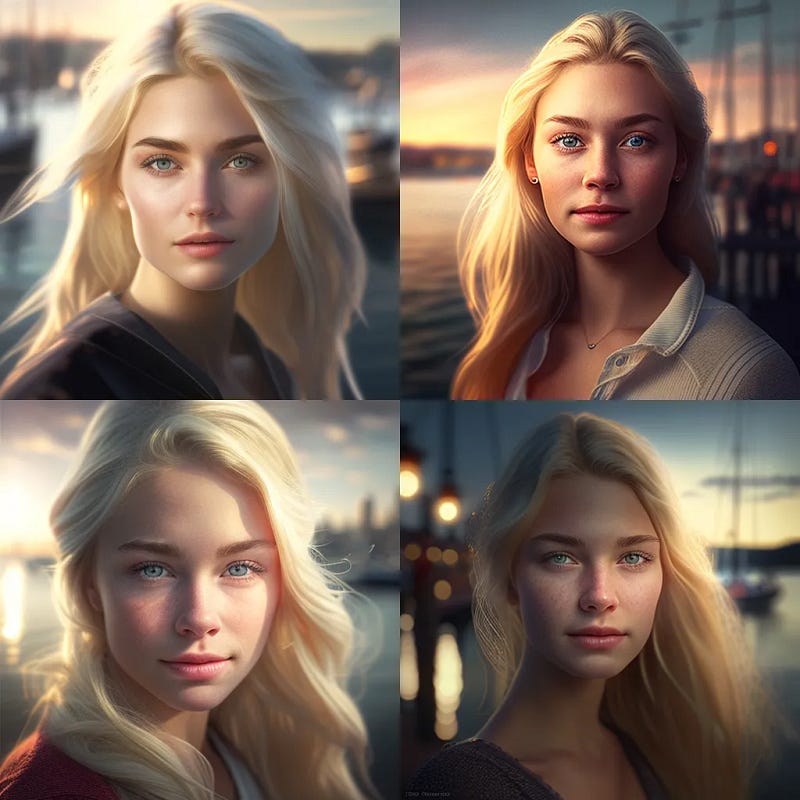
Image Created by Author with Midjourney

But I didn’t stop there because I tried to provide Midjourney with a prompt with additional information such as the lens used to take the photo and the aperture to try to get different images. However, I must say that in the end the result was almost the same, that is, subject in focus and background blurred as in the following prompt:

portrait of a beautiful blond girl in her 20s, a marina in the background, clear facial features, photograph, 50mm lens, f/2.8, accent lighting, global illumination — uplight — v 4

And the result was this:
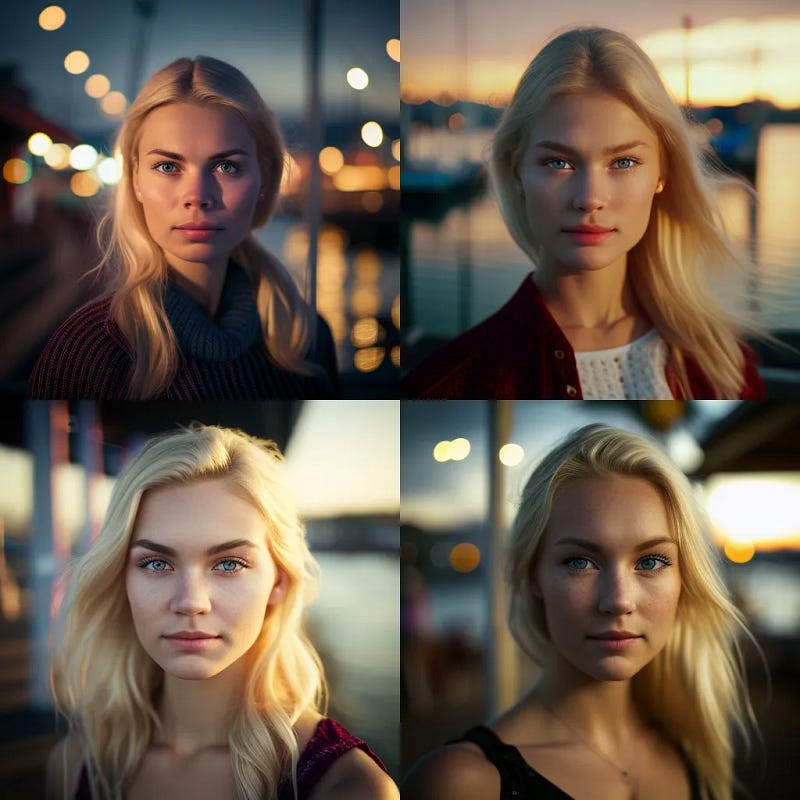
Image Created by Author with Midjourney

Setting a 50mm lens and f/2.8 aperture, the desired effect was, of course, a bokeh effect (subject in focus and background blurred), but by varying these parameters, I expected to obtain different types of shots. For example, with the following prompt, I reduced the focal distance and increased the aperture to obtain a more homogeneous focus.

This was the prompt used:

portrait of a beautiful blond girl in her 20s, a marina in the background, clear facial features, photograph, 24mm lens, f/ 22, accent lighting, global illumination — uplight — v 4

and this was the result obtained:
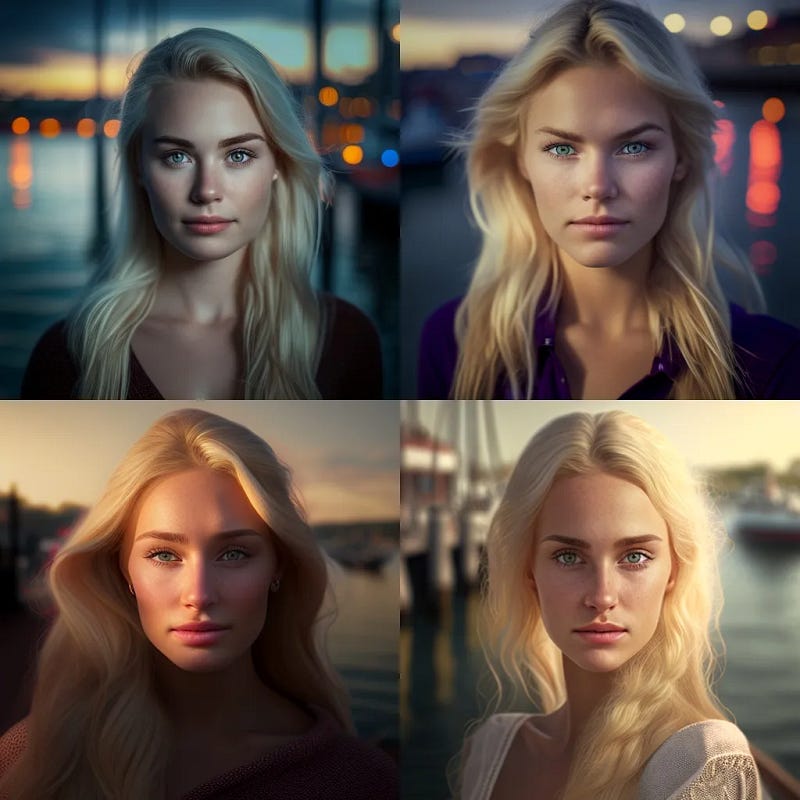
Image Created by Author with Midjourney

As you can still see a bokeh effect.

That’s why I ask you: “if you have any prompts through which, by entering parameters such as lens length, focal aperture, and whatever else, you can significantly modify images, feel free to write them in the comments.

In any case, the results obtained with this type of prompt are really impressive, and therefore I definitely consider it a prompt to save.

Obviously, then it is a matter of playing with the subject to obtain the variations that you prefer.

For example, if we want the same type of photograph but instead of the beautiful 20-year-old blonde girl, we want the portrait of a beautiful 30-year-old brunette girl with brown eyes, the game is easily done.

This is the prompt:

portrait of a beautiful 30-year-old brunette girl with brown eyes, a marina in the background, clear facial features, photograph, 50mm lens, f/2.8, accent lighting, global illumination — uplight — v 4

and this is the result:
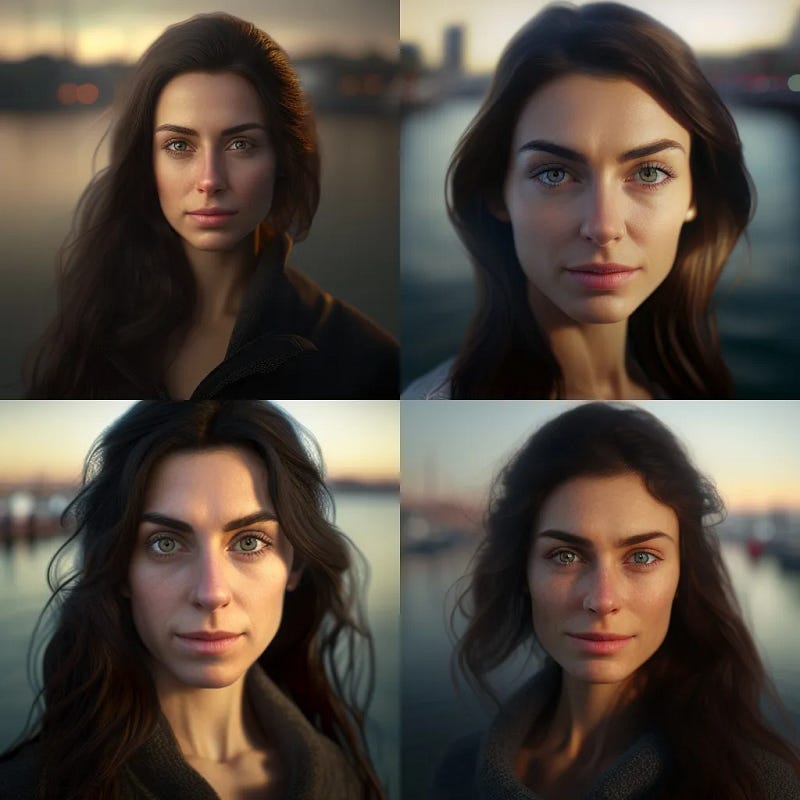
Image Created by Author with Midjourney

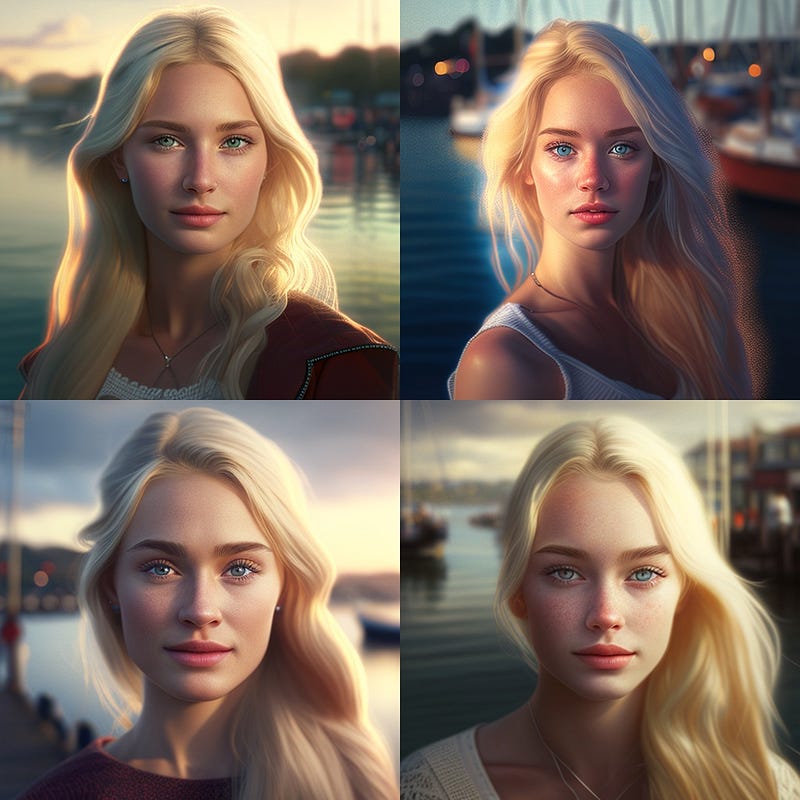
Now let’s add the “stylize” command to the prompt that we saw earlier to make the image more artistic.

Here’s the new prompt:

portrait of a beautiful blonde girl in her 20s, a marina in the background, clear facial features, photograph, accent lighting, global illumination --uplight --v 4 --s 500

And here’s the result:
Created by Author with Midjourney

As you can see, the resulting images are much more artistic and less photorealistic.

Needless to say, you can have fun and experiment by changing the subject, location, and lighting. Enjoy the process, and if you feel like it, feel free to share your results here in the comments.

Prompt for creating anime-style images with Midjourney

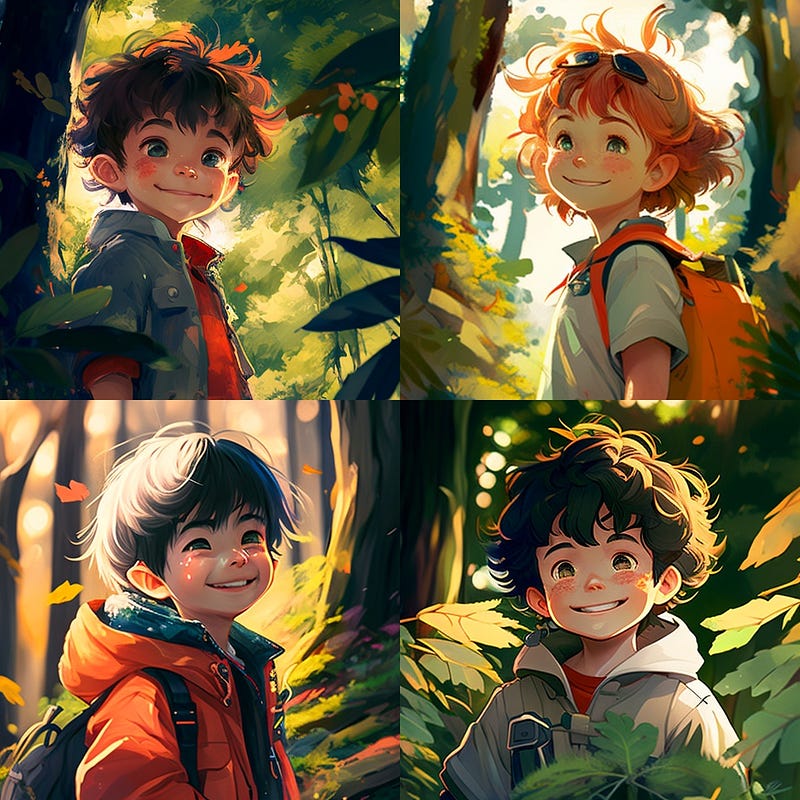
Now, let’s see a prompt for an anime-style image.

Here’s the prompt:

highly realistic anime illustration of a smiling child in a forest, bright and colorful, sharp and detailed, cinematic background

And here’s the result:
Created by Author with Midjourney

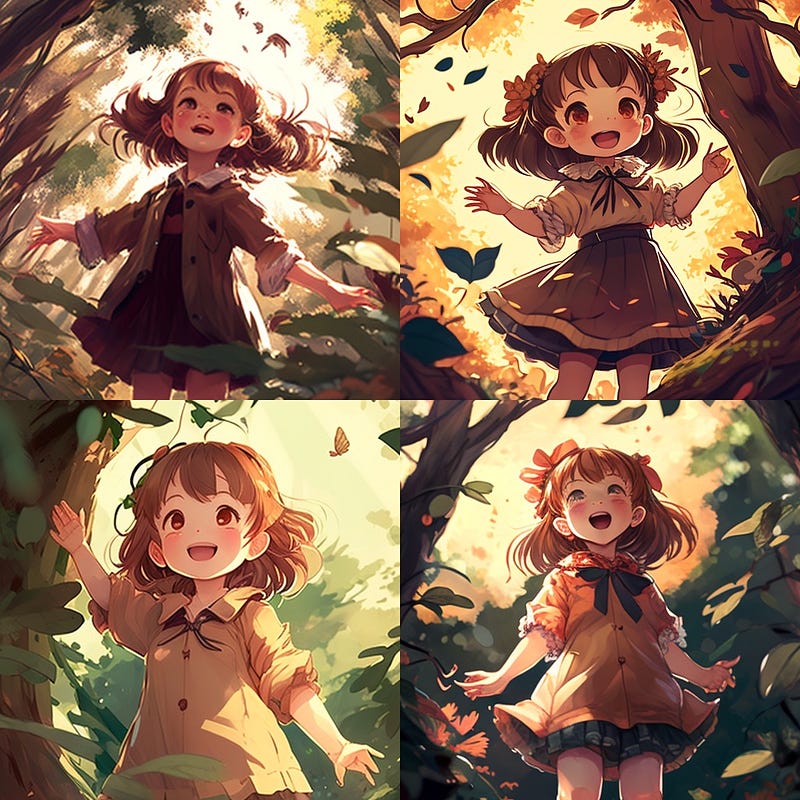
As you can see, thanks to this prompt for Midjourney, we have created a beautiful anime-style image that we can further customize. For example, we could specify that the child must always be smiling, with one arm raised, looking upward, and wearing a brown dress.

Here’s the prompt:

Highly realistic anime illustration of a smiling child in a forest, one arm raised and looking upward, wearing a brown dress, bright and colorful image, sharp and detailed, cinematic background

And here’s the image:
Created by Author with Midjourney

Prompt for creating cartoon-style images with Midjourney

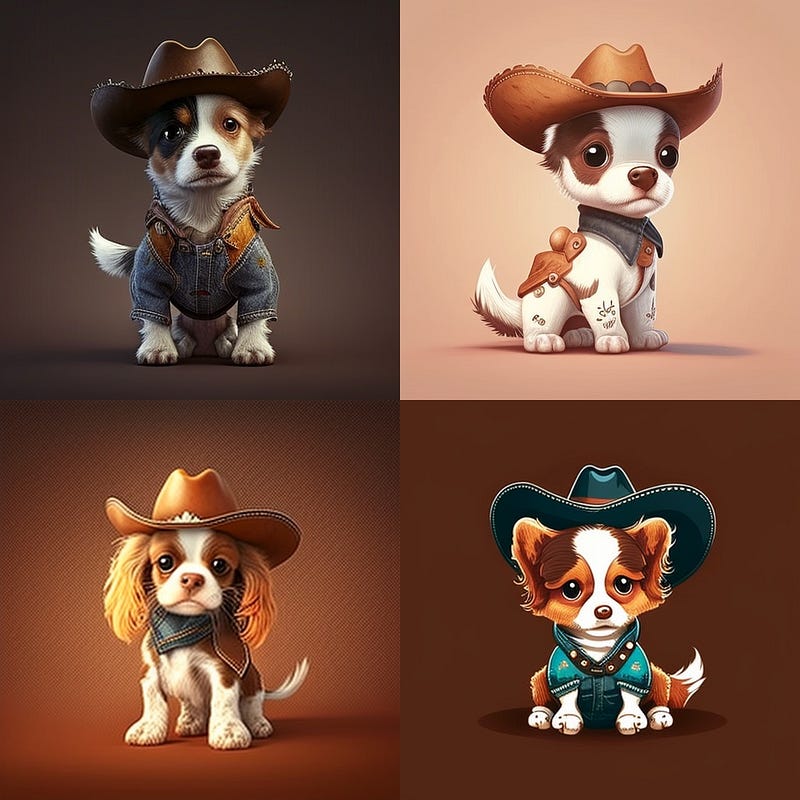
Let’s create a cute cartoon-style image of a little dog dressed as a cowboy.

Here’s the prompt:

cute little dog dressed as a cowboy, cartoon style

And here’s the result:
Created by Author with Midjourney

For this prompt, we didn’t give any specific instructions, but we can certainly be more specific if we want to.

Prompt for creating 3D rendered images with Midjourney

Now, let’s use another prompt to ask Midjourney to create a 3D rendered version of our cute little dog.

Here’s the prompt:

high detail cute dog face, realistic 3D render --v 4

And here’s the result:
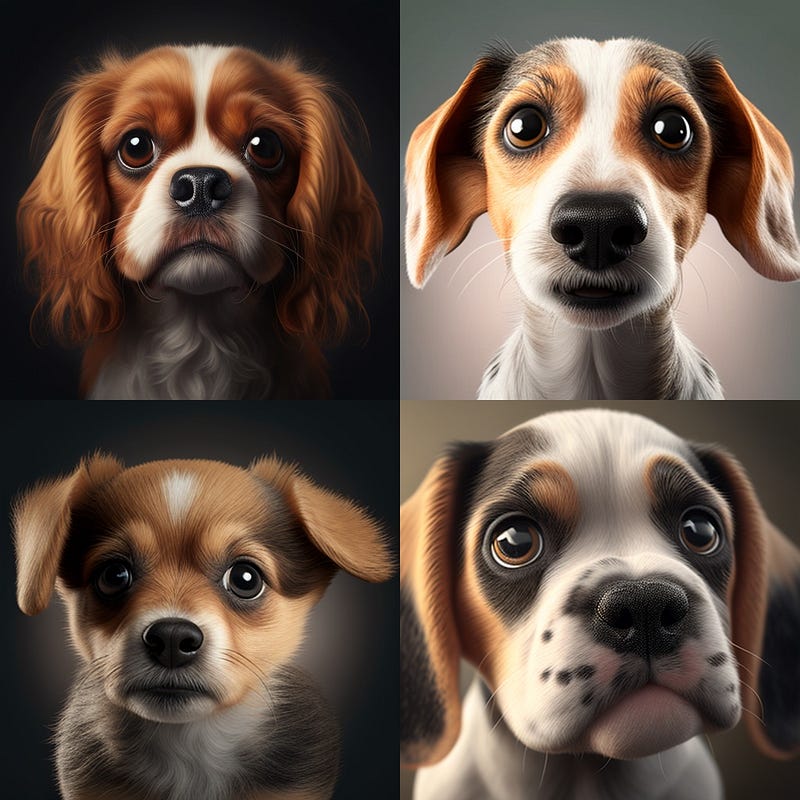
Created by Author with Midjourney

Impressive, I would say!

Prompt for creating fantasy-style images eith Midjourney

Now we ask Midjourney to create a fantasy character for us. For example, let’s say we want to have a boy with light skin, blond hair, blue eyes, dressed in leather, with a fantasy-style forest background with an artistic vein equal to 300 and an aspect ratio of 16:9.

This is the prompt:

boy, male, light skin, blond hair, blue eyes, leather dress, forest background, fantasy --s 300 --ar 16:9

And this is the result:
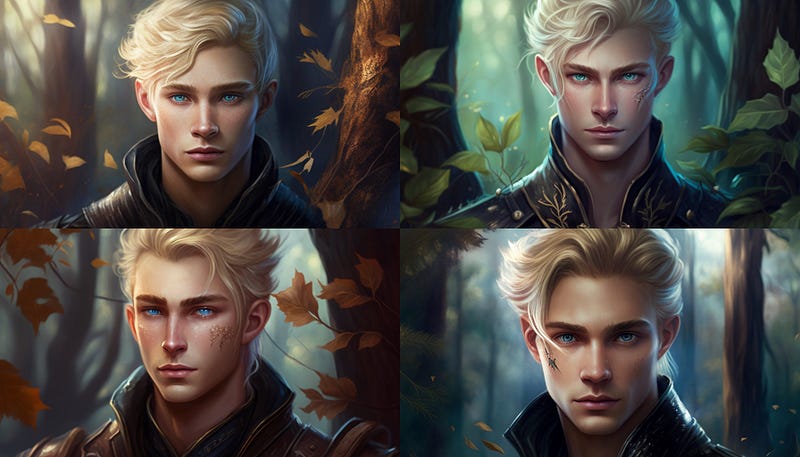
Created by Author with Midjourney

What do you think?

And what if we wanted to add a leather hat with a feather on his head?

Here’s the prompt:

boy, male, light skin, blond hair, blue eyes, dressed in leather, wearing a leather hat with a feather on his head, forest background, fantasy --s 300 --ar 16:9

And here’s the result:
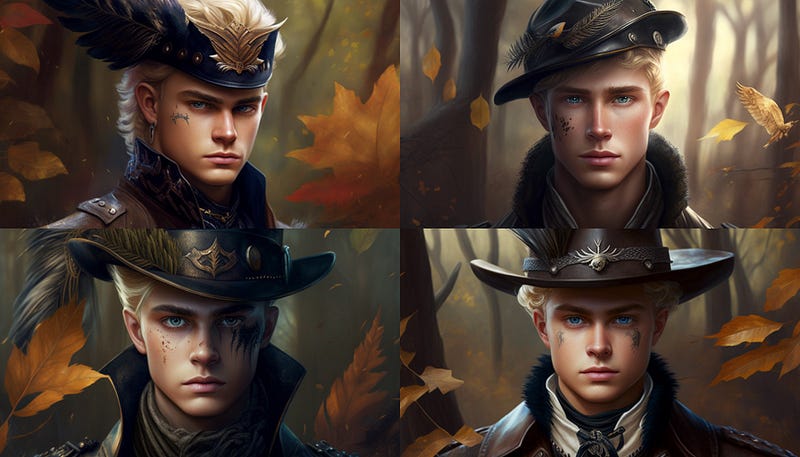
Created by Author with Midjourney

Prompt for creating coloring images ideal for coloring books

Midjourney allows you to create coloring book images ideal for adult or children’s coloring books.

Here’s an example prompt for coloring book images:

Coloring book, simple garden flowers mandala images for adults, completely white background, clean line art, no shading, no colored objects --ar 2:3

And here’s the result:
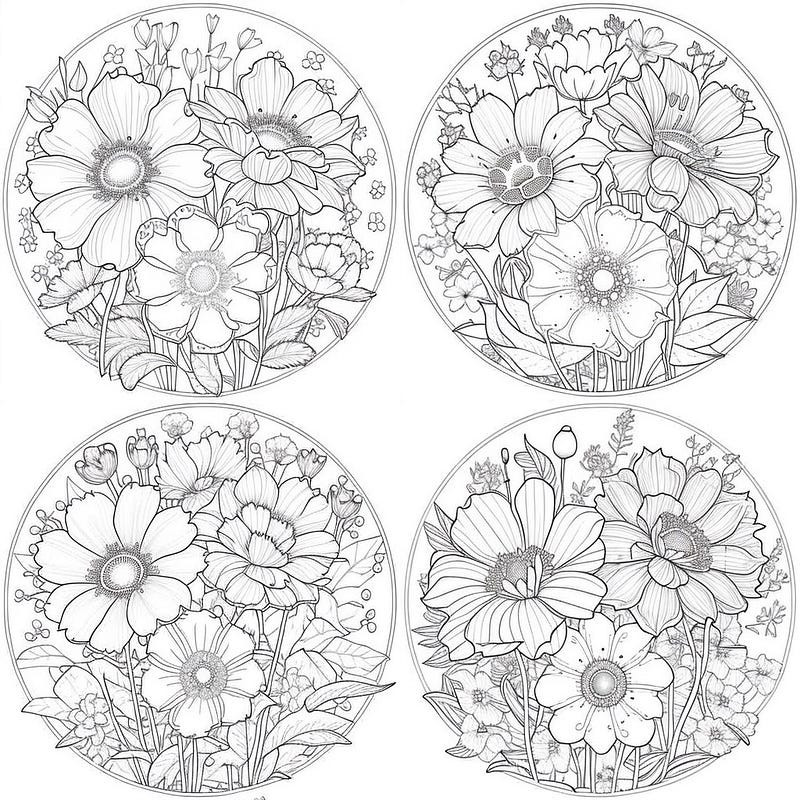
Created by Author with Midjourney

Here I have included the aspect ratio parameter set to 2:3 to obtain images that are ideal for printing on A4 sheets.

Here you will find more interesting prompts for creating fantastic and original coloring pages with Midjourney

Prompt to generate stickers with Midjourney

With these prompts for Midjourney you can create stickers that you can have printed directly from print-on-demand services

Images for restaurant menu

Midjourney Prompt to generate images of food for inclusion in a restaurant menu

As you can see, Midjourney allows you to generate amazing images with just a few pieces of information. With the right prompt, you can not only obtain excellent images but also bring to life the images that are currently only in your mind. Thanks to artificial intelligence, these images can become a reality and visible to everyone.

If you appreciate this type of content, start following me now because here on Medium, I share information about new business ideas and useful tools to improve our productivity through my stories. As always, around fifty claps 👏 per person are greatly appreciated and will motivate me to do better and keep this page updated with new prompts for Midjourney.

Save it now among your reading list and come back often.

See you soon!

You might also be interested in these stories:

👏 If you enjoy this kind of content as much as I do, let me know by leaving 50 claps, and then go to the comments section and post a link to one of your stories. I will come and read it and leave you my 50 claps. Receiving many claps certainly lifts your mood and encourages you to write on this platform.

Why not do it?

Thank you for reading ,my story!

Would you like to receive my articles directly to your inbox. Then sign up here! 👈

If you are intent instead on starting to create passive income for yourself through writing, then simply activate your membership on Medium with a membership costing $5 per month. Registering from the following link will support me at no additional cost to you. Register now! 🫵

Creativity
Ideas
Writing Prompts
Artificial Intelligence
Innovation
Recommended from ReadMedium