
Artificial Intelligence, Art & Design
15 tips to identify if an image is AI-generated art
How to spot AI-generated images at a glance
With AI image generators becoming increasingly advanced, it’s harder to determine whether an image was made by a human artist or AI-assisted.
Never fear, I am here! I’m going to give you my 15 top tips to spot AI art.
I find that I’m asked more and more to give my expert opinion on whether photos, fan art, or book cover designs, are human or ersatz. People want to know if they’re being sold the real deal or not. Some art admirers want to know if their appreciation is misplaced. And on the other side, I get asked by fellow AI artists if I can spot any telltale signs of artificiality, so we can improve our craft. I’ve also beta-tested for image generators like Jasper Art.
I feel like an art dealer authenticating whether an artwork is a fraud (or a detective investigating forgery). It’s actually quite exciting, and I love when people call on my expertise. I get to use my AI skills — and finally put my expensive art degree and scholarships to practical use (take that, Dad!).
But I believe we need to share AI art literacy with everyone, especially to safeguard against AI becoming the next “fake news” in an election cycle. We all need to learn how to spot AI images at a glance. So here’s a guide!
15 Telltale Signs an Image is Actually AI Art
— AI hands were a dead giveaway previously. Remember the Lovecraftian fingers of the dark ages of AI, in distant 2022? However, don’t rely on this anymore. Since March 2023, fingers generate accurately most of the time. Small details like the correct articulation of knuckles might remain clues.
— Eyeballs. One thing that hasn’t improved (yet!) is the circumference of the iris and pupils. AI can’t do circles. The albedo of the pupil is difficult to replicate. Often these are misshapen; not oval or egg-shaped, but incomplete, as if they are asymmetrical or have a notch taken out.
— Eyes (advanced). In photographic AI you can also look for mismatched reflections in eyeballs. The cornea naturally reflects a tiny white dot. If the eye is looking outward, this should be on the nasal side. If the eye is turned toward the nose, this pin-point reflection should appear nearer their nose.
Dots should be symmetrical — although note that the corneal light reflex may be mismatched in a photo if someone has a squint or lazy eye. Use your best judgment as to whether it’s fake, or normal cross-eyedness.
— Ears. You didn’t hear it from me, but AI ears are the new hands. They often lack definition. Artists get a pass (ears are hard!), but photographs should contain a helix (the outer curve that bends in) an anti-helix (that curve that protrudes), a tragus (the knob on the side of your face), an ear-notch and lobe. In images generated by AI these details can be indistinct.
And while you’re checking the ears, look out for mismatched earrings too!
—Teeth. The dentist will see you now. AI smiles can appear like the whole row of teeth was been capped in one action, with no gaps left for flossing!
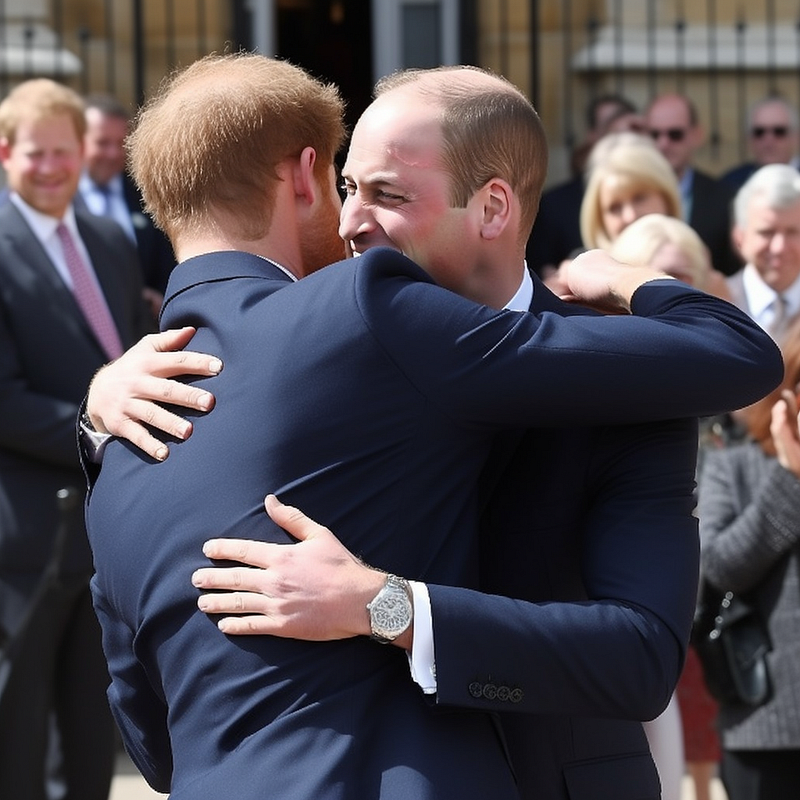
—Duplicates. If a famous person’s name was used as a term in the prompt, sometimes the AI will duplicate them (especially in a blurred background). Take a closer look at the other faces. I’ve hilariously missed this myself, in my AI “What If” series of Prince Harry:
— Buttons and bows. Call the fashion police! AI doesn’t know “how” items of clothing come together or work in the real world. It has no experiential basis to reference. Remember, these are superficial simulacrums. So look for mismatched buttons, unevenly spaced or sized. Also, buttons on male shirts are on the right, traditionally, and female on the left (dating back to when women had servants to dress them). AI doesn’t always get this right.
You can look for additional clothing errors, like impossible seams or untethered random bows. Also, shoes may not have correct lacing or eyelets, and laces may be missing aglets. Do the knots look possible?
— Historical errors. This applies more to photographs (artists can take liberties), but a sound understanding of history will help you detect AI — including whether photography even existed then, or that particular style.
A selfie daguerreotype of Jesus at the Last Supper probably didn’t happen.
— Wish fulfillment. On that note, ask yourself if someone is showing you an image they want you to believe, or that you want to believe (or that you’re susceptible to falling for). That politician that you don’t like, finally spotted eating babies? Exercise your skepticism. Especially with political content. I suspect that governments will shortly require campaigns to verify images.
— Source. It may sound obvious, but who is the image from? Do they have a reputation in this field (photography, watercolor, fanart—even proudly AI)? Do they have a consistent style, or do their mediums change erratically? You can perform a reverse image search or fact check. If photos depict famous faces, is the photographer likely to have access to celebrities?
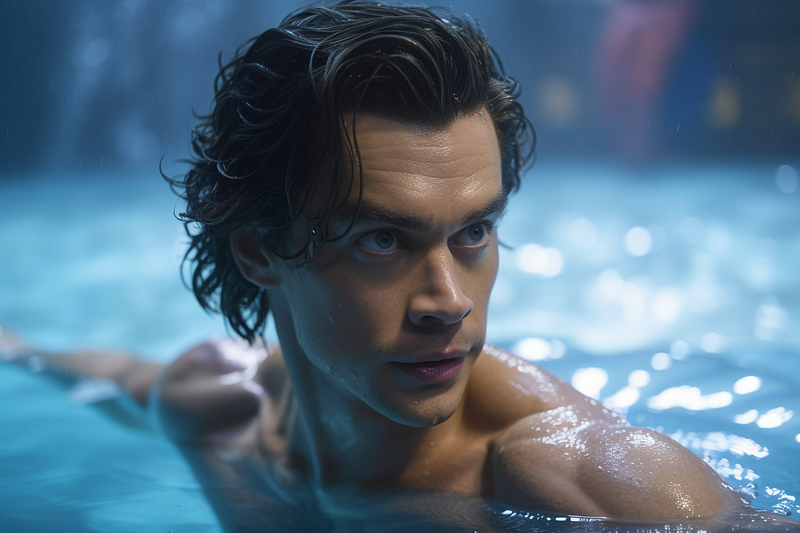
— Ridiculous levels of sexiness. This one should be self-evident. AI has the propensity to render detailed, unrealistically gorgeous gals and handsome hunks. In fact, almost all AI images are uncommonly pleasing to the eye:
— Square composition. MidJourney images are 1024 x 1024 pixels by default. This square shape is vestigial and stems from the training data being cropped to squares for consistency so it wasn’t distorted. Users can adjust aspect ratios now, but many don’t. If it’s square, it’s more likely an AI image. Other aspect ratios have similar file sizes but different dimensions.
Even different aspect ratios tend to centralize subjects and be less dynamic because a square focus is deeply ingrained in the square training datasets.
— Text. While Adobe Firefly can now render fonts, it’s rare to get complete text in AI artwork. Watch for road signs, shopfronts, book titles, and logos.
— Visual anomalies. One of my favorite SNL skits is the spoof game show, “What’s Wrong With This Picture?” in which contestants struggle to spot simple errors like a swing having only one rope. The same applies to AI images — look for continuity errors. Ask yourself: How did that get there? What is happening in the picture? Can you reconstruct the order of events?
— Incoherency. Just as AI doesn’t understand the functionality of clothing, it doesn’t comprehend the 3D actuality of objects or real people (it’s really just a glorified photo-restorer making interpolations based on how images should look; everything to AI is surface and face value). Purposelessness or lack of intent is a hallmark of this fallacy; look for designs and structures that don’t make sense but look cool. AI art is all style over functionality.
Remember, form follows function. Impossible objects are just that: impossible! This is especially true of architecture, industrial design, vehicles, and mechanisms. Ask yourself if it works in the real world.
Case studies: Spotting a fake AI image in the wild
I’d like to show you some of the AI generated content that I’ve been hired to debunk, but most of those are private. Thankfully we can find more online!
Let’s look at a quick example that crossed my Facebook feed earlier today:
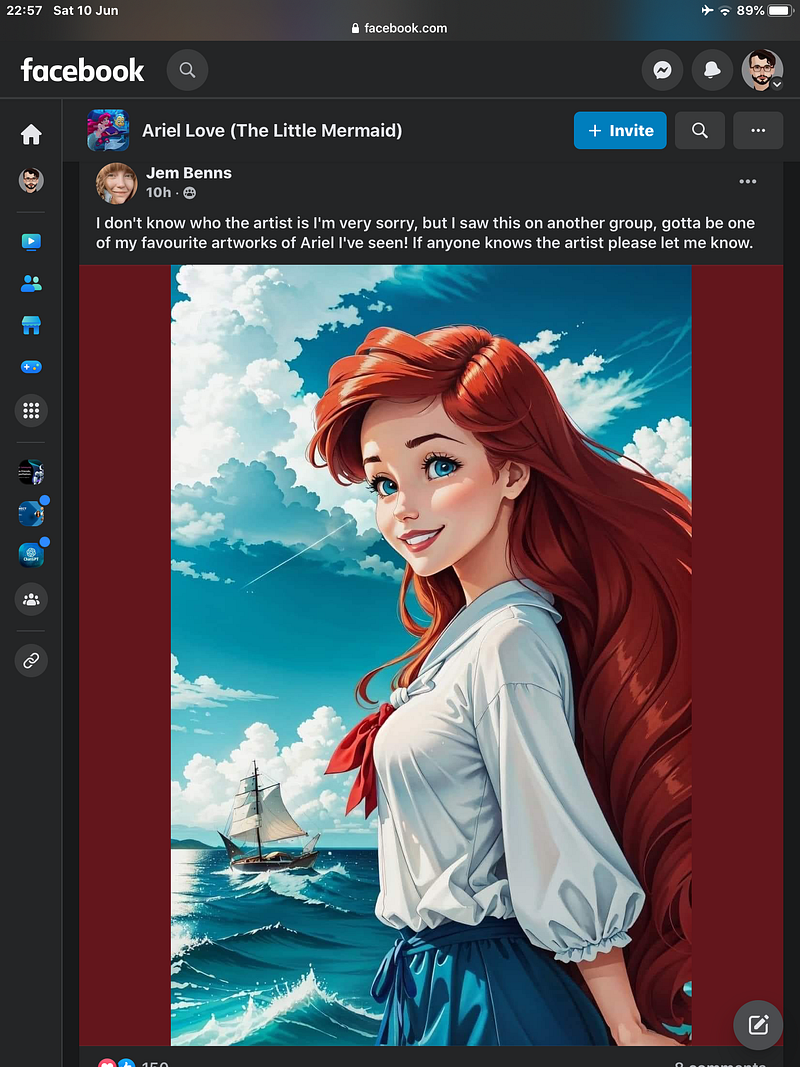
Can you spot 4 signs that this Ariel was created by an AI image generator?
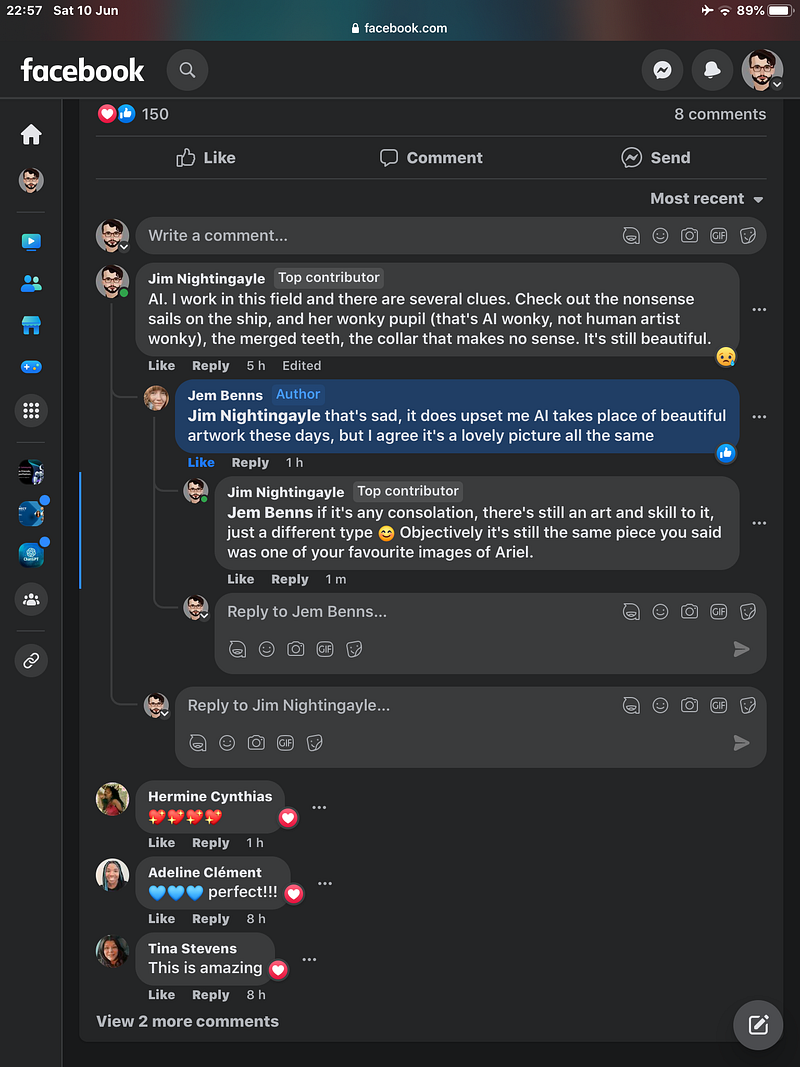
Using my guide, you should be able to detect: the non-circular pupil, the uninterrupted block of teeth, the clothing that doesn’t make sense (the random red bow), and the impossible sails and rigging on the schooner.
The AI art that fooled the Sony World Photography Organization
Finally, let's look at a realistic image that won the Sony World Photography Awards. I’m a little surprised that the judges didn’t notice (which highlights the urgent need for everyone to learn AI visual literacy). With all respect to the German AI artist, Boris Eldagsen, if you’ve read this far, you should be able to outperform the Sony World Photography Organization’s experts!
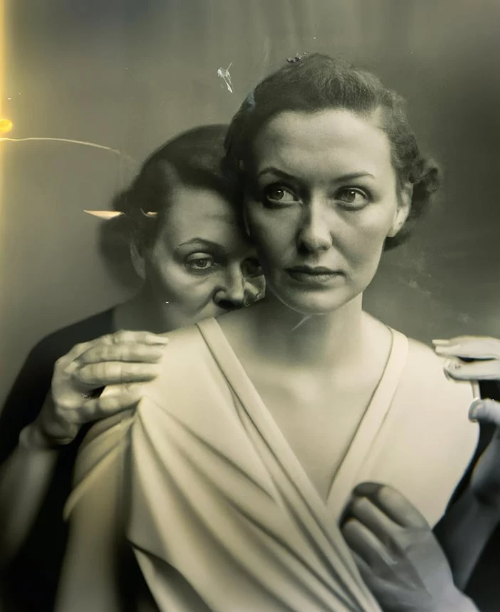
Hopefully, you noticed the fingers (which have mismatched lengths and fingernails), the unlikely drape of the costume (which defies fabric bias, and note there is no selvage to the sleeve), the poorly defined ears, and most significantly: the eyes. There’s a flat edge to the right iris, and the spark is wrong. I’ve heard AI art vaguely described as dead-eyed. Now that you know to look for the corneal light reflex, you‘ll understand why that is.
Improving your own AI art so it looks less fake and more realistic
These tips to spot AI fakes can be used by AI artists as well to improve their craft. One of the best ways to correct eyes is with a GFP-GAN, which circles the iris and pupils and often fixes the corneal light reflex. This effectively makes two AIs compete to restore the AI image as if it’s a damaged photo:
Building your own AI visual literacy
I’m going to leave you with links to my popular AI “fake image” galleries, so you can keep on practicing and hone your skills. If my article has helped or inspired you, please clap and share a link to my guide on your social media!
You might enjoy these related articles from Jim the AI Whisperer:
Who is Jim the AI Whisperer?
Jim the AI Whisperer offers private training in how to use AI generators to create stunning visuals, as well as how to write original and compelling content. If you’re interested in discovering more, feel free to contact me.
I’m also available for podcasts, interviews, fine-tuning AI prompts, and creating custom prompt libraries and AI images for companies.


