
How to Increase the Size of Your Midjourney Images
Upscale your images to print resolution
Midjourney is an amazing platform for creating image using generative AI. Although the service is a bit more challenging to use than competing options like OpenAI’s DALL-E, Midjourney images are known for their exquisite details and dreamlike, visually-stunning qualities.
Unfortunately, the images are also known for their minuscule size. By default, Midjourney images are just 512 pixels by 512 pixels.
The service does offer built-in upscaling options, but they’re not great — the most extreme built-in upscaling (Beta Upscaling) only results in a 2048-pixel image. That’s about 4 megapixels — hardly large enough to print or enlarge.
The great news, though, is that you can use the software program Topaz Photo AI to make Midjourney images truly high-resolution with just a bit of extra work.
Here’s the process I use to increase the size and resolution of Midjourney images with Topaz Photo AI. You can download a free trial of Photo AI on the Topaz website to follow along.
Grab an Image From Midjourney
Midjourney is a little trickier to use than alternatives like OpenAI’s DALL-E. I found this tutorial from Digital Trends helpful.
Essentially, you set up a Discord account, request an invite to Midjourney’s discord, find a “newbie” room, and then use the command “/image [PROMPT]” to create a set of sample images. You can then “upscale” those right in Midjourney, which results in a larger — but still small — image.
Here’s a Midjourney image I created with the prompt: “A Bichon Frise eating an orange.” After initial upscaling, it’s about a 1 megapixel image.
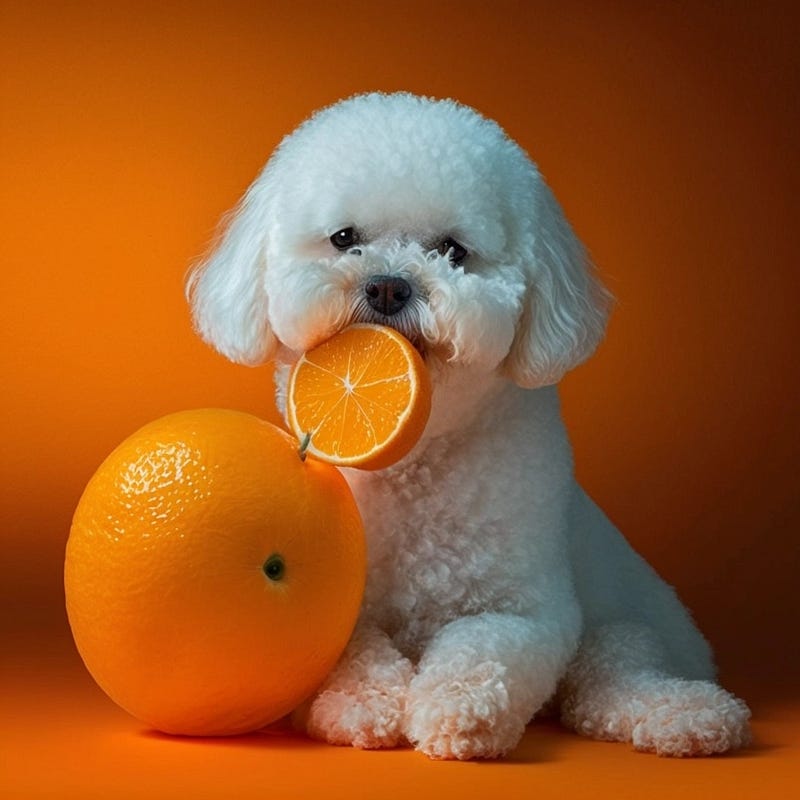
Visually, it looks great at a web resolution. But if we go to enlarge it, things get messy, and fast.
Here’s a detail view of the image, enlarged to show details.
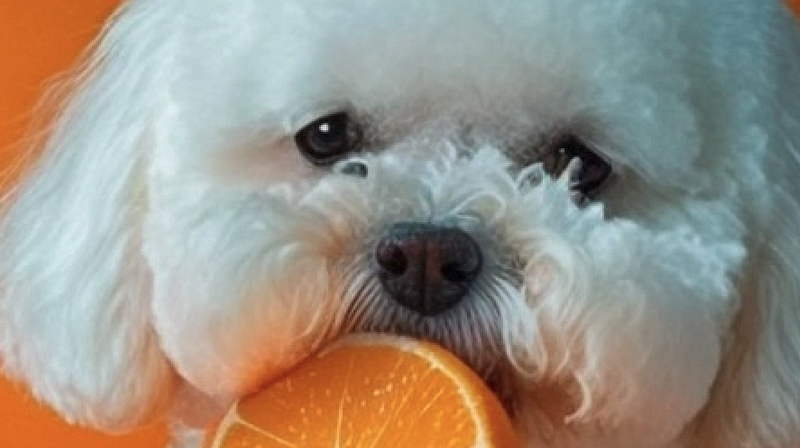
There are a lot of issues with this image. Because of the low resolution, its pixelated and not crisp. There is also noticeable artifacting, especially around the eyes and the hair on the dog’s nose.
The image would work fine in a blog post, but if you wanted to display it at high resolution or print it, these defects would be far too noticatble. Likewise, if you wanted to crop into the image, you’d lose enough pixels that the defects would become a problem, even for web usages.
AI Upscale Midjourney Images with Topaz Photo AI
That’s where Topaz Photo AI comes in. The software tool is a powerful desktop software suite that uses artificial intelligence to increase the resolution of low-res images, which also removing noise, blurring, artifacts and other image defects.
Photo editors often use Topaz to clean up old photo scans, or to fix issues with digital images that were captured at a low resolution or have other visual defects.
Topaz is a pro-grade software program, but you can grab a free trial on the Topaz website.
Open Topaz Photo AI, and select your Midjourney image.
Photo AI will automatically analyze the image, detecting ways to make improvements.
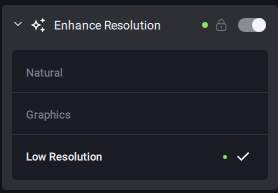
I like to set the Upscaling to around 4x, which is a 400% enlargement. Use the Enhance Resolution slider to do this.
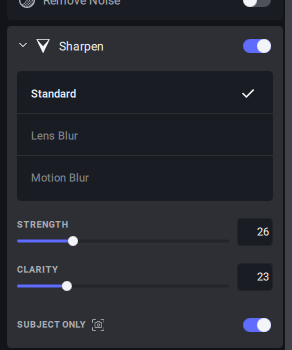
I also like to use Topaz Photo AI’s Sharpen tools to make the image crisper and less blurry. I find this helps to create realistic enlargements.
If you’re enlarging photos of people, you can use Photo AI’s Face Reconstruction tools as well.
You’ll then see a preview of the low-res image and upscaled, corrected image side by side. Select the Save button to finalize the upscaling and photo correction. Topaz Photo AI will save a high-resolution copy of the image to your computer. The process takes about 20–60 seconds depending on your hardware.
Results of Photo AI Upscaling
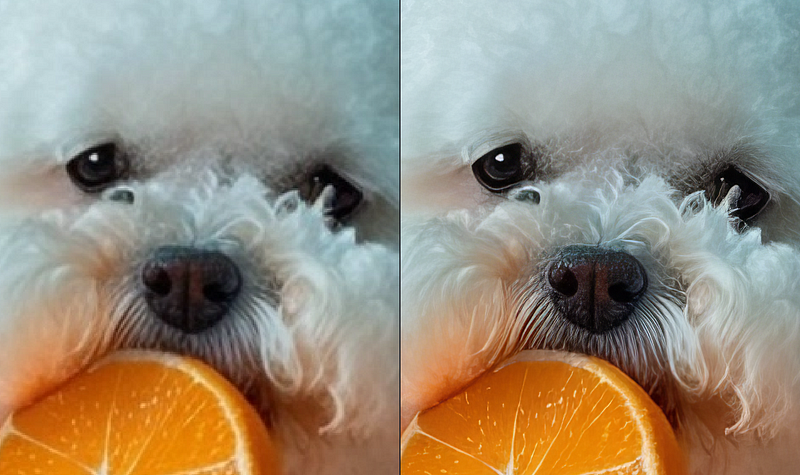
Here’s the original and upscaled versions of our Bichon image side by side.
Wow! You can already see that Topaz Photo AI has made the image much crisper and sharper, even while increasing its size 400%. The hairs around the dog’s nose are much more distinct, the eyes are clearer, and the orange even looks ripe and juicy!
When we look at a detail view of the enlarged image, the difference is even clearer.
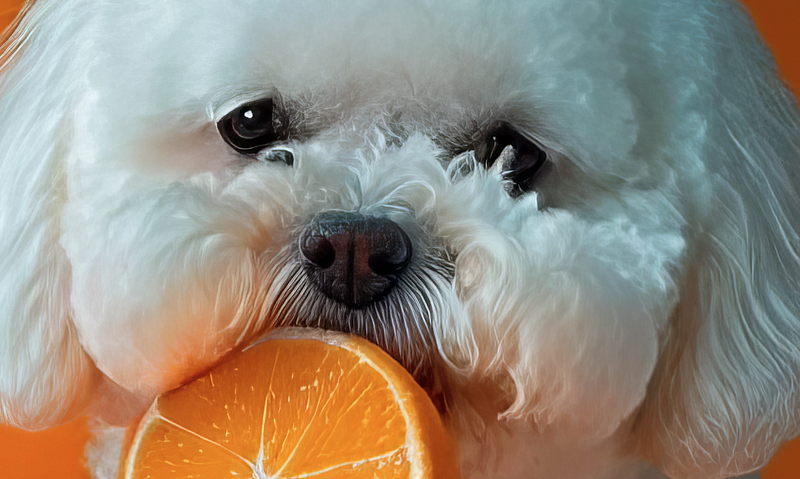
Here’s a comparable zoom level on the original image, for comparison.
As you can see, the image is much clearer! And the best part is that it’s now over 3,000 pixels on each side. You could print this already, and that’s a 4x enlargement.
Topaz Photo AI can also enlarge up to 8x, so you can get even bigger, print-ready images using this process.
Photo AI allows for bulk upscaling and image improvement, too, so if you have a giant batch of Midjourney images, you can process them all at once.
Challenges and Caveats
The only real downside to the software is its price. As I write this, Topaz Photo AI costs $199.
Still, if you upscale many Midjourney images — or you can use Photo AI for your other photographic work, such as removing blurring or noise from images or upscaling older scanned images — it’s well worth the price.
It’s also important to check your upscaled images, especially if they contain faces. Sometimes the face reconstruction functions work great, but for tiny faces, they can result in strange distortion. I like to “pixel peep” my upscaled image at 100% after upscaling, to check and make sure everything turned out okay.
Topaz Photo AI actually lets you do this right in the app, which helps to quickly check if something looks weird (or weirder than a Midjourney image should, anyway) and make tweaks.
Conclusion
Lots of people have accused tools like DALL-E and Midjourney of being mere “toys”, in part because of the small size of the images they generate.
With this process, though, you can enlarge your Midjourney images to a truly usable (and printable) size, making them suitable for full-page blog images, printed publications, wall art, and much else.
And even if you don’t need huge images, remember that the sharpening and face reconstruction functions in Photo AI can result in better, crisper images at any resolution.
Grab a free trial of Photo AI, get some images from Midjourney, and they this technique out!
More From The Generator
Medium is an amazing platform. For just $5 per month, you’ll get access to every article on Diy Life Tech, all my other writing, and the writing of thousands of other medium contributors, from Clive Thompson to Barack Obama. Subscribe today!
This article contains affiliate links that support my writing at no cost to you. Thanks!




