
2023 Creator Tools
Fix DALL-E Face Issues With Upscaler’s Face Pro
Wonky AI faces, fixed!
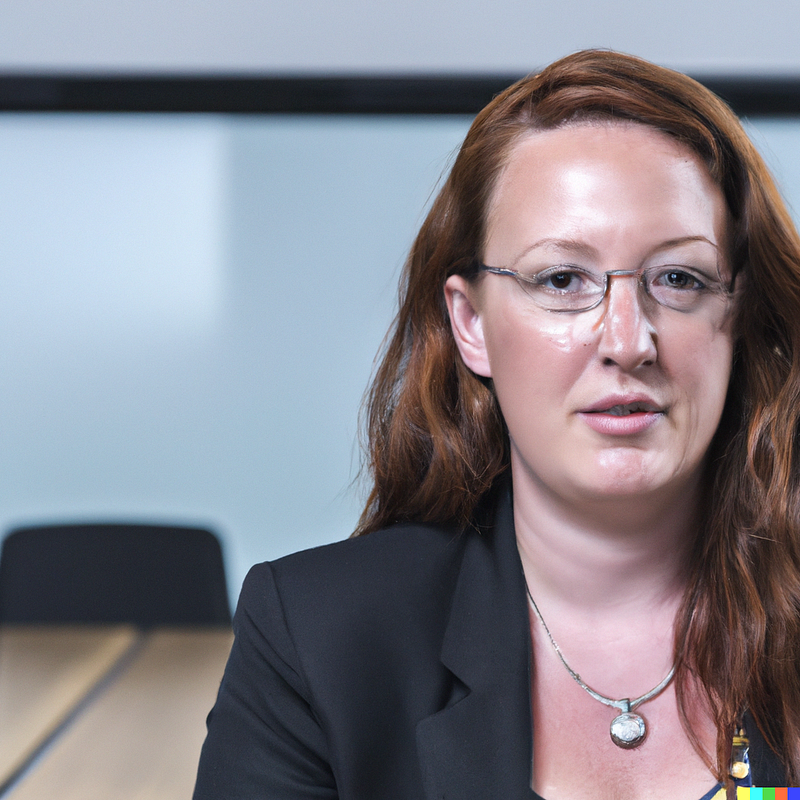
AI image generation systems like Dall-E can create some wonky faces. Although these systems are useful for generating AI people, human faces are complex. That means you can often identify an AI-generated image of a person based upon strange errors on the face.
A new system from Upscaler allows users to quickly and easily fix these errors, transforming DALL-E face images into something much more usable. The system also upscales the image at the same time, increasing its size by 400% or more.
Here is our test of Upscaler’s new face correction techniques. Want to try Upscaler out for yourself? We got a special deal that gives our readers 10 free credits to try the system out.

Common Errors with AI Faces
There are a lot of photos of people, which means that AI systems like DALL-E have a lot of training data to learn from when it comes to generating faces. Faces are also relatively predictable, which means that these AI systems became decent at generating them pretty quickly.
Decent, however, is not perfect. Although AI systems can generate plausible faces, systems like Dall-E still struggle to get the details perfect.
Common errors on AI faces include:
- Strange placement or shape of the eyes
- Extraneous features added around the periphery of the face
- Strange issues with teeth or lips
- Inappropriate or incorrect facial expressions
- Poorly drawn eyebrows, wrinkle lines, or eyelids
Even if the image you generate with AI is otherwise excellent, an error on the face can make it unusable. Fixing these errors manually with tools like Photoshop is time-consuming and requires a talented retoucher.
Fixing AI Faces with Upscaler
We have previously reviewed Upscaler, which is a simple tool for using AI to dramatically increase the size of images produced by Dall-E and other systems. (Our parent company works with Upscaler’s parent company on an unrelated partnership.)
Although it’s not as powerful as tools like Topaz, it has a simple and easy-to-use web interface that makes upscaling very easy.
Upscaler’s system now has a new feature, too. In addition to upscaling images, it now includes a setting called ‘Face Pro’ that automatically fixes wonky AI faces.
The system works by removing the face from the image during the upscaling process, and using an AI model specifically for face reconstruction in order to fix the face before sending the final image to the user. The whole process usually takes about 30 seconds to complete.
Testing the Upscaler Face Pro Setting
Using Face Pro is simple. You select it on the Upscaler page under the “AI Model” section, and then upload your image to upscale as normal.
We tested the Face Pro system with images from two platforms.
DALL-E Face Images
To begin, we started with an image created by Dall-E. Here is the prompt and the resulting image.
Woman in a company boardroom, closeup, photorealistic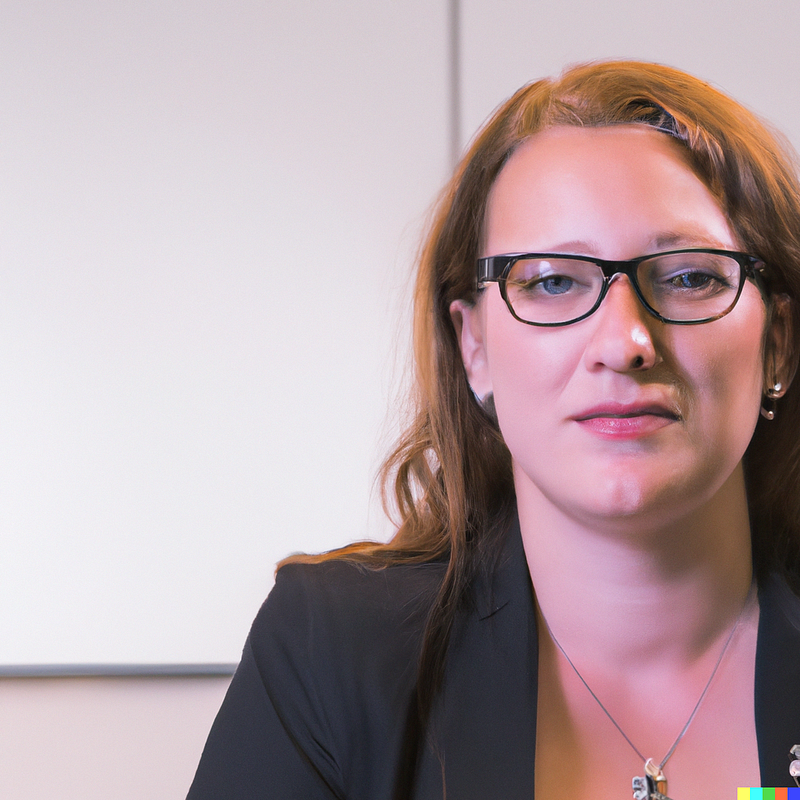
As you can see, Dall-e got the general intent correct, but the face has several noticeable errors. The eyes and hairline are strange, there are strange flaws around the ears, and there are some artifacts around the lips.
We ran this Dall-e image through Upscaler with the Face Pro setting selected. Here is the result.
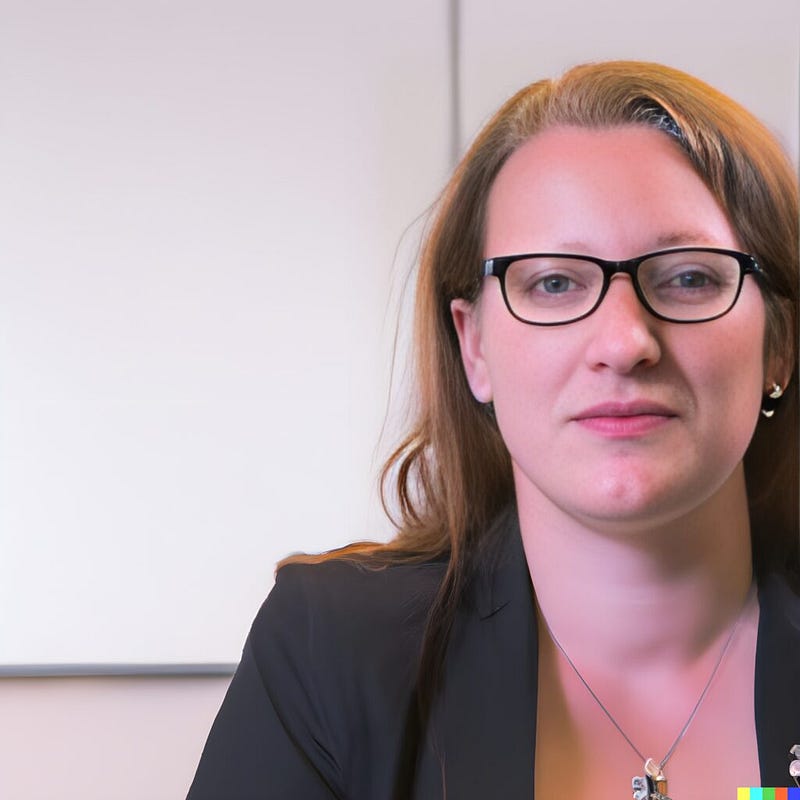
The results aren’t perfect, but they are much better than the original. The AI-generated person’s left eye still looks a little strange, but the artifacting around the lips, the hairline issues, the strange reflections on the face, and the ear shape all look much better. It’s a dramatic improvement, and this image would now be much more usable.
This Person Does Not Exist
For another comparison, we tested the system on the output of Thispersondoesnotexist.com, a popular free AI face generator. The system is based on StyleGAN, an early generative adversarial network face generator created by NVIDIA. The system is specifically tuned to create faces, but it still often creates faces with strange AI issues.
Here’s the sample face that we created with thispersondoesnotexist.com.

It’s fairly convincing, but you can see several issues. There are flaws with the teeth, strange angles in the eyebrows, an unrealistic pattern of wrinkles near the eyes, and a strange shape to the earring.
Here is the result after running the image through Upscaler.

The teeth look much better and more realistic, the eyebrows and eye areas have more convincing patterns and wrinkles, and the earring has more of a natural shape. You might still need to retouch the hair just below the earring, but overall this is a much more convincing-looking face.
We did notice that Upscaler’s system tends to result in a softer look in the original image. This is probably due to the process used to correct the face, rather than the upscaling process, which tends to preserve detail. For many users, the softening probably isn’t an issue, but if you need to keep the original crisp lines in a photo, it’s something to keep in mind.
Conclusion
Overall, we were impressed with Upscaler’s ability to fix AI-generated faces. The system did best when taking very strange Dall-e faces and turning them into something usable.
If you were using one of these faces in a marketing campaign, you’d likely still want the involvement of a professional retoucher. For basic illustrative content, however, Upscaler’s system does a great job.
Even if you’re going to make small corrections to the face, it can also get you well on your way to having a usable face with just a few second’s worth of time.
You can try out Upscaler yourself. We worked with StockPhotos.com, which created the tool, to get a special deal for our readers. Your first 10 credits for the system are free.
Try it out on your own face photos and see if Upscaler’s new system can help make them better and more realistic.
Originally published at https://syntheticengineers.com on January 2, 2023.


