avatarClark

Free AI web copilot to create summaries, insights and extended knowledge, download it at here

6997

Abstract

r/">Website</a></p><p id="a01e">🌐 Research: <a href="https://www.corecode.io/macupdater/">Website</a></p><h1 id="596c">5. Museeks</h1><figure id="429c"><img src="https://cdn-images-1.readmedium.com/v2/resize:fit:800/1*Y37lqieFyDd0ERQnnNHbtg.png"><figcaption>Screenshot of Museeks app on Mac from the developer’s website</figcaption></figure><p id="acf4">When Mr. Jobs introduced the iPod and the iTunes store, many people had the right to own their music by purchasing them directly from the store. Now, unfortunately, you don’t own your music. Instead, services like Apple Music, Spotify, or Pandora keep you in their debt. Still, some people possess an extensive library of local music files and want to play their songs locally.</p><p id="1a36">macOS comes with an app named QuickTime which allows you to play many media files, but it has a relatively classic interface design and is not really up to today’s design standards.</p><p id="c694">Introducing Museeks, a simple, minimal app that allows you to create your own playlists and manually add your music library to play anytime you desire. The app doesn’t offer much in user interface design, but it provides enough functionality to satisfy you.</p><p id="f70d">Museeks can import .m3u playlists and adapt its interface to dark mode.</p><p id="8dd2">🔐 Privacy: Collects personal data</p><p id="78b2">💳 Price: Free!</p><p id="f188">☑️ Compatibility: 💻 Mac</p><p id="4986">🧩 Design: Displeasing</p><p id="e8d7">⭐️ Rating: Not available</p><p id="e3c5">🔗 Download: <a href="https://museeks.io/">Website</a></p><p id="c5c4">🌐 Research: <a href="https://github.com/martpie/museeks">GitHub</a></p><h1 id="8355">6. Subtitler</h1><figure id="bacc"><img src="https://cdn-images-1.readmedium.com/v2/resize:fit:800/1*A1GMkLfnbeCVlZp7qmafaw.png"><figcaption>Screenshot of Subtitler app on Mac</figcaption></figure><p id="6854">Like the previous app where you could play your music locally, some people own movies as local files and watch them on their Mac. However, for many non-English speakers, the problem with watching a local film, tv show, or documentary is not having the subtitle file.</p><p id="daac">Subtitler is a simple utility that allows you to drag the movie file you want to watch and receive its subtitle in almost any language. Simply click on the subtitle file and have it downloaded to your computer.</p><p id="9220">Once the subtitle is downloaded, you can watch it with a media player, which I’ll introduce one later in this story.</p><p id="357b">🔐 Privacy: Collects personal data</p><p id="153e">💳 Price: Free!</p><p id="2b37">☑️ Compatibility: 💻 Mac</p><p id="f172">🧩 Design: Displeasing</p><p id="dc71">⭐️ Rating: Not available</p><p id="b37e">🔗 Download: <a href="https://s8sachin.github.io/subtitler/">Website</a></p><p id="8c81">🌐 Research: <a href="https://github.com/s8sachin/subtitler">GitHub</a></p><h1 id="03fd">7. CleanShot X</h1><figure id="0dce"><img src="https://cdn-images-1.readmedium.com/v2/resize:fit:800/1*31hnvKt6hpeI_rx42lBJdg.png"><figcaption>Screenshot of CleanShot X app on Mac from the developer’s website</figcaption></figure><p id="1adb">Taking a screenshot on your Mac is one of the easiest things you can do. Simply press <code>CMD + Shift + 3</code> keys on your Mac, and it will do the job. But, for many people, especially creatives who make a tutorial from their screen or designers who share prototypes with developers, the simple screenshot tool on the macOS is not enough.</p><p id="63ee">CleanShot X is a phenomenal utility that allows you to do much more with your screenshots. For example, I use the annotation tools within its editor to make my point when showcasing a feature on an app or a website.</p><p id="6c6b">You can push your screenshots to the cloud so they are available online. Also, the ability to quickly drag-and-drop is a convenient feature.</p><p id="6ab9">Many apps and websites don’t allow you to select their text or share a link to their article so you can read them later; that is why CleanShot X provides a tool to screenshot any scrollable content.</p><p id="933f">There is also screen recording in various formats and recording your webcam and screen simultaneously, which is excellent for tutorial creation.</p><p id="072c">Don’t miss this one if you are looking for a solid utility and productivity all-in-one app to assist you in the screen capture. It is a great app.</p><p id="320e">🔐 Privacy: Data is not yet provided</p><p id="781e">💳 Price: 29</p><p id="b4cc">☑️ Compatibility: 💻 Mac</p><p id="7da5">🧩 Design: Decent looking</p><p id="8c00">🔗 Download: <a href="https://cleanshot.com/">Website</a></p><p id="ecdb">🌐 Research: <a href="https://cleanshot.com/">Website</a></p><h1 id="c347">8. iStatMenu</h1><figure id="6a65"><img src="https://cdn-images-1.readmedium.com/v2/resize:fit:800/1*3q9TSaEYqmcjadpTf40CTg.jpeg"><figcaption>Screenshot of iStatMenu app on Mac from the developer’s website</figcaption></figure><p id="a9ae">Many power users are already familiar with this app. Once installed and configured, you will have the ability to monitor your Mac’s hardware properly.</p><p id="52f1">What makes this app unique is how well its design is. It gives information about your Mac. All you need is to tell iStatMenu what information you need, and it will provide them as icons and text in your menu bar.</p><p id="5822">I have it set to show my system memory alongside CPU temperature and SSD storage. I have also configured it to show me the weather and send real-time info about my upload and download speed.</p><p id="47f6">Not so often, there is an app that is leaking memory and making your system slow. It is imperative to find and report that app for making sure the bugs get fixed in their upcoming releases. Using iStatMenu, I could easily do that.</p><p id="3c94">🔐 Privacy: No data collection</p><p id="2a66">💳 Price: 9.99</p><p id="d1f2">☑️ Compatibility: 💻 Mac</p><p id="d60d">🧩 Design: Displeasing</p><p id="8879">⭐️ Rating: Not available</p><p id="c310">🔗 Download: <a href="https://apps.apple.com/us/app/istat-menus/id1319778037?mt=12">AppStore</a></p><p id="b5c3">🌐 Research: <a href="https://bjango.com/mac/istatmenus/">Website</a></p><h1 id="e8dc">9. The Unarchiver</h1><figure id="edd5"><img src="https://cdn-images-1.readmedium.com/v2/resize:fit:800/1*TgsjVgcXoBanjV7v9T20KQ.png"><figcaption>Screenshot of The Unarchiver app on Mac</figcaption></figure><p id="4553">One of the best free utilities to work with compressed files on the Mac is the Unarchiver. It is a free app that updates almost 2 to three times a year and supports many compression formats.</p><p id="499a">There is little configuration to do for making it the default app to uncompress and compress your files. Once that is done, you won’t even notice how well The Unarchiver works.</p><p id="4610">🔐 Privacy: No personal data collection</p><p id="c0c6">💳 Price: Free!</p><p id="1e25">☑️ Compatibility: 💻 Mac</p><p id="0aaa">🧩 Desi

Options

gn: Displeasing</p><p id="338c">⭐️ Rating: Insufficient data</p><p id="2b49">🔗 Download: <a href="https://apps.apple.com/us/app/the-unarchiver/id425424353?mt=12">AppStore</a></p><p id="d930">🌐 Research: <a href="https://theunarchiver.com/">Website</a></p><h1 id="7c30">10. IINA</h1><figure id="6bbb"><img src="https://cdn-images-1.readmedium.com/v2/resize:fit:800/1*Udysg_0oWm3gmynfazr30g.png"><figcaption>Screenshot of IINA app on Mac from the developer’s website</figcaption></figure><p id="ea08">One of the best native-looking media players for Mac is IINA. It is a light app and natively works with Apple Silicon. In addition, it has a great set of features that make this an incredible player.</p><p id="3ac7">For one, the picture-in-picture feature is excellent for watching a podcast and wanting to attend to your work simultaneously. Also, there is the trackpad and gesture support for changing the media playback.</p><p id="b2f0">IINA supports dark mode and brings some additional playback control to MacBooks with a touch bar. Perhaps, one underrated feature is playing online videos from streaming sources and YouTube, which not many have mentioned about this app.</p><p id="8512">If you are looking for an advanced video player that looks Mac-like, then give IINA a try. It is an app worth owning on any Mac.</p><p id="a471">🔐 Privacy: Data is not yet provided</p><p id="e1f0">💳 Price: Free!</p><p id="bf0c">☑️ Compatibility: 💻 Mac</p><p id="c2f7">🧩 Design: Aesthetically pleasing</p><p id="d6b7">⭐️ Rating: Not available</p><p id="4ffd">🔗 Download: <a href="https://iina.io/">Website</a></p><p id="877d">🌐 Research: <a href="https://github.com/iina/iina">GitHub</a></p><p id="0b76">Thank you for reading this story. This story was the November edition of the monthly Mac apps. If you have any recommendations, whether that is apps, feedback, or a single comment, let me know in the response section, and I will get back to you as soon as I can.</p><p id="8ee3">I would appreciate it if you support me by becoming a Medium member using the link below:</p><div id="3f06" class="link-block"> <a href="https://cercinus.medium.com/membership"> <div> <div> <h2>Join Medium with my referral link - Nima Sakhtemani</h2> <div><h3>As a Medium member, a portion of your membership fee goes to writers you read, and you get full access to every story…</h3></div> <div><p>cercinus.medium.com</p></div> </div> <div> <div style="background-image: url(https://miro.readmedium.com/v2/resize:fit:320/0*jWPqqM2ZBJhBbQXW)"></div> </div> </div> </a> </div><p id="7954">Here are the previous editions of monthly Mac apps:</p><div id="db21" class="link-block"> <a href="https://readmedium.com/10-mac-apps-for-october-20e781103c84"> <div> <div> <h2>10 Mac Apps for October</h2> <div><h3>Apps for organizing, design, finance, and many more.</h3></div> <div><p>medium.com</p></div> </div> <div> <div style="background-image: url(https://miro.readmedium.com/v2/resize:fit:320/1*DRallM82DNC1IW5YucLQbQ.jpeg)"></div> </div> </div> </a> </div><div id="a4e9" class="link-block"> <a href="https://readmedium.com/10-mac-apps-for-september-4bc2171ec657"> <div> <div> <h2>10 Mac Apps for September</h2> <div><h3>Mac apps to improve your daily experience</h3></div> <div><p>medium.com</p></div> </div> <div> <div style="background-image: url(https://miro.readmedium.com/v2/resize:fit:320/1*oEa7MFf9erUImZ04-LFPUg.png)"></div> </div> </div> </a> </div><div id="c01b" class="link-block"> <a href="https://readmedium.com/10-mac-apps-for-august-ce12220a8a26"> <div> <div> <h2>10 Mac Apps For August</h2> <div><h3>Supercharge your Mac with these fantastic apps.</h3></div> <div><p>medium.com</p></div> </div> <div> <div style="background-image: url(https://miro.readmedium.com/v2/resize:fit:320/1*9oXdow6vkmV6UtCKmnuH2A.jpeg)"></div> </div> </div> </a> </div><div id="ef93" class="link-block"> <a href="https://readmedium.com/10-mac-apps-for-july-96643c2c82fa"> <div> <div> <h2>10 Mac Apps For July</h2> <div><h3>Apps in the category of productivity, utility, and addons</h3></div> <div><p>medium.com</p></div> </div> <div> <div style="background-image: url(https://miro.readmedium.com/v2/resize:fit:320/1*mgCtRY9T8Byz0Anq5tbCfw.png)"></div> </div> </div> </a> </div><div id="df2b" class="link-block"> <a href="https://readmedium.com/10-mac-apps-for-june-55a6ff7ab4c"> <div> <div> <h2>10 Mac Apps For June</h2> <div><h3>June is an important month for many people who love tech. In this story I’ll introduce 10 apps that are useful to…</h3></div> <div><p>medium.com</p></div> </div> <div> <div style="background-image: url(https://miro.readmedium.com/v2/resize:fit:320/1*1m_h8lVvaEzw7hOJKTVP7Q.jpeg)"></div> </div> </div> </a> </div><div id="6df5" class="link-block"> <a href="https://readmedium.com/mac-apps-for-the-month-of-may-25e9741dc427"> <div> <div> <h2>Mac Apps For The Month Of May</h2> <div><h3>The number of useful Mac apps to help me become more productive always amazes me. Seeing how far the Mac has gone, I am…</h3></div> <div><p>medium.com</p></div> </div> <div> <div style="background-image: url(https://miro.readmedium.com/v2/resize:fit:320/1*MXFcFGORdoTivPIxjGhIZA.png)"></div> </div> </div> </a> </div><div id="24c0" class="link-block"> <a href="https://readmedium.com/10-minimal-apps-for-mac-d693d83d6425"> <div> <div> <h2>10 Minimal Apps for Mac</h2> <div><h3>Ten Mac apps designed with minimalism in mind.</h3></div> <div><p>medium.com</p></div> </div> <div> <div style="background-image: url(https://miro.readmedium.com/v2/resize:fit:320/1*5d5Gmw5hlIu55wGbzheZ7Q.jpeg)"></div> </div> </div> </a> </div></article></body>

10 Mac Apps for November
Image of a MacBook Pro taken by Nima Sakhtemani

November might not be as exciting for tech enthusiasts as the previous months, but it sure is fruitful with all the updates app developers push to bring their apps with the latest features to work with macOS Monterey.

Speaking of macOS Monterey, I have been using it for almost a week, and it is such an exciting update. AirPlay is the most fascinating feature I’ve found for this new operating system. I can simply play music or cast my iPhone’s screen to my Mac.

In this article, I will introduce ten apps in categories of utility, productivity, and entertainment. I hope you find them helpful.

1. Secrets
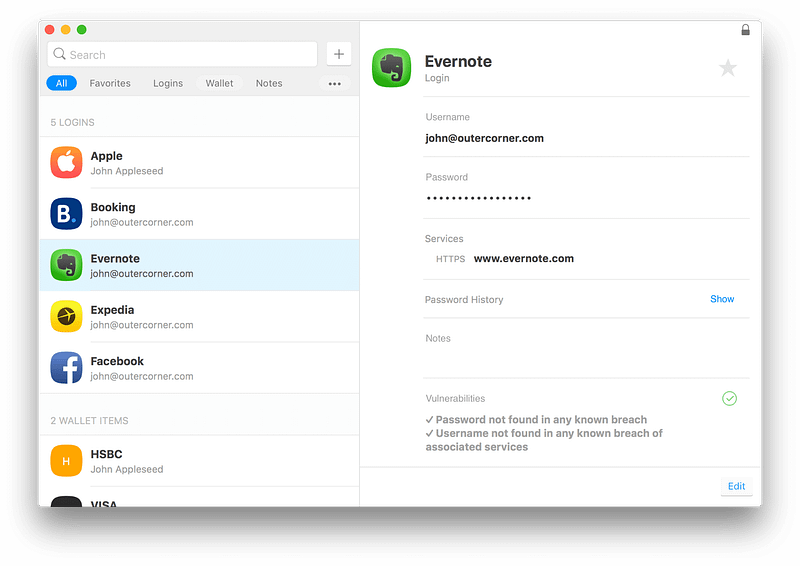
Screenshot of Secrets app on Mac from the developer’s website

Secrets is one of the most minimal password managers I’ve found so far. It uses tons of white space, and brings clarity and focus when dealing with passwords and critical private data.

For the category of security and privacy, Secrets is one of the few apps on the app store that uses iCloud for data synchronization, so if you are worried about having your data on some company’s servers, rest assured, this is a much safer option.

One of the best features of Secrets is its ability to save One-Time passwords. In addition, it makes the process of filling passwords and their OTP keys much more facile.

If you are looking for a password manager that doesn’t require a subscription and works in a minimal form, give Secrets a try. You might save your future self some dollars from over-expensive subscriptions.

🔐 Privacy: No personal data collection

💳 Price: $19.99

☑️ Compatibility: 📱iPhone, 📱iPad, 💻 Mac

🧩 Design: Decent looking

⭐️ Rating: Insufficient data

🔗 Download: AppStore

🌐 Research: Website

2. Silicon Info
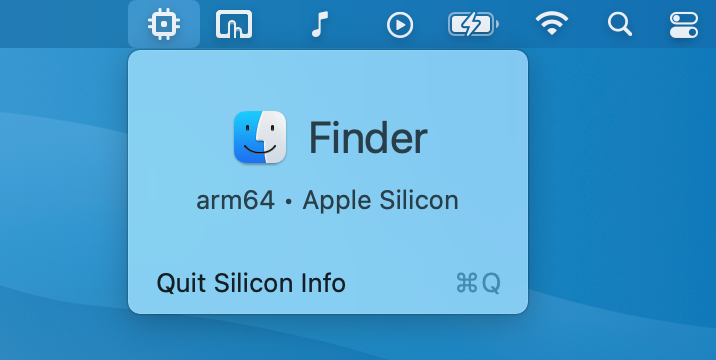
Screenshot of Silicon Info app on Mac from the developer’s website

Ever since I upgraded my MacBook Pro 2016 to a Mac Mini M1, I have been amazed at the performance of Apple Silicon. Apps launch near-instantly and don’t use much memory. Everything is smooth, and overall, the experience of using your Mac is highly elevated. I love it.

What I don’t love about Apple Silicon is its semi-slow process of transitioning apps from x86 codes to ARM. Despite the robust Rosetta 2 layer that translates x86 to arm binaries, I still deal with many apps that haven’t released their native ARM-compatible Mac version.

Interestingly, with the help of a petit utility app called Silicon Info which resides in the menu bar, I can see if an app I’m using on my M1 Mac is compatible with Apple Silicon or Intel.

Using Silicon Info, I was able to find out many Intel apps and refer to their websites for downloading their Apple Silicon version. The advantage is an immense change in performance and power consumption.

If you own an Apple Silicon Mac, this app could be beneficial for you.

🔐 Privacy: No data collection

💳 Price: Free!

☑️ Compatibility: 💻 Mac

🧩 Design: Displeasing

⭐️ Rating: Insufficient data

🔗 Download: AppStore

🌐 Research: GitHub

3. Motrix
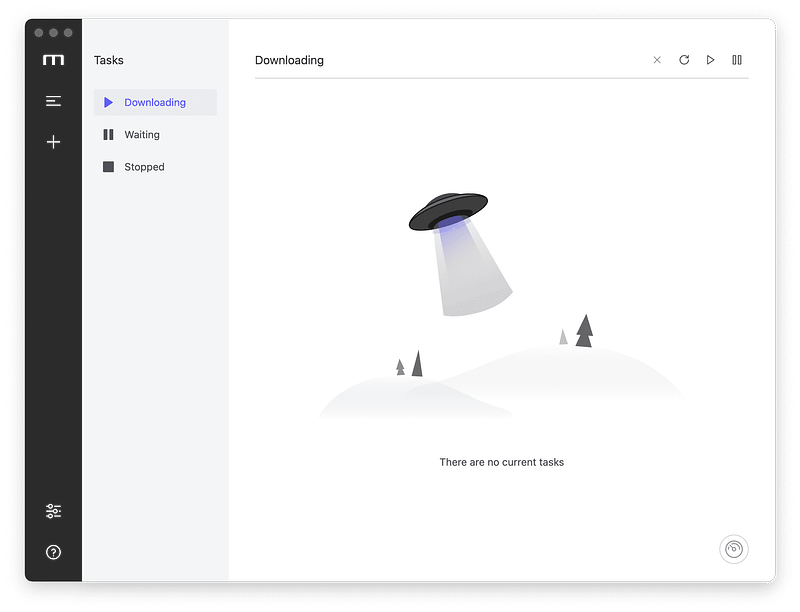
Screenshot of Motrix app on Mac from the developer’s website

When it comes to downloading files from the web, the default Safari browser is fine for small files. However, sometimes, we download large files such as a Linux distro or a 4K HDR video which could easily take more than 4 GBs of space, and Safari isn’t capable enough for them.

Sure, Safari could be useful for downloading large files, but it only provides a decent experience if your internet connection is fast. Unfortunately, having fast internet is not possible for many, and they need to manage their time and observe their data limit from their ISP.

Matrix is a minimal, good-looking download manager that bring many useful features. You can download torrent files, split your downloads to 64 threads, and get a dynamic graphical progress indicator to understand how your download has progressed so far.

🔐 Privacy: Data is not yet provided

💳 Price: Free!

☑️ Compatibility: 💻 Mac

🧩 Design: Decent looking

⭐️ Rating: Not available

🔗 Download: Website

🌐 Research: GitHub

4. MacUpdater
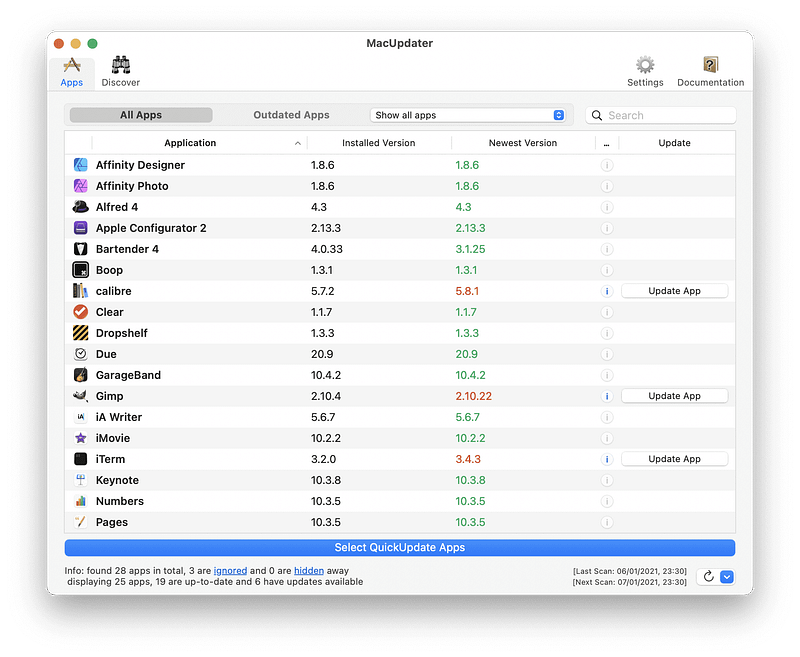
Screenshot of MacUpdater app on Mac from the developer’s website

I love AppStore on my iPhone and iPad, but on Mac, sadly, it doesn’t come with many apps I need. However, apps like Bartender 4, NordPass, TextSniper, Sketch, and Figma can download directly from their websites. Unfortunately, keeping these apps up-to-date is a hassle as you won’t know when they need an update unless you go and manually check each application.

Using MacUpdater, your job is much easier. Simply open the app and click on the reload button at the bottom right of the screen. The app will update its configuration file and check each app on your Mac individually. You can directly update the apps or simply open them within the same window.

MacUpdater doesn’t have a modern user interface, but it works much better than many similar apps in the same category.

🔐 Privacy: Collects personal data

💳 Price: $14.99

☑️ Compatibility: 💻 Mac

🧩 Design: Displeasing

⭐️ Rating: Not available

🔗 Download: Website

🌐 Research: Website

5. Museeks
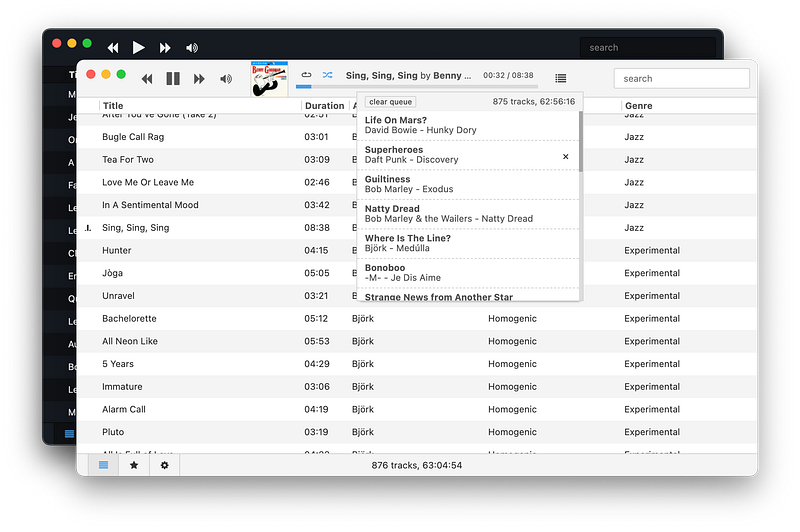
Screenshot of Museeks app on Mac from the developer’s website

When Mr. Jobs introduced the iPod and the iTunes store, many people had the right to own their music by purchasing them directly from the store. Now, unfortunately, you don’t own your music. Instead, services like Apple Music, Spotify, or Pandora keep you in their debt. Still, some people possess an extensive library of local music files and want to play their songs locally.

macOS comes with an app named QuickTime which allows you to play many media files, but it has a relatively classic interface design and is not really up to today’s design standards.

Introducing Museeks, a simple, minimal app that allows you to create your own playlists and manually add your music library to play anytime you desire. The app doesn’t offer much in user interface design, but it provides enough functionality to satisfy you.

Museeks can import .m3u playlists and adapt its interface to dark mode.

🔐 Privacy: Collects personal data

💳 Price: Free!

☑️ Compatibility: 💻 Mac

🧩 Design: Displeasing

⭐️ Rating: Not available

🔗 Download: Website

🌐 Research: GitHub

6. Subtitler
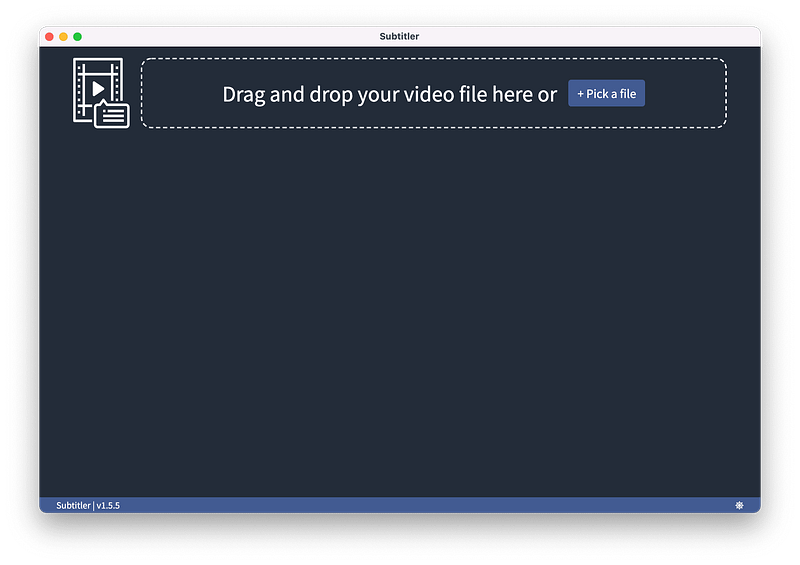
Screenshot of Subtitler app on Mac

Like the previous app where you could play your music locally, some people own movies as local files and watch them on their Mac. However, for many non-English speakers, the problem with watching a local film, tv show, or documentary is not having the subtitle file.

Subtitler is a simple utility that allows you to drag the movie file you want to watch and receive its subtitle in almost any language. Simply click on the subtitle file and have it downloaded to your computer.

Once the subtitle is downloaded, you can watch it with a media player, which I’ll introduce one later in this story.

🔐 Privacy: Collects personal data

💳 Price: Free!

☑️ Compatibility: 💻 Mac

🧩 Design: Displeasing

⭐️ Rating: Not available

🔗 Download: Website

🌐 Research: GitHub

7. CleanShot X
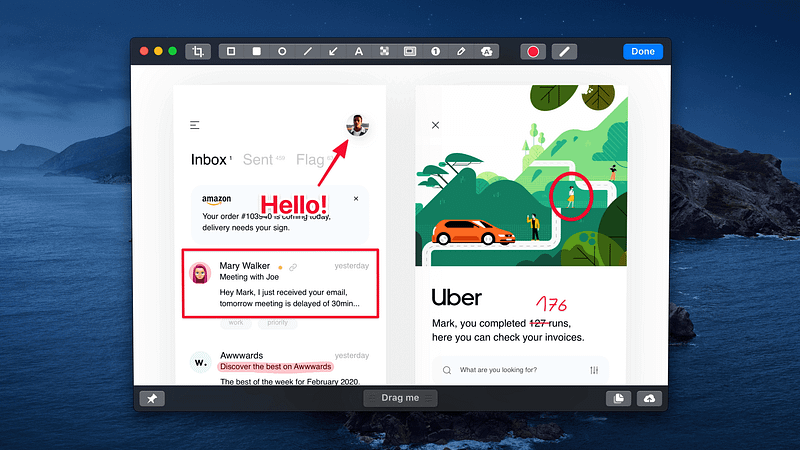
Screenshot of CleanShot X app on Mac from the developer’s website

Taking a screenshot on your Mac is one of the easiest things you can do. Simply press CMD + Shift + 3 keys on your Mac, and it will do the job. But, for many people, especially creatives who make a tutorial from their screen or designers who share prototypes with developers, the simple screenshot tool on the macOS is not enough.

CleanShot X is a phenomenal utility that allows you to do much more with your screenshots. For example, I use the annotation tools within its editor to make my point when showcasing a feature on an app or a website.

You can push your screenshots to the cloud so they are available online. Also, the ability to quickly drag-and-drop is a convenient feature.

Many apps and websites don’t allow you to select their text or share a link to their article so you can read them later; that is why CleanShot X provides a tool to screenshot any scrollable content.

There is also screen recording in various formats and recording your webcam and screen simultaneously, which is excellent for tutorial creation.

Don’t miss this one if you are looking for a solid utility and productivity all-in-one app to assist you in the screen capture. It is a great app.

🔐 Privacy: Data is not yet provided

💳 Price: $29

☑️ Compatibility: 💻 Mac

🧩 Design: Decent looking

🔗 Download: Website

🌐 Research: Website

8. iStatMenu
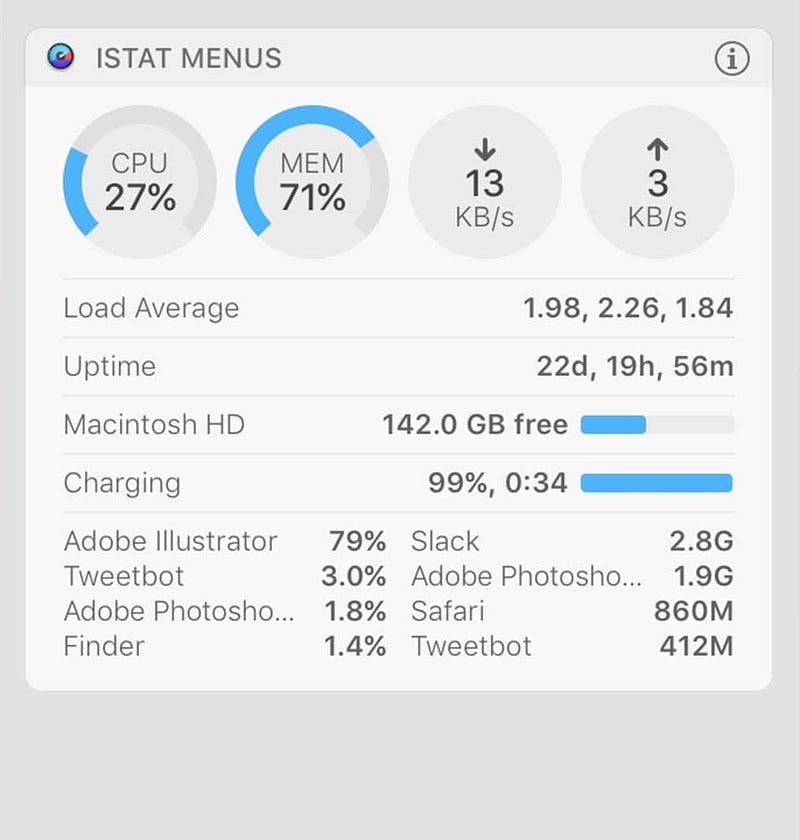
Screenshot of iStatMenu app on Mac from the developer’s website

Many power users are already familiar with this app. Once installed and configured, you will have the ability to monitor your Mac’s hardware properly.

What makes this app unique is how well its design is. It gives information about your Mac. All you need is to tell iStatMenu what information you need, and it will provide them as icons and text in your menu bar.

I have it set to show my system memory alongside CPU temperature and SSD storage. I have also configured it to show me the weather and send real-time info about my upload and download speed.

Not so often, there is an app that is leaking memory and making your system slow. It is imperative to find and report that app for making sure the bugs get fixed in their upcoming releases. Using iStatMenu, I could easily do that.

🔐 Privacy: No data collection

💳 Price: $9.99

☑️ Compatibility: 💻 Mac

🧩 Design: Displeasing

⭐️ Rating: Not available

🔗 Download: AppStore

🌐 Research: Website

9. The Unarchiver
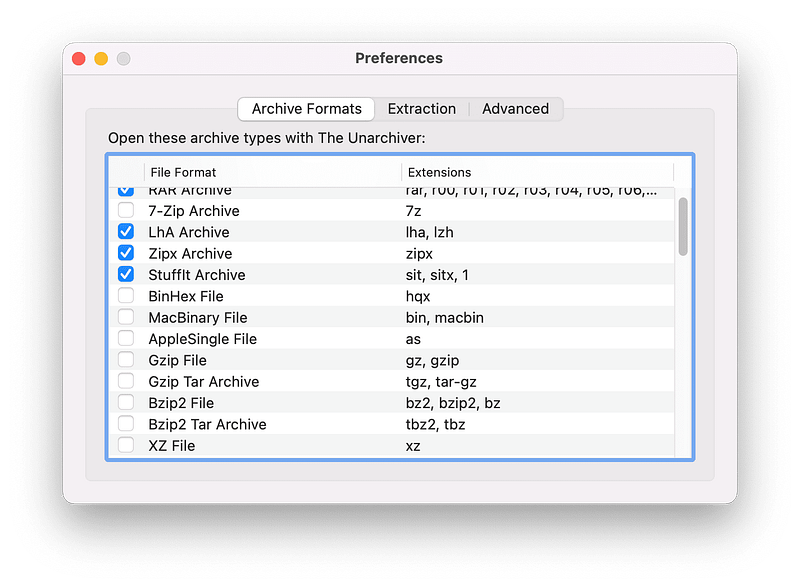
Screenshot of The Unarchiver app on Mac

One of the best free utilities to work with compressed files on the Mac is the Unarchiver. It is a free app that updates almost 2 to three times a year and supports many compression formats.

There is little configuration to do for making it the default app to uncompress and compress your files. Once that is done, you won’t even notice how well The Unarchiver works.

🔐 Privacy: No personal data collection

💳 Price: Free!

☑️ Compatibility: 💻 Mac

🧩 Design: Displeasing

⭐️ Rating: Insufficient data

🔗 Download: AppStore

🌐 Research: Website

10. IINA
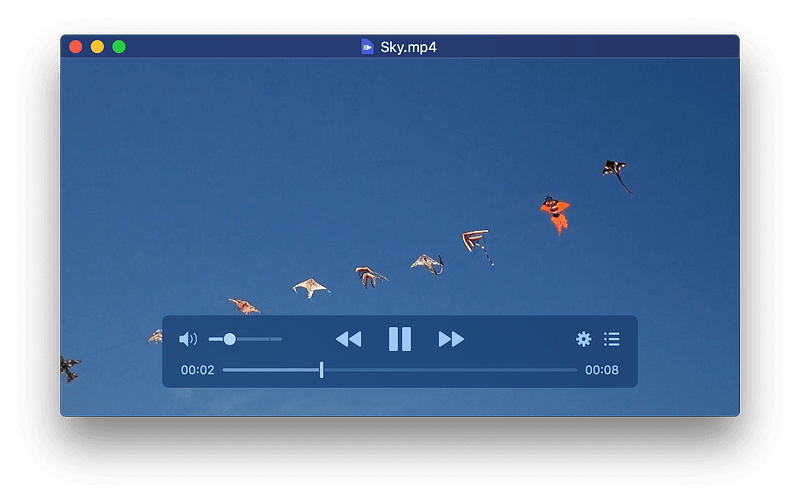
Screenshot of IINA app on Mac from the developer’s website

One of the best native-looking media players for Mac is IINA. It is a light app and natively works with Apple Silicon. In addition, it has a great set of features that make this an incredible player.

For one, the picture-in-picture feature is excellent for watching a podcast and wanting to attend to your work simultaneously. Also, there is the trackpad and gesture support for changing the media playback.

IINA supports dark mode and brings some additional playback control to MacBooks with a touch bar. Perhaps, one underrated feature is playing online videos from streaming sources and YouTube, which not many have mentioned about this app.

If you are looking for an advanced video player that looks Mac-like, then give IINA a try. It is an app worth owning on any Mac.

🔐 Privacy: Data is not yet provided

💳 Price: Free!

☑️ Compatibility: 💻 Mac

🧩 Design: Aesthetically pleasing

⭐️ Rating: Not available

🔗 Download: Website

🌐 Research: GitHub

Thank you for reading this story. This story was the November edition of the monthly Mac apps. If you have any recommendations, whether that is apps, feedback, or a single comment, let me know in the response section, and I will get back to you as soon as I can.

I would appreciate it if you support me by becoming a Medium member using the link below:

Here are the previous editions of monthly Mac apps:

Apple
Apps
Mac
Tech
Technology
Recommended from ReadMedium