avatarClark

Free AI web copilot to create summaries, insights and extended knowledge, download it at here

4776

Abstract

bmpjs49kf3Oc8A.png"><figcaption>The screenshot of the Pocket Casts for Mac</figcaption></figure><p id="e114">I’m a fan of podcasts. I listen while writing and designing. One of the issues I had with the default Podcast app on the Mac and iPhone was the lack of specific functionalities. I wanted to trim silences, so I don’t waste time when the host is not talking. I wanted a customizable app with multiple app icons and beautiful user interface.</p><p id="41ee">I found Pocket Casts which has a beautiful user interface. You are going to love how simple it is to find any podcast because the app has made navigation super simple.</p><p id="5a94">It is available on almost all platforms, but I wouldn’t count the desktop Mac app as a real Mac app since it looks and behaves like a website. Overall, it is great and does the job very well.</p><p id="d853">🔐 Privacy: No personal data collection</p><p id="08cf">💳 Price: Subscription $1.94 per month</p><p id="1d17">☑️ Compatibility: ⌚️Apple Watch, 📱iPhone,📱iPad, 💻 Mac</p><p id="ae83">🧩 Design: Decent looking</p><p id="83fb">🔗 Download: <a href="https://apps.apple.com/au/app/pocket-casts/id414834813">AppStore</a></p><p id="2c8e">🌐 Research: <a href="https://www.pocketcasts.com">Website</a></p><h1 id="1738">#5. Encrypto</h1><figure id="8948"><img src="https://cdn-images-1.readmedium.com/v2/resize:fit:800/1*8u3z1yBV1pVFkcpCLJXeIA.png"><figcaption>The screenshot of the Encrypto for Mac</figcaption></figure><p id="dba0">One of the perks of living in the 21st century is seeing the fast progress of technology and its effects on our lives. However, one of the worst things about it, is its effect on our privacy.</p><p id="4712">We are still immature in knowing what to do and how to handle customer data. When it comes to privacy, we don’t think logically and that is why many of us, in fact, most people need to be aware of data encryption and the practice of privacy.</p><p id="15f9">It is essential knowing how to encrypt and protect our most important files. Encrypto is a free app that helps you protect your files. Simply drag the file you want to encrypt and set a password. Let the app do its job, and after it’s finished, it will prompt a window asking you where to save the encrypted version.</p><p id="1696">🔐 Privacy: No personal data collection</p><p id="f2b2">💳 Price: Free!</p><p id="282f">☑️ Compatibility: 💻 Mac</p><p id="d5af">🧩 Design: Decent looking</p><p id="7be9">🔗 Download: <a href="https://apps.apple.com/us/app/encrypto-secure-your-files/id935235287?mt=12">AppStore</a></p><p id="e381">🌐 Research: <a href="https://macpaw.com/encrypto">Website</a></p><h1 id="1d8d">#6. Mactracker</h1><figure id="0d3c"><img src="https://cdn-images-1.readmedium.com/v2/resize:fit:800/1*OhPvqzfWu7d664SarfknoA.png"><figcaption>The screenshot of the MacTracker for Mac</figcaption></figure><p id="9ad3">As a fan of technology, most Apple, I have found myself trying to Google any product every time I think about researching one. I like the user experience of Google Search engine, but I don’t like how invasive its practices are with our privacy.</p><p id="0800">One of the best Mac apps that keeps getting itself updated for each new Apple product is MacTracker. It runs fast, and is a relatively lightweight app. It features all Apple products and gives you detailed information about their specifications and some links for further research.</p><p id="c0a9">If you are looking to purchase an Apple product, or if you are researching an Apple device, then use MackTracker as it will help you solve so much time searching the internet.</p><p id="91c6">🔐 Privacy: No data collection</p><p id="70db">💳 Price: Free!</p><p id="e688">☑️ Compatibility: 📱iPhone, 📱iPad, 💻 Mac</p><p id="2642">🧩 Design: Decent looking</p><p id="2fdb">🔗 Download: <a href="https://apps.apple.com/us/app/mactracker/id430255202?mt=12">AppStore</a></p><p id="e0ab">🌐 Research: <a href="https://mactracker.ca">Website</a></p><h1 id="0692">#7. Blackmagic Disk Speed Test</h1><figure id="b984"><img src="https://cdn-images-1.readmedium.com/v2/resize:fit:800/1*_fqAENQhjNDYWqoUdYrsCQ.png"><figcaption>The screenshot of the Blackmagic Disk Speed Test for Mac</figcaption></figure><p id="e539">The benefit of using a fast storage does not only affect file transfer speed. It also extends to random file access and the overall performance of that drive. Whether you have purchased an external hard drive or you want to test the SSD on your Mac, Speed Test is for you.</p><p id="3845">Blackmagic Disk Speed Test is one of the industry-leading apps when it comes to storage drive benchmark. The app works really well, and I haven’t seen any crash or inaccurate results.</p><p id="1d06">🔐 Privacy: Data is not yet provided</p><p

Options

id="3d88">💳 Price: Free!</p><p id="db50">☑️ Compatibility: 💻 Mac</p><p id="95d0">🧩 Design: Decent looking</p><p id="006e">🔗 Download: <a href="https://apps.apple.com/us/app/blackmagic-disk-speed-test/id425264550?mt=12">AppStore</a></p><p id="d1c5">🌐 Research: <a href="https://www.blackmagicdesign.com">Website</a></p><h1 id="f82c">#8. NightOwl</h1><figure id="243c"><img src="https://cdn-images-1.readmedium.com/v2/resize:fit:800/1*5ZIkAzsWRFniiIrJkUE6XA.png"><figcaption>The screenshot of the NightOwl for Mac</figcaption></figure><p id="1d68">The introduction of dark mode has been great. I love using apps at nighttime when I don’t have to endure the painful white light. Many apps have adapted themselves to the nighttime mode which I love, but the problem is their implementation. Some apps have not done an impressive job with the dark mode and simply reversed their color profiles.</p><p id="d3e8">The problem with a not good-looking dark mode is the difficulty your eyes have to deal with when you are reading any text. To help solve that problem, I use an app called NightOwl which basically takes control of the dark and light mode settings and allows you to force an app into a specific mode.</p><p id="3f0c">This way, while writing, my eyes will have a better time adjusting to the monitor.</p><p id="2938">NightOwl is a free app for the Mac and works as a menu bar app.</p><p id="a306">🔐 Privacy: Some personal data collection</p><p id="ea01">💳 Price: Free!</p><p id="0869">☑️ Compatibility: 💻 Mac</p><p id="8156">🧩 Design: Displeasing</p><p id="7868">🔗 Download: Not Found</p><p id="97e8">🌐 Research: <a href="https://nightowl.kramser.xyz">Website</a></p><h1 id="8ce6">#9. Amphetamine</h1><figure id="f1a3"><img src="https://cdn-images-1.readmedium.com/v2/resize:fit:800/1*SzQyxllWJVO_K-thO6GY7A.png"><figcaption>The screenshot of the Amphetamine for Mac</figcaption></figure><p id="1091">There are many moments when I have to leave my Mac for a quick task, and return to use it again. By default, the computer locks itself and dims the screen into the sleep mode. Having to type the password every time you try to use the Mac is not a good experience. It makes using the Mac tedious.</p><p id="4161">An app that help me stop the Mac from going into the sleep mode is Amphetamine. It is a highly customizable, free app that works as you would expect it to work. Simply allow some permission and let the app do its job.</p><p id="4e6d">The Amphetamine has saved me tons of hours from having to re-enter the login password.</p><p id="1f37">🔐 Privacy: No personal data collection</p><p id="883a">💳 Price: Free!</p><p id="c671">☑️ Compatibility: 💻 Mac</p><p id="af6c">🧩 Design: Displeasing</p><p id="f747">🔗 Download: <a href="https://apps.apple.com/us/app/amphetamine/id937984704?mt=12">AppStore</a></p><p id="e0b3">🌐 Research: Not Found</p><h1 id="5ac1">#10. Magnet</h1><figure id="84df"><img src="https://cdn-images-1.readmedium.com/v2/resize:fit:800/1*6uYBAg2pbknBC8zkxwVK5g.png"><figcaption>The screenshot of the Magnet for Mac</figcaption></figure><p id="969b">When I switched from Microsoft Windows to the macOS, one of the things that I immediately felt missing from the operating system was window management. I couldn’t find a way to split the apps or fill my screen with two or more apps in an equal size.</p><p id="a770">One of the most useful apps I’ve found since searching the App Store was Magnet.</p><p id="4e17">Magnet helps bring window management to the macOS. It is super light, and only occupies an icon on your menu bar. It is relatively cheap and works really well.</p><p id="42cd">🔐 Privacy: No data collection</p><p id="cc65">💳 Price: $7.99</p><p id="8df0">☑️ Compatibility: 💻 Mac</p><p id="5c8b">🧩 Design: Decent looking</p><p id="aca4">🔗 Download: <a href="https://apps.apple.com/us/app/magnet/id441258766?mt=12">AppStore</a></p><p id="2ed1">🌐 Research: <a href="https://magnet.crowdcafe.com">Website</a></p><p id="396b">Thank you for reading this story. I would love to hear your feedback, and comments in the response section.</p><p id="0441">If you own an iPhone, I suggest looking at my other article as well.</p><div id="4003" class="link-block"> <a href="https://readmedium.com/10-iphone-apps-for-the-month-of-may-2f0d5adfa241"> <div> <div> <h2>10 iPhone Apps For The Month Of May</h2> <div><h3>May this month be with you.</h3></div> <div><p>medium.com</p></div> </div> <div> <div style="background-image: url(https://miro.readmedium.com/v2/resize:fit:320/1*DsHkM7zwR1iSEGCorlaOEA.jpeg)"></div> </div> </div> </a> </div></article></body>

Mac Apps For The Month Of May
The number of useful Mac apps to help me become more productive always amazes me. Seeing how far the Mac has gone, I am super hyped and very hopeful of amazing changes that will come to the macOS.

The majority of the apps introduced in my stories have been observed for their privacy practices and I love when apps don’t collect any data.

In this story, I will introduce 10 Mac apps for the month of May which will be helpful to many people who need great apps.

#1. Pixelmator Pro
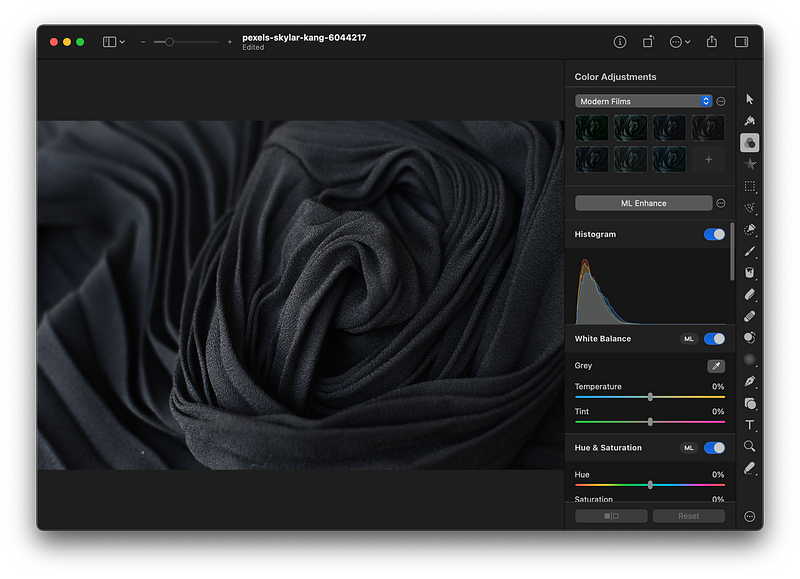
The screenshot of the Pixelmator Pro for Mac

If you are looking for an easy-to-use, beautiful and modern photo-editing app that makes use of artificial intelligence and machine learning, then look no further.

The Pixelmator Pro is a one of a kind Mac app that has a super simple user interface. It can do a variety of tasks on your photos, some of which are:

  • Color adjustment
  • Object selection
  • Repair
  • Type and Pen tool
  • Text tool
  • And a great export panel

If you like editing images, but don’t want to invest your time and money on complex apps like Photoshop then Pixelmator Pro is for you.

🔐 Privacy: No data collection

💳 Price: $39.99

☑️ Compatibility: 💻 Mac

🧩 Design: Aesthetically pleasing

🔗 Download: AppStore

🌐 Research: Website

#2. Vectornator
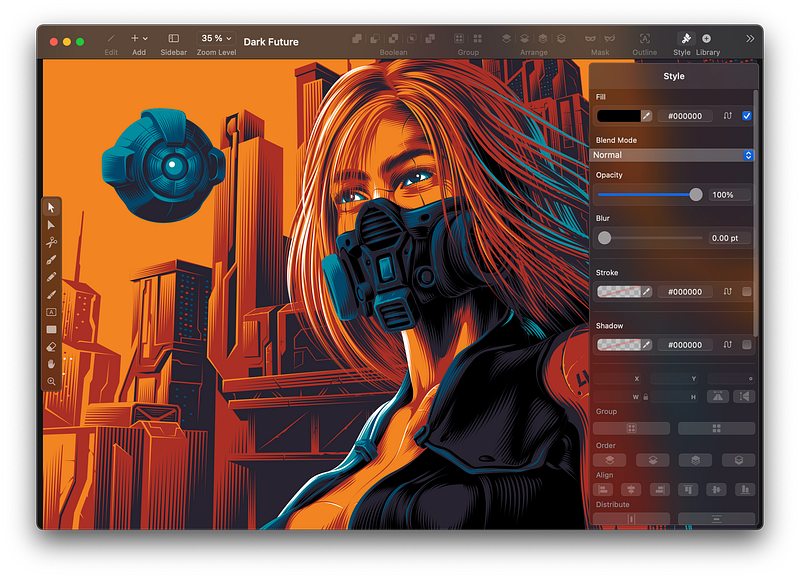
The screenshot of the Vectornator for Mac

I don’t usually come across a great app with a wonderful set of features while being totally free, but this time, I got lucky. One of the perks of being on the Apple ecosystem is finding polished, very well-made apps. This one is one of them.

The Vectornator is an illustration app that is widely known in the design industry. Not only it looks modern and beautiful, but also works without bugs (or at least I haven’t found one since using it).

The great thing about Vectornator is its active development and the team behind the app. They keep the app up to date with many great new features.

If you want to start a business, run a YouTube channel, or create a publication within Medium, you are going to need your own design files. A great way to make your own designs is with the Vectornator app which is totally free.

🔐 Privacy: Some personal data collection

💳 Price: Free!

☑️ Compatibility: 📱iPhone, 📱iPad, 💻 Mac

🧩 Design: Aesthetically pleasing

🔗 Download: AppStore

🌐 Research: Website

#3. Contrast
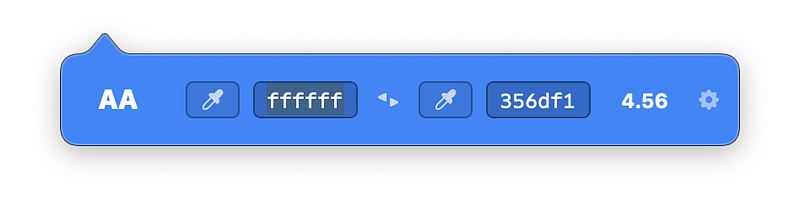
The screenshot of the Contrast app for Mac

Every so often we want to create a perfect presentation. Occasionally, we want a super readable text on any background. There are moments when we use a bright image as the background with a light text color on the foreground; when we do that, the text becomes unreadable since the contrast is not good.

To help with text contrast, I suggest using the Contrast app. It is designed by Matt D. Smith who is one of the greatest product designers. The app works really well and is optimized for Apple Silicon and new Macs.

🔐 Privacy: No data collection

💳 Price: $6.99

☑️ Compatibility: 💻 Mac

🧩 Design: Aesthetically pleasing

🔗 Download: AppStore

🌐 Research: Website

#4. Pocket Casts
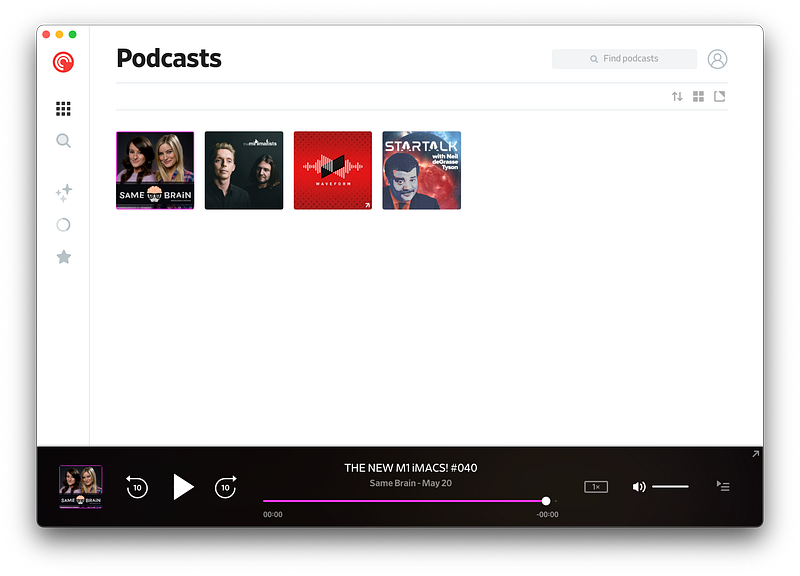
The screenshot of the Pocket Casts for Mac

I’m a fan of podcasts. I listen while writing and designing. One of the issues I had with the default Podcast app on the Mac and iPhone was the lack of specific functionalities. I wanted to trim silences, so I don’t waste time when the host is not talking. I wanted a customizable app with multiple app icons and beautiful user interface.

I found Pocket Casts which has a beautiful user interface. You are going to love how simple it is to find any podcast because the app has made navigation super simple.

It is available on almost all platforms, but I wouldn’t count the desktop Mac app as a real Mac app since it looks and behaves like a website. Overall, it is great and does the job very well.

🔐 Privacy: No personal data collection

💳 Price: Subscription $1.94 per month

☑️ Compatibility: ⌚️Apple Watch, 📱iPhone,📱iPad, 💻 Mac

🧩 Design: Decent looking

🔗 Download: AppStore

🌐 Research: Website

#5. Encrypto
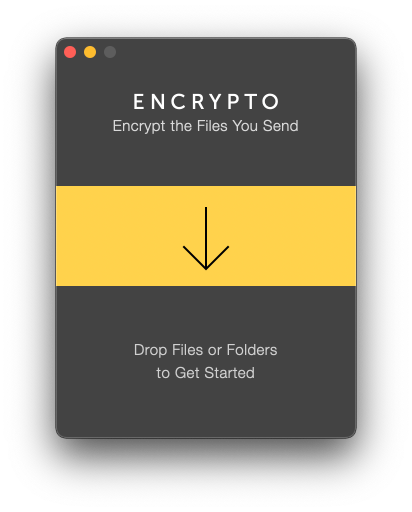
The screenshot of the Encrypto for Mac

One of the perks of living in the 21st century is seeing the fast progress of technology and its effects on our lives. However, one of the worst things about it, is its effect on our privacy.

We are still immature in knowing what to do and how to handle customer data. When it comes to privacy, we don’t think logically and that is why many of us, in fact, most people need to be aware of data encryption and the practice of privacy.

It is essential knowing how to encrypt and protect our most important files. Encrypto is a free app that helps you protect your files. Simply drag the file you want to encrypt and set a password. Let the app do its job, and after it’s finished, it will prompt a window asking you where to save the encrypted version.

🔐 Privacy: No personal data collection

💳 Price: Free!

☑️ Compatibility: 💻 Mac

🧩 Design: Decent looking

🔗 Download: AppStore

🌐 Research: Website

#6. Mactracker
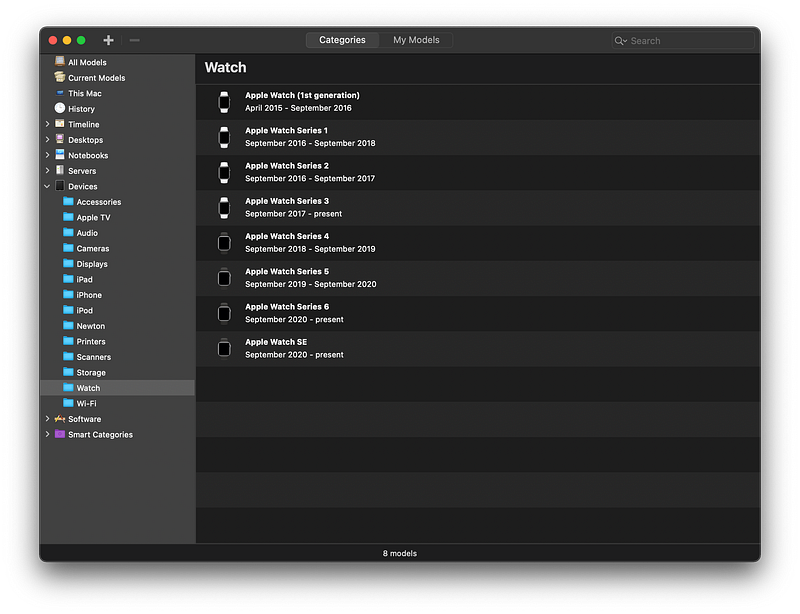
The screenshot of the MacTracker for Mac

As a fan of technology, most Apple, I have found myself trying to Google any product every time I think about researching one. I like the user experience of Google Search engine, but I don’t like how invasive its practices are with our privacy.

One of the best Mac apps that keeps getting itself updated for each new Apple product is MacTracker. It runs fast, and is a relatively lightweight app. It features all Apple products and gives you detailed information about their specifications and some links for further research.

If you are looking to purchase an Apple product, or if you are researching an Apple device, then use MackTracker as it will help you solve so much time searching the internet.

🔐 Privacy: No data collection

💳 Price: Free!

☑️ Compatibility: 📱iPhone, 📱iPad, 💻 Mac

🧩 Design: Decent looking

🔗 Download: AppStore

🌐 Research: Website

#7. Blackmagic Disk Speed Test
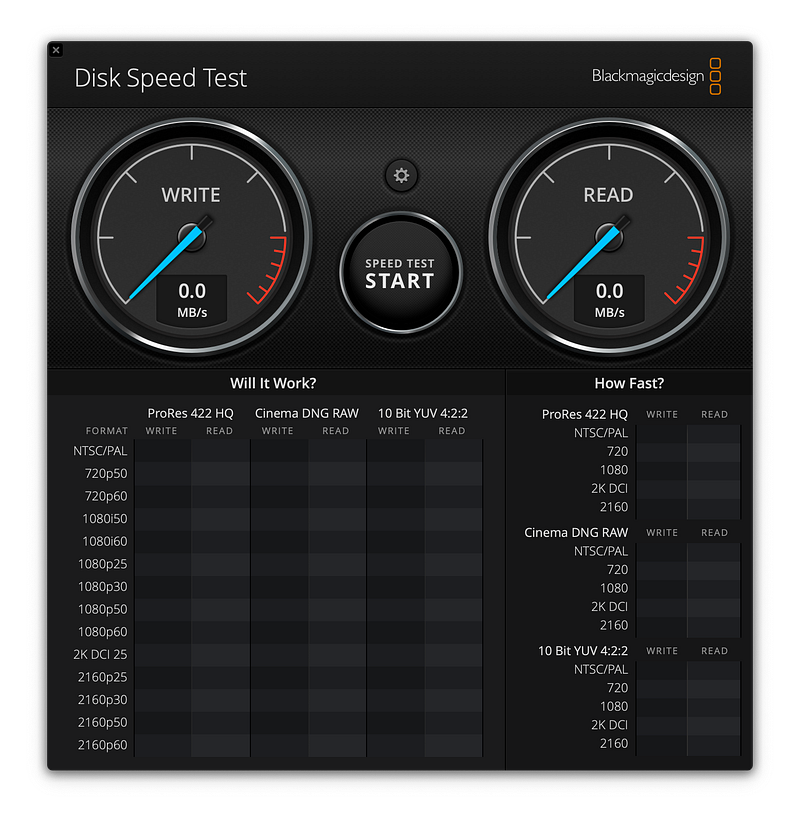
The screenshot of the Blackmagic Disk Speed Test for Mac

The benefit of using a fast storage does not only affect file transfer speed. It also extends to random file access and the overall performance of that drive. Whether you have purchased an external hard drive or you want to test the SSD on your Mac, Speed Test is for you.

Blackmagic Disk Speed Test is one of the industry-leading apps when it comes to storage drive benchmark. The app works really well, and I haven’t seen any crash or inaccurate results.

🔐 Privacy: Data is not yet provided

💳 Price: Free!

☑️ Compatibility: 💻 Mac

🧩 Design: Decent looking

🔗 Download: AppStore

🌐 Research: Website

#8. NightOwl
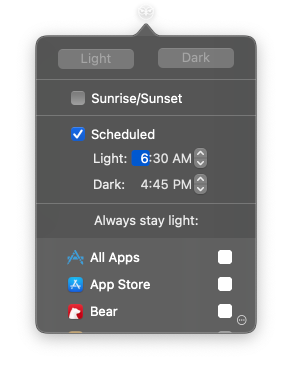
The screenshot of the NightOwl for Mac

The introduction of dark mode has been great. I love using apps at nighttime when I don’t have to endure the painful white light. Many apps have adapted themselves to the nighttime mode which I love, but the problem is their implementation. Some apps have not done an impressive job with the dark mode and simply reversed their color profiles.

The problem with a not good-looking dark mode is the difficulty your eyes have to deal with when you are reading any text. To help solve that problem, I use an app called NightOwl which basically takes control of the dark and light mode settings and allows you to force an app into a specific mode.

This way, while writing, my eyes will have a better time adjusting to the monitor.

NightOwl is a free app for the Mac and works as a menu bar app.

🔐 Privacy: Some personal data collection

💳 Price: Free!

☑️ Compatibility: 💻 Mac

🧩 Design: Displeasing

🔗 Download: Not Found

🌐 Research: Website

#9. Amphetamine
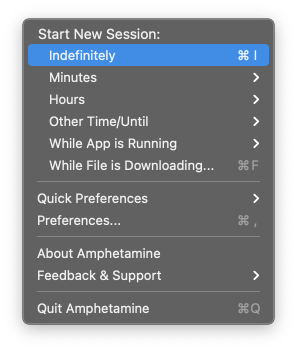
The screenshot of the Amphetamine for Mac

There are many moments when I have to leave my Mac for a quick task, and return to use it again. By default, the computer locks itself and dims the screen into the sleep mode. Having to type the password every time you try to use the Mac is not a good experience. It makes using the Mac tedious.

An app that help me stop the Mac from going into the sleep mode is Amphetamine. It is a highly customizable, free app that works as you would expect it to work. Simply allow some permission and let the app do its job.

The Amphetamine has saved me tons of hours from having to re-enter the login password.

🔐 Privacy: No personal data collection

💳 Price: Free!

☑️ Compatibility: 💻 Mac

🧩 Design: Displeasing

🔗 Download: AppStore

🌐 Research: Not Found

#10. Magnet
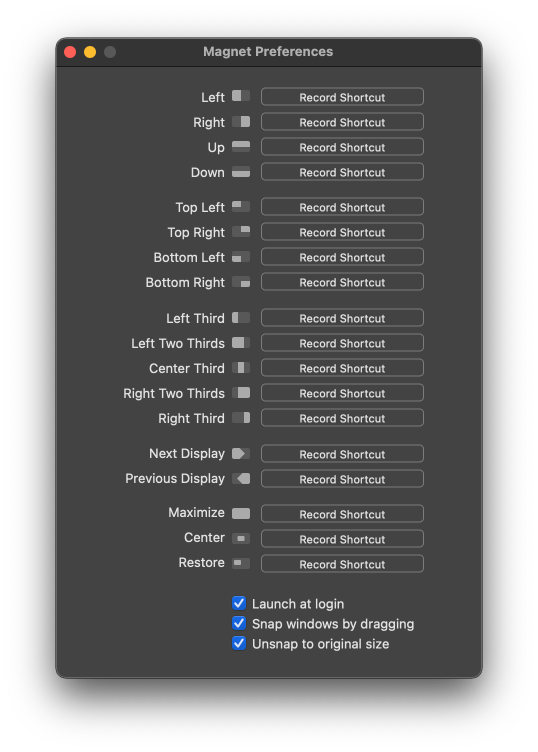
The screenshot of the Magnet for Mac

When I switched from Microsoft Windows to the macOS, one of the things that I immediately felt missing from the operating system was window management. I couldn’t find a way to split the apps or fill my screen with two or more apps in an equal size.

One of the most useful apps I’ve found since searching the App Store was Magnet.

Magnet helps bring window management to the macOS. It is super light, and only occupies an icon on your menu bar. It is relatively cheap and works really well.

🔐 Privacy: No data collection

💳 Price: $7.99

☑️ Compatibility: 💻 Mac

🧩 Design: Decent looking

🔗 Download: AppStore

🌐 Research: Website

Thank you for reading this story. I would love to hear your feedback, and comments in the response section.

If you own an iPhone, I suggest looking at my other article as well.

Mac
Apple
Apps
Productivity
Technology
Recommended from ReadMedium