
Angular 17 and NET Core 8: Exploring Token Server in Depth, including Client, User, Role, and Scope Management
Tutorial 5

Preface
This is another installment in our comprehensive series, Building a Talent Management SPA with Angular 17 and NET Core 8. For a broader view of the series and to access other parts, you can refer back to the series’ table of contents, where each segment is meticulously organized to guide you through every stage of building a robust Talent Management SPA.
Introduction
In software development, ensuring robust security is not just a feature, it’s a necessity. With the rise of digital threats, securing applications has become more critical than ever. In this tutorial, we will delve into implementing security using IdentityServer Duende, a popular open-source framework for implementing token-based authentication and authorization.
IdentityServer Duende Overview
IdentityServer Duende is a widely-used framework that facilitates the implementation of authentication and authorization in .NET applications. It provides a Token Services server, which is essential for securing applications by validating and issuing tokens. This tutorial is designed to guide you through setting up and configuring IdentityServer Duende and implementing effective authentication and authorization mechanisms.
Prerequisites
- Basic knowledge of .NET Core and C#
- Visual Studio or a similar IDE
- Familiarity with RESTful services and OAuth 2.0 concepts
Table of Contents
Part 1: Introduction to Duende IdentityServer
- What is Duende IdentityServer?
- Why use Duende IdentityServer for authentication and authorization?
Part 2: Getting Started with Duende IdentityServer and Admin UI
- Downloading and Running Duende IdentityServer locally
- Configuring Duende IdentityServer at Start up with JSON files
Part 3: Client App Setup
- Setting up a client application to work with Duende IdentityServer
- Configuring client applications for different authentication and authorization scenarios
Part 4: User and Role Management
- Managing users and roles in Duende IdentityServer
Part 5: Identity Resources, Api Resources, and Api Scopes Management
- A powerful framework for securing APIs and web services
- Resources and permissions that are required for an application to function securely
Part 6: External Authentication Providers
- Integrating Duende IdentityServer with external authentication providers like Google, Microsoft, and Facebook
- Configuring external authentication providers in Duende IdentityServer
Part 7: IdentityServer Application Programming Interface (API)
- Discovery Document (well-known endpoints) that describes the metadata and configuration of an IdentityServer installation
- Clients can use this information to configure themselves at runtime, rather than relying on static configuration files.
By covering these topics, you’ll have a comprehensive understanding of Duende IdentityServer and how to use it to build secure and flexible applications and APIs.
Source Code
The source code for the Token Service project discussed in this blog post is available on GitHub at the following URL: https://github.com/workcontrolgit/CATTokenService.AdminUI.Duende.
Part 1: Introduction to Duende IdentityServer
In this chapter, we will discuss the following topics:
- What is Duende IdentityServer?
- Why use Duende IdentityServer for authentication and authorization?
1.1 What is Duende IdentityServer?
Duende IdentityServer is an open-source, standards-compliant authentication and authorization server that is built on top of the IdentityServer4 framework. It is designed to help developers implement secure, flexible, and scalable authentication and authorization for web applications and APIs.
Duende IdentityServer provides a complete authentication and authorization solution that includes support for popular authentication protocols such as OpenID Connect and OAuth 2.0, as well as integration with external identity providers like Google, Microsoft, and Facebook.
1.2 Why is Duende IdentityServer a preferred choice for authentication and authorization?
Some of the key features of Duende IdentityServer include:
- Flexible configuration options that allow developers to customize the authentication and authorization flow to meet their specific needs
- Support for multiple authentication protocols and identity providers, including OpenID Connect, OAuth 2.0, SAML, and WS-Federation
- Built-in support for multi-factor authentication and user consent
- Seamless integration with ASP.NET Core and other popular web frameworks
- Extensive documentation and community support to help developers get started quickly
Overall, Duende IdentityServer is a powerful and flexible authentication and authorization solution that provides a comprehensive set of features and tools to help developers implement secure and scalable authentication and authorization for their applications and APIs.
Part 2: Getting Started with Duende IdentityServer and Admin UI
In this chapter, we will discuss the following topics
- Downloading and Running Duende IdentityServer locally
- Configuring Duende IdentityServer at Startup
2.1 Downloading and running Duende IdentityServer locally
I’ve created a repository with Duende IdentityServer for this blog series, which you can use to follow along. To get started, download the repository and run it on your local machine by following the steps outlined in my blog post entitled Duende IdentityServer Token Service: Git Clone and Launch in Visual Studio 2022.
Figure 1 contains a screenshot of the source code in the demo Token Service project. The screenshot depicts the organization of projects in the Visual Studio solution.
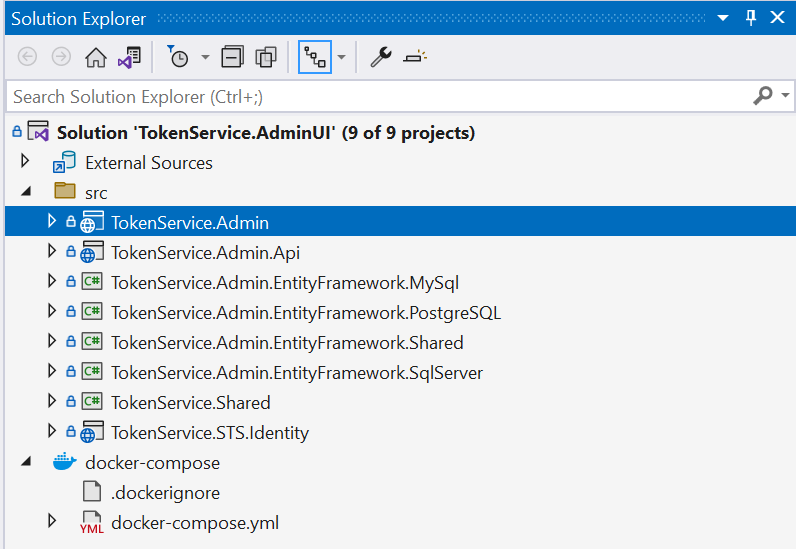
Here’s what each project is for:
- TokenService.Admin: This is an ASP.NET Core MVC application that provides an Admin UI for managing the configuration and data of Duende.IdentityServer and ASP.NET Core Identity.
- TokenService.Admin.Api: This project contains an API for managing the data of Duende.IdentityServer and ASP.NET Core Identity. It includes Swagger support for easy testing and documentation.
- TokenService.Admin.EntityFramework.MySql: This project contains migrations for MySql database that are used by the TokenService.Admin project.
- TokenService.Admin.EntityFramework.PostgreSQL: This project contains migrations for PostgreSQL database that are used by the TokenService.Admin project.
- TokenService.Admin.EntityFramework.Shared: This project contains EF Core DB Context, entities, and migration helpers (including seed the DB).
- TokenService.Admin.EntityFramework.SqlServer: This project contains migrations for SqlServer database that are used by the TokenService.Admin project.
- TokenService.Shared: This is a shared common layer for TokenService.Admin, TokenService.Admin.Api, and TokenService.STS.Identity projects. It contains common functionalities and utilities that are used across these projects.
- TokenService.STS.Identity: This project contains the instance of Duende.IdentityServer to provide login to the Admin UI. In addition, it is responsible for issuing and validating access tokens and providing authentication and authorization services.
The Token Service architecture comprises three main components (visual aids are provided in Figure 2):
- Admin UI (Clients): The Admin UI is a web-based user interface powered by the TokenService.Admin project. It is accessible via port 44303 when running on localhost and is designed to simplify the configuration and management of an IdentityServer4 instance by providing a graphical interface for administrators to interact with.
- Admin REST API (ApiResources): The Admin REST API is a set of RESTful APIs powered by the TokenService.Admin.Api project. It is accessible via port 44302 when running on localhost and is designed to provide server-side persistence for the configuration and management of an IdentityServer4 instance to a database.
- Token Server (Token Service) — The Token Server runs an instance of IdentityServer, which is responsible for issuing and validating JWTs (JSON Web Tokens). It is accessible via port 44310 when running on localhost. When a user logs in, the IdentityServer generates a JWT containing claims (user data) that identify the user and specify their authorized permissions. In addition to issuing JWTs, the IdentityServer also performs JWT validation to ensure that the token is genuine and has not been tampered with.
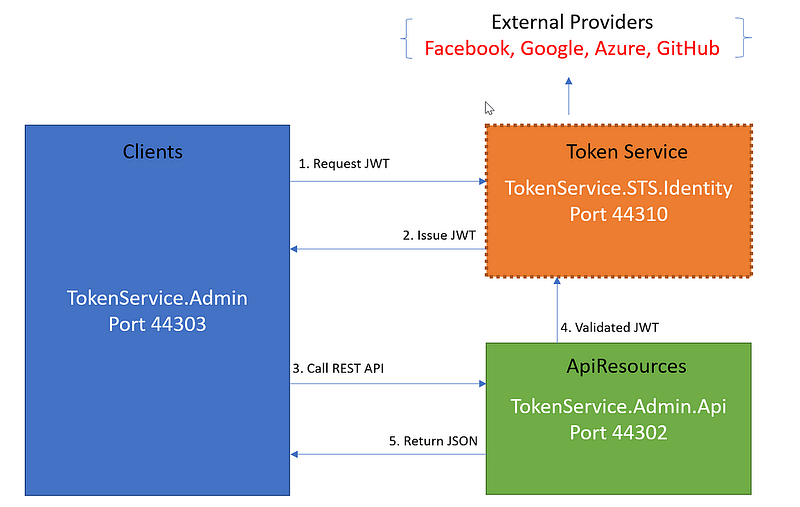
Duende IdentityServer simplifies the Token Service component by providing a built-in local login with accounts from its own local database. Additionally, the Token Service can be expanded to support external logins from popular social media platforms such as Facebook, Google, Azure, GitHub, etc.
2.2 Configuring Duende IdentityServer at Start up with JSON
When you first start up the demo Token Service, it will automatically seed the database with sample clients and user account/role information from two JSON files located in the root folder of the project TokenService.Admin (see Figure 3 for visual aids):
- identitydata.json — This file contains the credentials for the admin account, including username and password, as well as several testing accounts for you to use during development and testing.
- identityserverdata.json — This file contains the configuration data for client apps, including setup, API scopes, and API resources. This data is used to provide access to protected resources within your application and to enable various authentication and authorization scenarios.
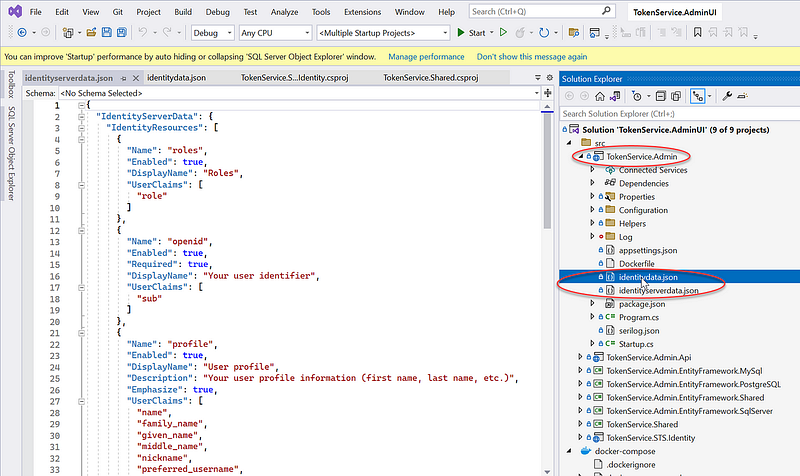
By default, these two files automatically loaded when you start the application for the first time. You can modify the contents of these files to fit your specific needs. Additionally, you can use the Admin UI to manage clients, users, and other resources as needed.
Part 3: Client App Setup
In this chapter, we will discuss the following topics
- Setting up a client application to work with Duende IdentityServer
- Configuring client applications for different authentication and authorization scenarios
3.1 Setting up a client application to work with Duende IdentityServer
In IdentityServer, a client represents a logical entity that is allowed to request and use resources, such as APIs and user information, from the server.
A client can be a web application, a mobile app, a command-line tool, or any other type of application that needs to authenticate and access protected resources.
When a client requests access to a resource, it must first authenticate itself with the IdentityServer by presenting a valid set of credentials, such as a client ID and a secret.
Once the client is authenticated, it can request access to specific resources, and the IdentityServer will grant or deny access based on the client’s permissions and the user’s consent.
Here’s a general guide on how to set up a client app in Duende IdentityServer:
- Log in to the IdentityServer Admin UI.
- Select “Clients” under the Clients/Resources menu
- Click the “Add Client” button to create a new client app.
- Enter the necessary information for your client app, including the client ID, name, and allowed grant types.
- Under “Redirect URIs,” specify the URLs to which users should be redirected after they authenticate with IdentityServer. You can also specify additional settings, such as the allowed scopes and permissions.
- Save the client app configuration, and then use the provided client ID and secret to authenticate your client app with IdentityServer.
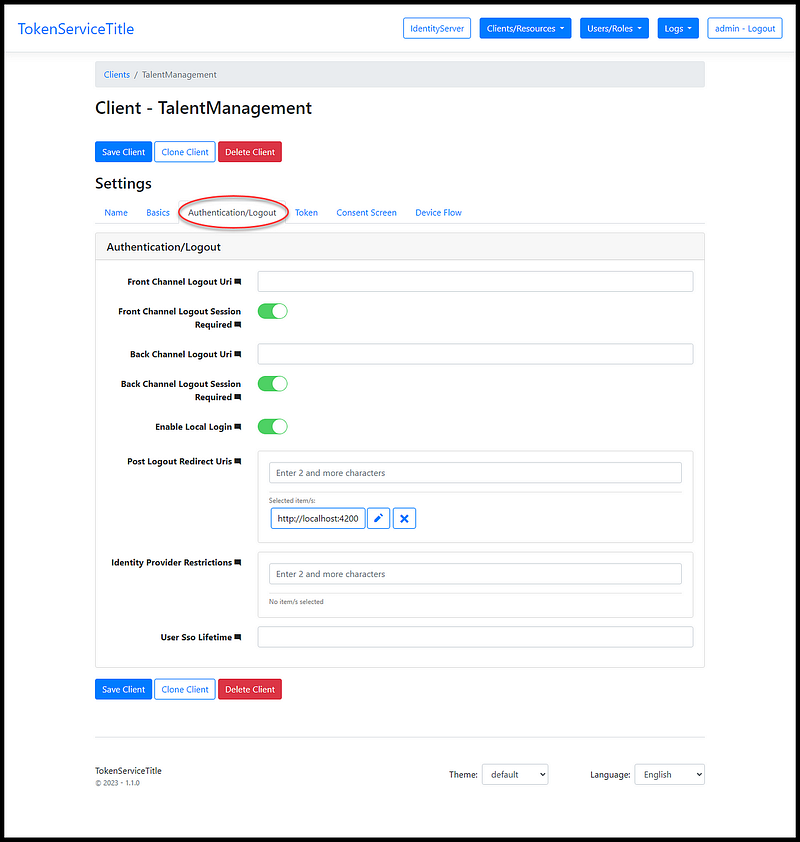
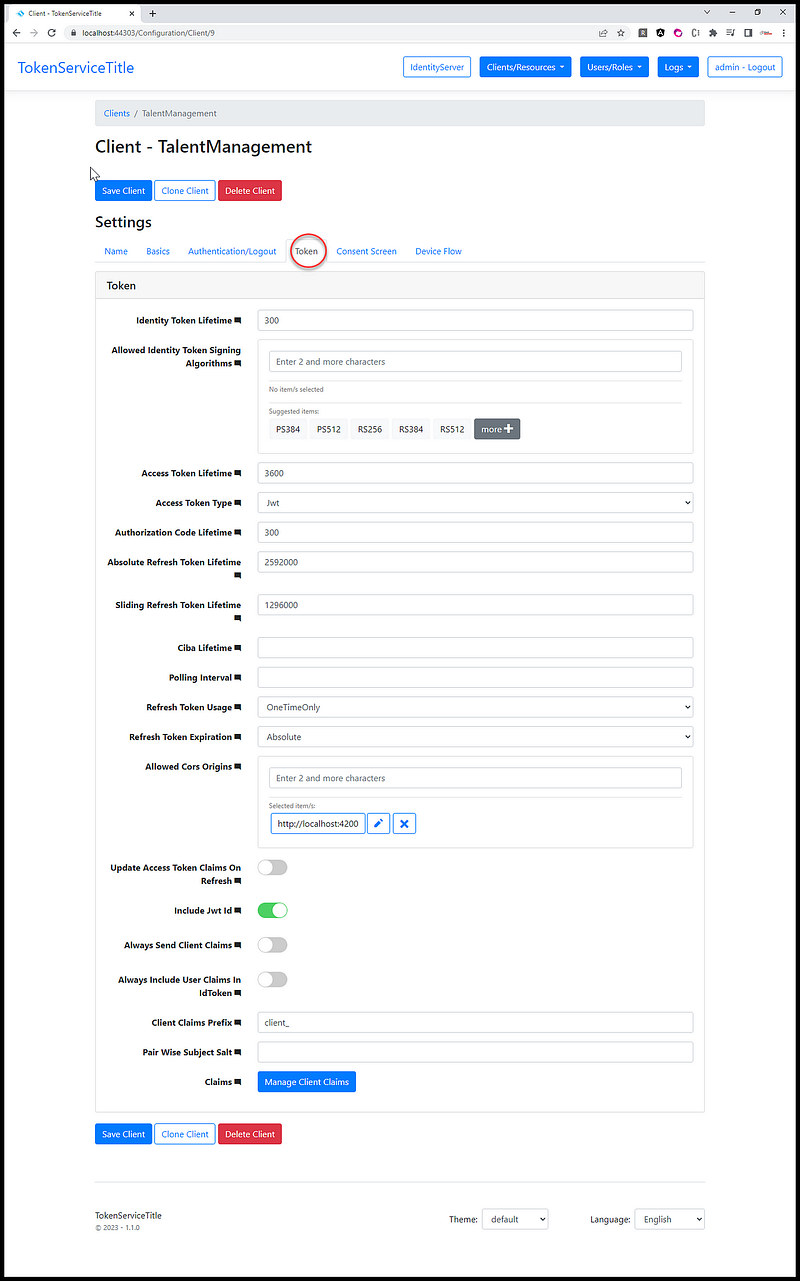
Figures 4, 5, and 6 are example screenshots of the TalentManagement client showing the configuration accessible via the Admin UI.
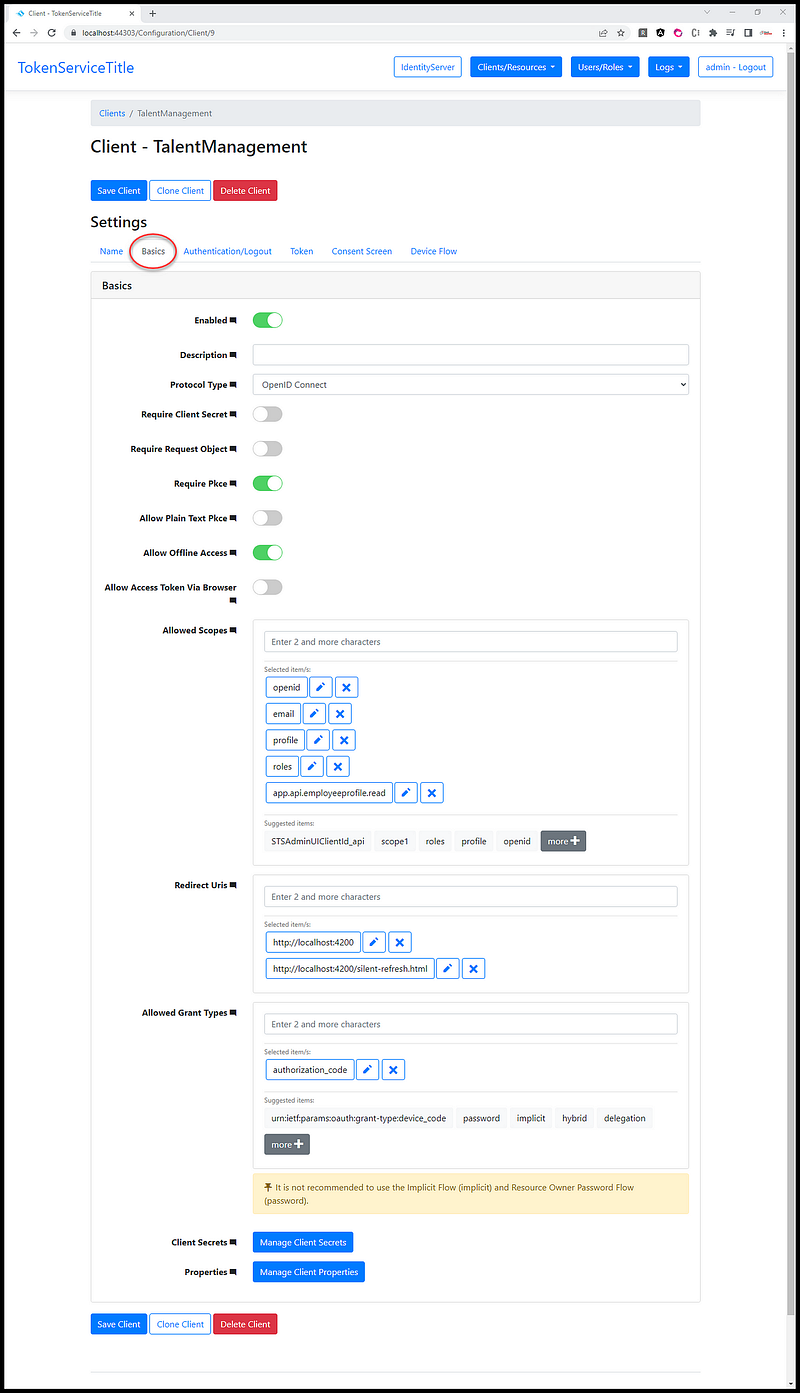
In summary, a client in IdentityServer is a registered application or service that is authorized to access protected resources, and it must authenticate itself to the server to gain access to those resources.
3.2 Configuring client applications for different authentication and authorization scenarios
One of the key features of IdentityServer is the ability to define various client types and grant types, which provide flexibility in how applications authenticate and authorize their users.
Client types refer to the types of applications that can interact with IdentityServer. IdentityServer supports several client types, including:
- Confidential clients: These are applications that can store a client secret, such as a web application that communicates with IdentityServer through a backend API. Confidential clients are considered more secure because they can authenticate themselves to IdentityServer with a secret that is not visible to the user.
- Public clients: These are applications that cannot store a client secret, such as a mobile app or a single-page application (SPA) that runs in a web browser. Public clients must use a different authentication flow that does not require a client secret, such as the Authorization Code flow with PKCE (Proof Key for Code Exchange).
- Machine-to-machine (M2M) clients: These are applications that communicate with IdentityServer without user interaction, such as a background service or a batch job. M2M clients use a different authentication flow that is optimized for non-interactive scenarios, such as the Client Credentials flow.
Grant types refer to the ways in which IdentityServer issues access tokens to clients. IdentityServer supports several grant types, including:
- Authorization Code: This is a flow that is typically used by web applications that can securely store a client secret. The flow involves the user being redirected to IdentityServer to authenticate and authorize the application, after which the application receives an authorization code that it can exchange for an access token.
- Implicit: This is a flow that is typically used by public clients that cannot store a client secret, such as SPAs. The flow involves the user being redirected to IdentityServer to authenticate and authorize the application, after which the application receives an access token directly in the browser.
- Client Credentials: This is a flow that is typically used by M2M clients that do not involve user interaction. The flow involves the client authenticating itself to IdentityServer using a client ID and secret, after which it receives an access token directly from IdentityServer.
- Resource Owner Password Credentials: This is a flow that is typically used in legacy scenarios where a client needs to authenticate a user with a username and password. The flow involves the client directly exchanging the user’s credentials with IdentityServer in order to obtain an access token.
- Device Flow: This is a flow that is typically used by devices such as smart TVs or IoT devices that do not have a web browser or keyboard. The flow involves the user being provided with a code that they enter on a different device, such as a mobile phone, in order to authenticate and authorize the application. The device then receives an access token.
The Angular Talent Management app is a Public Client type and the grant type is Authorization Code.
Part 4: User and Role Management
In IdentityServer, users and roles are used for authentication and authorization purposes.
A user represents an individual who is granted access to the protected resources by the IdentityServer. A user is identified by a unique username or email and typically has associated credentials such as a password, two-factor authentication, or other forms of identity verification.
Roles, on the other hand, are a way to group users based on their job responsibilities or other characteristics. Roles can be used to define access policies that determine which resources a user can access based on their role.
IdentityServer allows you to manage users and roles within the server itself or by integrating with external identity providers such as Active Directory, LDAP, or social login providers like Google or Facebook.
To manage users and roles in Dudende IdentityServer, you can follow these steps:
- Define user accounts: Once you have configured a user store, you can create user accounts with associated roles. You can define user accounts programmatically or use the IdentityServer management UI to create and manage users.
- Assign roles to users: Roles are used to group users with similar access requirements. You can assign roles to users programmatically or through the management UI.
- Protect resources using roles: Once you have defined roles and assigned them to users, you can use them to protect resources, such as APIs and web applications. You can configure IdentityServer to require a specific role to access a resource or use the role-based access control (RBAC) feature to define fine-grained access control policies.
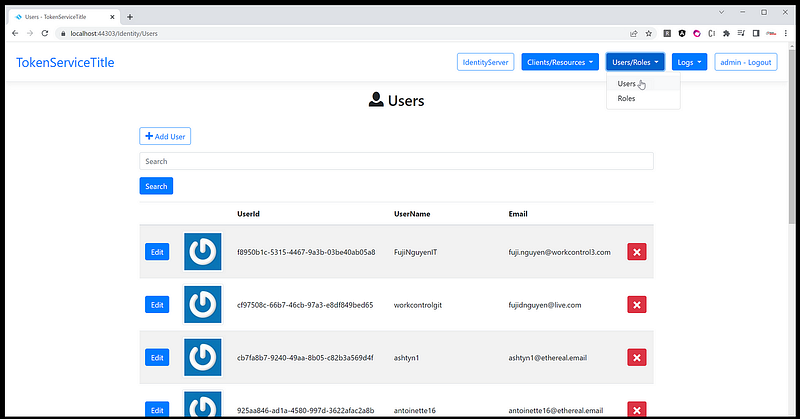
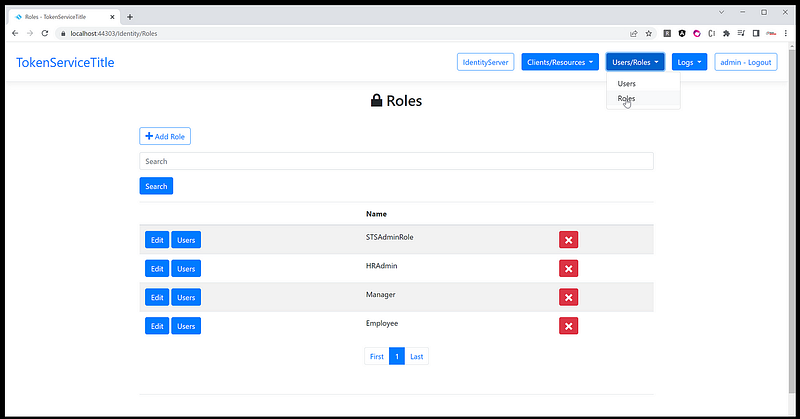
Examples of screenshots showing the management of users and roles via the Admin UI are displayed in Figures 7 and 8.
Overall, user and role management in Dudende IdentityServer is a critical aspect of securing your applications and APIs. By defining roles and assigning them to users, you can control access to resources based on user roles, which helps to minimize the risk of unauthorized access to sensitive information.
Part 5: API Resources, Identity Resources, and API Scopes Management
In IdentityServer, there are three main types of resources that can be protected by access control: API resources, identity resources, and API scopes.
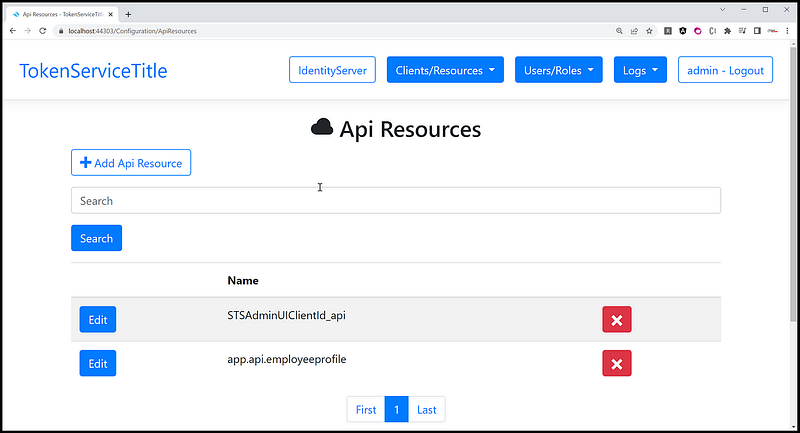
- API Resources: API resources represent the APIs that are being protected by IdentityServer. These can be RESTful APIs or other web services that require authorization to access. API resources are defined by their name, display name, description, and a set of user-defined scopes that can be associated with them.
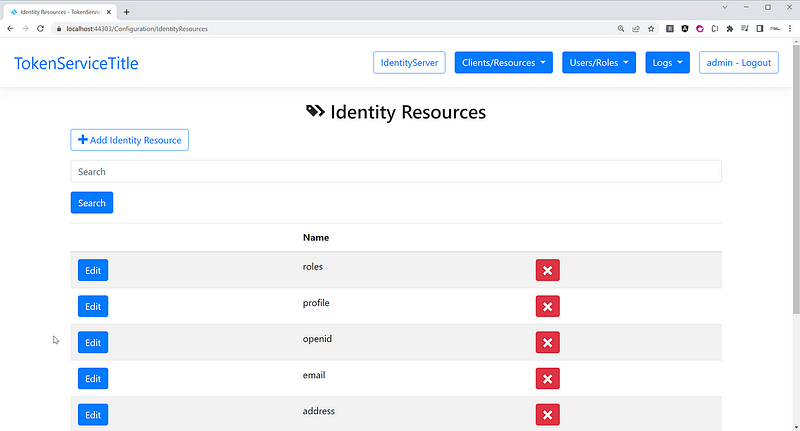
- Identity Resources: Identity resources represent user claims or profile data that can be requested and returned to clients during an authentication and authorization workflow. Examples of identity resources include the user’s name, email address, and profile picture. Identity resources can be customized and defined by administrators to include additional user attributes.
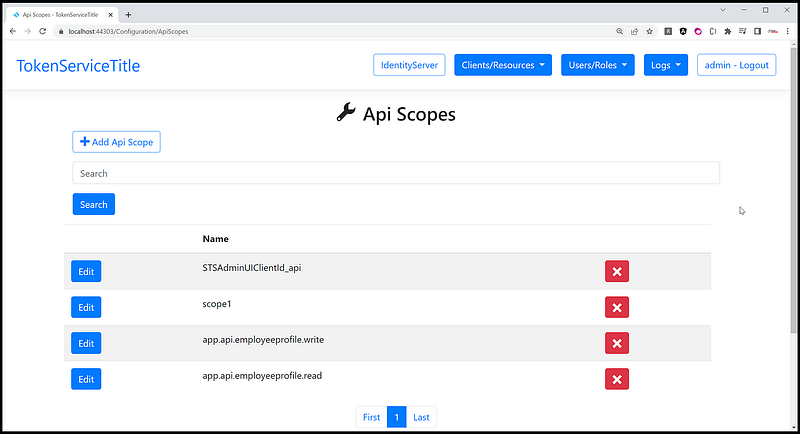
- API Scopes: API scopes are a set of permissions that define what actions a client can perform on an API resource. These can be things like read, write, or delete operations on a resource. Scopes can be defined for specific API resources, allowing fine-grained control over access to resources. Clients must request the appropriate scopes during an authentication and authorization workflow to gain access to protected resources.
In Figures 9, 10, and 11, there are example screenshots of the Admin UI used for managing Identity Resources, API Resources, and API Scopes.
Overall, the combination of API resources, identity resources, and API scopes provides a powerful framework for securing APIs and web services with IdentityServer. Administrators can define and customize these resources to meet the specific needs of their applications, while developers can leverage them to implement robust access control workflows.
Part 6: External Authentication Providers
Duende IdentityServer is a popular open-source framework that provides robust and extensible identity and access control solutions for modern applications and services. One of the features of Duende IdentityServer is the ability to integrate with external authentication providers to enable users to sign in using their existing accounts.
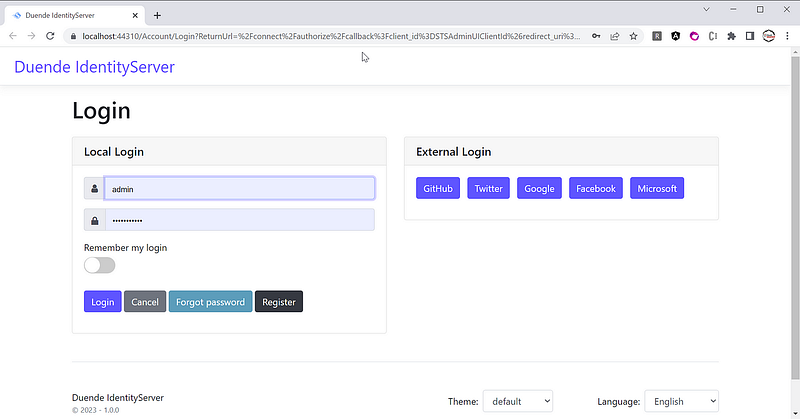
Duende IdentityServer offers integration with various external authentication providers, such as Microsoft, Google, Facebook, Twitter, GitHub, and others. An example screenshot demonstrating the supported providers in the demo Token Service project is shown in Figure 12.
Duende IdentityServer enables integration with various authentication providers by utilizing standard authentication protocols like OAuth 2.0 and OpenID Connect. This facilitates developers to seamlessly configure and personalize their authentication workflows to accommodate these providers. You can refer to my blog post entitled Duende IdentityServer Integration with Facebook, Google, Microsoft, GitHub, and Twitter for step-by-step instructions on how to integrate with these providers.
In addition to these popular providers, Duende IdentityServer also supports custom authentication providers through the use of plugins. Developers can create their own plugins to integrate with custom authentication systems, such as Active Directory or LDAP, and easily incorporate them into their authentication workflows. Please refer to Duede IdentityServer online documentation for more information.
Overall, the support for external authentication providers in Duende IdentityServer makes it a flexible and powerful tool for implementing secure and reliable authentication solutions in modern applications and services.
Part 7: IdentityServer Application Program Interface
When a client application wants to connect to an IdentityServer instance, it can use the discovery document to dynamically obtain the necessary information about the endpoints and other settings needed to interact with the IdentityServer.
The client application can download the discovery document from a well-known endpoint on the IdentityServer instance, typically located at the URL /.well-known/openid-configuration, which is defined by the OpenID Connect specification. The document is returned as a JSON object, containing the metadata and configuration information for the IdentityServer instance.
Once the client application has obtained the discovery document, it can use the information contained in the document to perform authentication and authorization flows with the IdentityServer instance. For example, the client application can use the authorization_endpoint and token_endpoint URLs from the discovery document to initiate the authorization code flow or the implicit flow.
In addition to the endpoints, the discovery document also contains other important information, such as the supported grant types, response types, and scopes. The client application can use this information to determine the appropriate authentication and authorization flows to use, as well as the scope of the access it can request.
Below is the Discover Document from the demo Token Service when running on localhost:
{
"issuer":"https://localhost:44310","jwks_uri":"https://localhost:44310/.well-known/openid-configuration/jwks",
"authorization_endpoint":"https://localhost:44310/connect/authorize",
"token_endpoint":"https://localhost:44310/connect/token",
"userinfo_endpoint":"https://localhost:44310/connect/userinfo",
"end_session_endpoint":"https://localhost:44310/connect/endsession",
"check_session_iframe":"https://localhost:44310/connect/checksession",
"revocation_endpoint":"https://localhost:44310/connect/revocation",
"introspection_endpoint":"https://localhost:44310/connect/introspect",
"device_authorization_endpoint":"https://localhost:44310/connect/deviceauthorization",
"backchannel_authentication_endpoint":"https://localhost:44310/connect/ciba",
"frontchannel_logout_supported":true,
"frontchannel_logout_session_supported":true,
"backchannel_logout_supported":true,
"backchannel_logout_session_supported":true,
"scopes_supported":["roles","openid","profile","email","address","STSAdminUIClientId_api","app.api.employeeprofile.write","app.api.employeeprofile.read","scope1","offline_access"],
"claims_supported":["role","sub","name","family_name","given_name","middle_name","nickname","preferred_username","profile","picture","website","gender","birthdate","zoneinfo","locale","updated_at","email","email_verified","address"],
"grant_types_supported":["authorization_code","client_credentials","refresh_token","implicit","password","urn:ietf:params:oauth:grant-type:device_code","delegation"],
"response_types_supported":["code","token","id_token","id_token token","code id_token","code token","code id_token token"],
"response_modes_supported":["form_post","query","fragment"],
"token_endpoint_auth_methods_supported":["client_secret_basic","client_secret_post"],
"id_token_signing_alg_values_supported":["RS256"],
"subject_types_supported":["public"],
"code_challenge_methods_supported":["plain","S256"],
"request_parameter_supported":true,
"request_object_signing_alg_values_supported":["RS256","RS384","RS512","PS256","PS384","PS512","ES256","ES384","ES512","HS256","HS384","HS512"],
"authorization_response_iss_parameter_supported":true,
"backchannel_token_delivery_modes_supported":["poll"],
"backchannel_user_code_parameter_supported":true}
The JSON document you provided is an example of a discovery document in IdentityServer. It contains metadata and configuration information for an IdentityServer installation. Here is a breakdown of the properties in this discovery document:
- “issuer”: The base URL of the IdentityServer instance.
- “jwks_uri”: The URL of the JSON Web Key Set (JWKS) endpoint, which provides the public keys used to verify JWTs.
- “authorization_endpoint”: The URL of the authorization endpoint, which clients use to initiate the authorization process.
- “token_endpoint”: The URL of the token endpoint, which clients use to obtain access tokens and refresh tokens.
- “userinfo_endpoint”: The URL of the userinfo endpoint, which clients use to obtain information about the authenticated user.
- “end_session_endpoint”: The URL of the endpoint to which clients should redirect when logging out of the IdentityServer.
- “check_session_iframe”: The URL of the check session iframe, which is used to monitor the user’s session state.
- “revocation_endpoint”: The URL of the token revocation endpoint, which clients use to revoke access and refresh tokens.
- “introspection_endpoint”: The URL of the token introspection endpoint, which clients use to check the validity of access tokens.
- “device_authorization_endpoint”: The URL of the device authorization endpoint, which is used for OAuth 2.0 device flow.
- “backchannel_authentication_endpoint”: The URL of the backchannel authentication endpoint, which is used for OAuth 2.0 CIBA flow.
- “frontchannel_logout_supported”: Indicates whether frontchannel logout is supported.
- “frontchannel_logout_session_supported”: Indicates whether frontchannel logout with session ID is supported.
- “backchannel_logout_supported”: Indicates whether backchannel logout is supported.
- “backchannel_logout_session_supported”: Indicates whether backchannel logout with session ID is supported.
- “scopes_supported”: A list of scopes that are supported by the IdentityServer instance.
- “claims_supported”: A list of claims that are supported by the IdentityServer instance.
- “grant_types_supported”: A list of grant types that are supported by the IdentityServer instance.
- “response_types_supported”: A list of response types that are supported by the IdentityServer instance.
- “response_modes_supported”: A list of response modes that are supported by the IdentityServer instance.
- “token_endpoint_auth_methods_supported”: A list of authentication methods that are supported by the token endpoint.
- “id_token_signing_alg_values_supported”: A list of signature algorithms that are supported for ID tokens.
- “subject_types_supported”: A list of subject types that are supported by the IdentityServer instance.
- “code_challenge_methods_supported”: A list of code challenge methods that are supported by the IdentityServer instance.
- “request_parameter_supported”: Indicates whether request parameters are supported.
- “request_object_signing_alg_values_supported”: A list of signature algorithms that are supported for signed request objects.
- “authorization_response_iss_parameter_supported”: Indicates whether the “iss” parameter is supported in authorization responses.
- “backchannel_token_delivery_modes_supported”: A list of token delivery modes that are supported by the backchannel authentication endpoint.
- “backchannel_user_code_parameter_supported”: Indicates whether the “user_code” parameter is supported in backchannel authentication.
The location to access the Discovery Document from the IdentityServer via the Admin UI is displayed in Figure 13.
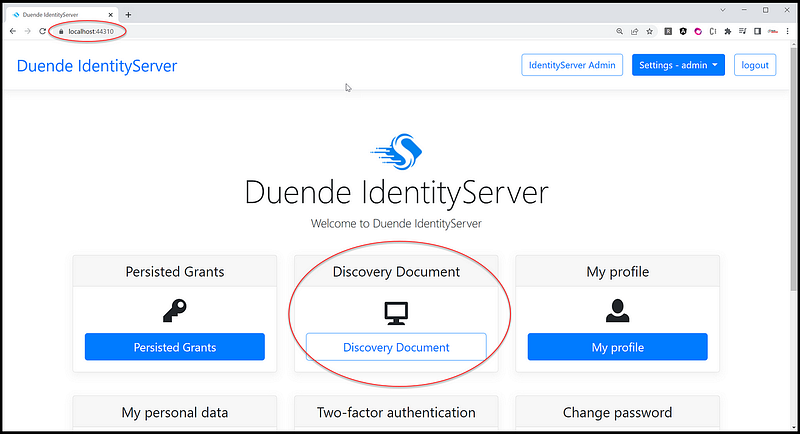
Overall, the discovery document provides a standardized way for client applications to obtain the necessary information to connect to an IdentityServer instance, which simplifies the integration process and promotes interoperability across different identity systems.
Frequently Asked Questions
- Where do I find the username and password to log in to IdentityServer? You can find the sample username and password in the JSON file “identitydata.json” located in the root folder of the project TokenService.Admin.
- How do I set up clients for .NET MVC, Blazor, React, Postman, etc.? The configuration is seeded with a sample clients using the settings in the JSON file “identityserverdata.json” located in the root folder of the project TokenService.Admin\identityserverdata.json. Additionally, you can log in with the admin account from the Admin UI to view the settings.
- Can IdentityServer be used with non-.NET applications? Yes, IdentityServer can be used with non-.NET applications through the use of OpenID Connect and OAuth2 protocols.
- What programming languages are supported by IdentityServer? IdentityServer is designed for .NET developers and primarily supports programming languages such as C# and .NET Core.
- What is the difference between IdentityServer and OAuth2/OpenID Connect? OAuth2 and OpenID Connect are protocols for authentication and authorization while IdentityServer is an implementation of these protocols.
- Can IdentityServer be integrated with other identity providers? Yes, IdentityServer can be integrated with other identity providers such as Google, Facebook, and Twitter.
- What is Duende IdentityServer? Duende IdentityServer is a fork of the IdentityServer4 project, and it is designed to be more maintainable and extensible than its predecessor.
- How can I get support for Duende IdentityServer? Duende Software, the company behind Duende IdentityServer, offers commercial support options for enterprise customers.
- Is Duende IdentityServer free? It is free for development, testing, and personal projects. You only pay for production.
Recommended Contents
- Duende IdentityServer Token Service: Git Clone and Launch in Visual Studio 2022
- Duende IdentityServer integration with Facebook, Google, Microsoft, GitHub, and Twitter
- Secure .NET CORE Web API with JWT from Duende IdentityServer
- Authenticate Asp.Net Web Form with IdentityServer4
- Secure React 17 with JWT and IdentityServer4
- Secure Net 5 Blazor Web Assembly with JWT and IdentityServer4 Admin UI
- Secure Angular 11 with JWT and IdentityServer4 Admin UI
- Angular Guard for Role-Based Access Control (RBAC) Driven by JWT
Summary
It bothers me that someone may steal my identity and use it to make thousands of dollars behind my back. It mostly bothers me because I currently have my identity and can’t figure out how to do that. ☹

Photo by Jon Flobrant on Unsplash
Duende Identity Server is a powerful authentication and authorization solution that can be used to support single-page application (SPA) login. It simplifies the implementation of secure authentication and authorization flows, providing robust security features such as token issuance and validation, access control, and user management.
To support SPA login, Duende Identity Server provides a set of APIs and protocols that enable the client-side application to securely communicate with the server-side Identity Server. The application can use these APIs to initiate the authentication process and obtain an access token that can be used to access protected resources.
Duende Identity Server also supports a range of external identity providers, such as Microsoft, Google, Facebook, and Twitter, enabling users to log in with their existing social media accounts. This simplifies the login process for users and eliminates the need for them to create and manage separate login credentials for each application.
Overall, Duende Identity Server provides a comprehensive and flexible solution for supporting SPA login, helping developers to implement secure and user-friendly authentication and authorization workflows in their applications.
Thank you for reading! I hope you found this useful. For more great content, follow me and consider becoming a Medium member. Your support helps me create more awesome articles. Have a fantastic day! — Fuji Nguyen


