
Duende IdentityServer integration with Facebook, Google, Microsoft, GitHub, and Twitter

Introduction
Recently, I worked on a project to integrate external authentication providers such as Facebook, Google, Microsoft, Github, and Twitter into the Duende IdentityServer. This solution enables login to the application using accounts from popular social media platforms. See Figure 1 for an example of external login options.
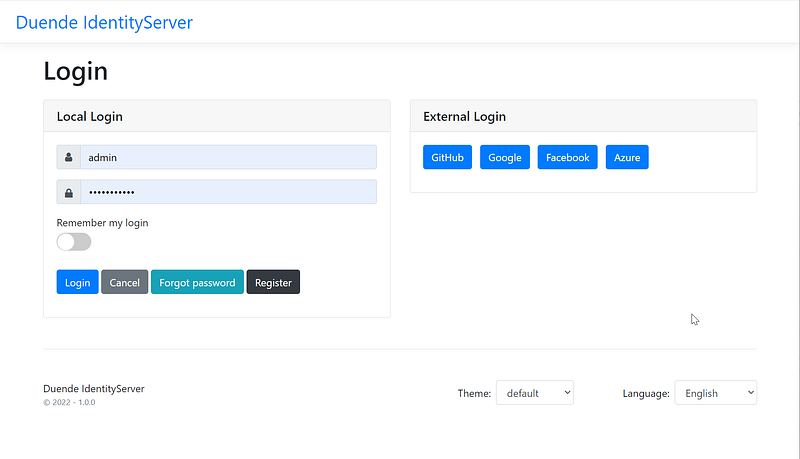
In this story, I will go over the C# code that enables external authentication providers. It is easier than you may think. The complete working source code is available on GitHub. A complimentary screencast is provided as well.
Architecture Overview
Modern applications typically consist of three major components (see Figure 2 for visual aids)
- Clients — apps such as web, mobile, console
- Api Resources — the REST API resources that provide data to Clients
- Token Service — the security components that issue/validate JWT
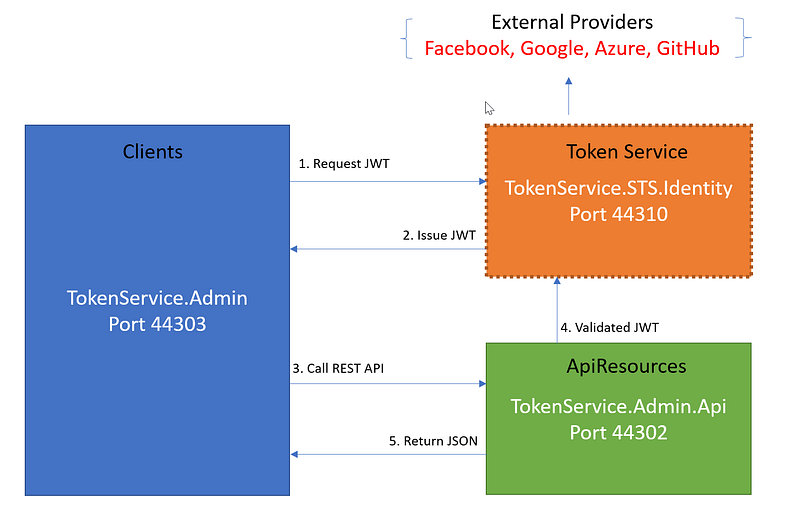
Duende IdentityServer facilitates the Token Service component. It has a built-in local login with the account from its own local database. The Token Service component can be extended to support external login with accounts from popular social media platforms.
For more information about modern architecture, see CAT architecture pattern for modern app SPA/Mobile.
Content
The tutorial consists of the following parts:
Part 1: Download and run Duende IdentityServer in Visual Studio 2022 Part 2: Review external provider integration source code Part 3: Walk through the source code that enables Facebook login Part 4: Walk through the source code that enables Google login Part 5: Walk through the source code that enables Microsoft login Part 6: Walk through the source code that enables Github login Part 7: Walk through the source code that enables Twitter login Part 8: Specify the provider’s settings using secrets.json
Prerequisites
- Latest Net Core 6 SDK
- Visual Studio 2022 Community — free code editor for C#Tutorial Content
Source Code
The complete project source code is available on GitHub
https://github.com/workcontrolgit/CATTokenService.AdminUI.Duende
Part 1: Download and run Duende IdentityServer in Visual Studio 2022
In preparation for this story, I have used the Skoruba Admin UI to create a Github repo of IdentityServer that you can download and run on your local desktop.
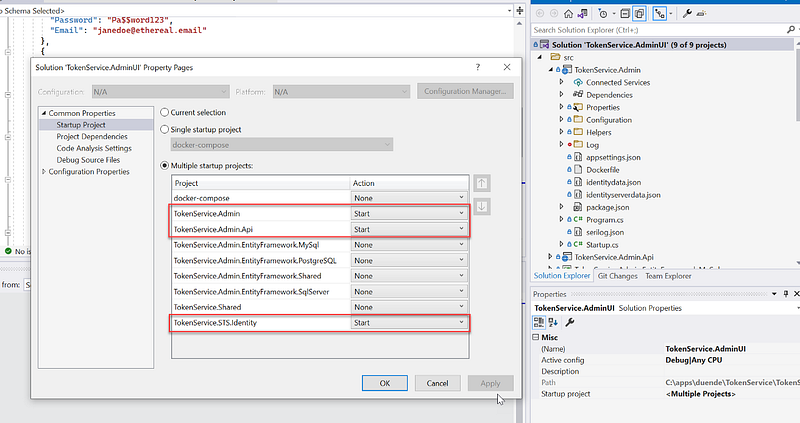
Before running the solution in Visual Studio 2022, be sure to access the Solution > Properties page and set the Multiple startup projects as shown in Figure 3.
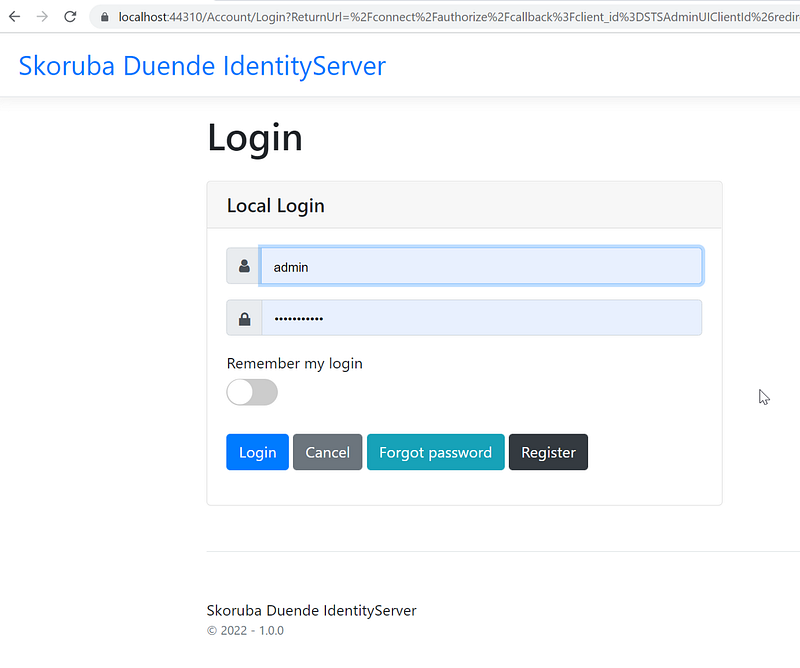
After running the solution, locate the login screen as shown in Figure 4. Log in with the account (admin, Pa$$word123)
Part 2 — Review external provider integration source code
The primary source code files are
- appsettings.json in the root of project TokenService.STS.Identity. See Figure 5 for the source code listing. The settings for external providers are in lines 39–54
- ExternalProvidersConfiguration.cs in the folder Configuration in the project TokenService.STS.Identity. See Figure 6 for the source code listing. This model class will hold the external provider configuration at runtime
- StartupHelpers.cs in the folder Helpers in the project TokenService.STS.Identity. See Figure 7 for the source code listing. The source code to register providers is in lines 379–447.
Part 3: Walk through the source code that enables Facebook login
Nuget package Microsoft.AspNetCore.Authentication.Facebook is the ASP.NET Core middleware that enables an application to support OAuth 2.0 authentication workflow.
Configuration Settings
The settings of Facebook provider are in the appsettings.json (Figure 5), lines 49–51. For step-by-step instructions to set up Facebook client id and client secret, see Facebook external login setup in ASP.NET Core.
The three settings are:
- FacebookProvider : false (default). If set to true, you must provide values for Facebook ClientId and Facebook ClientSecret fields.
- FacebookClientId: obtain when registering the app with Facebook
- FacebookClientSecret: obtain when registering the app with Facebook
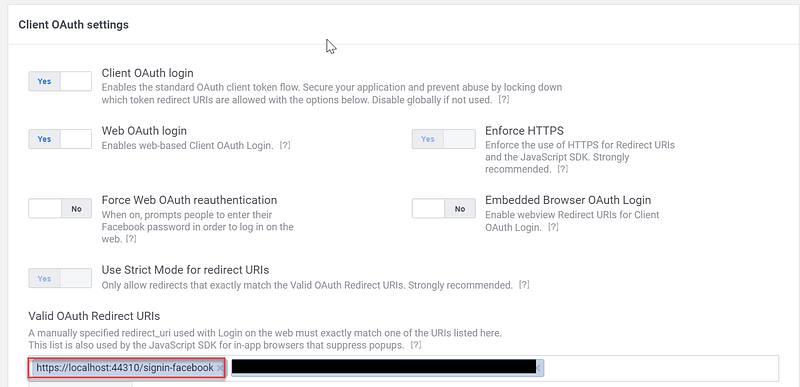
Note: make sure to set up “https://localhost:44310/signin-facebook” as the OAuh Redirect URIs. See Figure 8 for visual aids.
Register Provider
The code to register Facebook provider is in StartupHelper.cs (Figure 7), lines 423–433.
Part 4: Walk through the source code that enables Google login
Nuget package Microsoft.AspNetCore.Authentication.Google is the ASP.NET Core middleware that enables an application to support OAuth 2.0 authentication workflow.
Configuration Settings
The settings of Google provider are in the appsettings.json (Figure 5), lines 46–48. For step-by-step instructions to set up Google client id and client secret, see Google external login setup in ASP.NET Core.
The three settings are:
- UseGoogleProvider: false (default). If set to true, you must provide values for Google ClientId and Google ClientSecret fields.
- GoogleClientId: obtain when registering the app at Google API & Services
- GoogleClientSecret: obtain when registering the app at Google API & Services
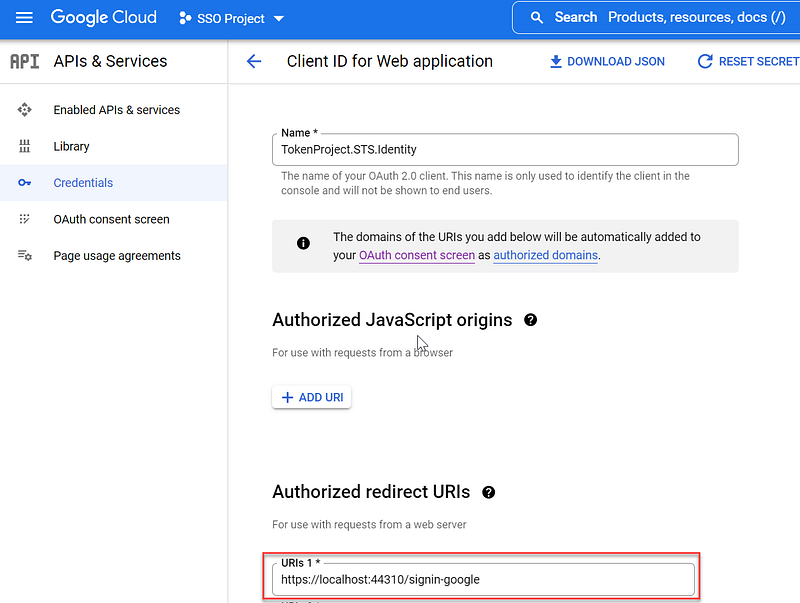
Note: make sure to set up “https://localhost:44310/signin-google” as the Authorized redirect URIs as shown in Figure 9.
Register Provider
The code to register a Google provider is in StartupHelper.cs (Figure 7), lines 402–411
Part 5: Walk through the source code that enables Microsoft login
Nuget package Microsoft.AspNetCore.Authentication.MicrosoftAccount is the ASP.NET Core middleware that enables an application to support OAuth 2.0 authentication workflow.
Configuration Settings
The settings of Microsoft provider are in the appsettings.json (Figure 5), lines 52–54. For step-by-step instructions to set up Microsoft client id and client secret, see Microsoft Account external login setup with ASP.NET Core.
The three settings are:
- UseMicrosoftProvider: false (default). If set to true, you must provide values for Microsoft ClientId and MicrosoftClientSecret fields.
- MicrosoftClientId: obtain when registering the app at Microsoft Azure portal
- MicrosoftClientSecret: obtain when registering the app at Microsoft Azure portal
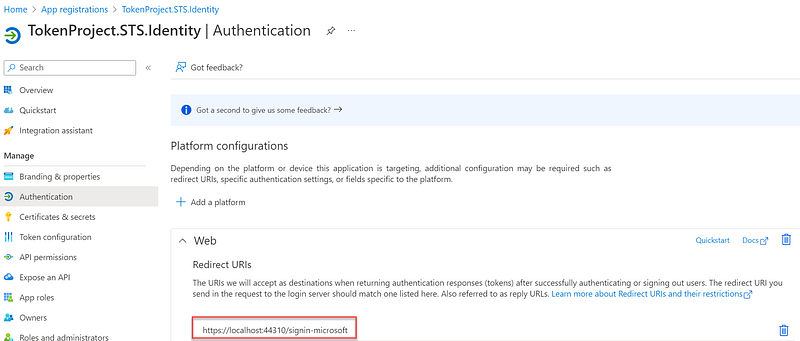
Note: make sure to set up “https://localhost:44310/signin-microsoft” as the Redirect URIs as shown in Figure 10.
Register Provider
The code to register Microsoft provider is in StartupHelper.cs (Figure 7), lines 435–446.
Part 6: Walk through the source code that enables GitHub login
Nuget package AspNet.Security.OAuth.GitHub is the ASP.NET Core middleware that enables an application to support OAuth 2.0 authentication workflow.
Configuration Settings
The settings of the GitHub provider are in the appsettings.json (Figure 5), lines 40–42. For instructions to set up the GitHub client app, see Creating an OAuth App.
The three settings are:
- UseGitHubProvider: false (default). If set to true, you must provide valuesv for GitHub ClientId and GitHub ClientSecret fields.
- GitHubClientId: obtain when registering the app at Developer settings screen
- GitHubClientSecret: obtain when registering the app at Developer settings screen
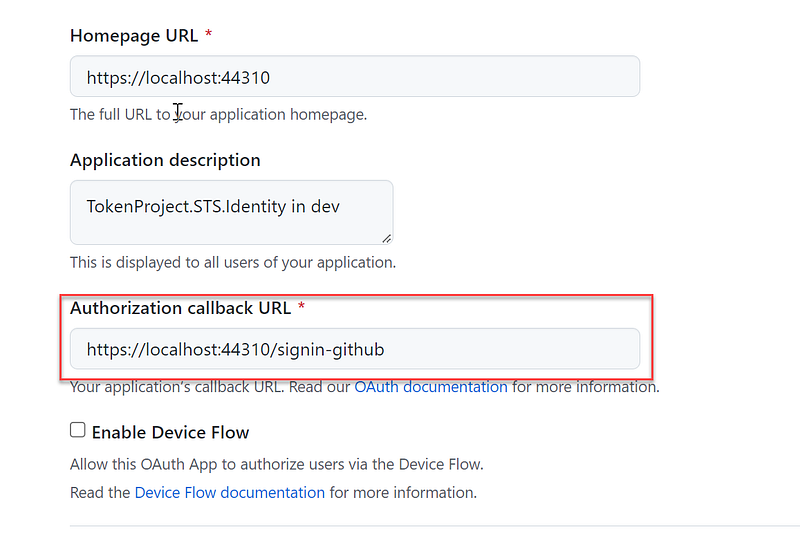
Note: make sure to set up “https://localhost:44310/signin-github” as the Authorization callback URL as shown in Figure 11.
Register Provider
The code to register GitHub provider is in StartupHelper.cs (Figure 7), lines 389–398.
Part 7: Walk through the source code that enables Twitter login
Nuget package Microsoft.AspNetCore.Authentication.Twitter is the ASP.NET Core middleware that enables an application to support OAuth 2.0 authentication workflow.
Configuration Settings
The settings of Twitter provider are in the appsettings.json (Figure 5), lines 40–43. For instructions to set up the Twitter client app, see Create the app in Twitter
The three settings are:
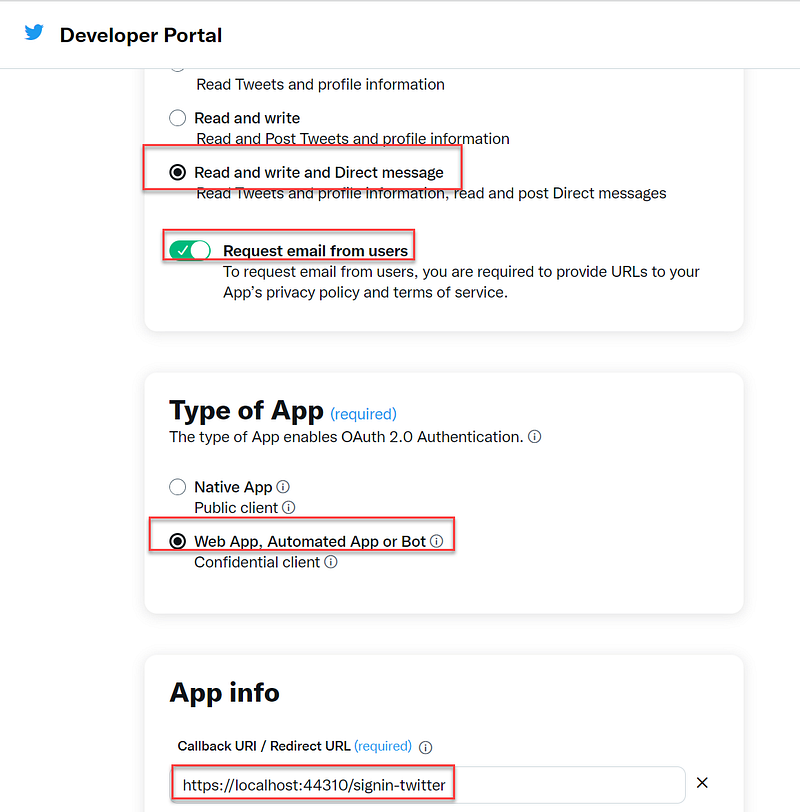
- UseTwitterProvider: false (default). If set to true, you must provide valuesv for Twitter ConsumerId and Twitter ConsumerSecret fields.
- TwitterConsumerId: obtain when registering the app at the Twitter developer portal
- TwitterConsumerSecret: obtain when registering the app at the Twitter developer portal
Note: make sure to set up “https://localhost:44310/signin-twitter” as Callback URI /Redirect URL as shown in Figure 12.
Register Provider
The code to register Twitter provider is in StartupHelper.cs (Figure 7), lines 400–409.
Part 8: Specify provider settings using secrets.json
Never store passwords or other sensitive data in the source code, appsetttings.json file. For provider settings, follow Microsoft's recommendation “Safe storage of app secrets in development in ASP.NET Core”. Figure 13 contains a sample text of settings for providers. You can cut and paste the text into your project secrets.json file and replace the actual values. To get the secrets.json file in Visual Studio 2022, right-mouse-click on the project TokenService.STS.Identity and select Manage User Secrets
Supplement Youtube Video
The video content includes
- Usecase for using account from social media to login
- Architecture overview of external authentication providers
- Running an instance Duende IdentityServer to see how external login work
- Doing a walk-thru of integration source code
- How to register client for Facebook, Google, Microsoft, GitHub, and Twitter
- Update settings in secrets.json when running IdentityServer in VS 2022
Related Stories
If you are interested to use IdentityServer to secure client apps, check out my previous publications on Medium
- Secure .NET CORE 6 Web API with JWT from Duende IdentityServer
- Authenticate Asp.Net Web Form with IdentityServer4
- Secure React 17 with JWT and IdentityServer4
- Secure Net 5 Blazor Web Assembly with JWT and IdentityServer4 Admin UI
- Secure Angular 11 with JWT and IdentityServer4 Admin UI
- Angular Guard for Role-Based Access Control (RBAC) Driven by JWT
Summary
Integrating external authentication providers into an application can be a time-consuming task for developers. Fortunately, Microsoft provides middleware libraries and online resources that make it easier to integrate with popular authentication providers with just a few lines of code. By using these libraries, developers can save time and focus on building other features and functionality into their application, rather than spending time on the tedious task of writing login code.
Thanks for reading! Hope you found it useful. Want more? Please follow me and become a member on medium for more articles. With your support, I’ll keep creating awesome content for you. Have a great day ahead! — Fuji Nguyen


