
Angular Guard for Role-Based Access Control (RBAC) Driven by JWT

Introduction
In June 2021, I released the Angular 12 Starter Kit on GitHub with boilerplate code for UI/UX Bootstrap, server-side pagination, sort, filter, and CRUD. The Angular app is secured by JSON Web Token (JWT) to facilitate authentication and authorization. This story will do a deep dive into the implementation of Role-Based Access Control (RBAC) using role claims available in the JWT.
Online Resources Highlights
credit where credit’s due
To develop this tutorial, I have reviewed and integrated tools and techniques from the following high-quality opensource projects and online resources.
- manfredsteyer/angular-oauth2-oidc — this opensource project has 1.4K stars on GitHub. It is a NPM package supporting OpenId Connect (OIDC) and OAuth 2 and in Angular. The library provides developer-friendly methods to work with JWT.
- Angular Role-Based Routing Access with Angular Guard — this Medium publication from Erkan Güzeler is an excellent reference to the Angular Guard concept and coding.
RBAC Overview
Role-based access control (RBAC) limits application access based on the user’s roles within an organization or company. The role in RBAC typically refers to the levels of access that users have to the application. To better understand RBAC, imagine that you work on an Angular app to manage company Employee Profiles. There are three roles in the app
- Employee — users in this role can view and update their own profile
- Manager — users in this role can view the profile of their subordinators and approve profile changes
- HR Admin — users in this role can enroll new employees and make administrative edit
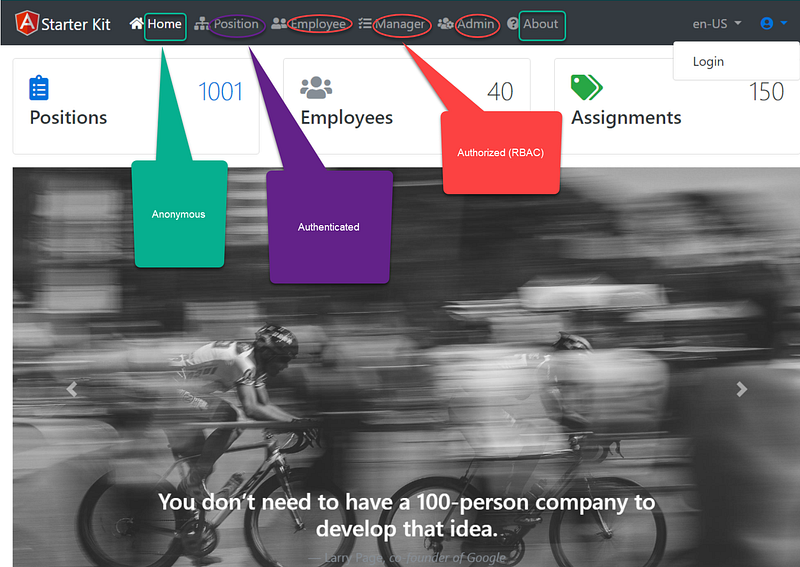
Figure 1 is a screenshot of a demo app where the Employee, Manager, and Admin menus are protected by Employee, Manager, and HR Admin application roles respectively. You can try the online demo using the accounts below.
- (antoinette16, Pa$$word123) — has Employee role and can access Employee page
- (rosamond33, Pa$$word123) — has Employee and Manager roles and can access the Employee and Manager pages
- (ashtyn1, Pa$$word123) — has Employee, Manager, and HR Admin roles and can access the Employee, Manager, and Admin pages
In this tutorial, we will learn the in and out of implementing the RBAC in Angular. When it is appropriate, I will link to GitHub so you can find the source code files.
Screencast
The complementary Youtube video is a record of my desktop going over the user interface navigation of the online demo. It will help to get you familiar with the use of role-based access to secure the menu items. Background music is coming (:
Prerequisites
The following tools and skills are recommended.
- Familiar with OIDC, oAuth2 and JWT
- Familiar with Angular Router
Tutorial Content
The tutorial will provide
- An overview of JWT to secure Angular
- The design and implementation of RBAC
- Code walk-thru
Overview of JWT in Angular app
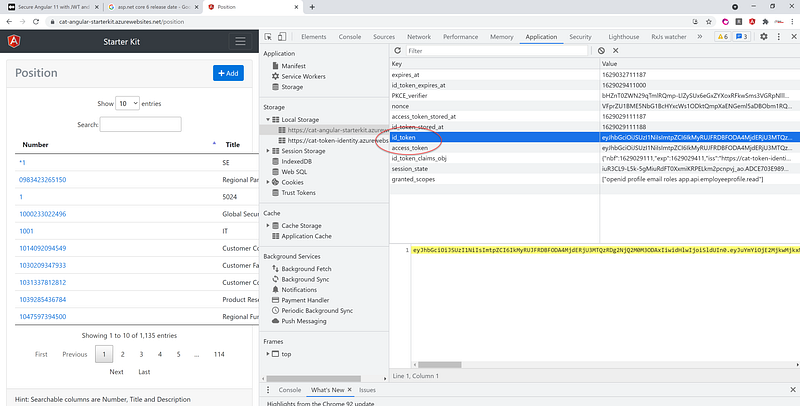
In the Angular SPA application, when the users successfully log in using their credentials, a JWT will be saved locally in the browser, typically in local or session storage. In Chrome developer tools, developers can see the JWT from the Application tab. Figure 2 depicts an example of JWT in Local Storage.
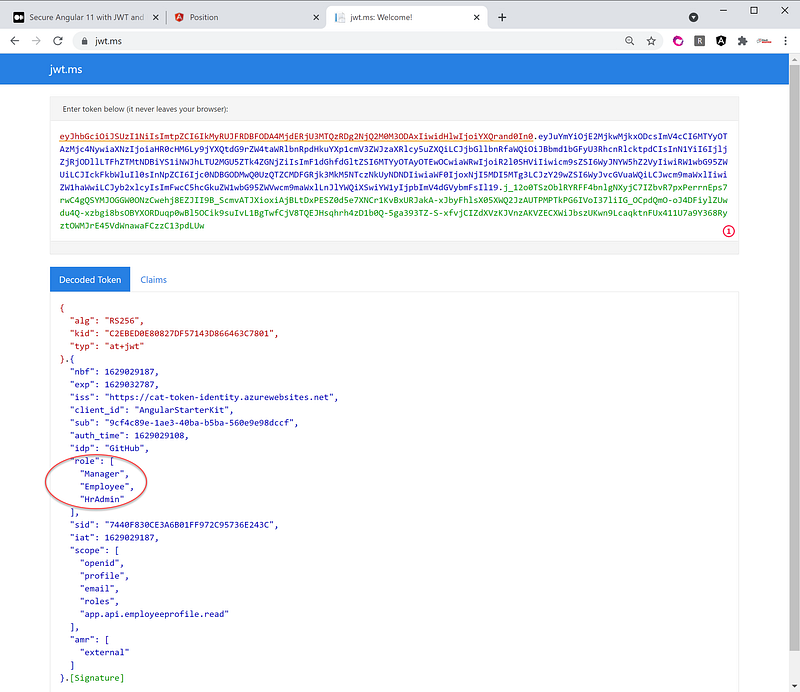
When the users want to access a protected WebAPI resource, the Angular app will retrieve the JWT access_token from local storage and sends the access_token in the Authorization header using the Bearer schema. The user’s roles must be included in the access_token, so the backend API can verify access based on roles. Figure 3 is an example of the decoded Access token in jwt.ms where you can see the role claims.
Design Consideration
The design for Angular guard supports three access types
- Anonymous — this access is usually set for public accessible pages, where the identity of the individual visiting the site is not important.
- Authenticated — this access encompasses all users who have logged in with a username and password or multi-factor authentication.
- Authorized — this access gives users permission to access a resource based on claims such as roles in the JWT.
Implementation
Architecting a separate guard for authentication and authorization is the approach to reinforce the single-responsibility principle (SRP). The implementation consists of two guard files
- auth-guard.service.ts — this file implements AuthGuard class to check for authentication based on the user’s login
- role-guard.service.ts this file implements RoleGuard class to check for authorization based on roles.
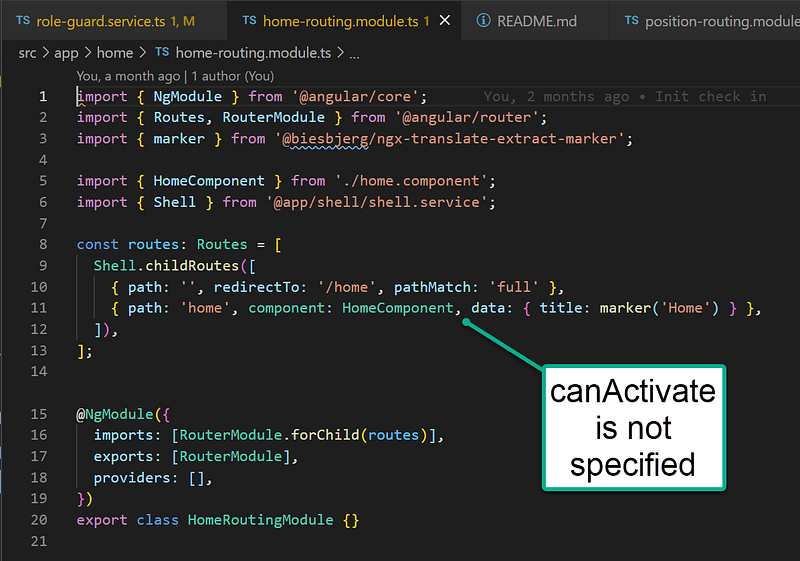
For routes that need Anonymous access such as Home page, the canActivate is NOT specified in the home-routing.module.ts. See Figure 4 for a screenshot of the example code in the home path.
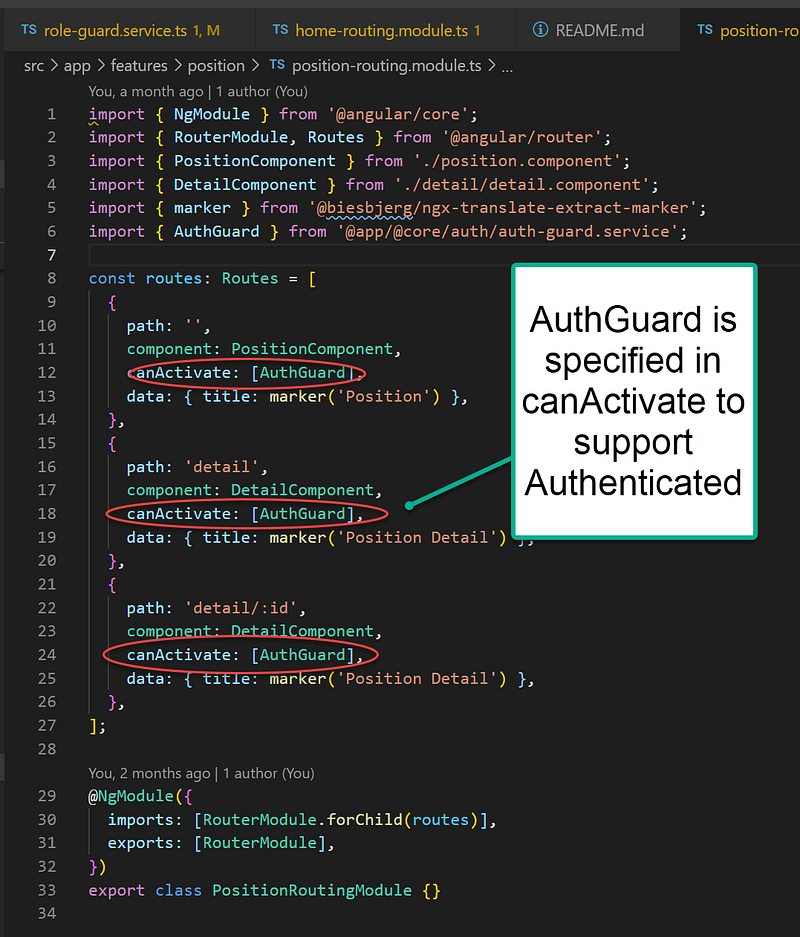
For routes that need Authenticated (login) access such as Position and Position Detail pages, the canActivate is specified in the position-routing.module.ts. See Figure 5 for a screenshot of the example code in the detail path where AuthGuard is referenced in canActivate attribute.
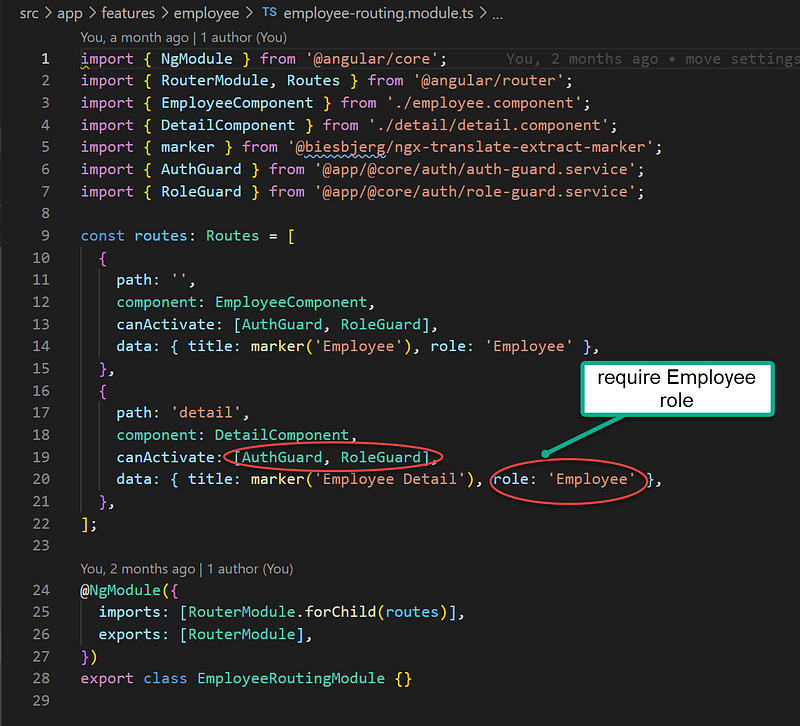
For routes that require Authorization access (RBAC) such as Employee, Manager, and Admin pages, the canActivate includes both AuthGuard and RoleGuard. For example, in the employee-routing.module.ts, the AuthGuard and RoleGuard are both specified in canActivate attribute. In addition, the role is passed via the data attribute with the value Employee. See Figure 6 for a screenshot of the example code in the detail path.
Code Walk-Thru of AuthGuard
Figure 7 is the source code listing of auth-guard.service.ts
Line 15: call the OIDC JS library to check the login status
Line 20: activate toaster to alert the user if failed login
Line 27–30: display toaster to alert the user to log in
Code Walk-Thru of RoleGuard
Figure 8 is the source code listing of role-guard.service.ts
Line 14: call the OIDC JS library to check the login status
Line 19: check roles that exist in the data of the route
Line 22–23: call OIDC JS library to retrieve login profile and roles
Line 26: compare login user’s role vs route’s required roles
Line 31: display toaster to alert the user of requiring role to access
Line 42–48: routine to display toaster
Related Tutorials
The following tutorials are related to this story. Tutorial #1 below has the complete source code of the online demo referenced in this story. Enjoy!
- Angular Starter Kit for Rapid Prototype — Angular 12 starter repo with boilerplate code for server-side pagination, CRUD, OIDC/oAuth2 JWT login, role-based access, and UI/UX Bootstrap. Include ASP.NET CORE 5 source code for the backend Token Service Server and REST Api Resources.
- ASP.NET Core Token Service Starter Kit — Ready-to-serve middleware ASP.NET CORE Token Service Starter Kit to secure SPA applications written in Angular, React, or Blazor WASM
- ASP.NET Core REST API Template Starter Kit — Recipe for building advanced REST API (microservice)
- Secure Angular 11/12 with JWT and IdentityServer4 Admin UI — In JWT we trust
GitHub Source Code
The repository referenced in this tutorial is below.
Summary
This story provides a tutorial on how to leverage role claims in the JWT to support RBAC. If you look for a robust solution to secure content on any given page using expanded permissions beyond roles, check out my post on Reddit where you find discussions on the opensource module ngx-permissions.
Thanks for reading! Hope you found it useful. Want more? Please follow me and become a member on medium for more articles. With your support, I’ll keep creating awesome content for you. Have a great day ahead! — Fuji Nguyen


