
Angular Starter Kit for Rapid Prototype

Angular 12 starter repo with boilerplate code for server-side pagination, CRUD, OIDC/oAuth2 JWT login, role-based access, and UI/UX Bootstrap. Include ASP.NET CORE 5 source code for backend Token Service Server and REST Api Resources.
Introduction
Imagine yourself participating in an Angular hackathon, where you and your team will build a line-of-business app in 8 hours. The app must be responsive, secure, and business-oriented. Options are building the app from scratch with bare Angular CLI or employing a starter kit to jump-start the project. In this story, I will introduce you to an Angular Starter Kit to scaffold an Angular app in minutes, make a few configuration changes, and be ready to add business features.
Online Demo
Developers love to see working source code. We all like to experiment with how something works, and then decide whether we want to spend our valuable time learning it. Check out the live demo. Log in with the account (janedoe, Pa$$word123) or your GitHub account. Please be aware that the educational demo may be slow to load data initially due to REST API running on low-tier, shared MSSQL resources in Azure.
The online demo showcases the following:
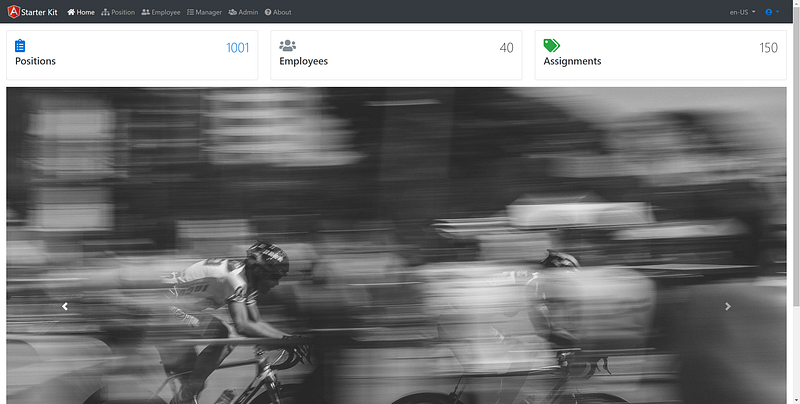
- The Home page contains mock-ups of the UI/UX with typical dashboard components such as card and carousel.
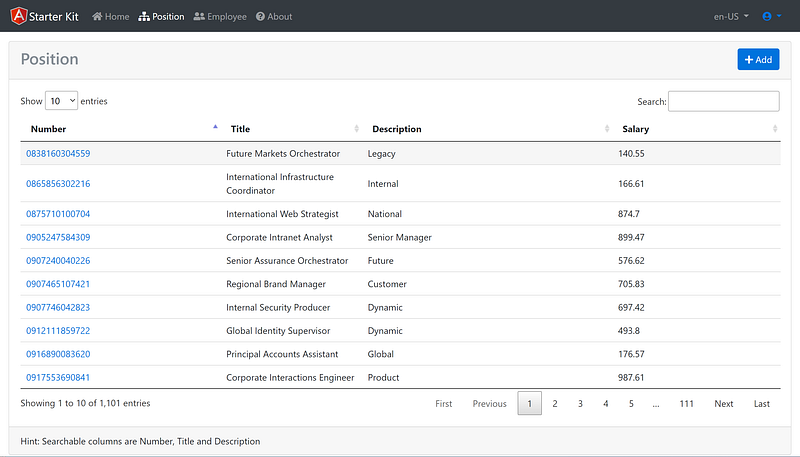
- The Position page is an example master/detail. The master page employs server-side pagination, sort, and filter, while the drill-down detail page is an example of CRUD. A reusable Toaster service enables confirmation of CRUD actions.
- Anonymous and secure pages are controlled by the OIDC JavaScript library and Token Service server. The Home and About menu allow anonymous access, while the Position, Employee, Manager, and Admin pages require login to an external Token Service Server.
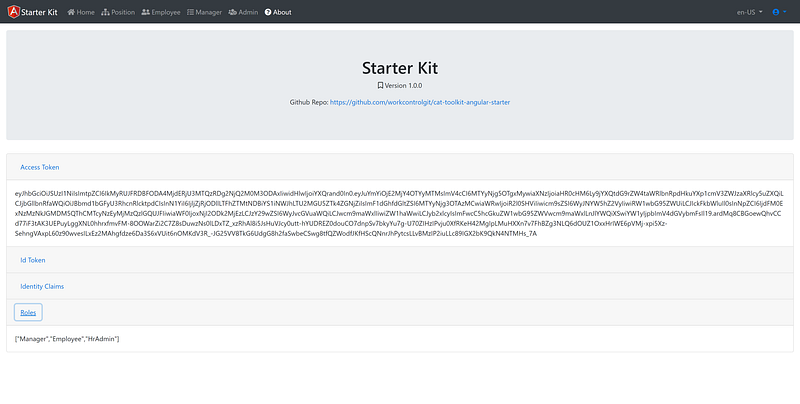
- Pages are secured by roles. The Employee, Manager, and Admin pages require users in Employee, Manager, and HRAdmin roles respectively for access.
Additional accounts for role-based access control testing
- (antoinette16, Pa$$word123) — has Employee role and can access Employee page
- (rosamond33, Pa$$word123) — has Employee and Manager roles and can access the Employee and Manager pages
- (ashtyn1, Pa$$word123) — has Employee, Manager, and HR Admin roles and can access the Employee, Manager, and Admin pages
GitHub Repos
The Angular Starter Kit utilizes the demo Token Service and ApiResources servers running in the Azure cloud. You can fork, clone, and then run the Angular Starter Kit project out of the box. Running Token Service and REST API on localhost is optional.
- Angular Starter Kit — this repo contains the Angular 12 source code. The project was scaffolded using ngx-rocket and then integrated with angular-oauth2-oidc.
- Token Service— this repo contains the ASP.NET CORE 5 C# source code of the Secure Token Service (STS) server. The project architecture is based on IdentityServer4 Admin UI.
- ApiResources— this repo contains the ASP.NET CORE 5 C# source code of the REST API, supporting pagination, sort, filter, and CRUD. The solution was generated using the OnionAPI Template.
Note: I do not go into details of download and setup Token Service and ApiResources in this tutorial. See the Related Tutorials section later for more info on how to do that.
Starter Kit Application Architecture
Figure 1 depicts the application architecture reference in this tutorial. It shows the JWT interface and communication ports between application components running in Azure. The architecture consists of Clients, ApiResources, and Token Service (CAT).
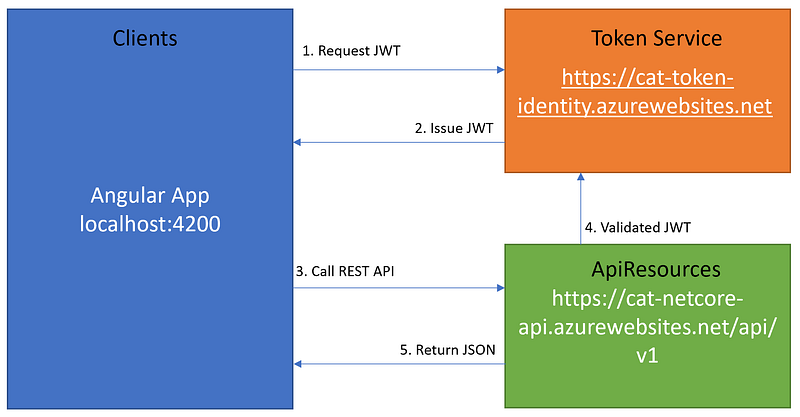
The client Angular app requests JWT from the Token Service, which runs an instance of IdentityServer4. The Token Service is responsible for issuing and validating JWT. When the Angular app needs to access the API Resources, it will send the JWT via the browser header to the API Resources. The API Resources will valid the JWT prior to response with data.
Prerequisites
The following tools/skills are recommended.
- Visual Code — free code editor for Angular
- Visual Studio 2019 Community — free code editor for C#
- Angular CLI — a command-line interface tool to initialize, develop, scaffold, and maintain Angular applications
- Knowledge of Git commands such fork/clone repository
- Familiar with OIDC and oAuth2 terminologies
Live Demo
Developers love to see working source code. We all like to experiment with how something works, and then decide whether we want to spend our valuable time learning it. Check out the live demo. Log in with the account (janedoe, Pa$$word123) or your GitHub account.
Tutorial Content
I have published numerous tutorials with source code about Angular, JWT/IendtityServer4, and ASP.NET CORE REST API on the Medium platform. I thought I pull the source code into one project and create a starter kit to help developers kick-start new Angular projects. The application architecture is based on the CAT Framework which promotes tightly integrated but loosely coupled modular software components.
This tutorial provides high-level documentation of the Angular Starter Kit, with a focus on the electrical/plumping behind the scene. I will refer to my previous tutorials and reference the source code folder/file in GitHub when applicable. The content consists of the following parts:
Part 1: Angular Starter Kit Introduction Discuss the features and benefits
Part 2: Getting Started Fork the repo and then clone/run on localhost
Part 3: UI/UX library Discuss the integration with the Bootstrap library
Part 4: Securing Angular with JWT (JSON Web Token) Discuss the integration with the OIDC library to secure the app with JWT
Part 5: Pagination and CRUD Make calls to protected REST API to display data in a grid and drill down to the detail
Part 6: Application Configurations Discuss environment variables settings to support security and REST API
Part 1: Angular Starter Kit Introduction
Features
The frontend tech stack includes
- Angular 12: latest and greatest version of Angular at the time of this writing
- Bootstrap 4: most popular UI/UX library on the planet
- ng-bootstrap: Angular bootstrap widgets
- angular-oauth2-oidc: NPM library to work with JWT/Token Service Server to secure Angular app
- Angular-datatables: robust data grid supporting server-side pagination (of large data table 100k+ rows)
- ng-http-loader: smart angular HTTP interceptor to display spinner on long-running HTTP calls
- Progressive Web App (PWA) — the responsive app that can be installed on desktop/mobile as an icon
Benefits
A complete starter template with
- best-practice app folder structure tailored for scalability and maintainability
- boilerplate code for UI/UX Bootstrap, server-side pagination, sort, filter, CRUD, and Role-Based Access Control
Part 2: Getting Started
I would recommend that you fork the Angular Starter Kit repo and then clone/run it on localhost.
To fork the repo
- Visit https://github.com/workcontrolgit/cat-toolkit-angular-starter
- Click on Fork button in the upper right corner
To clone your forked repo
- At the command prompt, enter git clone https://github.com/{your github account}/cat-toolkit-angular-starter
- Hit enter key
To run Angular Starter Kit
- Launch Visual Code and open the cloned source code folder.
- Access the Terminal screen (via View > Terminal menu)
- Run npm install to restore npm packages
- Run ng serve -o to run and automatically open the Angular Starter Kit in the browser
- Login with your GitHub account
Part 3: UI/UX library
The Angular Starter Kit is integrated with Bootstrap UI/UX library via the NPM package ng-bootstrap, which provides Angular widgets built from the ground up using only Bootstrap 4 CSS and APIs designed for the Angular ecosystem.
- header.component.html — markup to display header/menu using the navigation components
- home — markup to display and dashboard cards and carousel
See Figure 2 for a screenshot of the home page, displaying the header menu, dashboard, and carousel
For information on how to utilize menu, button, modal, and toaster components in ng-bootstrap library, see tutorial Angular 11 Modal Form, Dialog, and Toaster with Bootstrap.
Part 4: Securing Angular with JWT
The Angular app security is based on the modern OIDC protocol. It allows Angular client apps to verify the identity of the End-User based on the authentication performed by an Authorization Server, as well as to obtain basic profile information about the End-User in an interoperable and REST-like manner. The security information is encoded in the JWT, which consists of the ID Token and Access Token.
To understand how the OIDC library is integrated into the Angular app, please review the source code files below
- package.json — import library angular-oauth2-oidc
- app.component.ts — initialize auth service via this.authService.runInitialLoginSequence();
- core.module.ts — import OIDC related libraries
- auth — folder contains typescript code to handle login, logout, OIDC settings
- silent-refresh.html — support JWT silent refresh
- should-login.component.ts — component to require the user to login
- shell-public.service.ts — layout supporting anonymous access
- shell.component.ts — layout requiring login
- app-routing.module.ts — lazy-load supporting anonymous and required login
- role-guard.service.ts — role-based access control
Figure 3 is a screenshot of the About page, displaying Access Token, Id Token, and Identity Claims from the JWT. The source code for the About page can be found here.
For more information about Angular app security, please see tutorial Secure Angular 11 with JWT and IdentityServer4 Admin UI.
Part 5: Pagination/CRUD
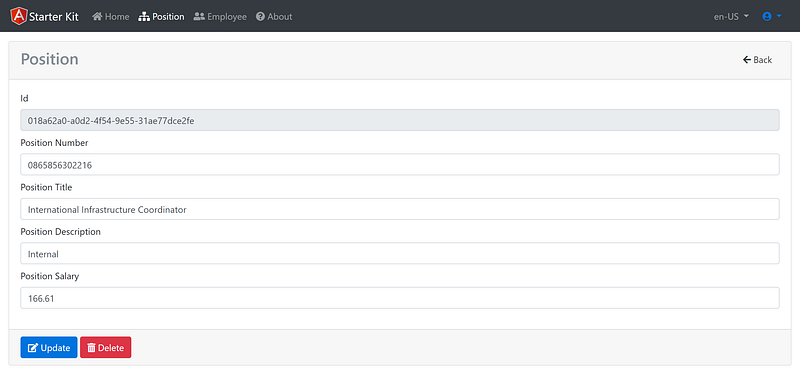
By using the Angular HTTP Client library and the OIDC library, the Angular Starter Kit calls the protected REST API and automatically passes the Access Token via the header. For performance, the server-side pagination technique is employed to support the fast display of the large datasets. See Figure 4 for the pagination screenshot. The unique record number is hyperlinked to the detail page to support CRUD. See Figure 5 for a screenshot of the edit form. To see the source code related to pagination and CRUD, review the module and components inside the position folder.
For additional references to pagination and crud techniques, check out the following tutorials:
Part 6: Application Configurations
You can define different build configurations for your projects, such as stage and production, with different setting variables. The project’s src/environments/ folder contains the base configuration file, environment.ts, which provides a default environment. You can add override defaults for additional environments, such as production and development, in target-specific configuration files. The configuration files and their settings to connect the Angular app to Identityserver4 and REST API are in the environment folder.
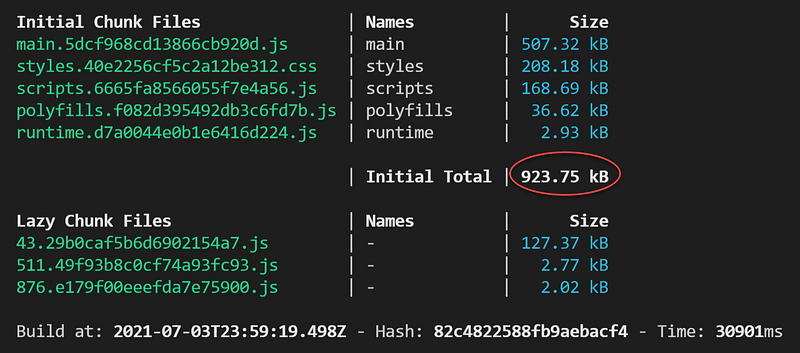
It is important to keep the size of the app small to support the fast load. If you run ng build — — configuration production, you will see the size of 923.75 kB. See Figure 6 for a screenshot of the build.
Since Angular Starter Kit is structured as a PWA (Progressive Web Apps), it can be added to the home screen and works as a mobile app. With PWA, it is technically possible to write code to get access to the mobile device’s camera, storage, or GPS to create robust line-of-business apps.
Related Tutorials
- ASP.NET Core Token Service Starter Kit — this tutorial contains instructions to download and run the ASP.NET Core Token Server on localhost to support SPA apps such as Angular, React, Blazor WebAssemply.
- NetCore REST API CRUD, Filter, Sort, Page, and Shape Data with VS Template OnionAPI — this tutorial has instructions to create Api Resources (REST API) using Visual Studio template.
- Angular Guard for Role-Based Access Control (RBAC) Driven by JWT — this tutorial includes code walk-thru to secure Angular routes using role claim in JWT.
Summary
The Angular Starter Kit provides electrical and plumbing to your new kitchen. It is up to you, my fellow developers, to work with your customers to shop and install the cabinets, countertop, and appliances to complete the kitchen.
If you have questions or suggestions to improve the Angular Starter Kit, please share them in the response section of this story. This tutorial focuses on the Angular client. I do plan to publish additional tutorials on the backend Token Service and REST API to provide developers with end-to-end solutions. Stay tuned!


