
Angular 11 Pagination 100,000+ Rows

Introduction
Have you ever come across a web application where it is slow to display a data table? The crawling performance is typical in any application that has a lot of data. The amount of data plays a big role in how fast a table will load. The root cause is “over-fetching” data.
The fix for “over-fetching” is server-side pagination — a programming technique for which only a subset of data such as 10 rows will be provided by the backend for display in the frontend.
Pagination, also known as paging, is the process of dividing a document into discrete pages, either electronic pages or printed pages. — Wikipedia
Are there libraries or tools out there to assist with server-side paging in Angular? In this story, I will employ the open-source project Angular DataTables, together with ASP.NET v5 REST API, to achieve a speedy display of 100,000+ rows of data.
Tutorial Content
To demonstrate how simple it is to do paging in Angular, I will start an application from scratch and then add Angular Datatables to support paging. The tutorial is divided into four parts:
Part 1: Scaffold an Angular 11 app using app generator Ngx-Rocket. By default, the generator will create the Home page and About page. These two pages will be used later on in parts 3 and 4 of the tutorial.
Part 2: Install the Angular Datatables library. The library will be installed via the npm -install command
Part 3: Set up the Angular Datatables module on the Home page. Follow the Angular Datatables documentation to configure server-side pagination against a REST API Person endpoint in the cloud.
Part 4: Set up the Angular Datatables module on the About page. Configure server-side pagination against an ASP.NET CORE/REST API Position endpoint running on the localhost that has 100k + records.
At the end of each tutorial part, I include a complementary screencast with background music (work in progress) so you can see how it was done on my desktop. Grab a drink and relax while watching the videos!
Related Tutorials
The focus of this tutorial is on Angular pagination. Two other related tutorials are
- NetCore 5.0 REST API Pagination 100,000+ Rows
- Angular 11 CRUD with .Net 5 REST API Tutorial
- Angular 11 Modal Form, Dialog, and Toaster with Bootstrap
Opensource Project Highlights
Angular DataTables is a table library with 1.5k+ stars on Github. The library supports Angular2+ to build complex HTML tables, including filter, sort, and paging. The developer Louis LIN, based in Paris, maintains the repo and provides excellent online documentation.
You can show your appreciation to Louis LIN by giving a “star” on his Github Repo.
Server-Side Pagination Overview
To address pagination, Angular DataTables provide a method to let all of the “heavy lifting” be done by a database engine on the server-side (they are after all, highly optimized to be used exactly for this case!), and then have that information drawn in the user’s web-browser. Consequently, it can display tables consisting of millions of rows with ease.
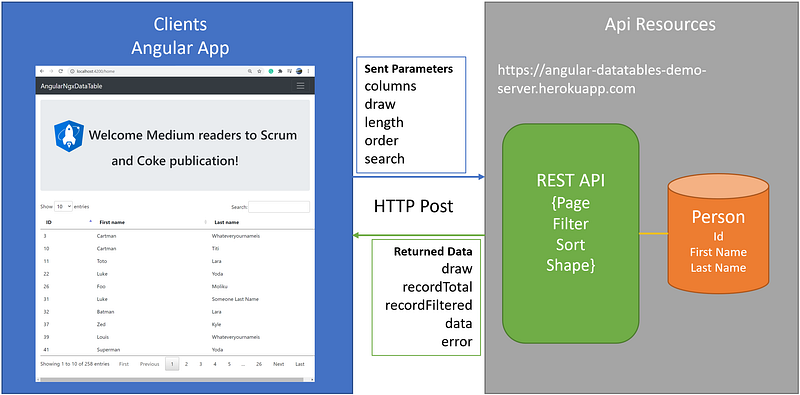
As shown in Figure 1, when using server-side processing, DataTables will make an Ajax request to the server for each draw of the information on the page (i.e. when paging, ordering, searching, etc.). DataTables will send a number of variables to the server to instruct it to perform the required processing and then return the data in JSON format to DataTables for display.
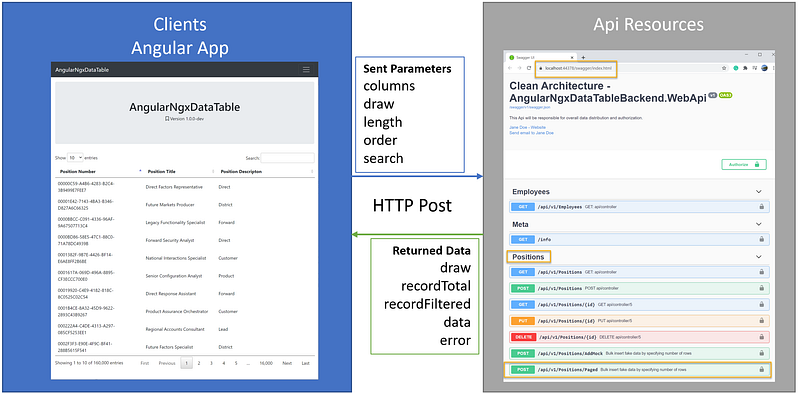
Sent Parameters — When making a request to the server using server-side processing, DataTables will send the input parameters such as columns, draw, length, order, and search, to let the server know what data to query.
Returned Data — DataTables expect a return of data in JSON format, including fields such as draw, recordTotal, recordFiltered, data, and error.
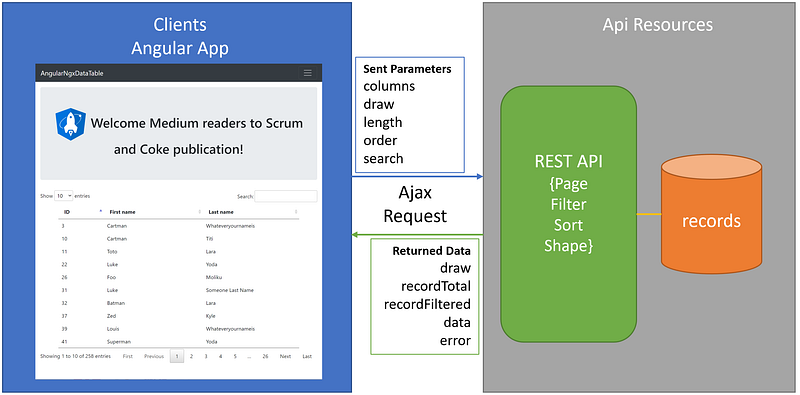
For more information about Clients-ApiResources-TokenService architecture for building scalable and maintainable modern applications, see CAT architecture pattern for modern app SPA/Mobile.
Prerequisites
The following tools/skills are recommended
- Visual Code — free editor for Angular source code.
- Ngx-Rocket — opensource Angular generator to scaffold new Angular app.
- Visual Studio 2019 Community —free editor for ASP.NET Core WebAPI C#.
- Familiarity with TypeScript and C#.
Let’s get started!
Part 1 — Create Angular app with Ngx-Rocket template
Ngx-Rocket is a high-quality starter template that Angular developers can use to quickly scaffold an Angular app with boilerplate code. The included enterprise features are responsive design, routing, authentication, HTTPS service extensions, i18n support, and more.
Task 1 .1— Install Ngx-Rocket generator
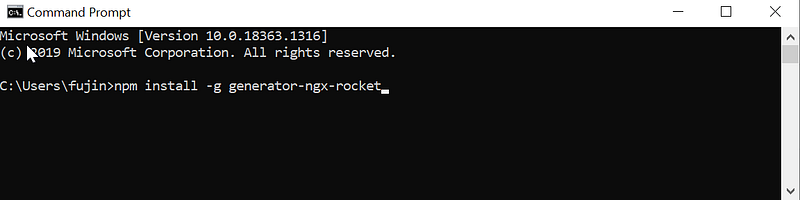
To install Ngx-Rocket generator (see Figure 2 for visual aids):
- Open command prompt
- Type in npm install -g generator-ngx-rocket
- Hit Enter key
Task 1.2 — Scaffold new Angular app
To scaffold a new Angular app using Ngx-Rocket generator, follow these steps:
- Create folder C:\apps\devkit\Clients\AngularNgxDataTable
- Open the command prompt and change to C:\apps\devkit\Clients\AngularNgxDataTable
- Type in “ngx new” and hit Enter
- When prompt for input parameters, use the settings as shown in Figure 3
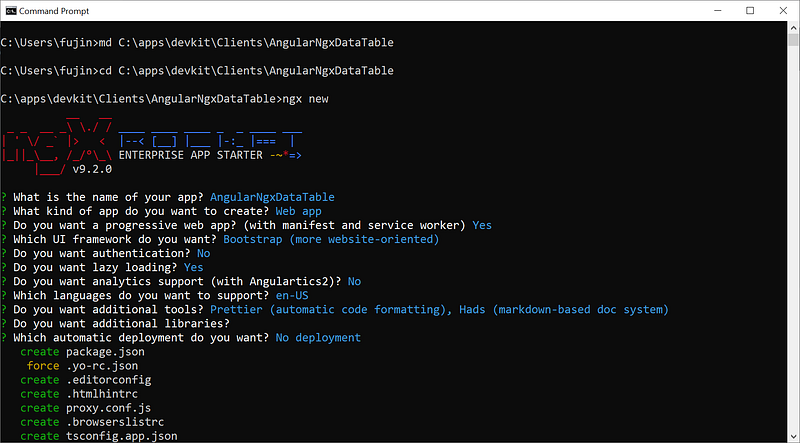
The Ngx-Rocket generator will first scaffold the Angular app and then automatically run npm -install command to restore npm packages afterward.
Screencast of Part 1
The complementary Youtube video (Figure 4) is a record of the steps in this part of the tutorial. If you find the video helpful, please like and subscribe.
Part 2 — Install the Angular Datatables library
In Part 1, we learned how to scaffold a new Angular app with responsive design using the Ngx-Rocket template. In Part 2, we will install the Angular Datatables library from Visual Code.
Task 2.1 — Open the Angular application with Visual Code
To open the project for edit:
- Launch Visual Code
- Open folder C:\apps\devkit\Clients\AngularNgxDataTable
Task 2.2 — Install Angular Datatables library
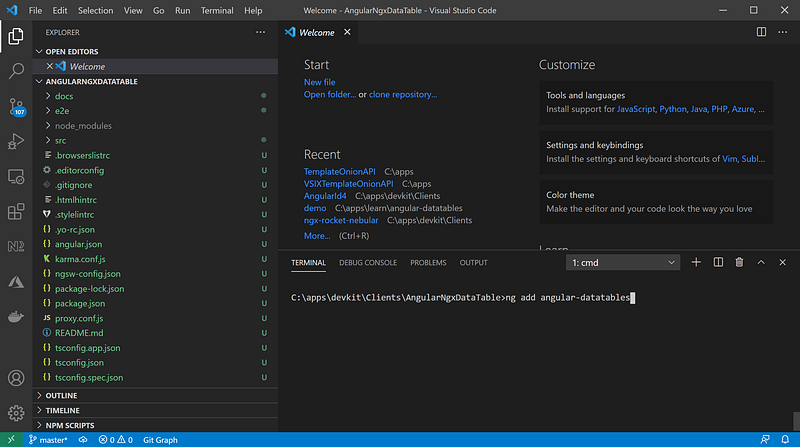
In Visual Code (see Figure 5 for visual aids):
- Click on menu View > Terminal (or “CTRL + ~”) to get to the Terminal prompt
- Type in: ng add angular-datatables
- Hit the ‘Enter’ key
For more information on Angular Datatables installation, see online documentation ‘Getting started’.
Screencast of Part 2
The complementary Youtube video (Figure 6) is a record of the steps in this part of the tutorial. If you find the video helpful, please like and subscribe.
Part 3 — Set up Angular Datatables module on the Home page
In Part 2, we installed the Angular Datatables library. In Part 3, we will modify the Home page to display a table with paging, sort, and filter features. As shown in Figure 7, the Angular app will make an HTTP Post to a REST API server https://angular-datatables-demo-server.herokuapp.com to retrieve Person data and display it on the Home page.
Task 3.1 — Import DataTablesModule to home.module.ts
Follow the steps below:
- In Visual Code, open to src\app\home\home.modules.ts
- Replace with the code in Figure 8
Code walk-thru
- line 8: import DataTablesModule
- line 11: add DataTablesModule to NgModule > imports section
Task 3.2— Set up HTML table in home.component.html
Follow the steps below:
- In Visual Code, open to src\app\home\home.component.html
- Replace with the code in Figure 9
Code walk-thru
- line 8: reference dtOptions in the table tag as required by Angular Datatables directive
- line 9–15: set up table header
- line 16–22: if existed data, loop thru and display data
- line 23–27: if there is no return data, display No Data
Task 3.3— Typescript to call REST API in home.component.ts
Follow the steps below:
- In Visual Code, open to src\app\home\home.component.ts
- Replace with the code in Figure 10
Code walk-thru
- line 3–6: import custom code to support API call
- line 25–28: setup Angular Datatables options
- line 16–22: if existed data, loop thru and display data
- line 31: setup httpclient POST
- line 32: subscribe and map the response to DataTableResponse class (import in line 6)
- line 35–38: mapping returned data to Angular Datatables internal variables
- line 42: define/map column to data
For more information on how to configure server-side pagination, visit Angular Datatables online documentation section Server side the Angular way.
Screencast of Part 3
The complementary Youtube video (Figure 11) is a record of the steps in this part of the tutorial. If you find the video helpful, please like and subscribe.
Part 4 — Set up Angular Datatables module on the About page
In Part 3, we learned how to configure Angular Datatables on the Home page to access a REST API provided by the creator of the Angular Datatables project. That REST endpoint has a small data set of about 250 Person records. In Part 4, we will add the Angular Datatables to the About page and configure it to access a local instance of ASP.NET CORE REST API that has 100,000+ Position records. The Angular will call REST API endpoint /api/v1/Positions/Paged via HTTP POST. See Figure 13 for the connectivity diagram between Angular and REST API.
Task 4.1 — Import DataTablesModule to about.module.ts
Follow the steps below:
- In Visual Code, open to src\app\about\about.modules.ts
- Replace with the code in Figure 14
Code walk-thru
- line 7: import DataTablesModule
- line 10: add DataTablesModule to NgModule > imports section
Task 4.2 — Set up HTML table in about.component.html
Follow the steps below:
- In Visual Code, open to src\app\about\about.component.html
- Replace with the code in Figure 15
Code walk-thru
- line 10: reference dtOptions in the table tag as required by Angular Datatables directive
- line 11–17: set up table header
- line 18–24: if existed data, loop thru and display data
- line 25–29: if there is no return data, display No Data
Task 4.3 — Typescript to call REST API in about.component.ts
Follow the steps below:
- In Visual Code, open to src\app\about\about.component.ts
- Replace with the code in Figure 16
Code walk-thru
- line 4–7: import custom code to support API call
- line 29–32: setup Angular Datatables options
- line 16–22: if existed data, loop thru and display data
- line 35: setup httpclient POST
- line 42: subscribe and map the response to DataTableResponse class (import in line 6)
- line 46–48: mapping returned data to Angular Datatables internal variables
- line 52: define/map column to data
Task 4.4— Clone ASP.NET REST API from Github and Run on Local
The source code for the REST API project is available on Github. The solution consists of five projects that are structured following the Clean Architecture design pattern. Follow the steps below to download and open source code:
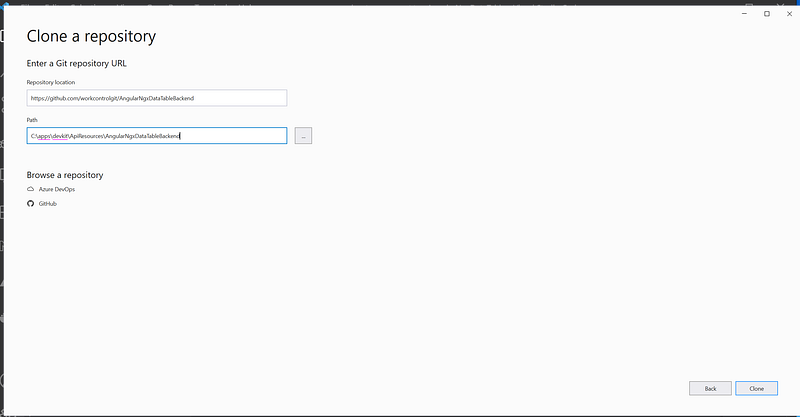
- Start Visual Studio 2019 and select the option Clone a Repository
- Clone the repo https://github.com/workcontrolgit/AngularNgxDataTableBackend to C:\apps\devkit\ApiResources\AngularNgxDataTableBackend (see Figure 17)
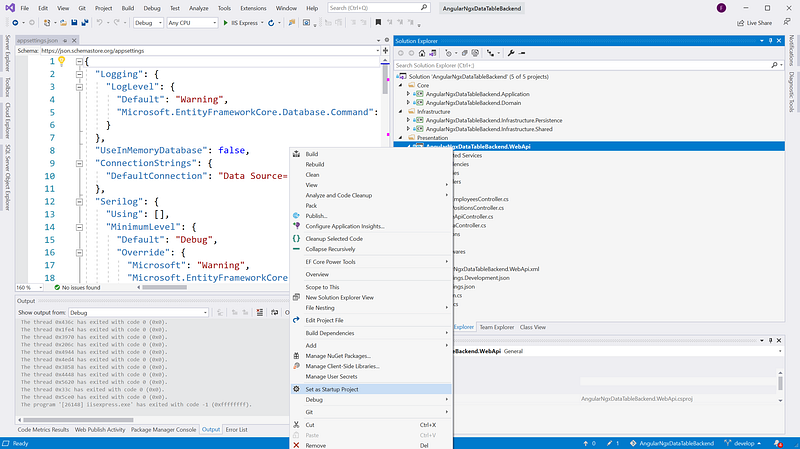
- Set AngularNgxDataTableBackend.WebApi as the StartUp project (see Figure 18)
- Run the solution by hitting F5. You should see the ASP.NET CORE REST API swagger running on https://localhost:44378/swagger/index.html (see Figure 19)
Notice that when you run the solution for the first time, it may take a few minutes to seed 100,000 rows of position test data.
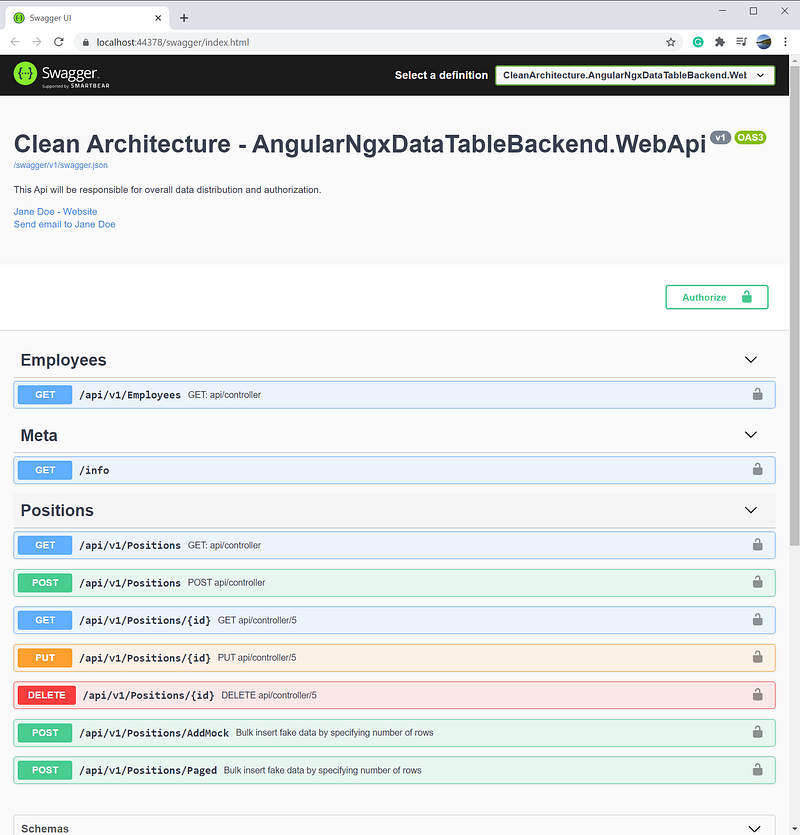
The Positions resource has an endpoint AddMock that can be used to add additional fake Position records to the backend. To learn how to fake realistic data in WebAPI, see Bogus Library for Fake Data In ASP.NET Core WebAPI.
Task 4.5— Run Angular app and Test Drive Paging Against ASP.NET CORE REST API
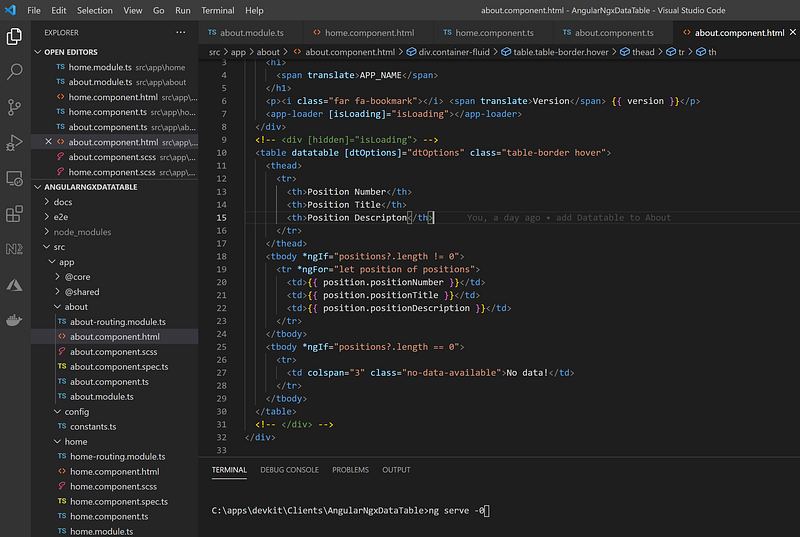
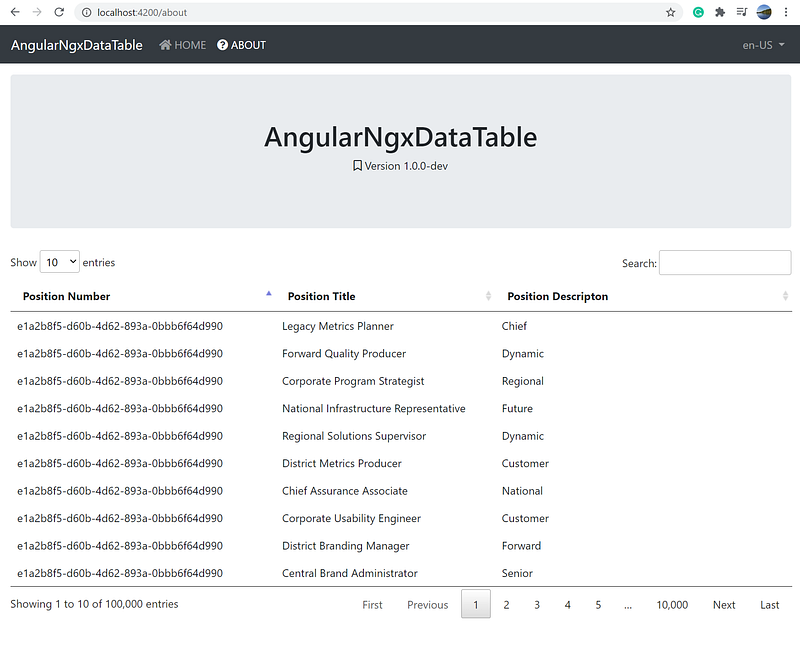
In the Visual Code > Terminal screen, run ng serve -o (see Figure 20) to automatically open the Angular App in the browser. After the app is open in the browser, click on the About page to see the position table (see Figure 21).
Screencast of Part 4
The complementary Youtube video (Figure 22) is a record of the steps in this part of the tutorial. If you find the video helpful, please like and subscribe.
Github Repos
The source code for Angular and REST API are available on GitHub. Feel free to clone and run on local.
- Angular Front-End https://github.com/workcontrolgit/AngularNgxDataTable
- ASP.NET REST API Backend https://github.com/workcontrolgit/AngularNgxDataTableBackend
Live Demo
Developers love to see a working product demo. We all like to be shown how something works so we can decide whether we want to spend our valuable time learning it. Check out the live demo.
References
- Angular Datatables Online Documentation
- Make API Calls the Right Way in Angular
- Secure Angular 11 App with Code Flow PKCE and IdentityServer4
Summary
I have worked with various Angular table libraries. My favorite is Angular Datatables for its configuration and good documentation. To do server-side pagination, you will need a REST API backend capable of page, sort, and filter.
You can use the Visual Studio template OnionAPI to scaffold ASP.NET CORE RESP API projects with boilerplate code for paging, sort, and filter. In fact, I used the OnionAPI template to jumpstart the sample REST API with 100,000 Position records in Part 4 of this story.
In real-world applications, there are many other integrations such as UI/UX, REST API/CRUD, Single-SignOn (SSO), and RBAC (role-based access control). If you are looking for an end-to-end solution, check out the Angular Starter Kit for Rapid Prototype.
Enjoy coding!


