avatarTeri Radichel

Free AI web copilot to create summaries, insights and extended knowledge, download it at here

12058

Abstract

tack points.</p><p id="b245">Also, the solution I presented in my Okta stories separates the people who create the users from the people who grant the permissions. I also use separation of duties within Okta itself. If you do that access to an Okta session token alone will be of limited use to an attacker.</p><p id="90cc">Those are some of the ways you can grant a user access to the console to view S3 buckets in multiple accounts.</p><h2 id="0c57">If you grant a user in a remote account access to that bucket via s3:* permissions and add the bucket to the resources in their policy can they get the contents of that bucket using an AWS Access Key?</h2><p id="c8a1">Here’s what I mean to be clear. I created the <b>s3remoteuser </b>in a different AWS account than the one where the bucket exists with no console access since that won’t help us access the bucket as just explained.</p><p id="e015">I gave that user <b>s3:GetObject </b>permissions on the bucket-mc-bucket-face S3 bucket.</p><figure id="7a4f"><img src="https://cdn-images-1.readmedium.com/v2/resize:fit:800/1*KGFrUkx6t5h5aQsbB6aY_A.png"><figcaption></figcaption></figure><figure id="a802"><img src="https://cdn-images-1.readmedium.com/v2/resize:fit:800/1*7y0GyhcaFv3dv2MyixDG-Q.png"><figcaption></figcaption></figure><figure id="3f15"><img src="https://cdn-images-1.readmedium.com/v2/resize:fit:800/1*9S06DZ1ScXE5-qckaE0tUg.png"><figcaption></figcaption></figure><p id="08bf">I create an access key and secret key for the user.</p><figure id="e916"><img src="https://cdn-images-1.readmedium.com/v2/resize:fit:800/1*goQsmygjtb-PJ-xDGcbqDg.png"><figcaption></figcaption></figure><p id="3652">Note that <i>I always require MFA with long-lived credentials</i> when handling sensitive information or actions, but I am going to delete these credentials before this blog post gets published and this user only has access to a bucket with an image in one of my blog posts currently once I have this working.</p><p id="f852">Create an AWS Profile.</p><figure id="5003"><img src="https://cdn-images-1.readmedium.com/v2/resize:fit:800/1*tErbyY0xqUe5gLSFl2TsBg.png"><figcaption></figcaption></figure><p id="89c4">Next I am going to use the s3 cp command. Initially I was going to use the GetObject command but I think s3 sync will be a bit simpler and more efficient. Sync should only copy over the files which are different so less gets and puts.</p><div id="82e8" class="link-block"> <a href="https://awscli.amazonaws.com/v2/documentation/api/latest/reference/s3/sync.html?src=radichel"> <div> <div> <h2>sync - AWS CLI 2.13.28 Command Reference</h2> <div><h3>undefined</h3></div> <div><p>undefined</p></div> </div> <div> <div style="background-image: url(https://miro.readmedium.com/v2/resize:fit:320/)"></div> </div> </div> </a> </div><p id="65ad">First I try to run this command:</p><div id="bbba"><pre><span class="hljs-symbol">aws</span> <span class="hljs-built_in">s3</span> sync <span class="hljs-built_in">s3</span>:<span class="hljs-comment">//bucket-mc-bucket-face . --profile s3remoteuser</span></pre></div><p id="2d50">Note that s3 bucket URIs start with s3:// followed by the bucket name.</p><p id="2b5c">Remember that I am running this command from a private network with limited outbound network access.</p><p id="d07a">I get this error but it takes a very long time to execute.</p><div id="2c6b"><pre>fatal <span class="hljs-literal">error</span>: An <span class="hljs-literal">error</span> occurred (AccessDenied) <span class="hljs-keyword">when</span> calling the ListObjectsV2 operation: <span class="hljs-keyword">Access</span> Denied</pre></div><p id="a848">Let’s add that action to our policy. Note that his command falls under the s3api. Why there are two separate service name categories I don’t know. Perhaps to make policies easier to create by giving people specific <b>s3</b> actions vs <b>s3api</b> actions.</p><figure id="9534"><img src="https://cdn-images-1.readmedium.com/v2/resize:fit:800/1*kgivmnlsbi2hzutFXF_grw.png"><figcaption></figcaption></figure><div id="bb7c" class="link-block"> <a href="https://awscli.amazonaws.com/v2/documentation/api/latest/reference/s3api/list-objects-v2.html?src=radichel"> <div> <div> <h2>list-objects-v2 - AWS CLI 2.13.28 Command Reference</h2> <div><h3>undefined</h3></div> <div><p>undefined</p></div> </div> <div> <div style="background-image: url(https://miro.readmedium.com/v2/resize:fit:320/)"></div> </div> </div> </a> </div><p id="9f64">When I look in the AWS console, I only see the option for s3, not s3api for services and I do not see this list-objects-v2 command as an option.</p><p id="9268">You also won’t find it on the S3 IAM actions page.</p><div id="c81a" class="link-block"> <a href="https://docs.aws.amazon.com/service-authorization/latest/reference/list_amazons3.html?src=radichel"> <div> <div> <h2>Actions, resources, and condition keys for Amazon S3</h2> <div><h3>undefined</h3></div> <div><p>undefined</p></div> </div> <div> <div style="background-image: url(https://miro.readmedium.com/v2/resize:fit:320/)"></div> </div> </div> </a> </div><p id="ad9a">What’s going on here? Well, the AWS IAM documentation and UI does not align with what’s going on here. Under the hood, S3 bucket calls ListObjectsV2. Seems like the error message needs to be fixed in this case.</p><blockquote id="acbe"><p><b>Note:</b> <b>s3:ListBucket</b> is the name of the permission that allows a user to list the objects in a bucket. <b>ListObjectsV2</b> is the name of the API call that lists the objects in a bucket.</p></blockquote><div id="9df2" class="link-block"> <a href="https://repost.aws/knowledge-center/s3-access-denied-listobjects-sync?src=radichel"> <div> <div> <h2>Resolve Access Denied error for ListObjectsV2 using S3 sync</h2> <div><h3>undefined</h3></div> <div><p>undefined</p></div> </div> <div> <div style="background-image: url(https://miro.readmedium.com/v2/resize:fit:320/0*Gc0LhqBJ5-yYY06W)"></div> </div> </div> </a> </div><p id="d99c">I’m going to manually add this action and here’s why. I have to use a slightly different URI.</p><figure id="b41f"><img src="https://cdn-images-1.readmedium.com/v2/resize:fit:800/1*g2iBvIpYKfbm_t_0g3NC3g.png"><figcaption></figcaption></figure><p id="8cd5">I’m still getting the error.</p><figure id="00a1"><img src="https://cdn-images-1.readmedium.com/v2/resize:fit:800/1*NI-vIcq00G8x3vC-ir0b6w.png"><figcaption></figcaption></figure><p id="3c84">But I notice that the command takes far too long to return a response. So here’s my next question.</p><h2 id="3c19">What happens when you try to access an S3 bucket in another account when you have a VPC Endpoint in the subnet where the host trying to reach the remote bucket exists?</h2><p id="b51e">Recall that the EC2 instance on which I’m running my commands is in a subnet that has both an Internet Gateway and VPC Endpoints. I added an S3 VPC Endpoint to my configuration.</p><p id="1d8f">Let’s take a look at the logs for my EC2 instance. It’s trying to reach this remote bucket. Where is it sending the requests?</p><p id="15c7">I actually don’t see any traffic at all related to these requests on private IP addresses.</p><p id="0a41">I do see requests to public IP addresses when I reverse the DNS for one of the IPs.</p><figure id="28fd"><img src="https://cdn-images-1.readmedium.com/v2/resize:fit:800/1*sqkphEeqCNtFdNOjcxdZJg.png"><figcaption></figcaption></figure><p id="8f87">Cross-account requests do not appear to remain on the private network without additional configuration. Or so I thought…</p><p id="0e2f">You could try using a gateway endpoint for S3 or other types of private networking but I’m not going to get into all that here. Gateway endpoints use an entry in your route table instead of a network interface in your subnet so in theory everything would be forced to the correct endpoint.</p><div id="422c" class="link-block"> <a href="https://docs.aws.amazon.com/vpc/latest/privatelink/vpc-endpoints-s3.html?src=radichel"> <div> <div> <h2>Gateway endpoints for Amazon S3</h2> <div><h3>undefined</h3></div> <div><p>undefined</p></div> </div> <div> <div style="background-image: url(https://miro.readmedium.com/v2/resize:fit:320/)"></div> </div> </div> </a> </div><p id="56ff">Later, when I successfully got the command working, I only saw traffic traversing private IP addresses. Did the S3 endpoint just take a very long time to deploy or was something broken and then fixed? I don’t know.</p><p id="75a1">The other weird thing is that I was getting network errors in the console when trying to update the bucket policy with a user that didn’t have permissions to do that. I switched to the root user (I know bad) and then I was able to update the policy and didn’t get the network errors anymore. Not sure if that was a temporary glitch or really is related to a user who didn’t have appropriate permission.</p><h2 id="aa9c">What do we need to add besides an IAM policy to let a remote user access an S3 bucket in an account?</h2><p id="e4eb">To allow a remote user to access a bucket in another account, we need to modify the remote bucket policy to allow that user to access the bucket.</p><figure id="910a"><img src="https://cdn-images-1.readmedium.com/v2/resize:fit:800/1*cG6LDyZNb_AIkGquj6b7pA.png"><figcaption></figcaption></figure><p id="9cd2">I still get an error on ListBucket (ListObjectsV2).</p><h2 id="a28e">Where can I view the error in the logs for cross account bucket access — in the bucket account or the remote account?</h2><p id="2834">Remember to turn on the error column in your CloudTrail event logs to make your life easier.</p><figure id="3042"><img src="https://cdn-images-1.readmedium.com/v2/resize:fit:800/1*IMnhCCYsXxw7-XEf9O0arA.png"><figcaption></figcaption></figure><p id="2bcc">First let’s check the account with the S3 bucket for errors.</p><p id="97d7">This error is a bit strange. The public block access policy is not found? And that appears to be an internal AWS user agent. I get this error for the user logged into the console. Weird, but not what I’m looking for. (And I hope my public access block policy is working.)</p><figure id="382b"><img src="https://cdn-images-1.readmedium.com/v2/resize:fit:800/1*3QQVBTr2IP1UeUwR5n4Rgg.png"><figcaption></figcaption></figure><p id="5efe">I don’t see any events in this log for the remote user. Let’s head over to CloudTrail logs in the account where the remote user exists.</p><p id="e12c">Well, not seeing the error there either.</p><p id="5690">Hmm.</p><p id="f38f">Where are the failed access logs?</p><h2 id="08af">What caused the ListObjectsV2 to fail?</h2><p id="2929">I’ll give you a hint. I already showed you above. The tiniest little syntax error causes this problem. And here’s what makes it harder to solve:</p><ul><li>The S3 Bucket UI tells you something is wrong with the policy but not exactly what. At least it doesn’t allow you to create a policy that doesn’t work.</li><li>The AWS IAM console will let you create an invalid policy.</li><li>The AWS CLI gives an inaccurate error message about ListObjectsV2 when it should say s3:ListBucket (which allows you to list the objects in the bucket using the ListObjectsV2 API).</li><li>There a

Options

re no additional error logs in AWS CloudTrail as far as I can tell.</li></ul><p id="cfd5">Here’s the problem.</p><figure id="4469"><img src="https://cdn-images-1.readmedium.com/v2/resize:fit:800/1*earaGNgpsPI7RFj084Ftmw.png"><figcaption></figcaption></figure><p id="b7bc">If you look at the policy above, I had a slash after the bucket name.</p><p id="c059">To make things even more inconsistent, you have to include the slash at the end of the bucket when you use the aws sync command:</p><figure id="8728"><img src="https://cdn-images-1.readmedium.com/v2/resize:fit:800/1*Q4imcZcrLYXrHquO4No0uQ.png"><figcaption></figcaption></figure><h2 id="205c">What can I see when I change the policy for the local user as I just did for the remote user?</h2><p id="bc7c">Now the user can see the contents of the bucket.</p><figure id="ba22"><img src="https://cdn-images-1.readmedium.com/v2/resize:fit:800/1*yKJ0U7Qg7FqOe2YWZHPjIA.png"><figcaption></figcaption></figure><h2 id="7dab">What if I change ListAllMyBuckets to only allow a specific resource?</h2><p id="0c98">Recall that we had to add ListAllMyBuckets for the local S3 user to view the buckets in the console. What if I only allow access to a specific bucket like this?</p><figure id="a091"><img src="https://cdn-images-1.readmedium.com/v2/resize:fit:800/1*gdH2kCjDGjBFYQBVh-P7Sg.png"><figcaption></figcaption></figure><p id="ba8e">The user cannot see any buckets.</p><figure id="38df"><img src="https://cdn-images-1.readmedium.com/v2/resize:fit:800/1*hHKqzch7TyFyZiTyf634gA.png"><figcaption></figcaption></figure><p id="c111">So perhaps the ARN is wrong and we need to remove the slash and asterisk?</p><figure id="6dd4"><img src="https://cdn-images-1.readmedium.com/v2/resize:fit:800/1*OzKtlW3zvMxijkvxnl7mNw.png"><figcaption></figcaption></figure><p id="9429">No. Still doesn’t work.</p><p id="e14d">What if we add a slash?</p><figure id="430f"><img src="https://cdn-images-1.readmedium.com/v2/resize:fit:800/1*5ohpwS2n9Xgp1gK_hIzxDg.png"><figcaption></figcaption></figure><p id="f1be">Nope.</p><p id="17bb">You have to grant a user access to see all your buckets in the console. That is unfortunate.</p><p id="f171">What if you don’t want the user to see some buckets?</p><p id="517d">You can segregate them to different accounts in your organization.</p><div id="5a8a" class="link-block"> <a href="https://readmedium.com/defining-aws-accounts-and-organizational-units-537cff5fc297"> <div> <div> <h2>Defining AWS Accounts and Organizational Units</h2> <div><h3>ACM.180 Defining accounts and organizational units based on by trust boundaries and roles to protect critical assets</h3></div> <div><p>medium.com</p></div> </div> <div> <div style="background-image: url(https://miro.readmedium.com/v2/resize:fit:320/1*RZ3Oj78vssbTg_Mut7LxSQ.png)"></div> </div> </div> </a> </div><h2 id="3805">Will you see CloudTrail Logs for a successful action?</h2><p id="0e74">Well, I can’t find them. I looked in the current region and us-east-1. I searched for the access key id. I searched for actions on S3 object resources. I am not seeing any record of this event.</p><p id="3336">The S3 GetObject logs appear in the S3 Access logs. This is something additional you have to enable.</p><p id="9af4">I wrote about why you need those type of logs in a post on CloudTrail Data Events for AWS Lambda Functions which serve a similar purpose.</p><div id="57d2" class="link-block"> <a href="https://readmedium.com/why-you-need-cloudtrail-data-events-for-aws-lambda-functions-fd47911d4fa6"> <div> <div> <h2>Why You Need CloudTrail Data Events for AWS Lambda Functions</h2> <div><h3>ACM.310 How can you see which IP addresses invoked your Lambda function?</h3></div> <div><p>medium.com</p></div> </div> <div> <div style="background-image: url(https://miro.readmedium.com/v2/resize:fit:320/1*qLv_Q5ExHkxsmp5867TVgg.png)"></div> </div> </div> </a> </div><p id="e282">Here’s how you can set up an S3 Access Log policy:</p><div id="fa3b" class="link-block"> <a href="https://2ndsightlab.medium.com/s3-server-access-log-bucket-policy-669a1a75c304"> <div> <div> <h2>S3 Server Access Log Bucket Policy</h2> <div><h3>ACM.200 Revisiting default AWS S3 ACLs that still exist</h3></div> <div><p>2ndsightlab.medium.com</p></div> </div> <div> <div style="background-image: url(https://miro.readmedium.com/v2/resize:fit:320/1*BoolwfjDKhdDzGT_Xyt9vw.png)"></div> </div> </div> </a> </div><p id="d76e">In the console:</p><figure id="9d20"><img src="https://cdn-images-1.readmedium.com/v2/resize:fit:800/1*qMZODu_Ywq1hyTdr5npGXA.png"><figcaption></figcaption></figure><figure id="77c0"><img src="https://cdn-images-1.readmedium.com/v2/resize:fit:800/1*an15uDdxzYZvAJaifqxJ2Q.png"><figcaption></figcaption></figure><p id="e1c6">You can also enable S3 object access events in CloudTrail.</p><div id="db30" class="link-block"> <a href="https://docs.aws.amazon.com/AmazonS3/latest/userguide/enable-cloudtrail-logging-for-s3.html?src=radichel"> <div> <div> <h2>Enabling CloudTrail event logging for S3 buckets and objects</h2> <div><h3>undefined</h3></div> <div><p>undefined</p></div> </div> <div> <div style="background-image: url(https://miro.readmedium.com/v2/resize:fit:320/)"></div> </div> </div> </a> </div><p id="ca7a">Under your bucket properties:</p><figure id="915e"><img src="https://cdn-images-1.readmedium.com/v2/resize:fit:800/1*RnYriqCHT_mIKR2RAZoOcA.png"><figcaption></figcaption></figure><p id="190e">That takes you to CloudTrail. Click on the trail you want to modify.</p><p id="a539">Note if you have an organizational CloudTrail you’ll need to modify this is the account where you created the organizational trail.</p><figure id="17da"><img src="https://cdn-images-1.readmedium.com/v2/resize:fit:800/1*MgdlR0kRZ8V45DKttFPJ4A.png"><figcaption></figcaption></figure><p id="5f8d">More on S3 Logging options:</p><div id="bd03" class="link-block"> <a href="https://docs.aws.amazon.com/AmazonS3/latest/userguide/logging-with-S3.html?src=radichel"> <div> <div> <h2>Logging options for Amazon S3</h2> <div><h3>Compare the logging options available for Amazon S3, including server-access logging and AWS CloudTrail logging.</h3></div> <div><p>docs.aws.amazon.com</p></div> </div> <div> <div style="background-image: url(https://miro.readmedium.com/v2/resize:fit:320/)"></div> </div> </div> </a> </div><h2 id="f479">Why would you use a cross-account role where a user assumes a role to access the bucket versus the direct access I show above?</h2><p id="e1ed">You can’t view the remote console with the method I just demonstrated with a remote user. If you want the user to be able to login and use the console to view the remote account in the AWS Console, you’ll need to use one of the other options I mentioned above.</p><p id="3aa0">I’ve seen someone write in an AWS resource that it is easier to manage cross-account roles. I’m not sure if that is exactly true. It will depend on your use case.</p><p id="8813">Remember that any local users with full S3 access can read any bucket contents that are not encrypted with a key they do not have permission to use or do not have a bucket policy limiting who can access the contents.</p><p id="23c5">Remember that for console access you need to give full access to view all the bucket names in the account.</p><h2 id="9ff4">Does this seem complicated and hard to remember all the details?</h2><p id="3fe2">It is.</p><p id="073e">I’ve been writing S3 bucket policies for over 10 years and I still can’t keep it all straight. I had to look things up while writing this post.</p><p id="fd50">That’s why I recommend using CloudFormation micro-templates — a term I made up and the methodology I have been using throughout this series:</p><div id="18bd" class="link-block"> <a href="https://readmedium.com/cloudformation-micro-templates-ae70236ae2d1"> <div> <div> <h2>CloudFormation Micro-Templates</h2> <div><h3>ACM.285 Why I put a single resource in each CloudFormation template</h3></div> <div><p>medium.com</p></div> </div> <div> <div style="background-image: url(https://miro.readmedium.com/v2/resize:fit:320/0*IH6BmmXGmtvfqPTq.png)"></div> </div> </div> </a> </div><p id="1630">And figure out how to create a single template or limited number of correctly configured S3 bucket templates that work for your organization. I started providing an S3 bucket template in this post which I will be building on for my Lambda function that copies files to an S3 bucket.</p><div id="273a" class="link-block"> <a href="https://readmedium.com/generic-template-for-an-s3-bucket-ef08c585e669"> <div> <div> <h2>Generic Template for an S3 Bucket</h2> <div><h3>ACM.192 Creating a reusable CloudFormation template for S3 buckets</h3></div> <div><p>medium.com</p></div> </div> <div> <div style="background-image: url(https://miro.readmedium.com/v2/resize:fit:320/1*maiXYHcDchSGHe3LKZZDvA.png)"></div> </div> </div> </a> </div><p id="1b55">When people can’t figure out how to configure access properly — that’s when they get frustrated and start opening everything publicly because they can’t figure out how to do it correctly. Make it easier. Use common templates for S3 bucket deployments, but make sure they work for all your use cases or people will push back against using them.</p><p id="8ccc">Follow for updates.</p><p id="4a3a">Teri Radichel | <i>© <a href="https://2ndsightlab.com/?source=post_page---------------------------">2nd Sight Lab</a> 2023</i></p><div id="8b5f"><pre><span class="hljs-section">About Teri Radichel:

⭐️ Author: Cybersecurity Books
⭐️ Presentations: Presentations by Teri Radichel
⭐️ Recognition: SANS Award, AWS Security Hero, IANS Faculty
⭐️ Certifications: SANS ~ GSE 240
⭐️ Education: BA Business, Master of Software Engineering, Master of Infosec
⭐️ Company: Penetration Tests, Assessments, Phone Consulting ~ 2nd Sight Lab</pre></div><div id="caae"><pre><span class="hljs-section">Need Help With Cybersecurity, Cloud, or Application Security?
~~~~~~~~~~~~~~~~~~~~~~~~~~~~~~~~~~~~~~~~~~~~~~~~~~~~~~~~~~~~~</span>
🔒 Request a penetration test or security assessment
🔒 Schedule a consulting call
🔒 Cybersecurity Speaker for Presentation</pre></div><div id="5a42"><pre>Follow <span class="hljs-keyword">for</span> more stories like <span class="hljs-keyword">this</span>:

❤️ Sign Up my Medium Email List ❤️ Twitter: <span class="hljs-meta">@teriradichel</span> ❤️ LinkedIn: https:<span class="hljs-comment">//www.linkedin.com/in/teriradichel</span> ❤️ Mastodon: <span class="hljs-meta">@teriradichel</span><span class="hljs-meta">@infosec</span>.exchange ❤️ Facebook: 2nd Sight Lab ❤️ YouTube: @2ndsightlab</pre></div><figure id="faf5"><img src="https://cdn-images-1.readmedium.com/v2/resize:fit:800/0*H9Ew1KCl-29nZiPR.jpeg"><figcaption></figcaption></figure></article></body>

S3 Access and Logging Pop Quiz

ACM.348 Can a user with s3:* read the objects in a bucket with the default policy? Where are logs when a user has cross account S3 access?

~~~~~~~~~~~~~~~~~~~~~~~~~~~~~~~~~~~~~~~~~~~~~~~~~~~~~~~

⚙️ Check out my series on Automating Cybersecurity Metrics | Code.

🔒 Related Stories: AWS Security | S3 | Application Security

💻 Free Content on Jobs in Cybersecurity | ✉️ Sign up for the Email List

~~~~~~~~~~~~~~~~~~~~~~~~~~~~~~~~~~~~~~~~~~~~~~~~~~~~~~~

In the last post, I altered my generic application policy to pass in application specific actions and resources. I want to clone files from an AWS CodeCommit repository and copy them to an S3 bucket in a remote account.

I left off the part about copying to the remote S3 account because that requires some additional configuration.

Let’s think about IAM Roles and S3 bucket policies for a minute.

For this test I’m going to got create the following:

  • An S3 bucket named bucket-mc-bucket-face with all the default bucket settings and upload a file to the bucket.
  • I’m going to create a user account in the same account named s3localuser.
  • I’m going to create a user in a remote account named s3remoteuser.

Can a user in the same account as an S3 bucket see the files in a bucket with a default bucket policy if you grant them s3:* access?

Attach the S3 full access policy to the local user.
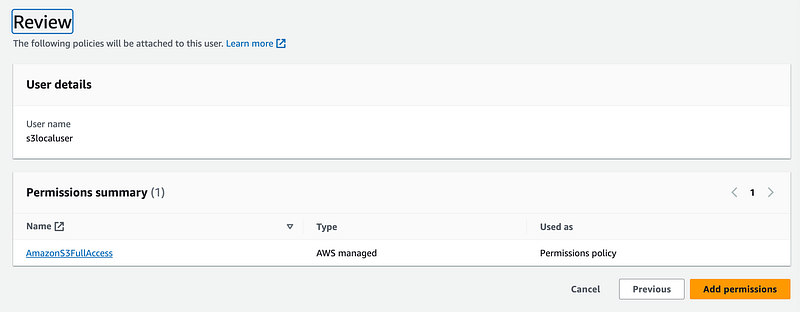
Login as s3localuser. Can the user see the S3 bucket? yes.
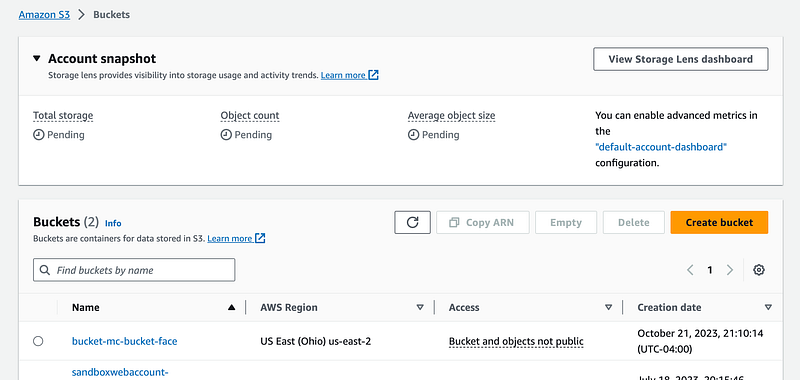
By default, any user in the same account with S3 permissions can see the bucket with a default bucket policy.

What if you only specify a single bucket in the resources for that user?

Let’s say I grant a user explicit access to the bucket in the IAM policy.
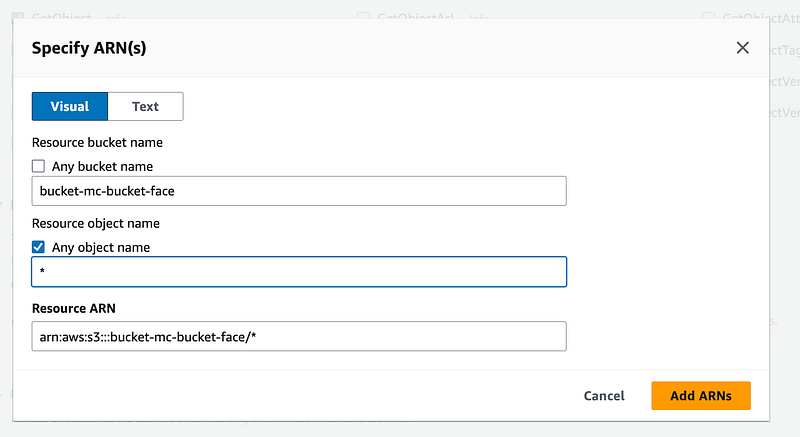
Well, in order to list the bucket in the AWS console you have to allow the user use s3:ListAllMyBuckets. Otherwise when they open the console they will get an error on the screen above even if they have permission to get or push files to an individual bucket, they will not be able to access the buckets from the console.
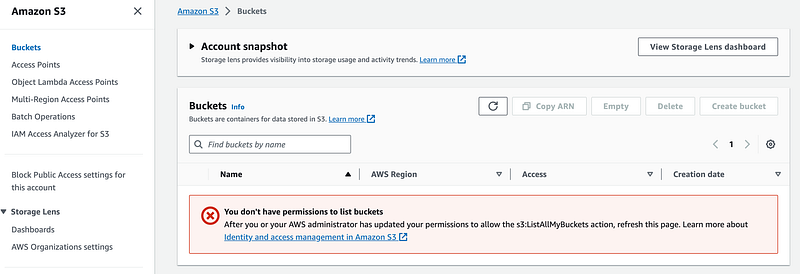
Add the ability to list all the buckets to solve that problem.
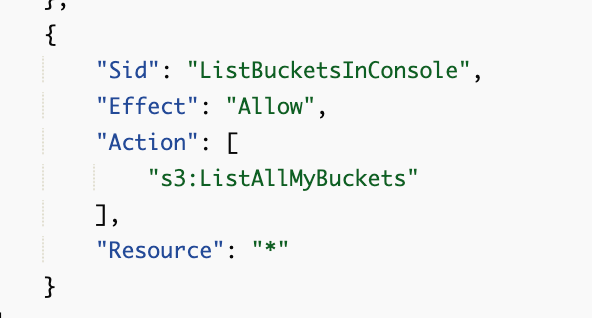
Even as I was writing this I forgot the names of certain actions and had to go back and review it. There are separate actions for listing buckets (ListAllMyBuckets) and viewing the objects or files in a bucket (ListBucket).

Now I can see the bucket but some permissions for all aspects of S3 are missing.
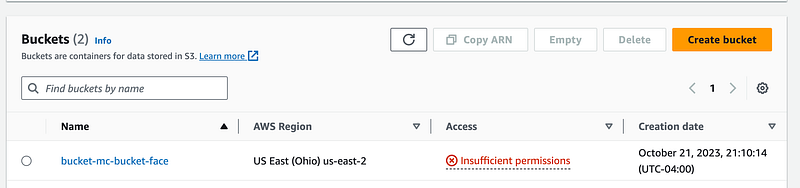
I also cannot view the objects in the bucket even with GetObject permission for objects in the bucket.
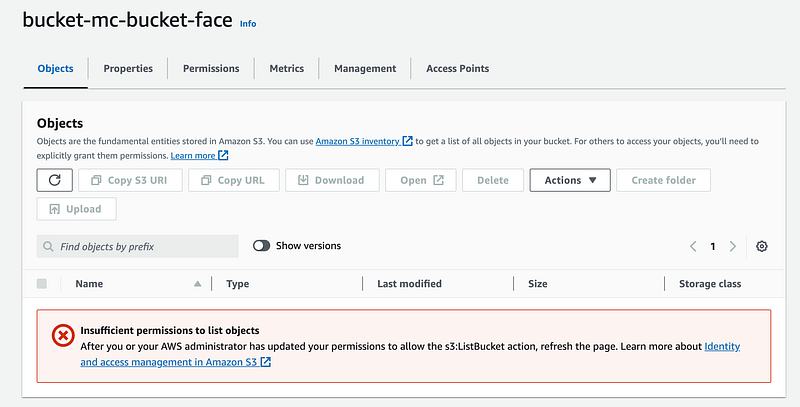
We also need to add the ListBucket permission.
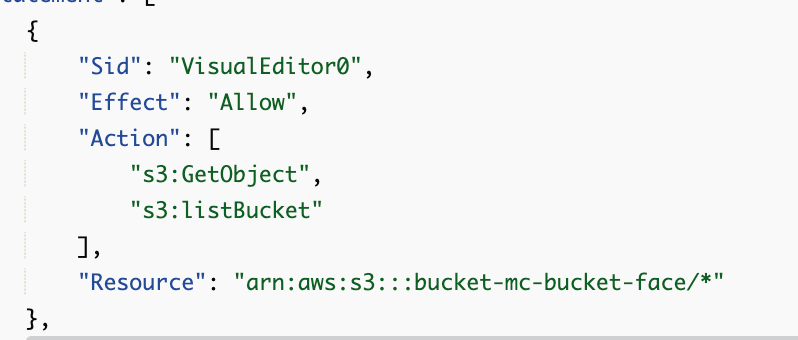
But that’s not exactly right either. See below.

What do we need to add besides an IAM policy to limit which buckets and resources a user in our AWS can see?

To restrict a user in a local account from accessing a bucket, you need to create a bucket policy that limits who can access the bucket. An S3 bucket is a resource policy. I wrote about the difference between IAM policies and resource policies here:

You can define exactly who can access a bucket in a bucket policy and those restrictions override anything granted to the user in the IAM policy.

Can you prevent the root user of an account from accessing a bucket?

Warning: It is possible to lock out everyone in an AWS account from accessing the content of buckets or modifying the policy in some cases. It depends who the owner of the account is and if you use something like allow everyone but this user with a DenyAll in your policy.

Make sure you understand who owns the buckets, which will vary based on when the bucket was created.

The post below suggests that if you get into this scenario, the root user of the account can delete the policy. However, recall that we limited the actions of the root user in an organization in an earlier post. You may need to alter your SCP to restore root user permissions to allow the user to perform this action.

Obviously logging in as the root user is not something you want to do in the first place, so be careful not to lock everyone out of a bucket when altering bucket policies.

Can you grant a user the ability to view buckets in another account in the AWS Console?

No. A user can only access resources in the specific account where it exists. However, you can allow a user to assume a cross-account role to access resources in another account in the AWS console. I wrote about cross-account IAM roles here for an AWS Organization and how to use them:

Note that you can also switch accounts using AWS SSO (IAM Identity Center). I just noticed that in one of my accounts, the screen changed when creating a user suggesting you can create one in IAM Identity Center or with IAM. I wrote some articles about why I still prefer IAM in these posts and how to fix the problems with AWS SSO if you choose to use it:

Some of the things I’m showing you how to do in the posts I’m writing were not even possible in AWS SSO last time I tried it. It doesn’t work for my use cases.

I also explored using Okta, which I will explore further in the future.

Note that Okta support had yet another data breach of their support team recently. The problem had to do with screen captures that the support team asked for and customers shared with the support person. Any time support teams ask me to do a screen share I say no for a number of reasons — not just the issue in this breach. I feel that support teams should not be using that method and especially for an identity product as there are too many attack points.

Also, the solution I presented in my Okta stories separates the people who create the users from the people who grant the permissions. I also use separation of duties within Okta itself. If you do that access to an Okta session token alone will be of limited use to an attacker.

Those are some of the ways you can grant a user access to the console to view S3 buckets in multiple accounts.

If you grant a user in a remote account access to that bucket via s3:* permissions and add the bucket to the resources in their policy can they get the contents of that bucket using an AWS Access Key?

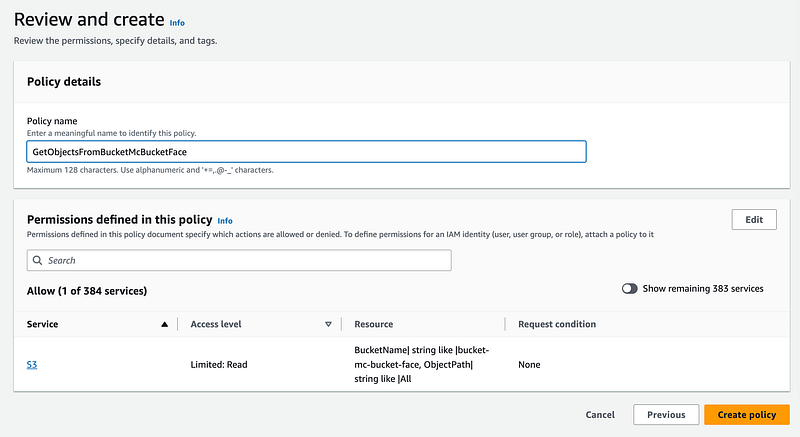
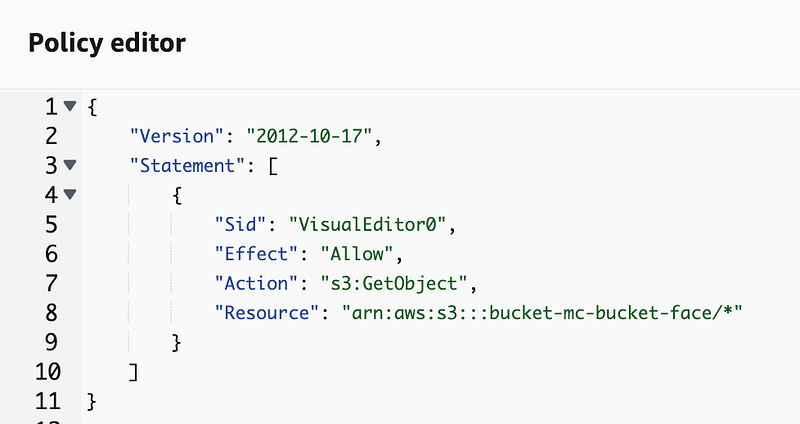
Here’s what I mean to be clear. I created the s3remoteuser in a different AWS account than the one where the bucket exists with no console access since that won’t help us access the bucket as just explained.

I gave that user s3:GetObject permissions on the bucket-mc-bucket-face S3 bucket.
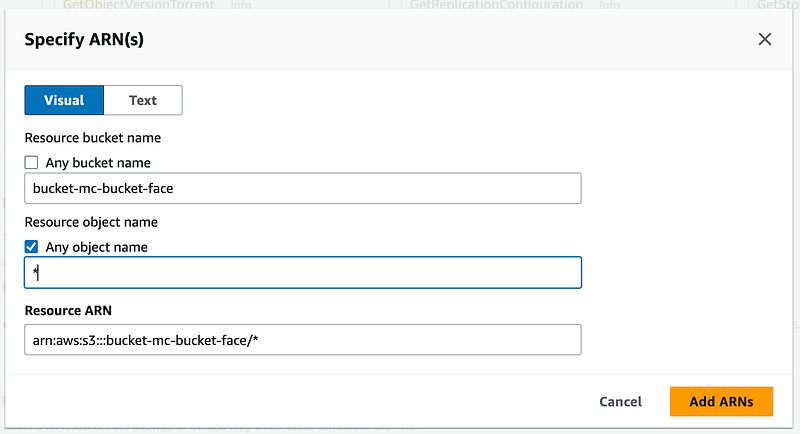
I create an access key and secret key for the user.
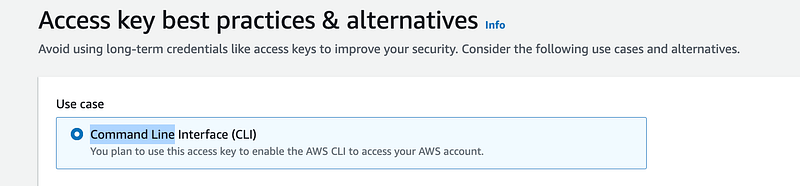
Note that I always require MFA with long-lived credentials when handling sensitive information or actions, but I am going to delete these credentials before this blog post gets published and this user only has access to a bucket with an image in one of my blog posts currently once I have this working.

Create an AWS Profile.

Next I am going to use the s3 cp command. Initially I was going to use the GetObject command but I think s3 sync will be a bit simpler and more efficient. Sync should only copy over the files which are different so less gets and puts.

First I try to run this command:

aws s3 sync s3://bucket-mc-bucket-face . --profile s3remoteuser

Note that s3 bucket URIs start with s3:// followed by the bucket name.

Remember that I am running this command from a private network with limited outbound network access.

I get this error but it takes a very long time to execute.

fatal error: An error occurred (AccessDenied) when calling the ListObjectsV2 operation: Access Denied

Let’s add that action to our policy. Note that his command falls under the s3api. Why there are two separate service name categories I don’t know. Perhaps to make policies easier to create by giving people specific s3 actions vs s3api actions.
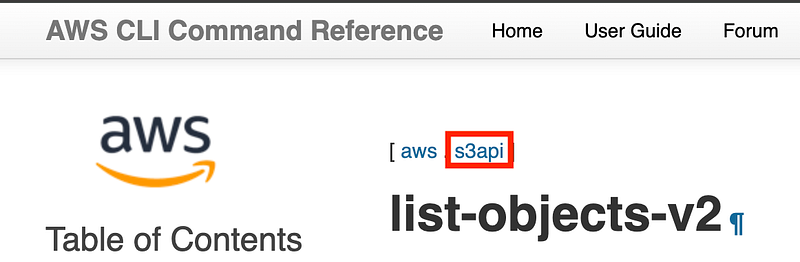
When I look in the AWS console, I only see the option for s3, not s3api for services and I do not see this list-objects-v2 command as an option.

You also won’t find it on the S3 IAM actions page.

What’s going on here? Well, the AWS IAM documentation and UI does not align with what’s going on here. Under the hood, S3 bucket calls ListObjectsV2. Seems like the error message needs to be fixed in this case.

Note: s3:ListBucket is the name of the permission that allows a user to list the objects in a bucket. ListObjectsV2 is the name of the API call that lists the objects in a bucket.

I’m going to manually add this action and here’s why. I have to use a slightly different URI.
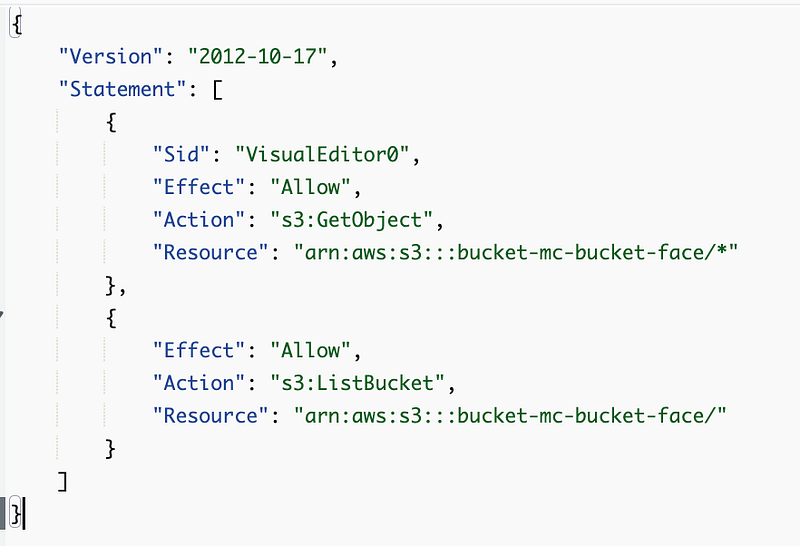
I’m still getting the error.

But I notice that the command takes far too long to return a response. So here’s my next question.

What happens when you try to access an S3 bucket in another account when you have a VPC Endpoint in the subnet where the host trying to reach the remote bucket exists?

Recall that the EC2 instance on which I’m running my commands is in a subnet that has both an Internet Gateway and VPC Endpoints. I added an S3 VPC Endpoint to my configuration.

Let’s take a look at the logs for my EC2 instance. It’s trying to reach this remote bucket. Where is it sending the requests?

I actually don’t see any traffic at all related to these requests on private IP addresses.

I do see requests to public IP addresses when I reverse the DNS for one of the IPs.
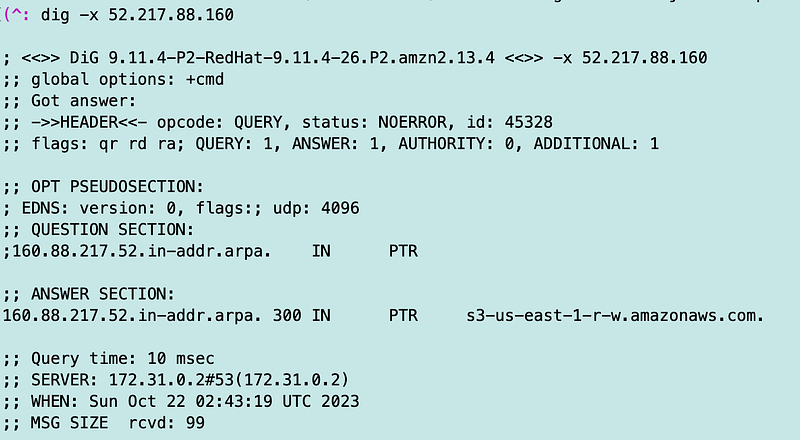
Cross-account requests do not appear to remain on the private network without additional configuration. Or so I thought…

You could try using a gateway endpoint for S3 or other types of private networking but I’m not going to get into all that here. Gateway endpoints use an entry in your route table instead of a network interface in your subnet so in theory everything would be forced to the correct endpoint.

Later, when I successfully got the command working, I only saw traffic traversing private IP addresses. Did the S3 endpoint just take a very long time to deploy or was something broken and then fixed? I don’t know.

The other weird thing is that I was getting network errors in the console when trying to update the bucket policy with a user that didn’t have permissions to do that. I switched to the root user (I know bad) and then I was able to update the policy and didn’t get the network errors anymore. Not sure if that was a temporary glitch or really is related to a user who didn’t have appropriate permission.

What do we need to add besides an IAM policy to let a remote user access an S3 bucket in an account?

To allow a remote user to access a bucket in another account, we need to modify the remote bucket policy to allow that user to access the bucket.
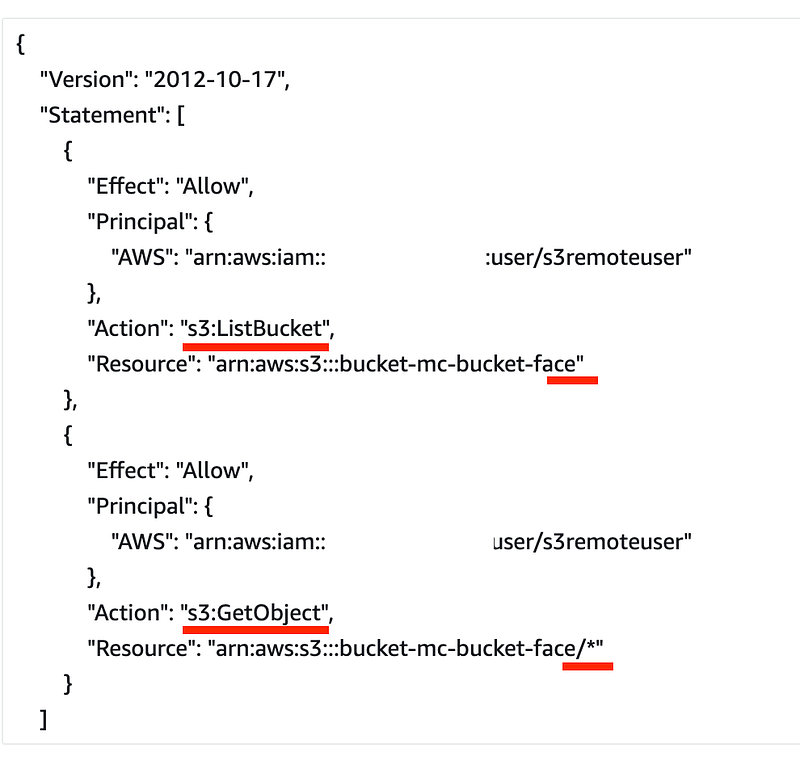
I still get an error on ListBucket (ListObjectsV2).

Where can I view the error in the logs for cross account bucket access — in the bucket account or the remote account?

Remember to turn on the error column in your CloudTrail event logs to make your life easier.
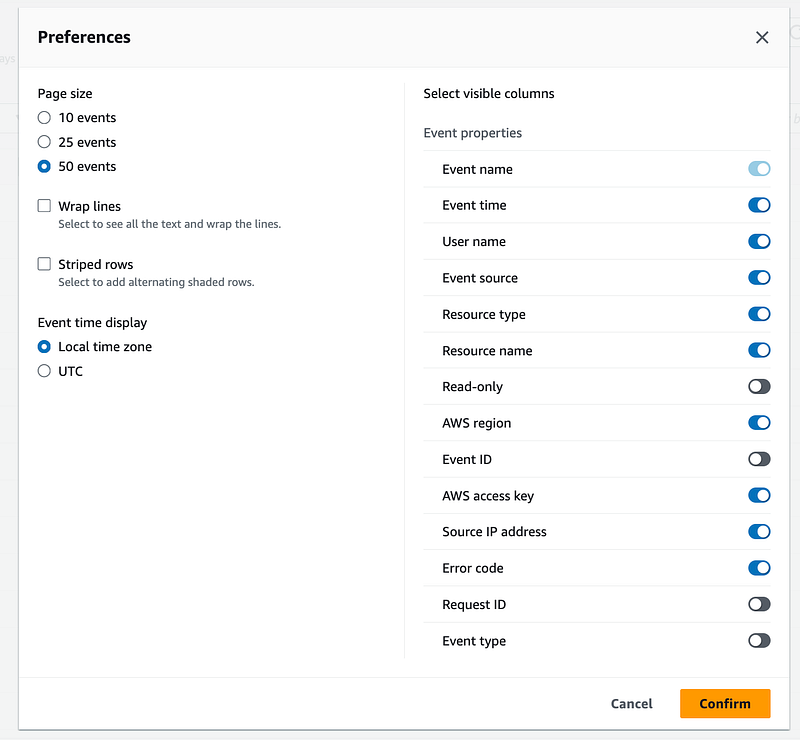
First let’s check the account with the S3 bucket for errors.

This error is a bit strange. The public block access policy is not found? And that appears to be an internal AWS user agent. I get this error for the user logged into the console. Weird, but not what I’m looking for. (And I hope my public access block policy is working.)

I don’t see any events in this log for the remote user. Let’s head over to CloudTrail logs in the account where the remote user exists.

Well, not seeing the error there either.

Hmm.

Where are the failed access logs?

What caused the ListObjectsV2 to fail?

I’ll give you a hint. I already showed you above. The tiniest little syntax error causes this problem. And here’s what makes it harder to solve:

  • The S3 Bucket UI tells you something is wrong with the policy but not exactly what. At least it doesn’t allow you to create a policy that doesn’t work.
  • The AWS IAM console will let you create an invalid policy.
  • The AWS CLI gives an inaccurate error message about ListObjectsV2 when it should say s3:ListBucket (which allows you to list the objects in the bucket using the ListObjectsV2 API).
  • There are no additional error logs in AWS CloudTrail as far as I can tell.

Here’s the problem.
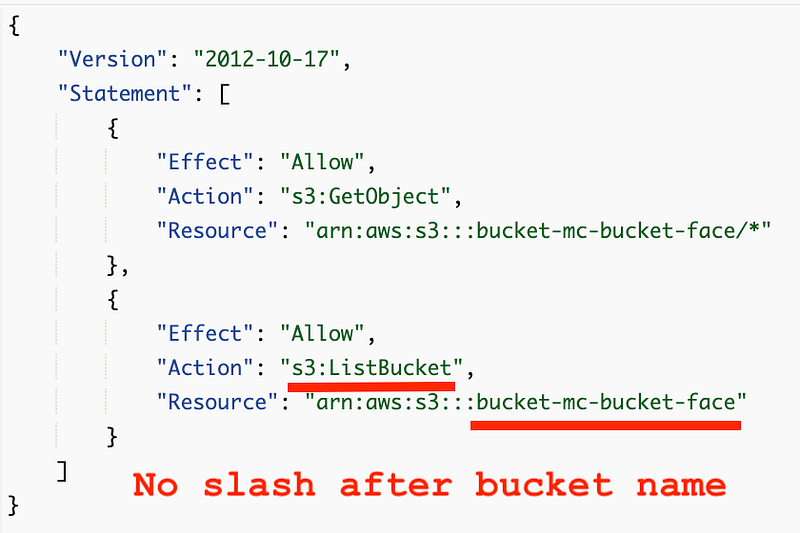
If you look at the policy above, I had a slash after the bucket name.

To make things even more inconsistent, you have to include the slash at the end of the bucket when you use the aws sync command:

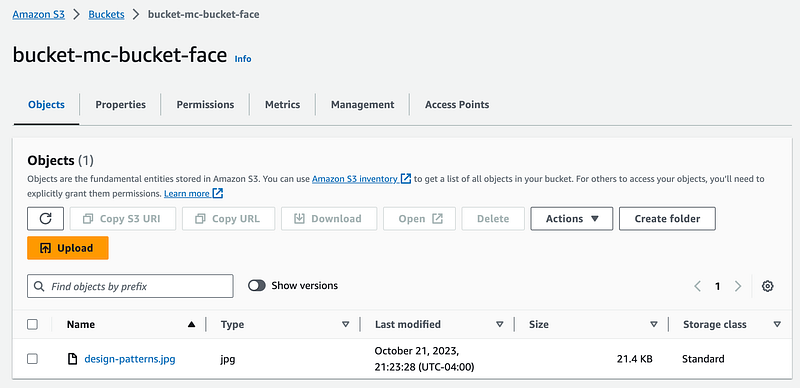
What can I see when I change the policy for the local user as I just did for the remote user?

Now the user can see the contents of the bucket.
What if I change ListAllMyBuckets to only allow a specific resource?

Recall that we had to add ListAllMyBuckets for the local S3 user to view the buckets in the console. What if I only allow access to a specific bucket like this?
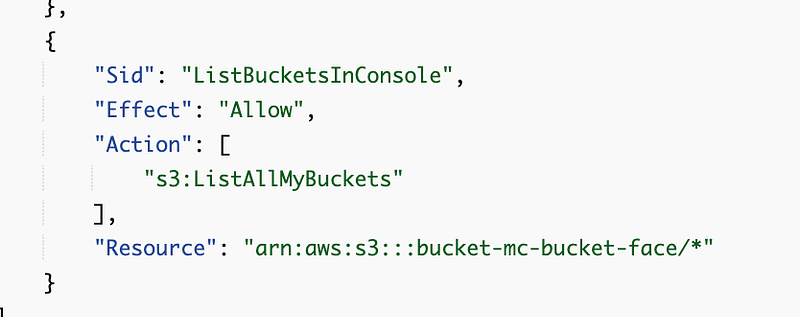
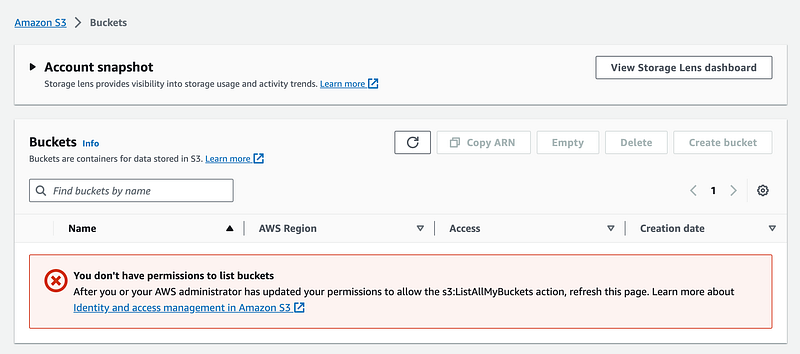
The user cannot see any buckets.
So perhaps the ARN is wrong and we need to remove the slash and asterisk?
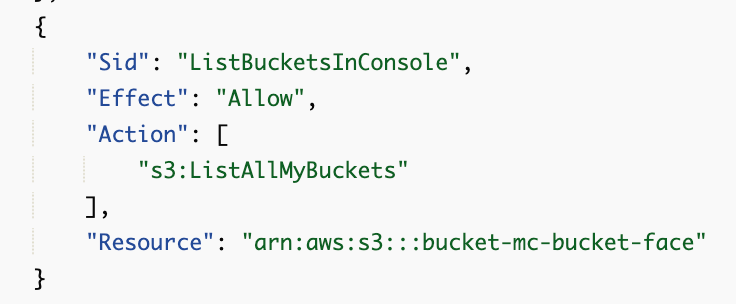
No. Still doesn’t work.

What if we add a slash?
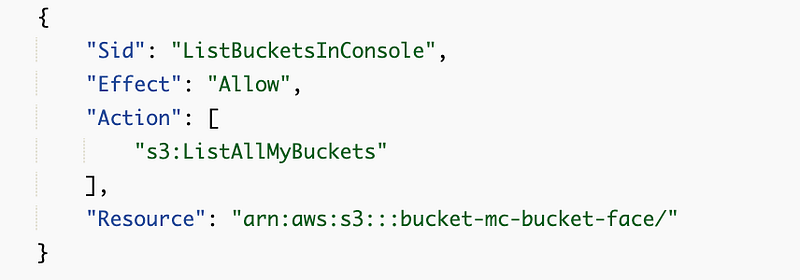
Nope.

You have to grant a user access to see all your buckets in the console. That is unfortunate.

What if you don’t want the user to see some buckets?

You can segregate them to different accounts in your organization.

Will you see CloudTrail Logs for a successful action?

Well, I can’t find them. I looked in the current region and us-east-1. I searched for the access key id. I searched for actions on S3 object resources. I am not seeing any record of this event.

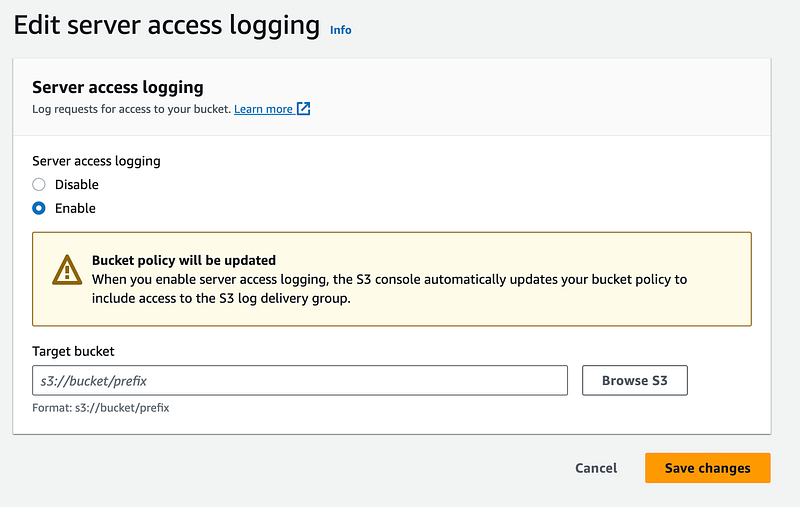
The S3 GetObject logs appear in the S3 Access logs. This is something additional you have to enable.

I wrote about why you need those type of logs in a post on CloudTrail Data Events for AWS Lambda Functions which serve a similar purpose.

Here’s how you can set up an S3 Access Log policy:

In the console:

You can also enable S3 object access events in CloudTrail.

Under your bucket properties:
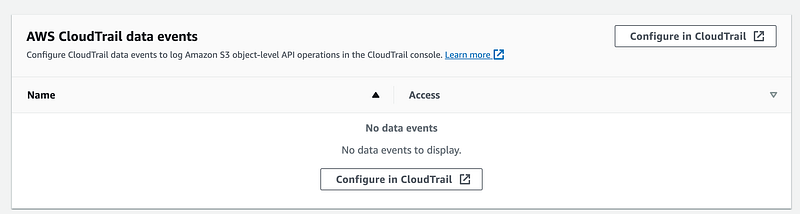
That takes you to CloudTrail. Click on the trail you want to modify.

Note if you have an organizational CloudTrail you’ll need to modify this is the account where you created the organizational trail.

More on S3 Logging options:

Why would you use a cross-account role where a user assumes a role to access the bucket versus the direct access I show above?

You can’t view the remote console with the method I just demonstrated with a remote user. If you want the user to be able to login and use the console to view the remote account in the AWS Console, you’ll need to use one of the other options I mentioned above.

I’ve seen someone write in an AWS resource that it is easier to manage cross-account roles. I’m not sure if that is exactly true. It will depend on your use case.

Remember that any local users with full S3 access can read any bucket contents that are not encrypted with a key they do not have permission to use or do not have a bucket policy limiting who can access the contents.

Remember that for console access you need to give full access to view all the bucket names in the account.

Does this seem complicated and hard to remember all the details?

It is.

I’ve been writing S3 bucket policies for over 10 years and I still can’t keep it all straight. I had to look things up while writing this post.

That’s why I recommend using CloudFormation micro-templates — a term I made up and the methodology I have been using throughout this series:

And figure out how to create a single template or limited number of correctly configured S3 bucket templates that work for your organization. I started providing an S3 bucket template in this post which I will be building on for my Lambda function that copies files to an S3 bucket.

When people can’t figure out how to configure access properly — that’s when they get frustrated and start opening everything publicly because they can’t figure out how to do it correctly. Make it easier. Use common templates for S3 bucket deployments, but make sure they work for all your use cases or people will push back against using them.

Follow for updates.

Teri Radichel | © 2nd Sight Lab 2023

About Teri Radichel:
~~~~~~~~~~~~~~~~~~~~
⭐️ Author: Cybersecurity Books
⭐️ Presentations: Presentations by Teri Radichel
⭐️ Recognition: SANS Award, AWS Security Hero, IANS Faculty
⭐️ Certifications: SANS ~ GSE 240
⭐️ Education: BA Business, Master of Software Engineering, Master of Infosec
⭐️ Company: Penetration Tests, Assessments, Phone Consulting ~ 2nd Sight Lab
Need Help With Cybersecurity, Cloud, or Application Security?
~~~~~~~~~~~~~~~~~~~~~~~~~~~~~~~~~~~~~~~~~~~~~~~~~~~~~~~~~~~~~
🔒 Request a penetration test or security assessment
🔒 Schedule a consulting call
🔒 Cybersecurity Speaker for Presentation
Follow for more stories like this:
~~~~~~~~~~~~~~~~~~~~~~~~~~~~~~~~~~~~~~~~~~~~~~~~~~~~~~~~~~~~~ 
❤️ Sign Up my Medium Email List
❤️ Twitter: @teriradichel
❤️ LinkedIn: https://www.linkedin.com/in/teriradichel
❤️ Mastodon: @teriradichel@infosec.exchange
❤️ Facebook: 2nd Sight Lab
❤️ YouTube: @2ndsightlab

AWS
S3
Cross Account
Bucket
Access
Recommended from ReadMedium
avatarMunidimple Muchalli
AWS GuardDuty

AWS Guard Duty

4 min read