
CloudFormation Micro-Templates
ACM.285 Why I put a single resource in each CloudFormation template
~~~~~~~~~~~~~~~~~~~~~~~~~~~~~~~~~~~~~~~~~~~~~~~~~~~~~~~
⚙️ Check out my series on Automating Cybersecurity Metrics | Code.
🔒 Related Stories: AWS Secruity | CloudFormation | Application Security
💻 Free Content on Jobs in Cybersecurity | ✉️ Sign up for the Email List
~~~~~~~~~~~~~~~~~~~~~~~~~~~~~~~~~~~~~~~~~~~~~~~~~~~~~~~
In the last post I wrote about how to make CloudFormation faster, since that was the source of a problem that caused someone to ask me how to avoid using CloudFormation altogether.
I have just one more follow up post from the AWS Heroes event at the moment. I’ve written about this concept before but I’m going to summarize it in a single post so I can refer to it if needed. I realized as I was trying to explain the concept and why I do it that I don’t have any single post on the topic. I just started doing what I always do when I began writing this now somewhat lengthy series.
The topic seemed to come up a lot in discussions in terms of how to solve various problems and why certain things didn’t work. I can’t remember all the reasons and I probably can’t write about all of them anyway, but I thought a single post covering the pros and cons of the single resource per template might help.
You use micro-services to create containers that do one thing. You can reate classes in object oriented programming to limit the scope of a class to a single type of object. Why not use micro-templates in CloudFormation?
I already explained a lot of this in the last two posts. When you use a single resource per template you lose some of the functionality and benefits that CloudFormation gives you if you don’t really know how to deploy a lot of different resources together properly. CloudFormation tracks dependencies and helps parallelize resource deployment for resources in the same template.
However, by breaking things apart, if you know the order in which things need to be deployed and where all your dependencies lie, you can potentially deploy things faster. I covered that in the post above in more detail showing you how and where you can cut corners, reduce unnecessary resource checks, and possibly control parallel deployments yourself. I also offered some other suggestions for speeding up CloudFormation deployments besides the use of single templates.
In addition to speeding up deployments, a single resource per template provides these additional benefits:
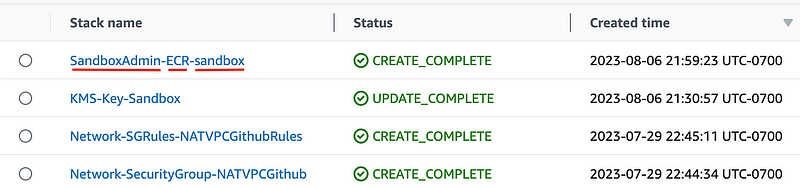
- Single resource templates allow you to include the AWS resource type in the stack name. That enables you to create a standard naming convention that allows you to quickly find the stacks that deploy a particular resource type. Check out some of the screen shots in these posts. Have you ever had to dig through a multitude of stacks in an enterprise account to find a stack? This might help. Note that the first post was only a starting point. The naming convention is now [Role]-[ResourceType]-[ResourceName] In the case of a Subnet you might need to tack on the AZ to the end of the subnet name if you are deploying multiple. For some resources deployed in multiple regions, you can take the Region name onto the end. All the resources for a specific application may incorporate an application code name into the resource name. You get the idea.
The latest iteration looks something like this:
- Create a stack for a single resource type allows you to create reusable templates to maintain governance throughout your organization.
- If people use a common template blessed by security and compliant with your organization’s security standards they won’t deploy misconfigured resources.
- Separate stacks for separate resources allows and organization to assign responsibility for different resource types to different teams. For example, you may have a separate team that manages roles and trust policies and a team that deploys encryption and a team that deploys networking.
- Segregating resources into different templates allows you to store different types of resources in different code repositories. That allows you to ensure that people aren’t changing code they shouldn’t be allowed to change. If you have all your code in a single repository for an application, including networking, IAM, and encryption configuration, you risk the chance that a junior developer or a malicious insider inadvertently or purposefully changes something they should not.
- You can troubleshoot and restore single resources in production having issues without the complexity of redeploying an entire stack of resources. Separate templates make troubleshooting easier and faster. You know exactly which resource failed when a stack failed because it’s the only resource s in the stack. It’s easier to find the error because there’s less code to sort out compared to a monolithic template.
- You can redeploy a single resource instead of redeploying a template with a whole bunch of resources in it. This avoids potential errors and problems due to unnecessary redeployments.
- When making changes to a smaller bit of code you don’t have as much risk where you might inadvertently break something else you didn’t mean to change.
Single purpose stacks just make sense to me. I didn’t realize a lot more people are doing things that way, but it became apparent during discussions as the AWS Heroes event. I remember when I hired a very, very smart DevOps person and he told me he hated CloudFormation. When I showed him my method of a single resource per stack he instantly didn’t think CloudFormation was as bad. It can still be challenging to deal with CloudFormation at times, as I have demonstrated throughout this series.
😆
However limiting the resources in a stack makes things a whole lot easier as far as I can tell. There are a few places where I included more than one resource in a stack like this post on creating a password for a resource:
But beyond that, I almost always put one resource in one stack. And that’s why I can easily search for all the CloudFormation stacks that contain a particular resource in the AWS console. I can enforce a naming convention. (And no, don’t get me started on tags.) I can enforce policies that only allow people to edit their own stacks. I wrote about all those things in the last two posts linked to above.
There is one other potential downtime. I don’t know if this problem still exists but years ago when I worked at Capital One the CloudFormation console was painfully slow when you had too many stacks. One of the ways around that is to put different types of resources in different accounts and environments. More on that to come.
I think to really get the gist of it, it might help to review the code. I have a consistent structure, naming convention, and I can deploy a lot of resources with fewer templates using this approach. I need ot check in some of my recent changes but you can still get the idea based on what is currently checked in here:
At some point, I’ll probably start from the top and explain how to deploy an organization step by step as this has been a bit meandering, but you can see the progress as I work through these posts:
Follow for updates.
Teri Radichel | © 2nd Sight Lab 2023
About Teri Radichel:
~~~~~~~~~~~~~~~~~~~~
⭐️ Author: Cybersecurity Books
⭐️ Presentations: Presentations by Teri Radichel
⭐️ Recognition: SANS Award, AWS Security Hero, IANS Faculty
⭐️ Certifications: SANS ~ GSE 240
⭐️ Education: BA Business, Master of Software Engineering, Master of Infosec
⭐️ Company: Penetration Tests, Assessments, Phone Consulting ~ 2nd Sight Lab
Need Help With Cybersecurity, Cloud, or Application Security?
~~~~~~~~~~~~~~~~~~~~~~~~~~~~~~~~~~~~~~~~~~~~~~~~~~~~~~~~~~~~~
🔒 Request a penetration test or security assessment
🔒 Schedule a consulting call
🔒 Cybersecurity Speaker for PresentationFollow for more stories like this:
~~~~~~~~~~~~~~~~~~~~~~~~~~~~~~~~~~~~~~~~~~~~~~~~~~~~~~~~~~~~~
❤️ Sign Up my Medium Email List
❤️ Twitter: @teriradichel
❤️ LinkedIn: https://www.linkedin.com/in/teriradichel
❤️ Mastodon: @teriradichel@infosec.exchange
❤️ Facebook: 2nd Sight Lab
❤️ YouTube: @2ndsightlab