
Generic Template for an S3 Bucket
ACM.192 Creating a reusable CloudFormation template for S3 buckets
Part of my series on Automating Cybersecurity Metrics and stories on AWS S3 Buckets. The Code.
Free Content on Jobs in Cybersecurity | Sign up for the Email List
In the last post we looked at options for an S3 bucket.
In this post we’ll try to create a generic S3 bucket template ~ the kind of code I used to provide in my cloud security classes.
Likely this S3 CloudFormation template will evolve as we need to create new S3 buckets. We will need additional features and settings as we implement new resources, the same way our generic KMS key template evolved throughout the series.
In fact, I’m going to have to modify that KMS Key template again to support the CloudTrail changes we need to make.
Adding a directory to our GitHub repo for S3 bucket code
To start I’m going to create a new S3 directory and my standard directory structure, which should look familiar if you’ve been following along.
mkdir S3
cd S3
mkdir stacks
cd stacks
mkdir cfn
Create a CloudFormation template for an S3 bucket
Then I’ll create an Bucket.yaml file in my stacks/cfn folder.
vi Bucket.yaml
Now we start creating our bucket script. I know I’m going to have to pass in a name parameter. Referring to my last post and the first property I want to set is bucket encryption.
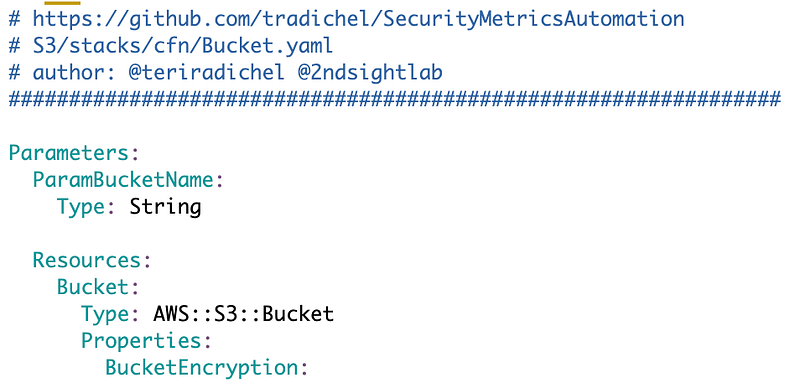
BucketEncryption
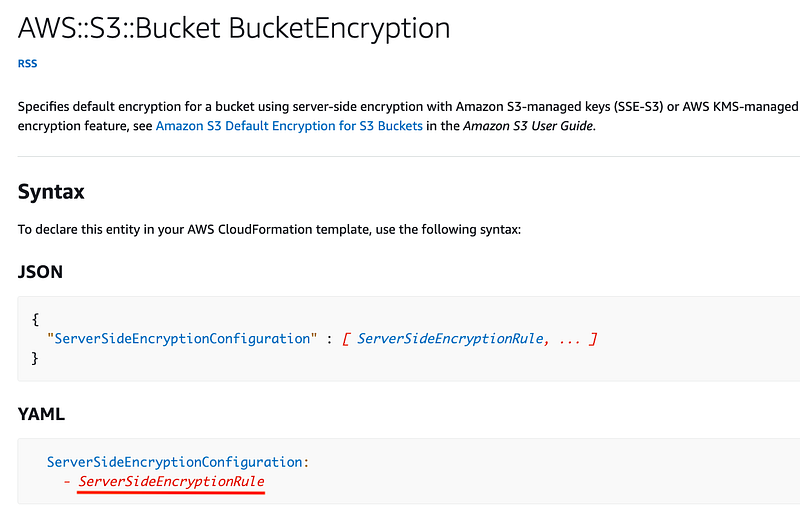
By default this will be set to AWS managed encryption. We want to set the KMS key here. To do that we need to configure the BucketEncryption property.
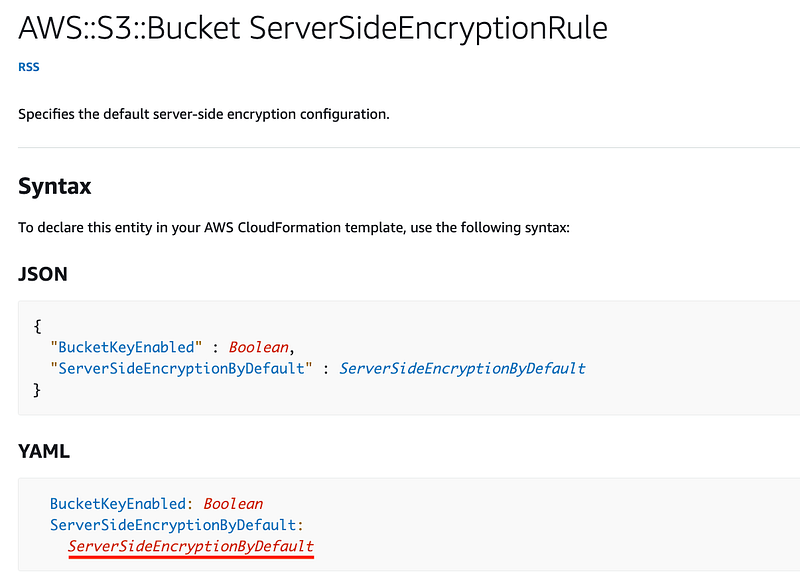
The BucketEncryption resource requires a ServerSideEncryptionRule resource.
The ServerSideEncryptionRule requires a ServerSideEncryptionByDefault resource.
And ironically the “SSE Encryption By Default” option that does not use a customer managed key allows us to assign a KMS key and algorithm. I imagine this is due to the fact that AWS S3 has been around a very long time — but no it was not the first AWS service. That was AWS SQS.
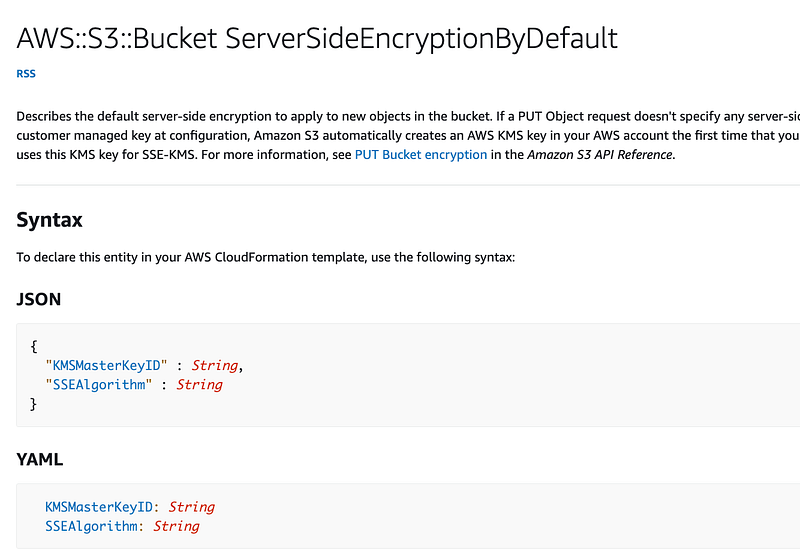
Why can’t we just assign a KMS Key ID to the bucket? I suspect this is due to the fact that AWS SSE and AWS S3 buckets existed prior to KMS and things have evolved in such a way they need to remain backwards compatible. It would be nice if AWS would add the option to assign the KMS Key ID directly to the bucket now that everything is encrypted by default. But for now, here’s our code.
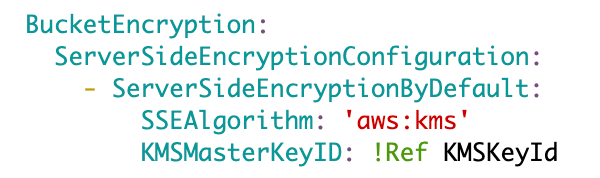
We’ll provide a way to pass in a KMS key ID via a ParamKMSKeyId parameter.
~~
Threat Modeling Tangent: Rogue bucket encryption (misconfigurations and ransomware)
My mind wanders here for a minute. One consideration here is making sure people pass in a valid key ID. In the case of a misconfiguration, what if someone updates a stack to the wrong key ID? What happens when the new key starts encrypting all your CloudTrail logs and you can’t access them? Here’s where you want to lock down who can change your CloudTrail stacks and resources to limit who can update them. You might think about an SCP on your CloudTrail to lock it to a particular Key ID — but what happens when you go to rotate that key? Probably better to limit who can update the key associated with your CloudTrail logs.
In the nefarious scenario, could an attacker encrypt all your data with a key ID from some other rogue AWS account? Well, one of the benefits of KMS when it comes to ransomware is that if an attacker used a key from AWS, AWS should be able to help you get that data back, or at least help you revert the configuration to the correct key.
In order to encrypt the data in your S3 bucket with some other mechanism, the attacker would first need to be able to get permission to decrypt the data in your S3 bucket via the key policy associated with the customer managed key we have assigned and proper IAM permissions. Perhaps you have administrators who can decrypt and view your CloudTrail logs.
However, the attacker would also need to be able to write back to the S3 bucket. In this case we are going to limit writing to the bucket to CloudTrail (covered in the next post when we create a bucket policy). So in order for ransomware to encrypt your CloudTrail logs they would need
- Permission to change the S3 bucket policy
- Obtain or create credentials with an IAM Policy allowed to decrypt the data in the bucket and write to the bucket
On top of those policies, we can add notifications, Config rules (something I haven’t written about yet) and SCPs to limit actions on top of our IAM and S3 bucket policies.
I’ll continue to consider these threats as we work through this series and how to best create an policy architecture that lets people get things done while preventing egregious errors and reduces the chances of successful attacks.
~~
BucketName
Next we’ll need to set the BucketName property. We’ll pass in a parameter for that as well via a ParamBucketName parameter.

LifecycleConfiguration
The CloudTrail bucket created by AWS Control Tower was 365 days with no archiving. We could set that same configuration here, but we can save money by archiving the data to a less expensive storage tier after a while if we don’t think we will need to access it. We can still access it in the future it will just take longer to retrieve.
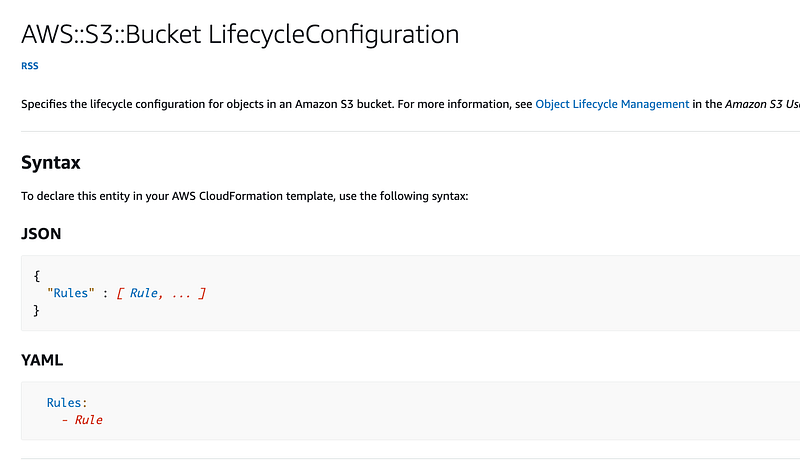
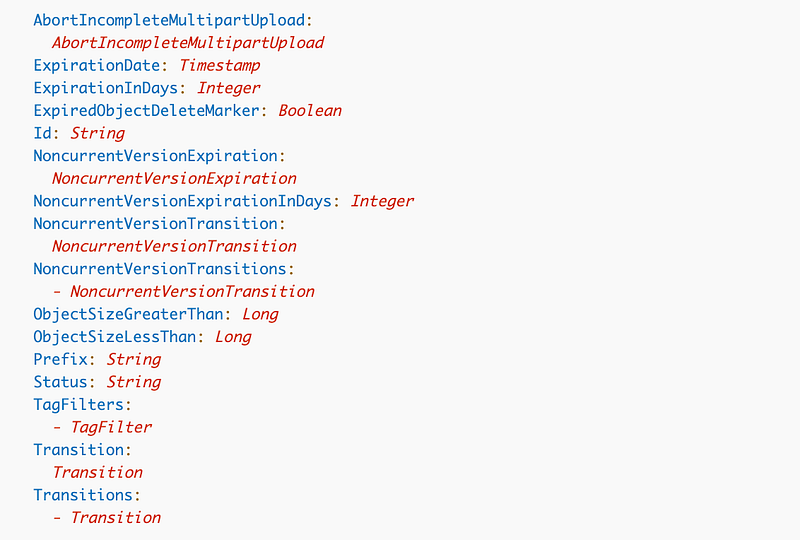
Alright click on Rule to find out how we need to configure a rule. We have a number of options.
ExpirationInDays
First we can use ExpirationInDays to define how many days before the objects get deleted. We can pass in a parameter and I’ll set the default to 365 days.

Transitions
We can also use Transitions to transition files to a lower cost storage option.
For Transitions, we can create a list of transitions which look like this.

We can choose from the following storage classes:
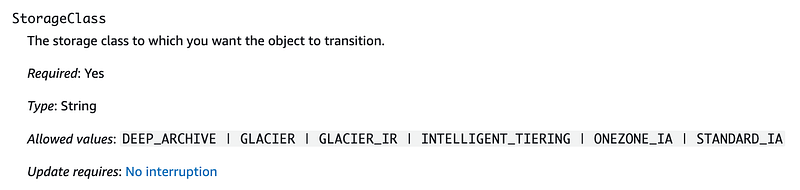
To determine which storage class to use, review the cost of each class and how quickly you can retrieve it. Consider how fast you would need to retrieve the data in the cast of a disaster (for backups) or a security incident (for archived CloudTrail and other logs).
Here’s a chart showing a comparison of the different classes.
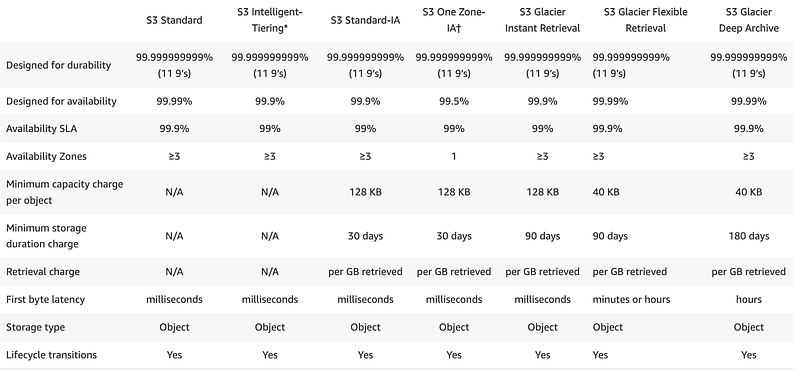
I find a few things interesting above.
If you choose to use Intelligent tiering, then you don’t have to pay for retrieval. But with intelligent tiering the minimum time before you can move objects to the another tier is 90 days and then 180 days for deep archive. Perhaps you would save more money by immediately archiving objects for certain use cases instead of using intelligent tiering.
Also, the minimum time you can leave objects in Deep Archive is 180 days. So your minimum cost will be the cost of that service times 180 days. Let’s look at the cost.
Make sure you select the correct region.
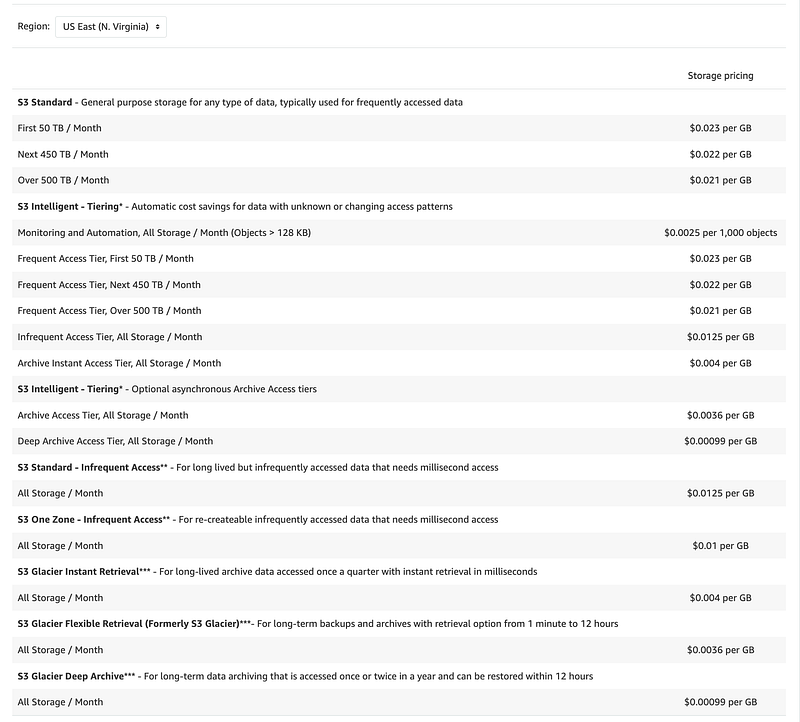
As you can see above you can potentially save a lot of money using S3 Glacier Deep Archive when you look at the total size of your storage in GB.
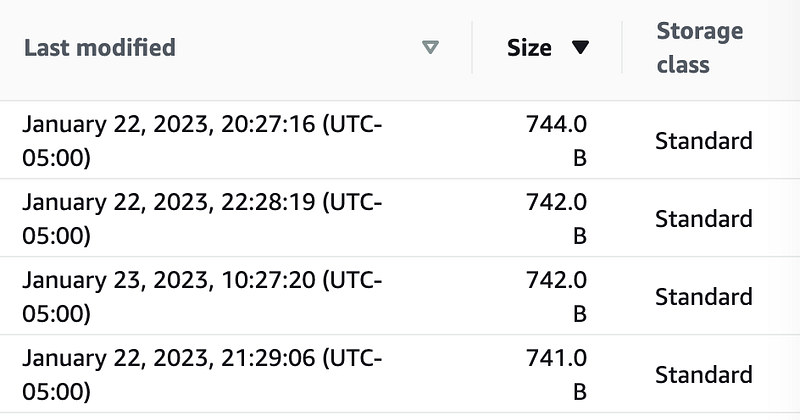
But check out the chart above again. The minimum capacity charge per object is 40KB. Keep that in mind if you are storing a lot of tiny objects. Like CloudTrail logs. Let’s take a look at my CloudTrail logs in my SSO account where I have a history of CloudTrail data.
As you can see almost every object is only about 740 bytes or about .74 KB. The minimum Capacity charge per object is 40 KB. In order to see if you will actually save money, if I understand correctly, you’ll need to calculate the total storage size after converting every object under 40 KB to a storage size of 40 KB. Then calculate your storage amount.
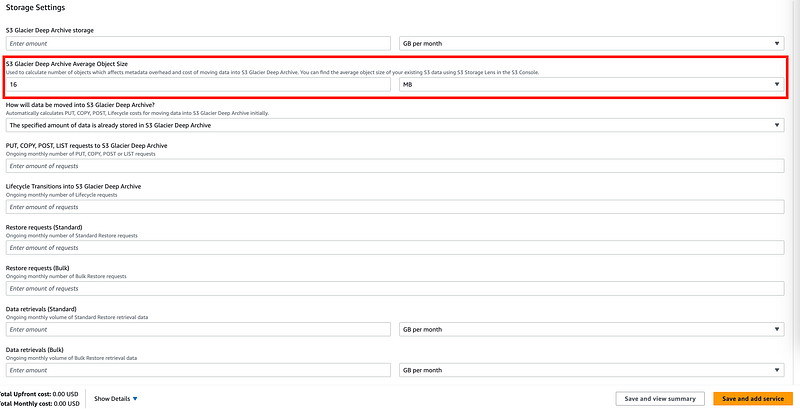
Maybe the AWS Pricing Calculator may help but you still have to feed it in all the correct inputs. How are you going to put in the number of files that are under 40KB.
The calculator is not going to be real precise. You can only enter an average object size.
You could also just create a spreadsheet. Just make sure you are not missing anything in these complex formulas (been there done that) and beta test to make sure your assumptions are correct.
Math does not bring me joy. I’m going to leave off any sort of storage tiering to start and revisit this later as I have plans to change CloudTrail in the future anyway. Also, I can go back and see how intelligent tiering changed my costs, if it did, in my existing account. At the moment half a month has passed and my costs are already higher than last month for CloudTrail logs so I think it’s not a great option. But I’ll double check that later.
If and when I do use tiering, one way for me to save money would be to zip up a bunch of those smaller files into minimum 40KB file sizes. If my files are 740 bytes and minimum object size is billed at 40KB and there are 40,000 bytes in 40KB then I can put 40,000 / 740 or roughly 55 files into a zip file to meet the minimum. But I randomly noticed I had some larger files as well. I could zip them into sizes that align with GB increments since retrieval are charged per GB. But I also need to be able to identify time ranges in each object to download a timeframe I require. So what if I zip them by month and year? Then I can tell what data I’m downloading instead of retrieving everything.
If this sound confusing it is. I already wrote about this in a security white paper for SANS institute on packet capture in AWS before AWS provided that capability because my advisor asked me how much it would cost to store logs on AWS. Not a simple answer to that question. We also had to perform similar analysis and file sizing when sending logs to S3 buckets when I worked for a firewall vendor.
Maybe we’ll revisit this topic later.
LoggingConfiguration
For LoggingConfiguration we may or may not want to set a logging bucket. If we are creating the logging bucket we won’t turn this on. Then we’ll create the bucket where we want to store data. In that case, we probably want logs indicating when the objects in the buckets were accessed.
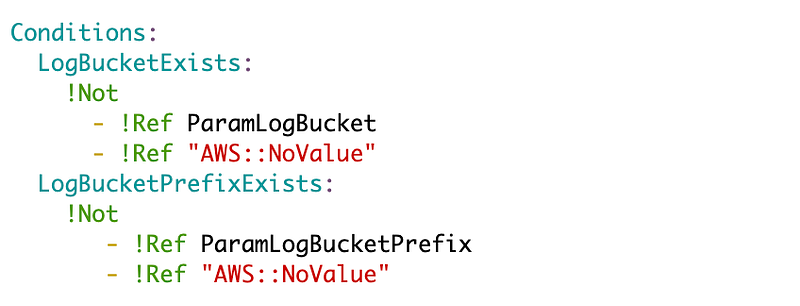
We’ll pass in the log bucket as an optional parameter named ParamLogBucket. If the bucket is passed in, logging will be configured otherwise it will not be. That means we need a condition. If the condition is set, we set values for the LoggingConfiguration.
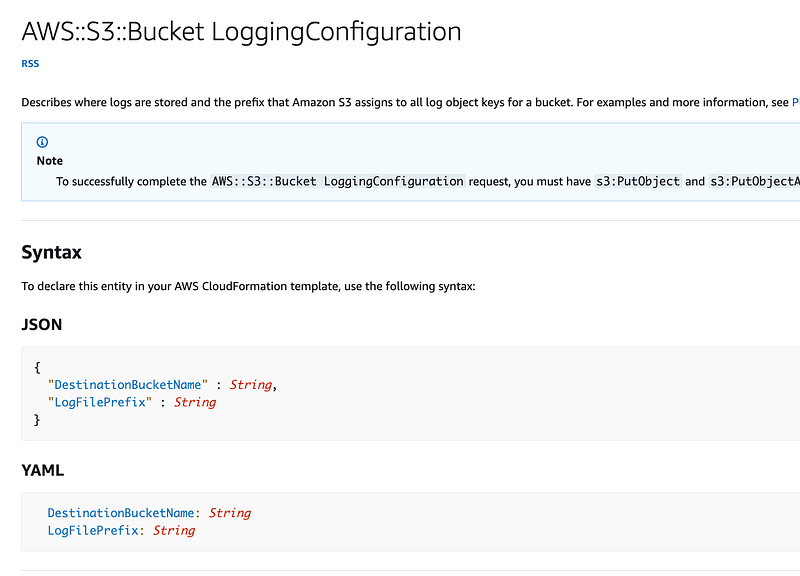
Notice that we can also pass in a LogFilePrefix. That allows us to use one bucket but put logs for different buckets in that bucket with the logs for each bucket in a separate folder. (Yes, I know it’s technically not a “folder” but it looks and works like a folder — for those who like to be nit-picky.)
For example, let’s say we create bucket1 and bucket2.
We could have the following folders in our “logs” bucket with the folders bucket1 and bucket2 storing the corresponding logs for each bucket.
/logs
    /bucket1
       log1.txt
       log2.txt
    /bucket2
       log1.txt
       log2.txt
We’ll make the prefix an optional parameter as well — ParamLogBucketPrefix. If it’s set, we’ll configure the LogFilePrefix property.
Here’s what our conditions look like:
Here’s the LoggingConfiguration property:

PublicAccessBlockConfiguration
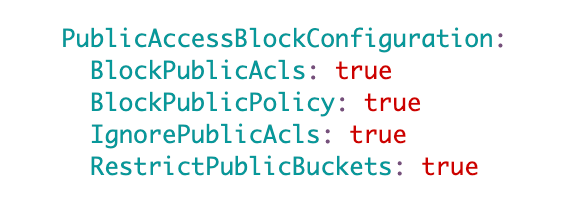
We want to block public access with the PublicAccessBlockConfiguration.
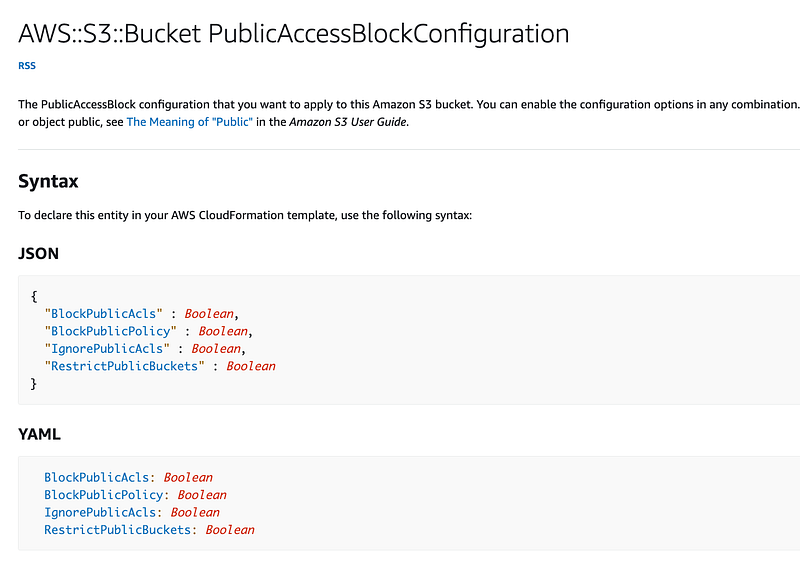
Since I always want this to be turned on, I’ll hardcode these values. Everyone should use this template, so they won’t be able to turn these off or enable an ACL.
VersioningConfiguration
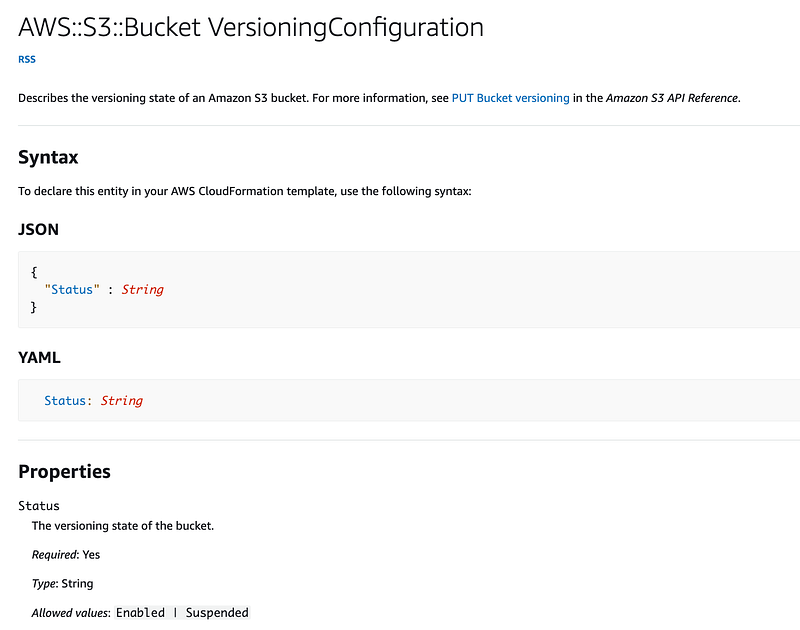
For VersioningConfiguration, we need to set the value to a VersioningConfiguration.
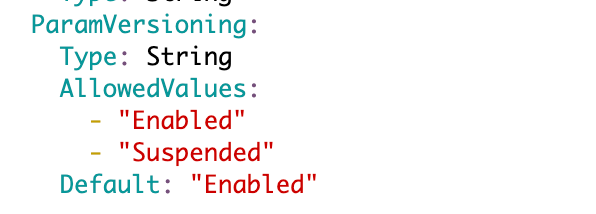
I’m going to create a parameter that is set on by default.
Then set the value:

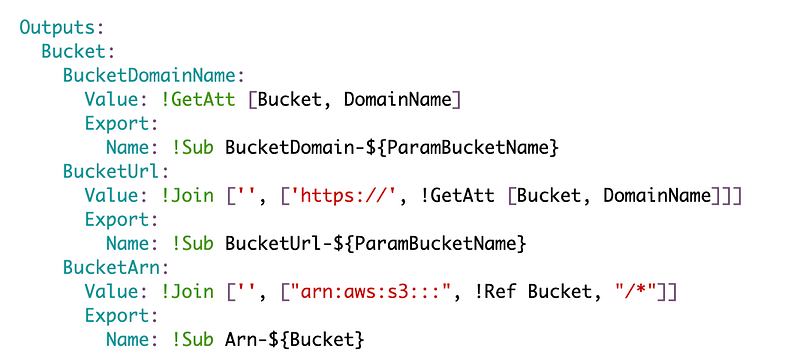
Outputs
Last we’ll want to create some outputs for values we may need later.
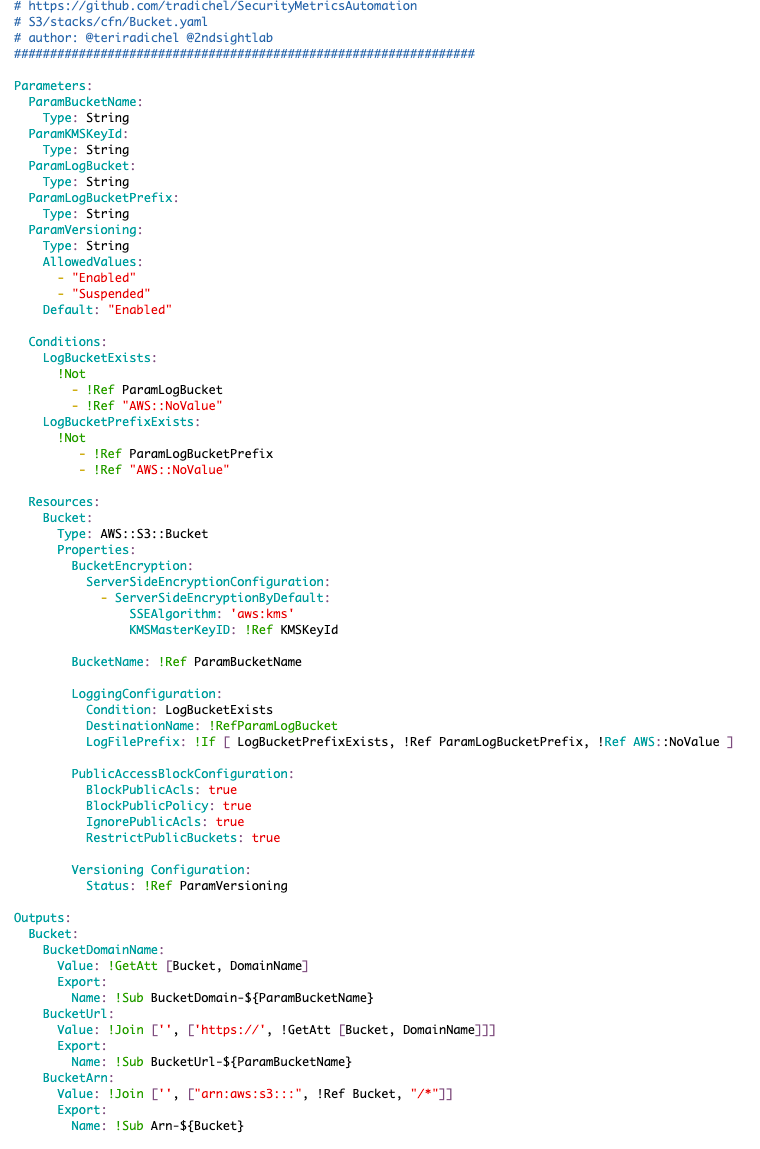
Full CloudFormation Template (Untested!)
We now have the code for our S3 bucket written but we still need to create our deployment script and test it out. No guarantees the code works! I’ll test it out in an upcoming post and add the deployment scripts.
Find out how these templates can help you improve security in your cloud environment.
I’ll publish the tested code in a subsequent post with the deployment scripts.
Follow for updates.
Teri Radichel | © 2nd Sight Lab 2023
About Teri Radichel:
~~~~~~~~~~~~~~~~~~~~
⭐️ Author: Cybersecurity Books
⭐️ Presentations: Presentations by Teri Radichel
⭐️ Recognition: SANS Award, AWS Security Hero, IANS Faculty
⭐️ Certifications: SANS ~ GSE 240
⭐️ Education: BA Business, Master of Software Engineering, Master of Infosec
⭐️ Company: Penetration Tests, Assessments, Phone Consulting ~ 2nd Sight Lab
Need Help With Cybersecurity, Cloud, or Application Security?
~~~~~~~~~~~~~~~~~~~~~~~~~~~~~~~~~~~~~~~~~~~~~~~~~~~~~~~~~~~~~
🔒 Request a penetration test or security assessment
🔒 Schedule a consulting call
🔒 Cybersecurity Speaker for PresentationFollow for more stories like this:
~~~~~~~~~~~~~~~~~~~~~~~~~~~~~~~~~~~~~~~~~~~~~~~~~~~~~~~~~~~~~
❤️ Sign Up my Medium Email List
❤️ Twitter: @teriradichel
❤️ LinkedIn: https://www.linkedin.com/in/teriradichel
❤️ Mastodon: @teriradichel@infosec.exchange
❤️ Facebook: 2nd Sight Lab
❤️ YouTube: @2ndsightlab


