
AWS S3 Bucket Configuration
ACM.191 What are all those properties and how should we configure them?
Part of my series on Automating Cybersecurity Metrics and stories on AWS S3 Buckets. The Code.
Free Content on Jobs in Cybersecurity | Sign up for the Email List
The last post covered encryption permissions for a customer managed key for AWS CloudTrail. We took a look at some potential issues in the documentation.
Next we want to create a bucket for our AWS Organizations Trail.
Before we create a bucket we need to read the documentation and understand the configuration options so we can configure the bucket securely.
CloudFormation for an AWS S3 Bucket
Let’s see what our options are when creating an S3 bucket with CloudFormation.
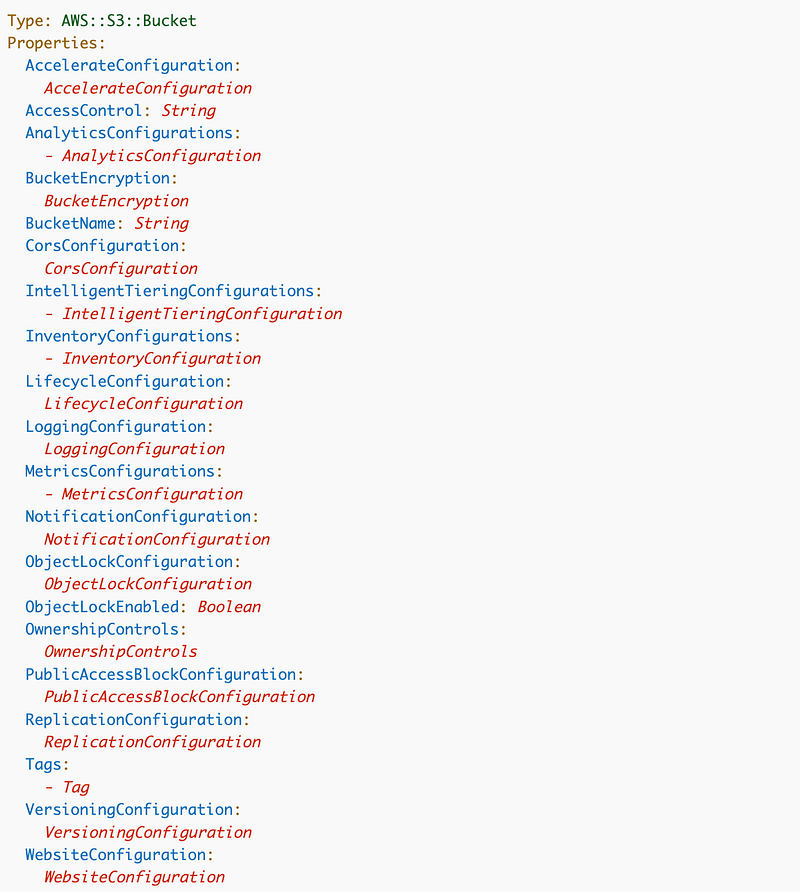
We can set quite a few properties for an S3 bucket. Let’s look at each of them in more detail.
S3 Bucket Template Properties
In the list below, I provide a description of each property, a link to documentation, and how AWS Control Tower configured the bucket it creates for AWS CloudTrail. I use the same setting unless stated otherwise.
~~~~~~~~~~~~~~~~~~~~~~~~~~~~~~~~~~~~~~~~~~~~~~~~~~~~~~~~~~~~~~~
Acceleration Transfer —Disabled
Amazon S3 Transfer Acceleration is a bucket-level feature that enables fast, easy, and secure transfers of files over long distances between your client and an S3 bucket.
~~~~~~~~~~~~~~~~~~~~~~~~~~~~~~~~~~~~~~~~~~~~~~~~~~~~~~~~~~~~~~~
Access Control (ACL) — Disabled
An ACL is a simplified way to open up access to an S3 bucket and my recommendation is that you NEVER USE IT. This option is the main culprit of all the incorrect wide open S3 buckets.
People who were too bothered to create a bucket policy simply open up complete access to the bucket with a click of a button “just for a minute” so they can “get things done”. If you need to quickly share a single file, there are better options (Like Google Drive limited to a specific Gmail address if you are really in a hurry.) If you are building an application which is a more appropriate use of S3 Buckets, take the time to properly configure your bucket.
We will not be enabling this and, in fact, we should create an SCP that prevents ACLs on all new buckets based on the IAM Policy on this page. If you’ve been following along, you probably see the problem here.
If we create this bucket in our root account, our SCP will not apply to this bucket. But I’m going to go ahead and create and test the bucket script, and ultimately we’ll move the CloudTrail logs to another account.
Bucket policies are a separate CloudFormation resource. I’ll cover bucket policies in separate posts, but just know that every bucket should have bucket policy that allows the most minimal access required to the bucket.

~~~~~~~~~~~~~~~~~~~~~~~~~~~~~~~~~~~~~~~~~~~~~~~~~~~~~~~~~~~~~~~
Analytics Configurations — Not Configured
By using Amazon S3 analytics Storage Class Analysis you can analyze storage access patterns to help you decide when to transition the right data to the right storage class. This new Amazon S3 analytics feature observes data access patterns to help you determine when to transition less frequently accessed STANDARD storage to the STANDARD_IA (IA, for infrequent access) storage class.
For more information about storage classes, see Using Amazon S3 storage classes.
We’re not going to use this right now but it might be helpful later to help reduce costs.
~~~~~~~~~~~~~~~~~~~~~~~~~~~~~~~~~~~~~~~~~~~~~~~~~~~~~~~~~~~~~~~
Bucket Encryption — AWS Managed Encryption
AWS Control Tower set up the CloudTrail bucket with default encryption using an AWS managed key.
We are going to try to use a Customer KMS Key instead. That is going to make our policies more complicated than those used by the Control Tower configuration but the logs will be better protected. The issue will be if someone needs to see the logs, we need to grant them access to use the key. Additionally, we need to grant CloudTrail access to use the key.
~~~~~~~~~~~~~~~~~~~~~~~~~~~~~~~~~~~~~~~~~~~~~~~~~~~~~~~~~~~~~~~
BucketName —Every bucket needs a name follows AWS naming rules.
~~~~~~~~~~~~~~~~~~~~~~~~~~~~~~~~~~~~~~~~~~~~~~~~~~~~~~~~~~~~~~~
CORS Configuration — No policy configured
We won’t need to configure CORS. In general, don’t use CORS unless you really know the implications of using it and how to configure it correctly.
~~~~~~~~~~~~~~~~~~~~~~~~~~~~~~~~~~~~~~~~~~~~~~~~~~~~~~~~~~~~~~~
Intelligent Tiering — None
The Amazon S3 Intelligent-Tiering storage class is designed to optimize storage costs by automatically moving data to the most cost-effective access tier when access patterns change.
This is not configured on my existing CloudTrail bucket created by Control Tower. I’ve enabled it to see if it helps and will check back.
~~~~~~~~~~~~~~~~~~~~~~~~~~~~~~~~~~~~~~~~~~~~~~~~~~~~~~~~~~~~~~~
Inventory Configurations (Rules) — Not Configured
We won’t configure this for a CloudTrail bucket.
Use S3 inventory to audit and report on the replication and encryption status of your objects for business, compliance, and regulatory needs. May be faster than the S3 List API. Amazon S3 Inventory provides comma-separated values (CSV), Apache optimized row columnar (ORC), or Apache Parquet output files that list your objects and their corresponding metadata on a daily or weekly basis for an S3 bucket or a shared prefix. If weekly, a report is generated every Sunday (UTC) after the initial report. For information about Amazon S3 Inventory pricing, see Amazon S3 pricing.
~~~~~~~~~~~~~~~~~~~~~~~~~~~~~~~~~~~~~~~~~~~~~~~~~~~~~~~~~~~~~~~
Lifecycle — 365 days
AWS Control Tower has configured the S3 bucket to retain the files for 365 days. The configuration does not include moving files to a less costly storage class when not frequently accessed, which could save you money. Beware that in the event that you need the files that are in a lower-priced storage class, it may take you longer to retrieve them.
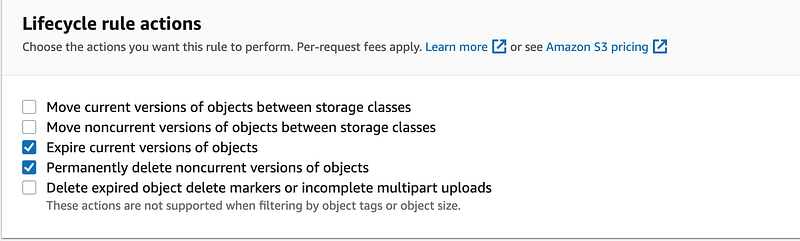
Note that I just turned on intelligent tiering above which should automatically move infrequently accessed files into a lower storage class after 90 days and then deep archive after 180 days. We’ll see how this works out since I have files in that bucket over 180 and 90 days and if it saves me any money.
You can find out more about the cost of different storage classes on the AWS S3 pricing page.
~~~~~~~~~~~~~~~~~~~~~~~~~~~~~~~~~~~~~~~~~~~~~~~~~~~~~~~~~~~~~~~
Logging — Server Access Logging Enabled
You can log actions to CloudTrail or S3 server access logs, but you will get slightly different information. The following link shows a chart of the datapoints logged for each option.
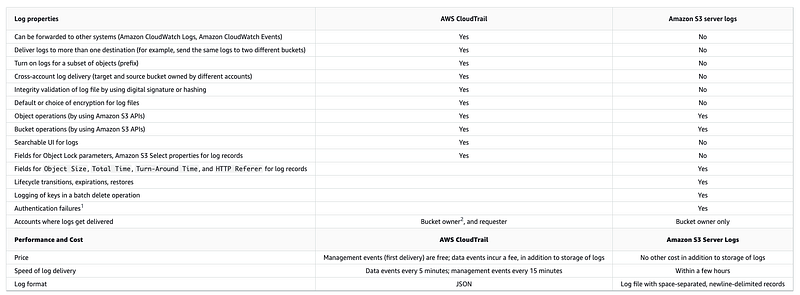
Consider the cost of CloudTrail compared to the cost of s3 above to understand the cost of the logging action you choose.
Server access logging provides the information in the following sample log provided by AWS in the link below. As you can see it looks similar to a web server log file.
79a59df900b949e55d96a1e698fbacedfd6e09d98eacf8f8d5218e7cd47ef2be DOC-EXAMPLE-BUCKET1 [06/Feb/2019:00:00:38 +0000] 192.0.2.3 79a59df900b949e55d96a1e698fbacedfd6e09d98eacf8f8d5218e7cd47ef2be 3E57427F3EXAMPLE REST.GET.VERSIONING - "GET /DOC-EXAMPLE-BUCKET1?versioning HTTP/1.1" 200 - 113 - 7 - "-" "S3Console/0.4" - s9lzHYrFp76ZVxRcpX9+5cjAnEH2ROuNkd2BHfIa6UkFVdtjf5mKR3/eTPFvsiP/XV/VLi31234= SigV4 ECDHE-RSA-AES128-GCM-SHA256 AuthHeader DOC-EXAMPLE-BUCKET1.s3.us-west-1.amazonaws.com TLSV1.2 arn:aws:s3:us-west-1:123456789012:accesspoint/example-AP Yes
79a59df900b949e55d96a1e698fbacedfd6e09d98eacf8f8d5218e7cd47ef2be DOC-EXAMPLE-BUCKET1 [06/Feb/2019:00:00:38 +0000] 192.0.2.3 79a59df900b949e55d96a1e698fbacedfd6e09d98eacf8f8d5218e7cd47ef2be 891CE47D2EXAMPLE REST.GET.LOGGING_STATUS - "GET /DOC-EXAMPLE-BUCKET1?logging HTTP/1.1" 200 - 242 - 11 - "-" "S3Console/0.4" - 9vKBE6vMhrNiWHZmb2L0mXOcqPGzQOI5XLnCtZNPxev+Hf+7tpT6sxDwDty4LHBUOZJG96N1234= SigV4 ECDHE-RSA-AES128-GCM-SHA256 AuthHeader DOC-EXAMPLE-BUCKET1.s3.us-west-1.amazonaws.com TLSV1.2 - -
79a59df900b949e55d96a1e698fbacedfd6e09d98eacf8f8d5218e7cd47ef2be DOC-EXAMPLE-BUCKET1 [06/Feb/2019:00:00:38 +0000] 192.0.2.3 79a59df900b949e55d96a1e698fbacedfd6e09d98eacf8f8d5218e7cd47ef2be A1206F460EXAMPLE REST.GET.BUCKETPOLICY - "GET /DOC-EXAMPLE-BUCKET1?policy HTTP/1.1" 404 NoSuchBucketPolicy 297 - 38 - "-" "S3Console/0.4" - BNaBsXZQQDbssi6xMBdBU2sLt+Yf5kZDmeBUP35sFoKa3sLLeMC78iwEIWxs99CRUrbS4n11234= SigV4 ECDHE-RSA-AES128-GCM-SHA256 AuthHeader DOC-EXAMPLE-BUCKET1.s3.us-west-1.amazonaws.com TLSV1.2 - Yes
79a59df900b949e55d96a1e698fbacedfd6e09d98eacf8f8d5218e7cd47ef2be DOC-EXAMPLE-BUCKET1 [06/Feb/2019:00:01:00 +0000] 192.0.2.3 79a59df900b949e55d96a1e698fbacedfd6e09d98eacf8f8d5218e7cd47ef2be 7B4A0FABBEXAMPLE REST.GET.VERSIONING - "GET /DOC-EXAMPLE-BUCKET1?versioning HTTP/1.1" 200 - 113 - 33 - "-" "S3Console/0.4" - Ke1bUcazaN1jWuUlPJaxF64cQVpUEhoZKEG/hmy/gijN/I1DeWqDfFvnpybfEseEME/u7ME1234= SigV4 ECDHE-RSA-AES128-GCM-SHA256 AuthHeader DOC-EXAMPLE-BUCKET1.s3.us-west-1.amazonaws.com TLSV1.2 - -
79a59df900b949e55d96a1e698fbacedfd6e09d98eacf8f8d5218e7cd47ef2be DOC-EXAMPLE-BUCKET1 [06/Feb/2019:00:01:57 +0000] 192.0.2.3 79a59df900b949e55d96a1e698fbacedfd6e09d98eacf8f8d5218e7cd47ef2be DD6CC733AEXAMPLE REST.PUT.OBJECT s3-dg.pdf "PUT /DOC-EXAMPLE-BUCKET1/s3-dg.pdf HTTP/1.1" 200 - - 4406583 41754 28 "-" "S3Console/0.4" - 10S62Zv81kBW7BB6SX4XJ48o6kpcl6LPwEoizZQQxJd5qDSCTLX0TgS37kYUBKQW3+bPdrg1234= SigV4 ECDHE-RSA-AES128-SHA AuthHeader DOC-EXAMPLE-BUCKET1.s3.us-west-1.amazonaws.com TLSV1.2 - Yes CloudTrail with provide similar in JSON format.
~~~~~~~~~~~~~~~~~~~~~~~~~~~~~~~~~~~~~~~~~~~~~~~~~~~~~~~~~~~~~~~
Logging — Data Object Logging Enabled
Object logging helps you understand not only wether a particular IP address accessed an S3 bucket and which action they took (Get, Put, etc.) but also which particular object, which in most cases is a file, the visitor accessed in the bucket.
This level of logging is important when reviewing a data breach. It can show you which files an attacker actually accessed instead of having to report access to all the files due to lack of granular logs.
~~~~~~~~~~~~~~~~~~~~~~~~~~~~~~~~~~~~~~~~~~~~~~~~~~~~~~~~~~~~~~~
Metrics
Specifies a metrics configuration for the CloudWatch request metrics (specified by the metrics configuration ID) from an Amazon S3 bucket.
In my particular test organization here are some of the metrics displayed:
- Storage: 8GB, increasing about .5 GB per month
- Objects: Just under 7M
Jumping over to CloudWatch you can find various options for metrics associate with S3 buckets:
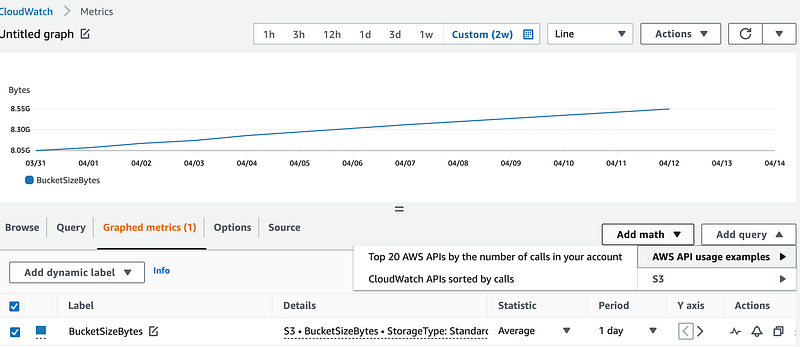
Note that there is a fee associated with CloudWatch metrics.
This is interesting and could be helpful when monitoring for suspicious activity, but for the moment I’m going to leave off metrics. I’ll revisit them in a separate post potentially as I have a definite use case in mind I would like to write about.
~~~~~~~~~~~~~~~~~~~~~~~~~~~~~~~~~~~~~~~~~~~~~~~~~~~~~~~~~~~~~~~
Notification Configuration — None
We won’t need event notifications at this time. You can set up a mechanism for something to subscribe to and react to S3 bucket events.
~~~~~~~~~~~~~~~~~~~~~~~~~~~~~~~~~~~~~~~~~~~~~~~~~~~~~~~~~~~~~~~
Object Lock — Off
Write once read many (WORM) configuration. This is off but it might be applicable to a CloudTrail bucket. I haven’t tested turning it on with CloudTrail. It is often used for things like data subject to legal holds.
~~~~~~~~~~~~~~~~~~~~~~~~~~~~~~~~~~~~~~~~~~~~~~~~~~~~~~~~~~~~~~~
Object Ownership — Object Writer
It is interesting that the Control Tower S3 bucket has this set to Object Writer. That makes Control Tower the owner of all the files in the S3 bucket.
~~~~~~~~~~~~~~~~~~~~~~~~~~~~~~~~~~~~~~~~~~~~~~~~~~~~~~~~~~~~~~~
Public Access Block (Block All Public Access) — On
This setting prevents making a bucket public. It should always be on. Limit who can turn it off.
~~~~~~~~~~~~~~~~~~~~~~~~~~~~~~~~~~~~~~~~~~~~~~~~~~~~~~~~~~~~~~~
Replication — Not configured
Files can be replicated to another region to help prevent data loss. This is not configured but if you are concerned about losing your CloudTrail logs, you could configure replication to another location as a backup. I’m not going to do this in the initial S3 bucket configuration but it is something I have one in the past for logs when I granted others permission that included potentially turning off or deleting logs. Even if they did that, I would have a copy of those logs in a separate AWS account to which that person did not have access. The consideration here is obviously cost for a large organization. You can reduce the cost in your backup account with lifecycle rules and lower cost storage options.
~~~~~~~~~~~~~~~~~~~~~~~~~~~~~~~~~~~~~~~~~~~~~~~~~~~~~~~~~~~~~~~
Tags — Configured
We won’t need any tags at the moment.
~~~~~~~~~~~~~~~~~~~~~~~~~~~~~~~~~~~~~~~~~~~~~~~~~~~~~~~~~~~~~~~
Versioning — enabled
It’s always a good idea to enable versioning in a bucket. If you restrict access to delete versions, you can restore the files in the case of inadvertent access or a ransomware attack.
~~~~~~~~~~~~~~~~~~~~~~~~~~~~~~~~~~~~~~~~~~~~~~~~~~~~~~~~~~~~~~~
Static Website Hosting — Off
We aren’t hosting a website in this bucket so this does not apply.
~~~~~~~~~~~~~~~~~~~~~~~~~~~~~~~~~~~~~~~~~~~~~~~~~~~~~~~~~~~~~~~
Other S3 properties in the UI
A few other options exists here not explicitly listed above. Some of these would be configured as a separate resources that references an S3 bucket. Some of these options may not be available via CloudFormation. In any case, we won’t be adding then to our CloudFormation template.
Storage Class Analysis — Not configured
We could use this to analyze storage classes we should use but I enabled intelligent tiering.
Access Point — None
Limit access to a bucket to your VPC, among other things.
Event Notifications — None
We are not using events in conjunction with our CloudTrail log at this time.
Event Bridge — Off
We are not using events in conjunction with our CloudTrail log at this time.
Requester Pays — Off
This applies if we want the requester to pay for accessing data in an S3 bucket.
~~~~~~~~~~~~~~~~~~~~~~~~~~~~~~~~~~~~~~~~~~~~~~~~~~~~~~~~~~~~~~~
Now that we understand what properties we want to set, we can formulate our CloudFormation template to create an S3 bucket.
Follow for updates.
Teri Radichel | © 2nd Sight Lab 2023
The best way to support this blog is to sign up for the email list and clap for stories you like. That also helps me determine what stories people like and what to write about more often. Other ways to follow and support are listed below. Thank you!
About Teri Radichel:
~~~~~~~~~~~~~~~~~~~~
Author: Cybersecurity for Executives in the Age of Cloud
Presentations: Presentations by Teri Radichel
Recognition: SANS Difference Makers Award, AWS Security Hero, IANS Faculty
Certifications: SANS
Education: BA Business, Master of Software Engineering, Master of Infosec
Company: Cloud Penetration Tests, Assessments, Training ~ 2nd Sight Lab
Like this story? Use the options below to help me write more!
~~~~~~~~~~~~~~~~~~~~~~~~~~~~~~~~~~~~~~~~~~~~~~~~~~~~~~~~~~~~~
❤️ Clap
❤️ Referrals
❤️ Medium: Teri Radichel
❤️ Email List: Teri Radichel
❤️ Twitter: @teriradichel
❤️ Mastodon: @[email protected]
❤️ Facebook: 2nd Sight Lab
❤️ YouTube: @2ndsightlab
❤️ Buy a Book: Teri Radichel on Amazon
❤️ Request a penetration test, assessment, or training
via LinkedIn: Teri Radichel
❤️ Schedule a consulting call with me through IANS ResearchMy Cybersecurity Book: Cybersecurity for Executives in the Age of Cloud



