
Granting AWS CloudTrail and Users Permission to use a KMS Key
ACM.190 Complexities and Caveats when using a customer managed encryption key with CloudTrail logs
~~~~~~~~~~~~~~~~~~~~~~~~~~~~~~~~~~~~~~~~~~~~~~~~~~~~~~~~~~~
⚙️ Part of my series on Automating Cybersecurity Metrics. The Code.
🔒 Related Stories: AWS Security | KMS | IAM | Cybersecurity
💻 Free Content on Jobs in Cybersecurity | ✉️ Sign up for the Email List
~~~~~~~~~~~~~~~~~~~~~~~~~~~~~~~~~~~~~~~~~~~~~~~~~~~~~~~~~~~
I created a key for CloudTrail in the last post.
Now we want to add permission for CloudTrail to use the key as explained here:
There are a number of different things going on in the above documentation and at the time of this writing not sure it’s all accurate and seems a bit repetitive. Let’s sort it out.
Caveats
Let’s start with the Caveats of encrypting CloudTrail with a KMS Key.
If you delete the key, CloudTrail can’t deliver the logs.

If you update the key policy, make sure you understand what you are doing. Better yet, test it in a mirrored test environment first, because even people who know what they are doing can make mistakes.

Grant CloudTrail Permission to use your KMS Key
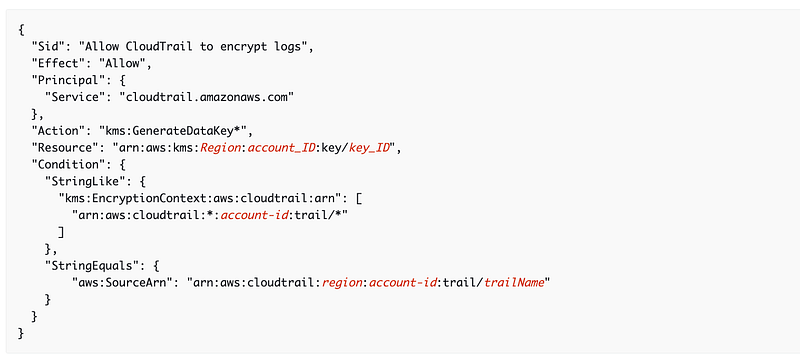
You need to add a section to your KMS key policy to allow CloudTrail to use your KMS key. The policy section you need to add to your KMS Key policy looks like this.
Caveat for CloudTrail Lake
AWS says a security best practice, is to add an aws:SourceARN to the policy so CloudTrail can only use the key in conjunction with the defined trail. However, a policy for a KMS key used to encrypt CloudTrail Lake event data store logs cannot use the condition keys so remove this section of the policy above if you are using CloudTrail Lake.
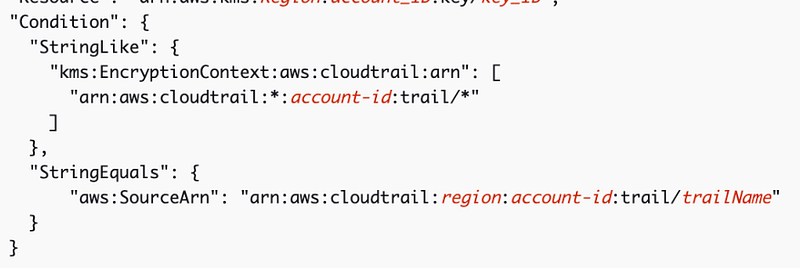
I wonder if there are any caveats for AWS Organizations Trails. I don’t see any in this snippet so hopefully we can leave in the restriction.

I did use CloudTrail Lake in a prior post:a
But we can explore other options for querying CloudTrail and defining permissions to see if they work with our encrypted CloudTrail logs and conditions. Stay tuned for that.
Granting AWS Services permission to encrypt in the KMS Key Policy
Any AWS Services that need to access or process CloudTrail logs will need access to the KMS key. Only CloudTrail should need to encrypt data.
Note the condition that restricts access to CloudTrail logs in specific accounts. Consider what challenges this creates.
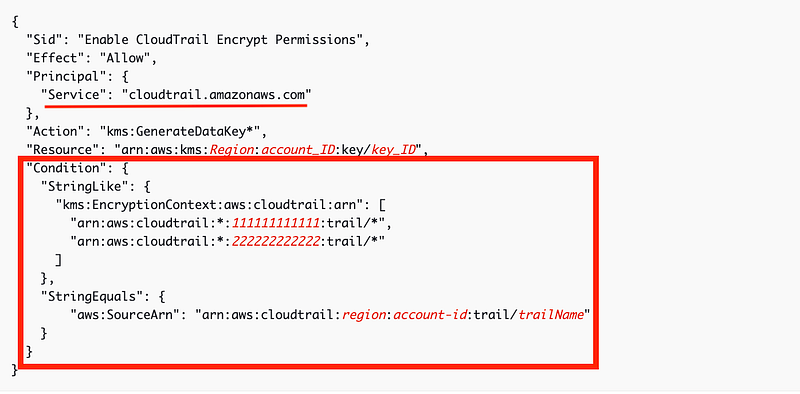
If we are creating an AWS Organizations trail, do we need to add every single account in our organization here in order to make this work? Or only the single Organization trail? Can we use a wildcard? We’ll test this out to show how it works in practice after creating a trail.
Note that in order to encrypt with KMS you also strangely need permission to decrypt. There is some explanation about decyrpting the data key but that is not decyprting the data. Decrypting the data key seems like an internal AWS action behind the scenes or perhaps you need two separate actions so you can segregate encryption and decryption permissions properly. But I digress. Bottom line. We need to grant CloudTrail permission to decrypt as well as encrypt.
Granting AWS Services permission to decrypt in the KMS Key Policy
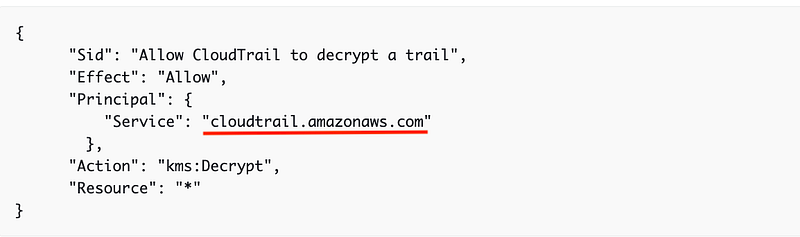
Any AWS services that need access to CloudTrail will require permission to use the KMS key. That includes CloudTrail itself.
Note that this policy below does not restrict to the source ARN as recommended previously. Perhaps that should be added if you are not using CloudTrail Lake. But what other services might be affected?
Also it doesn’t make sense that CloudTrail needs to decrypt with the KMS key as it should only be writing to the logs, not reading them. However, this is where the questionable AWS implementation comes into play. You have to grant encrypt permissions to decrypt data.
Keep AWS Services and other scripts or applications you might use that need access to CloudTrail in mind if you are applying a KMS key to an existing trail. Do you know all of the services that are reading and using CloudTrail and what might break? Consider security tools that need access to the logs. Will GuardDuty still work properly? It looks at CloudTrail logs.
Also, errors related to inability to access a KMS are usually very obscure in my experience. You will want to test this in a mirrored account first before applying it if possible.
Another option is to set up a new account and transition resource to it — which is NOT simple. Trust me, I’ve gone through multiple times for a large organization. But it is an option.
Cross-account access to decrypt data in a KMS key policy
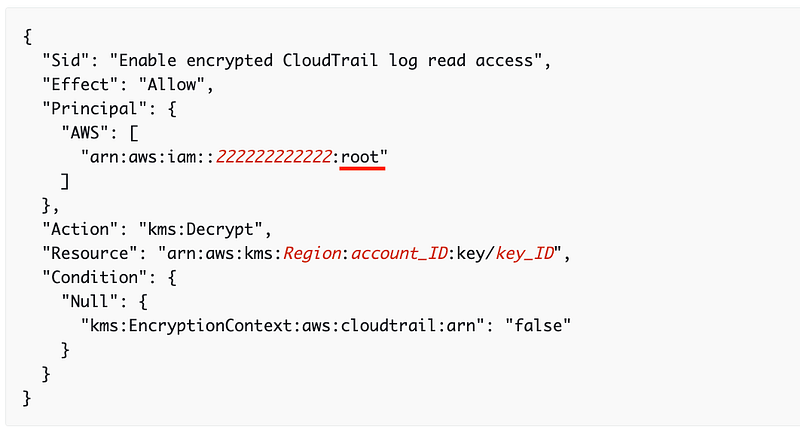
What we will likely need to do in the future is grant cross-account access to principals (users or roles) decrypt logs that is encrypted with the key. We don’t need this immediately, but for future reference, here are some sample policies.
I think the documentation here may be misleading. As I explained in a prior post, granting access to “root” in a KMS key, per the KMS documentation at the time I wrote that post, grants access to any administrative user in another account, not just the root user. The documentation states that this policy grants access to a role but it actually grants access to principals with administrative permissions in the other account if aligned with KMS documentation.
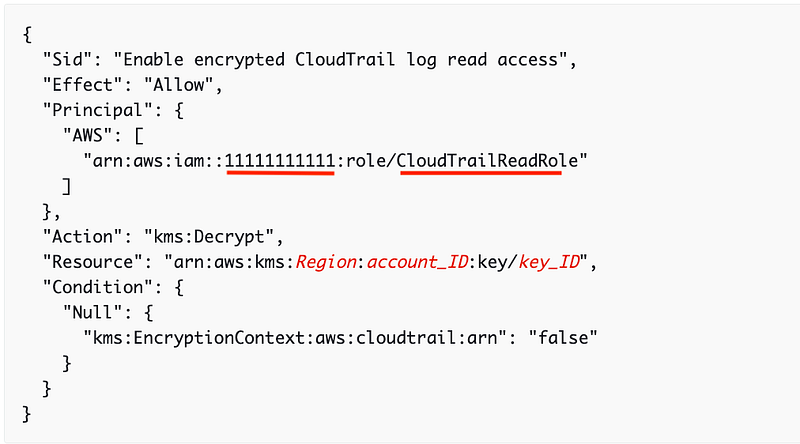
The documentation states that this next policy grants access to all users, but this should grant access to a specific role — CloudTrailReadRole — in account 111111111111. (Unless AWS works differently for this specific role and grants access to all users by default?)
As always, test it out any KMS policies you create for yourself and make sure only the correct people have access.
Granting AWS Principals permission to use the KMS Key in IAM Policies
You will also need to update the policy for the principal (User, Role, etc.) to grant access to use the key. As I explained in a prior post there are different policies that work together in AWS which all need to work together. These policies allow you to enforce segregation of duties.
So in addition to allowing access in the resource policy (the KMS key policy that is attached to the resource and specifies who can use that resource) you need to grant permissions to the principals to use the KMS key.
This is not a good policy. It allows a user to use any KMS key for both encryption and decryption.
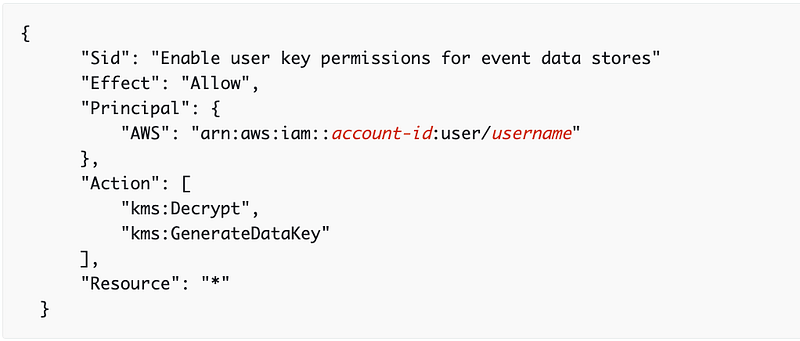
Update the resource to grant access to only the keys the user needs to use unless you truly want them to be able to use any key. Also, if they only need read-only access they should only need decrypt permissions. If I remember correctly that should work but we’ll test it out later when we want to grant other users specific access.
We’ll need to leave off any portions of policies that require trail names to implement this and I don’t want to forget to go back and add them so I’ll make these changes at the same time I implement the trail and do some testing.
Next, we’ll look at S3 buckets… I got a bit ahead of myself in the last post and initially promised S3 buckets were next, but really they are!
Follow for updates.
Teri Radichel | © 2nd Sight Lab 2023
About Teri Radichel:
~~~~~~~~~~~~~~~~~~~~
⭐️ Author: Cybersecurity Books
⭐️ Presentations: Presentations by Teri Radichel
⭐️ Recognition: SANS Award, AWS Security Hero, IANS Faculty
⭐️ Certifications: SANS ~ GSE 240
⭐️ Education: BA Business, Master of Software Engineering, Master of Infosec
⭐️ Company: Penetration Tests, Assessments, Phone Consulting ~ 2nd Sight Lab
Need Help With Cybersecurity, Cloud, or Application Security?
~~~~~~~~~~~~~~~~~~~~~~~~~~~~~~~~~~~~~~~~~~~~~~~~~~~~~~~~~~~~~
🔒 Request a penetration test or security assessment
🔒 Schedule a consulting call
🔒 Cybersecurity Speaker for PresentationFollow for more stories like this:
~~~~~~~~~~~~~~~~~~~~~~~~~~~~~~~~~~~~~~~~~~~~~~~~~~~~~~~~~~~~~
❤️ Sign Up my Medium Email List
❤️ Twitter: @teriradichel
❤️ LinkedIn: https://www.linkedin.com/in/teriradichel
❤️ Mastodon: @teriradichel@infosec.exchange
❤️ Facebook: 2nd Sight Lab
❤️ YouTube: @2ndsightlab


