
Resource, IAM, and Trust Policies on AWS
ACM.24 Architecting defense in depth AWS policies.
~~~~~~~~~~~~~~~~~~~~~~~~~~~~~~~~~~~~~~~~~~~~~~~~~~~~~~~~~
⚙️ Check out my series on Automating Cybersecurity Metrics. The Code.
🔒 Related Stories: AWS Security | Cloud Security Architecture | IAM
💻 Free Content on Jobs in Cybersecurity | ✉️ Sign up for the Email List
~~~~~~~~~~~~~~~~~~~~~~~~~~~~~~~~~~~~~~~~~~~~~~~~~~~~~~~~~
We’ve been using a lot of different AWS policies in this series — trust policies on roles, KMS Key policies, and policies assigned to users, roles, and groups.
In our last post we created the KMS key and a key policy that defines who can access and perform actions with or on that KMS key.
We also allowed an IAM role to administer our key and we granted a user permission to assume and use that role for administration.
When you design your AWS policies, you need to consider the implications of how the different policies you can create work together. Using different policies managed by different people leverages the concept of separation of concerns or segregation of duties. That way if one person’s credentials get stolen or abused, you still may be able to prevent an attacker from taking over the whole system.
Using multiple security controls to protect data is part of a defense in depth strategy. That’s a common term in security which I described in my book at the bottom of this post if you’re not familiar.
Let’s review the types of policies we just created and consider additional policies we may need as we complete this architecture.
Resource Policies
The policy associated with our KMS key is a resource policy. The policy is associated with a resource and defines who can access that resource. The resource policy does not give the identities included in the resource policy permission perform the actions (in other words to call the AWS APIs) to take those actions on the resource. It only says that if they are performing those actions the resource will allow it.
IAM Policies
If you’ve ever taken one of my cloud security classes you probably heard me say that every action in the cloud is an API call. Whether you are clicking a button, using a CLI, or an SDK, or calling the API directly, the cloud platform (AWS, GCP, or Azure) is most likely making an API call on your behalf to take some action in the cloud. IAM Policies give you permissions on AWS to make those API calls.
You can read more about the difference between resource and IAM policies here:
All the actions you can take on AWS for each service should be listed here:
Policies grant permissions to principals in AWS. You can find a list of possible AWS principals here, such as users or roles. Note that an AWS IAM Group is not a principal.
Our key will allow the specified roles to take actions with or on it, but we need to create an IAM Policy for each user or role to allow it to take those actions. In addition the Resource Policy needs to allow the user to access the resource.
Trust Policies (AssumeRolePolicyDocument in CloudFormation)
A trust policy on an AWS IAM role defines who can assume that role. You can require the person who can assume that role to be authenticated with MFA.
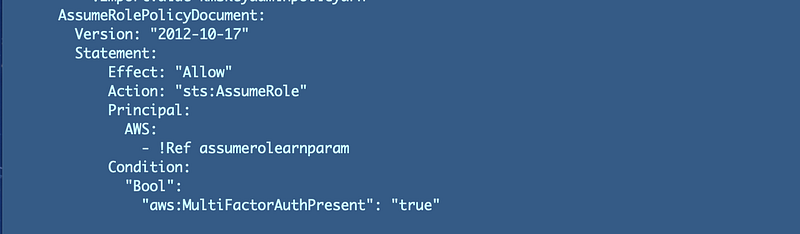
You an also apply other conditions such as which IP address the user is coming from and other restrictions using AWS Conditions. I explained what those are and how they work here if you want to find about more about the different conditions you can add to policies on AWS:
I explained the difference between an IAM Managed Policy and an IAM Policy when deploying a policy using CloudFormation in a prior post as well. It really has to do with the relationship of a policy to an identity. Ensure you deploy the correct type depending on what sort of relationship you require.
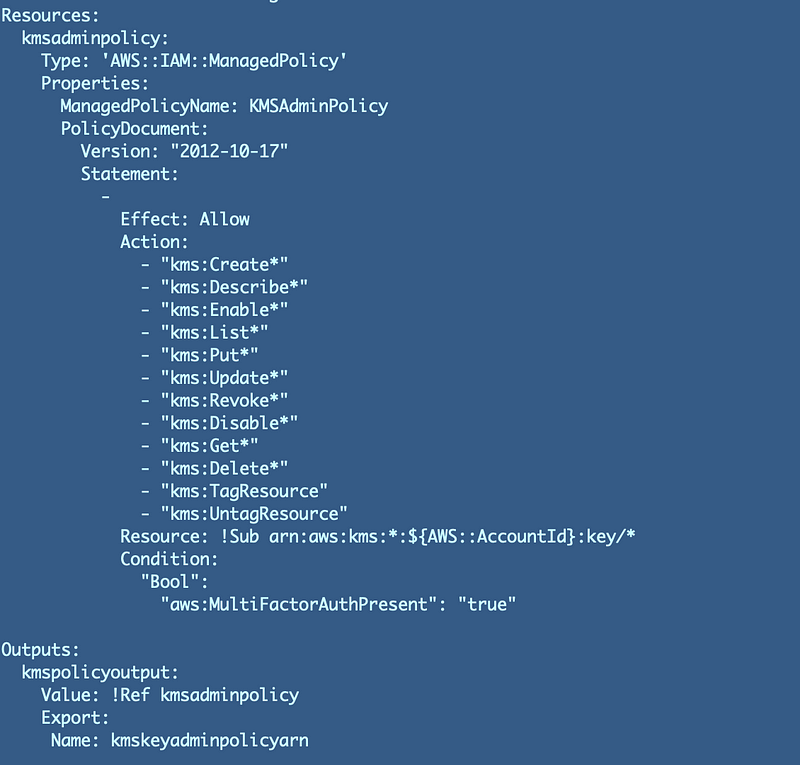
Future policies in our batch job architecture
Now we need to consider how we will implement the policies for the identities that are allowed to encrypt and decrypt credentials used to start batch jobs, and the data associated with each batch job. We’re probably going to need to use some S3 buckets so we will associate resource policies with our buckets and allow IAM roles to access the data in those buckets. Some lambda functions will likely be involved which will need to obtain permissions by way of an IAM role. AWS Batch will also use IAM roles.
In the administrator policy, we allowed the administrator to act on any key in the account. For our encrypt and decrypt users we want to limit them to using this specific key for credential storage and retrieval related to a particular batch job to reduce data exposure in the event of stolen credentials. That was covered in prior posts where I was thinking through the architecture and design I need to protect the data.
We can restrict AWS IAM Policies to specific resources, such as allowing an identity to take actions on a specific KMS key or a specific S3 bucket.
We deployed two roles for encrypting and decrypting the secrets used to assume our batch job roles. What permissions do we need to add to each role? By reducing policies to only what an identity needs to do and limiting access to only the resources the identity should be using, we reduce the potential damage lost or stolen credentials can do. We want to only provide the permissions required, but first we need to think through what these two roles need to do and access.
Role: BatchRoleDeployBatchJobCredentials
- Run CloudFormation Script to create AWS Secret Key and Access Key for our IAM user
- Run CloudFormation Script to create Secrets Manager Secret
- Assign the Encryption Key in our CloudFormation script to the Secret Manager Secret and store the secret
We may create a specific job with specific permissions and a specific role, or we could give our deployment system permission to deploy anything in any account. Which do you think is less risky? Which will be easier to manage? How can we reduce our overhead while maintaining limited permissions?
Role: RoleTriggerBatchJob
Our role that triggers the batch job needs to be able to do the following:
- Retrieve a specific Secret from Secrets Manager
- Decrypt the secret
- If we create a single purpose batch job or lambda function we can limit its access to a specific secret and KMS key.
- Will this role have access to all the credentials to start a batch job or will we create a separate role and function for each job?
I’ll cover some of those questions in upcoming posts. There’s no single answer but we can try to think through how to prevent access to data. We will also consider how access to data alone will provide limited value to an attacker through segregation and encryption. Additionally, I’ll show you some tools and techniques to help create a zero-trust policy.
Follow for updates.
Teri Radichel | © 2nd Sight Lab 2022
About Teri Radichel:
~~~~~~~~~~~~~~~~~~~~
⭐️ Author: Cybersecurity Books
⭐️ Presentations: Presentations by Teri Radichel
⭐️ Recognition: SANS Award, AWS Security Hero, IANS Faculty
⭐️ Certifications: SANS ~ GSE 240
⭐️ Education: BA Business, Master of Software Engineering, Master of Infosec
⭐️ Company: Penetration Tests, Assessments, Phone Consulting ~ 2nd Sight Lab
Need Help With Cybersecurity, Cloud, or Application Security?
~~~~~~~~~~~~~~~~~~~~~~~~~~~~~~~~~~~~~~~~~~~~~~~~~~~~~~~~~~~~~
🔒 Request a penetration test or security assessment
🔒 Schedule a consulting call
🔒 Cybersecurity Speaker for PresentationFollow for more stories like this:
~~~~~~~~~~~~~~~~~~~~~~~~~~~~~~~~~~~~~~~~~~~~~~~~~~~~~~~~~~~~~
❤️ Sign Up my Medium Email List
❤️ Twitter: @teriradichel
❤️ LinkedIn: https://www.linkedin.com/in/teriradichel
❤️ Mastodon: @teriradichel@infosec.exchange
❤️ Facebook: 2nd Sight Lab
❤️ YouTube: @2ndsightlab


