avatarGeeky Animals

Free AI web copilot to create summaries, insights and extended knowledge, download it at here

5244

Abstract

k, etc.).</li></ul><p id="0722"><b>DP’s weaknesses</b></p><ul><li>Creating a prompt with multiple subjects and focal points is more challenging.</li><li>Compositional control is limited.</li><li>It can be difficult to troubleshoot a long and complicated multi-prompt.</li></ul><figure id="8eea"><img src="https://cdn-images-1.readmedium.com/v2/resize:fit:800/0*atrEXPCg9kfXGjD_.png"><figcaption><b>Process prompting </b>uses a series of steps to create an image. Prompts are temporary disposable tools used during the creation process. /imagine prompt: a documentary photograph of humans directing robots in photo archiving — ar 16:9 followed by Vary (Strong) and Vary (Region).</figcaption></figure><h2 id="73ef">Process Prompting (PP)</h2><p id="adaf">PP has always existed, but there has never been a term to describe it. This method of prompting is supported by many new tools in Midjourney.</p><p id="12b3">PP can create something new or improve images created by DP.</p><p id="4b31">Prompts in PP are disposable, temporary tools that instruct the bot on what to do on the canvas.</p><p id="3c64">In the Japanese cat example above, three prompts were used: the first to create a photo of a cat, the second to create a guinea pig, and the third to resize the image aspect ratio. Unlike DP, the prompt on its own does not create the final image.</p><p id="1219">As Clarinet put it, “The prompt is the chisel, not the sculpture.”</p><p id="a1e7"><b>PP’s strengths</b></p><ul><li>Midjourney’s new features support PP. Indeed, many new features cannot be written into a prompt as DP.</li><li>Best for creating multiple subjects (focal points) and exerting greater control over the canvas (compositional control).</li><li>Edit and enhance the image.</li><li>The image creation process is divided into several steps. The entire process may not be restarted if a photo edit is required. To save time, you can skip to specific steps to continue editing.</li><li>Increase the uniqueness of the created images because PP creation steps increase the difficulty for others to copy and create similar images.</li></ul><p id="c51a"><b>PP’s weaknesses</b></p><ul><li>One needs to spend more time and effort in creating an image.</li><li>It is a multi-step process.</li><li>It is more difficult to achieve consistent vibes, aesthetics, colors, and coherency. (The style code can be helpful to fix this issue.)</li><li>The bot may refuse to add multiple subjects to an image via inpainting.</li><li>There will be no copying and pasting. It is necessary to become familiar with the new features and functions. This can be challenging for beginners.</li><li>PP creation steps can be shared but are more complicated and less repeatable than DP.</li></ul><h2 id="b0c9">Why do I need to know about DP and PP?</h2><p id="70f2">Midjourney’s new features, like inpainting and outpainting, favor using disposable prompts to sculpt an image, making “one prompt, one image” less reliable.</p><p id="bd04">Learning and remembering the keywords (or key phrases) rather than the entire prompt may be more beneficial because those keywords can also be applied to disposable prompts.</p><p id="474f">The Style Code should be used in conjunction with the “unlocking keywords/phrases” to apply across prompts.</p><p id="cbcc">The <a href="https://readmedium.com/midjourney-slider-method-how-to-fine-tune-images-by-multiprompting-8947d4713286">Slider Method</a> (or weighted <a href="https://readmedium.com/midjourney-a-gentle-guide-to-multi-prompt-96365320e59b">promptlet</a>) is becoming increasingly important for adjusting an effect in a disposable prompt. For example, in Vary (Region), you can <a href="https://readmedium.com/midjourney-a-simple-method-to-fine-tune-your-inpainting-555430df9e96">fine-tune the color of the eyes</a> with a slider.</p><h2 id="bb83">Implications</h2><p id="4acf">The prompting method is essential when comparing Midjourney’s prompt performance to other applications, such as DALL·E and Stable Diffusion.</p><p id="fc47">The performance of the different text-to-image systems must consider the roles of the disposable prompts in the image creation of Process Prompting.</p><p id="4e53">Process Prompting is not a post-production step for image editing or enhancement. It is a method of creating an image, just like Direct Prompting.</p><h2 id="0f39">Opinion and suggestion</h2><p id="4080">Midjourney should provide guidance on how to share PP steps. It’s all over the place right now.</p><p id="c476">Begin with the Midjourney Community Feed and encourage users to document the steps and temporary prompts to create those stunning images. Otherwise, the results are not reproducible, which may frustrate beginners who are just learning about prompting in Midjourney.</p><p id="da79">One possible solution is developing an auto-log system to record and document the image creation steps. The log file can be shared with other users.</p><p id="064d"><b>Related stories</b></p><div id="526b" class="link-block"> <a href="https://bootcamp.uxdesign.cc/midjourney-how-to-use-the-style-tuner-to-develop-your-aesthetic-style-f6ade04685a8"> <div> <div> <h2>Midjourney: How to use the Style Tuner

Options

to develop your aesthetic style</h2> <div><h3>Everyone is now an artist</h3></div> <div><p>bootcamp.uxdesign.cc</p></div> </div> <div> <div style="background-image: url(https://miro.readmedium.com/v2/resize:fit:320/0*iP1OWMGreOMT8CW2.png)"></div> </div> </div> </a> </div><div id="7907" class="link-block"> <a href="https://bootcamp.uxdesign.cc/midjourney-a-simple-method-to-fine-tune-your-inpainting-555430df9e96"> <div> <div> <h2>Midjourney: a simple method to fine-tune your inpainting</h2> <div><h3>Slider Method for Vary (Region). Use it to make a series of inpainting variations.</h3></div> <div><p>bootcamp.uxdesign.cc</p></div> </div> <div> <div style="background-image: url(https://miro.readmedium.com/v2/resize:fit:320/0*zMw7NdR8RVhll6Dc.png)"></div> </div> </div> </a> </div><div id="a53c" class="link-block"> <a href="https://bootcamp.uxdesign.cc/midjourney-slider-method-how-to-fine-tune-images-by-multiprompting-8947d4713286"> <div> <div> <h2>Midjourney Slider Method: How to fine-tune images by Multiprompting</h2> <div><h3>Fine-tune your image like a Pro with Slider Method. Adjust your image with numerical, descriptive, and implied…</h3></div> <div><p>bootcamp.uxdesign.cc</p></div> </div> <div> <div style="background-image: url(https://miro.readmedium.com/v2/resize:fit:320/0*k0bz6gPx5FCUENkn.png)"></div> </div> </div> </a> </div><div id="b0e5" class="link-block"> <a href="https://medium.com/@geekyanimals/list/e5b8cabc263d"> <div> <div> <h2>Midjourney</h2> <div><h3>Stories for Midjourney fans</h3></div> <div><p>medium.com</p></div> </div> <div> <div style="background-image: url(https://miro.readmedium.com/v2/resize:fit:320/0*7187f92167d68fe5443b8535e596a377941a91a1.jpeg)"></div> </div> </div> </a> </div><div id="a505" class="link-block"> <a href="https://medium.com/@geekyanimals/list/516b50973fbd"> <div> <div> <h2>Midjourney Mini-Tutorials</h2> <div><h3>Simple and easy-to-follow guides for Midjourney Beginners</h3></div> <div><p>medium.com</p></div> </div> <div> <div style="background-image: url(https://miro.readmedium.com/v2/resize:fit:320/0*e8b004ea601c726cd07088e935b4c6de81de0d14.jpeg)"></div> </div> </div> </a> </div><div id="6f33" class="link-block"> <a href="https://medium.com/@geekyanimals/list/9e8c7506dfda"> <div> <div> <h2>Midjourney Muse</h2> <div><h3>You wake up one morning and realize that you are, in fact, a Midjourney fanatic.</h3></div> <div><p>medium.com</p></div> </div> <div> <div style="background-image: url(https://miro.readmedium.com/v2/resize:fit:320/0*7f854ff9cd4b5487d79716d7159dd69ca231ed38.jpeg)"></div> </div> </div> </a> </div><p id="6dcd"><b>Conclusion</b></p><ul><li>In Midjourney, there are two prompting methods: direct and process. Each of them has its own set of advantages and disadvantages.</li><li>Process Prompting has become the new normal in Midjourney because many new features are only accessible through Process Prompting.</li><li>Shared prompts are becoming less reliable because the temporary disposable prompts and steps used to create the images are frequently undocumented.</li></ul><p id="edc8">I hope you like this story!</p><p id="c5b5"><b>Please give me a clap or leave a positive comment </b>to let Medium’s algorithm know that this story is helpful and has contributed to its platform’s success.</p><p id="0e8e">Your support inspires me to create higher-quality content in the future!</p><p id="687f">Never miss a story. <b>Follow me on Medium</b> for updates, stories, and tips about Midjourney.</p><div id="ee30" class="link-block"> <a href="https://medium.com/@geekyanimals"> <div> <div> <h2>Geeky Animals — Medium</h2> <div><h3>Read writing from Geeky Animals on Medium. I’m a veterinarian passionate about the intersection of Midjourney, AI, art…</h3></div> <div><p>medium.com</p></div> </div> <div> <div style="background-image: url(https://miro.readmedium.com/v2/resize:fit:320/0*expQMusdp5XOkDiw)"></div> </div> </div> </a> </div><p id="bfb9">Sign up <a href="https://medium.com/@geekyanimals/subscribe"><b>here</b> </a>for a free email alert when I post a new story.</p></article></body>

Midjourney Prompting: Direct & Process Methods

Why is one prompt one image no longer feasible?

Get a free email alert when a new story is published.
Prompting must keep up with text-to-image systems’ increasing complexity and advanced features. (All images were created with Midjourney by the author.)

Process Prompting is the new normal in Midjourney

Inpainting is now commonly used to fix abnormal fingers, clean up random “trash” in the image, and adjust colors, subject expressions, etc.

Outpainting is used to zoom out and add context to a photograph. It can also make mock-ups, expand the canvas size, and create consistent characters.

Some of these processes necessitate editing the original prompt, while others replace it. We occasionally activate the /remix mode and edit the outpainting prompts to optimize and adjust the output.

Prompting has progressed from crafting a line of text to a process that employs temporary disposable prompts for editing and greater control over the canvas.

Style Tuner goes one step further, allowing users to create a customized style code in another session before applying it to the prompt. The influence of the style code is then adjusted with the --stylize parameter to achieve the desired result.

Put another way, we no longer rely on a single prompt to generate the desired image.

Midjourney is evolving. So as its prompting method.

Prompting methods

On October 5th, 2023, Clarinet posted two new terms about prompting methods in Midjourney on Discord’s Prompt-faqs.

According to her, Direct Prompting (DP) is when someone creates an image using a single prompt.

Process Prompting (PP) is when someone creates an image using a series of steps where prompts are disposable tools to instruct the bot to do certain things on the canvas.
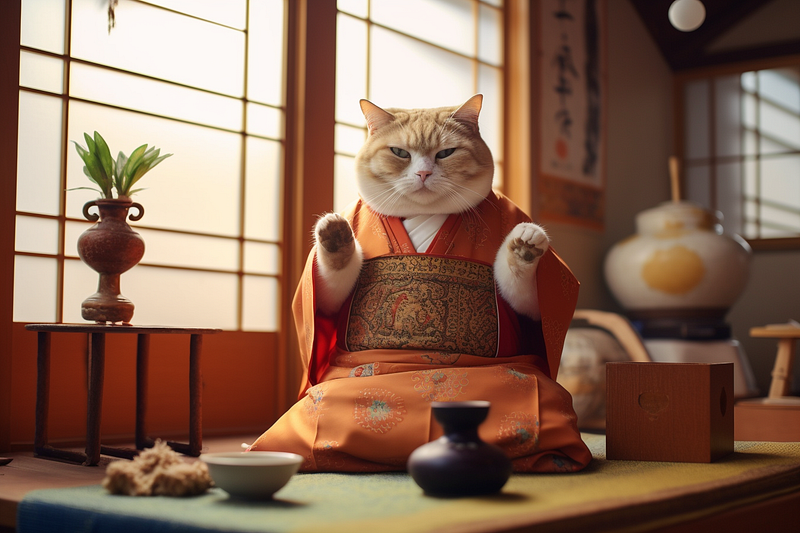
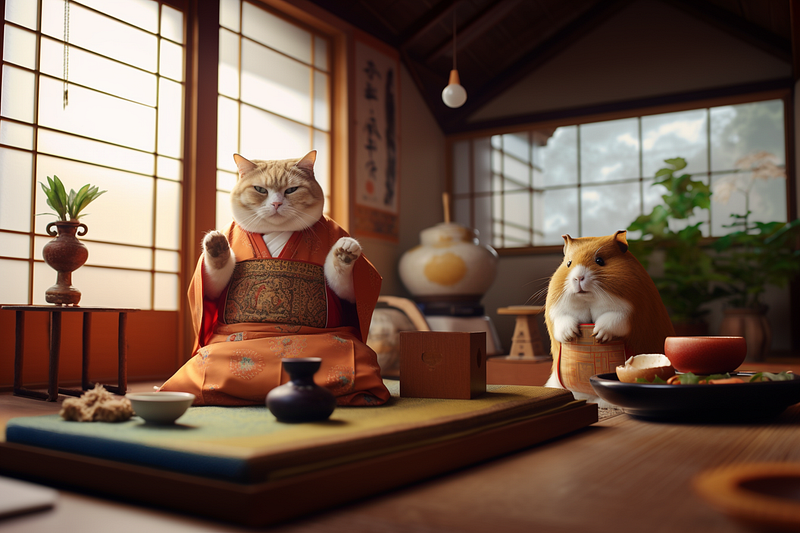
(Top/Left): Direct Prompting /imagine prompt: a photo of a chubby cat in the living room in the style of japanese — ar 3:2 (Bottom/Right): Process Prompting (PP) /imagine prompt: a photo of a chubby cat in the living room in the style of japanese — ar 3:2, then [Pan Right] a guinea pig in the living room in the style of japanese, then [Custom Zoom] a guinea pig in the living room in the style of japanese — ar 3:2 — zoom 1 to resize back to — ar 3:2
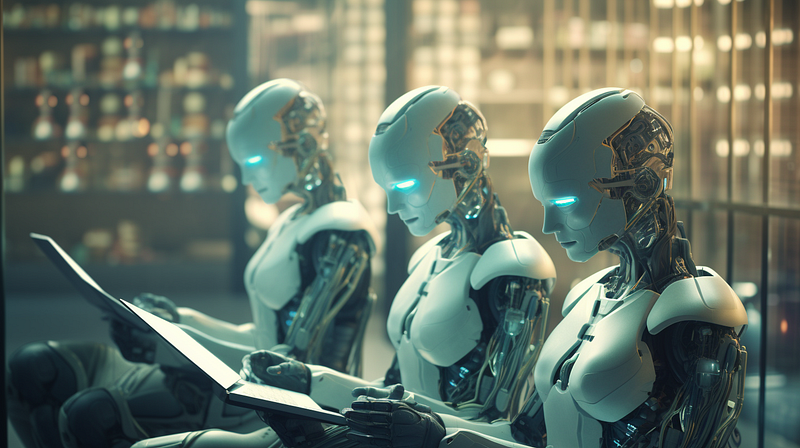
Direct prompting makes use of a prompt to generate an image. Anyone who has access to the prompt can create a similar image. /imagine prompt: a documentary photograph of humans directing robots in photo archiving — ar 16:9

Direct Prompting (DP)

We used to rely on DP before newer features like outpainting and inpainting were introduced in Midjourney.

After crafting or gathering a prompt from somewhere, one can create an image by feeding it to the bot. It’s simple: anyone who uses the same prompt will get roughly the same type of image.

DP’s strengths

  • The aesthetic, style, setting, composition, vibe, and relative size of the subjects/objects are coherent and consistent in DP.
  • Ideal for a single subject with a single focal point.
  • It’s easier to maintain a consistent vibe and aesthetic.
  • Beginner-friendly. To generate an image, simply copy and paste the prompt to /imagine.
  • Prompts are easily shared and predictable.
  • There are numerous sources for prompt “suppliers.” Shared prompts can be found via Medium stories, Midjourney Community Feed/Gallery, and Social Media (X, Facebook, etc.).

DP’s weaknesses

  • Creating a prompt with multiple subjects and focal points is more challenging.
  • Compositional control is limited.
  • It can be difficult to troubleshoot a long and complicated multi-prompt.
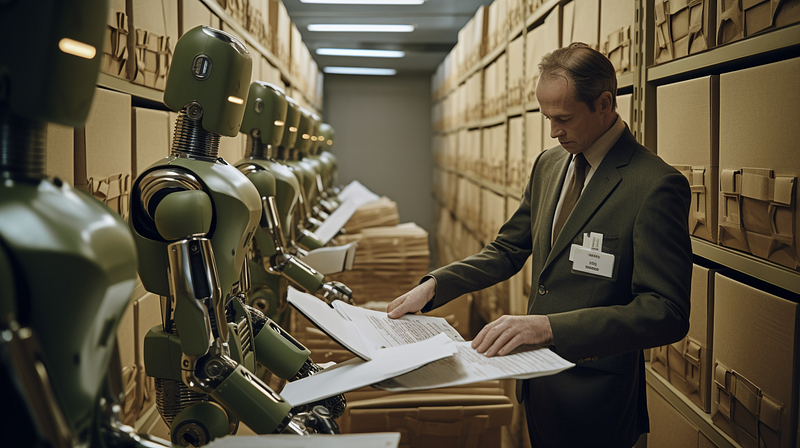
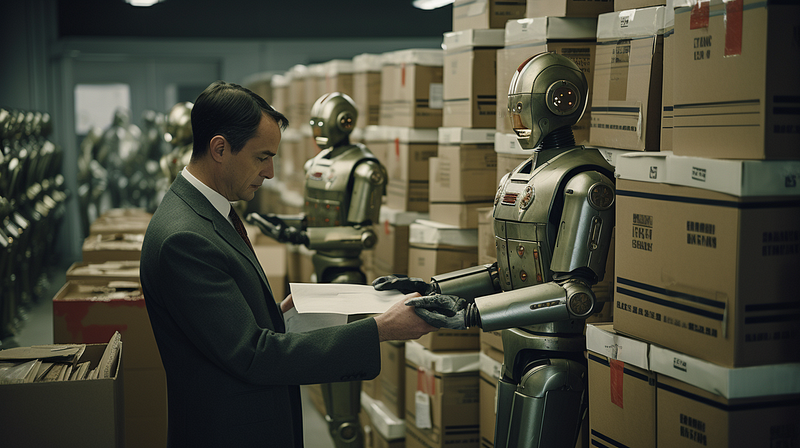
Process prompting uses a series of steps to create an image. Prompts are temporary disposable tools used during the creation process. /imagine prompt: a documentary photograph of humans directing robots in photo archiving — ar 16:9 followed by Vary (Strong) and Vary (Region).

Process Prompting (PP)

PP has always existed, but there has never been a term to describe it. This method of prompting is supported by many new tools in Midjourney.

PP can create something new or improve images created by DP.

Prompts in PP are disposable, temporary tools that instruct the bot on what to do on the canvas.

In the Japanese cat example above, three prompts were used: the first to create a photo of a cat, the second to create a guinea pig, and the third to resize the image aspect ratio. Unlike DP, the prompt on its own does not create the final image.

As Clarinet put it, “The prompt is the chisel, not the sculpture.”

PP’s strengths

  • Midjourney’s new features support PP. Indeed, many new features cannot be written into a prompt as DP.
  • Best for creating multiple subjects (focal points) and exerting greater control over the canvas (compositional control).
  • Edit and enhance the image.
  • The image creation process is divided into several steps. The entire process may not be restarted if a photo edit is required. To save time, you can skip to specific steps to continue editing.
  • Increase the uniqueness of the created images because PP creation steps increase the difficulty for others to copy and create similar images.

PP’s weaknesses

  • One needs to spend more time and effort in creating an image.
  • It is a multi-step process.
  • It is more difficult to achieve consistent vibes, aesthetics, colors, and coherency. (The style code can be helpful to fix this issue.)
  • The bot may refuse to add multiple subjects to an image via inpainting.
  • There will be no copying and pasting. It is necessary to become familiar with the new features and functions. This can be challenging for beginners.
  • PP creation steps can be shared but are more complicated and less repeatable than DP.

Why do I need to know about DP and PP?

Midjourney’s new features, like inpainting and outpainting, favor using disposable prompts to sculpt an image, making “one prompt, one image” less reliable.

Learning and remembering the keywords (or key phrases) rather than the entire prompt may be more beneficial because those keywords can also be applied to disposable prompts.

The Style Code should be used in conjunction with the “unlocking keywords/phrases” to apply across prompts.

The Slider Method (or weighted promptlet) is becoming increasingly important for adjusting an effect in a disposable prompt. For example, in Vary (Region), you can fine-tune the color of the eyes with a slider.

Implications

The prompting method is essential when comparing Midjourney’s prompt performance to other applications, such as DALL·E and Stable Diffusion.

The performance of the different text-to-image systems must consider the roles of the disposable prompts in the image creation of Process Prompting.

Process Prompting is not a post-production step for image editing or enhancement. It is a method of creating an image, just like Direct Prompting.

Opinion and suggestion

Midjourney should provide guidance on how to share PP steps. It’s all over the place right now.

Begin with the Midjourney Community Feed and encourage users to document the steps and temporary prompts to create those stunning images. Otherwise, the results are not reproducible, which may frustrate beginners who are just learning about prompting in Midjourney.

One possible solution is developing an auto-log system to record and document the image creation steps. The log file can be shared with other users.

Related stories

Conclusion

  • In Midjourney, there are two prompting methods: direct and process. Each of them has its own set of advantages and disadvantages.
  • Process Prompting has become the new normal in Midjourney because many new features are only accessible through Process Prompting.
  • Shared prompts are becoming less reliable because the temporary disposable prompts and steps used to create the images are frequently undocumented.

I hope you like this story!

Please give me a clap or leave a positive comment to let Medium’s algorithm know that this story is helpful and has contributed to its platform’s success.

Your support inspires me to create higher-quality content in the future!

Never miss a story. Follow me on Medium for updates, stories, and tips about Midjourney.

Sign up here for a free email alert when I post a new story.

Midjourney
Artificial Intelligence
Technology
Creativity
Future
Recommended from ReadMedium