avatarJ3

Free AI web copilot to create summaries, insights and extended knowledge, download it at here

5846

Abstract

<span class="hljs-comment"># Retrieve the stored API token</span> api_token = keyring.get_password(<span class="hljs-string">'system_name'</span>, <span class="hljs-string">'username'</span>)

<span class="hljs-keyword">if</span> <span class="hljs-keyword">not</span> api_token: <span class="hljs-keyword">raise</span> ValueError(<span class="hljs-string">"No API token found in the keyring."</span>)

<span class="hljs-built_in">print</span>(<span class="hljs-string">f'Using API token: <span class="hljs-subst">{api_token}</span>'</span>)</pre></div><p id="45fd">Replace <code>'system_name'</code> and <code>'username'</code> with appropriate identifiers for your application.</p><p id="5cc5"><code><b>4. Using Encrypted Files:</b></code></p><p id="9614">You can also store sensitive data in encrypted files using libraries like <code>cryptography</code>. This method requires a decryption step each time you need access to the data.</p><ol><li>Install <code>cryptography</code>:</li></ol><div id="fb30"><pre>pip install cryptography</pre></div><p id="2015">Encrypt and decrypt data:</p><div id="2cc3"><pre><span class="hljs-keyword">from</span> cryptography.fernet <span class="hljs-keyword">import</span> Fernet

<span class="hljs-comment"># Generate and save a key (do this once and keep the key secure)</span> key = Fernet.generate_key() <span class="hljs-keyword">with</span> <span class="hljs-built_in">open</span>(<span class="hljs-string">'secret.key'</span>, <span class="hljs-string">'wb'</span>) <span class="hljs-keyword">as</span> key_file: key_file.write(key)

<span class="hljs-comment"># Load the key</span> <span class="hljs-keyword">with</span> <span class="hljs-built_in">open</span>(<span class="hljs-string">'secret.key'</span>, <span class="hljs-string">'rb'</span>) <span class="hljs-keyword">as</span> key_file: key = key_file.read()

cipher_suite = Fernet(key)

<span class="hljs-comment"># Encrypt a message</span> token = cipher_suite.encrypt(<span class="hljs-string">b'your_secure_token_here'</span>)

<span class="hljs-comment"># Decrypt the message</span> api_token = cipher_suite.decrypt(token).decode()

<span class="hljs-built_in">print</span>(<span class="hljs-string">f'Using API token: <span class="hljs-subst">{api_token}</span>'</span>)</pre></div><p id="4ef2"><code><b>5. Secrets Management Services:</b></code></p><p id="6828">For highly sensitive or production environments, use secrets management tools like <b>AWS Secrets Manager</b>, <b>Azure Key Vault</b>, <b>Google Cloud Secret Manager</b>, or <b>HashiCorp Vault</b>. These services provide more robust security and management capabilities.</p><h1 id="5a54">Summary</h1><ul><li><b>Environment Variables</b> and <b>.env files</b>: Simple and effective for many use cases.</li><li><b>Keyring</b>: Provides secure local storage using OS capabilities.</li><li><b>Encrypted Files</b>: Good for storing multiple secrets securely.</li><li><b>Secrets Management Services</b>: Best for cloud-based, production-grade applications.</li></ul><p id="3ed8">Choose the method that best fits your security requirements and deployment environment.</p><figure id="a633"><img src="https://cdn-images-1.readmedium.com/v2/resize:fit:800/1*VxaajPXDzA3tFDl5o0s9Ew.png"><figcaption></figcaption></figure><p id="4f97">That’s all folks!</p><p id="0d5f">Thanks!</p><h1 id="2d50">Related Posts</h1><p id="bee7"><b>00</b>#Episode#PurePythonSeries — <a href="https://readmedium.com/lambda-in-python-421b0c18e825"><b>Lambda in Python </b></a>— Python Lambda Desmistification</p><p id="bfcb"><b>01</b>#Episode#PurePythonSeries — <a href="https://readmedium.com/send-emails-using-python-jupyter-notebook-94d14a5a5655"><b>Send Email in Python</b></a> — Using Jupyter Notebook — How To Send Gmail In Python</p><p id="ab9d"><b>02</b>#Episode#PurePythonSeries — <a href="https://readmedium.com/automate-your-email-marketing-with-python-f0d68234b789"><b>Automate Your Email With Python & Outlook</b></a><b> </b>— How To Create An Email Trigger System in Python</p><p id="ef73"><b>03</b>#Episode#PurePythonSeries — <a href="https://readmedium.com/manipulating-files-with-python-3f9a781287e9"><b>Manipulating Files With Python</b></a> — Manage Your Lovely Photos With Python!</p><p id="c327"><b>04</b>#Episode#PurePythonSeries — <a href="https://readmedium.com/pandas-dataframe-advanced-48f83a5b097f"><b>Pandas DataFrame Advanced </b></a>— A Complete Notebook Review</p><p id="5adb"><b>05</b>#Episode#PurePythonSeries — <a href="https://readmedium.com/is-this-leap-year-python-calendar-3d1a61f2c4a7"><b>Is This Leap Year? Python Calendar</b> </a>— How To Calculate If The Year Is Leap Year and How Many Days Are In The Month</p><p id="6346"><b>06</b>#Episode#PurePythonSeries — <a href="https://readmedium.com/list-comprehension-in-python-c22c4b0a6a8a"><b>List Comprehension In Python </b></a>— Locked-in Secrets About List Comprehension</p><p id="7dc3"><b>07</b>#Episode#PurePythonSeries — <a href="https://readmedium.com/graphs-in-python-b7d243737b77"><b>Graphs — In Python </b></a>— Extremely Simple Algorithms in Python</p><p id="c4ca"><b>08</b>#Episode#PurePythonSeries — <a href="https://readmedium.com/decorator-in-python-62c00f7e818"><b>Decorator in Python</b></a> — How To Simplifying Your Code And Boost Your Function</p><p id="d944"><b>10</b>#Episode#PurePythonSeries — <a href="https://readmedium.com/cs50-a-taste-of-python-a4ac87883ff4"><b>CS50</b></a><b> — A Taste of Python</b> — Harvard Mario’s Challenge Solver \o/</p><p id="78d2"><b>11</b>#Episode#PurePythonSeries — Python — <a href="https://readmedium.com/python-send-email-using-smtp-6ecf0b1dd608"><b>Send Email Using SMTP</b></a> — Send Mail To Any Internet Machine (SMTP or ESMTP)</p><p id="c961"><b>12#</b>Episode#PurePythonSeries — <a href="https://readmedium.com/advanced-python-technologies-d3d

Options

bdf1d70cb"><b>Advanced Python Technologies</b> </a><a href="https://readmedium.com/advanced-python-technologies-d3dbdf1d70cb">qrcode, Speech Recognition in Python, Google Speech Recognition</a></p><p id="da0b"><b>13#</b>Episode#PurePythonSeries — <a href="https://readmedium.com/advanced-python-technologies-ii-33d2d6888583"><b>Advanced Python Technologies II</b></a> — qFace Recognition w/ Jupyter Notebook & Ubuntu</p><p id="225f"><b>14#</b>Episode#PurePythonSeries — <a href="https://readmedium.com/advanced-python-technologies-iii-ac92cd677e5e"><b>Advanced Python Technologies III</b> </a>— Face Recognition w/ Colab</p><p id="6baf"><b>15#</b>Episode#PurePythonSeries — <a href="https://readmedium.com/iss-tracking-project-python-af4b5fa47a28"><b>ISS Tracking Projec</b></a><b>t </b>— Get an Email alert when International Space Station (ISS) is above of us in the sky, at night</p><p id="b305"><b>16#</b>Episode#PurePythonSeries — <a href="https://readmedium.com/using-gemini-chat-on-collab-2626fb035176"><b>Using Gemini Chat on Collab</b></a><b> </b>— Random Number Generation, List Manipulation & Rock-Paper-Scissors Game Implementations</p><p id="7986"><b>17#</b>Episode#PurePythonSeries — Python — <a href="https://readmedium.com/python-basics-2ce557a80f42"><b>Basics</b> </a>— Functions, OOP, file handling, calculator, loops</p><p id="0f7b"><b>18#</b>Episode#PurePythonSeries — Python — <a href="https://readmedium.com/efficient-file-handling-in-python-0d952971ebc9"><b>Efficient File Handling in Python</b></a><b> </b>— Best Practices and Common Methods (this one)</p><p id="7746"><b>19#</b>Episode#PurePythonSeries — Python — <a href="https://readmedium.com/how-to-securely-save-credentials-in-python-dd5c6983741a"><b>How To Securely Save Credentials in Python</b> </a>— Like API tokens, passwords, or other sensitive data (this one)</p><h1 id="c8db">Note</h1><p id="6fb1">The command <code>export API_TOKEN='your_secure_token_here'</code> is typically used in a shell script or a configuration file to set an environment variable. To use this in Python, you don't directly save this in a Python file, but rather in a file that initializes your environment before running your Python script.</p><p id="e3f5">Here are a few common options for where to save this command:</p><h2 id="526b">1. Shell Profile Files (Permanent Setting)</h2><p id="b58f">If you want to set the environment variable globally and persistently across sessions, you should add the command to your shell profile file. The specific file depends on your operating system and the shell you’re using:</p><ul><li><b>For <code>bash</code> shell on Linux or macOS</b>: Add to <code>/.bashrc</code> or <code>/.bash_profile</code>.</li><li><b>For <code>zsh</code> shell on macOS</b>: Add to <code>/.zshrc</code>.</li><li><b>For <code>bash</code> shell on Windows (using Git Bash or WSL)</b>: Add to <code>/.bashrc</code>.</li><li><b>For <code>PowerShell</code> on Windows</b>: Set a persistent environment variable using the <code>Environment</code> PS drive.</li></ul><p id="d49e"><b>Example for Linux/macOS using bash:</b></p><ol><li>Open your terminal.</li><li>Edit the profile file (e.g., <code>/.bashrc</code> or <code>/.bash_profile</code>)</li></ol><div id="ce0b"><pre>nano ~/.bashrc</pre></div><p id="9f1d">Add the following line at the end of the file:</p><div id="4b55"><pre><span class="hljs-built_in">export</span> API_TOKEN=<span class="hljs-string">'your_secure_token_here'</span></pre></div><ul><li>Save the file and close the editor.</li><li>Reload the file to apply the changes:</li></ul><div id="0c1e"><pre><span class="hljs-built_in">source</span> ~/.bashrc</pre></div><h2 id="0d5d">2. Shell Script File (Temporary or Specific Session)</h2><p id="8cec">If you want to set the environment variable only for specific sessions or scripts, you can create a shell script:</p><ol><li><b>Create a new shell script file</b> (e.g., <code>set_env.sh</code>):</li></ol><div id="26b9"><pre>nano set_env.sh</pre></div><p id="0f77"><b>Add the export command</b> to the script:</p><div id="502a"><pre><span class="hljs-meta">#!/bin/bash</span> <span class="hljs-built_in">export</span> API_TOKEN=<span class="hljs-string">'your_secure_token_here'</span></pre></div><ul><li><b>Save and close the file</b>.</li><li><b>Make the script executable</b>:</li></ul><div id="6f5c"><pre><span class="hljs-built_in">chmod</span> +x set_env.sh</pre></div><p id="c4e8"><b>Run the script</b> before your Python script to set the environment variable:</p><div id="f23c"><pre><span class="hljs-built_in">source</span> set_env.sh python your_script.py</pre></div><h2 id="27f3">3. .env File (Used with Python Libraries)</h2><p id="3c4b">If you prefer to use a <code>.env</code> file with Python, the environment variables are stored there, and then loaded in your Python script using a library like <code>python-dotenv</code>.</p><ol><li><b>Create a <code>.env</code> file</b>:</li></ol><div id="4c3c"><pre>nano .<span class="hljs-built_in">env</span></pre></div><p id="77c4"><b>Add your environment variable</b>:</p><div id="d997"><pre><span class="hljs-attr">API_TOKEN</span>=<span class="hljs-string">'your_secure_token_here'</span></pre></div><p id="9a05"><b>Load the <code>.env</code> file</b> in your Python script:</p><div id="20ec"><pre><span class="hljs-keyword">from</span> dotenv <span class="hljs-keyword">import</span> load_dotenv <span class="hljs-keyword">import</span> os</pre></div><div id="fd7f"><pre>load_dotenv() <span class="hljs-comment"># Load variables from .env file</span></pre></div><div id="faf5"><pre>api_token = <span class="hljs-built_in">os</span>.<span class="hljs-built_in">getenv</span>(<span class="hljs-string">'API_TOKEN'</span>) <span class="hljs-built_in">print</span>(api_token) # Your secure token</pre></div></article></body>

How To Securely Save Credentials in Python

Like API tokens, passwords, or other sensitive data #PurePythonSeries — Episode #19

The command EDITOR="code --wait" rails credentials:edit is used in Ruby on Rails to open the credentials file in the Visual Studio Code editor, and the --wait flag makes the command wait until the editor is closed before proceeding. Here is my first attempt, followed by a script run by Chris Oliver explaining everything in detail.
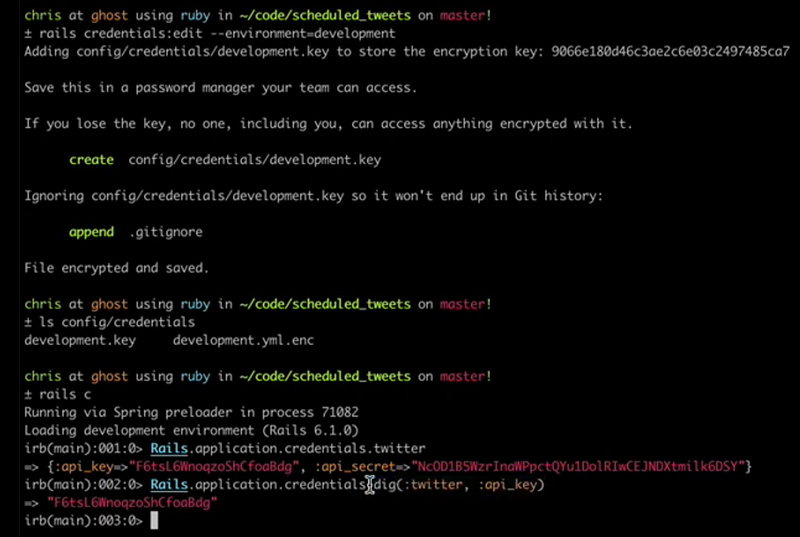
rails credentials:edit — environment-development, rails c, Rails.application.credentials.dig(:twitter, :api-key)

In Python, there isn’t a direct equivalent for editing files with an external editor like this, but you can achieve similar functionality by using the subprocess module to open a file with VS Code or any other text editor.

Here’s how you can do it in Python:

import subprocess

# Specify the file you want to edit
file_to_edit = 'path/to/your/file.txt'

# Open the file in Visual Studio Code and wait for the editor to close
subprocess.run(["code", "--wait", file_to_edit])

This Python script opens the specified file in VS Code and waits for the editor to close before continuing with the rest of the script, similar to the Rails command.

Let’s get started!

To securely save credentials like API tokens, passwords, or other sensitive data in Python, you should avoid hard-coding these values directly into your scripts. Instead, consider using environment variables, encrypted storage, or a configuration management system. Here are a few secure methods to handle credentials in Python:

1. Environment Variables:

Environment variables are a common way to store sensitive data securely. This approach keeps credentials out of your codebase and allows you to access them dynamically.

Setting Environment Variables

You can set environment variables in your operating system or through a shell before running your Python script:

For Unix-like systems (Linux, macOS):

export API_TOKEN='your_secure_token_here'

For Windows:

set API_TOKEN=your_secure_token_here

Accessing Environment Variables in Python

Use the os module to access these variables in your Python script:

import os

api_token = os.getenv('API_TOKEN')

if not api_token:
    raise ValueError("No API token found. Set the API_TOKEN environment variable.")

print(f'Using API token: {api_token}')

2. Using .env Files:

A .env file can store environment variables locally. This file should be kept secure and not included in version control.

  1. Create a .env file:
API_TOKEN=your_secure_token_here

Use the python-dotenv library to load environment variables from the .env file:

First, install python-dotenv:

pip install python-dotenv

Then, use it in your script:

from dotenv import load_dotenv
import os

load_dotenv()  # Load environment variables from .env file

api_token = os.getenv('API_TOKEN')

if not api_token:
    raise ValueError("No API token found. Check your .env file.")

print(f'Using API token: {api_token}')

3. Secure Storage with Keyring:

For storing credentials securely on your system, use the keyring library, which integrates with your operating system’s credential store (like macOS Keychain, Windows Credential Locker, or Linux Secret Service).

  1. Install the keyring library:
pip install keyring

Store and retrieve credentials:

import keyring

# Store the API token securely
keyring.set_password('system_name', 'username', 'your_secure_token_here')

# Retrieve the stored API token
api_token = keyring.get_password('system_name', 'username')

if not api_token:
    raise ValueError("No API token found in the keyring.")

print(f'Using API token: {api_token}')

Replace 'system_name' and 'username' with appropriate identifiers for your application.

4. Using Encrypted Files:

You can also store sensitive data in encrypted files using libraries like cryptography. This method requires a decryption step each time you need access to the data.

  1. Install cryptography:
pip install cryptography

Encrypt and decrypt data:

from cryptography.fernet import Fernet

# Generate and save a key (do this once and keep the key secure)
key = Fernet.generate_key()
with open('secret.key', 'wb') as key_file:
    key_file.write(key)

# Load the key
with open('secret.key', 'rb') as key_file:
    key = key_file.read()

cipher_suite = Fernet(key)

# Encrypt a message
token = cipher_suite.encrypt(b'your_secure_token_here')

# Decrypt the message
api_token = cipher_suite.decrypt(token).decode()

print(f'Using API token: {api_token}')

5. Secrets Management Services:

For highly sensitive or production environments, use secrets management tools like AWS Secrets Manager, Azure Key Vault, Google Cloud Secret Manager, or HashiCorp Vault. These services provide more robust security and management capabilities.

Summary

  • Environment Variables and .env files: Simple and effective for many use cases.
  • Keyring: Provides secure local storage using OS capabilities.
  • Encrypted Files: Good for storing multiple secrets securely.
  • Secrets Management Services: Best for cloud-based, production-grade applications.

Choose the method that best fits your security requirements and deployment environment.

That’s all folks!

Thanks!

Related Posts

00#Episode#PurePythonSeries — Lambda in Python — Python Lambda Desmistification

01#Episode#PurePythonSeries — Send Email in Python — Using Jupyter Notebook — How To Send Gmail In Python

02#Episode#PurePythonSeries — Automate Your Email With Python & Outlook — How To Create An Email Trigger System in Python

03#Episode#PurePythonSeries — Manipulating Files With Python — Manage Your Lovely Photos With Python!

04#Episode#PurePythonSeries — Pandas DataFrame Advanced — A Complete Notebook Review

05#Episode#PurePythonSeries — Is This Leap Year? Python Calendar — How To Calculate If The Year Is Leap Year and How Many Days Are In The Month

06#Episode#PurePythonSeries — List Comprehension In Python — Locked-in Secrets About List Comprehension

07#Episode#PurePythonSeries — Graphs — In Python — Extremely Simple Algorithms in Python

08#Episode#PurePythonSeries — Decorator in Python — How To Simplifying Your Code And Boost Your Function

10#Episode#PurePythonSeries — CS50 — A Taste of Python — Harvard Mario’s Challenge Solver \o/

11#Episode#PurePythonSeries — Python — Send Email Using SMTP — Send Mail To Any Internet Machine (SMTP or ESMTP)

12#Episode#PurePythonSeries — Advanced Python Technologies qrcode, Speech Recognition in Python, Google Speech Recognition

13#Episode#PurePythonSeries — Advanced Python Technologies II — qFace Recognition w/ Jupyter Notebook & Ubuntu

14#Episode#PurePythonSeries — Advanced Python Technologies III — Face Recognition w/ Colab

15#Episode#PurePythonSeries — ISS Tracking Project — Get an Email alert when International Space Station (ISS) is above of us in the sky, at night

16#Episode#PurePythonSeries — Using Gemini Chat on Collab — Random Number Generation, List Manipulation & Rock-Paper-Scissors Game Implementations

17#Episode#PurePythonSeries — Python — Basics — Functions, OOP, file handling, calculator, loops

18#Episode#PurePythonSeries — Python — Efficient File Handling in Python — Best Practices and Common Methods (this one)

19#Episode#PurePythonSeries — Python — How To Securely Save Credentials in Python — Like API tokens, passwords, or other sensitive data (this one)

Note

The command export API_TOKEN='your_secure_token_here' is typically used in a shell script or a configuration file to set an environment variable. To use this in Python, you don't directly save this in a Python file, but rather in a file that initializes your environment before running your Python script.

Here are a few common options for where to save this command:

1. Shell Profile Files (Permanent Setting)

If you want to set the environment variable globally and persistently across sessions, you should add the command to your shell profile file. The specific file depends on your operating system and the shell you’re using:

  • For bash shell on Linux or macOS: Add to ~/.bashrc or ~/.bash_profile.
  • For zsh shell on macOS: Add to ~/.zshrc.
  • For bash shell on Windows (using Git Bash or WSL): Add to ~/.bashrc.
  • For PowerShell on Windows: Set a persistent environment variable using the Environment PS drive.

Example for Linux/macOS using bash:

  1. Open your terminal.
  2. Edit the profile file (e.g., ~/.bashrc or ~/.bash_profile)
nano ~/.bashrc

Add the following line at the end of the file:

export API_TOKEN='your_secure_token_here'
  • Save the file and close the editor.
  • Reload the file to apply the changes:
source ~/.bashrc

2. Shell Script File (Temporary or Specific Session)

If you want to set the environment variable only for specific sessions or scripts, you can create a shell script:

  1. Create a new shell script file (e.g., set_env.sh):
nano set_env.sh

Add the export command to the script:

#!/bin/bash
export API_TOKEN='your_secure_token_here'
  • Save and close the file.
  • Make the script executable:
chmod +x set_env.sh

Run the script before your Python script to set the environment variable:

source set_env.sh
python your_script.py

3. .env File (Used with Python Libraries)

If you prefer to use a .env file with Python, the environment variables are stored there, and then loaded in your Python script using a library like python-dotenv.

  1. Create a .env file:
nano .env

Add your environment variable:

API_TOKEN='your_secure_token_here'

Load the .env file in your Python script:

from dotenv import load_dotenv
import os
load_dotenv()  # Load variables from .env file
api_token = os.getenv('API_TOKEN')
print(api_token)  # Your secure token
Credentials
Keep Secret
Keyring Token
Python3
Cryptography
Recommended from ReadMedium